
Australian Address Validation: PAF, G-NAF and How to Stop Bad Addresses Entering Your Systems (2026)
 Jignesh Vagadiya
14/11/2026
23 min read

A customer types “Unit 3/12 Smith St” into your checkout. Your form splits it badly, the shipping label prints “3/12 Smith Street” with no unit, the courier finds a block of flats with twelve letterboxes and no way to tell which one is Unit 3, and the parcel comes back eleven days later. You pay for the outbound leg, the return leg, the reship and the support email. Multiply that by a few percent of orders and it stops being a rounding error.
Addresses look like the simplest data your business holds. They are one of the messiest. People abbreviate, misspell suburbs, put the postcode in the wrong box, paste a work address into a home field and type “same as billing” into a line meant for a street. Every system downstream (your CRM, your ERP, your accounting package, your courier integration) then inherits whatever got typed on the day.
This guide is about doing it properly in Australia: what a valid address actually is here, how Australia Post’s PAF and Geoscape’s G-NAF differ, where in your workflow validation belongs, how to store the result so it stays useful, and what to do about the millions of addresses you already have. We have kept it practical and tool-agnostic, because the right answer depends on your volumes, your platform and how much a failed delivery costs you. If you have not already read our piece on ABN validation and lookup, it covers the business-identity half of the same problem; this one is the location half.
Why addresses go wrong long before anyone ships anything
The same place, written six ways
Take one real-world flat. People will write it as “Unit 3, 12 Smith Street”, “3/12 Smith St”, “U3/12 Smith Street”, “Flat 3 12 Smith St”, “12/3 Smith St” (reversed by mistake) or “12 Smith Street Unit 3”. All six refer to the same door. A database that stores them as free text treats them as six different places, which is how you end up with duplicate customers, split order histories and a CRM that cannot tell you whether two contacts live together.
Suburb names do the same thing. “St Kilda”, “Saint Kilda” and “St. Kilda” are one place. “Newcastle” exists in New South Wales and as a smaller locality elsewhere. Some Australian localities share names across states, and a handful of postcodes straddle state borders (0872 in the Central Desert region covers parts of three jurisdictions), so a rule like “postcode determines state” is wrong often enough to bite you.
Where bad addresses actually cost you
The obvious cost is failed delivery. The less obvious costs are usually larger over a year:
- Courier surcharges and address-correction fees when a carrier has to fix a label manually.
- Support time spent chasing customers for the right address, often after the parcel has already left.
- Duplicate records that inflate your customer counts and break lifetime-value reporting.
- Invoices and statements mailed to addresses that do not exist, which matters for accounts receivable.
- Marketing sends and direct mail wasted on undeliverable or duplicate contacts.
- Tax and freight errors when a region-based rule reads the wrong state or postcode.
None of these show up as a line item called “bad addresses”. They hide inside freight, support and reconciliation costs, which is partly why the problem survives for years in businesses that are otherwise well run.
What a valid Australian address actually looks like
Before you buy or build anything, it helps to know what you are validating against. An Australian address is more varied than most checkout forms assume.
Street addresses, units and levels
The core pattern is number, street name, street type, locality, state, postcode. Units add a prefix, and the slash convention (unit 3 of number 12 written as 3/12) is the common shorthand. The slash is for flats and units only. A level or floor is written differently (“Level 4, 100 George Street”), and a form that forces everything through a single “street” field mangles these. Business addresses add building names, suite numbers and levels in combinations that no tidy regular expression will cover.
Two details trip up a lot of custom forms. Street numbers can include letters (“12A”) and ranges (“12-14”). And a unit number can be alphabetic (“Unit G03”). If your validation insists on digits, you will reject real addresses and teach customers to type something that passes instead of something that is true.
PO Boxes, parcel lockers and other non-street destinations
PO Boxes, GPO Boxes and Locked Bags are valid and common. Australia Post’s own developer guidance says integrations should accept them, because they are legitimate addresses. That creates a business decision, not a technical one: a PO Box is fine for an invoice and useless for most courier deliveries. Your system needs to know the address type so a PO Box can be accepted on a billing address and refused (politely, with a clear message) on a delivery address that needs a street.
Parcel lockers and parcel-collect points are newer and growing. Australia Post’s developer documentation shows locker addresses in a form like “Parcel Locker 10” followed by the suburb and postcode, and notes that some locker and collect addresses omit the ten-digit customer number. A validator built a few years ago may not recognise them at all and will happily reject a perfectly good locker address. If you ship to consumers, test this explicitly.
Rural and remote addresses
Rural delivery is where naive validation falls over hardest. Addresses can use rural mail box numbers, lot numbers with no street number, property names, or “c/o” arrangements. Some are not geocodable to a precise point in any commercial dataset. Treating “no match found” as “invalid” will block real customers in exactly the regions where online shopping is most valuable to them. We come back to this in the section on awkward cases, because the fix is a process decision rather than a better lookup.
PAF, G-NAF and everything else: what each one is for
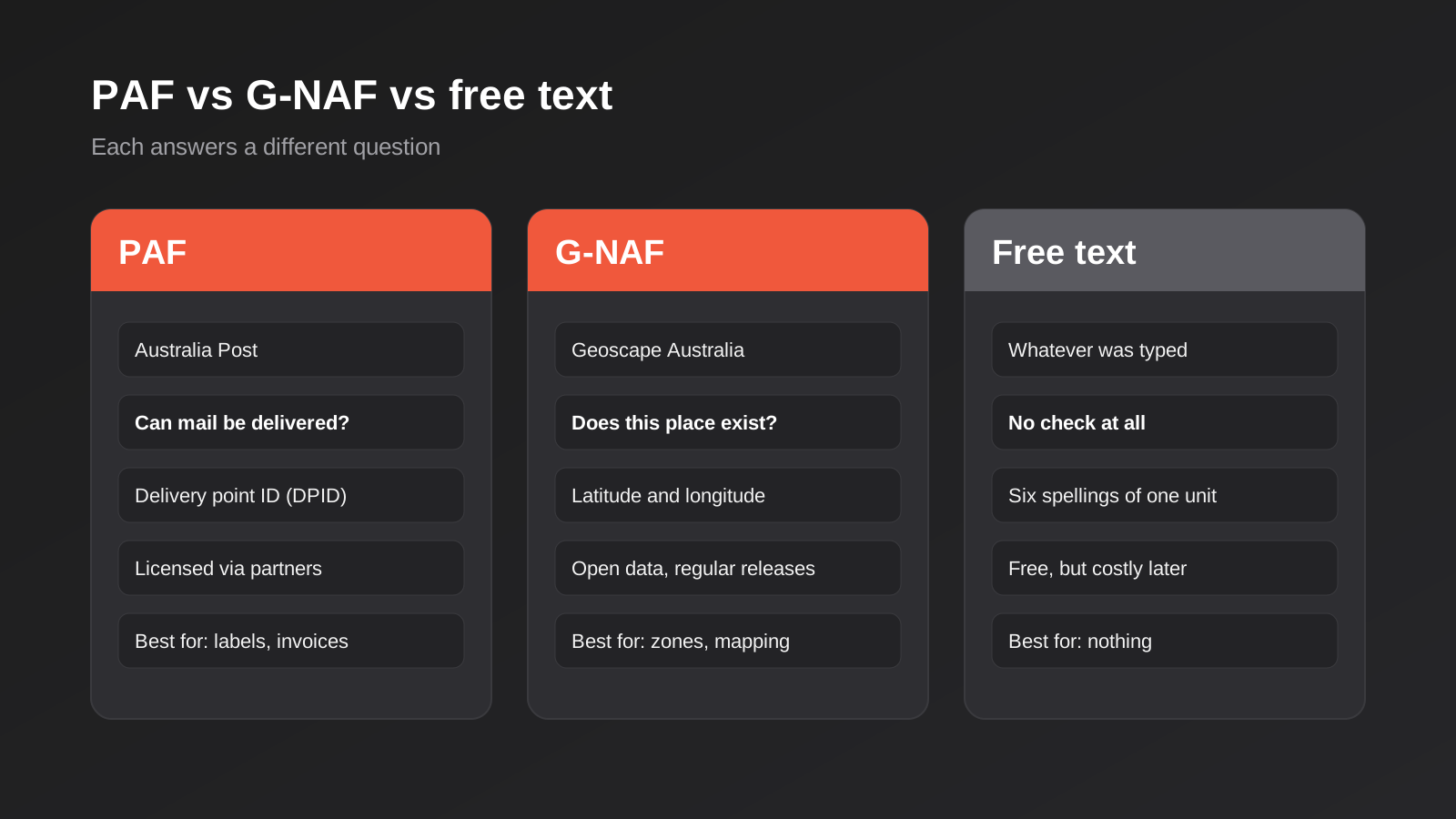
Two datasets sit under almost every Australian address validation product, and people regularly confuse them. They answer different questions.
PAF: can Australia Post deliver here?
The Postal Address File is Australia Post’s database of delivery addresses. It is built around mail delivery: if an address is in PAF, Australia Post recognises it as a delivery point. Each delivery point carries an identifier (the Delivery Point Identifier, or DPID), which is useful as a stable key for a physical delivery location. PAF is licensed rather than free. Australia Post makes it available through its address-data programs and through licensed partners and software vendors, and the commercial model involves separate agreements and reporting obligations. For most businesses, the practical route is to use a vendor that already holds the licence rather than negotiate one directly.
PAF is the right reference when your question is “will a postal or courier network treat this as deliverable?”. It is less helpful for places that are not postal delivery points, such as a new lot that has been surveyed but has no mail service yet.
G-NAF: does this place exist?
The Geocoded National Address File is maintained by Geoscape Australia and aggregates address data from state and territory authorities, with coordinates attached. It is released on a regular cycle (roughly quarterly) and holds many millions of addresses. G-NAF is built around the question of whether an address exists as a real, locatable place, and it gives you latitude and longitude, which PAF does not. The NSW Government’s address service (Point) is one example of a provider that combines the two, offering suggestions drawn from GNAF-Live, G-NAF and PAF, with a separate PAF-only validation API that returns the delivery point identifier. It also illustrates that refresh cadence differs by source: the live layer updates frequently, while the packaged datasets update on a slower cycle.
G-NAF is the better reference when you care about location: service-area checks, delivery-zone pricing, mapping, and anything that needs a coordinate. Its licensing is more open than PAF’s, but you should read the current terms before building on it, because they have changed over the years and the details matter for commercial use.
Where Google-style autocomplete fits
General mapping autocompletes (the kind built into maps platforms) are excellent at finding places. They are not designed as authoritative sources of deliverable postal addresses. They can return a business, a landmark or an address that looks right but is not a PAF delivery point. For a booking form or a store locator, that is fine. For freight labels and invoices, it is a risk. Some providers now offer separate address-validation services on top of their maps products, and coverage varies by country, so check Australian support specifically before assuming it behaves the way it does elsewhere.
Which one do you need?
For most Australian businesses the answer is “whichever your vendor uses, and ideally both”. A decent commercial validation API checks against PAF and G-NAF, returns a standardised address, a deliverability signal and often a geocode. The decision that actually matters is not the dataset. It is how the validator behaves when it cannot match: does it block the customer, warn and allow, or silently accept? We cover that below, because it drives conversion and data quality far more than which vendor you pick.
Build, buy or use the platform’s own
There are three realistic routes, and they suit different businesses.
Use what your platform already offers
Shopify, WooCommerce, most CRMs and many ERPs have some form of address lookup or can install an app or plugin that adds one. For a store shipping a few hundred parcels a month this is usually enough. The questions to ask are whether it validates against PAF or only autocompletes, whether it fills separate unit, street and locality fields, and what it does when it cannot find a match. Install it, then deliberately test the awkward cases from the previous section before you trust it.
Buy a validation API from a specialist vendor
Vendors such as Addressfinder, Experian and Intech sell Australian address verification that checks against PAF, G-NAF or both, with real-time and batch options. This is the sensible default for a business with meaningful volume, a custom checkout, a quoting tool or an internal system where staff type addresses all day. You pay per lookup or on a subscription, and in exchange you get licensing handled, regular dataset refreshes and a vendor who is responsible for keeping the match logic current. We have no preferred vendor and would not recommend one without knowing your volumes, but we are happy to help you evaluate options as part of an API and integrations project.
Build your own on open data
You can load G-NAF yourself, build a search index and run your own autocomplete. It is a genuine option if you have unusual needs, high volume or a data-residency requirement that rules out a vendor. It is also considerably more work than it looks. You inherit dataset ingestion, quarterly updates, fuzzy matching, normalisation, abbreviations, unit-number edge cases and monitoring. You also do not get PAF, so you cannot make claims about postal deliverability. We would only recommend this path when the volume or constraints justify permanent ownership, and we would size the maintenance honestly before starting. Treat the ongoing maintenance as part of the price from day one.
Where in the flow to validate
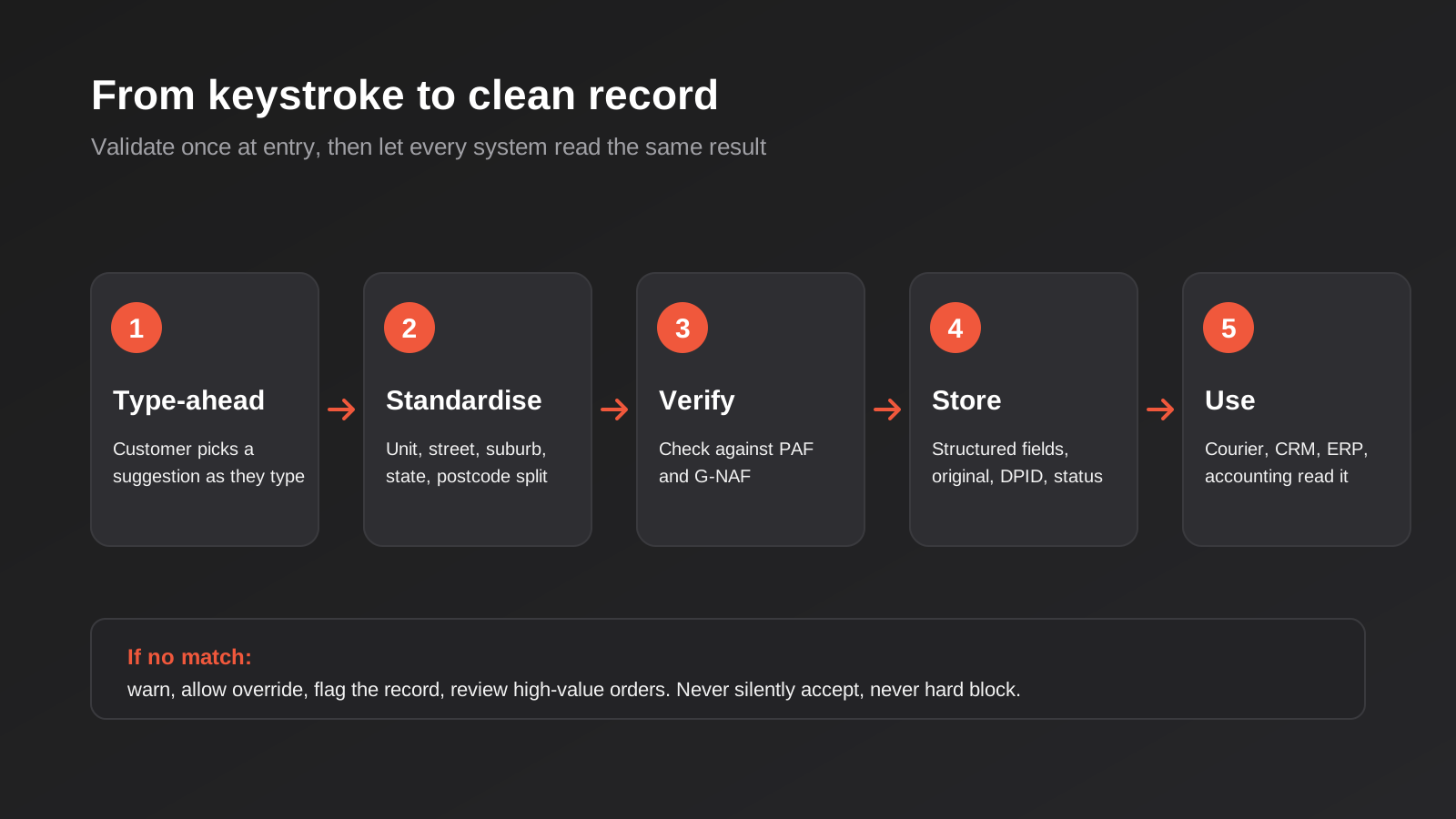
The most common mistake is treating validation as a single gate at checkout. Addresses enter your business through at least five doors, and each needs a slightly different approach.
1. Type-ahead at the point of entry
The best validation is the one the customer barely notices. An autocomplete field that suggests addresses as they type does two things at once: it saves them keystrokes, and it replaces what they would have typed with a canonical address. Conversion usually improves rather than suffers, because a faster form is a better form. Make sure the selected suggestion populates separate fields (unit, street number, street name, locality, state, postcode) rather than dumping a single string into one box.
2. Submission-time verification
Autocomplete helps, but people also type over suggestions, paste addresses and skip the dropdown. A second check on submit catches those. This is where you decide your policy: hard block, soft warning or silent accept. We lean towards a soft warning for delivery addresses (“We could not confirm this address, please check the unit number and postcode”) with a clear option to proceed anyway, plus a flag on the record. A hard block loses sales in rural areas and new developments. Silent accept is how the problem stays invisible.
3. Imports and integrations
Addresses also arrive via CSV imports, marketplace order feeds, form builders, API connections and staff typing into the CRM. Each of these bypasses your nice checkout widget. Put the validation step inside the integration itself, not only the front-end form. If you are connecting systems, this belongs in your CRM integration logic: normalise the address on the way in, store the verified version and keep the original so you can audit what changed.
4. Back-office entry
Sales and support staff type addresses into quoting tools, ERPs and CRMs constantly, usually under time pressure. Give them the same lookup the customer sees. The cost is small and the payoff is large, because back-office entry is where the messiest data tends to originate.
5. Batch cleanup of what you already hold
Validation at entry fixes the future. The existing database is a separate project, covered further down.
Storing addresses so they stay useful
Validation is wasted if you throw away the structure afterwards. A well-designed address record is not a single text column.
Structured fields, not one blob
Store the components separately: unit or level, street number, street name, street type, locality, state and postcode, plus a country code. Splitting them lets you filter by suburb, match duplicates and format the address correctly for each destination. A single “address” field makes all of that a string-parsing exercise forever.
Keep both the original and the verified version
Keep what the customer typed and what the validator returned, along with a status (verified, partially matched, overridden by the customer, unverified) and a timestamp. When a parcel fails, you want to be able to tell whether the system accepted a bad address or the customer overrode a warning. Without the original, you cannot debug anything.
Store the identifiers and the coordinates
If your vendor returns a delivery point identifier or a persistent address ID, store it. It is the closest thing to a stable primary key for a location, and it makes deduplication dramatically simpler than comparing text. Store latitude and longitude too if you have them; they power service-area checks and delivery-zone pricing without another lookup.
Plan for addresses changing
Addresses are not permanent. New streets appear, lots are subdivided, localities are renamed and postcodes are adjusted. A record verified three years ago may not verify today. Store the verification date and re-check on a schedule that matches how much a failure costs you. A subscription business shipping monthly might re-verify annually and before each shipment batch; a business with one-off orders can simply verify at entry.
The awkward cases, and the policy that handles them
No validator is perfect, so what matters is what your process does when it disagrees with the customer.
New estates and recent developments
Brand-new streets may take time to appear in any dataset, and datasets refresh on different schedules. The customer is right; the data is behind. Allow an override, flag the record, and have a human or a rule review flagged orders above a certain value before dispatch rather than rejecting the sale.
Rural, remote and property-name addresses
For these, “unverified” is common and perfectly normal. Accept them with a flag, and where a courier needs additional detail (gate codes, access instructions, a phone number), give the customer a field for it. Do not make rural customers fight a form designed for suburban streets.
Apartments with ambiguous unit numbers
Buildings with a concierge, a mailroom or a street entrance on a different road from the postal address cause real-world delivery problems that no validator can see. A free-text “delivery instructions” field next to the validated address is worth more than any extra rule.
International addresses
If you also ship overseas, do not push those addresses through an Australian validator. Switch the form logic by country and use a validator or a looser structure appropriate to the destination. The number of businesses that reject a New Zealand postcode because it has four digits and “must be an Australian state” is not small.
Keeping addresses consistent across Shopify, CRM, ERP and accounting
Most growing businesses hold the same customer address in three or four systems. The sync problem is real, and it mirrors the field-ownership problems we describe in our guide to two-way sync between business systems.
The principle is simple: decide where the verified address lives, and let other systems read from it rather than each editing their own copy. In practice that usually means the system closest to the customer (the store or portal) captures and verifies, and the CRM, ERP and accounting system receive the structured result. If your ERP is the master customer record, the same logic applies in reverse. Our ERP integration work frequently turns up customer tables where the delivery address field has been used for three different purposes over ten years, and untangling it is the first job.
Watch for field-length and format mismatches. Accounting packages often limit address lines to a fixed length and may not support separate unit fields, so decide how a unit is serialised when the destination only has two lines. Document it once and apply it everywhere, rather than letting each integration invent its own rule. Shipping integrations deserve special attention because they are the most sensitive consumer of address quality; our article on shipping carrier integration for Australian ecommerce covers how labels, rates and tracking depend on the address being right.
Billing and delivery addresses also need to stay distinct. A common bug is a sync that overwrites the customer’s delivery address with their billing address (or the reverse) every time either changes. Treat them as separate records with their own verification status, and make sure your automations do not collapse them.
Cleaning an existing database
If you already hold years of free-text addresses, a batch cleanse is worth doing, but approach it carefully. We cover the broader process in our guide to cleaning your data before you automate; the address-specific points are these.
- Back up the table first and keep the original values in a separate column. Never overwrite in place without a way back.
- Run the batch through a validation service and sort results into three buckets: confidently corrected, ambiguous, and unmatched.
- Auto-apply only the confident corrections. Send the ambiguous bucket for a human decision, since a wrong automated “fix” is worse than an untidy original.
- Use the verified identifiers to find duplicates, then merge carefully, because two people at the same address are not necessarily the same customer.
- Treat unmatched addresses as a list to review, not a list to delete. Many will be rural, new or simply unusual.
Run the batch in stages, starting with the customers you ship to most often. Fixing the top slice of your active customers delivers most of the benefit and gives you real match rates before you commit to the whole database.
Privacy, security and where the data goes
A customer’s address is personal information. Sending it to a third-party validation service means that provider handles personal data on your behalf, so read the vendor’s terms about retention, logging and where they process data. If a vendor stores or processes lookups overseas, that raises cross-border disclosure questions under the Australian Privacy Principles that you should work through with proper advice rather than guess at. Some businesses reduce the exposure by sending only partial strings to autocomplete endpoints (for example, suppressing the unit and name until the final verification step), though you should check that this still works for your vendor.
Protect the API key. A validation key embedded in front-end code can be copied and used by someone else at your expense, so restrict it by referrer or domain where the vendor allows, set usage limits and alerts, and keep any server-side key out of the browser entirely. Rate limits matter too: an autocomplete fires on nearly every keystroke, and a busy sale can exhaust a quota. Our guide on API rate limits in business integrations explains how to debounce, cache and fail gracefully so a lookup outage never blocks a checkout.
That last point is worth repeating. Your validator will go down at some point. Decide in advance what happens: the form should degrade to plain manual entry with a flag on the record, not a blank error page.
Measuring whether it worked
Validation is easy to install and surprisingly hard to prove. Pick a handful of measures before you start, so you can compare afterwards.
- Failed or returned deliveries as a share of orders, tracked before and after.
- Address-related support contacts per hundred orders.
- Courier correction fees or surcharges per month.
- The share of new addresses that arrive verified, partly matched or overridden.
- Checkout completion rate on the address step, to confirm the new form is not hurting conversion.
- Duplicate customer rate in the CRM.
The override rate is the one most people miss. If forty per cent of customers override your warning, either the validator is out of date or your form is confusing, and either is worth knowing. If almost nobody overrides, you may be blocking too hard. A healthy system shows a small, steady override rate concentrated in rural and new-development postcodes.
Be honest about attribution too. Failed-delivery rates move for reasons unrelated to your address form (carrier performance, peak periods, product mix), so compare against a stable baseline and look at the address-specific causes rather than the headline number alone.
Common mistakes
- Treating validation as one checkout gate. Imports, marketplace feeds, back-office entry and API connections all bypass the form, so the dirty data arrives anyway.
- Blocking on “no match”. A hard block rejects real customers in rural areas and new estates. Warn, allow an override and flag the record.
- Storing one free-text field. You lose the ability to filter, deduplicate and format correctly for different systems and destinations.
- Throwing away the original. Without what the customer typed, you cannot work out whether a failed delivery was a data problem or a customer problem.
- Assuming postcode determines state. A few postcodes cross borders, and some localities share names across states.
- Requiring digits only in unit and street numbers. Real addresses include “12A”, “12-14” and “G03”.
- Using a maps autocomplete as proof of deliverability. It finds places, not necessarily postal delivery points.
- Forgetting parcel lockers and PO Boxes. Either rejecting them everywhere or accepting them everywhere is wrong; the right answer depends on whether it is a billing or delivery address.
- Letting each system edit its own copy. Pick one place where the verified address lives and sync from it.
- Exposing the API key in the browser. Restrict it, cap usage and set alerts so a copied key cannot run up your bill.
- Never re-verifying. Addresses change, so build in a periodic check proportionate to your shipping volume.
Frequently Asked Questions
What is the difference between PAF and G-NAF?
PAF is Australia Post’s database of postal delivery points and is licensed through Australia Post and its partners. G-NAF is Geoscape Australia’s geocoded national address file, built from state and territory data and carrying coordinates. PAF tells you whether Australia Post recognises an address as deliverable. G-NAF tells you whether an address exists as a locatable place. Many commercial validators check both.
Do I need to pay for Australian address validation?
Not always. G-NAF is available as open data, so you can build on it yourself, and many platforms include basic autocomplete. Accessing PAF generally means going through a licensed vendor, which is a paid service. For low volumes a platform plugin may be enough. For meaningful volume or a custom system, a paid API usually works out cheaper than building and maintaining your own.
Will address autocomplete hurt my checkout conversion?
Usually the opposite, because typing fewer characters makes the form faster. The risk comes from poor implementation: a hard block on unmatched addresses, a dropdown that hides on mobile, or a lookup that is slow or fails. Test on real phones, allow manual entry as a fallback and watch your completion rate on the address step after launch.
Should I accept PO Box addresses?
For billing and correspondence, yes, they are valid and common. For delivery, it depends on your carrier and product. Many couriers will not deliver to a PO Box, so your form should know whether it is collecting a billing or a delivery address and respond accordingly, with a clear message when a street address is needed.
How do I clean up thousands of existing addresses?
Back up the data, keep the originals, and run a batch through a validation service. Apply only confident corrections automatically, review ambiguous matches by hand and treat unmatched addresses as a review list rather than deleting them. Start with your most active customers to measure real match rates before processing everything.
What should happen when the validation service is down?
The form should fall back to manual entry, record that the address was not verified and carry on. Blocking checkout because a third-party lookup failed turns a small outage into lost sales. Queue unverified addresses for a batch check once the service is back.
Where to Start
You do not need to fix everything at once. A sensible first week looks like this: pull a month of failed or returned deliveries and read the actual addresses, test your current form with the awkward cases (units, PO Boxes, a parcel locker, a rural property, a four-digit overseas postcode), and find out how many different systems hold a copy of the customer address. That alone usually shows where the biggest leak is. From there, add autocomplete at the point of entry, store the structured result, and decide your policy for unmatched addresses before you decide on a vendor.
If you would like a second pair of eyes on how addresses flow through your store, CRM and ERP, we are happy to talk it through. Our automation pricing page explains how we scope this kind of work, and there is no obligation to take it further.
Worth saying plainly about cost: because we run lean as a specialist agency rather than carrying a large account-management layer, our fixed quotes typically come in below typical Australian agency pricing. If you’ve already got a written quote from another agency for comparable scope, send it through and we’ll do our best to beat it.
Keep reading
Related posts
ABN Validation and Lookup for Australian Business Systems: A Practical Guide
How to validate and verify ABNs in forms, CRMs and supplier onboarding: checksums, the ABN Lookup service, GST status, edge cases and…
Best POS Systems for Australian Businesses (2026): 6 Compared
Six POS systems compared for Australian retailers and venues: Square, Zeller, Shopify POS, Lightspeed and Hike. Fees, drawbacks and who each suits.
Shipping Carrier Integration for Australian Ecommerce: Labels, Rates and Tracking
Connect your store to Australia Post and other carriers: rates, labels, manifests and tracking, plus when to use an app, a platform…
Got a project you'd like to talk through?
Tell us what you're working on — we'll come back with a plan.
