
Best POS Systems for Australian Businesses (2026): 6 Compared
 Jignesh Vagadiya
06/11/2026
22 min read
Most point of sale decisions get made at the worst possible moment: the week before a shop opens, or the day the old terminal dies on a Saturday. Someone searches for the cheapest option, signs up to whatever has a free plan and a card reader in the post by Tuesday, and then lives with it for years. The costs that matter turn up later. The stock count that disagrees with the website. The takings that never quite reconcile in Xero. The monthly plan that was fine for one till and is not fine for three.
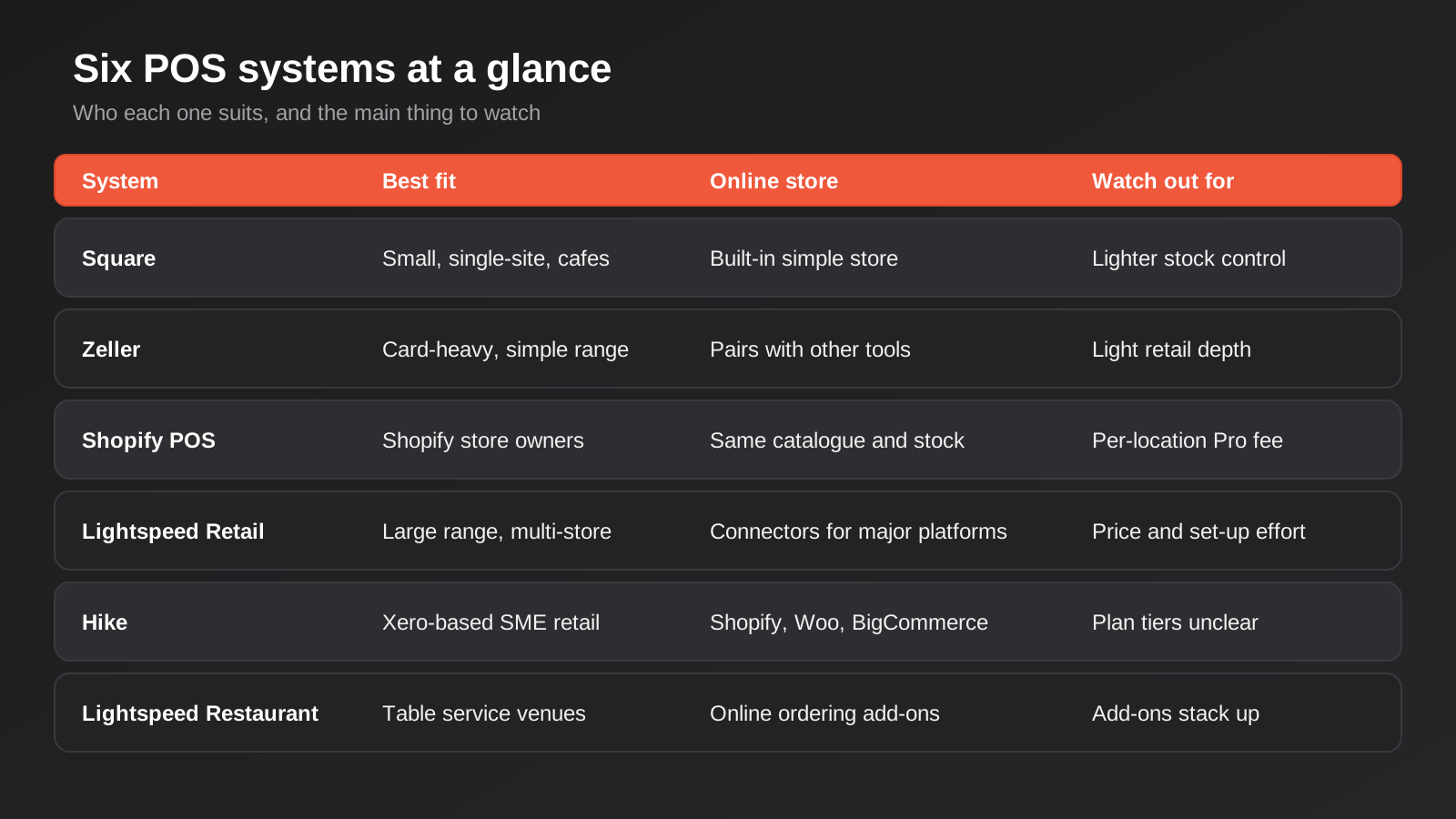
We spend a fair amount of our working week on the other side of this decision, connecting tills to online stores and accounting software, so we see which POS systems behave themselves once real trading starts and which ones turn every refund into a support ticket. This round-up covers six systems that Australian retailers and venues actually use: Square, Zeller, Shopify POS, Lightspeed Retail, Hike and Lightspeed Restaurant. It is not a ranking, because the right answer depends heavily on whether you sell online, how many locations you trade from and what accounting software sits behind the till.
Here is how we judged them. First, Australian fit: local card rates, GST handling, EFTPOS, Xero and MYOB connections and support during local hours. Second, how well stock and sales data leave the system, since a POS you cannot integrate becomes a data silo. Third, what it really costs once you add locations, registers, hardware and card fees. Every tool below gets a genuine drawback, and we have no affiliate arrangement with any of them. One caution up front: POS vendors change plans and rates often, so the prices below are what we found listed in early November 2026. Confirm them on the vendor’s own page before you commit.
What Changed on 1 October 2026 and Why It Affects Your Choice
Before the tools, one local development changes the maths. From 1 October 2026 the Reserve Bank’s reforms ended card surcharging on eftpos, Mastercard and Visa transactions, and the major banks have said the ban extends to other card schemes such as American Express. At the same time, the caps on interchange fees dropped: for consumer credit the cap fell from 0.8% to 0.3%, and for debit from 0.2% to 0.16% (or 8 cents on fixed-fee cards, down from 10).
For a small merchant the practical effect is that the card fee is now a cost of doing business that you absorb rather than pass on to the customer. That makes the processing rate on your POS a bigger deal than it was. The RBA expects smaller businesses to benefit most from the lower interchange, but only if your provider passes the saving through, and not every provider does so in the same way. When you compare systems below, read the card rate as seriously as the monthly plan price. A cheap subscription with a high blended card rate can cost more than an expensive subscription with a sharp one.
A related warning: do not respond to the ban by relabelling a surcharge as a “service fee” or “card handling fee”. Regulators have been clear that a relabelled card surcharge can still be misleading conduct. Weekend and public holiday loadings and genuine service or booking fees sit outside the ban, but they need to be real and clearly disclosed.
Square
Square is the default choice for a lot of small Australian businesses, and for good reason. It is a complete package: card reader, POS app, receipts, basic inventory, an online store and a growing set of extras like appointments and loyalty, all under one login. You can be taking payments the same afternoon you sign up.
What it does well
Speed to launch and simplicity. A cafe, a market stall, a hairdresser or a small giftshop can run entirely on Square without ever opening a settings menu beyond the basics. Pricing is transparent: the in-person card rate on Square’s Australian page is 1.6% per tap, insert or swipe, and the base software plan has no monthly fee, so you pay for processing and nothing else until you need more. The built-in online store means a retailer who wants a simple web shop does not need a second platform. Square also connects to Xero, which covers the accounting needs of many small operators.
Where it falls short
Square gets awkward as you grow. Its flat 1.6% rate is not the cheapest around once volume rises, and the retail inventory tools that most stock-heavy shops need sit behind a paid plan. If you already run a separate Shopify or WooCommerce store, the link between the two is not as tight as the one you get from a POS built by the store platform itself, so test stock sync properly before you trust it. Square has also been restructuring its subscription tiers, which means older and newer accounts may sit on different plans. Read your own dashboard rather than a comparison table, ours included.
What it costs
The base POS plan is free. Square’s Australian pages list a Plus tier for retail at $109 a month per location and for restaurants at $129 a month per location, with a custom-priced Premium tier above that. Card processing is 1.6% in person. Hardware is separate. Check squareup.com/au for current figures.
Who it suits
New businesses, single-location shops, mobile traders, cafes and service businesses that want to be trading quickly and can live with lighter inventory control. If your catalogue is a few hundred lines and your online presence is a simple store, Square is hard to beat on effort.
Zeller
Zeller is an Australian-founded payments company that bundles a business transaction account with card terminals and, more recently, point of sale features. It is the one on this list that is driven by payments first and software second, and that shapes both its strengths and its limits.
What it does well
The headline is the rate. Zeller advertises a flat 1.4% for in-person card payments across all cards including American Express, and a lower 1.2% for payments taken through an integrated POS, with no monthly terminal rental. For a business doing meaningful card volume, a fraction of a percent is real money. Several comparison sites also point to fast settlement into the Zeller transaction account, which helps cash flow if you are a small operator watching the bank balance. It is also Australian-built, so local needs such as EFTPOS and local banking are not an afterthought.
Where it falls short
Because Zeller grew out of payments and banking, the stock-control and retail reporting side is lighter than the dedicated retail systems. If you need purchase orders, variants across hundreds of SKUs, supplier management or multi-outlet stock transfers, you will probably find yourself pairing Zeller’s terminals with a separate system, which adds a layer that has to be integrated. Rates also differ by channel: keyed or phone payments and online payments are priced higher than the in-person headline, so work out your real channel mix before you quote the 1.4% to your accountant. We also saw conflicting rate figures on third-party sites, which is a reminder to read Zeller’s own pricing page rather than a summary.
What it costs
No monthly terminal rental is listed. In-person card payments are 1.4%, integrated POS payments 1.2%, and keyed payments higher. Terminals are an upfront purchase. Check myzeller.com for the current schedule and any fee changes made since the surcharging reforms.
Who it suits
Businesses where card fees are the biggest line item and the product range is simple: food trucks, markets, tradies selling on site, small hospitality venues and service businesses. It also makes sense as the payments layer underneath a separate inventory system if you already have one you like.
Shopify POS
Shopify POS is the obvious answer if your online store already runs on Shopify, because it is the same product with a till bolted on. One catalogue, one set of orders, one customer list and one stock count, whether the sale happened on the website or at the counter.
What it does well
The unified data is the whole point. A customer can buy online and return in store, or reserve online and collect at the counter, and the system treats it as a single customer with a single history. Inventory is shared across locations and channels without any connector in between, which removes the most common failure we see in retailers who run a separate till and web store. There is a free basic version included with Shopify plans, and a Pro tier adds the features that matter for bigger shops, such as smart stock tools, more granular staff permissions and better reporting. If you are choosing a platform for the first time, our comparison of ecommerce platforms for Australian retailers covers the online side of that decision.
Where it falls short
It only makes sense if Shopify is, or is about to be, your online platform. Running Shopify POS with a store on another platform defeats the purpose. The Pro tier is charged per location, which adds up quickly for multi-store retailers: the Australian pricing page lists it at $129 a month for each location, on top of your Shopify subscription. In-person card rates vary by Shopify plan and we could not find a single clean Australian figure to quote, so check what your plan attracts. Hardware is also fairly closed, so factor in buying Shopify-approved readers and stands.
What it costs
POS Lite comes with your Shopify plan. POS Pro is listed at $129 a month per location in Australia. Card rates depend on your plan. Hardware is extra. If you are also planning the store build itself, our Shopify pricing page shows how we quote that work.
Who it suits
Retailers who sell online and in store and want one source of truth for stock. Fashion, homewares, beauty, gifts and specialty food are the typical fits, especially with pop-up stalls or one to three stores.
Lightspeed Retail
Lightspeed Retail is the heavyweight of the group for stock-heavy businesses. It started life as a retail inventory system and that is still where it is strongest, with the kind of purchasing and stock-management depth that general-purpose tills do not attempt.
What it does well
Inventory. Purchase orders, supplier management, variants, stock transfers between outlets and reorder points are all first-class features, so a store with thousands of SKUs and several locations can stay on top of its stock. Multi-outlet reporting is solid, and it connects to ecommerce platforms and accounting software through its integrations, with Xero well supported. If you are the sort of retailer who gets nervous about shrinkage and dead stock, this is the system built for your worries.
Where it falls short
Price and complexity. It is the most expensive subscription on this list per location, and it takes a real implementation effort to configure properly: product data import, tax settings, receipt design and staff training all take time. Smaller shops often end up paying for depth they never use. Hardware, payments and some add-ons are priced separately, so the sticker price understates the total. Plan names and prices also vary between the Australian site and third-party summaries, so budget from the vendor’s quote rather than an aggregator.
What it costs
Lightspeed’s Australian site lists Core at $229 a month and Plus at $329 a month. An entry tier is commonly reported at around $129 a month, though we could not confirm that on the vendor page, so ask. Additional registers, payments and hardware are charged on top, and prices are typically quoted ex GST.
Who it suits
Established retailers with a large or fast-changing catalogue, two or more locations, and someone in the business who owns purchasing. Sports, outdoors, bikes, toys, hardware and fashion businesses often fit this profile.
Hike
Hike is an Australasian retail POS that sits between Square’s simplicity and Lightspeed’s depth. It is built around small and medium retailers who trade in Australia and New Zealand and who use Xero.
What it does well
It is genuinely retail-minded without the heft. You get inventory management, purchasing, multi-outlet support and ecommerce connections to platforms such as Shopify, WooCommerce and BigCommerce, at a lower entry price than Lightspeed. The Xero listing describes the integration as free for Hike and Xero users and says it handles on-account sales and payment updates. For a retailer who lives in Xero, a vendor that treats that connection as a core feature rather than an add-on is appealing.
Where it falls short
It is a smaller ecosystem. Fewer third-party apps, fewer integrators who know it well and less hardware choice than the big names. Which plan includes which integrations is also not clear from public information, and one regional review suggests Xero sync only comes with a higher tier. Get that in writing before you rely on it. Hike also does not match Lightspeed’s purchasing depth if you are running a very large range.
What it costs
One listing shows plans starting from around AUD $69 a month, though other sites quote different numbers without stating a currency, so confirm with Hike. A free trial is offered. Card processing depends on the payment provider you attach.
Who it suits
Independent retailers with one to a handful of stores, a few thousand SKUs and Xero as their books. It is a sensible step up for a business that has outgrown a basic till but does not need an enterprise inventory system.
Lightspeed Restaurant
Hospitality has different needs from retail: tables, courses, modifiers, kitchen tickets and split bills. Lightspeed Restaurant is the hospitality-specific product from the same company as Lightspeed Retail, and it is one of the established options for cafes, bars and restaurants.
What it does well
It handles the front-of-house workflow that a retail POS does not: floor plans, order-to-kitchen routing, menu modifiers and tableside ordering. Kitchen displays are available as an add-on, and online ordering can be connected to the system. Because it is a mature product with a large installed base, venue staff who have worked elsewhere often already know it, which shortens training.
Where it falls short
The add-ons stack up. Kitchen display screens, online ordering, extra registers and loyalty features are each charged on top of the base plan, so the real monthly bill is usually well above the headline. It is also more system than a small takeaway or a coffee cart needs. If your menu is ten items and you serve across a counter, a simpler tool will cost less and annoy your staff less.
What it costs
Lightspeed’s Australian page lists Starter at $79 a month, Essential at $179 and Premium at $359, with kitchen display screens around $40 a month each as an add-on. Third-party sites quote different figures, so go by the vendor page and your own quote.
Who it suits
Full-service restaurants, busy cafes, bars and multi-venue operators who need table service, kitchen routing and reporting by venue.
How to Choose
Three questions do most of the work, and they are more useful than any feature table.
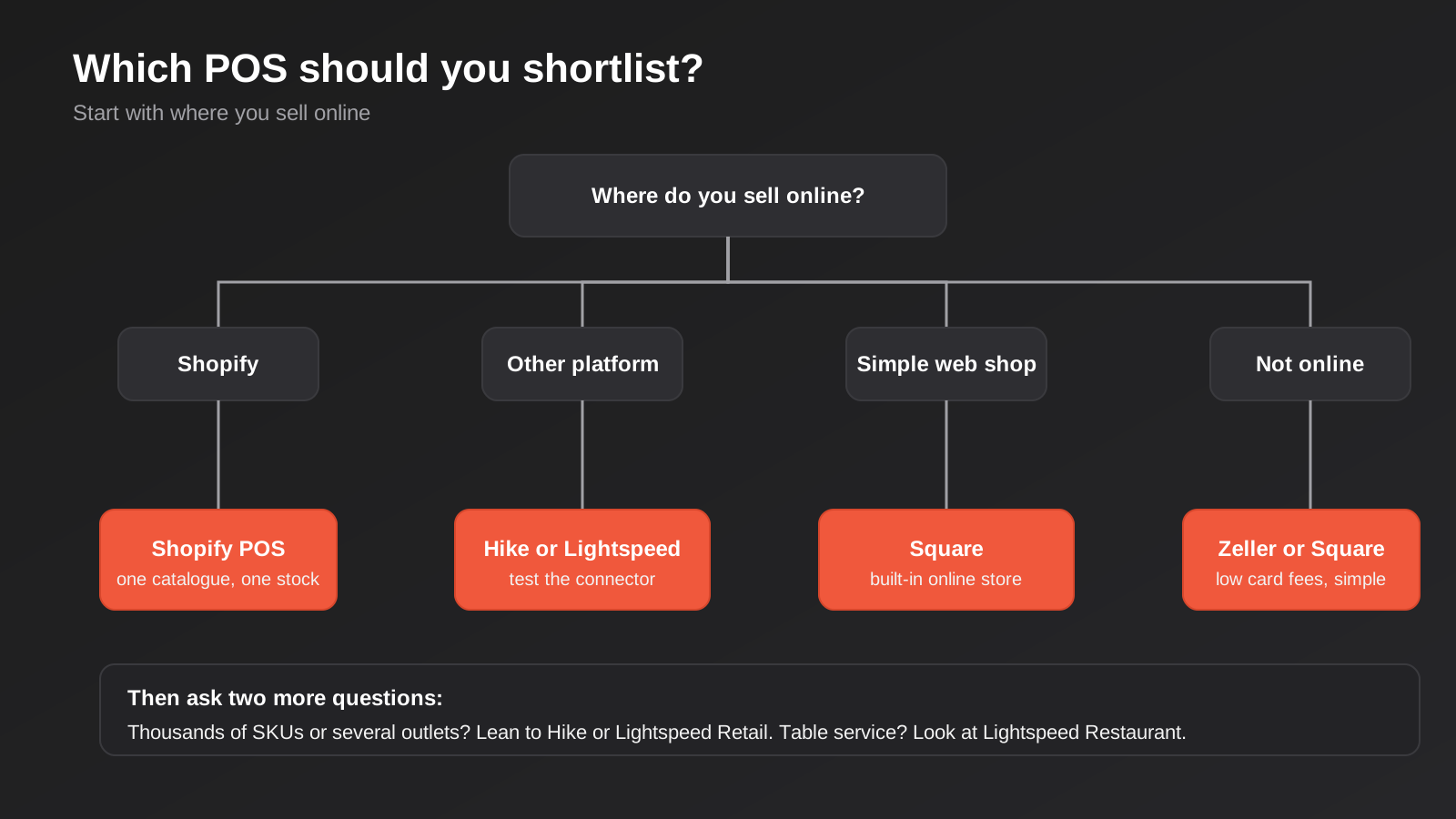
First, where do you sell online? If the answer is Shopify, start with Shopify POS and make it earn its place against the alternatives. If the answer is nowhere, or a simple web shop, Square or Zeller will do the job. If you sell on WooCommerce or another platform, you are looking at Hike or Lightspeed Retail and a connector that you test before you launch.
Second, how big is your range and how many places hold stock? A few hundred products in one shop is Square territory. Thousands of SKUs, supplier ordering and multiple outlets point to Hike or Lightspeed. This is the question that causes the most regret later, because moving to a more capable system means exporting products, rebuilding barcodes and retraining staff.
Third, what does your accountant need? Whatever you pick has to produce takings that reconcile. POS sales are untidy accounting data: GST, refunds, voids, split tenders, gift cards, EFTPOS cash-out. Ask your bookkeeper which format they want, and look at how each system sends daily summaries into Xero or MYOB. A deeper look at that side of things is in our round-up of accounting integrations for Shopify and WooCommerce.
Total cost, not plan price
Work out a twelve-month number for each shortlisted system. Include the monthly plan for every location, the cost of additional registers, the hardware you need (reader, stand, printer, cash drawer, barcode scanner), the blended card rate on your actual volume, and any add-ons you will really use. Then compare. A shop turning over $40,000 a month on cards pays about $560 a month at 1.4% and $640 at 1.6%, so a $80 difference in processing can outweigh a $50 difference in subscription. That sort of arithmetic is easy to do before you sign and miserable to discover afterwards.
Check the data exits
Before committing, find out how you get your data out. Can you export products, customers and sales history in a usable format? Is there an open API, and is it on every plan or only the top one? If the answer to either is vague, treat it as a warning. If you are not sure whether your preferred system can be connected to your store or accounts properly, our POS integration guide for Australian retail and hospitality explains what actually syncs and where it goes wrong.
The Costs That Do Not Show Up on the Pricing Page
Every vendor leads with the monthly plan, and every vendor’s real bill is made of other things. It helps to list them before you request quotes so you can compare like with like.
- Hardware. A card reader, a stand or tablet, a receipt printer, a cash drawer and a barcode scanner each have a price, and some systems only work with their own approved models. A single-counter shop and a three-register store are very different shopping lists.
- Extra registers and locations. Plans are commonly priced per location, with separate charges for additional registers. A third till can cost more than the first.
- Payment processing. The per-transaction rate, any fixed per-transaction cents, the rate for keyed and online payments, and what happens to your rate if your volume dips.
- Add-ons. Loyalty, gift cards, kitchen displays, appointments, advanced reporting and ecommerce connectors are often priced separately.
- Setup and migration. Cleaning and importing products, configuring tax and tender types, and training staff. This is your time or someone else’s invoice, and it is routinely underestimated.
- Integration. If the system does not connect natively to your store or accounts, the connector, whether a paid app or a custom build, is part of the cost of ownership.
None of these are tricks. They are just the normal shape of POS pricing, and they explain why two quotes for the same shop can differ by a factor of two without either vendor doing anything dodgy. The fix is to ask each one for a twelve-month total based on identical assumptions.
Questions to Ask Every Vendor
A short list, because a sales call goes better when you drive it.
- What is my blended card rate at my monthly volume, in writing, and is it fixed or reviewed?
- Which integrations are included on my plan, and which need a higher tier or a paid app?
- Does the Xero or MYOB connection send daily summaries or individual transactions, and how are refunds and GST coded?
- If I stop paying, how do I export my products, customers and sales history, and in what format?
- What happens to my trading if the internet drops? Can I keep selling and take card payments offline, and for how long?
- Is there a lock-in contract on software or hardware, and what does it cost to leave?
- Do you have local phone support during Australian trading hours, including weekends?
The offline question is worth pressing. Most modern systems can keep recording sales when the connection drops, but card payments are a separate matter, and the rules about offline card acceptance differ by provider. A cafe that loses its connection during a lunch rush finds this out the hard way.
When Your Tools Are Fine and the Connections Are Not
A pattern we see often is a business that picked a perfectly good POS and a perfectly good online store, and then spent months fighting the gap between them. Stock sells in store and the website keeps showing it. A price changes in one system and not the other. Daily takings land in the accounting software as a lump that nobody can trace back to a shift. None of those are the fault of the software. They are integration problems, and they have a different fix from changing vendors.
Before you switch systems because something feels broken, work out whether the tool is the problem or the connection is. Check which system is meant to be the source of truth for stock, for prices and for customers. If the honest answer is “both, depending on the day”, you have a design problem that a new POS will inherit. Fix the ownership question first, and then pick the tool that suits the answer.
Common Mistakes When Choosing a POS
- Choosing on the free plan alone. Free software with a weak card rate and paid add-ons for the features you need is rarely the cheapest option over a year.
- Ignoring the card rate. With surcharging gone on the main schemes, the rate you pay is margin out of your pocket. Ask for your blended rate, not just the headline.
- Buying for the shop you have, not the one you are building. If a second location or a web store is likely within two years, price that in now.
- Skipping the accountant. Decide how daily takings and card settlements will be recorded before you go live, not after the first messy BAS quarter.
- Underestimating data migration. Barcodes, SKUs, variants and supplier codes need cleaning before they go into any new system. Moving rubbish data into a better tool gives you better-looking rubbish.
- Not testing refunds and voids. The clean sale always works. Process a refund, a voided item, a split payment and an end-of-day close in a trial before you commit.
- Locking into long hardware contracts. Some providers tie terminals to multi-year rentals. Prefer outright purchase or month-to-month where you can.
- Relabelling surcharges. Calling a card surcharge a service fee does not make it compliant and invites complaints.
Frequently Asked Questions
What is the best POS system for a small Australian retailer?
There is no single best. Square is the easiest to start with, Shopify POS is the strongest if your online store is on Shopify, and Hike or Lightspeed Retail suit larger catalogues and multiple stores. The deciding factors are your online platform, the size of your range and your accounting software.
Can I still add a surcharge on card payments?
Not on eftpos, Mastercard or Visa. The RBA’s surcharging ban took effect on 1 October 2026, and the major banks have said it also covers other schemes. Genuine non-card fees, such as weekend loadings or booking fees, are treated differently, but they need to be real and clearly disclosed. Check your provider’s terms and ask your adviser if you are unsure.
Does my POS need to connect to Xero or MYOB?
It does not have to, but without a connection someone retypes or imports daily sales by hand. Most of the systems here connect to Xero. The quality varies: some post a clean daily summary, others push every transaction. Ask for a sample journal and show it to your bookkeeper.
Is it hard to switch POS systems later?
It is doable but rarely painless. Products, customer lists and gift card balances can usually be exported and imported, but sales history, loyalty points and custom reports often do not move cleanly. Budget a few weeks for a changeover, and do it in a quiet trading period rather than before Christmas.
Do I need my own EFTPOS terminal if I use a POS app?
Usually you need a card reader that pairs with the app, supplied by the same company or a compatible provider. Some systems let you attach your existing bank terminal, but then you lose the integrated reconciliation and often pay a different rate. Ask whether integrated payments are cheaper or dearer than standalone ones.
When does it make sense to pay for a custom integration?
When a standard connector cannot carry your business rules: trade and retail pricing from the same stock, click and collect across stores, a legacy system, or reporting that has to combine several locations and channels. If a ready-made connector does what you need, use it. Custom work is for the gaps.
Where to Start
Pick two systems, not six. Ask each for a written quote based on your real numbers: locations, registers, monthly card volume and the integrations you need. Then run a trial week with refunds, voids and an end-of-day close, and show the output to your accountant. That small test usually settles the decision faster than any comparison page, including this one.
If you decide a standard connector will not do the job, for example because your stock needs to flow between a till, a web store and your accounting software without someone babysitting it, that is the work we do. Our point of sale integration service covers the audit, data mapping, build and monitoring, and because every project depends on the systems and locations involved, we scope it individually. Our pricing page for custom-scoped work explains how we quote.
This isn’t a cost guide, so we haven’t put a market range on integration work here. If you’ve already got a written quote from another agency for comparable scope, send it through and we’ll do our best to beat it.
Keep reading
Related posts
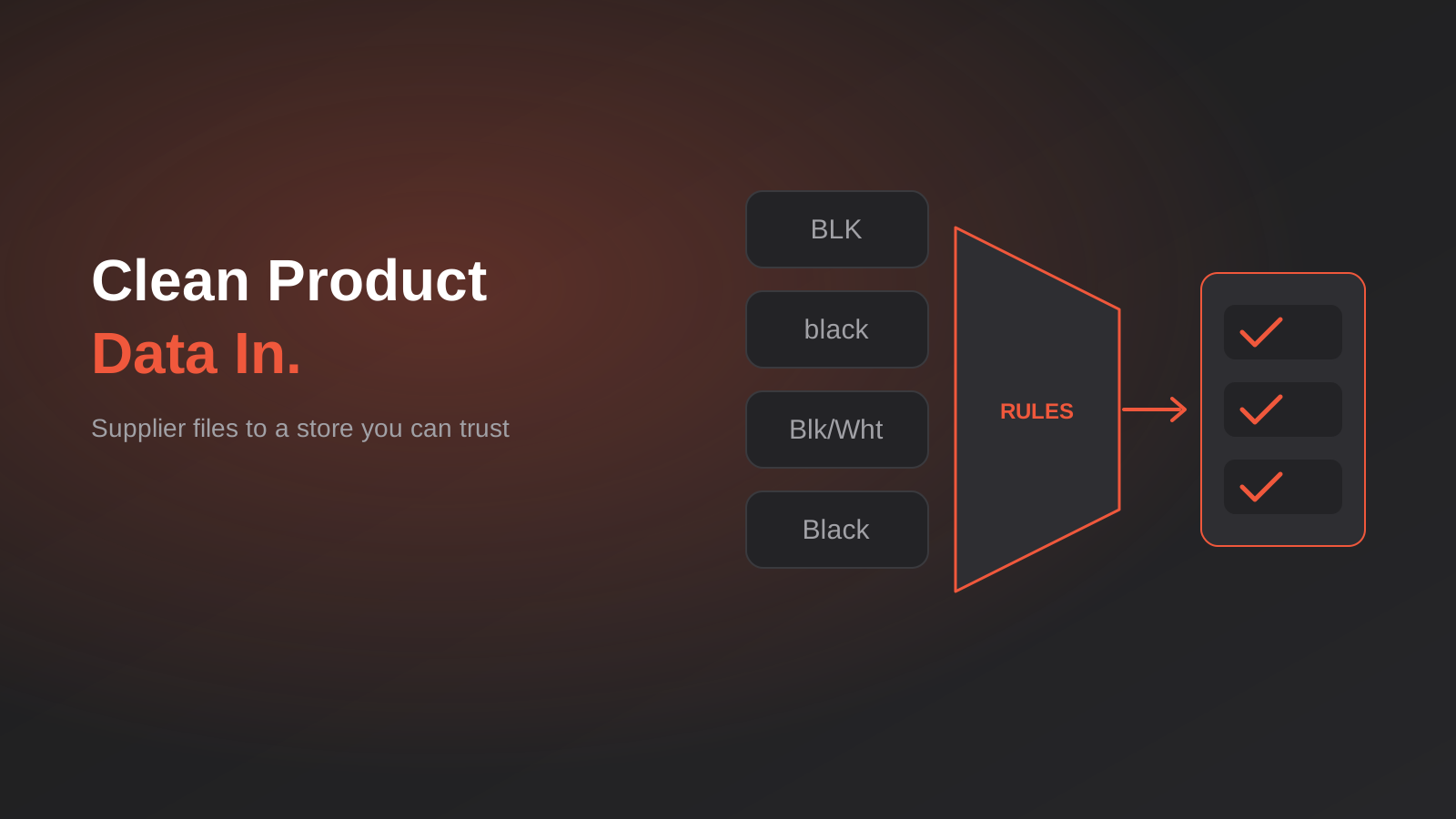
Product Data Management for Australian Ecommerce: Supplier Feeds, Staging and When You Actually Need a PIM (2026)
How to turn messy supplier files into clean product data: staging, validation, GTINs and whether you really need a PIM. A guide…
Single Customer View for Australian Businesses: Matching and Merging Records Across Shopify, Xero and Your CRM
How to build a single customer view in Australia: match and link duplicate customers across Shopify, Xero and your CRM without merging…
Australian Address Validation: PAF, G-NAF and How to Stop Bad Addresses Entering Your Systems (2026)
How to validate Australian addresses with PAF and G-NAF, where to check them in your workflow, and how to store clean data…
Got a project you'd like to talk through?
Tell us what you're working on — we'll come back with a plan.
