
Automating Employee Onboarding: A Workflow Australian Businesses Can Build Without New HR Software (2026)
 Jignesh Vagadiya
20/09/2026
21 min read
Jignesh Vagadiya
20/09/2026
21 min read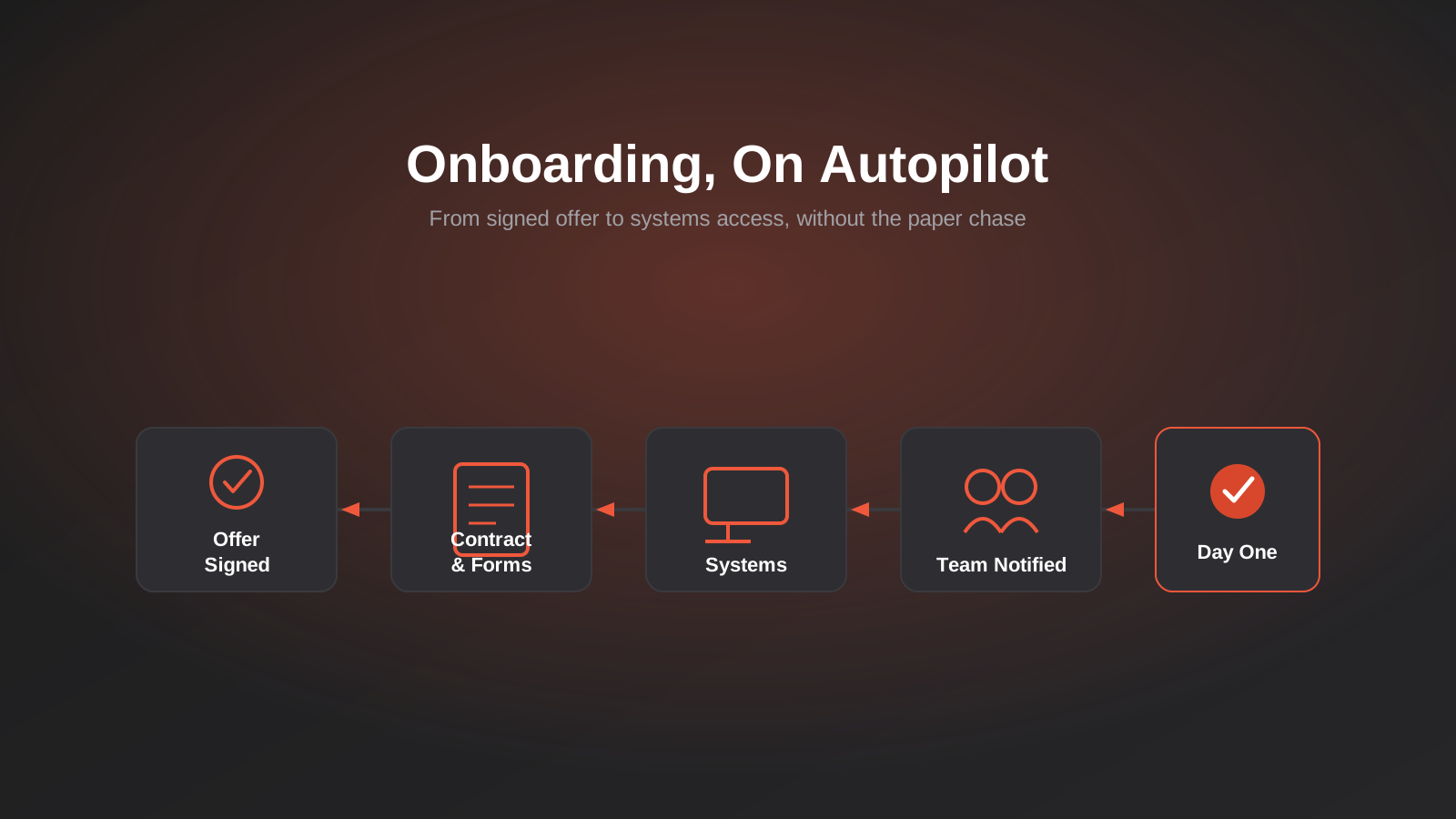
A client rang us in a mild panic two weeks ago because a new hire had turned up on their first day to find no laptop, no email address, and a manager who was in back-to-back meetings and hadn’t been told the start date had moved forward. Nobody had done anything wrong exactly. The offer had been verbally confirmed, a contract had gone out by email, and everyone assumed someone else was handling the rest. That “someone else” didn’t exist. It was a fifteen-person business, and this was their third hire that quarter, which is usually about the point manual onboarding starts to visibly crack.
This isn’t a story about a badly run business. It’s what happens to almost every growing Australian company at some point, because onboarding is one of those processes that looks simple from a distance and turns out to have a dozen moving parts once you actually map it — a contract, a handful of legally required forms, IT provisioning, a manager who needs briefing, a desk or a login that has to be ready, an induction that has to actually happen rather than get promised. None of it is individually hard. The failure mode is always the handoffs between steps, not the steps themselves.
We’re not going to tell you to buy a $15-a-seat HR platform, because most businesses hiring a handful of people a year don’t need one. What follows is how we actually build employee onboarding automation for Australian businesses using workflow automation tools they likely already have some familiarity with, what has to stay manual for legal reasons, and the point at which building it yourself stops making sense and a dedicated platform starts to.
What Actually Has to Happen When You Hire Someone
Before automating anything, it’s worth listing what genuinely needs to occur between an offer being accepted and someone being productive, because most employee onboarding automation projects fail at the scoping stage — either by automating the wrong ten percent or by assuming the whole thing can be handed to software when parts of it legally can’t be.
The paperwork Australian law actually requires
Every employer covered by the Fair Work Act has to give every new employee a Fair Work Information Statement, before or as soon as practicable after they start, under section 125 of the Act. It can be emailed, printed, handed over on day one or linked to from the Fair Work Ombudsman’s site — the delivery method is flexible, but giving it is not optional, and it’s an easy one to genuinely forget when the paperwork is scattered across email threads.
New employees also need a tax file number declaration completed before their first pay run, either on paper or through ATO online services via myGov, so you can withhold the right amount of tax. If they’re eligible for super guarantee contributions, you need to give them a Superannuation Standard Choice Form within 28 days of their start date so they can nominate a fund — and you’re required to keep a copy of that form, or the ATO’s online summary of it, for five years. From 1 July 2026 the payment window tightens too: super contributions generally need to reach the employee’s fund within 7 business days of payday, which puts more pressure on getting the choice form sorted early rather than as an afterthought in week three.
On top of that there’s the employment contract itself, right-to-work verification, bank details for payroll, emergency contacts, and usually some combination of a fair work statement acknowledgement, a policies sign-off and an induction checklist specific to the role. None of this is exotic. All of it is exactly the kind of repetitive, form-based, deadline-driven work that workflow automation handles well — not by replacing the legal requirement, but by making sure it actually happens on time, every time, for every hire, without depending on someone remembering.
Right to work and identity checks
Depending on the role and the employee’s citizenship or visa status, there’s usually some form of right-to-work verification required before or shortly after the start date — checking a visa’s work conditions through the Department of Home Affairs’ VEVO system, sighting identity documents, or both. This is one of the areas we deliberately keep as a checked, logged step rather than a fully automated one, because getting it wrong carries real consequences for the business and it genuinely needs a person to look at a document and confirm it matches the person in front of them. What automation can still do here is make sure the check happens before the start date rather than being discovered as missing in week three, by making it a tracked, due-dated task in the same workflow as everything else, rather than a mental note that depends on whoever handled the hire remembering to mention it.
The systems and access side
Separately from compliance, there’s a whole systems-provisioning job: an email account, access to whatever practice management, CRM or project tool the role needs, a Slack or Teams invite, software licences, maybe a company phone or a physical access card. In a five-person business this is one person’s afternoon. In a fifty-person business with several departments and a mix of SaaS tools, it’s easy for one login to get forgotten for two weeks while the new hire quietly can’t do half their job and is too new to know who to chase.
The human side managers keep forgetting
The part that’s hardest to automate, and the part that matters most, is the human side: a manager who’s actually prepared, a team that knows someone new is starting and roughly what they do, a first week that has some shape to it rather than “sit here while I figure out what to give you.” Automation’s job here isn’t to replace this — it’s to make sure it doesn’t get skipped because everyone assumed someone else had it covered. A calendar invite that fires automatically the moment a hire is confirmed, a Slack message to the manager with a prep checklist attached, a scheduled reminder three days before the start date — these are small, unglamorous automations that fix the exact failure mode from the story at the start of this article.
Why Manual Onboarding Falls Apart as You Grow
At one or two hires a year, a checklist in a shared document is genuinely fine. Somewhere between five and fifteen hires a year, most businesses hit a point where the checklist still exists but stops being followed consistently, because it depends on one person remembering to open it, work through it, and chase the people who owe them something — a signed contract, a completed form, a provisioned account — without a system nudging anyone.
The visible symptom is usually a bad first week for the new hire. The less visible symptom, and the one that actually costs money, is compliance risk quietly building up in the background: a Super Choice form that never went out within the 28-day window, a Fair Work Information Statement that got mentioned verbally but never actually delivered, a TFN declaration that sat in someone’s inbox for a fortnight because payroll didn’t know to chase it. None of these show up as an obvious problem the day they happen. They show up as a Fair Work Ombudsman enquiry or an ATO record-keeping gap months later, at which point “we usually remember to do that” is not a great answer.
There’s also a straightforward productivity cost that’s easy to underestimate. Every day a new hire spends waiting on a login, a tool access request, or clarity about what they’re meant to be doing is a day you’re paying a salary for partial output, on top of the manager time spent apologising for the gaps and trying to patch them ad hoc. Multiply that by however many people you hire a year and it adds up to a real number, even at a small scale.
None of this tends to surface as a single dramatic failure. It shows up as a slow accumulation of small gaps — a form that went out two days late, an account that took a week longer than it should have, a manager who found out about a start date the same morning it happened. Individually each one is minor and forgivable. Collectively, across a dozen hires a year, they’re the difference between onboarding being something the business does well without thinking about it, and onboarding being a recurring source of friction that everyone quietly dreads a little each time a new person joins.
How the Automation Actually Works
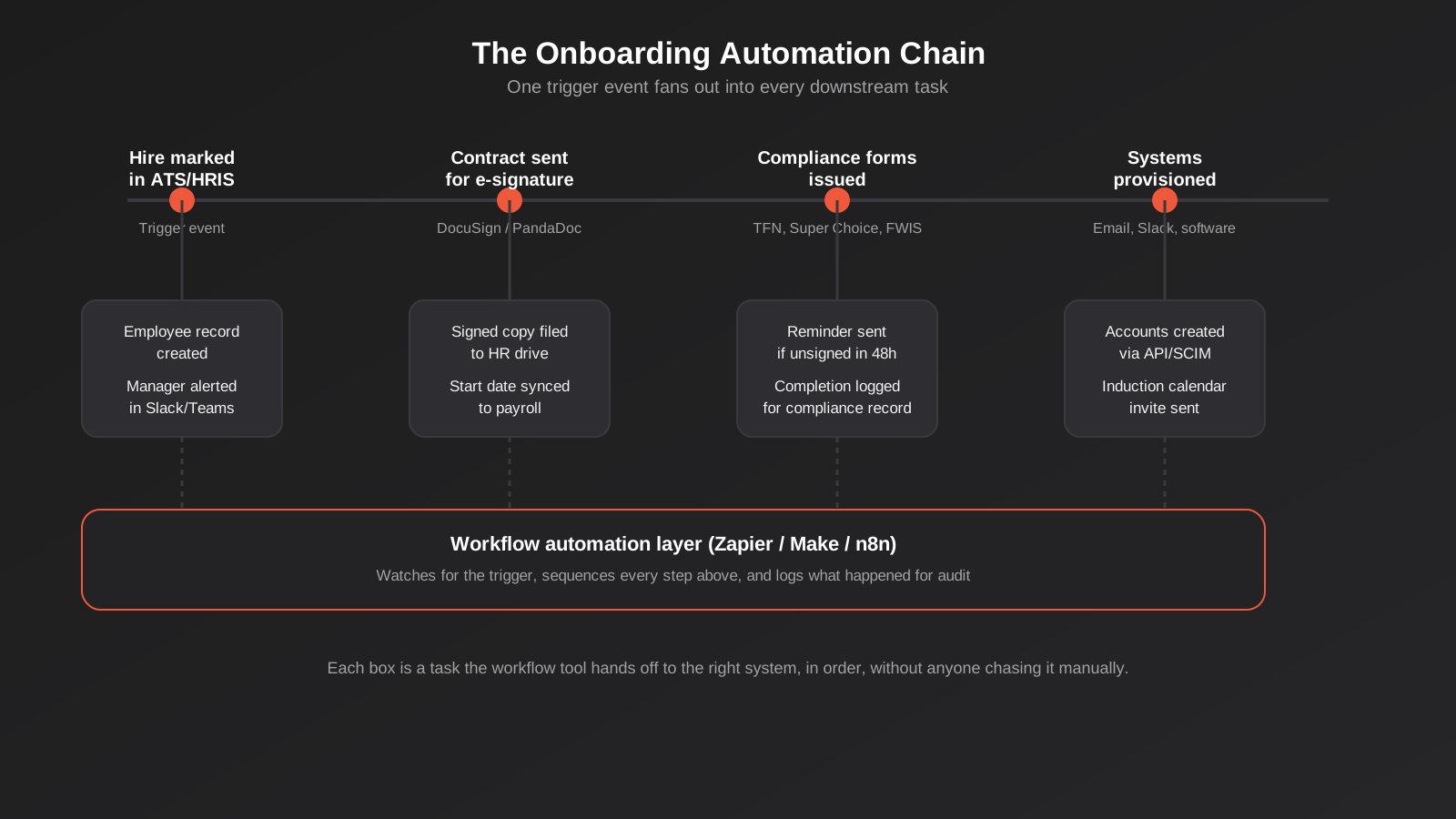
The pattern we build for most Australian clients doesn’t require replacing any of the systems already in use. It sits on top of them as a coordination layer — watching for the moment someone is hired, then firing off the right task to the right tool in the right order, and keeping a record of what’s happened for anyone who needs to check later.
The trigger event
Everything starts from one clearly defined moment — usually a candidate marked “hired” in an applicant tracking system or CRM, or a specific field being updated in a spreadsheet if that’s genuinely still what a smaller business is using. The discipline that matters here isn’t the tool, it’s making sure there’s exactly one trigger point that everyone actually uses, rather than three different people starting the process three different ways depending on who did the hiring. If you’re still deciding between workflow tools, we’ve covered the practical differences between Zapier, Make and n8n in more depth elsewhere, and any of the three can run this kind of build comfortably.
Contracts and e-signature
The trigger fires off a contract through DocuSign, PandaDoc or a similar tool, pre-filled with the role, salary and start date pulled from the ATS record rather than typed in again by hand. A reminder goes out automatically if it isn’t signed within a day or two, which is a small thing that quietly removes most of the “did they actually get it” follow-up emails HR teams end up sending manually. Once signed, the completed copy files itself into the right folder and the start date syncs to payroll, so nobody’s re-keying the same three dates into three different systems.
Compliance forms, automated but not skipped
This is the part worth being precise about, because it’s where “automate it” gets misunderstood as “skip it.” The workflow doesn’t complete a TFN declaration or a Super Choice form on anyone’s behalf — those need the employee’s own input and, in the TFN case, are increasingly completed by the employee directly through ATO online services. What the automation does is make sure the right form or the right link goes out to the right person at the right time, that a reminder fires if it isn’t back within a sensible window, and that completion gets logged against that employee’s record so you have a clean answer if anyone ever asks whether the 28-day Super Choice window was met. The Fair Work Information Statement is simpler still to automate properly: it’s a static document, so the same trigger that sends the contract can attach it or link to it, with delivery logged automatically rather than relying on someone remembering to mention it existed.
Provisioning systems and accounts
Once a start date is confirmed, the same workflow can create accounts across your core tools automatically where those tools support it through an API — email, Slack or Teams, the CRM or practice management system, project tools, and anything role-specific. Where a tool doesn’t expose an API for account creation, the automation can still generate a checklist ticket assigned to whoever handles IT, due a set number of days before the start date, so it’s a tracked task rather than a mental note. This is also where employee onboarding automation starts to overlap with the rest of your systems work — if you’re already connecting several platforms together for other reasons, the same API integration work that syncs your CRM, payroll and inventory systems is usually the right place to also wire up account provisioning, rather than treating it as a separate project.
Keeping a human in the loop
The manager gets notified the moment a hire is confirmed, not the day before they start, with a short checklist: book the induction session, prepare a first-week plan, tell the team. A calendar invite for induction goes out automatically. None of this replaces the manager actually doing the work of making someone feel welcome — it just makes it structurally hard for that work to get forgotten in a busy week, which is the actual failure mode in most of the bad first-day stories we hear from clients.
Build It Yourself vs Buy a Dedicated Platform
The honest answer to “should we build this with workflow automation or buy an HR platform” depends less on headcount than on hiring frequency, and it’s worth being straight about the trade-offs before committing to either.
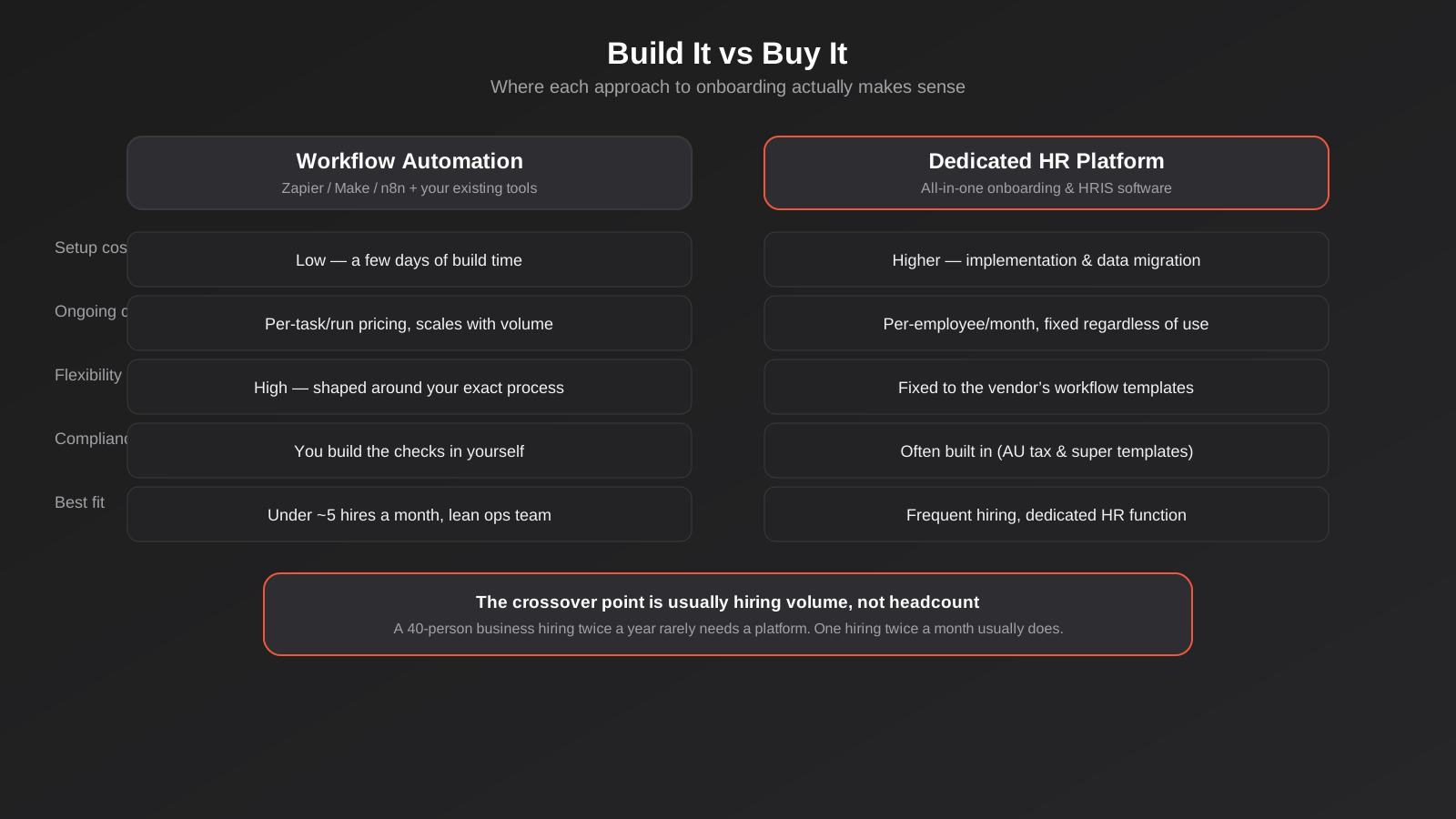
A workflow-automation build using tools you likely already pay for is cheap to set up, usually a few days of scoping and building for a first version, and genuinely flexible — it does exactly what your process needs, in exactly the order your process needs it, because you built it that way rather than adapting your process to fit a vendor’s template. The cost scales with usage rather than headcount, which suits a business hiring occasionally. The trade-off is that you own the compliance logic: the reminders, the 28-day window tracking, the record-keeping, all of it has to be built in deliberately rather than arriving as a feature.
A dedicated onboarding or HR platform — something like Employment Hero, BambooHR or similar — costs more up front in implementation and ongoing per-employee fees, and locks you into that vendor’s workflow templates rather than your own. What you get in return is Australian tax and super compliance largely built in, a proper employee record system rather than a workflow tool bolted onto a spreadsheet, and a lower ceiling on how much custom logic you need to maintain yourself. That trade generally starts paying off once you’re hiring frequently enough, roughly monthly or more, that a dedicated HR function exists or is about to, and the platform’s fixed cost is smaller than the time it’s saving.
If you’re below that threshold, the workflow-automation route is very often the better use of money, and it’s not a dead end — a well-built version can run for years and only gets replaced by a platform when hiring volume genuinely justifies the switch, not on a fixed timeline.
It’s also worth knowing the two approaches aren’t always mutually exclusive. Businesses that do move to a dedicated HR platform often keep a thin workflow-automation layer running alongside it, specifically to cover the gaps the platform doesn’t handle out of the box — a notification format the vendor doesn’t support, a sync into an internal tool the platform has no integration for, or a quirk in how a particular department wants its induction handled. The platform becomes the system of record, and the workflow layer keeps doing what it’s always done: quietly connecting things that would otherwise need a person in the middle.
What a First Build Actually Looks Like
To make this concrete, here’s roughly how a first version of this looks for a business hiring somewhere around ten people a year across a couple of departments, with no existing HR software beyond a spreadsheet and a shared inbox.
The first week is spent mapping the actual current process, not the process anyone thinks is happening — sitting with whoever currently runs onboarding and working through the last three or four hires to see where things genuinely slipped. This step matters more than it sounds like it should, because the gap between the documented process and the real one is usually where the automation needs to focus. Most businesses are surprised by at least one step that’s been quietly skipped for months without anyone noticing.
The second week is the build itself: setting the trigger point, usually a status change in whatever tracks candidates today, connecting the e-signature tool, building out the compliance form dispatch and reminder logic, and wiring up account creation for however many tools genuinely support it through an API. Anything that can’t be automated yet becomes a tracked, due-dated task instead, which is a perfectly good interim state rather than a failure to reach full automation.
The third week runs it against one or two real hires in parallel with the old manual process, specifically to catch the edge cases a clean design misses the first time — a candidate who negotiates a later start date after the workflow’s already fired, a role that needs a tool nobody thought to include, a manager who wants the Slack notification routed differently. This is normal, not a sign the build was wrong, and it’s the reason we always recommend running a couple of real hires through before calling it finished and switching off the manual checklist entirely.
How to Know It’s Working
Once it’s running, the most useful things to track aren’t vanity metrics, they’re the specific failure points the automation was built to close. Time from offer acceptance to a fully provisioned first day is the single clearest signal, and it’s worth measuring before and after so the improvement is visible rather than assumed. Alongside that, track whether compliance forms are consistently completed within their required windows — particularly the 28-day Super Choice deadline, since that’s the one with a hard legal timeframe attached — and whether the Fair Work Information Statement delivery is logged for every single hire, not just most of them.
It’s also worth periodically checking in with new hires themselves about their first week, since that’s the part hardest to measure through system logs. A short, informal check-in at the two-week mark tends to surface whether the automation is actually translating into a better experience, or whether it’s efficiently completing paperwork while the human side — the manager prep, the team introduction, the sense of being expected and welcomed — is still falling through the cracks it was meant to catch.
Where Employee Onboarding Automation Connects to the Rest of Your Stack
Onboarding rarely stays an isolated workflow for long once it exists. The same automation layer that creates an employee record and provisions accounts is a natural place to also sync that record into whatever internal tool has replaced your spreadsheets for tracking staff, equipment or client assignments — something we’ve written about in more detail in our guide to client portals and internal tools, which covers the broader question of when a spreadsheet has genuinely outgrown its job. Onboarding is usually one of the first processes to hit that wall, because it touches HR, IT and whoever manages the client or project the new hire is joining.
There’s also a smaller, lower-effort addition worth mentioning: a simple internal chatbot that answers a new hire’s first-week questions — where’s the WiFi password, who do I ask about parking, what’s the process for booking leave — pointed at your existing policy documents. It’s not a large project, and it noticeably cuts down the number of Slack messages a manager fields in someone’s first fortnight. If that’s of interest, it sits within the same territory as our AI chatbots and assistants work, usually as a small add-on to a broader onboarding build rather than a project on its own.
Common Mistakes We See
- Automating the systems and paperwork side while leaving the manager-and-team side entirely manual, which is exactly the part most likely to get forgotten in a busy week.
- Assuming a workflow tool can complete a TFN declaration or Super Choice form on the employee’s behalf, rather than just triggering, tracking and reminding around it.
- Building the automation around whichever tool the business happens to use today, without a single clear trigger point, so three different people start the process three different ways.
- Skipping the audit trail, so there’s no clean record showing the Fair Work Information Statement went out, or that the Super Choice form was issued within the 28-day window.
- Buying a full HR platform at low hiring volume because a vendor made a compelling pitch, then paying a fixed monthly fee for capability that’s barely used.
- Treating the first build as finished rather than revisiting it after a few real hires have gone through it, when the actual gaps usually become obvious.
- Forgetting that a system-provisioning step depends on a tool exposing an API, and assuming every account can be automated when some genuinely still need a manual ticket.
Frequently Asked Questions
Can we automate the TFN declaration and Super Choice form completely?
Not the completion itself — those forms need the employee’s own information and, for the TFN declaration, are increasingly filled in by the employee directly through ATO online services via myGov. What you can fully automate is everything around them: sending the right form or link at the right time, chasing it with a reminder if it isn’t back within a sensible window, and logging completion against the employee’s record so you can demonstrate the Super Choice form went out within the required 28 days if you’re ever asked.
How many hires a year justifies building this kind of automation?
There’s no strict cutoff, but in our experience the pain starts becoming obvious somewhere between five and ten hires a year, once a shared checklist stops being reliably followed by whoever’s turn it is to run it. Below that, a well-organised checklist and a diary reminder is often genuinely fine. Above roughly monthly hiring, most businesses are better off looking seriously at a dedicated HR platform rather than continuing to extend a workflow build.
What tools do you actually use to build this?
Most commonly a workflow automation platform such as Zapier, Make or n8n as the coordination layer, an e-signature tool like DocuSign or PandaDoc for the contract, and whatever ATS, CRM or spreadsheet already tracks candidates as the trigger source. The specific combination depends on what a business already has, since the goal is to connect existing tools rather than replace them.
Is it risky to automate anything related to compliance forms?
The risk profile actually tends to improve, not worsen, because the automation’s job is to guarantee timing and create a record, both of which are where manual processes usually fail. The genuine risk sits in building the automation carelessly — for instance, assuming a form has been completed just because it was sent, rather than tracking whether it actually came back. A properly built workflow distinguishes between “sent” and “completed” at every step.
Does this replace the need for an HR person?
No, and it isn’t meant to. It removes the repetitive, deadline-driven administrative load — sending forms, chasing signatures, provisioning accounts, logging what happened — so whoever handles HR or people operations spends their time on the parts that actually need judgement, like a difficult onboarding conversation or genuinely improving the first-week experience, rather than remembering to email a form.
What happens if a tool we use doesn’t support automatic account creation?
Not every SaaS tool exposes an API for provisioning new users, and that’s fine to work around rather than a reason to abandon the automation. In that case the workflow generates a tracked task instead — assigned to whoever manages IT, with a due date set ahead of the start date — so it’s a checklist item someone owns rather than a step that quietly falls through the cracks.
Where to Start
If any part of this sounds familiar — a good hire’s first week being rougher than it should have been, a compliance form you’re fairly sure went out on time but couldn’t actually prove, a manager finding out about a start date the same morning it happens — the first useful step is usually just mapping your current process end to end and being honest about where it actually breaks. That’s a short conversation, not a big project, and it’s usually enough to tell you whether a lean workflow build or a fuller platform is the right next move. We’re happy to have that conversation if you want a second opinion on where your onboarding process actually stands.
Keep reading
Related posts

Changing Live Automations Safely: Staging, Version Control and Rollback for Zapier, Make and n8n (2026)
How to draft, test, release and roll back changes to live Zapier, Make and n8n automations without breaking invoices, orders or customer…

Peppol E-Invoicing for Australian Businesses: Automating Accounts Payable From Structured Invoices (2026)
Peppol e-invoicing in Australia: what is and isn't mandatory, how to pick an access point, and how to automate accounts payable once…

Clean Your Data Before You Automate: A Practical Guide to CRM Data Cleanup for Australian Businesses (2026)
Connecting systems on messy data copies the mess everywhere. Here's how to clean, match and merge records before you automate or integrate.
Got a project you'd like to talk through?
Tell us what you're working on — we'll come back with a plan.
