
Peppol E-Invoicing for Australian Businesses: Automating Accounts Payable From Structured Invoices (2026)
 Jignesh Vagadiya
24/10/2026
23 min read
Jignesh Vagadiya
24/10/2026
23 min read
Somewhere in your business there is a shared inbox called accounts@ or invoices@, and it is probably the least loved place in the building. Supplier invoices arrive as PDFs, photos of PDFs, and the occasional Word document. Someone opens each one, squints at the ABN, types the amounts into the accounting system, hunts down the purchase order, and then walks the whole thing over to whoever is meant to approve it. Every one of those steps is a chance to mistype a number or pay the same bill twice.
Peppol e-invoicing is the boring, unglamorous fix for that, and it has been sitting in Australian accounting software for a few years now. It is not a new product you buy. It is a network, run under the ATO, that lets one business send a structured invoice straight into another business’s system as data rather than as a document. Most of the writing about it is aimed at finance teams worried about compliance. Very little of it covers the part we get asked about, which is what you can actually automate once invoices arrive as data.
So this guide is about the practical side. What Peppol is, what is and is not mandatory, how receiving invoices differs from sending them, how to choose an access point, what has to be true about your own data first, and how to wire the whole thing into approvals and payment runs. If your concern is retail supply chain documents like purchase orders and ship notices, that is a different standard and we cover it in our guide to EDI integration for Australian suppliers. This one is about invoices.
What Peppol Actually Is (and What It Isn’t)
Peppol is an international network and set of standards for exchanging business documents electronically. In Australia and New Zealand the ATO acts as the Peppol Authority, which means it manages who is allowed to connect and accredits the providers that do the connecting. You do not send an invoice to the ATO, and the ATO does not read your invoices. It is the referee, not the post office.
The way documents move is called the four-corner model. You (corner one) hand an invoice to your access point (corner two). Your access point looks up where your customer’s access point lives (corner three) and delivers the invoice there. Your customer’s access point passes it into their accounting or ERP system (corner four). At no point does your software connect directly to your customer’s software, which is the entire reason the system scales. You connect once, and you can then reach anyone else on the network.
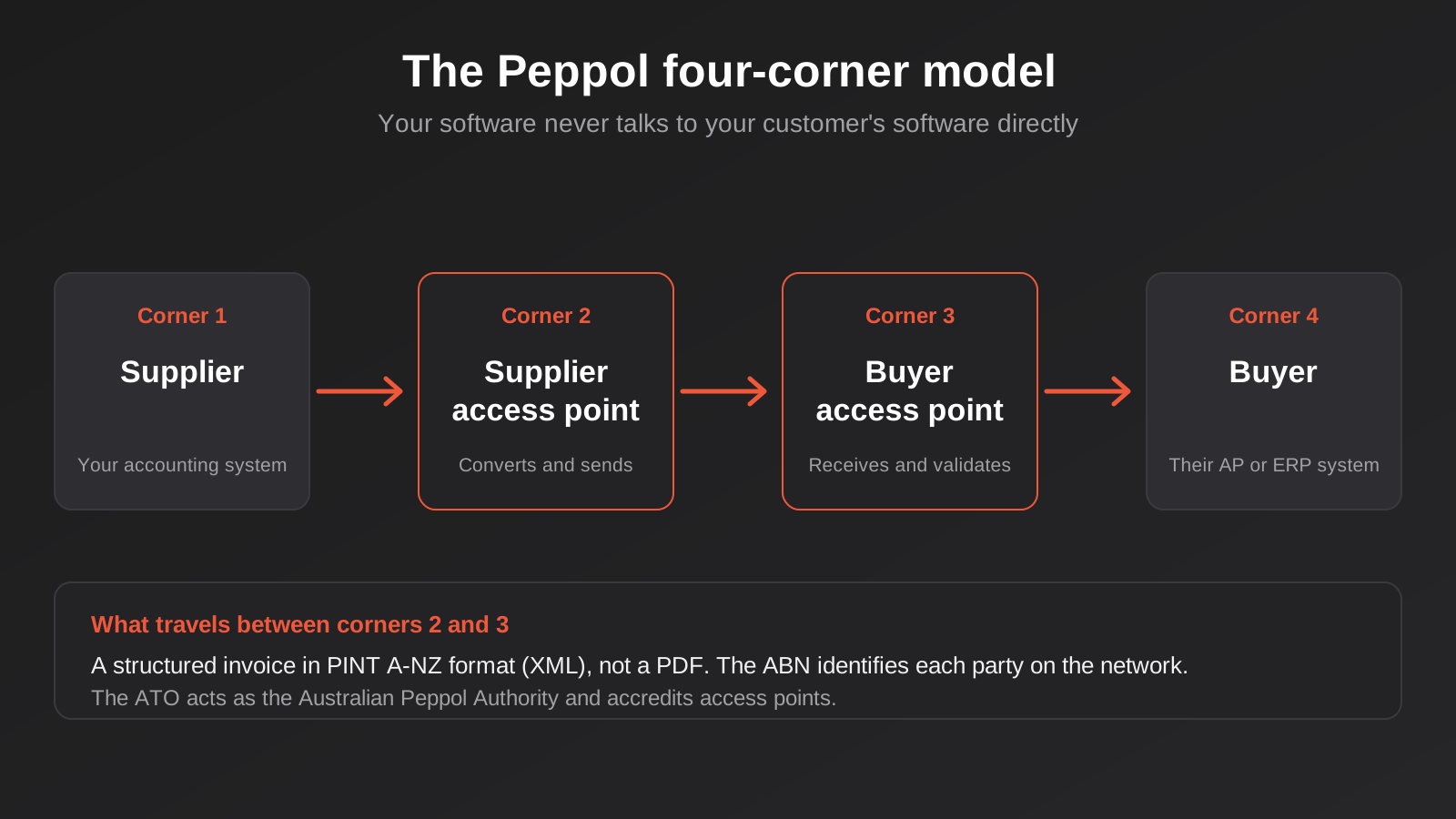
The part that matters for automation is what travels between corners two and three. It is not a PDF. It is a structured file, an XML document laid out to a defined specification, where every field has a fixed name and position. In our region that specification is called PINT A-NZ, the Australia and New Zealand flavour of the international Peppol invoice format. The supplier’s ABN, the buyer’s ABN, each line item, the GST on each line, the due date, the purchase order number: all of it sits in labelled fields that a machine can read without guessing.
What Is Mandatory and What Isn’t
This is where a lot of online content gets muddled, so it is worth being careful. As of this writing, there is no general legal requirement for Australian businesses to send or receive e-invoices with each other. A proposed business e-invoicing right was discussed at length and, according to the current industry commentary we found, was not legislated. Business-to-business use is voluntary.
The mandatory part sits on the government side. Commonwealth agencies have obligations to be able to receive e-invoices, and published targets call for a growing share of their incoming invoices to come through Peppol during 2026. If you invoice federal government agencies, that is a practical nudge to get set up. If you only invoice other private businesses, nobody is forcing you.
We would treat the exact dates and thresholds as something to check on the ATO’s own eInvoicing pages before you plan around them, because they have shifted over the years and plenty of vendor blogs repeat older versions. The ATO’s eInvoicing information is the source of truth. What we can say from the work we do is that adoption by accounting platforms is well ahead of adoption by businesses, which is the gap this guide is trying to help you use.
Why the Format Matters More Than the Network
People tend to describe Peppol as a delivery system, but the delivery is the least interesting bit. Email delivers PDFs perfectly well. What Peppol changes is that the invoice arrives already understood. The buyer’s system does not have to extract text from an image, guess which number is the total, or work out whether “10%” on line three is GST or a discount. That ambiguity is where nearly all the cost of manual accounts payable lives, and structured data removes it.
Why Receiving Invoices Is the Real Prize
Most small businesses first meet Peppol as a sender. A large customer, often a government agency, says they can only accept e-invoices, and the supplier scrambles to switch it on. That is a perfectly reasonable reason to start, but it is the smaller benefit. Sending a structured invoice mostly saves you a PDF attachment. The larger gain is on the receiving side, because that is where the manual typing happens.
Think about what your accounts payable process looks like today and where the labour goes. It is rarely the payment itself, which is a few clicks in your bank. It is everything upstream of the payment: capturing the invoice, checking it is genuine, coding it to the right account, matching it against what you actually ordered, and getting a human to say yes. If you want a longer look at the receivables mirror image of this problem, our guide to accounts receivable automation covers chasing and reconciling the money coming in. This is the other half of the ledger.
What the PDF Process Really Costs You
The cost of a PDF invoice is not the time to read it. It is the error rate and the delay that come with reading it. A transposed digit in an amount, a supplier name typed slightly differently from the one already in your system, a purchase order number that never made it onto the invoice, a bank detail change that arrives by email and gets believed. None of these are exotic. They are the ordinary failure modes of a process that depends on a person re-keying data from an image.
We are not going to put a dollar figure on the average cost per invoice, because the numbers you will find online come from vendor marketing and vary wildly depending on who is selling. The honest way to size it for your own business is to count. How many supplier invoices do you process in a month, how long does each take from arrival to approved, and how often does one bounce back for a correction? Your own answers will be more reliable than any industry average.
What Changes When an Invoice Arrives as Data
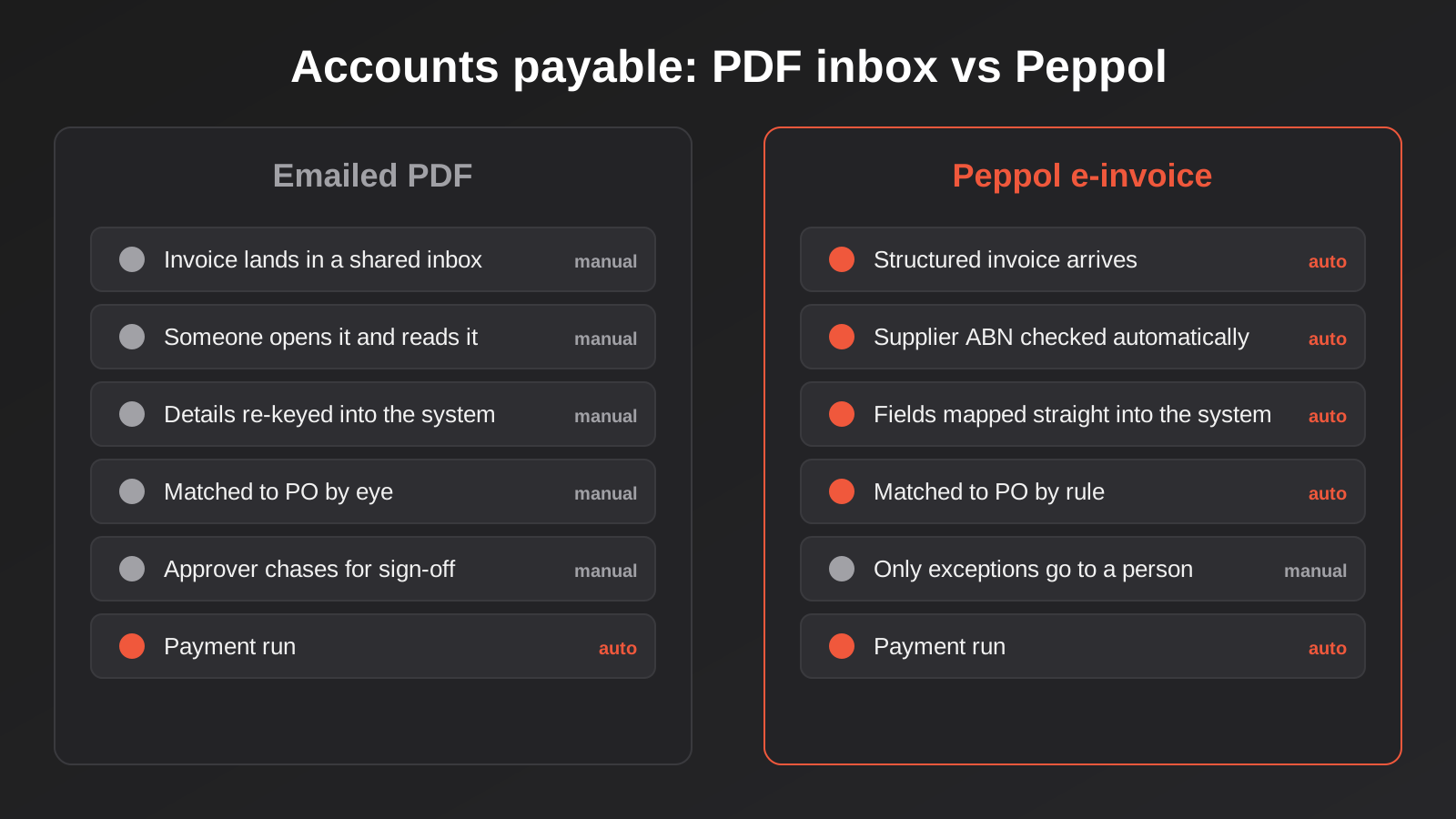
When the invoice lands as structured data, several steps that used to be human become rules.
- The supplier is identified by ABN rather than by whatever name they typed in the header, so you can check automatically that it matches an approved supplier already in your system.
- The amounts, GST and line items come through as fields, so there is nothing to re-key and nothing to misread.
- The purchase order number is in a dedicated field, so matching an invoice against an order becomes a lookup rather than a search.
- Exceptions are explicit. If the invoice total differs from the order, or the supplier is not recognised, a rule can flag it instead of someone noticing three weeks later.
The important point is that Peppol does not do any of this for you. It hands you clean data. Whether you turn that data into an automated process, or simply have a tidier version of the same manual one, depends on what you build around it. That is the difference between switching the feature on and getting a result from it.
Sending vs Receiving: Two Different Setups
It helps to treat these as two separate projects, because the effort and the payoff are different.
Sending E-Invoices
Sending is usually the easier of the two. In most modern accounting packages it amounts to enabling the feature, registering your ABN on the network through your software’s access point, and then choosing “send as e-invoice” for customers who can receive them. The prerequisite is that your customer is also reachable on the network. The Peppol Directory lets you check whether a business is registered before you send, and it is a good habit to confirm that rather than assuming.
The things that trip people up when sending are almost all about data. A customer’s ABN missing or mistyped in your system means the invoice has nowhere to go. A purchase order number that is not captured on the sales order means the invoice arrives at your customer without the one reference their system uses to match it. Large customers in particular often reject invoices that lack a buyer reference. None of that is a Peppol problem. It is a data completeness problem that Peppol makes visible.
Receiving E-Invoices
Receiving is where the automation lives, and it is also where you have to do some thinking. Switching on receipt means your suppliers can start sending you structured invoices, but most of them will not, at least not at first. Peppol adoption among small suppliers is patchy. So in practice you will run a mixed inbox for a long time: some invoices arrive as data, many still arrive as PDFs.
That is not a reason to wait. It is a reason to design for both. Your process needs a path for e-invoices that flows through the rules without human typing, and a fallback path for the PDFs that does not break the moment someone forwards one. We come back to that mixed model in the section on connecting everything together.
Choosing an Access Point
Your access point is the provider that actually connects you to the network. You have more choice than most people realise, and the choice has real consequences for how much you can automate later.
The Built-In Route
For most small and mid-sized businesses the access point is part of their accounting software. Xero, MYOB, QuickBooks and Reckon are all named on the ATO’s list of eInvoicing-ready software, and the ATO describes setup in those products as a few simple clicks. If you live inside one of those platforms, this is the sensible default. The invoice goes from your ledger to the network and back without you ever thinking about the access point.
The limit is what you can do with the data once it arrives. A built-in access point is designed to get the invoice into the ledger as a draft bill. It is not designed to run your approval workflow, enforce your purchasing rules or sync with a second system. If your needs stop at “bills appear in Xero without typing”, the built-in route is plenty. We go into what actually syncs between Xero and the rest of your stack in our guide to Xero integration and GST mapping, and that is worth reading before you decide how much customisation you need.
A Separate Provider
If your accounting software is not on the ready list, or you run an ERP that does not handle Peppol natively, you can use a standalone access point provider. The ATO publishes a register of accredited providers. These tend to offer richer features: dashboards, rules for routing, more control over validation, and often an API so your own systems can pull invoices and push them out.
The trade-off is another subscription and another system to keep connected. A standalone provider makes sense when you have multiple entities, multiple software platforms, or enough invoice volume that you want fine control over how documents flow. It also tends to be the better fit if you have an ERP and want to land invoices in it directly. That kind of connection is real integration work, the type we do under ERP integration, because every ERP is configured a little differently.
Questions Worth Asking Any Provider
Before you commit, put these to the vendor, whether built-in or standalone, and get the answers in writing.
- Is the provider accredited by the ATO, and is that accreditation current?
- Does it handle credit notes and invoice corrections, or only standard invoices?
- Can you get the structured data out via an API or export, or only view it in their portal?
- What happens to an invoice that fails validation? Is the sender told, and can you see it?
- Is there a way to receive attachments, like a timesheet or delivery docket, alongside the invoice?
- What does it cost when volume grows, and what happens if you want to switch providers later?
That last question matters more than it sounds. Your Peppol registration ties your ABN to a particular access point, and moving later means re-registering and coordinating the switch. It is not hard, but it is not instant, so choose with a view to where you will be in two years rather than next month.
What Has to Be True About Your Data First
Peppol is unforgiving in a useful way. A PDF can be vague and still get paid, because a human fills the gaps. A structured invoice that is missing a mandatory field gets rejected outright. That is good for data quality in the long run and a nuisance in the first month.
The fields that cause most of the early friction are predictable.
- ABNs on every customer and supplier record, correctly formatted and current.
- Purchase order numbers captured against orders and carried through to the invoice.
- GST treatment set per line, not just per invoice, because the structured format reports tax at line level.
- Consistent units of measure and item descriptions, so a line on a supplier’s invoice can match a line on your order.
- Bank details and remittance information stored against the supplier, with a controlled way to change them.
If these sound like housekeeping, that is because they are. They are also the same housekeeping that makes any other automation reliable. We wrote about the principle in cleaning your data before you automate, and the same logic applies here: connecting systems on messy records just copies the mess faster. A one-off clean-up of your supplier and customer lists before you turn Peppol on will save weeks of rejected invoices.
A Note on Supplier Matching
The most useful single check on the receiving side is matching the incoming supplier ABN against your existing supplier list. It sounds trivial, and it is, but it quietly closes off a whole category of fraud. A fake invoice from a business you have never dealt with will not match an approved supplier, so a rule can hold it for review instead of letting it sail through. A genuine supplier whose ABN is not yet in your system will also be held, which is correct: you want a person to confirm the new supplier once, not have the system auto-create vendors from whatever turns up.
Connecting Peppol to the Rest of Your Stack
Getting invoices into your accounting software as draft bills is the starting line, not the finish. The value comes from what happens next.
Matching Against Purchase Orders
If you raise purchase orders, an incoming e-invoice can be matched against the order automatically. Two-way matching compares the invoice to the order. Three-way matching adds the goods-received record. When everything agrees within a tolerance you set, the invoice can move forward without anyone touching it. When it does not agree, it goes to a person with the discrepancy already highlighted.
Setting the tolerance is a business decision, not a technical one. A few cents of rounding on a long invoice should not stop the line, but a ten per cent price variance probably should. Write the rule down in plain English first, then build it.
Approval Workflows
Approvals are where automation either earns its keep or gets in everyone’s way. The pattern that tends to work is to route by risk, not by habit. Invoices that match an order and fall under a threshold go straight through. Invoices over the threshold, from new suppliers, or with a mismatch get routed to a named approver, with the invoice data, the matching order and the reason it was flagged all in one place. We cover the design thinking in our piece on where to put a human approval step, and the short version is that every approval you add should exist because it catches a real risk, not because it always has.
Keeping Duplicates Out
Duplicate payments are a classic accounts payable leak, and structured invoices help but do not eliminate them. The same invoice can arrive twice, once via Peppol and once as a PDF a supplier forwards “just in case”. A reliable process checks supplier, invoice number and amount before creating a bill, and treats a repeat as a no-op rather than a second payable. This is the same retry and duplication problem we dig into in idempotency and retries, and it applies to any automation that creates financial records.
Triggering Payment
Once an invoice is approved, the bill sits in your accounts payable queue until the payment run. Peppol itself does not move money; it carries the invoice and the payment details. Your payment run, whether it is a bank file, a scheduled batch or a payments platform, still does the paying. The useful automation here is making sure that approved e-invoices appear in the next run without anyone having to remember them, and that the remittance advice goes out to the supplier afterwards.
Handling the Mixed Inbox
Because most suppliers will not send e-invoices for a while, plan for two lanes. Lane one is structured invoices, which go through the rules above. Lane two is PDFs, which go through your existing capture process, whether that is manual entry or an OCR tool that reads the document and proposes the fields. Aim to make both lanes end in the same place, a draft bill with the same fields, so that matching, approval and payment do not care which door the invoice came through. Over time, the structured lane gets bigger as you nudge suppliers across. You can do that by simply telling your regular suppliers that you can receive e-invoices and giving them the ABN-based address to send to.
Edge Cases That Catch People Out
Most of the early problems with e-invoicing are not with the happy path. They are with the odd cases that a PDF process absorbed without fuss.
Credit Notes and Corrections
A credit note is its own document type on the network, and it has to reference the invoice it reverses. If your software or provider treats credit notes differently, or does not support them at all, you will end up processing them manually and risking a mismatch in your ledger. Check this during provider selection, not after your first return.
Attachments and Supporting Documents
A PDF invoice often carries a delivery docket or a timesheet in the same file. A structured invoice carries the data, and supporting documents have to be attached separately if the specification and your provider allow it. If your approvers rely on seeing the supporting document to approve, make sure it survives the move to structured invoices.
Rejected or Invalid Invoices
When an invoice fails validation, someone needs to know. A rejection that disappears into a provider’s portal is worse than a bounced email, because nobody sees it. Find out how failures are reported, and decide who owns the follow-up. On the sending side, this is usually the person who raised the invoice. On the receiving side, it is whoever manages supplier relationships.
Multiple Entities and Group Structures
If you run several companies under one group, each ABN registers separately. You can often use the same access point for all of them, but you need to be deliberate about which entity receives which supplier’s invoices, otherwise a bill lands in the wrong company’s ledger and has to be reversed.
Foreign Suppliers
Peppol is international, but your overseas suppliers will mostly not be on the Australian network, and the rules about tax on imported services are a separate matter. Treat them as lane two for now.
What It Costs
We are deliberately not going to quote numbers here. Pricing for access points and for the integration around them varies by provider, by volume and by how much you want automated, and the figures floating around online are usually from a vendor trying to sell a specific product. What we can describe is where the cost actually sits.
For many businesses the access point itself is close to free, because it is bundled into accounting software they already pay for. The real cost is on three things: the one-off data clean-up, the work of building the matching and approval rules around the incoming data, and the time to bring suppliers across. If you use a standalone provider, add their subscription and any per-document fees. If you connect to an ERP or build a custom workflow, add the integration work.
A sensible way to judge it is to compare against the hours your team spend on invoices now. If the manual process takes a few hours a week, a built-in access point and a couple of simple rules may be all you need. If it takes someone’s whole week, a more thorough integration will pay back faster. Either way, start by measuring the current process, and set the rules before you shop for tools.
Common Mistakes
- Switching on Peppol and stopping there, when the savings come from the rules you build around the incoming data, not from the network itself.
- Skipping the data clean-up, then watching invoices bounce because ABNs, PO numbers or line-level GST are missing or wrong.
- Assuming suppliers will adopt it quickly, instead of designing a process that handles both structured invoices and PDFs for a long time.
- Treating all invoices as equal, with no matching rule or threshold, so every e-invoice still lands on a person’s desk.
- Letting the system auto-create new suppliers from incoming invoices instead of holding unknown ABNs for a person to confirm.
- Choosing an access point on price alone, without checking credit note support, data export or how hard it is to switch later.
- Forgetting the sending side’s mirror problem: customers whose ABNs or buyer references are missing, so your invoices have nowhere to go.
- Relying on dates and thresholds quoted in vendor blogs, instead of confirming current obligations on the ATO’s own pages.
Frequently Asked Questions
Is Peppol e-invoicing mandatory for Australian businesses?
Not for general business-to-business invoicing. There is no blanket requirement for private businesses to send or receive e-invoices with each other. The obligations sit with Commonwealth government agencies, which have targets for receiving invoices through the network. If you supply federal agencies it is worth setting up, and if you do not, it is a voluntary efficiency choice. Check the ATO’s eInvoicing pages for the current position, as the details have changed over time.
Do I need a separate access point if I use Xero or MYOB?
Usually not. Xero, MYOB, QuickBooks and Reckon are named on the ATO’s list of eInvoicing-ready software, and their built-in access points let you send and receive without a separate provider. You would consider a standalone provider if your software is not on that list, you run multiple platforms, or you want richer routing, validation and API access than the built-in option gives you.
Can I receive Peppol invoices without sending them?
Yes. Sending and receiving are separate capabilities, and you can enable receiving to cut your own accounts payable typing even if none of your customers require e-invoices. In practice receiving tends to deliver more value, because that is where manual data entry sits, though it only helps once your suppliers start sending to you.
What happens to suppliers who can’t send e-invoices?
They carry on sending PDFs, and you handle them through your existing process. A good design has two lanes that end in the same place, so structured invoices go through your rules automatically and PDFs go through manual or OCR capture, both producing the same draft bill. Over time you can encourage regular suppliers to switch by telling them you can receive e-invoices and giving them your Peppol address.
Is Peppol the same thing as EDI?
No. They overlap but are different. Peppol is a network and set of standards that covers invoices and some related documents, aimed broadly at business and government. EDI, in the Australian retail context, is the older exchange of purchase orders, ship notices and invoices that big retailers require from suppliers. If a retailer demands EDI, a Peppol invoice will not satisfy it, which is why we treat them separately.
How long does it take to get set up?
Turning on the feature in accounting software can take an afternoon. The slower parts are cleaning your ABN and purchase order data, deciding your matching and approval rules, and getting suppliers to send. A reasonable expectation is that the technical switch-on is quick and the process change is gradual, and that you will spend longer on the rules and the supplier conversations than on the registration.
Where to Start
Start with a count, not a tool. Work out how many supplier invoices you process in a month, how many you could match to a purchase order, and where they get stuck between arrival and payment. That number tells you whether a built-in access point and a couple of simple rules will do, or whether you need something more built around your systems. Then fix the ABN and purchase order data, switch on receiving, and move a handful of regular suppliers across before you try to automate the rest.
If you would like a second opinion on how e-invoices should flow into your accounting software or ERP, or you want the matching and approval rules built so they stay out of everyone’s way, we are happy to talk it through. There is no fixed price list for this kind of work because the scope depends on your systems, which is why we explain how we quote on our automation pricing page.
Worth putting a number on it: because we run lean as a specialist agency rather than carrying a large account-management layer, our fixed quotes typically come in below the Australian averages for comparable scope. If you’ve already got a written quote from another agency for comparable scope, send it through and we’ll do our best to beat it.
Keep reading
Related posts

Changing Live Automations Safely: Staging, Version Control and Rollback for Zapier, Make and n8n (2026)
How to draft, test, release and roll back changes to live Zapier, Make and n8n automations without breaking invoices, orders or customer…

Clean Your Data Before You Automate: A Practical Guide to CRM Data Cleanup for Australian Businesses (2026)
Connecting systems on messy data copies the mess everywhere. Here's how to clean, match and merge records before you automate or integrate.
Best Project Management Tools for Australian Small Teams (2026)
Trello, Asana, monday.com, ClickUp, Notion and Zoho Projects compared for Australian small teams: real prices, honest drawbacks and how to choose.
Got a project you'd like to talk through?
Tell us what you're working on — we'll come back with a plan.
