
Accounts Receivable Automation for Australian Businesses: Getting Paid Without Chasing Invoices by Hand (2026)
 Jignesh Vagadiya
28/09/2026
21 min read
Jignesh Vagadiya
28/09/2026
21 min read
Every business we work with has one employee, or one director, who spends part of their week doing the same thing: opening the aged receivables report, working out who’s overdue, and sending the same three emails they sent last month. Some of them have a spreadsheet with reminder dates colour-coded. A few have a sticky note on the monitor that says “chase Thursday”. None of them enjoy it, and almost none of them have automated it — even though the accounts payable side of the ledger usually got sorted out years ago.
That gap is odd when you think about it. Businesses will happily automate the money going out — bill capture, approval routing, batch payments — but leave the money coming in to manual follow-up. Part of the reason is that chasing a customer for payment feels like a relationship problem, not a process problem, so it doesn’t get treated like one. The other part is that most people have only seen the blunt version of automation: Xero’s built-in reminder emails, which are better than nothing but nowhere near what a proper accounts receivable workflow can do.
This is a practical look at what accounts receivable (AR) automation actually covers for an Australian business, where it plugs into Xero, MYOB or an ERP, what a sensible reminder and escalation workflow looks like, and where the real cost and effort sits. We covered the payables side of this in our accounts payable automation guide — this is the other half of the ledger, and a genuinely different problem, because you can’t automate your way past a customer who simply doesn’t want to pay.
It’s also a problem most businesses underestimate the cost of, precisely because the cost is spread thin rather than showing up as one line item. It’s not just the hours spent chasing — it’s the cash sitting in someone else’s bank account instead of yours, the finance team’s week getting reshuffled around reconciliation, and the credit risk nobody notices building up on a handful of accounts until it’s a bad debt write-off. None of that needs expensive software to fix. Most of it needs a properly designed workflow, which is the part that actually takes thought.
What accounts receivable automation actually automates
“AR automation” gets used loosely, so it’s worth breaking it into the jobs it’s actually doing, because most businesses need some of them and not all of them.
Invoice generation and delivery
The simplest layer: invoices generate automatically from a trigger — a job marked complete in your field service tool, a Shopify order, a signed proposal — instead of someone building them by hand at the end of the month. This matters more than it sounds, because a late invoice is the single biggest cause of a late payment. If you invoice net 30 days after the work finished, you’ve already given your customer a 30-day head start on forgetting why they owe you money.
Payment reminders and escalation
This is the part everyone pictures: emails (and increasingly SMS) that go out before an invoice is due, on the due date, and at set intervals afterwards, with the tone and urgency escalating each time. Done properly, this isn’t one generic reminder template — it’s a ladder of messages that changes wording, sender and channel as an invoice ages, which we cover in detail further down.
Payment matching and reconciliation
When a payment lands in the bank feed, something has to work out which invoice (or invoices) it belongs to, apply it, and flag anything that doesn’t match cleanly — a part-payment, a payment with no reference, a customer who paid the wrong amount. Manually, this is the drudge work that eats a bookkeeper’s Monday morning. Automated well, it clears itself and only surfaces the genuine exceptions.
Credit control and risk flags
The more mature layer: automatically flagging customers who are trending toward a credit limit, who’ve missed two payment cycles in a row, or who show up on a credit-risk check as newly distressed, so sales and finance see the risk before it becomes a bad debt rather than after.
Most businesses only need the first two properly built. The third and fourth matter more as your customer count and average invoice size grow, or if you’re trading on credit terms with businesses rather than taking payment upfront from consumers.
One thing worth deciding upfront, because it shapes the whole build: which channel actually gets a response from your customers. Email is the default and it’s fine for the early, polite stages, but plenty of Australian businesses find SMS gets a noticeably faster response once an invoice is genuinely overdue — it’s harder to leave unread in an inbox with four hundred other emails in it. A good workflow doesn’t pick one channel and stick with it regardless; it escalates the channel alongside the tone, the same way a collections agency would.
What Xero and MYOB do on their own — and where they stop
Both platforms have basic invoice reminders built in, and for a very small business sending a handful of invoices a month, that’s a genuinely reasonable starting point. It’s worth being clear-eyed about where the native tools stop, because that’s exactly where the “should we automate this” conversation usually starts.
The native reminder limits
Xero’s automated invoice reminders let you set a small number of rules — days before due, days after due — with one wording per rule, applied the same way to every customer. MYOB’s equivalent is similarly basic. Neither platform will vary the tone by how overdue an invoice is, escalate to a different sender, send SMS, apply late fees automatically, produce a proper statement of account, or give you a dashboard of collection performance over time. They also don’t distinguish between a customer who’s two days late because of a mail merge glitch and one who’s forty-five days late and not responding — both get the same templated nudge.
What a dedicated AR layer adds
This is where purpose-built Australian tools like ezyCollect, CreditorWatch Collect and Chaser (and general cash-management tools like Satago) come in — they sit on top of Xero or MYOB via API, pull the aged receivables data, and run the escalation ladder, statements, payment links and reporting that the base accounting platform was never built to do. For a lot of businesses this is genuinely the right call: it’s a subscription, it’s built for the job, and it saves you building and maintaining custom logic that a vendor already maintains.
Where we get involved is the businesses that fall between those two worlds — a workflow that needs to trigger from something outside Xero (a job management system, a custom portal, a franchise network reporting up to head office), or a business running an ERP where the debtor ledger doesn’t sit in Xero at all. In both cases the reminder logic itself is simple; the harder part is getting clean, current debtor data flowing between systems reliably, which is squarely an API and integration problem rather than an off-the-shelf AR tool problem.
There’s also a middle tier worth naming: businesses that are happy with Xero or MYOB as the ledger of record but want more control over the workflow than a packaged AR product offers — a specific approval step before a credit hold applies, a Slack notification to the account manager rather than just an email to the customer, a reminder ladder that behaves differently for wholesale accounts versus retail. That’s usually a Zapier, Make or n8n build sitting on top of Xero’s API, and it’s a genuinely reasonable middle ground between “buy a subscription” and “commission a custom system”.
Building the reminder and escalation ladder
Whether you build this in a dedicated AR tool, in Zapier or Make sitting on top of Xero, or as a custom workflow, the structure is the same, and it’s worth designing properly rather than sending one reminder and hoping.
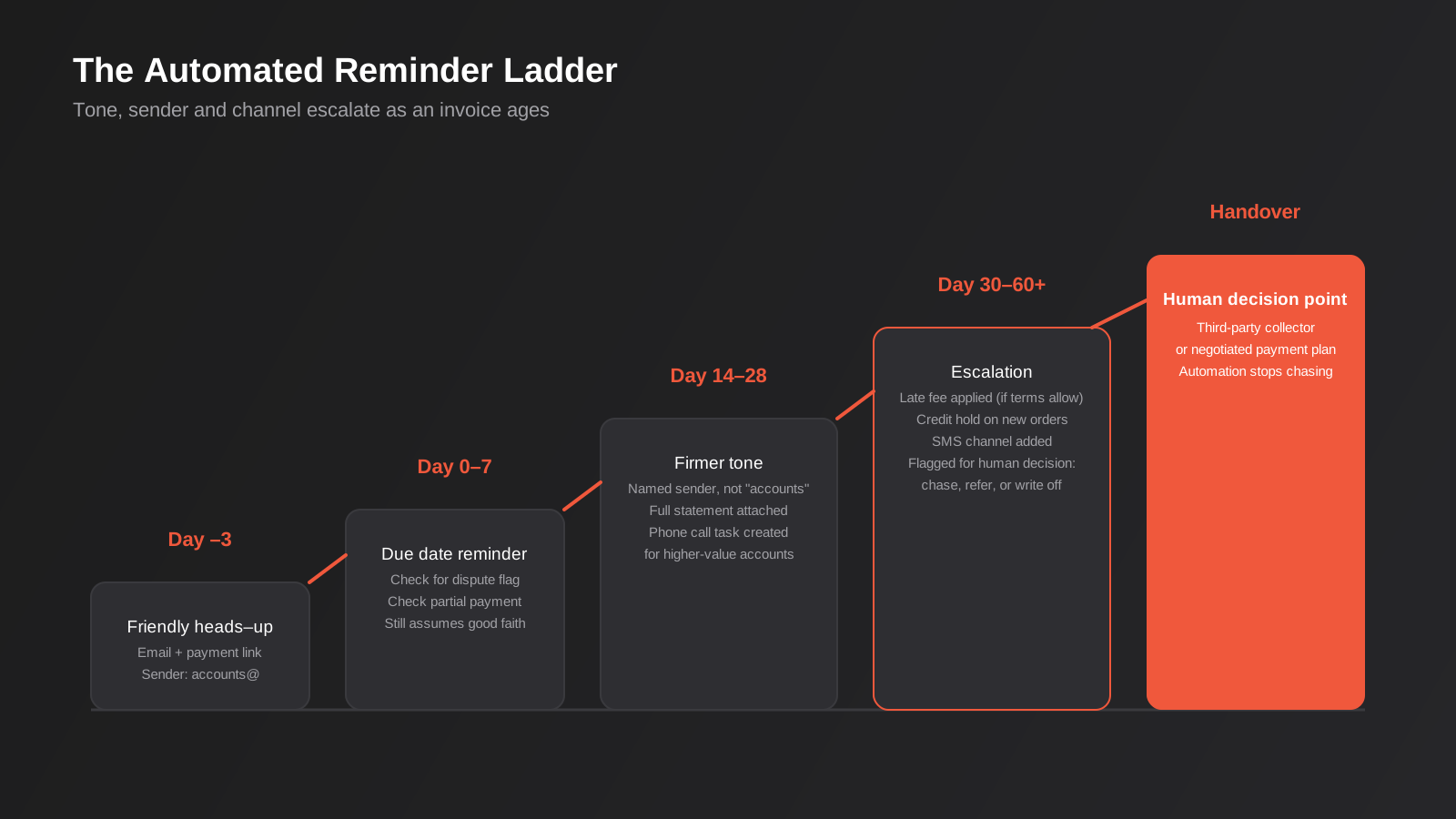
Stage one: before the invoice is even due
A friendly heads-up two or three days before the due date, ideally including a direct payment link, catches the customers who simply haven’t got around to paying yet. This single stage, on its own, clears a surprising share of invoices that would otherwise have gone overdue purely through inattention rather than any dispute or cash flow problem.
Stage two: due date and the first week after
A plain, non-accusatory reminder on the due date, then a slightly firmer one around day 7, still assuming good faith. This is also the point where the workflow should check for a partial payment or a dispute flag rather than blindly continuing to chase an invoice that’s already half-resolved.
Stage three: two to four weeks overdue
Tone shifts, the sender often changes from an automated “accounts” address to a named person, and it’s common to add a phone call task for larger invoices — automation should hand a task to a human at this point rather than trying to fully replace them for your higher-value accounts. Sending a full statement of account here, not just the one invoice, gives the customer no excuse that they “didn’t realise how much was outstanding”.
Stage four: 30–60 days and beyond
This is where late fees or interest (if your terms and conditions actually allow for them — check before you apply them, because plenty of Australian standard terms don’t) get automatically calculated and added, credit holds get triggered on future orders, and the account gets flagged for a manual collections decision: keep chasing, hand to a third-party collector, or write off.
The mistake we see most often isn’t skipping automation — it’s building a ladder with one rung. A single reminder template firing repeatedly reads as robotic by the third send, and customers learn to ignore it exactly the way they’ve learned to ignore a generic Xero reminder.
Payment matching and reconciliation automation
Reminders get the attention, but the matching side is where the actual hours get saved, particularly for businesses with more than a couple of hundred invoices a month.

What matches cleanly
A payment that references the correct invoice number and matches the amount owed is trivial to match automatically, and in a well-configured Xero or MYOB setup, most of this already happens through bank feed rules. The value-add of a dedicated matching layer shows up on the messier cases: a customer who pays three invoices in one lump sum, a payment that’s $4.50 short because of a bank fee, or a remittance advice that arrives by email separately from the bank transaction.
Handling the exceptions properly
The goal isn’t zero exceptions — it’s a small, clean exception queue instead of a bank feed full of unreconciled transactions that someone has to sort through from scratch every week. A good matching workflow parses remittance emails, applies fuzzy matching on amount and customer name when the reference is missing, and only pushes genuinely ambiguous payments to a human, with enough context attached that resolving it takes thirty seconds rather than ten minutes of digging through the ledger.
Why this matters for the reminder ladder too
These two pieces aren’t independent. If matching lags by even a day or two, your reminder workflow will chase customers who’ve already paid — which does more damage to the relationship than a slightly late invoice does, because now you look disorganised rather than just diligent. Any AR automation build needs matching running at least as fast as the reminder cadence, or you’re better off not automating the reminders at all.
Automating credit control and risk
This is the layer most businesses add later, once the basics are working, but it’s worth knowing what it looks like so you can decide if you’re there yet.
- Automatic credit limit checks before a new order or job is confirmed, rather than a salesperson having to remember to look up the customer’s balance
- Flags when a normally reliable customer misses a payment cycle for the first time — often the earliest real signal of a business in trouble
- Scheduled credit checks (through services like CreditorWatch or illion) on new commercial customers before extending trading terms
- Automatic holds on future invoicing or dispatch when an account crosses an agreed threshold of overdue debt
None of this is complicated logic on its own. What makes it worth automating is that it removes the judgement call from an individual salesperson who’s incentivised to get the sale out the door, and replaces it with a rule the business actually agreed to. That’s often the real value of this layer — not the labour saved, but the bad debt avoided.
One nuance worth building in from the start: a dispute isn’t the same as a slow payment, and treating them identically is a common failure mode. If a customer replies to a reminder saying the invoice is wrong, or the goods arrived damaged, or they never received the delivery, that account needs to come out of the automated ladder immediately and go to a human, not keep receiving escalating payment demands while the dispute sits unresolved. A simple reply-parsing rule — anything that isn’t a payment confirmation gets flagged for review rather than auto-continuing — avoids the genuinely damaging version of this mistake, which is sending a “final notice” to a customer who raised a legitimate quality issue three weeks ago and never heard back.
Measuring whether it’s actually working
Automating the workflow is only half the job; you also need a way to tell if it’s improving anything, otherwise you’re just guessing. Two numbers matter more than the rest.
Days Sales Outstanding (DSO)
The average number of days it takes to collect payment after a sale, calculated from your receivables balance and revenue over a period. It’s a lagging number and it moves slowly, but it’s the one figure that tells you, in a single glance, whether your cash conversion cycle is getting better or worse over a quarter. If DSO is climbing while your payment terms haven’t changed, something in the collections process has quietly stopped working — often a reminder ladder that used to run and got disabled, or a new sales channel that isn’t plugged into the same workflow as the rest of the business.
Collection Effectiveness Index and the simpler proxies
A more precise measure of how much of what was actually collectible got collected in a period, rather than just how old the debt is on average. Most small businesses don’t need the full formula — a simpler proxy works fine: the percentage of invoices paid within terms, tracked monthly, and the percentage of the receivables balance sitting in the 60-plus-days bucket. If a dedicated AR platform is doing its job, both of those numbers should move in the right direction within one or two billing cycles of turning the workflow on. If they don’t, the problem usually isn’t the automation — it’s that the underlying data (invoice accuracy, agreed terms, dispute rate) needs fixing first, and no reminder ladder repairs a genuinely disputed invoice.
What it costs, and where the effort actually goes
For most Australian small businesses, the honest starting point is a dedicated AR platform on top of Xero or MYOB — monthly subscription pricing, a few hours of setup, and you’re running a proper reminder ladder within a week. That’s the right call for the majority of businesses reading this, and we’d say so even though it’s not billable work for us.
The setup work that actually takes time, regardless of which platform you pick, is rarely the software configuration — it’s deciding the rules. Someone in the business has to actually agree on the reminder cadence, the wording at each stage, who the escalation contact is for each customer segment, and what happens at the point where automation should stop and a phone call should start. Skip that conversation and you end up with a technically working system nobody trusts, because the finance team keeps overriding it manually anyway. Budget the thinking time, not just the setup time.
Custom-built AR automation earns its cost when one or more of these is true:
- Your debtor ledger doesn’t live in Xero or MYOB at all — it’s in an ERP, a franchise management system, or a custom-built platform
- The trigger for an invoice needs to come from somewhere a standard AR tool can’t watch — a job completion event, a custom client portal, a marketplace payout
- You need consolidated debtor reporting across multiple entities or locations that off-the-shelf tools don’t handle well
- You’re already paying for several point solutions and the integration between them, not the reminder logic itself, is the actual bottleneck
In practice, most of the cost in a custom build isn’t the reminder emails — it’s reliably getting accurate, current invoice and payment status out of whatever system holds it, particularly if that system is an older ERP with a limited or undocumented API. We’ve written separately about what that kind of ERP integration work involves, and it’s worth reading before you scope an AR automation project against an ERP, because the integration is usually the majority of the effort and the majority of the risk.
If you want visibility across the whole debtor book rather than just automated chasing — ageing trends, DSO by customer segment, a live dashboard finance can check without exporting a report — that overlaps with reporting and data automation more than it does with the reminder workflow itself. We’ve covered that ground in more depth in our guide to reporting and data automation, and the two projects are worth scoping together rather than as separate builds that don’t talk to each other.
Common mistakes we see
- Automating the reminder and forgetting the matching. Chasing customers who’ve already paid because reconciliation lags behind the reminder schedule is the fastest way to make automation look worse than the manual process it replaced.
- One template for every stage of lateness. A single reminder that just repeats gets ignored by day two of being overdue — and trains customers to ignore it.
- No path back to a human. Automation should escalate a genuinely stuck or disputed invoice to a person, not keep sending polite emails to an account that’s six weeks overdue and unresponsive.
- Applying late fees the terms and conditions don’t actually support. Check what you’re contractually entitled to charge before you automate charging it — this is a legal detail, not a technical one, and it’s easy to get wrong at scale.
- Treating every customer the same. A large, reliable enterprise account that pays 10 days late every quarter needs a different workflow to a small business genuinely struggling with cash flow. Automation without segmentation damages the relationships that matter most.
- Building the whole thing before testing it on a small customer segment. Run a new reminder ladder against 10–15% of your debtor book first and watch what happens before it touches every customer relationship you have.
Frequently Asked Questions
Do we need a dedicated AR tool, or can we build this ourselves with Zapier or Make?
For most small businesses on Xero or MYOB, a dedicated AR platform is the faster and cheaper route — the reminder logic, statements and reporting are already built and tested. Building your own in Zapier, Make or n8n makes sense when the trigger or the debtor data lives outside your accounting platform, or when you need behaviour a packaged tool doesn’t offer, like a custom credit-hold workflow tied into your own order system.
Will automated reminders damage relationships with good customers?
Done properly, no — a well-worded early reminder is less awkward than a phone call, and most customers barely register it. The risk is in the tone and the segmentation, not the automation itself. A reliable, long-standing customer shouldn’t get the same escalating language as a new account with a history of late payment, and a good workflow accounts for that.
Can this work if our debtor ledger sits in an ERP rather than Xero or MYOB?
Yes, but the project looks different. The reminder and matching logic itself doesn’t change much; what changes is how you get reliable, current invoice and payment data out of the ERP in the first place, which is an integration project in its own right rather than a quick add-on to an accounting platform.
How is this different from accounts payable automation?
Accounts payable automation deals with money leaving the business — capturing supplier invoices, routing approvals, scheduling payments. Accounts receivable automation deals with money coming in, and it carries a different risk: get AP automation wrong and you might pay something twice; get AR automation wrong and you can damage a customer relationship or lose visibility over cash you’re owed. We cover the payables side of the ledger separately, referenced earlier in this guide.
What should we automate first if we’re starting from a completely manual process?
Payment matching and reconciliation, before reminders. There’s no point building an escalation ladder that fires against an aged receivables report nobody trusts because it’s three days out of date. Get matching running cleanly first, then layer the reminder workflow on top of accurate data, and only add credit control and risk flagging once the first two are running without someone needing to check them daily.
Is SMS actually worth adding, or is email enough?
Email covers the early, polite stages fine. Once an invoice is genuinely overdue, a lot of Australian businesses find SMS gets read and actioned faster simply because it’s harder to bury in an inbox — it’s worth adding as an escalation channel for the later stages of the ladder rather than using it from day one, when it can come across as heavy-handed for a bill that’s two days late.
Does AR automation replace our bookkeeper or accounts person?
No — it removes the repetitive part of their week so they can spend time on the accounts that actually need a judgement call: the dispute, the payment plan negotiation, the customer who needs a phone call instead of another email. The businesses that get the most value treat automation as freeing up that person’s time, not eliminating the role.
Where to start
If you’re still working your aged receivables report by hand, start by mapping out what actually happens today — who chases, when, and how often it works versus how often it gets ignored. That fifteen-minute audit usually tells you more about where to automate than any tool comparison will. Pull up the last three months of overdue invoices and note, honestly, which ones needed a genuine conversation and which ones just needed a reminder that never got sent. That split is usually the clearest signal of how much of the problem automation can actually solve. From there, most businesses get real value from a dedicated AR platform sitting on top of Xero or MYOB within a couple of weeks, no custom development required.
Where we come in is the businesses where the debtor data doesn’t sit neatly in an accounting platform, or where AR needs to connect into a broader set of CRM and sales automation workflows — credit checks feeding into the sales process, collections status visible to account managers, that sort of thing. It’s rarely a case of ripping out what you’ve got; more often it’s connecting the systems that already work well individually so the data moves between them without someone re-typing it. If that sounds like your situation, we’re happy to have a look at what you’re running today and talk through what’s actually worth automating first, no pressure to build more than you need.
Keep reading
Related posts

Changing Live Automations Safely: Staging, Version Control and Rollback for Zapier, Make and n8n (2026)
How to draft, test, release and roll back changes to live Zapier, Make and n8n automations without breaking invoices, orders or customer…

Peppol E-Invoicing for Australian Businesses: Automating Accounts Payable From Structured Invoices (2026)
Peppol e-invoicing in Australia: what is and isn't mandatory, how to pick an access point, and how to automate accounts payable once…

Clean Your Data Before You Automate: A Practical Guide to CRM Data Cleanup for Australian Businesses (2026)
Connecting systems on messy data copies the mess everywhere. Here's how to clean, match and merge records before you automate or integrate.
Got a project you'd like to talk through?
Tell us what you're working on — we'll come back with a plan.
