
Reporting & Data Automation: How Australian Businesses Stop Building Reports by Hand (2026)
 Jignesh Vagadiya
07/09/2026
21 min read
Jignesh Vagadiya
07/09/2026
21 min read
Every business we work with has a version of the same Friday afternoon ritual. Someone opens four or five different tools — Xero, the CRM, the ad platforms, maybe a spreadsheet that’s been passed between three different staff members over two years — and manually copies numbers into a report nobody asked to be beautiful, just accurate and on time. It takes an hour if the month has been kind, three if a platform changed its export format again.
This is the part of automation that gets the least attention. Chatbots and AI agents get the headlines, but reporting is where we see the most obvious, least argued-about return on a small automation project. It’s not glamorous. Nobody demos a dashboard at a dinner party. But when a business owner tells us they finally trust the numbers they’re looking at, and they got that trust back without hiring an analyst, that’s a genuinely useful outcome.
This piece is about what reporting and data automation actually involves for an Australian small-to-mid-size business in 2026 — not the enterprise business intelligence version with a data warehouse and a full-time analytics team, but the version that fits a business with a handful of systems, a finite budget, and people who need answers, not another tool to log into.
What reporting and data automation actually means
Strip away the marketing language and reporting automation is just this: numbers move from where they’re generated to where someone needs to see them, on a schedule, without a person copying and pasting them in between. That’s the whole idea. Everything else — the dashboards, the visualisations, the AI-written commentary some tools now bolt on — sits on top of that basic movement of data.
It sits next to, but isn’t the same as, workflow automation. If you’ve read our comparison of Zapier, Make and n8n, you’ll know those tools move data to trigger an action — a new lead creates a task, a paid invoice updates a spreadsheet. Reporting automation usually uses the same category of tool, but the destination is different: not an action, a number sitting in the right place at the right time, ready to be read.
Dashboard vs automated report — they’re not the same thing
A dashboard is a live view someone has to go and open. An automated report is something that arrives — an email, a Slack message, a PDF attached to a message at 8am Monday. Both count as reporting automation, and most businesses end up using both, but they solve different problems. A dashboard is good for someone who checks numbers daily as part of their job, like a marketing manager watching campaign spend. A pushed report is better for someone who needs the number but won’t remember to go looking for it, like an owner who wants a Monday snapshot without logging into anything.
We get this wrong ourselves sometimes when scoping a project — a client asks for “a dashboard” when what they actually want is a report that turns up in their inbox, because they’ve never once opened the last three dashboards they paid for. Working out which one you actually need, before building either, saves money.
Where it fits with the rest of your systems
Reporting automation tends to be the layer that sits across everything else. A business that’s automated its CRM workflows or its order processing still needs somewhere those systems’ numbers come together, because a CRM tells you about pipeline and an accounting platform tells you about cash, and neither tells you the full story on its own. That’s the gap reporting automation fills — not a new source of data, but a way of pulling the existing sources into one place someone can actually read.
What data actually gets automated
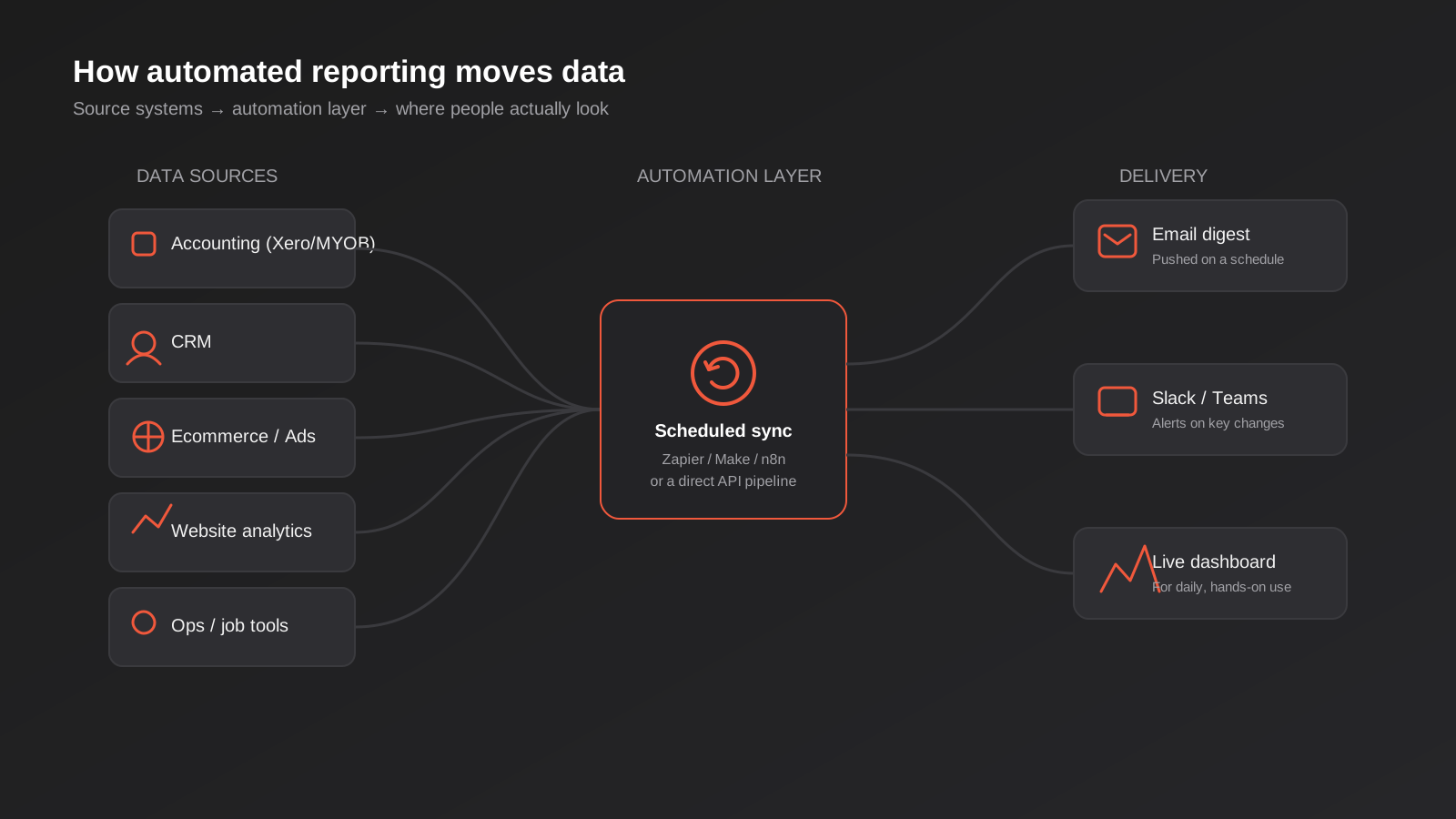
In practice, the businesses we work with are usually trying to bring together some combination of the following:
- Accounting data from Xero or MYOB — revenue, outstanding invoices, cash position
- CRM data — pipeline value, deals won and lost, response times
- Ecommerce platform data — sales, average order value, stock levels, refund rates
- Ad platform spend and performance — Google Ads, Meta, sometimes LinkedIn or TikTok
- Website analytics — traffic, conversions, source of leads
- Operational tools — job management, bookings, project tracking software specific to the industry
What actually needs pulling together looks different by industry, and it’s worth being specific rather than assuming a generic template fits. A trades or construction business usually cares most about job costing against quoted price, ute and crew utilisation, and outstanding invoices by age — numbers that live in a job management tool and an accounting platform, not in Google Analytics. A professional services firm cares about billable utilisation, work in progress and debtor days. An ecommerce store cares about margin by product line after ad spend, stock cover, and return rate by category. None of these are exotic requirements, but they’re also not what a generic marketing dashboard template ships with out of the box, which is why copying someone else’s dashboard rarely works as well as building one around the numbers your business actually runs on.
The honest starting point for most businesses isn’t any of those systems — it’s a spreadsheet. Somewhere in the business is a spreadsheet that’s become the unofficial source of truth, usually because a platform doesn’t report the number a specific person cares about, so they built their own version. These spreadsheets are the hardest part of a reporting automation project, not the easiest, because they encode decisions and calculations nobody’s written down anywhere else. Before automating anything, it’s worth sitting with whoever owns that spreadsheet and working out exactly what it’s actually calculating, because half the time the formula has quietly drifted from what it was originally meant to measure.
The single source of truth problem
Almost every reporting automation project we scope runs into a moment where two systems disagree about the same number. Marketing says a lead cost $40. The CRM says $52. Both are technically correct — they’re just counting different things, on different dates, with different attribution windows. Automating the reporting doesn’t fix this. If anything it makes the disagreement more visible, faster, because now it happens every week instead of being quietly ignored in a manual spreadsheet nobody double-checked. Deciding which system is authoritative for which number, before building the automation, is unglamorous work that determines whether the finished report gets trusted or gets picked apart in the first meeting it’s shown in.
Three ways to build automated reporting
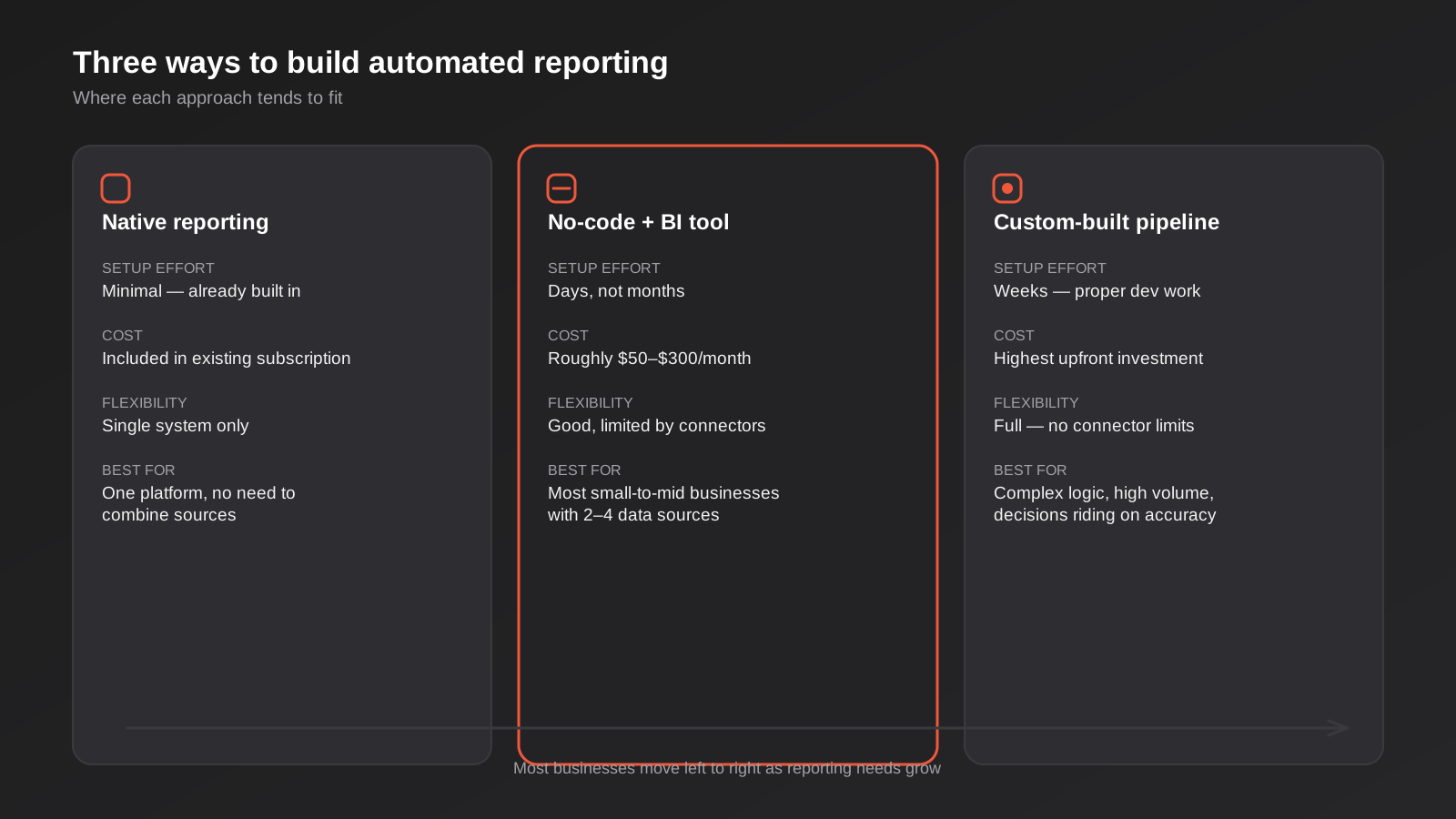
There isn’t one correct way to do this, and the right answer changes depending on how many data sources are involved and how much the numbers need to be trusted for financial or operational decisions.
Native, built-in reporting
Most platforms already ship with some reporting built in — Xero has standard financial reports, Shopify has an analytics tab, Google Ads has its own dashboards. For a single-system view, this is genuinely the right starting point and the cheapest one, because it’s already paid for. The limitation is obvious the moment a business needs to see two systems side by side — ad spend against revenue, for instance — because no platform reports honestly on data it doesn’t own.
No-code automation plus a reporting tool
This is where most small-to-mid businesses land, and it’s usually the right call. A workflow tool like Zapier, Make or n8n pulls data out of each system on a schedule and pushes it into a reporting layer — Looker Studio, Databox, Klipfolio or Geckoboard are the common ones we see used well in Australia. Setup takes days rather than months, ongoing cost is usually a few hundred dollars a month across tools, and it can be adjusted without touching code when a business adds a new platform or drops one. The trade-off is that it’s only as reliable as the connectors each tool offers, and some platforms — particularly niche industry software — simply don’t have a clean native connector, which forces a workaround.
Custom-built reporting
For businesses with several systems that don’t play nicely together, high data volumes, or reporting that feeds directly into pricing or operational decisions, a custom pipeline is worth the extra investment. This usually means connecting to each system’s API directly, storing the data somewhere central, and building a purpose-built view on top of it rather than fitting the business into a template a generic BI tool assumes. It costs more upfront and needs a developer involved when something changes, but it removes the connector limitations of the no-code approach and can handle logic those tools genuinely can’t — custom margin calculations, multi-entity consolidation, anything involving data that needs cleaning before it’s meaningful.
These three paths aren’t always a one-time choice, either. A common, sensible pattern is starting with native reports to prove the numbers matter, moving to a no-code automation once the manual effort becomes annoying enough to justify the setup, and only investing in a custom pipeline once the business has outgrown what the no-code tools can cleanly handle — usually signalled by connector limitations, a data volume the free or entry-level tiers choke on, or logic that keeps needing awkward workarounds inside a tool that wasn’t built for it. Trying to jump straight to a fully custom build before the reporting need is well understood is one of the more expensive mistakes we see, because the requirements are still shifting while the more rigid, harder-to-change system is being built.
Choosing a reporting tool that actually fits
Of the no-code path options, Looker Studio and Power BI come up constantly, and the honest answer is that most small Australian businesses over-think this decision. Looker Studio is free, connects natively to Google Analytics, Google Ads and Google Sheets, and is genuinely easy for a non-technical person to read and lightly edit. It struggles once the data gets complex — heavy calculations, row-level permissions, very large datasets — which is where Power BI is stronger, but Power BI generally assumes someone on staff who’s comfortable with DAX formulas and ongoing maintenance.
Purpose-built small business dashboard tools like Databox, Klipfolio and Geckoboard sit in between. They’re built specifically for pulling marketing and sales metrics together with minimal setup, they’re not free, and they cap out faster than Power BI once a business wants genuinely custom logic. For a business whose reporting need is “show me marketing, sales and cash in one place, refreshed daily,” one of these is often the fastest path to something usable.
The mistake we see most is choosing the tool before defining what needs reporting on. A marketing team ends up paying for Power BI seats to rebuild something Looker Studio was already handling for free, or a business tries to force finance-grade reporting with row-level security into a tool that was never built for it. Start from the questions the report needs to answer, then pick the tool that answers them with the least ongoing effort.
Data handling and privacy considerations
Once customer or financial data is flowing into a third-party reporting tool, it’s worth a moment’s thought about where that data actually sits and who can see it. Most of the mainstream tools — Looker Studio, Power BI, Databox and similar — host data offshore, generally in the US, which is fine for the vast majority of Australian small businesses but is worth checking against your obligations under the Privacy Act if the reports include personal information, particularly for businesses in regulated industries like healthcare or finance. The practical fix is usually simple: aggregate the data before it hits the reporting layer, so the dashboard shows totals and trends rather than individual customer records, and keep any report containing personally identifiable information restricted to internal, access-controlled delivery rather than a broadly shared link. This is a scoping question worth raising with whoever builds the automation, not an afterthought once the dashboard is already live.
Where AI-generated commentary actually helps — and where it doesn’t
Most of the reporting tools worth using in 2026 now offer some version of AI-written commentary bolted onto the dashboard — a paragraph explaining that revenue was up 12% because of a particular campaign, or flagging that a metric moved outside its usual range. It’s worth being clear-eyed about what this is actually doing, because the marketing around it oversells it. These tools are pattern-matching against the numbers already in front of them, not reasoning about your business the way a person who knows the context would. They’re genuinely useful for two things: catching a movement a busy person might otherwise scroll past, and turning a wall of numbers into a first-pass written summary that saves someone the job of writing it themselves each week.
Where it falls down is causation. An AI summary will tell you that leads dropped 30% in the same week a metric changed; it won’t reliably tell you whether that’s because a competitor launched a promotion, the sales team was short-staffed, or a tracking pixel broke. Anyone building automated reporting with an AI commentary layer should treat the written explanation as a prompt to go and look, not as the finished answer. We’ve seen reports where the AI-generated commentary confidently attributed a sales dip to the wrong campaign because it only had access to ad platform data and no visibility into what was actually happening operationally that week — a warehouse delay, in that case, not a marketing problem at all.
If you’re weighing up whether AI features belong in a reporting build or elsewhere in how your systems talk to each other, our guide to MCP servers and how AI agents get access to business systems covers the broader question of connecting AI tools to your actual data sources, which is a related but different problem to summarising a dashboard.
Delivery matters more than the tool
This is the part that gets skipped in most reporting projects, and it’s often the difference between an automation that gets used and one that quietly dies within a month. A dashboard someone has to remember to log into is only as good as their willingness to log in, and in our experience that willingness is genuinely low — even for people who asked for the dashboard in the first place. Login-required reporting works well for someone who lives in the numbers daily as part of their role. For anyone else, a pushed report — an email digest, a PDF, a Slack or Teams message with the key numbers already summarised — gets read far more reliably, because it arrives instead of waiting to be found.
This is why we always ask, before building anything, who’s actually going to look at this and how often. An owner who wants a Monday morning snapshot doesn’t need a dashboard, they need five numbers in an email. A marketing manager who’s optimising campaigns daily does need the live dashboard, because a static email can’t answer the follow-up questions they’ll have. Most businesses need both — a pushed summary for the people making decisions, and a live view for the person doing the day-to-day work — and building only one of the two is a common reason reporting projects get called a failure when the automation itself worked fine.
What it costs and how to scope a project
Costs vary a lot depending on the path. A single-source native report costs nothing beyond the platform subscription already being paid. A no-code automation plus BI tool setup for two to four data sources typically runs from a modest one-off setup fee through to a few thousand dollars, depending on how messy the source data is, plus an ongoing subscription for the tools themselves — usually somewhere between $50 and $300 a month depending on data volume and the number of dashboards or reports needed. A custom-built pipeline is the largest investment, and the right one for businesses where reporting accuracy has real financial consequences, or where the number of systems and the complexity of the logic has outgrown what a no-code tool can cleanly handle.
Scoping well starts with a short list, not a wish list. We ask clients to name the three to five numbers that would actually change a decision if they were wrong or late, rather than every metric that would be nice to see. That list defines which systems need connecting, which in turn defines the realistic cost. Projects that start from “connect everything and show it all” tend to blow out in scope and end up as dashboards nobody reads, because the volume of information becomes its own barrier to actually using it. Our reporting and data automation work usually starts with that shortlist conversation before a single connector gets built, because it’s the cheapest place to fix a scope problem.
Measuring ROI on reporting automation
Reporting automation is one of the easier automation categories to justify financially, because the time saved is directly countable. If someone spends four hours a week assembling a report manually, that’s roughly 200 hours a year — and that’s before counting the cost of errors that come from manual copy-paste work, which are common and usually invisible until a decision gets made on a wrong number.
The harder part to measure, but the more valuable one, is decision speed. A business that finds out on the 15th of the month that a marketing channel underperformed in the first week has lost two weeks of ad spend it can’t get back. Automated, timely reporting doesn’t just save the hours spent building the report — it compresses the gap between something going wrong and someone finding out. That’s genuinely difficult to put a dollar figure on in advance, but it’s worth tracking after the fact: look at how many decisions in the following quarter were made faster, or made at all, because the number was available when it was needed rather than three weeks later.
A useful way to frame the business case, before spending anything, is to separate the hard savings from the soft ones and be honest about which is doing the heavier lifting. Hard savings are the hours reclaimed from manual report-building, multiplied by whatever that person’s time is worth to the business — straightforward to calculate and usually enough on its own to justify a no-code setup within a few months. Soft savings are harder to pin down but often larger over time: fewer decisions made on stale or wrong numbers, less time spent in meetings arguing about whose spreadsheet is correct, and a business owner who can glance at five numbers instead of chasing three people for updates before a decision gets made. Neither figure needs to be perfectly precise to be useful — the point is having a rough number in mind before the project starts, so it’s possible to tell afterwards whether it actually delivered.
Common mistakes we see
- Automating a report nobody reads. If a report has been forwarded unopened for three months, automating its production faster doesn’t fix the underlying problem — it just means the unread report arrives on time.
- Building the dashboard before agreeing what “good” looks like. A dashboard with twenty metrics and no benchmarks tells people numbers are moving, not whether that’s a problem.
- Trusting a connector without checking the numbers against the source for at least a few weeks. Currency conversion, timezone mismatches and attribution windows quietly produce wrong totals that look plausible.
- Skipping the “who reads this and how” conversation. Building a login-required dashboard for someone who wanted an email digest is the single most common reason a reporting project gets shelved.
- Treating the spreadsheet as ground truth without checking its formulas. Automating a broken calculation just makes the wrong number arrive faster and look more official.
- No owner for the reporting once it’s live. Platforms change their APIs and export formats. Without someone responsible for noticing when a number looks off, automated reporting can quietly break and nobody notices for weeks.
- Taking an AI-generated explanation of a metric movement at face value. These tools are pattern-matching against the numbers they can see, not the operational context behind them — treat the commentary as a starting point for a question, not a finished answer.
- Piping personal or financial data into a reporting tool without checking where it’s hosted. This is an easy thing to fix early and a much harder one to unwind once a dashboard is embedded in weekly meetings.
Frequently Asked Questions
How long does a reporting automation project usually take?
For a no-code setup connecting two to four common platforms, two to four weeks is realistic, including a period of checking the automated numbers against manual reports before switching over fully. A custom-built pipeline with several systems and bespoke logic typically takes longer, often six to twelve weeks, because it involves proper API integration work rather than configuring existing connectors.
Do I need a data analyst on staff to maintain this?
Not for a no-code setup using tools like Looker Studio, Databox or Geckoboard — these are built to be adjusted by a marketing manager or operations lead without specialist skills. A custom-built pipeline or a heavy Power BI setup with complex DAX formulas generally does need someone with the technical background to maintain it, whether that’s in-house or an agency retainer.
What’s the difference between reporting automation and business intelligence (BI)?
In practice the line is blurry, but reporting automation usually refers to getting existing numbers moved and displayed automatically, while BI implies a deeper layer of analysis — forecasting, trend modelling, deeper statistical work on top of the data. Most small-to-mid businesses need the former and only later grow into needing the latter.
Can this work with industry-specific software that isn’t a mainstream platform?
Often, but it depends entirely on whether that software has an API or exports data in a usable format. Some niche platforms, particularly older or smaller industry-specific systems, don’t offer either, which forces either a manual export step to remain in the process or a custom integration built directly against whatever access the platform does provide.
Should the dashboard replace our accounting software’s own reports?
No — for compliance and audit purposes, the accounting platform stays the source of truth for financial statements. An automated dashboard sits alongside it as a faster, combined view for day-to-day decisions, not a replacement for statutory reporting.
How do we know if our numbers across systems don’t match?
Build a short reconciliation check into the first few weeks after launch — compare the automated report’s key totals against a manual pull from each source system on the same date range. Mismatches usually come down to timezone settings, currency handling, or one system counting something the other excludes, like refunds or GST.
Is it worth automating reporting before automating the underlying workflows?
Often yes, and in the opposite order to what people expect. Seeing the numbers clearly first tends to reveal which workflow is actually worth automating next, rather than guessing. A business that automates its reporting can see, for example, that a huge share of admin time goes into one specific process, which then becomes the obvious next automation project rather than a guess.
Where to start
If reporting in your business currently means someone blocking out a chunk of their week to build the same document by hand, the fix is rarely as big a project as it sounds. Most of the businesses we’ve helped with this started with three or four numbers that mattered and one clear answer to who needed to see them and how — not a full rebuild of every report they’d ever produced.
If you want a second opinion on what’s worth automating first in your business, or you’re not sure whether a no-code setup or something more custom fits your systems, we’re happy to have that conversation without a sales pitch attached — get in touch and we’ll talk through what actually makes sense for where you’re at.
Keep reading
Related posts

Changing Live Automations Safely: Staging, Version Control and Rollback for Zapier, Make and n8n (2026)
How to draft, test, release and roll back changes to live Zapier, Make and n8n automations without breaking invoices, orders or customer…

Peppol E-Invoicing for Australian Businesses: Automating Accounts Payable From Structured Invoices (2026)
Peppol e-invoicing in Australia: what is and isn't mandatory, how to pick an access point, and how to automate accounts payable once…

Clean Your Data Before You Automate: A Practical Guide to CRM Data Cleanup for Australian Businesses (2026)
Connecting systems on messy data copies the mess everywhere. Here's how to clean, match and merge records before you automate or integrate.
Got a project you'd like to talk through?
Tell us what you're working on — we'll come back with a plan.
