
Accounts Payable Automation for Australian Businesses: Invoice Processing Without the Manual Grind (2026)
 Jignesh Vagadiya
12/09/2026
21 min read
Jignesh Vagadiya
12/09/2026
21 min read
Someone in your finance team opens the inbox, downloads a PDF invoice, retypes the numbers into Xero, tries to match it against a purchase order that actually lives in a different spreadsheet, forwards it to a manager for sign-off, waits, chases, waits again, and finally pays it three weeks after it arrived. Multiply that by 60, 200, 500 invoices a month and you’ve got a meaningful chunk of a full-time role that exists purely to move numbers from one screen to another.
That’s still how most Australian businesses run accounts payable, and it’s one of the last pockets of pure manual data entry where automation genuinely fixes the problem rather than just relocating it. We build workflow and integration projects across a lot of different processes, and invoice processing keeps coming up as a candidate because it ticks every box that makes automation worth doing: high volume, rule-based, repetitive, and painful in a way that doesn’t require rebuilding how the business actually operates.
This is a practical look at what accounts payable automation actually involves, the different ways to build it depending on your size and complexity, and where we’ve seen these projects go sideways. It isn’t a pitch for one platform — the right setup depends heavily on how many invoices you process, how many systems you’re already running, and how complicated your approval chain genuinely is versus how complicated everyone assumes it is.
What Accounts Payable Automation Actually Does
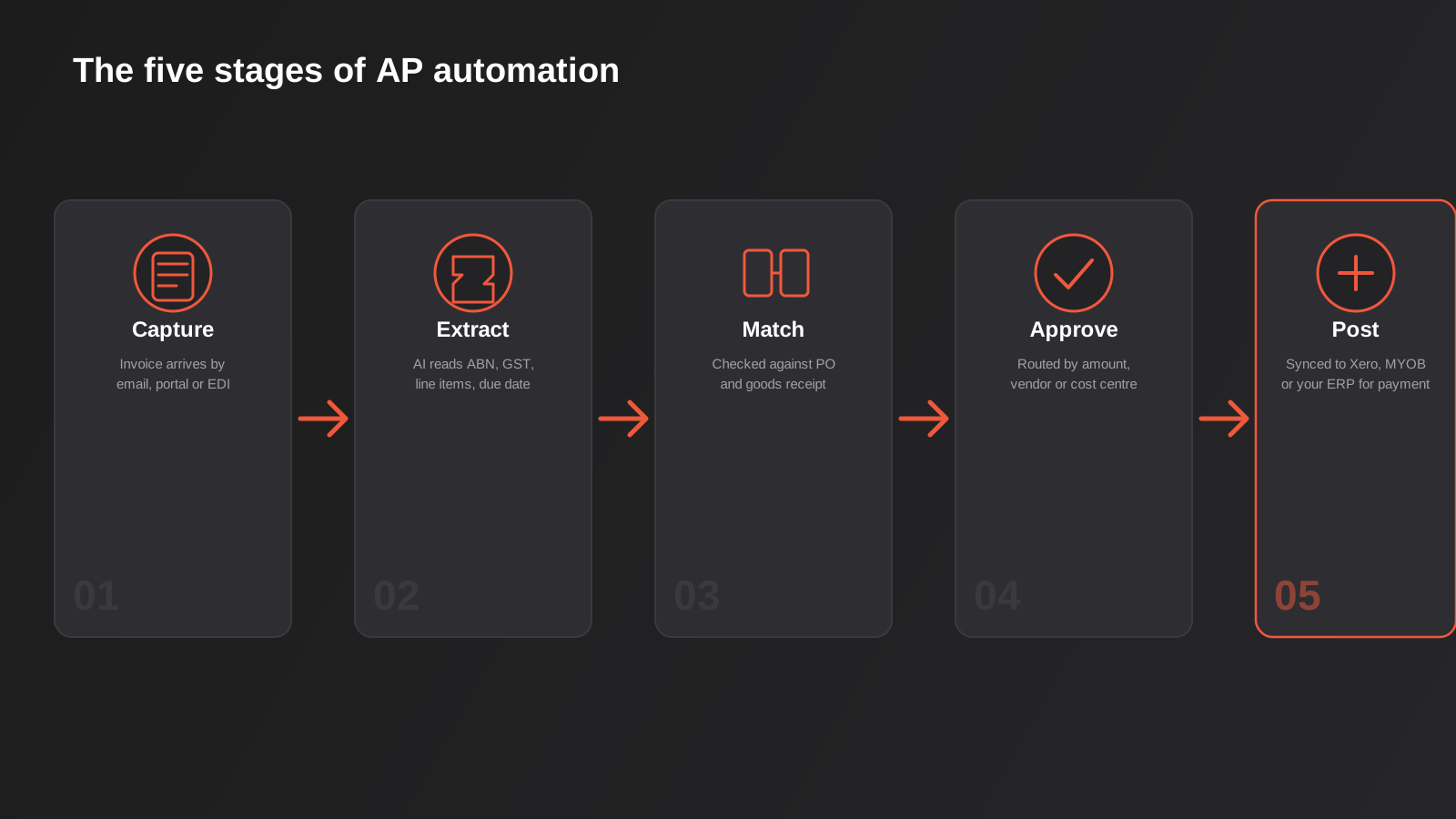
Accounts payable automation isn’t one piece of software — it’s a chain of steps, and most of the disagreement between vendors and consultants comes down to which parts of that chain their particular tool actually handles. Broken down properly, there are five stages: capture, extraction, matching, approval and posting. Get clear on which of these you’re actually trying to fix before you look at any software, because a lot of AP projects buy a tool that automates one stage brilliantly while leaving the other four exactly as manual as they were.
Capturing the invoice
Invoices arrive however your suppliers feel like sending them: email attachments, a supplier portal, paper that gets scanned, or occasionally an EDI feed if you’re dealing with larger trading partners. The first job of an automated AP system is simply getting all of that into one place instead of six different inboxes and a shared drive folder that only one person actually checks. This sounds trivial and it isn’t — a huge share of AP delays happen because an invoice sat in someone’s personal inbox for a week before anyone noticed it existed.
Part of getting this right is setting up a single dedicated inbox — something like [email protected] — and actually telling suppliers to use it, rather than letting invoices keep arriving addressed to whichever staff member the supplier happened to deal with first. It’s not glamorous work, but a surprising share of AP automation projects stall here because nobody did the unglamorous job of redirecting supplier communication before turning any automation on. Automating a process that’s still fed from six inboxes just means six different automations, or one automation that misses half the invoices.
Extracting the data
This is the part most people mean when they say “AI invoice processing.” Older OCR tools worked off rigid templates — they needed to learn the exact layout of each supplier’s invoice before they could read it reliably, which fell apart the moment a supplier changed their template or you onboarded someone new. Current AI-based extraction reads invoices the way a person does: it identifies the ABN, the GST component, the line items, the due date and the bank details regardless of layout, and it flags anything it isn’t confident about instead of guessing. That confidence scoring matters more than the raw accuracy number vendors advertise, because the failure mode you actually care about is silent errors, not obvious ones.
Matching against purchase orders and receipts
Matching is where AP automation earns its keep as a control, not just a convenience. A two-way match checks the invoice against the purchase order — same vendor, same items, same price, within a defined tolerance. A three-way match adds the goods receipt, confirming you actually received what you’re being asked to pay for, which matters a lot more for businesses handling physical stock than for services businesses paying for software subscriptions and contractor invoices. Tolerance settings are where a lot of the practical judgement lives: too tight and every invoice with a 40-cent freight variance kicks out for manual review, defeating the point; too loose and the matching stops catching anything meaningful.
Routing for approval
Once an invoice is captured, extracted and matched, it needs a human decision on most businesses’ processes — even fully automated AP setups usually keep approval as a deliberate checkpoint rather than removing it entirely. Good routing logic sends invoices to the right approver based on amount thresholds, cost centre or vendor, escalates automatically if someone doesn’t act within a set window, and has a defined delegate for when the usual approver is on leave. This is the piece that gets skipped most often in DIY setups, and it’s usually the reason an automation project that looked great in a demo grinds to a halt in week three when the finance manager goes on holiday and nothing has anyone covering for them.
Posting and paying
Once approved, the invoice needs to land in your accounting or ERP system as a bill, correctly coded, without anyone re-keying it a second time. This is the step that actually closes the loop — extraction and matching without a clean sync back into Xero, MYOB or your ERP just moves the manual entry from “typing invoice data” to “copying data between two systems,” which is not the win it looks like on paper. Proper integration here also sets you up for batch payment runs and gives you a clean audit trail of exactly who approved what and when, which matters at tax time and matters more if you’re ever audited.
What Manual AP Actually Costs You
Industry research on invoice processing consistently puts the fully-loaded cost of handling a single invoice manually somewhere between $15 and $40, once you count the data entry time, the back-and-forth chasing approvals, and the error correction when something gets miscoded. Processing time is measured in days rather than minutes on a manual process, largely because invoices sit waiting for someone to notice them rather than because the actual work takes long. None of that shows up as a line item anywhere — it’s spread across a bookkeeper’s time, a finance manager’s inbox, and the accountant’s EOFY reconciliation, which is exactly why most businesses underestimate how much it’s actually costing them.
The costs compound in ways that are easy to miss. Late payment fees and damaged supplier relationships are the obvious ones. Less obvious: missed early payment discounts, which some suppliers offer for payment within 7 or 10 days and which manual processes almost never hit because the invoice hasn’t even been approved by then. Duplicate payments happen more often than most finance teams would like to admit, particularly when the same invoice arrives by email and again through a supplier portal and nobody cross-checks. And then there’s the audit trail problem — when an invoice is approved via a forwarded email thread, reconstructing who actually signed off on what six months later is a genuinely unpleasant exercise.
Early payment discounts are worth calling out on their own, because the maths on them is better than most businesses realise. A common supplier term is something like 2/10 net 30 — a 2% discount if you pay within 10 days, full amount due within 30. Missing that discount because the invoice was still sitting in an approval queue on day 12 doesn’t look like a cost anywhere in your accounts, but a 2% discount for paying 20 days early works out to an annualised return in the high thirties as a percentage — better than almost anything else you could do with that cash in the short term. A process that gets invoices approved within a few days rather than a few weeks is the only way to actually capture that.
The Different Ways to Automate Accounts Payable
There isn’t one correct way to automate AP — there’s a spectrum, and where you land on it should be driven by invoice volume and process complexity, not by whichever tool a LinkedIn ad happened to show you this week.
Built-in tools in Xero, MYOB and QuickBooks
If you’re processing a modest number of invoices a month with one or two approvers, the bill capture and approval features already built into Xero, MYOB or QuickBooks are often genuinely enough. They read invoices reasonably well, create draft bills automatically, and support basic approval steps. The limitation shows up once you need more than a simple linear approval, need matching against purchase orders with real tolerance rules, or need to manage approvals across multiple entities — the built-in tools weren’t designed for that level of control and it starts to show.
Dedicated AP automation software
The next tier is purpose-built AP software that sits on top of your existing accounting platform. These tools are built specifically around multi-step approval hierarchies, proper matching logic, multi-entity support, and a defensible audit trail — the things that start mattering once a business has more than a couple of approvers or more than one cost centre to worry about. They’re priced on a subscription that usually scales with users or invoice volume, and for a lot of growing Australian businesses this is the sweet spot: purpose-built for the job without needing a developer to set up or maintain.
Workflow automation platforms as the glue
Sometimes the off-the-shelf AP tools don’t quite fit — maybe approvals need to happen in Slack or Teams rather than a separate app, or exceptions need to trigger a specific process unique to your business. That’s where workflow automation platforms like Zapier, Make or n8n come in, connecting an OCR or extraction tool to your accounting system and handling the routing logic in between. We’ve written a detailed comparison of Zapier, Make and n8n if you’re trying to work out which one actually fits your business rather than which one has the best marketing. This approach gives you more flexibility than a packaged AP tool, at the cost of needing someone who actually understands the workflow logic to build and maintain it.
Custom integration for ERP-level complexity
Larger and more complex businesses — multiple entities, multiple currencies, invoices that need to match against inventory receipts or production orders inside an ERP like NetSuite, SAP or Pronto — usually outgrow both the packaged AP tools and the workflow-automation-glue approach. At that point you’re looking at proper API-level integration between your invoice capture layer and your ERP’s procurement and finance modules. We cover what that actually involves in our guide to ERP integration for Australian businesses, and our ERP integration service page goes into the technical detail if you’re already at this scale.
Choosing the Right Approach for Your Business
The honest way to work out where you sit is to plot your business on two axes: how many invoices you process a month, and how complicated your approval and matching rules actually are — not how complicated they feel, which is often inflated by habit rather than genuine necessity.
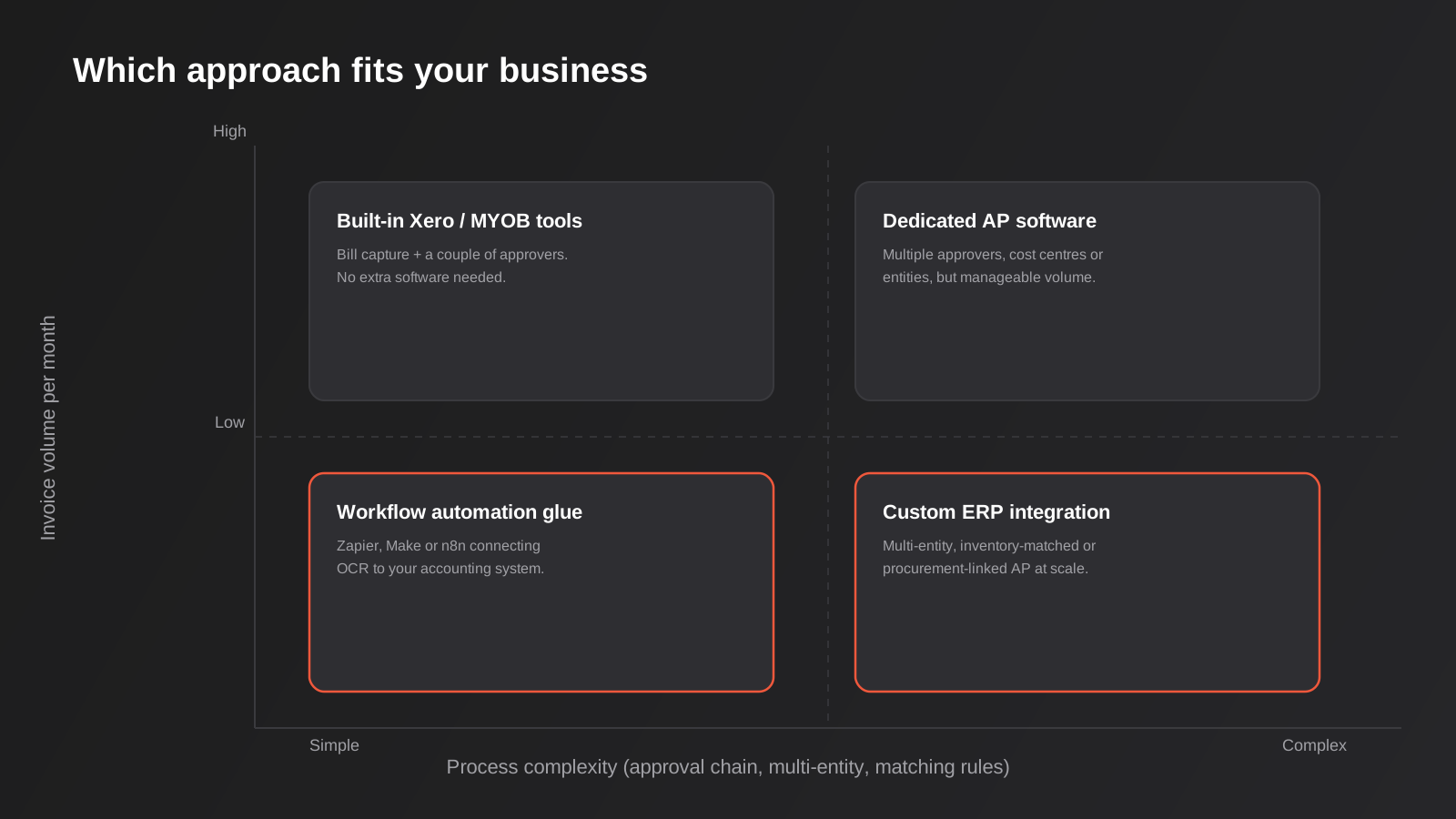
Low volume with a simple, single-approver process rarely justifies new software at all — get the built-in capture and approval tools in your accounting platform set up properly and move on. Low volume with real complexity, like multiple cost centres or a formal delegation of authority policy, is where dedicated AP software earns its subscription cost even at modest invoice numbers, because the risk of a control failure matters more than the volume. High volume with a genuinely simple process is the classic case for workflow automation glue — you don’t need a heavyweight platform, you need something fast that connects the pieces you already have. And high volume with real complexity — multi-entity, inventory-matched, procurement-linked — is where custom integration against your ERP is worth the investment, because at that scale a five percent improvement in matching accuracy is worth real money.
One thing worth saying plainly: most businesses overestimate how complex their process actually is. A lot of “we need custom software” requests we get for AP turn out to be a built-in Xero workflow that was never configured properly, plus a habit of emailing PDFs around because that’s how it’s always been done. It’s worth being honest about that before committing budget to anything more sophisticated — our broader framework for measuring AI and automation ROI is a useful gut-check before greenlighting a build.
It’s also worth noting these categories aren’t mutually exclusive in practice. We regularly see businesses running dedicated AP software for their core supplier invoices while using a workflow automation platform on the side to handle something specific it doesn’t cover well — expense reimbursements routed through Slack, or a particular supplier who only sends data via a webhook feed. Treating the decision as an either/or often leads to picking one tool and then forcing every edge case through it badly, when a small amount of glue automation around the main system would have been simpler and cheaper.
Getting the Detail Right in Australia
A few things are specific to running AP automation for an Australian business, and skipping them causes real problems down the track.
Valid tax invoices and GST
To claim a GST credit, you generally need a valid tax invoice showing the supplier’s ABN, the GST amount or a statement that the total includes GST, and the other details the ATO requires for invoices over $82.50. Extraction tools need to actually check for this, not just pull whatever numbers appear on the page — an invoice missing a valid ABN or GST breakdown shouldn’t sail through matching and approval as if it were compliant, because it’ll cause a headache at BAS time when your accountant asks why a chunk of your GST credits don’t have valid supporting invoices.
Duplicate invoice detection
The same invoice arriving twice — once by email, once through a supplier portal, sometimes with a slightly different file name — is one of the most common ways businesses end up double-paying. A properly configured system checks for duplicates on a combination of vendor, invoice number and amount, not just an exact file match, because the second copy is rarely byte-for-byte identical to the first.
Bank detail change fraud
Invoice fraud where a scammer impersonates a supplier and requests a change of bank details by email is common enough that the Australian Cyber Security Centre specifically warns about, and it’s exactly the kind of thing automation can make worse if you’re not careful. Any change to a supplier’s bank details should trigger a manual verification step — ideally a phone call to a known number, not a reply to the email that requested the change — regardless of how confident your extraction tool is that it read the new details correctly. Automating around this control rather than through it is one of the more expensive mistakes a business can make.
Record retention
The ATO generally requires you to keep records supporting your GST and income tax claims for five years. Whatever AP system you land on needs to actually retain the original invoice image alongside the extracted data and the approval trail for that long, in a form you can actually retrieve — not just the processed data with the source document quietly archived somewhere inaccessible.
One edge case worth knowing about if you deal with certain industries — agriculture, some government contracts, occasionally larger enterprise arrangements — is the recipient-created tax invoice, where you as the buyer issue the tax invoice rather than receiving one from the supplier. If any part of your supplier base works this way, your AP automation needs to actually support generating and matching against RCTIs rather than assuming every invoice always arrives from the other direction, which is the default assumption most off-the-shelf tools make.
What a Realistic Rollout Looks Like
The AP automation projects that actually work tend to follow a similar shape, and it isn’t “buy software, switch everyone over on Monday.”
Start with a pilot supplier group
Rather than routing every supplier through the new process on day one, pick a handful of your higher-volume, lower-complexity suppliers and run them through the automated flow first. This surfaces the genuine edge cases — the supplier whose invoices are scanned photos rather than PDFs, the one whose ABN doesn’t match what’s in your system, the one who still faxes things — while the blast radius of a mistake is small. Expanding the pilot supplier by supplier, rather than flipping every vendor at once, means any given week you’re only debugging one new pattern rather than fifteen.
Measure before you start, not after
It’s hard to prove an automation project worked if you never actually measured the process it replaced. Before rollout, capture a baseline: average days from invoice receipt to payment, roughly how many hours a week go into AP across the team, and how many invoices needed correction or chasing last month. Without that baseline, six months later you’re relying on a general sense that things feel better, which is a much harder case to make to whoever signed off on the budget.
Roll out in phases, and keep a manual escape hatch
Even a mature AP automation setup should have a documented manual path for the invoice that genuinely doesn’t fit — the one from a brand-new overseas supplier with a format nobody’s seen, or the one that arrives during a system outage. Building that escape hatch into the process from the start, rather than treating every exception as a crisis, is what stops automation projects from becoming fragile. The goal isn’t zero human involvement; it’s making sure the humans are only involved in the invoices that actually need judgement, rather than the 90% that don’t.
Common Mistakes We See
- Automating a broken approval process instead of fixing it first — if nobody can explain why an invoice needs three sign-offs, automating that process just makes the pointless part faster.
- No fallback path for invoices the extraction tool can’t read confidently, so anything unusual silently stalls instead of routing to a person.
- Matching tolerances set without any testing, either so tight that every minor freight variance kicks out for manual review or so loose the matching stops catching anything real.
- Skipping a manual verification step for supplier bank detail changes, which is exactly the control that stops the most expensive kind of invoice fraud.
- Building extraction and matching without ever properly syncing back to the accounting system, so someone still ends up re-keying data by hand at the last step.
- Choosing a platform sized for the business you might be in three years rather than the one you actually run today, or the opposite — picking something you’ll outgrow within six months.
- Ignoring supplier data quality — inconsistent vendor names, outdated bank details and duplicate supplier records in the accounting system undermine even a well-built automation.
How AP Automation Fits the Bigger Picture
Accounts payable automation rarely sits in isolation once a business starts taking automation seriously. The same invoice data that flows through capture and matching is exactly what feeds cash flow forecasting and spend dashboards — our guide to reporting and data automation covers how that reporting layer gets built once the underlying data is clean and structured rather than scattered across PDFs. And the broader workflow thinking behind AP — capture, route, escalate, sync — is the same thinking that underpins most of what we build under workflow automation generally, whether that’s invoices, leave requests, or new customer onboarding.
Frequently Asked Questions
Is accounts payable automation worth it if we only process a small number of invoices each month?
If you’re processing under 30 or 40 invoices a month with a simple single-approver process, dedicated AP software is often overkill — getting the bill capture and approval features already built into Xero or MYOB configured properly usually solves most of the manual pain for free. The calculation changes once you have multiple approvers, cost centres, or enough volume that a bookkeeper is spending real hours a week on it.
Does accounts payable automation work with Xero or MYOB, or do we need to switch accounting software?
You don’t need to switch. Most dedicated AP tools and workflow automation platforms are built to sync with Xero, MYOB and QuickBooks specifically, posting bills directly rather than requiring you to change your core accounting system. Switching accounting platforms to get better AP automation is almost always the wrong order of operations — fix the invoice processing layer first.
How long does an accounts payable automation project usually take to set up?
Configuring built-in accounting software tools or a packaged AP product can happen in a couple of weeks, most of which is spent mapping approval rules and cost centres correctly rather than technical setup. A custom integration against an ERP, with proper matching against inventory or procurement data, is a longer project — typically measured in weeks to a couple of months depending on how many systems are involved and how clean the underlying data already is.
What happens when the software misreads an invoice?
A properly configured system flags low-confidence extractions for manual review rather than posting them straight through, so the practical risk is a slower invoice, not a wrong payment. The mistake to avoid is choosing a tool that doesn’t surface its own confidence level and just posts whatever it extracted — that’s where genuine errors slip through.
Is it secure to automate invoice approvals and payments?
It can be more secure than a manual process, provided the controls that matter are actually built in — particularly manual verification of any change to a supplier’s bank details, and a clear audit trail of who approved what. Automation without those specific controls can make invoice fraud easier rather than harder, so they shouldn’t be treated as optional extras.
What’s the difference between dedicated AP software and just using Zapier or Make?
Dedicated AP software comes with matching logic, approval hierarchies and audit trails built in specifically for finance workflows, ready to configure. Zapier, Make or n8n give you more flexibility to build exactly the process you want, including anything unusual to your business, but someone needs to design and maintain that logic rather than picking it up out of the box. Which one makes sense depends on how standard your process is and whether you have the technical capacity to maintain a custom build.
Where to Start
Before choosing any software, map your current AP process end to end — every hand-off, every approval step, every system the data touches — and be honest about which parts are actually necessary versus which parts exist because that’s just how it’s always been done. That map tells you where you sit on the volume-and-complexity spectrum, which tells you whether you need better configuration of what you already have, a packaged AP tool, workflow automation glue, or a proper integration against your ERP.
If you want a second opinion on which of those fits your business, we’re happy to have a conversation about what your current process actually looks like and where the real friction is — no obligation, and no assumption that the answer is a big custom build. Sometimes the honest advice is to spend an afternoon configuring the tools already sitting inside your accounting software. Other times the volume and complexity genuinely justify a proper integration project. Get in touch and we can talk through what your specific setup actually needs.
Keep reading
Related posts

Changing Live Automations Safely: Staging, Version Control and Rollback for Zapier, Make and n8n (2026)
How to draft, test, release and roll back changes to live Zapier, Make and n8n automations without breaking invoices, orders or customer…

Peppol E-Invoicing for Australian Businesses: Automating Accounts Payable From Structured Invoices (2026)
Peppol e-invoicing in Australia: what is and isn't mandatory, how to pick an access point, and how to automate accounts payable once…

Clean Your Data Before You Automate: A Practical Guide to CRM Data Cleanup for Australian Businesses (2026)
Connecting systems on messy data copies the mess everywhere. Here's how to clean, match and merge records before you automate or integrate.
Got a project you'd like to talk through?
Tell us what you're working on — we'll come back with a plan.
