
Best Payment Gateways for Australian Businesses (2026): 6 Compared
 Jignesh Vagadiya
08/11/2026
21 min read
On 1 October 2026, a line item that Australian merchants had been passing to customers for years stopped being allowed. Card surcharges on Visa, Mastercard and eftpos payments are now banned, online as well as in store, and gateways have been switching their surcharge functions off. The fee your gateway charges didn’t go away. It just moved from the customer’s total to your margin.
That makes the choice of gateway matter more than it did a year ago. A difference of a fraction of a percent on every sale used to be partly recoverable at checkout. Now it isn’t. Choosing the best payment gateway in Australia now starts with the fee schedule, so this guide compares six gateways Australian businesses actually use for online payments: Stripe, PayPal, Square, Tyro, Airwallex and eWAY. We’ve looked at headline fees, what’s included in them, how each handles Australian realities such as PayTo, GST and local support, and where each one has a real weakness.
Our selection criteria are simple. A gateway had to be available to ordinary Australian businesses without a six-figure processing volume, had to accept cards online, and had to be something we regularly see in the wild when we connect stores and systems. We left out buy-now-pay-later providers and wallet-only options, because those sit alongside a gateway rather than replacing it. A warning on the numbers: fees change often, third-party comparison sites disagree with each other, and several providers publish only part of their pricing. We’ve used the figures that were consistent across sources in November 2026 and flagged where they weren’t. Confirm anything that matters on the provider’s own pricing page before you commit.
What the Surcharge Ban Changes
Before comparing gateways, it’s worth being clear about what has and hasn’t changed, because the details affect how you read every fee below.
From 1 October 2026, the card schemes’ rules, enforced through your merchant agreement, stop you adding a surcharge to Visa, Mastercard and eftpos payments. The ban covers online payments. Stripe has said it is switching off surcharging support in Australia for both online payments and its in-person terminals, and eWAY has said it is removing its surcharge functionality ahead of the deadline. If your checkout still adds a card fee line, remove it, and check your payment plugins as well as your gateway settings, because some store plugins add their own.
The edges of the ban are less settled. Sources disagree on whether American Express is covered; some say it is, others say it sits outside this reform pending a further review by the Reserve Bank. PayPal and BPAY are also reported as outside the ban. Until you’ve read the RBA’s and the ACCC’s current guidance, treat anything that isn’t a Visa, Mastercard or eftpos payment as uncertain, and don’t assume you can surcharge it.
The same date brought lower caps on domestic interchange, the wholesale fee that sits underneath what you pay. In principle that gives providers room to cut their own rates, and Stripe has moved its domestic online rate from 1.70% to 1.65% plus 30 cents from 1 October, according to its own notice. Others may follow or may not, which is a good reason to ask any provider you’re considering whether their pricing already reflects the lower caps. Caps on foreign-issued cards are reported to arrive later, in April 2027.
The practical effect is that you now absorb the fee. Pricing products as though the gateway cost is zero, and then discovering a thin margin on small orders, is the mistake most of the merchants we talk to are at risk of. If your average order is small, the fixed per-transaction charge matters as much as the percentage.
Stripe
What it is. An online payments platform with a developer-friendly API, hosted checkout pages and a wide range of payment methods. It’s the engine behind a lot of Australian stores, including the default payments option on some ecommerce platforms.
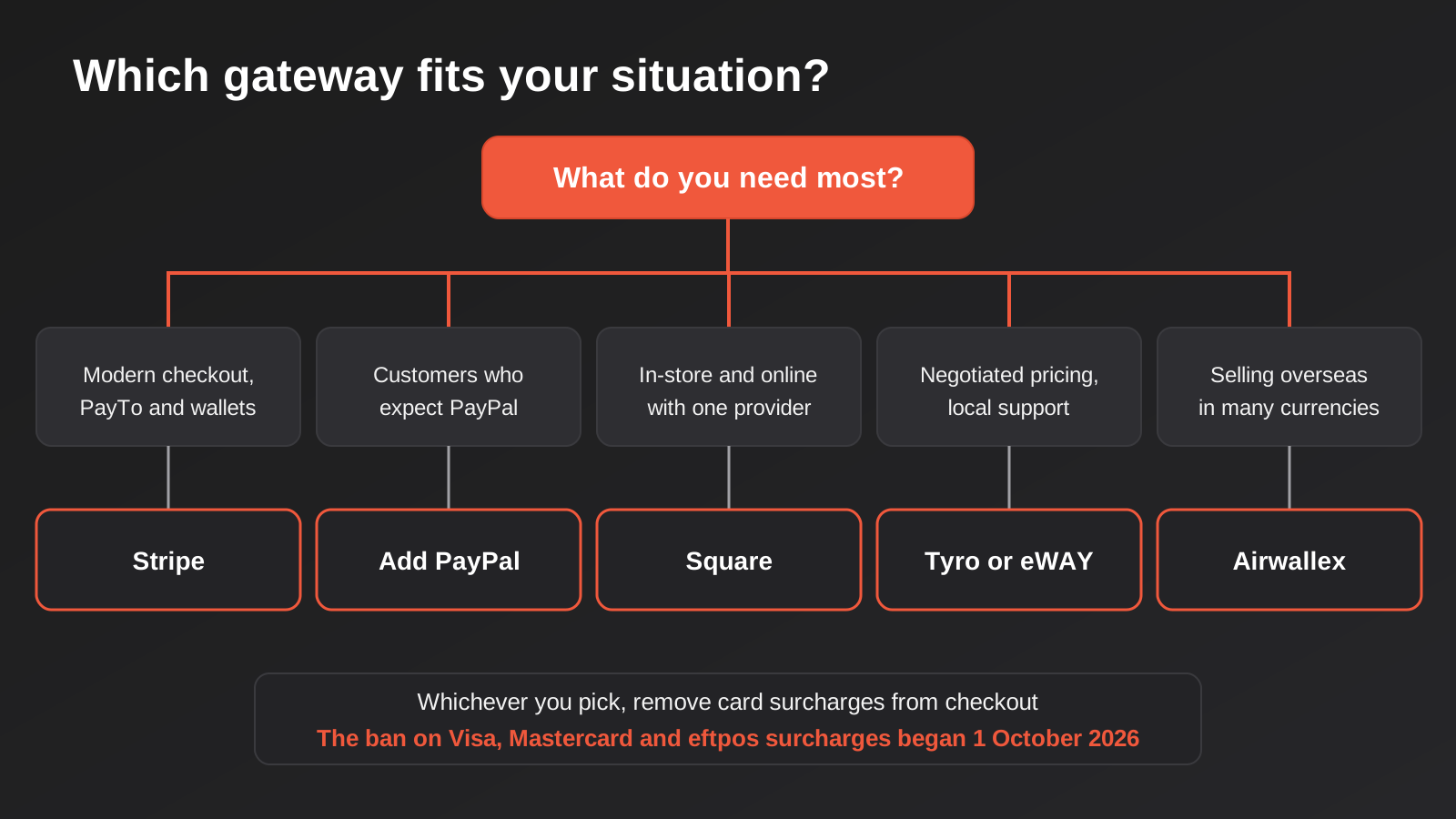
What it does well. Coverage and polish. Cards, Apple Pay and Google Pay, buy-now-pay-later options and PayTo (the account-to-account payment that replaces the old direct debit forms) sit behind one integration. Hosted checkout and payment links mean a small business can accept payments without writing code, while a developer can build exactly the flow they want. Subscriptions, invoicing and reporting are strong. Standard payouts to your bank account carry no extra fee. It also suits businesses that expect to grow, because the same account scales from a payment link to a custom checkout.
Where it falls short. Support, and sometimes account decisions. Stripe is largely self-serve, so when something goes wrong with a payout or a review of your account, you’re dealing with a queue rather than a relationship. Like any provider, it can pause or limit an account it considers risky, and merchants who sell in higher-risk categories should read the terms closely. The feature range also means the fee schedule has many lines, such as instant payouts, international cards, currency conversion and disputes, so the headline rate is only part of the story.
What it costs. Stripe’s support notice puts the domestic online card rate at 1.65% plus 30 cents from 1 October 2026, down from 1.70% plus 30 cents; some sources still show the older figure. International cards are widely reported at about 3.5% plus 30 cents. PayTo is reported at roughly 1% to 1.3% plus 30 cents, with a per-transaction cap, though sources disagree on the exact numbers, so check Stripe’s Australian pricing page. Instant payouts, where you want funds immediately rather than on the standard schedule, carry an extra percentage fee. There’s no monthly fee on the standard account.
Who it suits. Online stores and service businesses that want a modern checkout, subscriptions or PayTo, and that are comfortable with self-serve support. It’s the safest default for most ecommerce builds, and a sensible starting point for any business that expects its payment needs to get more complicated.
PayPal
What it is. The long-running wallet and payments provider. Many customers hold a PayPal balance or have a card saved with it, and expect to see the button at checkout.
What it does well. Recognition. Some customers simply prefer to pay with PayPal, particularly on first purchases from an unfamiliar store, because they don’t have to hand over card details. Adding it can lift conversion for those customers. It’s quick to set up, supported by nearly every ecommerce platform, and its buyer protection reassures hesitant shoppers.
Where it falls short. Cost and control. PayPal’s headline domestic rate is the highest of the six, and the same buyer protection that reassures customers can work against merchants in disputes. PayPal can also place holds or limits on funds, particularly on new accounts or after a sudden jump in sales, which hurts cash flow when it happens. Treat it as an additional payment method that earns its place by catching customers who’d otherwise leave, not as your main gateway.
What it costs. Most 2026 sources put the domestic online rate at 2.9% plus 30 cents and the international rate at 3.9% plus 30 cents, though one guide lists 2.6% for domestic payments and PayPal’s published rates for your account type are the ones that count. PayPal’s fees didn’t change with the interchange reforms. There’s no monthly fee for standard accounts.
Who it suits. Stores whose customers ask for it, or whose analytics show abandoned checkouts where PayPal is missing. Offer it next to a card gateway, track how much it’s actually used, and keep the cost in your margin calculation.
Square
What it is. A payments company that began with card readers and has grown into a full system covering in-person sales, online stores, invoicing and a point-of-sale setup. We covered its in-store side in our comparison of POS systems for Australian businesses.
What it does well. One provider for physical and online sales. If you have a shopfront, a market stall or a mobile service and also sell online, having every sale land in the same reports with the same payout schedule is a real convenience. Pricing is simple, with no monthly fee on basic plans, and onboarding is quick enough that people often start taking payments the same day.
Where it falls short. Online rates are higher than the specialist gateways, and the strength of the product is in person. Reported online card rates sit well above Stripe and eWAY, so a business that sells mostly online pays more for the convenience of a single system. Customisation is also more limited than a developer-first platform offers, so complicated checkout flows can run into the edges.
What it costs. Sources report 2.2% for online card payments and 1.6% for in-person card payments, with no monthly fee on basic plans and hardware sold separately. Check whether a fixed per-transaction fee applies to your plan, because the sources we found didn’t agree on that point.
Who it suits. Businesses with a meaningful in-person side, such as cafes, retailers and mobile services, that also want to sell online without managing two providers. If nearly all your revenue is online, it’s probably not the cheapest option.
Tyro
What it is. An Australian-owned payments company best known for eftpos terminals, with an ecommerce product for online payments that is typically sold through a conversation rather than a published price list.
What it does well. Local relationship and negotiation. Tyro offers Australian-based support, and because its pricing is custom for larger merchants, a business with steady volume can negotiate a rate that the self-serve providers don’t offer. That’s particularly relevant now, when every fraction of a percent is coming out of margin. It also integrates with a number of Australian point-of-sale and practice-management systems, which makes it a natural fit for businesses whose software already talks to it.
Where it falls short. Transparency and speed. We couldn’t find a published online card rate on Tyro’s site, only an eftpos-focused figure of 1.4% including GST for smaller merchants and custom pricing above that. Some third-party pages quote a specific online rate, but we couldn’t verify it as applying to general ecommerce. You’ll need a quote, and the setup is slower than signing up for a self-serve account in an afternoon. We also couldn’t find a public statement on where Tyro stores cardholder data, so if data location matters to you, ask in writing.
What it costs. Quote-based for online payments. Ask for the rate, any fixed per-transaction fee, monthly or terminal fees, and whether GST is included or on top. Compare the quote to the self-serve providers at your actual monthly volume and average order size.
Who it suits. Established Australian businesses with consistent volume, an existing Tyro relationship or software that integrates with it, and a preference for local support. If you’re just starting and want to accept payments this week, you’ll find it slower than the alternatives.
Airwallex
What it is. A global payments and business account provider, founded in Australia, aimed at businesses that sell or spend across borders. Its online payment product competes directly with Stripe.
What it does well. Multi-currency. If you sell to customers overseas, pay overseas suppliers or hold balances in several currencies, Airwallex lets you do all of that in one place, often at better foreign-exchange rates than a bank gives you. Its domestic card rate is reported at 1.65% plus 30 cents, the same as Stripe’s new figure, and the developer tools are modern.
Where it falls short. It’s a more specialised product than the others, and the extra capability can mean more setup and more to understand. Sources disagree on whether there’s a monthly fee on the online payments account, with one listing a figure of around A$29 and another listing none, so confirm before you compare. Foreign-exchange conversion carries its own margin, reported at roughly half a percent to a percent, which matters if you convert a lot. And for a purely domestic store, you won’t use most of what you’re paying attention to.
What it costs. Domestic cards are reported at 1.65% plus 30 cents and international cards at roughly 3.4% plus 30 cents, plus the currency conversion margin where applicable. The monthly fee question needs checking against Airwallex’s own page.
Who it suits. Exporters, businesses with overseas suppliers and anyone whose revenue or costs are largely in foreign currency. If you only sell in Australian dollars to Australian customers, a simpler gateway will do the job.
eWAY
What it is. An Australian payment gateway, part of the Global Payments group, that has served local merchants for many years and integrates with most Australian shopping carts and accounting packages.
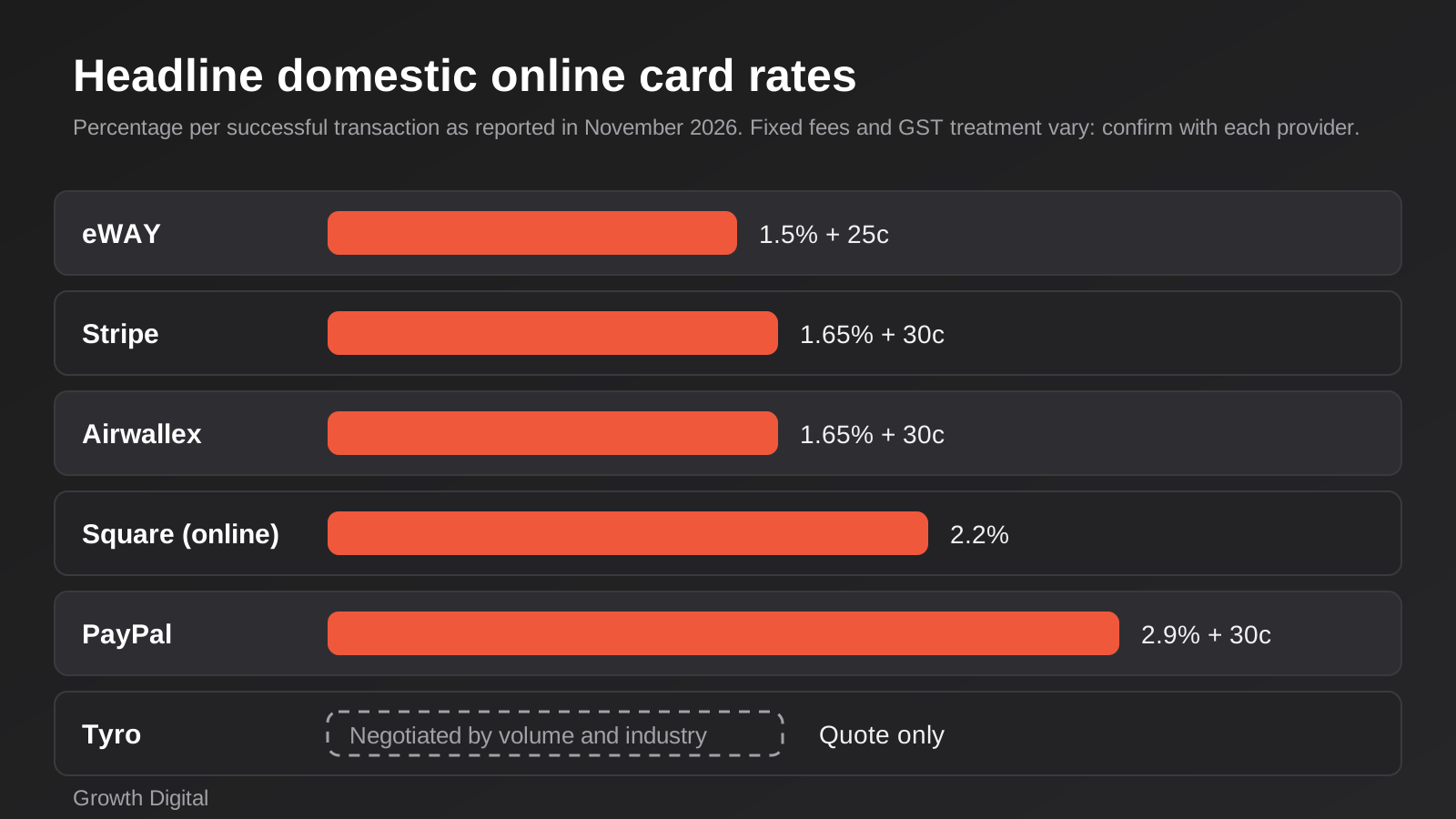
What it does well. Straightforward pricing and local fit. Its published standard rate of 1.5% plus 25 cents for Visa, Mastercard and American Express is the lowest headline domestic rate in this comparison, and sources report no monthly fee or lock-in on the pay-as-you-go online product. It has a long track record with Australian small businesses and plugin support for the common platforms. Like Stripe, it has said it is removing surcharging ahead of the ban.
Where it falls short. Scope and polish. It does fewer things than Stripe or Airwallex: fewer payment methods, less in the way of subscription tooling, and a less modern developer experience. International credit cards carry an extra fee on top of the base rate, reported at 1.99%, though calculators disagree on the final international figure. The rate card is quoted excluding GST, so add ten percent to the fee when you compare it with a provider that quotes GST-inclusive. Older third-party pages show tiered monthly plans that appear to predate the current model, so check which product you’re actually signing up to, and whether you’ll need a separate merchant account with a bank.
What it costs. The standard online rate is published at 1.5% plus 25 cents, with a further percentage on international credit cards. Gateway-only arrangements and custom plans for larger merchants are negotiated directly.
Who it suits. Australian businesses selling mostly to Australian customers who want a low, predictable rate and a gateway their accountant and web developer already know. It’s less suited if you need modern payment methods, subscriptions or heavy customisation.
What the Fees Look Like on a Real Order
Percentages are hard to feel, so here is the arithmetic on two typical order sizes using the headline domestic rates reported above. These are illustrations, not quotes: they ignore GST, international cards, disputes and payout fees, and the Square figure uses its reported online percentage without a fixed fee because we couldn’t confirm one.
- A $50 order. eWAY costs about $1.00 (2.0% of the order), Stripe and Airwallex about $1.13 (2.25%), Square about $1.10 (2.2%) and PayPal about $1.75 (3.5%).
- A $250 order. eWAY costs about $4.00 (1.6%), Stripe and Airwallex about $4.43 (1.77%), Square about $5.50 (2.2%) and PayPal about $7.55 (3.0%).
Two things stand out. First, the gap between the cheapest and the most expensive option is bigger in dollar terms on larger orders, but the fixed fee makes small orders proportionally pricier everywhere. A store selling $20 accessories gets hit harder by the 25 to 30 cent component than a store selling $400 furniture. Second, the difference between eWAY and Stripe on a $250 order is about 43 cents. Whether that gap matters depends on whether you’d give it up for Stripe’s wider payment methods and tooling. For many businesses the answer is yes; for a high-volume store selling a simple product, it may not be.
Multiply the per-order gap by your monthly order count before deciding. Two thousand orders a month at a 43 cent difference is $860 a month, which pays for a lot of other things. Two hundred orders a month is $86, which probably doesn’t justify switching providers on its own. We’d rather you did that sum than took our word for which is cheaper.
Security, Chargebacks and Staying Compliant
Fees get the attention, but the costly mistakes in payments are usually about security and disputes. A few principles apply whichever gateway you pick.
Keep card data off your own systems. Use the provider’s hosted checkout or embedded fields so card numbers go straight to the gateway and never touch your server. That keeps your compliance workload under the card industry’s data security standard far lighter than handling the numbers yourself. If a developer proposes collecting card details on your own page and passing them on, ask why.
Use strong customer authentication where it’s offered. Most gateways support 3D Secure, which asks the cardholder to confirm a payment with their bank. It adds a little friction and shifts liability for some fraudulent chargebacks away from you. Turn it on, then watch your conversion rate to make sure the friction isn’t costing more than it saves.
Plan for disputes. Every gateway charges a fee when a customer disputes a payment, and you lose the sale if you can’t show evidence. Keep order confirmations, delivery proof and a clear refund policy. A refund is almost always cheaper than a lost dispute, so make refunds easy for genuine complaints.
Watch for plugin sprawl. On WordPress and WooCommerce stores in particular, a gateway plugin is code with access to your checkout. Use plugins that are actively maintained by the provider, keep them updated, and remove ones you aren’t using. A neglected payment plugin is a classic route into a hacked store.
Think about the customer’s data too. Payment records link names, emails and purchase history, which are personal information under the Privacy Act. Know which overseas providers receive it and for how long you keep it. Our payment gateway integration guide covers how this plays out in a build, and a short written note on your providers and data flows is worth having before a customer asks.
How to Choose the Best Payment Gateway in Australia
There’s no single winner, because the gateways are optimised for different problems. A few questions sort the field quickly.
Where do your customers pay?
If you take payments in person and online, a unified provider such as Square keeps reporting simple. If you’re purely online, the specialists compete mainly on rate and features, and the in-person strength of Square stops mattering.
What does your average order look like?
Work out the real cost on a typical order, not just the percentage. On a $40 order, a 30 cent fixed fee adds three-quarters of a percentage point; on a $400 order it barely registers. Stores with small orders should lean toward the lower fixed fee (eWAY’s 25 cents against the 30 cents elsewhere is a small edge) and watch for any minimum fees.
Do you need more than cards?
PayTo, wallets, buy-now-pay-later and subscriptions are where Stripe is strongest. Our guide to payment gateway integration for Australian businesses goes into how these methods fit together and what to plan for in the build.
How will the money reach your books?
Payouts that bundle many orders, fees and refunds into a single bank deposit are the reason accounts teams dread reconciliation. Check how each gateway reports payouts, and whether it connects cleanly to Xero or MYOB. Our comparison of accounting integrations for Shopify and WooCommerce covers that side, and our Xero integration page explains how we approach matching payouts to invoices.
Who answers when it breaks?
Think about the day a payout is late or an account is flagged. Self-serve providers are excellent when everything works and slow when it doesn’t. A provider with human support in Australian hours costs more, or needs more volume to negotiate, but it’s worth pricing in if your cash flow is tight.
Common Mistakes When Choosing a Payment Gateway
- Comparing headline percentages only. The fixed fee, international card loading, currency conversion, dispute fees and payout charges all change the real cost. Compare on a worked example at your own order size.
- Forgetting GST. Some rate cards are quoted excluding GST and some include it. A difference of ten percent on the fee is easy to miss when you’re comparing two pages.
- Leaving a surcharge plugin switched on. The ban applies whether the fee comes from your gateway or from a plugin on your store. Check checkout as a customer would, with a test order.
- Relying on one provider with no backup. If an account is paused or a payout held, an online store with a single gateway stops trading. A second method, even a low-volume one, is cheap insurance.
- Assuming PayPal belongs at the top. It’s useful for the customers who want it, but pushing everyone to the most expensive option is an unforced error. Offer cards first and PayPal as an alternative.
- Ignoring data and compliance. Ask where cardholder data is processed, who the sub-processors are, and how the provider handles PCI compliance. A hosted checkout keeps most card data away from your own systems.
- Not testing refunds and disputes. A gateway that is easy to take money on and awkward to refund through will cost you staff time every week. Run a refund before you go live.
Frequently Asked Questions
What is the cheapest payment gateway in Australia?
On headline domestic card rates, eWAY’s published 1.5% plus 25 cents is the lowest of the six we compared, with Stripe and Airwallex at 1.65% plus 30 cents. The cheapest in practice depends on your order size, international sales, GST treatment and any monthly fees, and Tyro’s negotiated pricing can beat the published rates at higher volumes.
Can I still add a card surcharge online?
Not on Visa, Mastercard or eftpos payments. The ban began on 1 October 2026 and covers online sales as well as in-store ones. Rules for American Express, PayPal and BPAY are described differently by different sources, so check the RBA and ACCC guidance rather than assuming you can surcharge them.
Do I need a separate merchant account?
It depends on the product. All-in-one options such as Stripe, Square and PayPal bundle the gateway and the merchant account. Some gateway-only arrangements, including certain eWAY and Tyro setups, can involve a separate account with a bank, which adds its own fees. Ask which model applies to the plan you’re being quoted.
What is PayTo and should I offer it?
PayTo is the newer account-to-account payment method in Australia, replacing the old direct debit form with an agreement the customer approves in their banking app. It can be cheaper than cards for larger or recurring payments, and Stripe supports it. It suits subscriptions and invoices more than casual impulse purchases.
Which gateway works best with Shopify or WooCommerce?
Stripe and PayPal are supported almost everywhere, and Shopify stores often use Shopify’s own payments option, which runs on Stripe in Australia. WooCommerce has plugins for all six providers. Check the plugin’s reviews and update history, because a poorly maintained plugin is a bigger risk than a slightly higher fee.
How long does it take to get set up?
Self-serve providers such as Stripe, PayPal and Square can often take payments within a day, subject to identity and business verification. Tyro, eWAY gateway-only arrangements and anything involving a bank merchant account usually take longer, so allow a week or more and don’t leave it until the week you plan to launch.
Where to Start
If you haven’t already, do a surcharge audit this week. Place a test order as a customer would and read the checkout total line by line. Check any invoices or quotes you send that mention a card fee, your terms and conditions, and your point-of-sale settings if you also trade in person. Look at your payment plugins’ settings pages, not just your gateway dashboard, since a leftover fee rule in a plugin can quietly keep charging customers after the ban and put you in breach of your merchant agreement.
Pick two providers, not six. Estimate your monthly card volume and average order, then work out the all-in cost of each on a real example, including fixed fees, GST and any international sales. Open both accounts if they’re self-serve, run a test order and a test refund, and see how the payout appears in your accounting software. The decision usually becomes obvious.
If you’re building or rebuilding a store, payments should be part of the plan from the start rather than something bolted on at the end. Our fixed-package Shopify builds include payments setup, and the Shopify pricing page shows exactly what each package covers. Custom gateway integrations, such as connecting a provider to a bespoke checkout or a billing system, are scoped individually because the work varies so much with the systems involved.
Because we run lean as a specialist agency rather than carrying a large account-management layer, our fixed quotes typically come in below the Australian averages covered in this guide. If you’ve already got a written quote from another agency for comparable scope, send it through and we’ll do our best to beat it.
Keep reading
Related posts
Best Inventory Management Software for Australian Ecommerce Stores (2026): 6 Compared
Six inventory tools for Australian online stores compared on price, Shopify and Xero sync and real drawbacks, plus what Stocky's shutdown means…

Retail Media Networks in Australia: Cartology, Coles 360 and Whether Your Brand Should Buy In (2026)
Cartology, Coles 360 and Bunnings are reshaping Australian retail advertising. What retail media networks actually cost, and who should buy in.
Black Friday & Cyber Monday Marketing for Australian Ecommerce Stores (2026)
A practical guide to Black Friday and Cyber Monday 2026 for Australian stores: email flows, site readiness, ad budgets and ACCC pricing…
Got a project you'd like to talk through?
Tell us what you're working on — we'll come back with a plan.
