
Automation Sprawl: How to Audit, Document and Consolidate a Workflow Stack That’s Gotten Away From You
 Jignesh Vagadiya
03/10/2026
21 min read
Jignesh Vagadiya
03/10/2026
21 min read
Someone in operations built a Zap three years ago to stop re-typing lead details into the CRM. It saved twenty minutes a week, so they built another. Then sales wired up a workflow to push deal updates into Slack. Then finance connected invoicing to a reminder sequence, and someone in the warehouse set up an automation to flag low stock. Nobody wrote any of it down, because nobody thought of it as building software — it was just making an annoying task disappear.
Multiply that by three or four years and a dozen well-meaning people, and most growing Australian businesses end up with somewhere between thirty and two hundred live automations spread across Zapier, Make, n8n and whatever built-in automation each core app ships with. Ask the owner or operations manager how many of those are currently running and you’ll usually get a shrug followed by a guess that’s wrong by a factor of two. Ask what happens if one of them stops firing and the honest answer, more often than not, is “we’d probably find out when a customer complained.”
That gap — between the mental model of “a few handy shortcuts” and the reality of an unmanaged piece of business-critical infrastructure quietly moving customer data, payments and stock levels between systems every day — is automation sprawl. It isn’t something you fix by switching platforms or buying a smarter tool. It’s an audit and governance problem, and most businesses only take it seriously the week something important breaks silently and nobody can say why.
What Automation Sprawl Actually Looks Like
Sprawl rarely announces itself. It builds up in small, reasonable decisions that each made sense on their own, and only looks like a problem once you try to get a full picture of it. A few patterns we see constantly when we’re brought in to look at an existing automation stack:
- Nobody in the business can name, off the top of their head, how many automations are currently live, or list what most of them do.
- Two or three automations quietly do almost the same job, built by different people who didn’t know the others existed.
- Critical workflows run through one person’s personal Gmail, Slack token or trial account rather than a shared business login.
- A customer gets the same confirmation email twice, or a lead gets created three times in the CRM, and nobody can say which automation is responsible.
- The monthly bill from the automation platform keeps climbing and nobody can point to which workflow is eating the task quota.
- Changing one system — a CRM field rename, a new checkout step, an app update — breaks two or three automations nobody remembered existed.
How It Happens
Nobody sets out to build sprawl. It’s almost always the by-product of growth outpacing process. Early on, one person handles most of the operational load and builds automations as personal productivity hacks — nothing wrong with that at ten people. The trouble starts when the business keeps growing but automation ownership doesn’t formalise alongside it. There’s no single person or team responsible for “automation” as a function, so anyone with a Zapier login and a deadline just builds what they need. Each individual decision is sensible. The accumulated result isn’t.
It’s worth saying plainly: this isn’t a failure of the tools. Zapier, Make and n8n all do exactly what they’re built to do. If you’re still weighing those platforms against each other for a fresh build, our comparison of Zapier, Make and n8n covers how their pricing and governance models actually differ. Sprawl is what happens in the absence of a process for deciding what gets built, who owns it, and when it gets reviewed — regardless of which platform it’s built on.
A Realistic Example
Picture a twenty-five-person distribution business that’s been automating steadily for three years. An operations coordinator built the first automations — order confirmations, a low-stock alert, a reminder sequence for overdue invoices. As the business grew, a second person joined operations and, not knowing what already existed, built a near-identical overdue invoice reminder on a different trigger. Sales built two automations to push new leads into the CRM from two different lead-capture forms, each with slightly different field mappings. When the warehouse moved to a new inventory system, someone patched the low-stock alert to keep working rather than rebuilding it properly, and that patch is now the only thing standing between the business and silently running out of stock on a dozen SKUs. None of these decisions was wrong at the time. Together, they’re a stack nobody can draw an accurate map of without sitting down and doing the work — which is exactly the position most businesses we talk to are in by the time they come to us.
Why Sprawl Is a Bigger Risk Than It Looks
It’s tempting to treat a messy automation stack as an efficiency annoyance rather than a real risk. We’d push back on that. A handful of specific exposures show up in almost every audit we run.
One person becomes a single point of failure
If the operations manager who built and quietly maintains sixty interconnected Zaps leaves the business, what’s left behind is an opaque system that nobody else fully understands. This is the single biggest risk we see, and it has nothing to do with the quality of their work. Even well-built automations become a liability the moment only one person can safely change them. We’ve seen businesses hold off on a system upgrade for months purely because the person who understood the automations layered on top of the old system had already left, and nobody wanted to be the one who broke something trying to untangle it.
Credentials and data access nobody has reviewed
Automations built on personal logins carry personal API tokens and OAuth grants into systems holding customer and financial data. Few businesses can currently produce a list of every third-party automation with write access to their CRM, accounting system or customer database. Under the Australian Privacy Principles, a business is still responsible for personal information it holds even when that information is moving through an automation platform nobody in IT or management signed off on. That responsibility doesn’t transfer to the automation tool, and it doesn’t disappear because the workflow was built quickly to solve an immediate problem. An audit most businesses haven’t done is exactly the kind a regulator, cyber insurer or potential acquirer eventually asks for, usually at the worst possible time to be scrambling for an answer.
Failures are silent, not loud
A website outage is obvious within minutes. A broken automation usually isn’t. A trigger quietly stops firing, a field mapping silently fails after an app update, and nothing alerts anyone because most teams never built a monitoring layer in the first place. We’ve written a detailed guide on catching broken automations before they cost you — worth reading alongside this one, since monitoring and auditing solve different halves of the same problem: monitoring catches a known automation that’s stopped working, while an audit finds the ones you didn’t know were there in the first place. A business can have excellent monitoring on the twenty automations it knows about and still be completely blind to the forty it doesn’t, which is why the two need to happen together rather than one standing in for the other.
Duplicate and conflicting writes corrupt your data
When two automations both react to the same trigger — a new order, a form submission, a status change — you get duplicate records, double-sent emails or two systems disagreeing about which one is correct. Untangling that after the fact, once a CRM or inventory system has months of duplicate entries, is far more expensive than the original automations were ever meant to save, and it’s rarely a quick clean-up — someone has to work out which record is correct, which automation caused the duplicate, and whether it’s still happening.
Cost creep nobody’s tracking
Task-based billing means cost scales with volume, not value. A workflow built for a trickle of monthly form submissions can quietly become one of your biggest line items once volume grows, long after anyone checked whether it’s still the right way to solve the problem. We regularly see businesses paying for a platform tier three or four times larger than they need, because nobody’s gone back to check which automations are actually driving the task count, or whether a handful of high-volume, low-complexity workflows would be cheaper run a different way.
The Automation Audit: A Practical Process
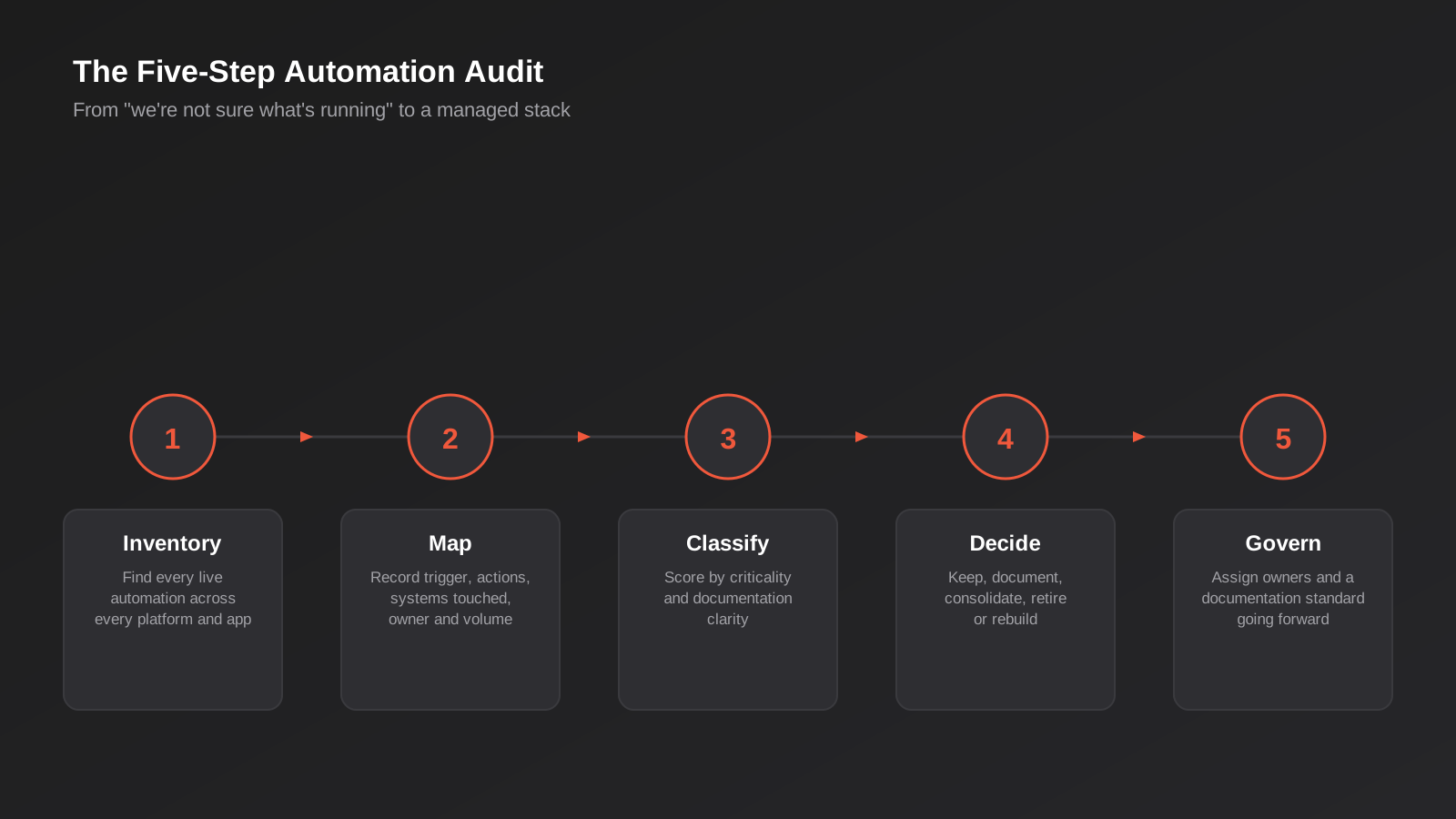
This is close to the same process we run before quoting on any automation rebuild or workflow automation engagement — you can’t fix or price what you haven’t mapped. It doesn’t require new tools, just time and a consistent method. Here’s how we’d run it.
Step 1: Build a complete inventory
Start wider than you think you need to. Most businesses underestimate their automation count because they only check the obvious platform. Work through:
- The admin or billing panel of every automation platform in use (Zapier, Make, n8n, Power Automate) — these show a full count of active zaps, scenarios or workflows, including ones built by people no longer at the company.
- Built-in automation inside each core app individually — CRM workflow rules, Xero bank rules and recurring invoices, Shopify Flow, helpdesk macros. These rarely show up in a platform-level audit because they’re not built in a dedicated automation tool at all.
- Active third-party app connections and OAuth grants inside your core systems — most CRMs, accounting platforms and ecommerce systems have a settings page listing every connected app with API access, which is often the fastest way to find automations nobody mentioned.
- A direct question to every department head: “what have you built, or asked someone to build, to save time in the last two years?” This single question surfaces more shadow automation than any technical scan.
Expect this stage to take longer than it sounds like it should. The point isn’t to produce a perfect list on the first pass — it’s to get close enough that the next steps have something real to work with. It’s normal to keep finding a few more automations for weeks after you think the inventory is complete, particularly ones built inside individual apps rather than a dedicated automation platform.
Step 2: Map what each one actually does
For every live automation, record the trigger, the actions it takes, every system it touches, which data fields move, roughly how often it runs, who built it, who currently depends on its output, and when it was last changed. A plain spreadsheet is the right tool here — the goal is visibility, not a polished system. We’ve seen businesses stall an audit for weeks trying to find the “right” documentation tool before anyone had mapped a single workflow. A workable set of columns is: automation name, platform, trigger, actions taken, systems touched, approximate monthly volume, builder, current owner, last modified date, and a one-line plain-English description of what it’s for. That last column matters more than it sounds — if nobody can write one honest sentence describing what an automation does, that’s a strong sign nobody currently understands it well enough to be responsible for it.
Step 3: Classify by risk and business value
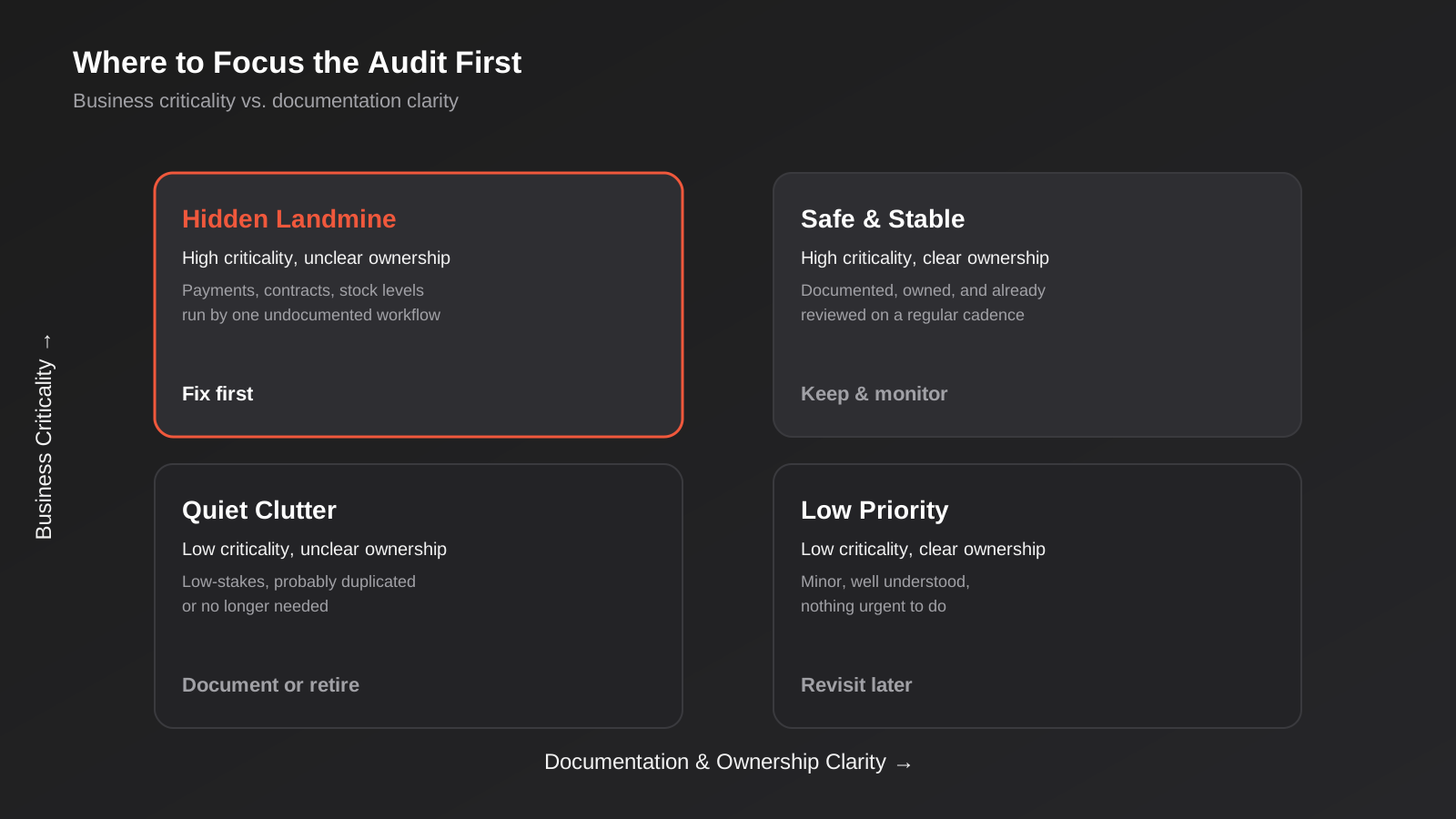
Once you can see everything, sort it on two dimensions rather than one. The first is criticality: does revenue, customer experience, payroll or compliance genuinely depend on this automation? The second is clarity: is there a current owner, is the logic documented anywhere, and would someone other than the original builder be able to fix it if it broke tomorrow? Most teams only sort by complexity or how often something runs, which misses the real risk. A simple five-step Zap that updates a payment status and that only one person understands is a far bigger liability than a complicated twelve-step workflow that’s well documented and jointly owned. When we run this exercise with a client, “high criticality” usually means anything touching customer payments, contracts, stock levels that drive purchasing decisions, or data that would trigger a notifiable breach if it leaked. “Low clarity” means no current owner, no documentation beyond the automation’s own internal settings, or a builder who’s left the business or moved to a different role.
Step 4: Decide — keep, document, consolidate, retire or rebuild
Every automation on the inventory should land in one of five buckets.
Keep as-is applies to low-risk, well-understood workflows that are already doing their job efficiently. Don’t touch these just because you’re in an auditing mindset — a working automation with a clear owner doesn’t need to be rebuilt for the sake of it.
Document applies to anything that’s working fine but exists only in one person’s head. The fix here is writing it down — trigger, logic, systems touched, why it exists — not rebuilding it. This is usually the largest bucket and the cheapest to clear.
Consolidate applies to near-duplicate automations that should become one workflow with branching logic instead of three parallel ones built by different people at different times.
Retire applies to automations built for a process, product or system that no longer exists. These show up far more often than most teams expect once they actually look — a promotion workflow from a campaign that ended two years ago, an alert tied to a supplier the business no longer uses.
Rebuild applies to anything that’s grown past what the platform it’s built on can reliably handle, or that’s patching over a gap that really needs a proper system integration rather than another workaround layered on top of the last one.
Step 5: Assign ownership and set a documentation standard
The audit only stays useful if something changes afterwards. Every live automation going forward needs a named owner, a one-line description of what it does and why, the systems it touches, and the date it was built or last changed. This doesn’t need to be elaborate — a shared register with five columns beats an elegant system nobody updates.
Consolidation Patterns That Actually Work
Once the audit is done, the temptation is to rebuild everything at once. Don’t. A few patterns consistently get the best result for the least disruption.
Merge near-duplicates into one branched workflow
If three automations all react to a new order but handle slightly different product types or payment methods, that’s usually one workflow with conditional branches, not three separate ones. Fewer moving parts means fewer places for something to silently break, and one person can understand the whole thing rather than three fragments.
Replace long point-to-point chains with a direct integration
A common sprawl pattern is data hopping through three or four automations to get from system A to system C, each one a potential failure point. If a workflow has grown past four or five hops, it’s usually cheaper and more reliable to build a direct integration between the two systems that actually need to talk. Our guide to API integrations for growing businesses covers when a direct integration beats a chain of automation steps, and what that actually costs to build properly.
Reconsider platform economics once volume has grown
Task-based billing that made sense at low volume can become the biggest line item in the stack once a business scales. This is usually the point where it’s worth re-running the platform comparison rather than assuming the tool you started with is still the right one for the volume you’re now running.
Know when the fix isn’t a smarter automation
Some workflows keep breaking not because they’re poorly built but because they’re held together across systems that were never designed to talk to each other — particularly anything syncing against an ERP or finance platform. At that point, patching the automation again isn’t the fix; a proper ERP integration or custom sync usually is. Recognising that line early saves months of rebuilding the same brittle workaround.
Archive before you delete
When an automation lands in the retire bucket, turn it off rather than deleting it outright, and keep a record of what it did and why it was retired. We’ve seen businesses delete an old automation only to discover three months later that it was quietly handling an edge case nobody remembered — a specific customer type, a regional tax rule, an old integration still limping along in the background. A short cooling-off period with the automation disabled but not destroyed costs nothing and avoids that scramble.
Governance That Stops Sprawl Coming Back
An audit without ongoing governance just resets the clock on the same problem — give it another two or three years and you’ll be back where you started, just with different automations. The businesses that stay clean aren’t the ones with the fanciest tooling; they’re the ones that made a handful of boring habits non-negotiable.
- A central automation register. One shared document listing every live automation, its owner and what it does. New automations get added before they go live, not after someone asks what they are.
- Shared business accounts, not personal logins. Automations should run on accounts the business controls and can hand over, not an individual’s personal email or Slack token.
- A naming convention. Something as simple as “[Department] – [Trigger] – [Action]” makes an automation’s purpose legible to someone who didn’t build it.
- A quarterly review. A standing thirty-minute slot to check for automations that are no longer needed, duplicated, or quietly breaking.
- A monitoring layer. Alerts that fire when a trigger stops firing, not just when the platform itself reports an error — covered in more detail in our automation monitoring guide.
- Automation ownership in offboarding. When someone leaves, “what automations do they own” needs to be a checklist item in IT and HR offboarding, not something discovered three weeks later when something stops working.
None of this requires new software or a big budget. It requires someone being accountable for it being done, and it being genuinely harder to build an unauthorised automation than to go through the register. Most sprawl we see didn’t happen because governance was tried and failed — it happened because nobody ever decided whose job it was.
How Long an Audit Actually Takes
The time an audit takes tracks the number of systems and stakeholders involved, not the number of automations. A business running forty automations across three core systems with one operations owner can usually complete a focused audit in a week or two of dedicated time. A business running a hundred-plus automations across six departments and a dozen apps will take longer, mostly because of the time it takes to track down the right people and get straight answers, not because the technical work itself is hard. It’s worth running the audit in phases rather than waiting to tackle everything at once — inventory and classify first, then work through the highest-risk quadrant before moving to lower-priority cleanup. Treating it as a staged project rather than a single sprint also means the business keeps operating normally throughout, rather than freezing all automation work for a month while the audit runs. If the audit surfaces the kind of ROI question that usually comes next — whether consolidation is actually worth the investment, and how to justify the time it takes against the risk it removes — our framework for measuring automation ROI is the natural follow-on.
Common Mistakes
- Deleting an automation before confirming nothing downstream depends on it. Disable and monitor for a cycle before removing anything that touches customer-facing or financial data.
- Treating the audit as a one-off project. Without a review cadence, sprawl rebuilds itself within a year.
- Assuming a cheaper platform is automatically the right move. Migration has its own cost and risk; it only pays off when volume or complexity genuinely justifies it.
- Handing the fix to whoever understands the mess the least. The audit needs input from whoever built the original automations, even if they’re not the one maintaining them going forward.
- Rebuilding everything in one big-bang migration. Consolidate the highest-risk automations first and leave the low-risk ones until there’s a real reason to touch them.
- Skipping documentation because “it’s just a quick Zap.” Every undocumented automation today is next year’s mystery workflow nobody can safely change.
- Auditing once and never again. New hires build new shortcuts the moment the old ones were cleaned up. A register that nobody’s required to use before going live decays within months.
- Confusing “it still runs” with “it’s still needed.” An automation can execute successfully every day while serving a process the business quietly abandoned a year ago. Working and useful aren’t the same thing — the inventory should check both.
Frequently Asked Questions
How many automations before it counts as sprawl?
There’s no fixed number. Sprawl isn’t about volume, it’s about visibility: if nobody in the business can list what’s currently live, name an owner for each one, or say confidently what breaks if one stops working, you’ve got sprawl whether that’s fifteen automations or two hundred.
Can our operations team run this audit themselves, or do we need outside help?
The inventory and mapping stages are genuinely doable in-house with the process above — it’s mostly a matter of time and persistence rather than technical skill. Where outside help earns its cost is in the classification and consolidation stages, particularly deciding which automations need a proper integration rather than another patch, and avoiding the mistakes that come from being too close to the original builds. An internal team can also struggle to be objective about workflows a colleague built, which is where a second set of eyes tends to speed things up rather than slow them down.
Will auditing or consolidating break anything that’s currently working?
Not if it’s done properly. The audit itself only observes and documents, so it carries no risk on its own. Consolidation should always follow a disable-and-monitor approach — turn off or redirect an automation, watch for a full business cycle, and only remove it once you’ve confirmed nothing downstream relied on it.
Is moving everything to n8n always the answer once we’ve outgrown Zapier?
No. Self-hosted n8n solves a cost and control problem for high-volume, repetitive workflows, but it introduces its own maintenance overhead and isn’t automatically cheaper once you account for hosting and upkeep. The right call depends on volume, in-house technical capacity and how much you value a vendor-supported platform versus full control. It’s worth deciding platform by platform, workflow by workflow, rather than as a blanket migration — a low-volume automation that rarely changes is often better left exactly where it is, even if a higher-volume one next to it genuinely justifies the move.
How do we find automations nobody told us about?
Check the connected apps or OAuth grants settings inside your core systems — CRM, accounting platform, ecommerce store — which list every third-party app with active API access, including ones nobody currently remembers approving. Combine that with a direct question to every department head about what they’ve built or commissioned to save time, which usually surfaces more than any technical scan alone.
What’s the first thing to fix once the audit is done?
Start with the quadrant where business criticality is high and documentation or ownership is unclear — typically anything touching customer data, payments or compliance that only one person understands. That’s where a silent failure does the most damage, and it’s usually a shorter list than people expect.
Where to Start
If you can’t currently list every automation running in your business, who owns each one, and what happens if it stops — that’s the starting point, not a rebuild. A proper inventory and risk classification usually takes less time than businesses expect, and it tells you exactly where to spend any further budget rather than guessing.
We run this kind of audit regularly before quoting on custom automation and integration work, because it’s the only way to price a fix accurately instead of patching over a symptom. It also tends to change the brief — businesses often come to us asking for a new automation, and the audit reveals that consolidating three existing ones solves the actual problem for less than building a fourth would have cost.
If your automation stack has grown past the point anyone fully understands it, we’re happy to have a conversation about what an audit would actually look like for your systems.
Keep reading
Related posts

Changing Live Automations Safely: Staging, Version Control and Rollback for Zapier, Make and n8n (2026)
How to draft, test, release and roll back changes to live Zapier, Make and n8n automations without breaking invoices, orders or customer…

Peppol E-Invoicing for Australian Businesses: Automating Accounts Payable From Structured Invoices (2026)
Peppol e-invoicing in Australia: what is and isn't mandatory, how to pick an access point, and how to automate accounts payable once…

Clean Your Data Before You Automate: A Practical Guide to CRM Data Cleanup for Australian Businesses (2026)
Connecting systems on messy data copies the mess everywhere. Here's how to clean, match and merge records before you automate or integrate.
Got a project you'd like to talk through?
Tell us what you're working on — we'll come back with a plan.
