
Custom Software vs Off-the-Shelf: A Decision Framework for Growing Australian Businesses (2026)
 Jignesh Vagadiya
02/09/2026
22 min read
Jignesh Vagadiya
02/09/2026
22 min read
Every growing business hits the same wall eventually. You started on a handful of off-the-shelf tools — a CRM, a project management app, maybe Xero and a Shopify store bolted together with a couple of Zaps — and for a while that setup carried the business further than you expected. Then the workarounds started piling up. Someone’s manually re-keying data between two systems every morning. A process that should take one click takes four tabs and a spreadsheet. The tool that was supposed to save time is now the reason a task takes twice as long.
That’s usually the moment the question “should we just build our own thing?” gets asked out loud for the first time. It’s rarely asked calmly. It’s asked after a data export goes wrong, after a subscription price jumps 40% at renewal, or after the fifth person in a row says “the system doesn’t really do that, so we just do it in a spreadsheet.” We get this call a lot, and the honest answer is almost never a clean “build” or “buy.” It’s a question of which specific parts of the operation deserve custom software and which parts are still genuinely well served by something you can sign up for this afternoon.
This guide is the framework we actually use with clients weighing up custom software vs off-the-shelf — how to tell the difference between a process problem and a software problem, what custom development really costs and takes in Australia right now, and where a smaller, lower-risk build like an MVP or a PWA gets you most of the value without the multi-year commitment. If you’re trying to work out whether your business has outgrown its stack or just needs to configure it properly, this is the checklist we’d walk you through in a discovery call.
Custom software vs off-the-shelf: it’s not one question, it’s several
Almost nobody actually needs to choose between a fully custom platform and a stack of SaaS subscriptions. Most businesses that get real value from custom development are running a hybrid: standard tools for standard jobs, and a purpose-built system for the one or two processes that are actually specific to how they operate. Payroll, accounting, email marketing and generic CRM record-keeping are solved problems — buying is almost always right there. The part worth building is usually much narrower: a client portal, a quoting engine with pricing logic nobody else has, an inventory allocation rule that’s unique to your supply chain, or a layer that connects three existing systems so your team stops doing the connecting by hand.
Framing it this way changes the conversation. Instead of “should we build custom software,” the useful question becomes “which of our processes are generic, and which ones are actually where we compete?” A generic process run through custom software is expensive and pointless — you’re paying to reinvent something a $50-a-month tool already does well. A differentiating process forced into an off-the-shelf tool is the opposite problem: you’re bending the way you work to fit software that was designed for someone else’s business, and every workaround is a small tax you keep paying.
Where off-the-shelf earns its keep
It’s worth being upfront about this, because agencies that only sell custom builds have an obvious incentive to talk this part down: for a large share of what a business needs, buying is the right call and will remain the right call. The economics are straightforward — a SaaS vendor spreads their development cost across thousands of customers, which is why you can get genuinely sophisticated software for a monthly fee that wouldn’t cover a week of custom development. You’re also not on the hook for security patching, uptime, or feature development; that’s the vendor’s job, and a good vendor is better resourced to do it than most internal teams.
The jobs SaaS is genuinely built for
Anything that’s a solved, well-understood problem across most businesses in your category is a strong candidate to buy rather than build. Accounting and payroll (Xero, MYOB), email marketing and marketing automation entry points, help desk and ticketing, basic project management, and standard ecommerce storefronts on Shopify or WooCommerce all fall into this bucket. These tools have had years and, in some cases, decades of refinement poured into them by teams far larger than any single business could justify hiring. Trying to out-build Xero’s accounting engine or Shopify’s checkout flow is not a fight worth having — the smarter move is almost always to configure these tools well and, where genuinely needed, connect them to the parts of the business that are actually different.
The same logic applies to workflow automation between these tools. Before assuming a gap between two systems needs a custom integration, it’s worth checking whether a tool like Zapier, Make or n8n already covers it — we’ve written a detailed comparison of Zapier vs Make vs n8n for Australian businesses that goes through when each one is the right fit. A huge amount of what looks like “we need custom software” at first glance turns out to be “we need someone to properly wire up the tools we already pay for,” and that’s a far cheaper problem to solve.
The point where the workarounds start costing more than the subscription
The signal that off-the-shelf has stopped working isn’t usually dramatic. It shows up as a slow accumulation of small frictions: a spreadsheet that’s become a shadow system of record because the CRM can’t model your actual sales process, a person whose real job has quietly become manually reconciling two systems that don’t talk to each other, or a customer-facing process that requires an internal workaround every single time because the platform’s standard flow doesn’t match how your business actually sells or delivers.
A useful test: if you asked five people on the team to describe the “real” process for something and they each described a slightly different manual workaround around the same software limitation, that’s not a training problem. That’s the software telling you it wasn’t built for this. The other reliable signal is cost scaling in the wrong direction — when a SaaS tool’s per-seat or per-transaction pricing means your software bill grows faster than your revenue, at some point the maths flips in favour of owning the asset outright rather than renting a slice of someone else’s platform forever.
What “custom” actually means in 2026 (it’s rarely all-or-nothing)
One reason the build-vs-buy conversation gets stuck is that “custom software” sounds like one big, expensive, all-or-nothing decision. In practice it usually isn’t. There are a few genuinely different shapes a custom project can take, and picking the right one matters as much as the build-vs-buy decision itself.
Full custom builds
This is what most people picture: a bespoke web application built from the ground up around your specific workflow, data model and users. It’s the right call when the process you’re automating is genuinely a competitive advantage, when no existing platform models your business logic without heavy compromise, or when the software itself is becoming a product you sell or a core part of how you deliver. Full web app development gives you complete control over the data model, the workflow, and how the system scales — but it also means you own the full lifecycle: hosting, security, maintenance and the roadmap.
Extending a platform you already run
A lot of what looks like “we need custom software” is actually “we need a custom feature on top of the platform we already trust.” If your ecommerce store runs on Shopify, extending it with a custom app or a headless front end is usually far cheaper and lower-risk than replatforming onto something bespoke. You keep the parts of the platform that already work — payments, checkout, inventory sync, PCI compliance — and add the one thing it doesn’t do out of the box. This is the sweet spot for a lot of Australian retailers and B2B sellers: the commerce engine stays standard, and the differentiation gets built as an extension rather than a replacement.
Building on top of your CRM or ERP through its API
The third shape, and the one we see underused the most, is building a thin custom layer that sits on top of existing systems and talks to them through their APIs, rather than replacing any of them. Your ERP stays your ERP, your CRM stays your CRM — but you build the specific piece of logic, reporting, or client-facing interface that none of them offer natively, and it pulls and pushes data through proper integrations. This is where a lot of ERP integration work actually lives: not ripping out the core system, but building the connective tissue and the custom logic around it that turns three disconnected platforms into one coherent operation. It’s usually the cheapest of the three paths and the one with the least disruption to a team that already knows how to use its existing tools.
A practical framework: the questions worth asking before you decide
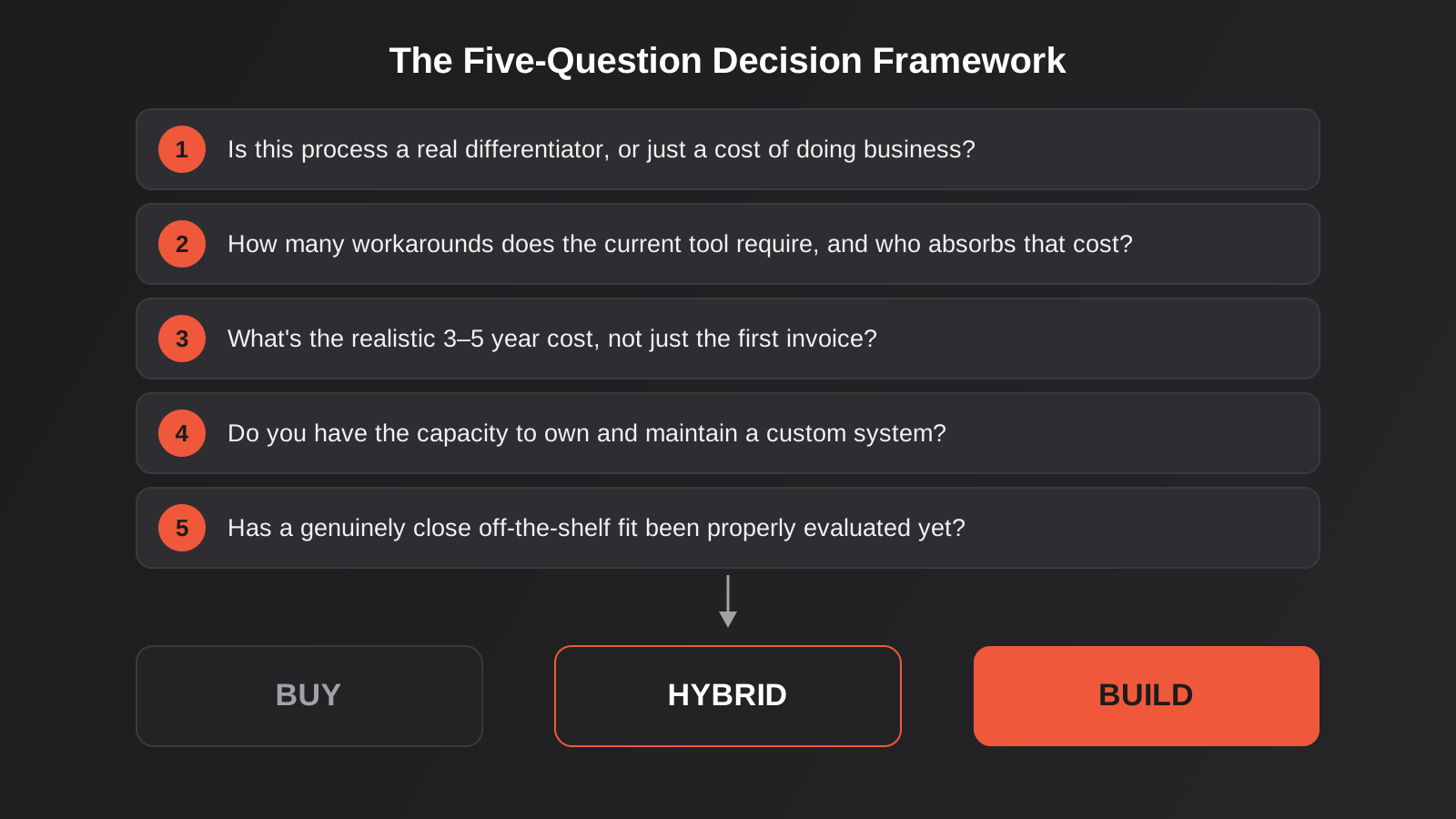
When a client brings us a build-vs-buy decision, we work through the same handful of questions regardless of industry. None of them alone is decisive, but together they usually make the answer obvious.
Is this process actually a competitive differentiator, or just a cost of doing business? If a competitor running the exact same off-the-shelf tool would be no worse off than you, buying is fine. If the way you handle this process is genuinely part of why customers choose you, it’s worth owning.
How many workarounds does the current tool require, and who’s absorbing that cost? Count them properly — not just the big obvious ones, but the small daily frictions. A workaround that takes ten minutes a day doesn’t sound like much until you multiply it by every working day and every person doing it.
What’s the realistic 3–5 year total cost, not just the first invoice? Off-the-shelf pricing usually scales with usage — more seats, more transactions, more contacts — while custom software has a higher upfront cost but a comparatively flat maintenance cost afterwards. Model both curves out a few years, not just the first quarter.
Do you have (or can you get) the internal capacity to own a custom system? Custom software isn’t a one-off purchase; it’s an asset that needs a maintenance relationship, whether that’s in-house or with an agency. If nobody in the business can own that relationship, a well-configured SaaS tool with a vendor who owns the roadmap is genuinely the safer choice, at least for now.
Is there a genuinely close off-the-shelf fit you haven’t properly evaluated yet? This one gets skipped more often than it should. We’ve had projects where the client was ready to commission a full build, and a half-day workshop on configuring an existing tool properly — custom fields, a different plan tier, a well-built integration — solved 80% of the problem for a fraction of the cost. Always rule this out properly before committing to a build.
Testing a custom build without betting the business on it
One of the biggest reasons businesses avoid custom software for too long isn’t that it’s the wrong call — it’s that the word “custom” conjures a six-figure, twelve-month project with no way to validate the idea until it’s finished. That fear is reasonable if you’re commissioning a full platform on day one, but it’s not how a sensible custom build actually starts.
The right first step is almost always an MVP — a minimum viable product that builds the smallest version of the system that actually tests the core assumption, gets used by real people doing real work, and gives you evidence before you commit to the full build. A good MVP isn’t a stripped-down demo; it’s a genuinely functional piece of software scoped down to the one workflow that matters most, built fast enough that you’re learning from real usage within weeks rather than months. If the MVP proves the concept, you’ve validated the investment before the bigger spend. If it doesn’t, you’ve spent a fraction of a full build finding that out, and you still have an off-the-shelf fallback to lean on while you rethink the approach.
This is also where the “build the differentiator, buy the rest” principle earns its keep in practice. An MVP doesn’t need to replace your accounting system or your CRM on day one — it needs to prove out the one new capability that doesn’t exist anywhere in your current stack, and it can keep talking to your existing tools through simple integrations while it does that. That keeps the scope tight, the cost predictable, and the risk contained to the one thing you’re actually testing.
The PWA question: a build-vs-buy decision worth understanding on its own
There’s a specific version of the build-vs-buy decision that comes up constantly and deserves its own section: do you need a native mobile app, or does a Progressive Web App cover what you actually need? This is really the same framework applied at a smaller scale — native app development is the “full custom, high commitment” option, and for a lot of businesses it’s solving a problem they don’t actually have.
A PWA is a web application that behaves like a native app — installable on a home screen, capable of working offline, able to send push notifications — but built and deployed as a single web codebase rather than separate iOS and Android apps that need their own app store approval process, their own release cycles, and often separate development teams. For a business whose “app” need is really about convenience, repeat engagement or offline access to information (a loyalty program, a booking system, a field service tool for staff), a PWA usually delivers the experience customers actually want at a fraction of the cost and ongoing maintenance burden of native.
Native still wins when you genuinely need deep device integration — heavy use of Bluetooth or NFC hardware, background processing that iOS and Android restrict for web apps, or when app store presence itself is part of the marketing strategy and customers expect to find you there. But those are specific, identifiable requirements, not a default. Before committing to two native codebases and the ongoing cost of maintaining them, it’s worth being honest about which category your business actually falls into.
What this actually costs in Australia
Numbers help ground this conversation, so here’s the shape of it, in general terms rather than a fixed quote — every project varies with scope and complexity, and we’d always rather scope a real project than throw out a headline figure that doesn’t hold up.
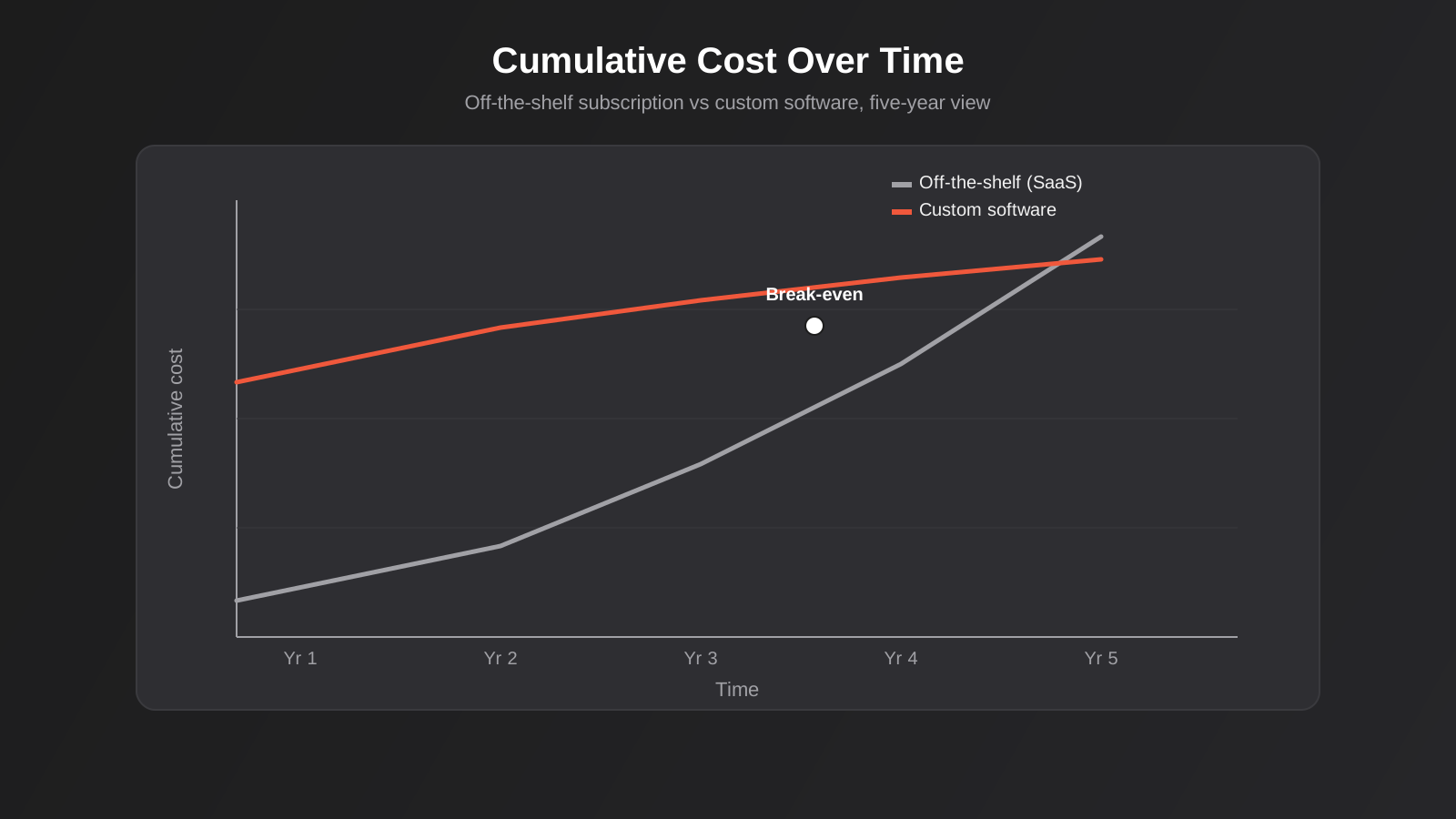
Off-the-shelf SaaS pricing is usually a monthly or annual subscription that scales with seats, contacts or transaction volume — low friction to start, and the cost is visible and predictable in the short term. The catch is that predictability doesn’t mean it stays cheap: as a business grows, per-seat and usage-based pricing means the software bill grows right alongside headcount and revenue, sometimes faster, and there’s no ceiling on that beyond what the vendor decides to charge at renewal.
Custom development runs on the opposite curve. There’s a real upfront investment — discovery, design, build and testing — and the size of that investment depends heavily on scope: a focused MVP validating one workflow is a very different project to a full multi-module platform replacing several systems at once. After launch, the ongoing cost is maintenance, hosting and incremental development rather than a per-seat fee, which is where the economics tend to flip in your favour once the user base or transaction volume gets large enough. The break-even point is different for every business, which is exactly why the five-question framework above matters more than any generic price comparison — the right answer depends on your growth trajectory, not a rule of thumb.
Vendor lock-in and who actually owns your data
There’s a cost to buying that rarely shows up in the pricing page: what happens when you want to leave. Most SaaS contracts make it easy to get your data in and comparatively hard to get it out in a usable form. Export tools are often an afterthought, API rate limits can turn a full data export into a multi-day job, and the data model on the way out rarely matches the data model you’d need on the way into whatever comes next. None of this is usually deliberate bad faith — it’s just not what the vendor optimised for — but it means the true cost of a SaaS platform includes the exit cost, and that cost tends to grow every year you stay, as more of the business becomes dependent on how that specific tool structures its data.
This is worth factoring into the build-vs-buy decision directly, not as an afterthought. If a process is genuinely core to the business and you’re relying on a third-party platform to hold the system of record for it, you’re accepting some amount of strategic risk on that vendor’s pricing decisions, product direction and even their continued existence. That’s a perfectly reasonable trade-off for non-core functions — nobody needs to own their payroll platform’s source code. It’s a much bigger deal for whatever function actually differentiates the business, which is exactly why that’s the part worth owning outright.
The practical middle ground, and the one we usually recommend, is to build the custom layer so it doesn’t assume permanence in any single upstream platform. A well-built integration with your CRM or ERP should be replaceable if that platform changes or you eventually migrate away from it, without having to rebuild the custom logic sitting on top of it. That’s a design decision made at the start of a project, not something you can retrofit later, which is one more reason this conversation is worth having properly before development starts rather than mid-build.
Integrations and migrations change the calculus
Two situations tend to accelerate a build-vs-buy decision faster than anything else: when a business is trying to connect systems that were never designed to talk to each other, and when a business is outgrowing a platform entirely and facing a migration.
On the integration side, the honest starting point is almost always to ask whether a standard integration or automation platform can do the job before reaching for custom development. But some systems — particularly ERPs, older line-of-business software, and B2B procurement portals that expect structured formats like cXML or OCI — simply don’t have the kind of prebuilt, plug-and-play connectors that modern SaaS tools do. That’s where custom ERP integration work becomes the only realistic path: building the specific connection your ERP and your other systems need, properly authenticated, properly error-handled, and built to survive the ERP vendor’s next update rather than breaking on it.
Platform migrations raise a related but distinct question: when a business has outgrown its current platform, is the answer to migrate to a bigger off-the-shelf platform, or to use the migration as the moment to build something purpose-fit instead? There’s no universal answer, but the same framework applies — if the destination platform is still solving a generic problem well, migrate to it properly rather than reinventing it. If the business has genuinely outgrown what any off-the-shelf platform in that category offers, the migration project is exactly the right moment to scope a custom alternative, because you’re already touching the data and the workflows.
Common mistakes we see
- Building custom software for a process that’s genuinely generic, because nobody checked whether a well-configured off-the-shelf tool would have solved it for a tenth of the cost.
- Forcing a differentiating process into an off-the-shelf tool for years past the point it stopped fitting, absorbing the workaround cost quietly instead of ever properly costing it out.
- Commissioning a full custom platform as the first step, instead of validating the core assumption with a smaller MVP first and finding out early that the workflow needed to change.
- Building a native app for both iOS and Android when a PWA would have delivered the same customer experience for a fraction of the ongoing cost.
- Treating custom software as a one-off purchase rather than an asset that needs an ongoing maintenance relationship, then being surprised when nobody owns it eighteen months later.
- Skipping proper API integration work and instead relying on someone manually re-keying data between systems, until that person leaves and the process quietly breaks.
- Choosing a build-vs-buy path based on what a vendor or agency is trying to sell, rather than on the five questions that actually determine the right answer for the business.
Frequently Asked Questions
How do I know if my business has actually outgrown off-the-shelf software, or if we just haven’t configured it properly?
Start by properly auditing the workarounds your team is already running — spreadsheets that have become shadow systems of record, manual data re-entry between tools, or processes everyone describes slightly differently. If a short configuration review or a better integration between your existing tools would remove most of that friction, you likely haven’t outgrown the platform yet. If the workaround exists because the core workflow itself isn’t something the platform was ever designed to model, that’s a stronger signal you’re dealing with a genuine gap rather than a setup issue.
Is custom software always more expensive than SaaS in the long run?
Not always, and it depends heavily on how your usage scales. SaaS pricing usually grows with seats, contacts or transaction volume, so a business with a large or fast-growing user base can end up paying substantially more over several years than the upfront cost of owning a comparable custom system. A smaller business with modest, stable usage may never reach that crossover point, in which case a subscription genuinely stays the cheaper option indefinitely.
What’s the difference between an MVP and just building a smaller version of the full product?
An MVP isn’t simply “the full product with fewer features” — it’s specifically scoped to test the riskiest assumption in the project with real users, as fast as possible. A good MVP might deliberately skip features that will eventually matter a lot, if those features aren’t what determines whether the core idea actually works. The goal is learning, not a smaller launch.
Can a PWA replace a native app entirely?
For a lot of use cases, yes — particularly anything centred on content, bookings, ordering, loyalty or account management, where the value is convenience and repeat engagement rather than deep hardware access. Where native still wins is heavy use of device hardware the browser can’t fully access, background processing the OS restricts for web apps, or a genuine strategic need for app store presence. Most businesses asking this question fall into the first category, not the second.
Do we need to replace our CRM or ERP to get custom functionality on top of it?
Usually not. Most of the value in custom development around an existing CRM or ERP comes from building a layer on top that talks to the core system through its API, rather than replacing the system itself. This is generally far cheaper, far less disruptive to a team that already knows the existing tool, and lower-risk than a full platform replacement, and it’s the approach we recommend by default unless the core system itself is genuinely the problem.
How long does a typical custom build take from decision to launch?
It depends entirely on scope, but a focused MVP validating a single core workflow is typically measured in weeks to a few months, not a year. A larger platform replacing multiple systems or supporting several distinct user roles takes longer and benefits from being broken into phases rather than one large release. The timeline is one more reason to start with the smallest version that genuinely tests the idea — it gets you real usage and real feedback far sooner than a single big-bang launch.
Where to start
If you’re somewhere in the middle of this decision right now — not sure whether the friction your team is dealing with is a configuration problem or a genuine software gap — the fastest way to get clarity is usually a short, structured conversation rather than a lengthy discovery document. We’d rather spend half an hour understanding what’s actually breaking down in your operation and tell you honestly if the answer is a better integration, a smarter use of the tools you already pay for, or a genuinely custom build, than sell you a project you don’t need.
If that’s useful, get in touch and we’ll talk through where your business actually sits on the build-vs-buy spectrum, and what the smallest sensible next step looks like from there.
Keep reading
Related posts
Who Owns Your Custom Software? Source Code, IP and Handover for Australian Businesses (2026)
Paying for custom software doesn't mean you own it. What Australian contracts must say about code ownership, licences, handover and escrow.
Role-Based Access Control for Client Portals and Internal Tools: A Practical Guide
RBAC for client portals and internal tools: roles, record-level isolation and audit logs explained — a practical guide for growing Australian businesses.
Single Sign-On for Australian Businesses: When SSO Is Worth the Setup
SSO for growing Australian businesses: SAML vs OAuth vs OIDC explained, how to pick an identity provider, costs, and rollout mistakes to…
Got a project you'd like to talk through?
Tell us what you're working on — we'll come back with a plan.
