
Backup and Disaster Recovery for Custom Software and Automations: A Practical Guide for Australian Businesses (2026)
 Jignesh Vagadiya
08/11/2026
23 min read
Picture a Monday morning phone call that sounds small. The quoting tool has stopped saving new jobs. By lunchtime it is clear the database was corrupted by a failed update over the weekend, and the person who built the tool left the business last year. There is a backup. It is a nightly file copy sitting on the same server that just failed, and nobody has ever tried to restore it.
Scenarios like this are not unusual, and it is rarely about hardware. Most Australian businesses with a custom app, a client portal or a stack of Zapier, Make or n8n workflows have something that is “backed up” in the loosest sense. A setting is ticked, a plan includes snapshots, an old developer once said it was handled. What they do not have is an answer to two plain questions: how much work can we afford to lose, and how long can we afford to be down?
This guide is about backup and disaster recovery for the software that runs your operations, not your marketing website. We cover the two numbers that drive every decision, what actually needs protecting in a custom app or automation stack (it is more than the database), how to build a setup proportionate to your size, how to test it, and the mistakes we see most often. If you are only after website backups, our website care and support plans cover that side. Everything below is about business systems.
Why backing up business software is different from backing up files
Backing up a laptop is easy to reason about. Files go somewhere else, and if the laptop dies you copy them back. Business software is harder because it is made of several moving parts that only work together at a specific point in time.
A typical custom web app has application code, a database, uploaded files such as PDFs and photos, environment configuration, secrets such as API keys, and a set of third-party services it depends on. An automation stack has workflow definitions, credentials, run history, and the connections to every system it touches. Lose any one of these and the others may be useless. A perfect database copy does you no good if the encryption key that unlocks half the columns was never saved. A restored workflow is dead weight if every credential inside it needs re-authorising and the person who knows the admin logins has gone.
There is also the problem of consistency. If your order table is copied at 2:00 am and your uploaded invoices at 2:40 am, the two may disagree about what exists. Databases have proper tools for taking consistent copies. Copying the data directory file by file while the database is running is the classic way to produce a backup that looks fine and refuses to start.
Backup, replication and high availability are three different things
People use these words interchangeably, and it causes real damage. A backup is a separate, point-in-time copy you can go back to. Replication keeps a second live copy in sync with the first, which is brilliant when a server dies and useless when someone deletes a table, because the deletion replicates instantly. High availability keeps the service running through a failure, usually by running more than one of everything.
If you remember one thing from this section: replication protects you from hardware failing, and backups protect you from people and software failing. Most real incidents are the second kind. A bad migration, a script run against the wrong environment, an integration that overwrites good data with blanks, a staff member clearing a list they thought was a test. You need both ideas in play, and only backups let you rewind.
The two numbers that drive every decision: RPO and RTO
Before anyone picks a tool, you need to agree two numbers with the business. They sound like jargon, but they are really just two questions asked in plain language.
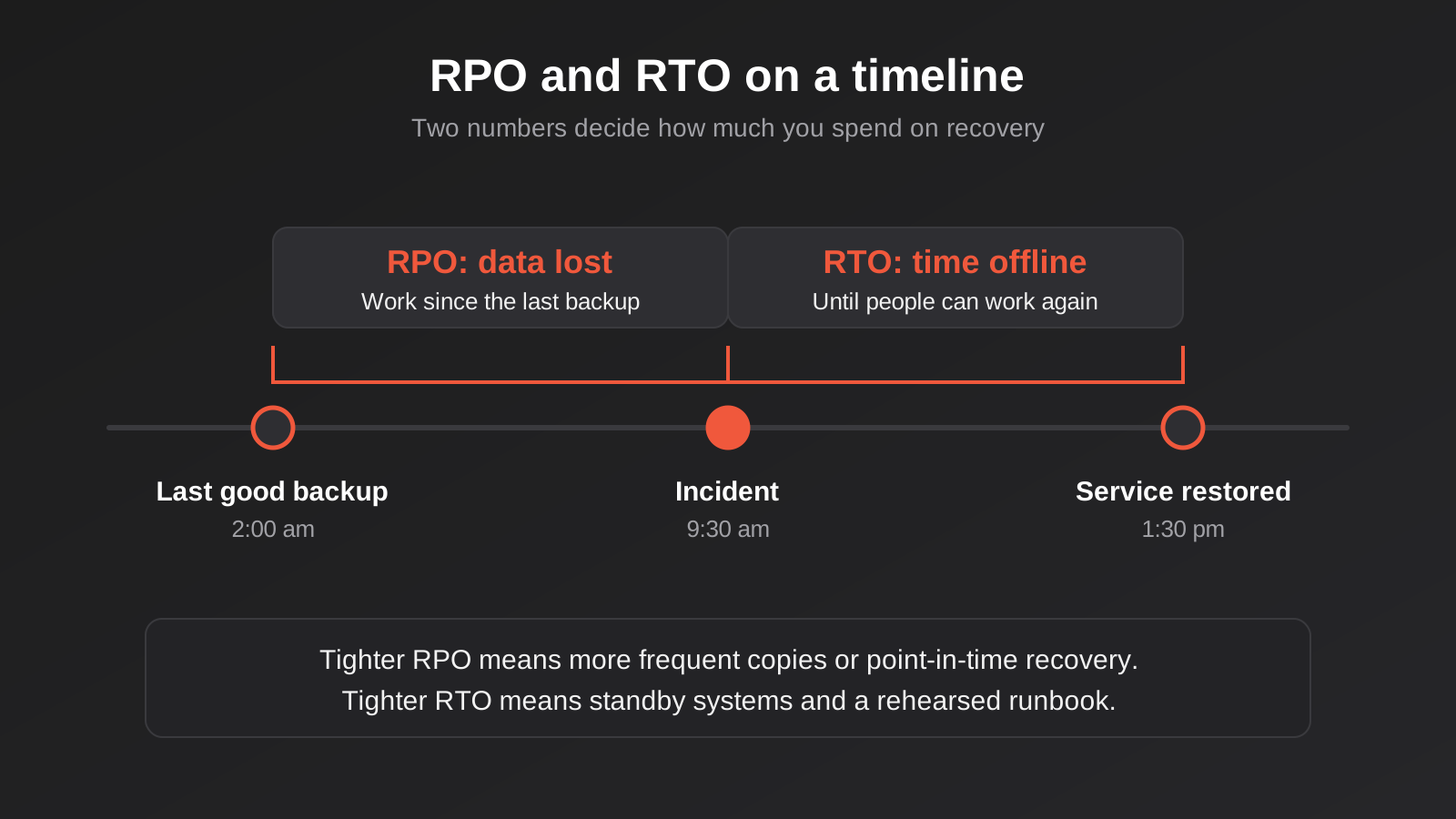
- Recovery Point Objective (RPO): how much recent work can we afford to lose? If the answer is “a day”, nightly backups are fine. If the answer is “a few minutes”, you need continuous log shipping or point-in-time recovery.
- Recovery Time Objective (RTO): how long can this system be unavailable before it hurts? If the answer is “a couple of days”, a documented rebuild from backups is acceptable. If the answer is “an hour”, you need a warm standby or a very rehearsed runbook.
The tighter either number gets, the more the setup costs, and the relationship is not linear. Going from a 24-hour RPO to a 1-hour RPO is usually modest. Going from 1 hour to 1 minute is a different class of engineering. The same applies to RTO. This is why asking “can it be fully protected?” gets you nowhere, and asking “what would an outage of this system cost per hour?” gets you somewhere useful.
How to set the numbers without guessing
Sit down with whoever actually uses the system and ask three things. What do you do the moment it is unavailable? How long until customers or staff feel it? What can be re-entered by hand, and how long would that take?
The answers are often surprising. A booking system may feel critical, but if staff can fall back to a shared calendar and a phone for a day, the true RTO might be four to eight hours and the RPO a single day of bookings that can be re-keyed from emails. A quoting tool that feeds your accounts system may tolerate an afternoon of downtime but not lost quotes that customers have already accepted, so its RPO is much tighter than its RTO. Different systems in the same business deserve different numbers, and that is fine. Nobody needs to give every system the premium treatment.
A useful trick is to put a rough dollar figure on an hour of downtime and a rough figure on an hour of lost data. If an hour offline costs you a few hundred dollars in lost productivity, spending thousands a month on instant failover is not sensible. If it costs a large share of daily revenue, a cheap nightly dump is under-investing.
Write them down per system
Put the numbers in a one-page table: system, owner, RPO, RTO, where the data lives, and who restores it. This single page is more valuable than most elaborate disaster recovery documents because it forces decisions, and it is the first thing anyone will want during an incident. It also exposes the awkward gaps, like a system nobody can name an owner for.
What actually needs protecting
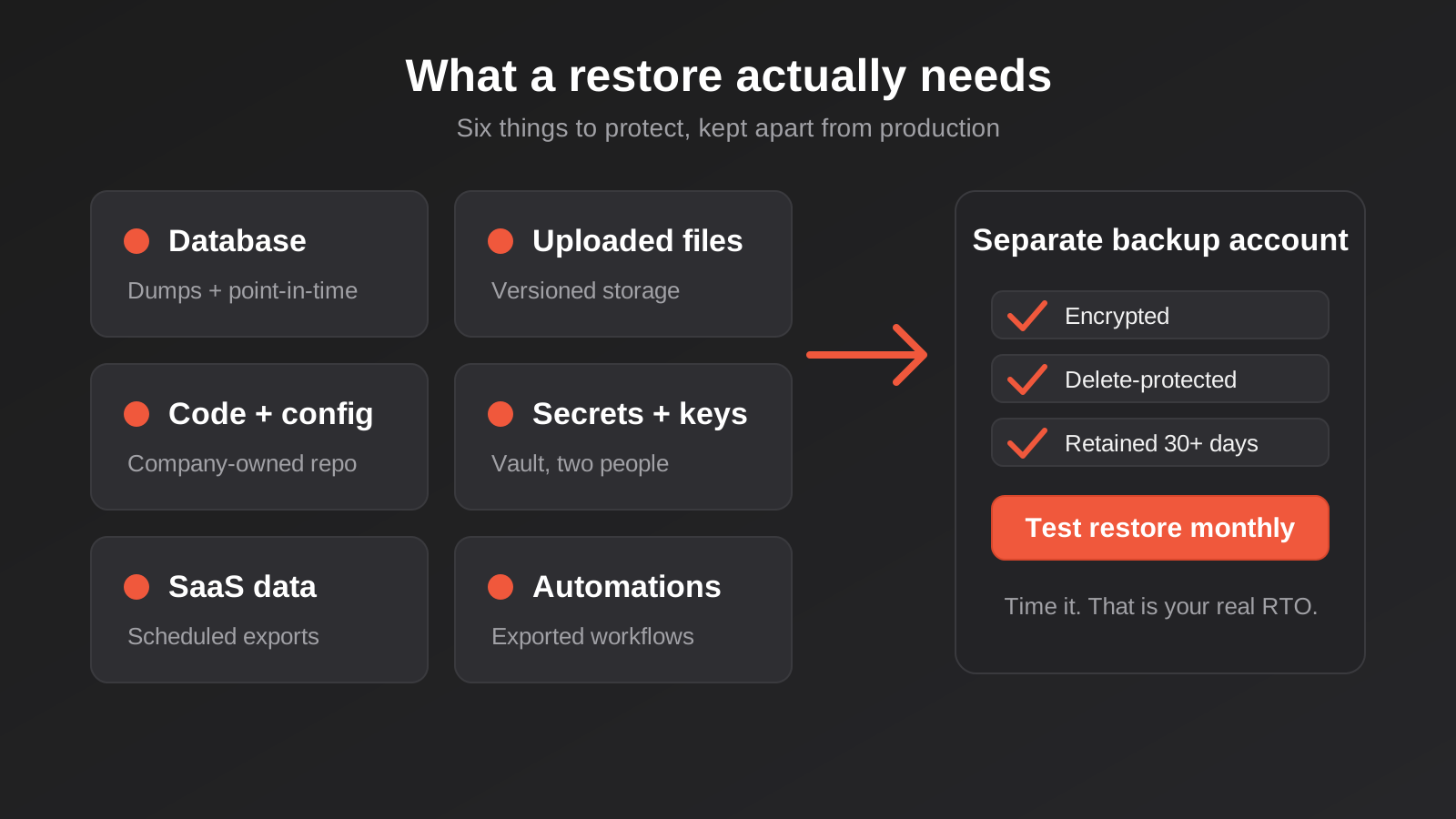
Work through your systems with this checklist. Each item is a place where a restore commonly falls over.
The database, done properly
For most custom apps this is the crown jewels. Use the database’s own tooling: logical dumps (such as pg_dump for Postgres) for portable copies, and continuous archiving with point-in-time recovery for tighter RPOs. Managed database services from the major cloud providers generally offer automated snapshots and point-in-time restore with a retention window you configure. Check what that window is. A default of a few days will not help you discover that a bad import quietly damaged records three weeks ago.
Take at least some copies as logical dumps even if you rely on snapshots. A snapshot is tied to that provider and that database engine version. A logical dump can be restored into a fresh server somewhere else if the provider itself has a bad day or you need to move.
Uploaded files and documents
Customer-uploaded PDFs, signed documents, product images and generated reports usually live in object storage or on a server disk, separate from the database. They need their own backup, and the two need to be roughly in step. Turn on versioning in object storage so an overwritten or deleted file can be pulled back, and consider object lock for anything with legal retention needs. Remember that in Australia business records generally need to be kept for years, not months, so retention is a requirement and not a nice-to-have.
Code, configuration and infrastructure
Code should be in version control under an account your business owns, not in a developer’s personal account. That ownership problem is the first thing we check whenever we inherit a system. Beyond the code, capture how the thing is deployed: server setup scripts, container definitions, DNS records, scheduled jobs, and environment variable names. If the only copy of the deployment knowledge is inside one person’s head, your real RTO is however long it takes to reach them.
Secrets and encryption keys
This is the one people forget. API keys, database passwords, signing secrets, and especially encryption keys need a secure, separate home, such as a secrets manager or a properly managed password vault with more than one authorised person. If your database stores encrypted fields and the key lives only on the server that just died, your backup is a pile of unreadable bytes. Treat key recovery as part of the backup, and test it.
Third-party SaaS data you assumed was safe
Your CRM, accounting package, helpdesk and project tools all hold business data, and most providers back up their own infrastructure but not your mistakes. If a staff member bulk-deletes contacts or an integration overwrites a field across ten thousand records, the provider will often tell you the data is gone or offer a paid, time-limited restore. Many platforms have an export or API that lets you take your own regular copy. For the systems that matter, schedule that export to storage you control. A weekly export of key tables is a cheap safety net.
Backing up your automations: the part nobody thinks about
Automation platforms are software, and the workflows inside them are your business logic. They deserve the same care as code. Yet we regularly meet businesses with dozens of Zapier or Make scenarios that exist nowhere else. If the account is suspended, the one admin leaves, or a well-meaning colleague edits the wrong step, the logic is gone and so is the knowledge of why it was built that way.
What to capture for each platform
- n8n: workflows can be exported as JSON, including through the command line, and credentials can be exported too (encrypted with the instance’s encryption key, which you must also store safely). The database that holds execution history and settings needs its own backup if you self-host.
- Make: scenarios can be exported as blueprints. Export them on a schedule, or at minimum after any significant change, and keep the files in version control with a sensible commit message.
- Zapier: export options are more limited, so documentation matters more. For each Zap, keep a short written record of the trigger, the actions, the field mappings that are not obvious, and which accounts it connects to. Screenshots of the editor are better than nothing.
Whichever tool you use, store the exports somewhere that is not the automation platform itself. A git repository under a company-owned account works well because you also get history. You can see who changed what, and you can roll a single workflow back without touching the others. That ties directly into changing live automations safely, since a backup you can diff is also a rollback plan.
The credentials problem
Restoring a workflow is the easy half. Every connection inside it, whether to your CRM, your accounting system or your email provider, usually needs credentials that are tied to a specific user or app registration. If those were set up under a former employee’s login, they may stop working the day that person’s account is closed. We wrote about exactly this in automation ownership when staff leave. The disaster recovery version of the same lesson: keep a register of which connection uses which identity, and make sure at least two people can re-authorise it.
Run history and in-flight work
An often-missed gap is what was happening at the moment of failure. If an outage hits while 200 orders are mid-flight through a workflow, restoring last night’s state may re-run some, skip others and duplicate the rest. Before an incident, decide how you will reconcile. Can the workflows be safely re-run? Is there a source of truth, such as the shop or CRM, that you can compare against once you are back? Having that answer ready turns a messy recovery into a checklist.
Building a proportionate backup setup
You do not need an enterprise programme. You need something that matches your RPO and RTO and that somebody is accountable for. Here is how we think about three levels of investment.
Level one: the sensible minimum
For internal tools and low-risk systems where a day of lost work and a day of downtime are survivable. Automated daily database backups, kept for at least 30 days. Object storage versioning. Code in a company-owned repository. Workflow exports taken on change. Secrets in a vault with two authorised people. A documented restore procedure that someone other than the builder has read. This is inexpensive, and it already puts you ahead of most small businesses.
Level two: tight data, patient recovery
For systems where losing more than a few minutes of data is painful but a few hours of downtime is tolerable, typical of order handling, quoting and booking. Add continuous archiving or point-in-time recovery on the database, cross-region or cross-account copies, longer retention with a tiered schedule (daily for a month, weekly for a quarter, monthly for a year), and a scripted rebuild so the environment can be recreated rather than hand-built under stress.
Level three: near-continuous availability
For revenue-critical platforms where an hour offline is serious. Here you are paying for a warm standby or multi-zone setup, automated failover, and regular failover drills. It costs real money in both infrastructure and engineering time, so be honest about whether the system earns it. Many businesses discover that only one or two systems justify this level, and the rest sit comfortably at level one or two.
The 3-2-1 idea, applied sensibly
The old rule still holds: three copies of important data, on two different kinds of storage, with one copy somewhere else. For cloud systems the practical translation is that your backups should not live in the same account, with the same credentials, as production. If an attacker or a mistaken script can reach production, it should not also be able to delete every backup. Separate accounts, restricted delete permissions and retention locks are what turn a backup from “probably fine” into something that survives a ransomware attempt or a compromised admin login.
Where the data physically sits
If your systems hold personal information about customers, where backups are stored matters. Under the Privacy Act, Australian Privacy Principle 8 deals with sending personal information overseas, and APP 11 requires reasonable steps to protect it from loss and misuse. Backups count. Pick Australian regions for backup storage where you can, and check that any backup vendor is covered by the same assumptions you made about production.
Testing: the step that turns a backup into a recovery
A backup you have never restored is a hope. It is common to find, on the first real test, that the backup job has been failing quietly for months, or that it works but the restore takes eleven hours instead of the two you assumed. You want to learn those facts on a calm Tuesday, not during an outage.
A realistic testing rhythm
- Automated checks, every run: the backup job reports success or failure, its size is compared to the previous run, and an alert fires if either looks wrong. A backup that suddenly shrinks by 90 per cent is telling you something.
- Monthly: restore a recent database backup into a throwaway environment and run a few sanity queries. Open a few restored files. Takes under an hour once scripted.
- Quarterly: rebuild a whole system from scratch using only your documentation and backups, ideally by someone who did not build it. Time it. That time is your real RTO.
- After any significant change: new database version, new hosting, new integration, new platform. Backups tied to old assumptions are the commonest cause of a failed restore.
Record each test: date, who ran it, how long it took, what broke. Treat the broken things as the value of the exercise. A test that finds nothing wrong the first time is more likely a shallow test than a perfect setup.
Run a tabletop exercise once a year
Technical restores prove the data comes back. A tabletop exercise proves the people do the right thing. Get the relevant staff in a room for an hour and walk through a scenario: the main database is corrupted at 10 am on a Tuesday, what happens? Who decides to call it a disaster? Who tells customers? Where is the runbook, and can it be reached if email is down? You will always find two or three things nobody had thought about, such as the runbook living inside the system that has just failed.
Monitoring helps here too, because the sooner you know something is wrong, the less you have to recover. Our guide to automation monitoring and alerting covers catching broken workflows early, which shrinks the amount of data affected before you even reach for a backup.
What a recovery actually looks like on the day
It helps to picture the sequence, because the first hour is where people make expensive mistakes.
Stop the bleeding before you restore
If bad data is still being written, a restore will simply be overwritten again or, worse, will pull the same bad inputs back in. Pause the integrations and automations feeding the system, put up a maintenance notice, and confirm what is actually wrong. Is it hardware, a bad deployment, corrupted data, or a compromised account? The answer decides what you restore and from when.
Restore to a new place first
Resist the urge to restore over the top of the broken system. Bring the backup up alongside it, check it, and only then switch over. That keeps the damaged copy available for investigation and gives you a way back if the restore turns out to be from the wrong point. It also stops you destroying the evidence you will want if the cause was a security incident.
Reconcile the gap
Whatever your RPO was, there is now a window of work missing. Identify it, then fill it from other sources: payment provider records, email confirmations, the shop platform, a CRM, staff notes. This is where your earlier thinking about sources of truth pays off. Replay carefully rather than all at once, and watch for duplicates when integrations come back online.
Bring things back in order
Re-enable the app first, then the integrations, one at a time, with monitoring watching each. A flood of queued webhooks hitting a freshly restored database is a good way to cause a second outage. Keep a log of the timeline as you go. You will want it for the post-incident review and, if personal information was involved, for deciding whether anything needs reporting.
Do the review
Afterwards, write down what happened, what the real RPO and RTO turned out to be, and what you would change. No blame, just fixes. Update the one-page table with the real numbers.
Security, privacy and your obligations
Backups are a copy of your most sensitive data, so they need the same protection as the original, and sometimes more because they are easy to overlook. Encrypt backups at rest and in transit. Limit who can read them and, separately, who can delete them. Log access.
The Australian Signals Directorate’s Essential Eight includes regular backups as one of its eight mitigation strategies, with the maturity model setting out expectations such as testing restores and protecting backups from modification and deletion. You do not need to chase a formal maturity level to benefit from it, but it is a useful, free reference for what “good” looks like, and the current wording is worth checking directly on the ASD site because it gets updated.
Then there is the question of deletion. If a customer asks for their data to be deleted, or your retention policy says to purge records after a set period, what happens to the copies in old backups? You generally cannot surgically edit an immutable backup, so the usual approach is to let backups age out on a defined schedule, keep that schedule documented and reasonable, and make sure a restored backup is re-purged against a deletion log before it goes live. The live-data side of deletion deserves the same attention as the backup side.
If the worst happens and personal information is lost or accessed without authorisation, the Notifiable Data Breaches scheme may apply, and the clock for assessment starts early. Knowing in advance who makes that call is part of being ready. This is general information, not legal advice, so involve your lawyer or the OAIC guidance for anything specific.
Costs: what to expect
It is hard to quote honest figures without knowing the system, but the shape of the costs is predictable. Storage for backups is usually the cheapest part, especially if you tier older copies into cheaper storage classes. Managed database snapshots and point-in-time recovery typically add a modest proportion to the database bill. The larger cost is engineering time: scripting the backups, wiring up monitoring, writing the runbook and running restore tests.
Level one is mostly a one-off setup effort followed by a small monthly overhead. Level two roughly doubles the infrastructure line for the systems it covers and adds some ongoing testing time. Level three can multiply the hosting bill for a system, because you are paying for capacity that sits idle until needed. When people are surprised by a proposal, it is usually because the third-level number was priced for a system that only needed the first.
The cheapest backup improvement is almost always a restore test, which costs a few hours and tells you whether everything else you have paid for works.
Common mistakes
- Never testing a restore. The single most common failure. Backups run for years and nobody ever opens one.
- Keeping backups next to production. Same server, same cloud account, same admin login. One compromise or one mistaken command removes both.
- Confusing replication with backup. A replica faithfully copies your mistakes at the speed of light.
- Forgetting the secrets. Encryption keys, API credentials and signing secrets stored only on the failed machine.
- Ignoring uploaded files. The database is backed up religiously while the documents it points to sit on a single disk.
- Leaving automations undocumented. Workflows that exist only inside one platform account owned by one person.
- Short retention. Keeping seven days of backups when problems typically surface weeks later.
- One-person knowledge. The restore procedure exists only in the head of the developer who has since moved on.
- Setting the same target for everything. Overspending on trivial systems while a critical one gets a nightly file copy.
- Silent failures. No alert when the backup job stops, so the gap is discovered at the worst possible moment.
- Restoring over the top of the broken system. Destroying evidence and removing the way back if the restore point was wrong.
Frequently Asked Questions
How often should a business back up its custom software?
It depends on how much recent work you can afford to lose, which is your RPO. Daily is a reasonable floor for most internal tools. For systems taking orders, bookings or payments, point-in-time recovery that lets you rewind to within minutes is worth considering. Pick the frequency from the business impact of lost data, not from what the hosting plan happens to include by default.
What is the difference between RPO and RTO in plain English?
RPO is how much recent data you can afford to lose, measured as time. RTO is how long you can afford to be offline. A system can have a relaxed RTO and a strict RPO, for example a quoting tool that can be down for an afternoon but must never lose an accepted quote. Setting them separately for each system keeps the spend sensible.
Do I need to back up my Zapier, Make or n8n workflows?
Yes. Workflows hold real business logic, and platform accounts can be suspended, misconfigured or locked to a departed employee. n8n and Make allow exports you can store in version control. Zapier’s export options are more limited, so keep written documentation of every Zap and which account each connection uses. Also record who can re-authorise the credentials.
Is my cloud provider already backing everything up for me?
Providers protect their own infrastructure, which is a different job from protecting your data from your own mistakes. Managed databases often include snapshots, but the retention window may be short and you have to switch some features on. SaaS vendors generally will not restore data you or an integration deleted. Read the shared responsibility terms and fill the gaps yourself.
How often should we test restoring from backup?
Run automated checks on every backup, restore a sample into a throwaway environment monthly, and rebuild a full system from scratch at least once a year, ideally quarterly for critical ones. Retest after any major platform or hosting change. Time each test, because the measured duration is your real recovery time.
Do backups have to stay in Australia?
There is no blanket rule that forces it, but if backups contain personal information, the Privacy Act obligations around overseas disclosure and securing that information still apply to them. Using Australian regions is the simplest way to avoid the question, and some contracts or industries will require it. Check any specific obligations with your adviser.
Where to Start
You do not need to fix everything this month. Start with an hour and a whiteboard. List every system the business depends on, give each an owner, and write a rough RPO and RTO beside it. Then pick the single most important system and try to restore it into a scratch environment. Whatever goes wrong in that first attempt is your real to-do list, and it will be more accurate than any theoretical plan.
If you want a second pair of eyes, we are happy to look at how your custom app, integrations or automations are protected and tell you plainly where the gaps are. We build and look after this sort of software through our web application development work, so we know where the awkward parts usually hide. There is no pressure to engage us for the fixes. You can also see how we approach pricing for custom builds before getting in touch.
Worth putting a plain comparison on the table: because we run lean as a specialist agency rather than carrying a large account-management layer, our fixed quotes typically come in below what most Australian agencies charge. If you’ve already got a written quote from another agency for comparable scope, send it through and we’ll do our best to beat it.
Keep reading
Related posts
Security Testing for Custom Software: Pen Tests, Scanning and What to Check Before Launch (2026)
What security testing custom software needs before launch: scanning, permission tests and pen tests, what they cost in Australia, and how to…
Data Migration for Custom Software: Moving Off Spreadsheets and Legacy Systems Without Losing Records (2026)
How to plan a data migration to new custom software: cleaning, mapping, reconciliation, cutover strategy and rollback, so nothing goes missing on…
Audit Logging for Custom Software and Automations: What to Record, What to Leave Out and How Long to Keep It
Audit logging for custom software and automations: what to record, what to leave out, and how long to keep logs under Australian…
Got a project you'd like to talk through?
Tell us what you're working on — we'll come back with a plan.
