
OAuth vs API Keys: Which Authentication Fits Your Business?
 Jignesh Vagadiya
01/10/2026
21 min read
Jignesh Vagadiya
01/10/2026
21 min read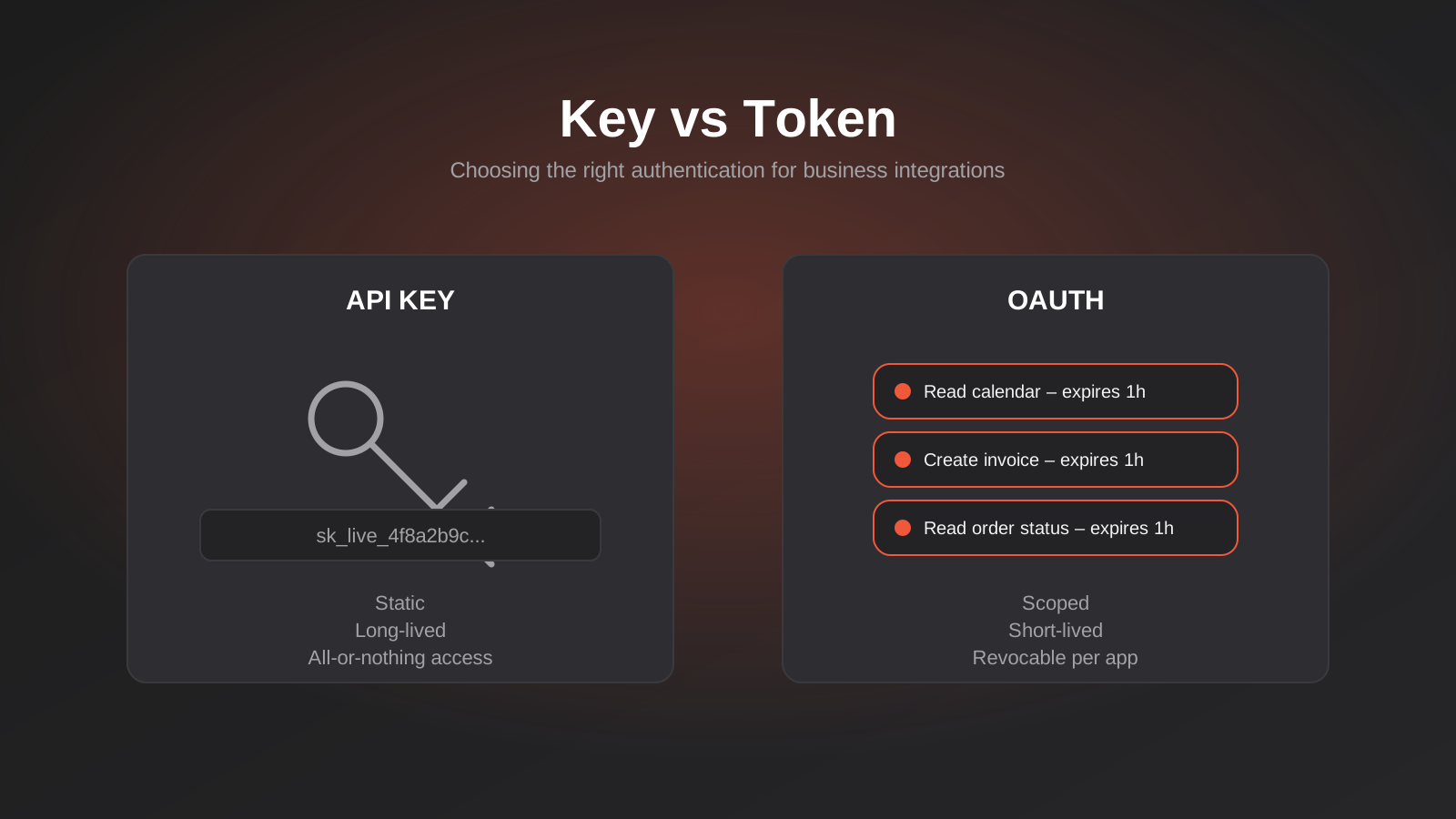
Somewhere in your business, a spreadsheet macro or a Zapier step is holding a password. Not a user’s password — an API key, pasted into a settings field two years ago by a developer who has since left, granting whatever system it unlocks full, permanent, unmonitored access to your data. Nobody remembers it’s there until the integration breaks, or worse, until it shows up in a breach notification from a vendor you’d half forgotten you used.
This isn’t a hypothetical. It’s the default state of most small and mid-sized business integrations in Australia right now. Somebody needed two systems to talk to each other, found the fastest way to make that happen, and moved on. Nine times out of ten the fastest way was an API key, because API keys are simple, and simple wins when you’re trying to ship an integration before lunch.
The problem is that “fastest” and “appropriate” aren’t the same decision, and most businesses never actually weigh up OAuth vs API keys — they just inherit whatever the first developer picked. We get asked to untangle the result often enough that it’s worth writing down properly: what each approach actually does, where each one genuinely fits, and why 2026 has made this decision harder to ignore, thanks to AI agents and MCP servers that now sit between your business systems and the outside world.
What an API key actually is
An API key is a long string of characters — something like sk_live_4f8a2b9c... — that a system accepts in place of a username and password. You generate one in a vendor’s dashboard, drop it into a request header or query string, and the receiving system treats any request carrying that string as authorised. That’s the entire mechanism. There’s no login flow, no redirect, no consent screen. One secret, passed along with every request, forever (or until someone remembers to rotate it).
This simplicity is exactly why API keys are everywhere. A developer connecting your CRM to your invoicing platform can have it working in twenty minutes with an API key, versus a couple of hours wiring up a proper OAuth flow. For a huge number of real integrations, that trade-off is entirely sensible. The question is knowing which integrations those are.
Where API keys genuinely make sense
API keys are the right call when the integration is server-to-server, both systems are trusted, and there’s no individual end user whose permissions need to be respected. A nightly job that pulls your Xero invoices into a reporting dashboard, a monitoring script checking your site’s uptime, a backend service posting webhook events between two internal tools — these are all legitimate, low-risk uses of a static key. Nobody is impersonating a customer. There’s one application talking to one other application, and the blast radius of a leaked key is contained to that single relationship.
Plenty of smaller SaaS tools also only offer API keys, full stop — their customer base doesn’t need the complexity of OAuth, and building it would be over-engineering for both sides. If a platform’s entire integration surface is “pull some data out, push some data in,” a key is often the honest, proportionate answer.
Where API keys quietly become a liability
The trouble starts when an API key is used for something it was never designed to secure. Three failure patterns show up constantly in integration audits we run for clients:
- No expiry. Most API keys don’t expire unless someone manually rotates them, which almost never happens. A key generated in 2022 by a contractor who left the business in 2023 is often still live, still granting full access, in 2026.
- No scoping. A single key is frequently all-or-nothing — it can read customer records, write orders, issue refunds and delete data, because the platform didn’t build granular permissions into its key system. Give that key to one integration and you’ve effectively given it to every integration that ever touches that key.
- No audit trail tied to a person. When something goes wrong — data exported it shouldn’t have been, an order modified incorrectly — a shared static key tells you which integration made the call, not which person or process actually initiated it. Investigating an incident becomes guesswork.
None of this means API keys are bad. It means they’re a blunt instrument, and blunt instruments cause damage when they’re used on jobs that need precision.
What OAuth actually solves
OAuth gets described as “more secure” so often that the actual mechanics get lost. OAuth isn’t really an authentication protocol in the way a password is — it’s an authorisation protocol. It answers a different question than an API key does. An API key answers “is this request allowed at all?” OAuth answers “what, specifically, is this request allowed to do, on whose behalf, and for how long?”
That distinction matters enormously once more than one party is involved. Picture a scenario an API key genuinely can’t handle well: your business uses a job-booking platform, and you want to let that platform read your calendar from Google and write new appointments into Xero on your behalf — but you don’t want to hand it your Google or Xero password, and you don’t want it to have permanent, unlimited access to either account. That’s precisely the problem OAuth was built to solve.
The flow, in plain terms
When an application wants access under OAuth, it redirects you to the provider you’re granting access to (Google, Xero, Salesforce, whatever it is). You log in there, directly, on their site — the requesting application never sees your password. You’re shown exactly what’s being requested (“this app wants to read your calendar events and create new events”), and you approve or deny it. If you approve, the provider hands the requesting application a token: not your credentials, just a time-limited pass that’s scoped to exactly what you agreed to.
That token usually expires within an hour, and the application silently refreshes it using a separate, longer-lived refresh token, which you can revoke at any time from your account settings without changing a single password. If the integration misbehaves, or the vendor relationship ends, you pull the pin on the token and the access is gone immediately — no password reset required anywhere.
Scopes are the real win
The part of OAuth that actually earns its complexity is scoping. A properly implemented OAuth integration can request read-only calendar access without ever being able to touch your email, your contacts or your files, even though all of those live under the same Google account. Compare that to a Google API key approach (where it’s even offered), which tends to be far coarser. Scoped access means a compromised integration is a contained incident, not an account takeover.
Why short-lived tokens matter more than they sound like they should
It’s worth being specific about why token expiry is the feature that does most of the real work in OAuth, because it’s easy to wave it away as a technicality. A stolen API key is valid until someone notices and rotates it — which, as above, can take years. A stolen OAuth access token is typically only valid for an hour, sometimes less. An attacker who intercepts it has a narrow window before it’s worthless, and even if they also get the refresh token, that refresh token is tied to a specific client application and can be revoked independently of every other integration using the same provider. The security benefit isn’t abstract — it’s the difference between a leak that matters for an hour and a leak that matters until someone happens to stumble across it.
Where JWTs fit into this picture
JSON Web Tokens (JWTs) get mentioned alongside OAuth so often that people assume they’re competing options, which isn’t quite right. A JWT is a format — a signed, self-contained way of packaging information (who this token belongs to, what it’s allowed to do, when it expires) so that a receiving system can verify it hasn’t been tampered with, without needing to call back to a central server to check. OAuth frequently uses JWTs as the format for its access tokens, precisely because that self-contained verification is fast and doesn’t add a database lookup to every API call. If you hear a developer mention JWTs in the context of an integration, they’re usually describing the token format OAuth is using under the hood, not proposing a third, separate authentication scheme.
Where OAuth adds complexity you genuinely don’t need
We’re not going to pretend OAuth is free. It requires redirect URIs, token storage, refresh logic, and handling for expired or revoked tokens gracefully — none of which a junior developer builds correctly on the first try. For a purely internal, server-to-server job with no individual user and no third-party data involved, building a full OAuth client to replace a perfectly good API key is wasted effort that adds failure points without adding real protection. The skill isn’t picking OAuth by default — it’s recognising which category a given integration actually falls into.
OAuth vs API Keys: A Decision Framework You Can Actually Apply
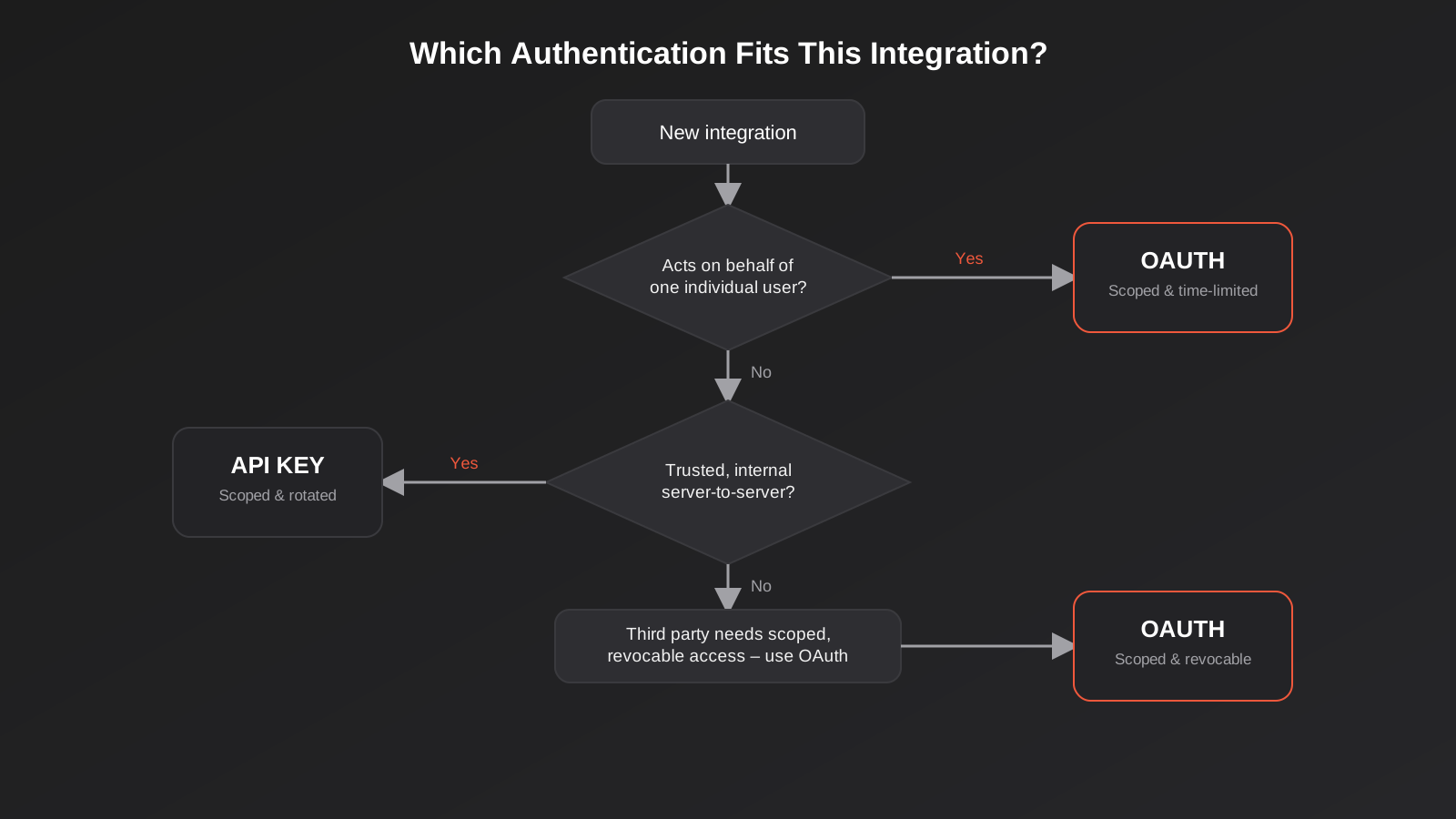
Most of the confusion we see isn’t about the mechanics — it’s about which situation a business is actually in. These four questions cover almost every real case.
1. Is there an individual user whose data is being accessed?
If the integration acts on behalf of a specific customer or staff member — reading their inbox, posting to their account, pulling their calendar — you need OAuth, full stop. A shared API key can’t express “this access is Jane’s, not Tom’s,” and regulators increasingly expect that kind of individual accountability for anything touching personal data.
2. Is this a trusted, internal, server-to-server connection?
If it’s your own backend talking to your own database, or your reporting tool pulling from your own accounting platform with no third party and no individual end user in the loop, a well-managed API key is proportionate. Don’t let anyone talk you into OAuth here purely because it sounds more secure — the added complexity buys you nothing in this scenario.
3. Does the vendor only offer one option?
Plenty of platforms don’t give you a choice. Smaller tools often only expose API keys; larger platforms handling customer-facing data (Google, Microsoft, Xero, Salesforce, Shopify’s customer-facing scopes) increasingly only offer OAuth, or are actively deprecating key-based access. When the decision’s already made for you, the job becomes managing that approach properly, not debating it.
4. What happens when this integration needs to be revoked?
This is the question businesses skip and regret skipping. If an employee who managed an integration leaves, or a vendor relationship ends badly, how fast can you cut off access — and will doing so break five other things that quietly started relying on the same shared key? OAuth tokens scoped per-application and per-user are trivial to revoke individually. A single shared API key wired into a dozen workflows is a much messier thing to kill cleanly, which is itself a reason to favour scoped, individually-revocable access wherever the vendor supports it.
Where this actually plays out in business systems
This isn’t an academic distinction — it shows up constantly in the integration work we do connecting ERP platforms to ecommerce stores, CRMs, and warehouse systems. A mid-sized distributor connecting their ERP to a punchout catalog for a major retail customer, for instance, is usually dealing with cXML or OCI credentials that function like heavily restricted API keys — scoped to a single trading relationship, which is sensible given the narrow, well-defined nature of that integration. But the same business connecting its ERP to a staff-facing mobile app, where individual warehouse staff need different permission levels, is in OAuth territory whether they realise it or not.
We see the same split in general API integration work: a payment gateway webhook verifying signatures is a different problem to a sales rep’s laptop authenticating into a CRM through a mobile app, even though both get lumped together as “API integrations” in a project brief. Treating them identically is how businesses end up either over-building simple connections or, far more commonly, under-securing the ones that actually need scoped, revocable access. We covered the mechanics of keeping systems in sync once they’re connected in our piece on webhooks versus polling — that’s the “how data moves” question; this article is about the separate “who’s allowed to move it” question, and both need answering for any integration to be trustworthy.
A worked example: a booking platform, Xero and Google Calendar
It helps to see the decision framework applied to something concrete rather than kept abstract, so take a scenario we see in some form constantly: a service business wants its online booking platform to create matching entries in Google Calendar and raise an invoice in Xero the moment a client confirms an appointment.
Three separate authentication decisions are actually bundled into that one sentence, and they don’t all resolve the same way. The booking platform’s connection to Google Calendar has to be OAuth, no real debate — it’s acting on behalf of an individual staff member’s calendar, Google doesn’t offer a meaningful API key alternative for this kind of access, and the business needs the ability to revoke one staff member’s calendar access without touching anyone else’s. The connection to Xero is also properly an OAuth relationship in Xero’s own API, again because it’s acting on behalf of a specific connected organisation’s accounting data, with scopes limited to invoicing rather than full access to payroll or banking feeds.
But the internal piece — the background job inside the booking platform’s own infrastructure that checks every few minutes for newly confirmed appointments and triggers those two outbound calls — that’s a server-to-server process with no individual user context, and it’s entirely reasonable for it to authenticate to the booking platform’s own database with a tightly scoped internal API key, rotated on a schedule, rather than anyone trying to force OAuth onto a process that was never going to have an end user in the loop. Getting this wrong in either direction is common: businesses either bolt a static API key onto the Google and Xero connections because it was quicker during setup (creating exactly the leaked-credential risk described earlier), or they over-engineer the internal job with unnecessary OAuth machinery because “OAuth is the secure one,” adding fragile token refresh logic to a process that didn’t need it. The right answer is different for each of the three connections, which is the whole point of treating this as a deliberate decision rather than a house style applied uniformly across every integration a business builds.
The 2026 wrinkle: AI agents and MCP servers
Authentication has become a live, urgent question again because of how AI agents now access business systems. The Model Context Protocol (MCP) has quickly become the standard way to give an AI assistant structured access to a company’s tools and data — its CRM, its order system, its internal documentation — rather than bolting on a one-off custom integration for every AI feature. We’ve written separately about what MCP servers are and how they work; this is the narrower, more urgent question sitting underneath that: how do you make sure the AI agent connecting to your MCP server is only allowed to see and do what it should?
The MCP specification itself has moved firmly in OAuth’s direction. Recent updates to the spec made OAuth 2.1 with PKCE the standard for securing remote MCP servers, moving away from static, long-lived credentials toward short-lived, revocable tokens — along with supporting mechanisms like dynamic client registration and protected resource metadata, so an AI client can discover and negotiate the right level of access rather than being handed a blanket key. The direction of travel is unambiguous: give an AI agent scoped, time-limited, revocable access, not a permanent all-access key sitting in a config file somewhere.
The uncomfortable part is how wide the gap is between that standard and what’s actually deployed. Independent scans of publicly reachable MCP servers through 2026 have consistently found that only a small minority properly implement OAuth, while the majority still rely on static API keys or personal access tokens with no expiry — essentially handing an AI agent the same kind of permanent, unscoped key that caused problems in human-built integrations for the last decade, except now the thing holding the key is making autonomous decisions about when to use it.
What this means if you’re building AI access into your systems
If your business is exploring custom MCP development to give an AI assistant access to internal systems, the authentication layer isn’t an implementation detail to leave until later — it’s the part that determines whether the project is safe to ship. A few things worth insisting on with whoever builds it:
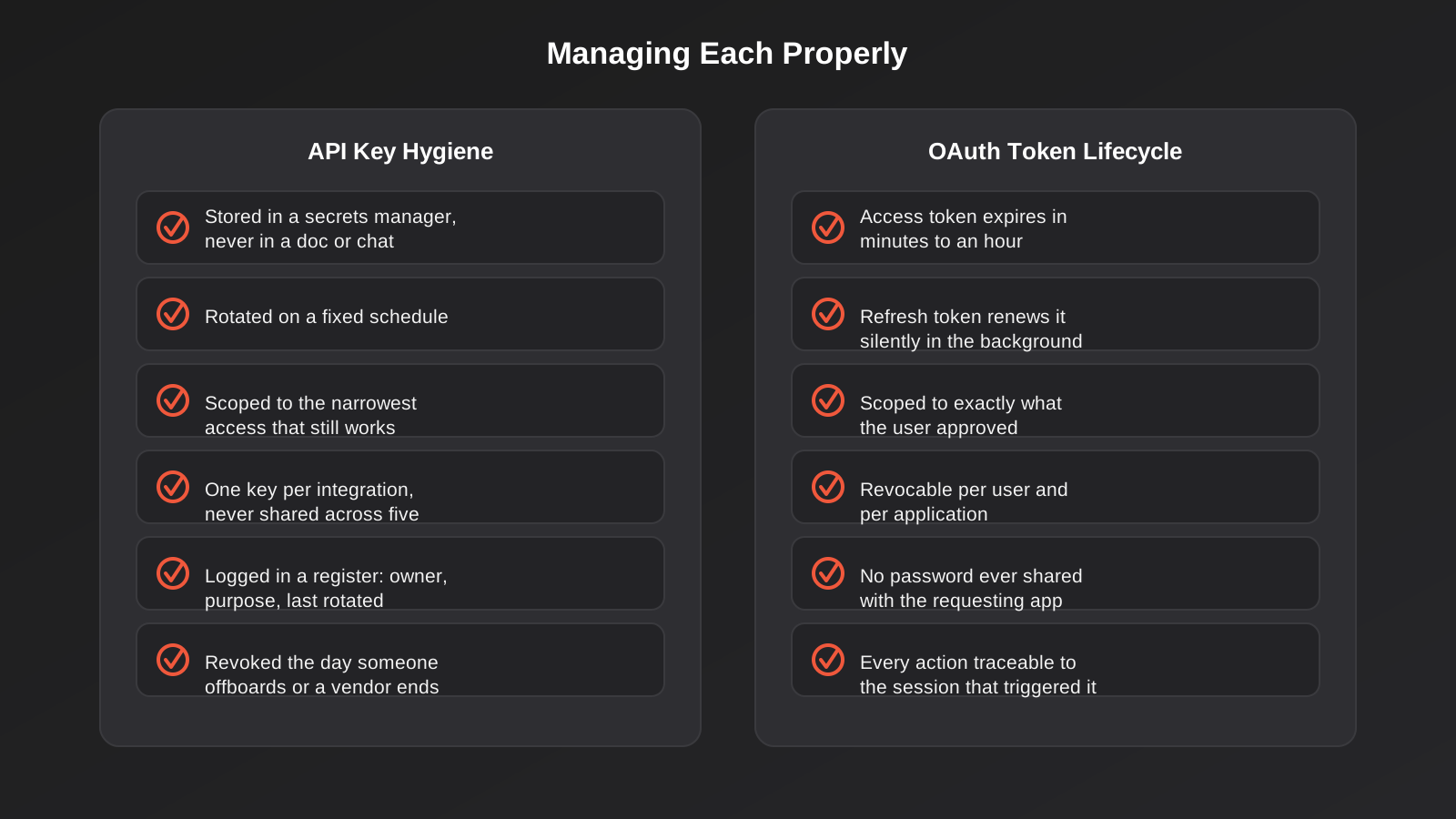
- The agent’s access should be scoped to specific actions and data, not a blanket connection to the whole system. An AI assistant that only needs to look up order status shouldn’t technically be capable of issuing refunds.
- Tokens should expire and refresh automatically, not sit valid indefinitely in an environment variable.
- Every action the agent takes through the MCP server should be logged against the session or user that triggered it, so if something goes wrong, you can trace exactly what the AI did and on whose instruction.
- Revocation needs to be immediate and granular — you should be able to cut off one agent’s access without disrupting every other integration relying on the same server.
None of this is exotic. It’s the same discipline that well-run OAuth integrations have always required — it’s just arriving at a moment when a lot of businesses are moving fast on AI projects and treating authentication as something to bolt on afterwards.
Implementing this properly without an in-house security team
Most of the businesses we work with don’t have a dedicated security engineer, and don’t need one to get this right — they need a handful of habits applied consistently.
Use a secrets manager, not a spreadsheet or a Slack message
If API keys still have to exist in your stack (and for plenty of integrations, they should), they belong in a proper secrets manager — something like AWS Secrets Manager, Doppler, or even your hosting platform’s built-in environment variable encryption — not in a document, a spreadsheet column, or pasted into a chat thread that outlives the person who needed it.
Rotate keys on a schedule, not only after an incident
Set a calendar reminder. Quarterly is reasonable for most business integrations; anything touching financial data or customer records deserves more frequent rotation. The point isn’t paranoia — it’s making sure a key leaked eighteen months ago and forgotten about isn’t still valid today.
Keep a live inventory of what’s connected to what
Most businesses genuinely don’t know how many active API keys and OAuth connections exist across their systems until something breaks and someone has to go looking. A simple register — which system, which key or token, what it accesses, who owns it, when it was last rotated — turns an incident response from a frantic afternoon into a five-minute lookup.
Default to the least access that still works
When a platform offers scoped API keys (read-only versus read-write, specific resource types rather than account-wide access), use the narrowest scope the integration actually needs. It costs nothing extra and meaningfully limits what a leaked credential can do.
Treat authentication decisions as part of the project brief, not an afterthought
If you’re commissioning any integration work — whether that’s a CRM connection, an ERP integration, or a custom AI tool — ask directly how access will be authenticated, scoped and revoked before development starts. It’s a two-minute conversation at the briefing stage and a much longer, more expensive one after something’s gone wrong. For a broader look at how these pieces fit together across CRM, payment and inventory systems, our guide to API integrations for growing businesses covers the wider integration landscape this question sits inside.
Common mistakes we see
- Using one API key across every integration. When the same key is embedded in five different tools, revoking it to deal with one compromised system breaks the other four, which is exactly why businesses end up leaving obviously stale keys active for years.
- Choosing OAuth because it sounds more secure, for an internal job that doesn’t need it. Over-engineering a simple server-to-server connection adds fragile moving parts — token refresh logic, redirect handling — without reducing any real risk.
- Granting full-account OAuth scopes because it was the path of least resistance during setup. Plenty of integrations request far broader permissions than they use, simply because narrowing the scope took an extra five minutes during development that nobody budgeted for.
- Never auditing what’s still connected. Integrations get built, the person who built them moves on, and nobody owns the question of whether that access is still needed eighteen months later.
- Storing credentials in plain text in code repositories or shared documents. Still astonishingly common, and one of the most preventable ways credentials end up in a breach.
- Treating AI agent access the same as a trusted internal script. An MCP server or AI integration given a static, unscoped key is a materially different risk to a cron job with the same key, because the agent is making its own decisions about when and how to use its access.
Frequently Asked Questions
Is OAuth always more secure than an API key?
Not automatically. OAuth is more secure for the specific problems it was designed to solve — individual user access, scoped permissions, easy revocation — but a badly implemented OAuth flow (tokens stored insecurely, scopes requested too broadly, refresh tokens never expiring) can end up less secure than a well-managed, narrowly scoped API key used for the right kind of connection. The authentication method matters less than whether it’s implemented and managed properly.
Can I use API keys and OAuth in the same system?
Yes, and most mature systems do exactly this. It’s common to use an API key to identify which application is making a request (for rate limiting and billing purposes) alongside an OAuth token that governs what that specific user has authorised the application to access. They answer different questions and aren’t mutually exclusive.
What should I do if I think an old API key is still active somewhere?
Treat it the same as a password you suspect is compromised: rotate it immediately, check the vendor’s access logs for any unusual activity during the period it may have been exposed, and update every system that legitimately uses it with the new key. Then put a review process in place so unused or orphaned keys get caught before they sit active for years.
Do small businesses really need to worry about this, or is it only an enterprise problem?
It’s arguably more of a problem for small and mid-sized businesses, because enterprises typically have dedicated security teams reviewing access, while smaller businesses often have a handful of integrations set up years apart by different people, with nobody responsible for the full picture. The risk per integration might be similar; the chance of it going unnoticed is higher without a security team watching.
How does this apply to giving an AI tool access to our systems?
The same principles apply, with higher stakes, because an AI agent acts autonomously rather than waiting for explicit human instruction each time. Scoped, expiring, revocable access (the OAuth model) is strongly preferable to a static key for any AI integration that touches real business data, which is why the MCP specification has pushed OAuth 2.1 as its standard for remote server access.
How often should we rotate API keys?
Quarterly is a reasonable default for most business integrations, with more frequent rotation for anything touching financial data, customer records or payment details. The exact interval matters less than having one at all — most businesses we audit have no rotation schedule, which means keys simply persist until someone remembers they exist.
Where to start
If you’re not sure what’s currently authenticating your business’s integrations — how many keys are live, which ones are scoped sensibly, which ones should have been revoked a year ago — that’s the honest starting point, before any new integration or AI project gets added on top of what’s already there. It’s a conversation worth having early, whether you’re untangling an existing mess or planning a new integration build from scratch. If you’d like a second set of eyes on how your systems are currently connected and secured, we’re happy to talk it through.
Keep reading
Related posts
POS Integration for Australian Retail and Hospitality: Stock, Sales, Settlements and Getting the Books to Agree (2026)
How point-of-sale integration works for Australian retailers and hospitality venues: stock sync, daily sales posting, settlements and fees, and keeping the books…
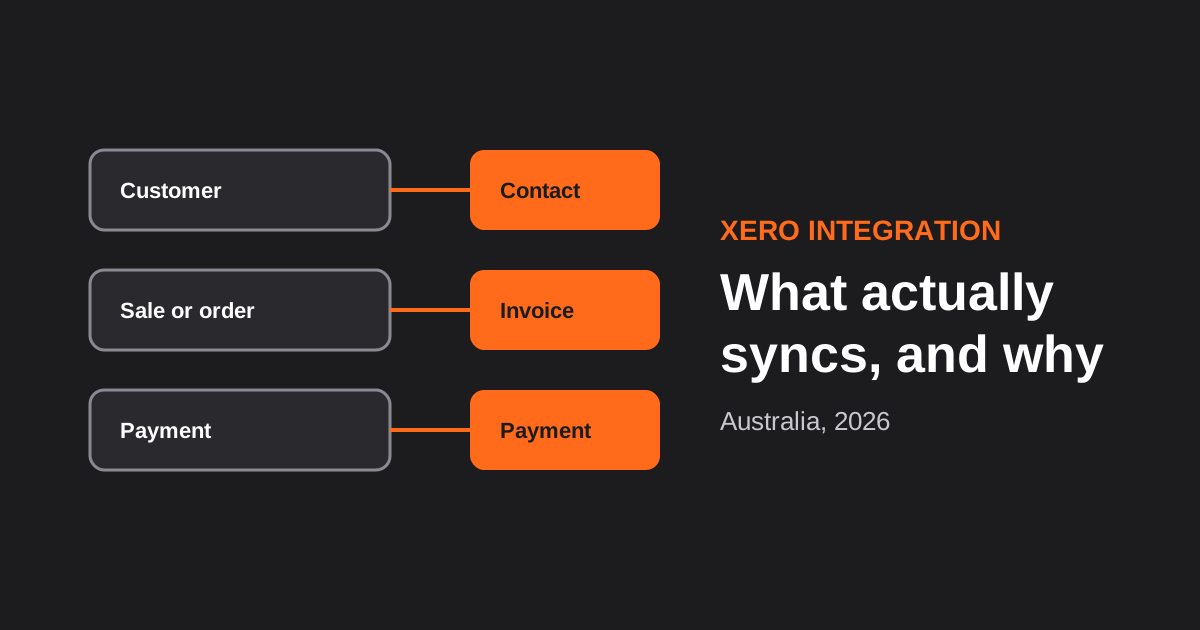
Xero Integration for Australian Businesses: What Actually Syncs, GST Mapping and the Mistakes That Break Reconciliation (2026)
How a Xero integration really works in Australia: what to sync, how to map invoices, payments, refunds and GST, and the mistakes…

CRM Integration for Australian Businesses: What to Connect First and How to Do It Properly (2026)
A practical guide to CRM integration for Australian businesses: what to connect first, which way data should flow, native vs middleware vs…
Got a project you'd like to talk through?
Tell us what you're working on — we'll come back with a plan.
