
Webhooks vs Polling: How Real-Time Data Sync Actually Works
 Jignesh Vagadiya
26/09/2026
21 min read
Jignesh Vagadiya
26/09/2026
21 min read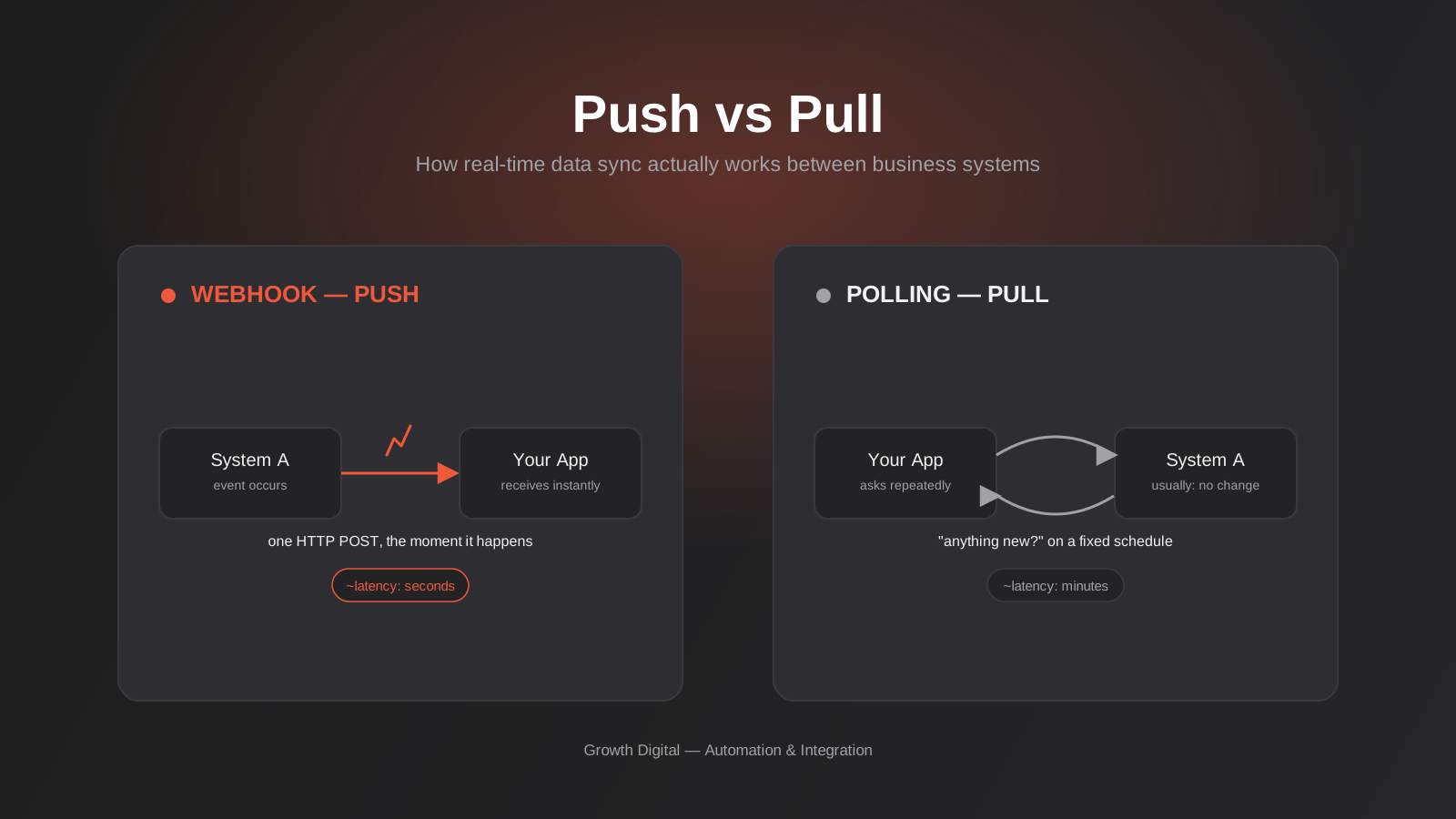
A client once asked us why an order paid on their Shopify store took almost ten minutes to show up as a fulfilled invoice in Xero. Nothing was broken. The integration was doing exactly what it had been built to do — check for new orders every ten minutes and pull across anything it found. For a small business processing a dozen orders a day, that gap barely matters. For a business running flash sales, it’s the difference between a warehouse team packing an order on time and a customer emailing to ask where their parcel is.
This is the webhooks vs polling decision sitting underneath almost every integration project we scope: when two systems need to share information, does one system ask the other for updates, or does the other system announce them as they happen? It sounds like a minor implementation detail. It isn’t. It shapes how fast your data moves, how much an integration costs to run, how it fails, and how much work it takes to keep it reliable. We’ve written before about the broader question of when a growing business actually needs custom API integrations — this piece goes one level deeper, into a decision that sits inside almost every one of those projects once you’ve decided to build.
We’ll walk through how polling and webhooks actually work, when each one is the right call, what genuinely goes wrong with webhooks in production (and how to design around it), and the hybrid pattern we default to for clients who need both speed and confidence that their numbers are right.
Webhooks vs Polling: Two Ways to Move Data Between Systems
Every integration, no matter how many platforms it touches, boils down to one of two patterns for getting fresh data from System A into System B. Understanding both properly — not just as buzzwords, but as the mechanics underneath them — makes every later decision easier.
Polling: you ask, over and over
Polling is the older, simpler pattern. Your system sends a request to another system’s API on a fixed schedule — every minute, every five minutes, every hour, once overnight — and asks, in effect, “has anything changed since I last checked?” Most of the time the answer is no. You get an empty response, and you ask again next cycle.
Polling is easy to build, easy to reason about, and easy to debug. There’s no inbound traffic to secure, no need to expose a public endpoint, and no dependency on the other system supporting anything beyond a standard read API. It also has a hard ceiling: your data is only ever as fresh as your last poll, and every poll costs something — a request against a rate limit, a few seconds of processing, a small but real amount of infrastructure load on both sides.
Webhooks: the system tells you
A webhook flips the direction. Instead of your system asking, the other system tells you — the moment something happens, it sends an HTTP POST to a URL you’ve registered, carrying the details of that event. An order is paid, a deal moves stage, a support ticket is closed: the source system pushes that fact to you in near real time, generally within a second or two.
This is dramatically more efficient when changes are infrequent relative to how often you’d otherwise need to check, and it’s the only realistic option when a customer-facing moment depends on the data arriving quickly. The cost is that webhooks require your system to expose a reachable, secured endpoint, and to handle a set of failure modes that simply don’t exist with polling — which we’ll get into properly, because this is where most DIY integrations quietly go wrong.
Why This Actually Matters for the Business
It’s tempting to treat this as a purely technical preference. In practice it shows up in three places owners and operations teams actually feel.
Latency. A five-minute polling interval means a customer’s address change, a stock-out, or a payment failure can sit unnoticed for up to five minutes. For back-office reporting that’s irrelevant. For anything a staff member or customer is actively waiting on — an abandoned cart follow-up, a lead notification, a “your order has shipped” email — five minutes feels slow and thirty feels broken.
Cost and load. Every poll is an API call, and API calls aren’t free in the ways that matter. Some platforms bill per call once you cross a threshold. Almost all of them apply rate limits, and a polling job set too aggressively will eventually hit that ceiling and start failing silently. We’ve inherited more than one client integration that was quietly throttled for weeks because a well-meaning polling script checked every sixty seconds “just to be safe.” Webhooks avoid this entirely — you’re not paying for thousands of empty checks to catch the one that mattered.
Reliability under scale. A polling job that works fine syncing fifty orders a day can fall over syncing five thousand, because each poll now has to page through more records in the same time window. Webhooks scale naturally with actual event volume rather than with how often you’ve decided to check.
Staff trust in the numbers. This one is harder to put a dollar figure on but shows up constantly in practice. Once a warehouse team, a sales floor, or a finance person catches an integration showing stale or contradictory numbers a handful of times, they stop trusting the system and start double-checking manually — which quietly undoes the entire point of automating the sync in the first place. Getting the latency right for each specific use case isn’t just a technical nicety; it’s what keeps people actually relying on the automation instead of working around it.
There’s a newer reason this choice matters too. As more businesses start connecting AI agents and internal assistants to their live business data — through protocols like MCP, which lets an AI agent query and act on your actual systems rather than working from a stale export — the freshness of the underlying data pipeline becomes the ceiling on how useful that agent can be. An assistant answering questions from data that’s an hour old will eventually give someone a wrong answer with total confidence.
When Polling Is Genuinely the Right Call
We don’t default to webhooks just because they’re the more modern-sounding pattern. Polling is the correct, boring, low-maintenance choice in several common situations:
The other system doesn’t support webhooks
Plenty of platforms Australian businesses run on — older practice management software, some legacy ERPs, a fair few industry-specific tools built for a narrow vertical — simply don’t offer outbound webhooks at all. If the option doesn’t exist, it isn’t a design decision, and polling (or an export/import batch job) is what you’ve got.
A delay of minutes or hours genuinely doesn’t matter
Nightly finance reconciliation, weekly reporting rollups, syncing a product catalogue that changes a few times a month — none of this needs sub-second delivery. Building webhook infrastructure for a process that runs once a day is effort spent solving a problem nobody has.
You need a full, not incremental, view
Webhooks tell you about individual events. They’re a poor fit when what you actually need is the complete current state of a dataset — a full stocktake, a complete customer list for a marketing sync, an end-of-month export. Polling a “list all records” endpoint is simply the right tool for that job.
You can’t expose an inbound endpoint
Some environments — certain locked-down internal networks, a handful of higher-security setups in finance or government — genuinely can’t or won’t accept inbound HTTP traffic from a third party. Polling out from inside the network avoids that problem entirely, because the connection is always initiated from your side.
When You Actually Need Webhooks
The flip side: there are situations where polling, even done well, produces a worse product or a worse customer experience no matter how tightly you tune the interval.
Anything where a person is actively waiting is the clearest case. A customer completing checkout expects their order confirmation immediately, not on the next five-minute cycle. A sales rep wants a lead notification the second a form is submitted, not when the CRM sync happens to run. A support team handling live chat needs a handoff from a bot to a human to happen instantly, not with a noticeable pause. We’ve covered the broader shift toward automated first response in our piece on AI chatbots for customer support — underneath almost every one of those bots is a webhook firing the moment a message arrives.
Stock and inventory accuracy is another. If a product sells out on your website but your point-of-sale system doesn’t hear about it for ten minutes, you can oversell in that window — a genuinely expensive mistake at scale, and one that erodes trust with a customer fast. Payment and fraud events are similar: a failed payment, a chargeback, a suspicious transaction all warrant an immediate reaction, not a scheduled one.
And, practically, cost and courtesy to the platforms you’re integrating with. If you’d otherwise need to poll every thirty seconds to hit an acceptable latency, you’re almost certainly better off finding the webhook option, because that polling frequency will chew through rate limits and infrastructure for no good reason when a push notification would do the same job for a fraction of the load.
What Actually Happens Inside a Webhook Delivery
This is the part that gets glossed over in most explainers, and it’s exactly the part that determines whether a webhook integration is solid or a source of silent data loss six months later. A webhook isn’t a magic instant teleport of data — it’s an HTTP request, with everything that implies about things that can go wrong.
Signature verification — the security step people skip
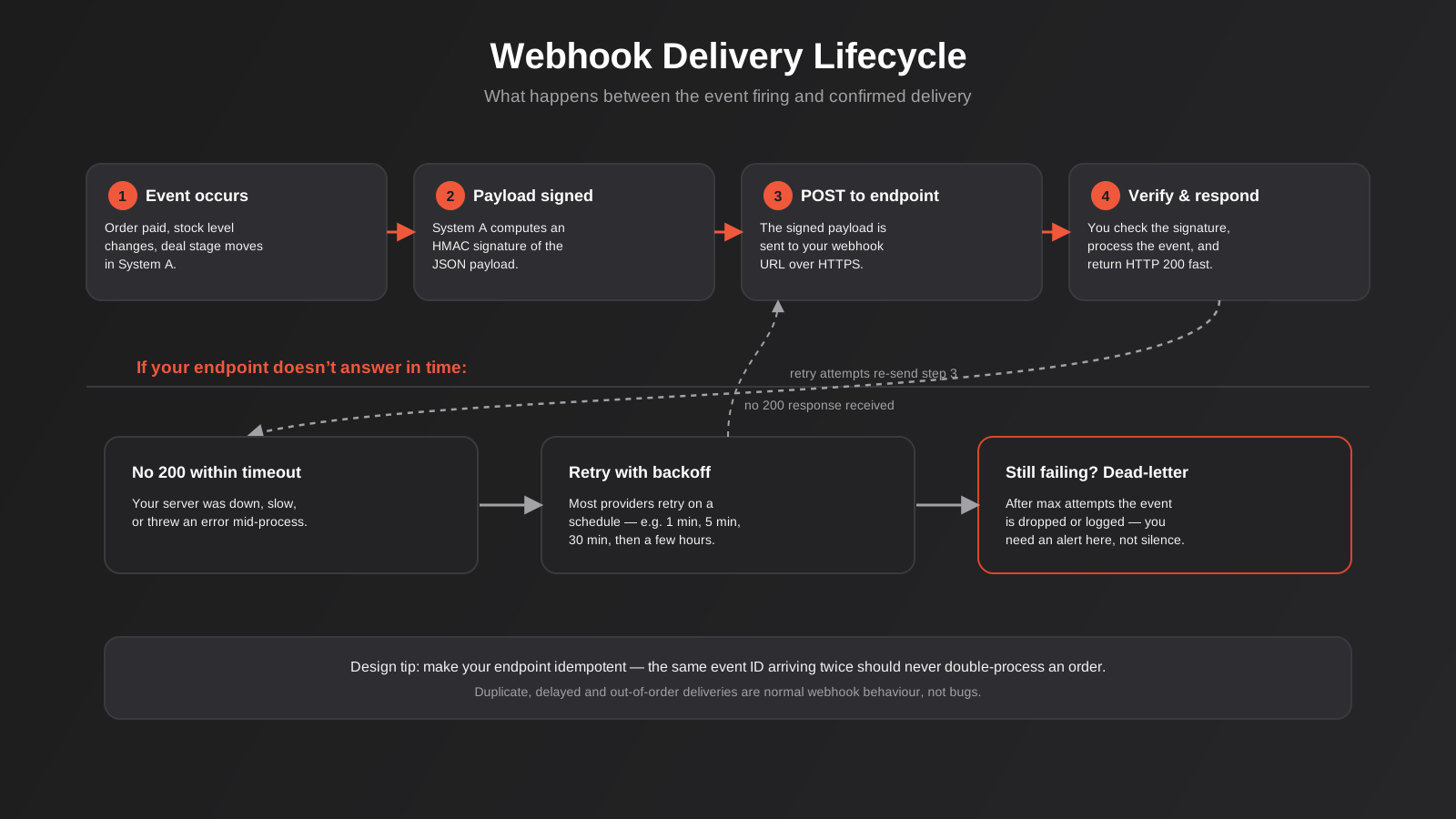
Because a webhook endpoint is a public URL, anything on the internet can technically send a POST request to it. If your code trusts whatever arrives without checking where it actually came from, you’ve built an open door for someone to fabricate a “payment received” event or a “stock updated” event and have your system act on it. Every reputable platform signs its webhook payloads — typically with an HMAC signature computed from a shared secret — and expects you to recompute that signature on your end and compare it before processing anything. Skipping this step is the single most common security gap we find when reviewing a client’s existing integrations. It takes a few lines of code and it should never be optional.
Idempotency — designing for duplicates on purpose
Webhook providers generally guarantee at-least-once delivery, not exactly-once. That’s a deliberate trade-off on their part: it’s better to occasionally send the same event twice than to risk silently dropping one. It means your endpoint will, sooner or later, receive the same event ID more than once — because of a retry, a network hiccup, or a timeout that happened just after your server had actually finished processing it. If your logic isn’t idempotent — if receiving the same “order paid” event twice creates two invoices instead of one — that duplicate will eventually happen in production. The fix is straightforward: store the event ID you’ve already processed and check against it before doing anything, so a repeat delivery is a no-op rather than a double-charge.
Ordering isn’t guaranteed
It’s easy to assume events arrive in the order they happened. They don’t always. Network delays, retries, and parallel delivery infrastructure on the sending platform’s side mean a “deal won” event can occasionally arrive before the “deal updated” event that preceded it. If your integration logic depends on strict ordering — and a surprising amount of hastily built automation does — you need to either use timestamps in the payload to reorder events yourself, or fetch the current state from the source system’s API rather than trusting the event sequence blindly.
Retries, backoff, and dead-lettering
If your endpoint doesn’t return a successful response quickly — because it’s down, slow, or throws an error mid-process — the sending platform will typically retry the delivery on a schedule: perhaps after one minute, then five, then thirty, tapering off over hours. After a defined number of attempts, most platforms give up and either drop the event or log it for manual inspection, depending on their dashboard. This is the point at which a lot of businesses discover, weeks later, that a batch of orders never made it into their fulfilment system, because nobody was watching for that failure. A production-grade webhook integration needs its own logging and alerting on delivery failures — treat a dead-lettered event as an incident, not a shrug.
The Hybrid Pattern We Actually Build
Given everything above, the honest answer for most integrations that matter isn’t “webhooks” or “polling” in isolation — it’s both, doing different jobs. This is the pattern we default to for clients whose integrations touch orders, payments, or anything financial, where being fast most of the time isn’t good enough and being occasionally wrong isn’t acceptable.
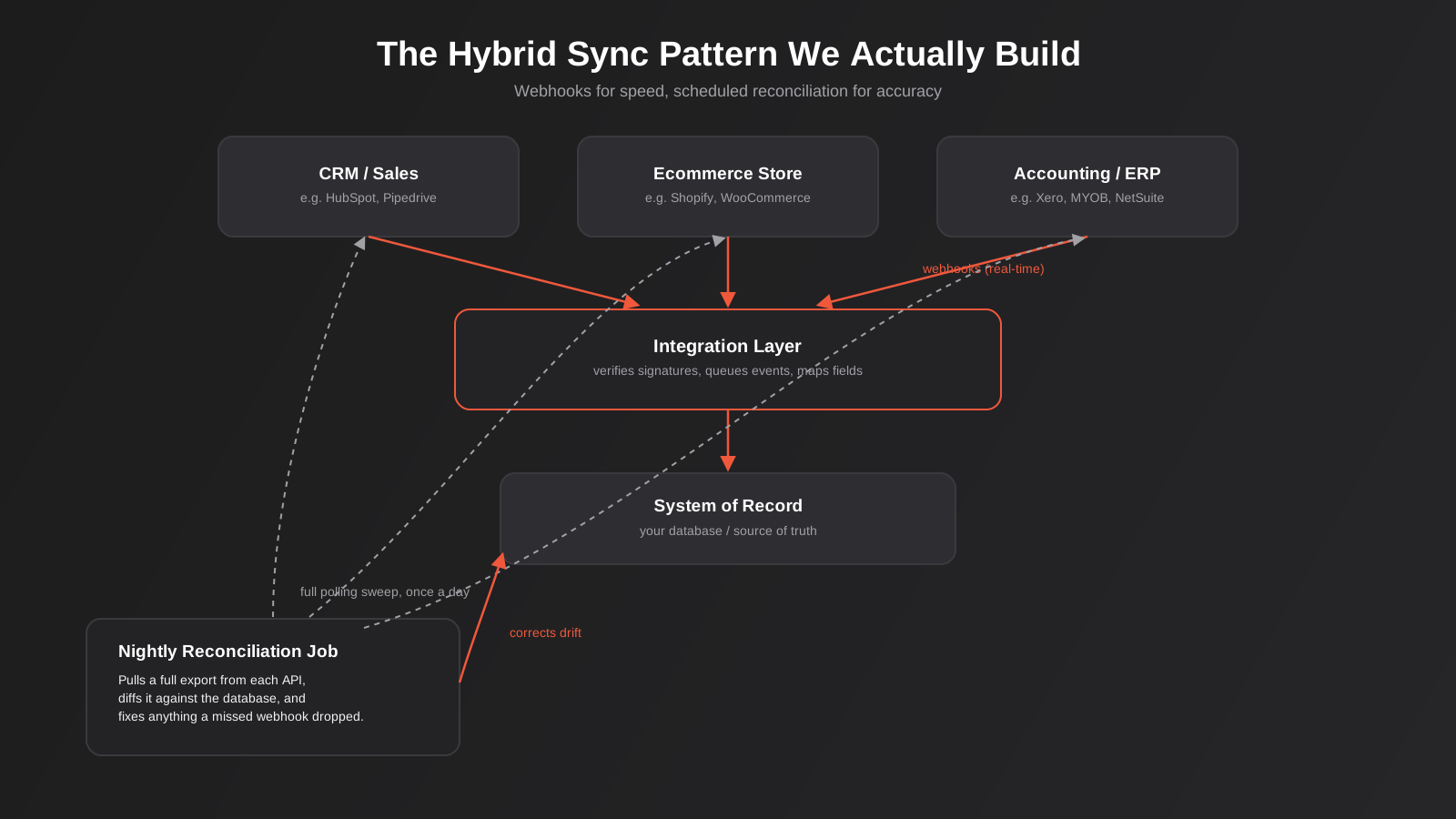
Webhooks do the heavy lifting for speed — the vast majority of events flow through in near real time, keeping your systems visibly in sync throughout the day. Sitting alongside that, a scheduled reconciliation job — usually nightly, sometimes more often for higher-volume clients — pulls a full export from each connected system’s API and diffs it against your database. Anything a missed webhook, a failed retry, or an outage dropped gets caught and corrected here, quietly, before it becomes a customer-facing discrepancy or a finance team finds it during month-end.
This is exactly the kind of drift that comes up in the comparison between RPA-style automation and proper API integration we’ve written about separately — the reconciliation job is what makes an API-based integration trustworthy enough to actually remove manual checking, rather than just moving the checking to a different spreadsheet. The integration layer sitting between your source systems and your database is also where signature verification, idempotency checks, and field mapping between two platforms’ different data models all live — it’s genuinely the most important piece of the architecture, even though it’s the one with no user-facing screen and the one people are most tempted to skip when a project’s scoped in a hurry.
Choosing the Right Pattern for Your Systems
In practice the decision is rarely abstract — it’s dictated by what the specific platforms you run actually support. A few patterns we see repeatedly across Australian businesses:
Ecommerce platforms like Shopify and WooCommerce have mature webhook support for orders, inventory, and customer events — there’s rarely a good reason to poll these for anything time-sensitive. CRMs such as HubSpot, Pipedrive, and Salesforce also support webhooks well, particularly for deal and contact changes. Accounting platforms like Xero and MYOB have more limited webhook coverage — Xero supports webhooks for a defined set of events, but a lot of financial reporting sync still runs on scheduled polling because the data being synced is a reconciled position, not a stream of discrete events. Older or on-premise ERP and practice management systems are the most likely to have no webhook support at all, which is where a well-tuned polling schedule, or a middleware layer that translates between the two worlds, becomes necessary. We’ve gone deeper on the ERP side of this specifically in our guide to ERP integration for Australian businesses, including where webhook limitations on the ERP side change the shape of the whole integration. Payment gateways like Stripe and PayPal sit at the mature end of the spectrum — their webhook events are well documented, signed by default, and genuinely the only sensible way to know about a payment outcome, since polling a payment API to ask “did that charge succeed?” introduces exactly the kind of delay you can’t afford around money changing hands.
The practical starting point for any integration project is the same regardless of platform: check the API documentation for a “webhooks” or “events” section before assuming you need to poll. If it exists, use it for anything time-sensitive and reserve polling for full syncs and reconciliation. If it doesn’t, poll deliberately — pick an interval based on how much delay is actually tolerable for that specific data, not an arbitrary “every minute to be safe,” which usually just means rate-limit trouble down the track.
Testing and Monitoring Before You Rely on It
A webhook integration that’s only ever been tested against the happy path — server up, network fine, payload exactly as documented — is an integration that hasn’t really been tested at all. Before we put one in front of real orders or real customer data, we push it through a few deliberately awkward scenarios first, because production will eventually hit every one of them anyway.
The first step, before writing any handling logic, is simply looking at a real payload. Platform documentation describes what a webhook should contain, but the actual JSON that arrives can differ in small but breaking ways — a field that’s sometimes null, a nested object that’s occasionally flattened, a date format that changes between event types. Tools built for exactly this — request-inspection services, or the webhook testing consoles most major platforms now build into their own dashboards — let you trigger a test event and see precisely what lands, before you’ve committed to assumptions about its shape.
From there, we deliberately test failure. That means temporarily taking the receiving endpoint offline and confirming the sending platform actually retries the way its documentation claims, watching what a malformed or partial payload does to the handler rather than assuming it’ll fail gracefully, and confirming the reconciliation job genuinely catches an event that was allowed to fail permanently. It’s a fairly quick set of checks to run once, and it catches the kind of gap that’s expensive to discover for the first time against a live customer order.
Two habits are worth building in from day one rather than retrofitting later. The first is logging the raw, unprocessed payload of every inbound webhook somewhere durable before your handling logic touches it — if that logic has a bug, you still have the original event to replay once the bug is fixed, instead of a gap in your data with no record of what was actually sent. The second is alerting specifically on delivery failures and dead-lettered events, routed somewhere a person will actually see it — a Slack channel, an email to whoever owns the integration, a line in a monitoring dashboard. We’ve written more broadly about setting this up properly in our guide to monitoring and alerting for automation workflows, and the same principle applies here: an integration with no failure alerting isn’t reliable, it’s just unmonitored, and those aren’t the same thing.
What Getting This Wrong Actually Costs
This isn’t a purely academic architecture debate. We’ve seen the real-world cost of getting it wrong show up as: double-booked appointments because two systems both thought they held the last available slot; duplicate orders in fulfilment because a webhook retry wasn’t handled idempotently; a sales team missing a hot lead because the CRM sync only ran every thirty minutes; and finance teams manually reconciling a spreadsheet every month because nobody built the reconciliation job that would have caught the drift automatically. None of these are exotic edge cases — they’re the predictable result of treating “connect these two systems” as a simple problem and reaching for whichever pattern was fastest to wire up in a no-code tool, without asking which pattern the actual use case demanded.
Common Mistakes We See
- Polling every sixty seconds “to be safe” without checking the platform’s rate limits, then wondering why the integration starts failing under normal load.
- Trusting an incoming webhook payload without verifying its signature, leaving the endpoint open to spoofed events.
- Writing webhook handlers that assume each event arrives exactly once, then discovering duplicate orders or double-sent emails the first time a retry fires.
- Assuming webhook events arrive in the order they occurred, and building logic that silently breaks when they don’t.
- Building webhook infrastructure with no monitoring on delivery failures, so a dead-lettered event is discovered weeks later by a customer complaint rather than an alert.
- Relying on webhooks alone with no reconciliation job, so any missed event becomes a permanent, invisible discrepancy between two systems.
- Choosing a no-code automation tool’s default trigger without checking whether it’s actually polling under the hood — some “instant” triggers are polling every minute and calling it real time.
Frequently Asked Questions
Is a webhook always faster than polling?
In practice, yes — a webhook typically delivers within one to a few seconds of the event happening, while even an aggressive polling schedule checking every minute introduces an average delay of around thirty seconds, and a more typical five or ten-minute interval introduces exactly that much lag. The trade-off isn’t speed, which webhooks almost always win; it’s the added complexity of securing and monitoring an inbound endpoint.
Can I just poll more frequently instead of building webhook support?
You can, up to the point where you hit the platform’s rate limits or start generating a noticeable, unnecessary load for no real benefit. If the platform genuinely offers webhooks for the event you care about, tightening a polling interval is usually solving the wrong problem — it’s more infrastructure cost for a result webhooks would give you for less.
What happens if our server is down when a webhook fires?
Most platforms retry failed deliveries automatically on a backoff schedule — commonly over the course of several hours — before giving up. That gives you a window to recover, but it isn’t infinite, and different platforms have different retry windows and limits. This is exactly why we build a nightly reconciliation job alongside webhooks for anything business-critical: it catches whatever fell through that window without anyone needing to notice in real time.
Do Zapier, Make, or n8n handle this for us automatically?
Partially. These platforms can consume webhooks from apps that support them, and some offer their own polling-based “instant” triggers for apps that don’t — which is worth knowing, because that “instant” label sometimes means polling every one to fifteen minutes rather than a true push. They generally don’t give you fine control over signature verification, idempotency handling, or reconciliation logic out of the box, which is where a custom integration layer earns its place for higher-stakes data.
How do I know if a platform supports webhooks?
Check the platform’s developer or API documentation for a section usually labelled “Webhooks,” “Events,” or occasionally “Notifications.” Most mainstream SaaS platforms — ecommerce, CRM, help desk, payment processors — support them for their most common events. Older, on-premise, or narrowly built industry software is far less likely to, which is usually the first sign a project will need a polling or middleware approach instead.
Is this something we need for a small business, or only at larger scale?
It scales down more than people expect. Even a business with a handful of orders a day benefits from a webhook-driven “order shipped” email over a delayed one, and from not having to explain to a customer why their payment confirmation took ten minutes. The reconciliation half of the hybrid pattern matters less at very low volume, where a human can eyeball the numbers — but the webhook half is worth getting right from day one, because retrofitting idempotency and signature checks into a live integration is more work than building them in from the start.
Where to Start
If you’re scoping a new integration, the useful first step isn’t choosing a pattern — it’s listing out, event by event, which pieces of data actually need to move in seconds and which ones are genuinely fine moving in minutes or overnight. That list almost always turns out shorter and more specific than “sync everything in real time,” and it’s what actually determines whether you need webhooks, polling, or — for anything touching orders, payments, or customer records — both, working together properly rather than one bolted on as an afterthought.
We build these integration layers for clients across ecommerce, CRM, ERP and accounting systems as part of our broader API & integrations work, and it’s rarely a one-size-fits-all build — the right architecture depends entirely on which platforms you’re connecting and what’s actually riding on the data being fresh. If you’re not sure whether your current setup is quietly relying on polling where it shouldn’t, or webhooks with no safety net underneath them, we’re happy to have a look and talk through what we’d actually recommend for your systems.
Keep reading
Related posts
POS Integration for Australian Retail and Hospitality: Stock, Sales, Settlements and Getting the Books to Agree (2026)
How point-of-sale integration works for Australian retailers and hospitality venues: stock sync, daily sales posting, settlements and fees, and keeping the books…
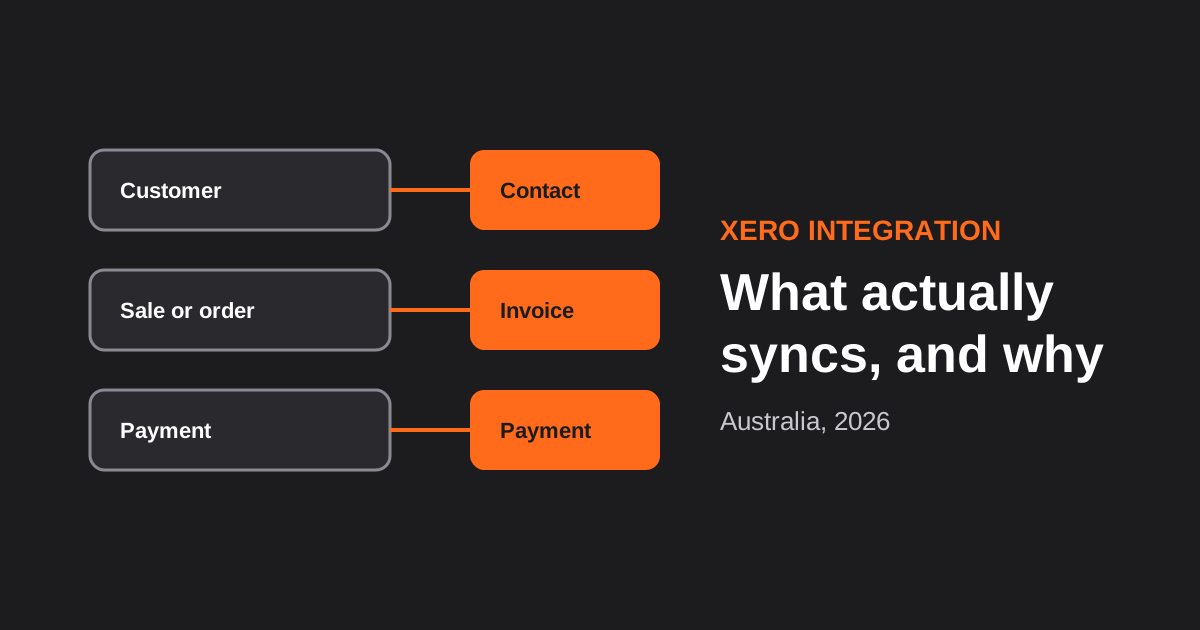
Xero Integration for Australian Businesses: What Actually Syncs, GST Mapping and the Mistakes That Break Reconciliation (2026)
How a Xero integration really works in Australia: what to sync, how to map invoices, payments, refunds and GST, and the mistakes…
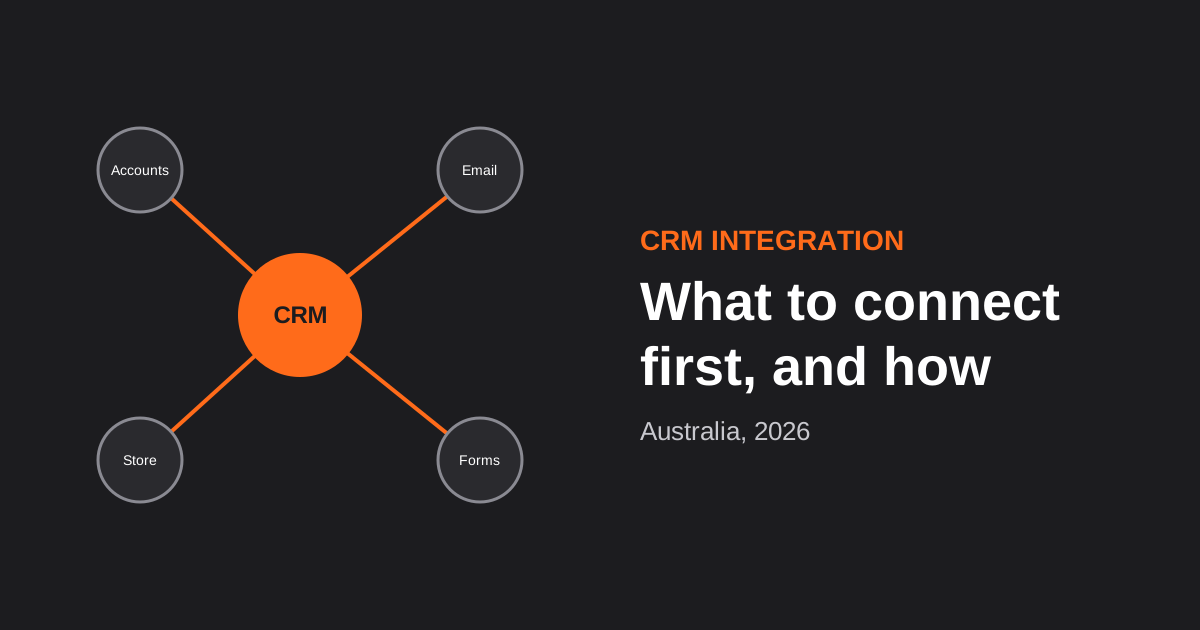
CRM Integration for Australian Businesses: What to Connect First and How to Do It Properly (2026)
A practical guide to CRM integration for Australian businesses: what to connect first, which way data should flow, native vs middleware vs…
Got a project you'd like to talk through?
Tell us what you're working on — we'll come back with a plan.
