
Multi-Location SEO for Australian Franchises: How to Rank Every Branch Without Them Competing
 Jignesh Vagadiya
04/10/2026
21 min read
Jignesh Vagadiya
04/10/2026
21 min read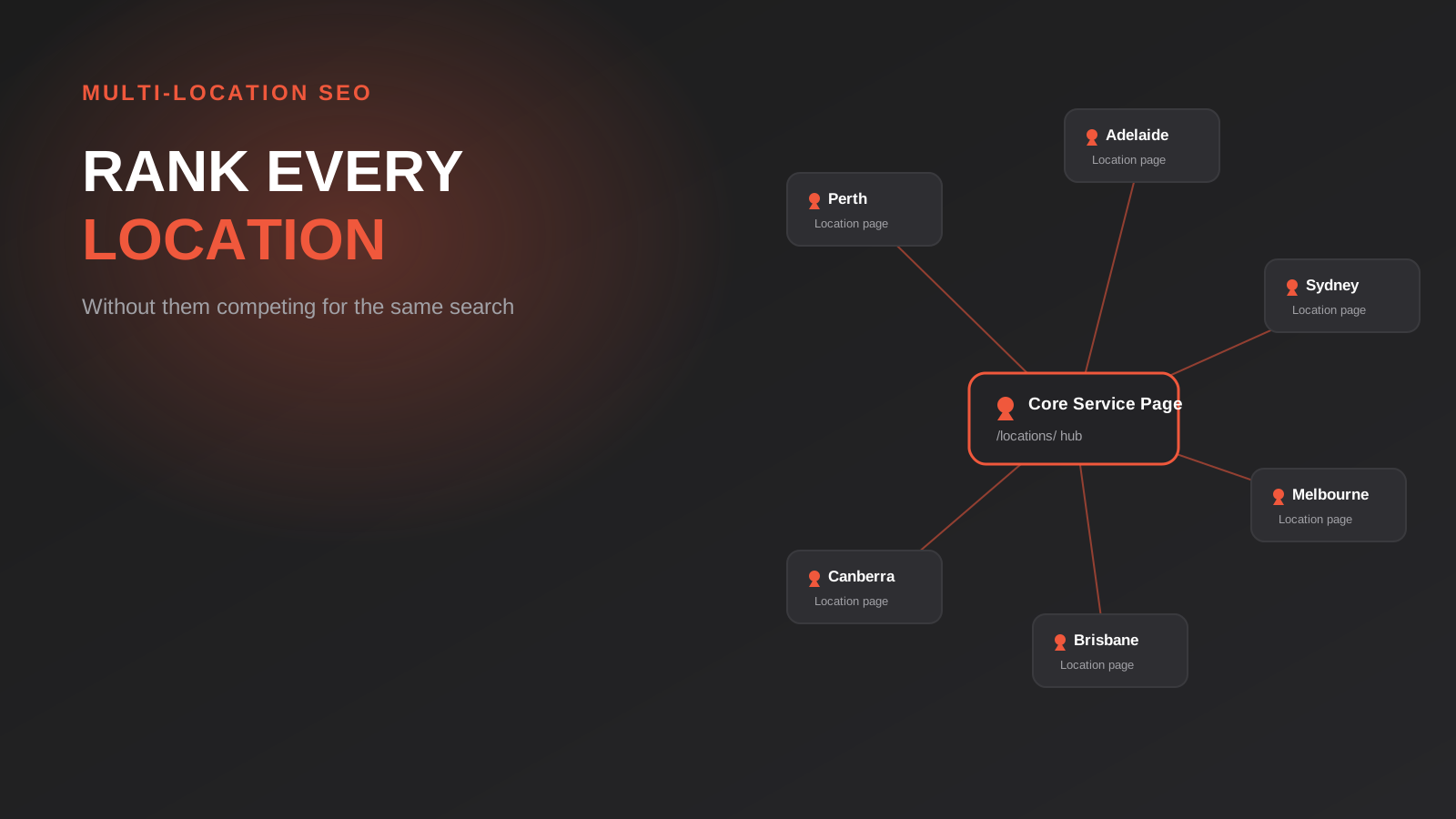
A franchise client came to us with a strange problem. Their Perth store was ranking fine. Their Adelaide store was ranking fine. But Melbourne and Brisbane, opened later with the same website template, had barely moved after four months. When we pulled the location pages side by side, the reason was obvious: they were close to identical. Same three paragraphs with the city name swapped in, same stock photo of a generic shopfront, same service list copied word for word. Google wasn’t ignoring the pages out of spite — it genuinely couldn’t tell them apart from each other, let alone from the two dozen other local competitors with near-identical pages of their own.
Multi-location SEO gets talked about as if it’s just local SEO done several times over. It isn’t. A single-location business optimises one Google Business Profile, builds authority around one set of local signals, and lives or dies by one local pack result. A multi-location business is running that process in parallel across every branch, on one shared domain, often with templated content systems that actively work against uniqueness, and with a real risk that the locations start competing with each other in search results instead of the competition. Get the architecture wrong early and you end up fixing it two years and forty location pages later, which is a much bigger job than doing it properly from branch three onward.
This guide covers what’s actually different about ranking multiple branches under one brand: how to structure the URLs, what a location page needs to avoid being flagged as duplicate content, how to manage Google Business Profile at scale, and how to stop your own branches from cannibalising each other’s rankings. If you’re running a single location and want the fundamentals of local SEO first, our local SEO guide for Sydney businesses covers the groundwork this article builds on — this one picks up from there once you’ve got more than one address to rank.
Why Multi-Location SEO Breaks the Rules You Learned for a Single Site
Most SEO advice assumes one website chasing one set of rankings. Multi-location businesses run into three problems that don’t exist at single-location scale, and all three show up quietly rather than as an obvious error.
The first is duplicate content, but not in the sense most people think. Nobody is copying a competitor’s page. The duplication happens internally — branch pages built from the same template, written by the same person on the same day, differing only in a suburb name and a phone number. Google’s systems are specifically tuned to detect this pattern because templated location pages are one of the most common forms of low-value content on the web. A page that reads like a mail-merge document gets treated like one.
The second is keyword cannibalisation between your own pages. If someone searches “accountant Melbourne” and you’ve got a Melbourne CBD page and a Melbourne Richmond page both targeting roughly the same terms, Google has to pick one to rank and will often alternate between them or suppress both in favour of a competitor with a clearer signal. You end up competing against yourself for the query you actually want to win.
The third is signal dilution across Google Business Profile. A single-location business pours every review, every photo, every post into one profile. A ten-location business is trying to build the same strength across ten profiles simultaneously, usually with far less attention per listing, which is exactly why some branches rank beautifully in the local pack and others never show up at all.
None of this means multi-location SEO is harder in some abstract sense. It means the standard playbook needs a layer of structure on top of it, starting with the decision that affects everything downstream: where each location’s page actually lives.
Site Architecture: Subfolder vs Subdomain vs Separate Domain
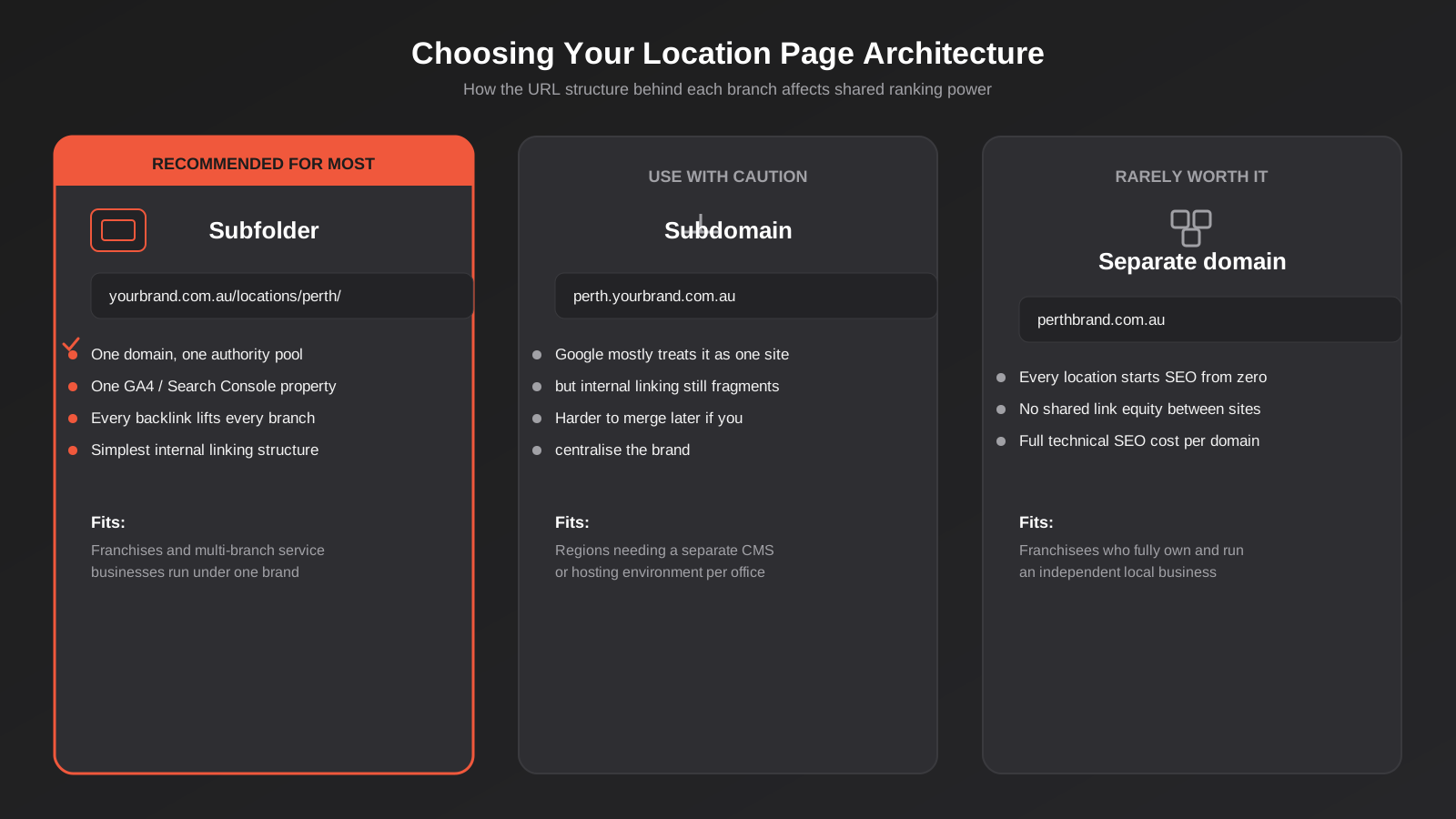
This decision is the one franchise groups and multi-branch businesses most often get wrong before they’ve even thought about content, because it tends to be made by whoever built the website rather than whoever is accountable for rankings. Three structural options exist, and they are not close to equivalent.
Why subfolders win for most multi-location brands
A structure like yourbrand.com.au/locations/perth/ keeps every page on one domain. That matters because Google’s ranking signals — backlinks, domain trust, historical authority — accumulate at the domain level first and then get distributed across the pages on it. A backlink pointing at your homepage, a mention in an industry article, a link from a supplier’s site: all of it strengthens the entire domain, Perth and Melbourne and Brisbane pages included. One Google Search Console property shows you performance across every location in one place instead of ten. One GA4 property means your conversion data isn’t split across properties you have to stitch back together for reporting. For a franchise or multi-branch service business operating under a single brand, this is close to a solved problem, and it’s the structure we’d recommend by default unless there’s a specific reason not to use it.
When a subdomain or separate domain actually makes sense
Subdomains (perth.yourbrand.com.au) get treated by Google much closer to “same site” than they did a decade ago, but internal linking and crawl behaviour still fragment more than a clean subfolder structure, and merging subdomains back into a unified structure later is a genuinely painful migration. We’d only reach for this if a region needs its own hosting environment or CMS instance for a real technical reason — a franchisee running their own WordPress install, for instance.
A fully separate domain per location (perthbrand.com.au) is rarely worth it. Every location starts its SEO authority from zero, there’s no shared link equity between sites, and you’re paying the full technical SEO cost — crawlability, Core Web Vitals, schema, the lot — multiplied by the number of locations. The only case where this genuinely fits is a franchise model where each franchisee fully owns and independently operates their local business, including its own marketing budget and brand discretion. Even then, we’d push back and ask whether a subfolder on the parent brand’s domain, with the franchisee controlling their own page content, gets a better outcome for everyone. It usually does.
Building Location Pages That Don’t Read Like Duplicates
Architecture solves the domain-level problem. It does nothing for the page-level problem, which is that most location pages are written once and cloned. The fix isn’t complicated, but it does take real effort per page, which is exactly why most businesses skip it and exactly why the businesses that do it win the local pack.

The six-part skeleton Google won’t flag as thin content
Unique on-page copy is the baseline, and it has to go further than rewriting the intro paragraph. Different examples, different emphasis, a different structure to the service breakdown if the branch genuinely offers something different. If two location pages could have their city names swapped and nobody would notice, they’re duplicates.
Local schema markup matters more than most businesses realise. Each location needs its own LocalBusiness schema block with that branch’s actual geo-coordinates, opening hours, and phone number — not a head-office block copied across every page with the address field changed. This is one of the most common technical mistakes we find auditing franchise sites: the schema says one thing, the visible page content says another, and Google treats the mismatch as a trust problem.
Suburb-specific reviews pulled from that branch’s own Google Business Profile, rather than a pooled testimonials feed showing reviews from every location mixed together, give both users and Google a genuine local trust signal. Local citations and backlinks — directory listings, a mention from the local chamber of commerce, sponsorship of a local sports club, a piece of local press coverage — all need to name the specific branch, not just the brand.
Branch-specific service and operational details matter where they’re genuinely true: different stock on the showroom floor, different equipment, different parking and accessibility, services one branch offers that another doesn’t. And local team and community signals — real photos of the actual site and staff, named local team members, genuine community involvement — do more for both trust and uniqueness than any amount of extra copy.
Who should actually write it: franchisor template vs franchisee input
The common failure mode is a franchisor writing one “master” location page and rolling it out to every branch with find-and-replace. The fix doesn’t mean abandoning consistency. A good structure gives every location the same skeleton — the same headings in the same order, the same brand voice, the same core service information — but leaves genuine room for branch-specific input: a paragraph the local manager or franchisee fills in themselves about the team, the area, or what’s different about trading there. That one paragraph, repeated honestly across forty locations, is often the single highest-leverage change we make on a franchise site audit.
Google Business Profile at Scale
If your organic location pages are the foundation, Google Business Profile is where most of the actual local pack visibility gets decided, and running ten or fifty profiles well is a genuinely different operational problem than running one. We cover the fundamentals of an individual profile in our Google Business Profile guide — everything below assumes you’ve already got that groundwork in place and are now trying to do it across a whole network of locations at once.
Bulk verification and location groups
Google’s Business Profile Manager supports bulk location management once you’ve verified more than ten listings under one account, which changes the whole workflow: new locations, hour changes, and holiday closures can be pushed in bulk instead of one profile at a time. The catch is that bulk verification requires a consistent, legitimate address and NAP (name, address, phone) format across every listing from day one — retrofitting consistency onto profiles that have drifted apart over a few years of ad hoc edits is a much slower clean-up job than getting it right as each location opens. If you’re opening new branches regularly, this is worth setting up properly before location five, not after location fifteen.
The suburb-review problem
Review volume and quality concentrate wherever someone is actively asking for them. In a multi-location business, that’s almost always wherever the manager happens to care most about it, which means Perth might sit on 180 reviews at 4.8 stars while a newer Adelaide branch has 6 reviews at 3.9. That gap directly affects local pack ranking at Adelaide, independent of anything else on the page. The fix is operational, not technical: a standard post-service review request workflow rolled out to every branch at the same cadence, with the request routed to that branch’s own profile, not a generic head-office link that doesn’t credit the right location.
Avoiding Keyword Cannibalisation Between Branches
Cannibalisation shows up when two of your own pages are realistically competing for the same search intent, and it’s most common in dense metro areas where branches sit close together. Two plumbers ten kilometres apart in the same city, each with a page targeting “plumber Melbourne,” confuse Google about which one is actually relevant to a given search, and the practical result is usually that both pages underperform compared to one clear, well-targeted page per genuine service area.
The fix starts with mapping search intent to actual service areas, the same keyword-to-content exercise we walk through in our keyword research guide, but applied suburb by suburb rather than topic by topic. Each location page should target the suburb and surrounding area it genuinely serves, not the whole metro area every other branch is also trying to claim. Where a city needs broader coverage than any single branch’s service radius, a hub page for the city as a whole — linking out to each specific branch page — gives Google a clear hierarchy instead of six pages shouting over each other for the same broad term. Internal linking should reinforce that hierarchy: branch pages linking up to the city hub and across to genuinely nearby branches, not every page linking to every other page in a flat, directionless web.
How Many Location Pages Is Too Many? Avoiding Doorway Pages
Once a business understands that location pages help local rankings, the obvious next temptation is to build one for every suburb within driving distance. A lawn care business with one depot in Frankston starts building separate pages for Frankston, Carrum Downs, Seaford, Mornington and a dozen other nearby suburbs it’s happy to service, each page differing only in the suburb name stitched into otherwise identical copy. This isn’t a scaled-up version of good multi-location SEO. It’s a doorway page strategy, and Google’s spam policies name the pattern specifically: multiple pages built to rank for highly similar searches that all funnel the visitor to the same destination, with no meaningful difference between them beyond the targeted keyword.
The practical rule of thumb we use with clients is that a location page represents a genuine location — a staffed site, a branch with its own team, its own reviews, its own real operational details — not a suburb you’d merely like to rank in. If one depot genuinely services a 25-kilometre radius covering fifteen suburbs, that’s a single service-area page, not fifteen near-identical location pages. The service-area page can and should name the suburbs it covers naturally within real content — a sentence noting coverage across the Mornington Peninsula, a case example from a specific suburb, a note about typical travel time to outlying areas — without duplicating the entire page structure fifteen times over.
The line that separates a legitimate new location page from a doorway page with a different postcode is whether the thing being described actually exists independently: a real address, a real local team, local reviews that aren’t just redirected from the main branch, and content that would read as false if you tried to apply it to the suburb next door. If a page could be cloned to a neighbouring suburb by changing one word, it shouldn’t exist as a separate page at all. This matters beyond just avoiding a Google penalty — a site with forty thin suburb pages and three real locations dilutes the authority those three real pages could otherwise be building, and it’s slower to fix after the fact than it is to simply not build the problem in the first place.
Technical SEO Considerations for Multi-Location Sites
Sitemaps and crawl budget at scale
Once a site has more than a handful of location pages, it’s worth separating them into their own XML sitemap — a locations-sitemap.xml alongside your regular page and post sitemaps — rather than letting them sit buried among blog posts and other content. This gives Google a clean, dedicated list of location URLs to crawl and makes it far easier to spot indexing problems in Search Console, since you can check coverage for the locations sitemap specifically rather than hunting through a combined report. Crawl budget itself isn’t typically a limiting factor until a business is into the hundreds of location pages, but a clean hub-and-spoke internal linking structure, with every location page reachable in one or two clicks from the main locations hub, keeps pages from becoming orphaned and going stale between crawls.
Canonicalisation and location finder tools
A surprisingly common technical fault on franchise sites: every location page canonicalises back to the main service page or the locations hub, rather than to itself. This usually happens when location pages are generated from a template that sets a default canonical and nobody remembers to override it per page. The effect is that Google is explicitly told not to index the location pages at all, no matter how good the content on them is. It’s worth checking this directly in your page source or via Search Console’s URL inspection tool on a sample of location pages, because the symptom — pages that never appear in search despite being live for months — looks identical to a dozen other problems and is easy to misdiagnose.
Store locator or location finder tools — the searchable map or dropdown many multi-location sites use to help visitors find their nearest branch — need to generate real, crawlable links to each location’s own URL. A locator built purely as client-side JavaScript that renders results without ever producing a page Google can land on and index leaves genuinely good location content invisible to search, even though it looks perfectly functional to a human visitor. The fix is usually straightforward: make sure the locator links to real location page URLs rather than injecting content into a single unchanging page shell.
“Near me” search doesn’t need keyword stuffing
A large and growing share of local search now happens as “near me” or implicit proximity queries, and the instinct this creates is to stuff “near me” phrasing into page copy. It doesn’t help. Google resolves proximity intent using the signals covered earlier in this guide — accurate schema coordinates, a verified Google Business Profile at the right address, consistent NAP data, and genuine local citations — rather than by matching the literal phrase on the page. Time spent getting those signals right outperforms time spent working “near me” into headings.
Local Link Building and Citations Across Multiple Suburbs
Link building for a single-location business is relatively contained: local directories, local press, local partnerships, all pointing at one site. For a multi-location business, the question becomes whether a given link should point at the homepage, the city hub, or the specific branch page, and getting that wrong wastes the value of a genuinely good local link.
A citation from a suburb-specific directory or a mention from the local football club a branch sponsors should point to that branch’s page, not the homepage — it’s a hyper-relevant local signal and burying it at the domain level throws away most of its value. Broader coverage — a feature in a national trade publication, a supplier partnership announcement — is better pointed at the homepage or a relevant service page, since it isn’t tied to one location. The practical discipline is keeping a simple record of which links belong to which page as they come in, because without it, link building for a multi-location brand tends to default to “point everything at the homepage,” which flattens signals that would otherwise meaningfully lift individual branches in their own local pack results.
Reporting on Multiple Locations Without Losing the Signal
A single combined traffic number across all locations hides exactly the information you need to act on. If Melbourne is up 40% and Adelaide is down 15%, a blended average shows modest overall growth and nobody asks why Adelaide is bleeding. Reporting for a multi-location business needs a view by location — organic traffic, local pack visibility, conversion rate, review growth — alongside the combined view, not instead of it.
Search Console’s performance data can be filtered by page, which lets you track each location page’s impressions and clicks individually, and Business Profile Manager’s bulk reporting does the same for GBP-side metrics like calls, direction requests, and profile views per listing. The businesses that catch a struggling branch early are the ones checking location-level data monthly, not the ones waiting for a franchisee to call and ask why the phone’s stopped ringing.
Common Mistakes We See on Multi-Location Websites
- Launching a new location page with the previous branch’s copy, swapping only the city name and phone number, and expecting it to rank on timing alone.
- Letting Google Business Profile reviews, photos, and posts concentrate on whichever branch has the most engaged manager, while newer or quieter branches fall behind with no plan to catch up.
- Using a separate domain or subdomain per franchisee because it feels like it gives them “their own site,” when it actually resets their SEO authority to zero and cuts them off from the parent brand’s link equity.
- Targeting the same broad city-level keyword from every branch page in that city instead of mapping each page to its actual service radius, then wondering why rankings are unstable and pages seem to swap places in results from week to week.
- Copying LocalBusiness schema from one location to every other page with only the address field changed, leaving mismatched phone numbers, hours, or coordinates that undermine trust signals across the whole site.
- Pointing every new backlink and citation at the homepage by default, even when the mention is genuinely local and specific to one branch.
- Reviewing only blended, company-wide traffic and ranking data, which hides underperforming individual locations until a franchisee or manager raises it manually.
Frequently Asked Questions
Should every location get its own page, even if we only have five branches?
Yes, generally. Even five well-built location pages — each with genuine local content, its own schema, and its own Google Business Profile connection — outperform one generic “our locations” page listing addresses. The exception is a genuinely tiny operation where branches are essentially interchangeable with no local differentiation at all, but that’s rare once a business has multiple trading addresses and a local customer base at each one.
How much unique content does a location page actually need?
There’s no magic word count, but a useful test is whether a local customer reading the page would believe someone who actually works at that branch wrote it. That typically means at least a few genuinely unique paragraphs covering the local team, the specific service area, and anything that’s actually different about trading there, on top of the shared brand information every location carries.
Can we migrate from separate domains to a subfolder structure without losing rankings?
Yes, but it needs the same care as any platform migration: a full URL mapping, 301 redirects from every old domain’s page to its new subfolder equivalent, updated Google Business Profile website links, and a monitoring period afterward to catch anything that slipped through. It’s a real project, not a quick fix, but the long-term consolidation of authority onto one domain is usually worth the short-term risk if it’s planned properly.
What’s the fastest way to tell if our location pages are being treated as duplicates?
Search Google for a distinctive sentence from one location page in quotation marks and see whether your other location pages show up as near-matches, or check Search Console’s coverage report for pages marked as duplicate without user-selected canonical. A sharp drop in impressions for newer location pages a few months after launch, while older pages keep ranking, is also a common early sign.
Do we need a separate Google Business Profile for each location, or can one profile cover several addresses?
Each physical location that customers can visit or that serves a defined local area needs its own Google Business Profile listing, verified at that address. One listing can’t represent multiple locations — Google’s guidelines are explicit about this, and profiles that try to game it by listing one address while serving a wider area without disclosure risk suspension.
How do we handle SEO for a franchise where franchisees control their own marketing?
The cleanest model we’ve seen work is a shared subfolder structure the franchisor controls technically — architecture, schema, Core Web Vitals, the consistent brand skeleton — with a defined content area on each location page that the franchisee owns and fills in themselves. That gives every branch a genuinely local voice without each franchisee needing to run their own website, hosting, and technical SEO from scratch.
Where to Start
If you’re opening a new location, the architecture decision above is worth getting right before the page goes live — it’s far cheaper to build correctly from the start than to migrate later. If you’ve already got several branches live and suspect they’re duplicating each other or competing for the same searches, the Search Console check in the FAQs above is a reasonable first look you can do yourself this week.
Beyond that, a proper multi-location SEO audit — checking architecture, schema consistency, keyword overlap between branches, and Google Business Profile health across every listing — is the kind of project that pays for itself quickly once you can see which locations are actually costing you rankings. We do this kind of work regularly through our SEO service, and pricing for an audit or ongoing multi-location programme is outlined on our SEO pricing page. If you’d rather just talk through what’s happening with your own locations first, we’re happy to have that conversation before anything’s signed.
Keep reading
Related posts
Psychology Practice Marketing in Australia: Local SEO, Compliant Copy and the Waitlist Problem (2026)
How Australian psychology practices handle local SEO, AHPRA-compliant copy and waitlist triage when they're already at capacity (2026).

Physiotherapy Marketing in Australia: Local SEO, Website Design and Booking (2026)
How Australian physiotherapy clinics win new patients through Google Business Profile, local SEO, website design and real-time booking in 2026.
Local SEO for Veterinary Clinics in Australia: Google Business Profile, Reviews and the Emergency Search (2026)
Veterinary clinic SEO explained: Google Business Profile, review generation and the emergency search most vet websites get wrong.
Got a project you'd like to talk through?
Tell us what you're working on — we'll come back with a plan.
