
Google Business Profile: The Complete Guide for Australian Businesses (2026)
 Jignesh Vagadiya
30/09/2026
23 min read
Jignesh Vagadiya
30/09/2026
23 min read
Open Google Maps in any Australian suburb, search for a plumber, a physio or a cafe, and the businesses sitting at the top of that local pack are rarely the ones with the biggest advertising budget or the newest website. More often they’re the ones that have quietly kept their Google Business Profile in good order — the right category, a steady trickle of reviews, hours that are actually correct, photos that get updated. Meanwhile a business two doors down with a far nicer site and a much bigger marketing spend sits on page two of the map results because nobody has touched their listing since it was claimed in 2019.
That gap matters more than most business owners realise. For anything with a physical location or a service area — trades, clinics, retail, hospitality, professional services — Google Business Profile is frequently the first, and sometimes the only, thing a prospective customer sees before they decide to call, visit or scroll past. It sits above the organic results, it carries your reviews front and centre, and on mobile it’s often the entire search experience. Yet we still see profiles treated as a one-off setup task rather than an asset that needs the same ongoing attention as the rest of a marketing programme.
This guide covers what actually moves the needle on a Google Business Profile in 2026: how the ranking factors work, how to set a profile up properly (or fix one that’s been neglected), how reviews and posts function as ongoing signals rather than set-and-forget content, and what to do if a profile gets suspended. If you’re after the broader local SEO picture — citations, NAP consistency and city-specific strategy — our local SEO guide for Sydney businesses covers that ground; this piece goes deep on the profile itself.
What Google Business Profile Actually Controls
It helps to be precise about what a Google Business Profile does and doesn’t influence, because a lot of confusion comes from businesses assuming it’s the same lever as organic SEO. It isn’t. Your website’s organic rankings and your Business Profile are related but separately evaluated, and they show up in different places on a results page.
Search for a service and you’ll typically see a map with three pinned businesses (the “local pack”), sitting above or beside the standard blue-link organic results. The local pack is driven primarily by your Business Profile data — category, reviews, proximity, completeness — while the organic results below are driven by your website’s content, technical SEO and backlink profile. A business can rank brilliantly in the local pack with a mediocre website, and a business can rank well organically with a neglected profile. Ideally you want both, because they capture different intent: someone tapping a pin in the map pack usually wants to call or get directions right now, while someone clicking an organic result is often still researching.
Proximity, relevance and prominence
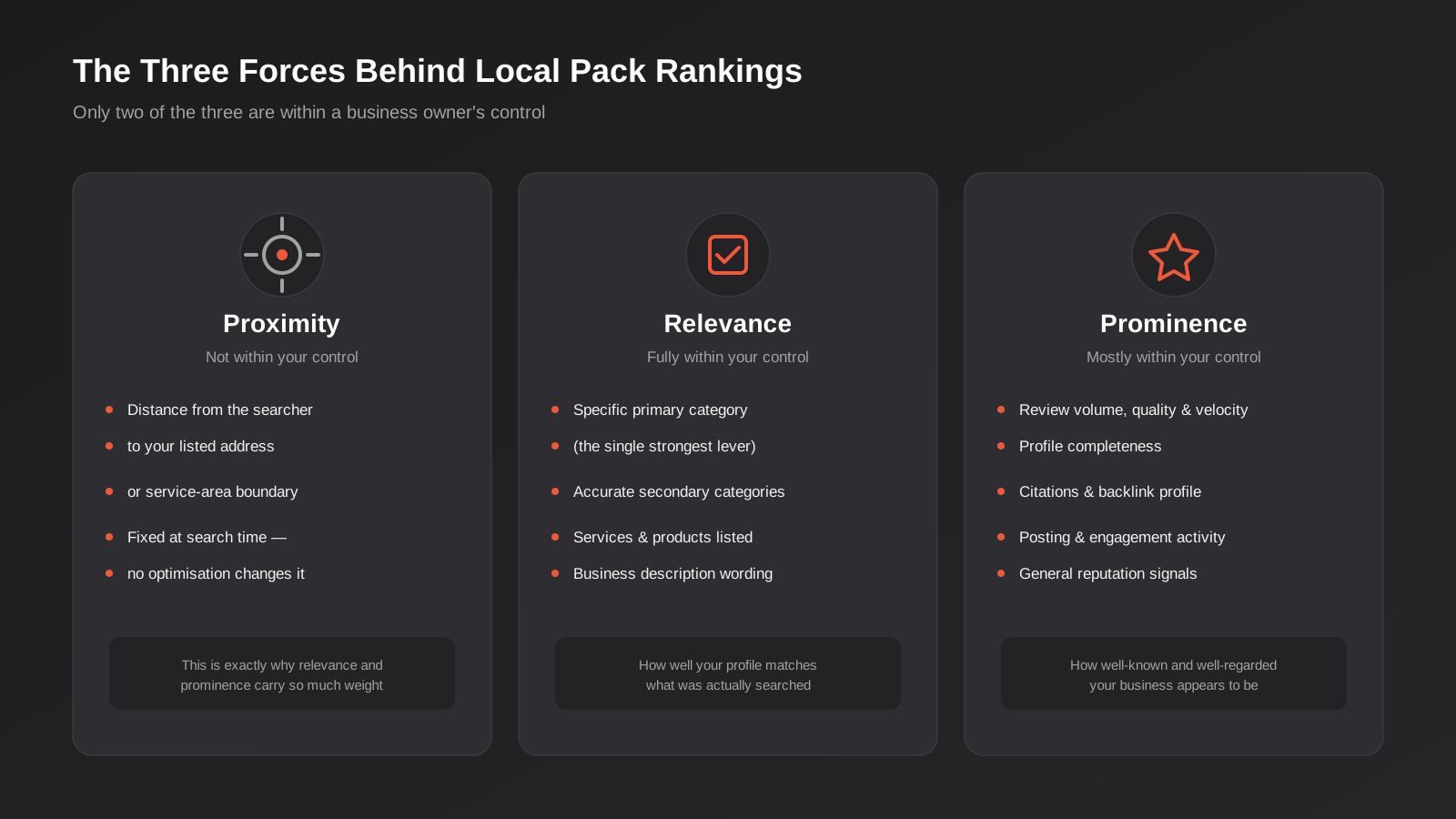
Google has been consistent for years about the three broad factors behind local pack placement: proximity, relevance and prominence. Proximity is simply how close the searcher is to your listed address or service area — it’s the one factor you have almost no control over, which is exactly why the other two matter so much. Relevance is how well your profile matches what was searched, driven heavily by your category selection, business description and the services you’ve listed. Prominence is a catch-all for how well-known and well-regarded your business appears to be — review volume and quality, how complete your profile is, your backlink and citation profile, and general engagement with the listing.
The practical upshot: you can’t move closer to every searcher, but you can absolutely improve relevance and prominence, and those two factors are where most of the ranking gap between competitors actually lives. A business that’s slightly further away but has a tightly matched category, a complete profile and a healthy flow of recent reviews will frequently outrank a closer competitor who’s done none of that work.
Where this fits against site-wide SEO
We treat Business Profile optimisation as one layer within a broader SEO strategy, not a replacement for it. A profile can only pull so much weight on its own — if your website is slow, thin on content or missing the local landing pages that support your service areas, you’re leaving the organic side of the results page uncontested. The two channels also reinforce each other: a well-optimised profile drives clicks to a website that then needs to convert that visitor, and a strong website with local content and citations feeds the prominence signals that help the profile rank. Treating them separately is one of the more common ways Australian businesses underperform in local search relative to what their actual reputation would justify.
Setting Up (or Fixing) Your Profile Foundations
Most of the profiles we audit weren’t set up badly — they were set up adequately in a hurry, years ago, and never revisited. The foundational fields are worth getting right because they’re expensive to get wrong later: changing a business name or primary category after the fact can trigger a re-review of the entire profile, sometimes with a temporary suspension while Google re-verifies it.
Choosing your primary and secondary categories
Category selection is consistently rated as one of the single strongest ranking levers available to a business owner, and it’s also one of the most commonly botched. Google maintains several thousand category options, updated regularly, and the temptation is to pick something broad and safe — “Health and Wellness” instead of “Physiotherapist”, “Contractor” instead of “Electrician”. That broad choice actively works against you, because relevance is judged against how tightly your category matches the search term, not how much ground it covers.
The rule we apply with clients: the primary category should describe the single service that makes the business the most money, chosen as specifically as the category list allows. Secondary categories (you can add several) should cover genuine additional services you offer, not adjacent categories you’d like to rank for but don’t actually deliver. Adding categories you don’t service is a fast way to dilute relevance for the category that actually matters, and it’s also a common trigger for a compliance review if a customer reports the mismatch.
Storefront vs service-area business
If customers visit your premises — a clinic, a showroom, a cafe — you’re a storefront business and your address is shown publicly. If you travel to customers — most trades, mobile services, many consultants — you should be set up as a service-area business, with your address hidden and a defined coverage area instead. Getting this wrong is one of the more common suspension triggers we see: a business with no public-facing premises (working from a home address or a shared office) that lists itself as a storefront looks, to Google’s automated systems, indistinguishable from a fake or spam listing.
When you do set up as a service-area business, define coverage by named suburbs or cities rather than entire states or regions. Listing all of Victoria as your service area doesn’t make you eligible to rank across the whole state — it just tells Google you don’t know where your actual customers are, which works against relevance rather than for it. A tradie servicing the eastern suburbs of Melbourne is better served listing fifteen to twenty specific suburbs than one broad metro-wide radius.
NAP consistency and verification
Your business name, address and phone number (NAP, in the jargon) need to match exactly across your website, your profile and every other directory or citation you appear in — not approximately, exactly, down to whether you write “St” or “Street”. Inconsistency here is a prominence and trust signal Google weighs more heavily than most business owners expect, and it’s worth a proper audit if your business has changed address, merged with another entity or been through a rebrand in the last few years, since old citations tend to linger long after the details change.
Verification itself is usually done by postcard, phone or email depending on your business category and history, and for most eligible businesses it’s now instant or near-instant. If you’re asked to verify by video — increasingly common for service-area businesses and newer accounts — have your signage, invoices and any physical proof of trading ready, since a rejected video verification can add weeks to the process.
Profile Completeness: The Fields Most Businesses Skip
Completeness sounds like a checkbox exercise, but Google treats an incomplete profile as a weaker prominence signal — it reads as a business that either doesn’t exist properly or doesn’t care about its listing, and it ranks accordingly. The fields that actually get skipped are rarely the obvious ones like phone number; they’re the ones that take a bit of thought.
Business description, attributes and services
The business description (750 characters) is one of the few places you can naturally include the terms customers actually search for, without keyword-stuffing a page that’s meant to read like a human wrote it. Describe what you do, who you do it for, and what makes the business worth choosing — specifics beat generic claims every time.
Attributes (wheelchair accessible, women-led, outdoor seating, online appointments, and dozens more depending on category) and the services or products section are both searchable and both frequently left blank. A cafe that lists “outdoor seating” and “dog friendly” as attributes is directly answering a filter a searcher might apply, and a trade business that lists its actual services individually (hot water system installation, blocked drain clearing, gas fitting) rather than one generic “plumbing” entry gives Google far more to match against specific searches.
Photos and video
Profiles with a healthy, regularly updated photo library get meaningfully more engagement than sparse ones, and Google’s own guidance nudges searchers toward businesses with recent photos specifically. The categories worth prioritising are the exterior (so people can find the physical location), the interior, the team, and photos of the actual work or product — not stock imagery, which Google’s systems are increasingly good at detecting and which does nothing for trust anyway. Uploading a handful of new photos every month, rather than fifty at once and then nothing for a year, reads as an active business rather than an abandoned listing.
Hours, special hours and holiday hours
Being open at the moment someone searches is one of the higher-weighted factors in whether a business gets surfaced at all, which means incorrect hours don’t just annoy the customer who turns up to a closed shop — they actively suppress your visibility during the hours you’re marked as closed. Public holidays are the most commonly missed update in Australia specifically, since state-based holidays (Melbourne Cup Day, various regional show days) don’t always get reflected even by businesses that are otherwise diligent about their standard hours. Setting special hours a month ahead of major holiday periods takes minutes and avoids both the ranking suppression and the one-star reviews from customers who showed up to a locked door.
Reviews: Volume, Velocity and the ACCC Problem
Reviews are the second-strongest ranking signal after the profile itself, and they’re also the area where Australian businesses run into a genuinely local complication that most generic (usually US-written) GBP guides never mention: the gap between what the ACCC allows and what Google allows.
Why steady review flow beats a burst
A profile that picks up two or three reviews a week, consistently, tends to perform better than one that sits static for months and then gets a rush of twenty reviews after a staff member does an end-of-quarter push. Google’s systems read velocity as a signal of an actively trading, currently-relevant business, and a sudden unnatural spike (especially one concentrated in a single day) can also trigger a manual or automated review of the profile for suspicious activity, which is the opposite of what you want. The practical fix is a simple, repeatable ask built into your existing customer touchpoints — a follow-up text after a job, a QR code on the invoice, a line in the email receipt — rather than an occasional campaign.
Responding to reviews — all of them
Responding to reviews, positive and negative, is itself an engagement signal and it’s also the difference between a one-star review sitting there unanswered forever and a one-star review that shows a prospective customer how the business handles a problem. A short, specific, non-defensive response to a bad review does more for conversion than most business owners expect — people reading reviews are often more interested in how a business responds to criticism than in the criticism itself.
The ACCC vs Google mismatch on incentives
This is worth its own section because it catches out otherwise careful business owners. Under Australian Consumer Law, the ACCC’s position allows an incentive for a review provided it’s offered regardless of whether the review ends up positive or negative, and provided the incentive is clearly disclosed. Google’s own review policy is stricter and bans incentivised reviews outright — any offer of a discount, entry into a draw or free product in exchange for a review, positive or negative, is a policy violation that can get individual reviews removed or the whole profile flagged.
In practice, that means the ACCC-compliant approach of “leave us a review, good or bad, and go in the draw for a $50 voucher” is still a breach of Google’s terms and puts the profile at risk, even though it would satisfy a regulator reviewing it under consumer law. The safest position — and the one we run for clients — is to treat Google’s rules as the effective floor regardless of what Australian Consumer Law technically permits: ask for reviews, make it easy to leave one, never tie it to any kind of reward. Fake or incentivised reviews are also, separately, misleading conduct under Australian Consumer Law in their own right, so the two rulebooks agree on the underlying principle even though they disagree on where exactly the line sits.
Posts, Q&A and Ongoing Activity Signals
Beyond the foundational setup, Google Business Profile has a handful of features that function less like static profile fields and more like a very lightweight content channel — and treating them that way, rather than ignoring them entirely, is where a lot of the easy wins sit.
A weekly posting cadence
Posts (updates, offers, events, product highlights) sit directly in the profile and in the knowledge panel that appears when someone searches your business name specifically. They don’t appear to move local pack position on their own, but they lift click-through once a searcher is already looking at your profile, and a profile with recent posts simply looks more active and trustworthy than one that hasn’t published anything since it was set up. A realistic cadence for most small and mid-sized businesses is weekly — a completed job, a seasonal offer, a new product, a team update — rather than daily, which is more effort than most teams can sustain without the content becoming filler.
Managing the Q&A section before customers do it for you
The Q&A feature lets anyone ask a public question on your profile, and anyone — not just the business owner — can answer it. Left unmanaged, this becomes a section where a competitor or a disgruntled former customer can post a misleading answer that sits there indefinitely, because most businesses never check it. The fix is simple but easy to forget: seed the section yourself with the five or six questions you actually get asked most often (do you offer emergency callouts, is parking available, do you take card payments) and answer them directly, then check the section periodically for anything new. It takes twenty minutes and closes off a gap that otherwise sits open to anyone.
Multi-Location and Service-Area Management
Businesses with more than one location, or a service area that spans several distinct regions, run into a different set of problems — mostly around duplication and consistency rather than the setup issues a single-location business faces.
Duplicate listing risk
Duplicate profiles are one of the most common issues we find during a multi-location audit, usually created accidentally — a franchisee sets up their own listing without realising head office already created one, or a business moves premises and a well-meaning customer or Google’s own automated systems generate a second listing at the new address while the old one lingers. Duplicates split your reviews, split your ranking signals across two weaker profiles instead of one strong one, and can trigger suspension flags on both if Google’s systems flag the pair as suspicious. Before doing anything else with a multi-location profile, it’s worth running a search for the business name across every location to confirm there’s exactly one listing per site.
Bulk management through Business Profile Manager
For anything beyond a handful of locations, managing profiles individually through the consumer-facing Google Maps app stops being practical. Business Profile Manager (Google’s bulk management console, accessible once locations are verified as a group) lets you push hours updates, respond to reviews and manage posts across every location from one place, and it’s worth the setup overhead even for a five or six location business, let alone a franchise network. The consistency it enforces — every location using the same category, the same core description structure, the same attribute set — is itself a prominence signal, since inconsistent categorisation across sibling locations reads as a less coherent, less trustworthy business to Google’s systems.
When Profiles Get Suspended (and How to Get Them Back)
Suspension is the scenario that turns a minor profile issue into an urgent one, because a suspended profile disappears from Maps and search entirely — not demoted, gone — for as long as it stays suspended. It’s worth understanding the common triggers before it happens, because prevention is far cheaper than the appeal process.
Common triggers
The most frequent causes we see: a category or business name that doesn’t match what the business actually does (adding categories you don’t service, or stuffing keywords into the business name field, which is itself a policy violation), a storefront listing at an address with no genuine public-facing premises, a sudden unnatural spike in reviews, a customer complaint flagged through the “suggest an edit” feature, or a service area that overlaps heavily with another listing under different ownership at a shared address (common with co-working spaces and virtual offices). Recently created profiles and profiles with a thin history are also scrutinised more heavily than long-established ones, so a new listing is worth extra care in the first few months.
The appeal process and realistic timelines
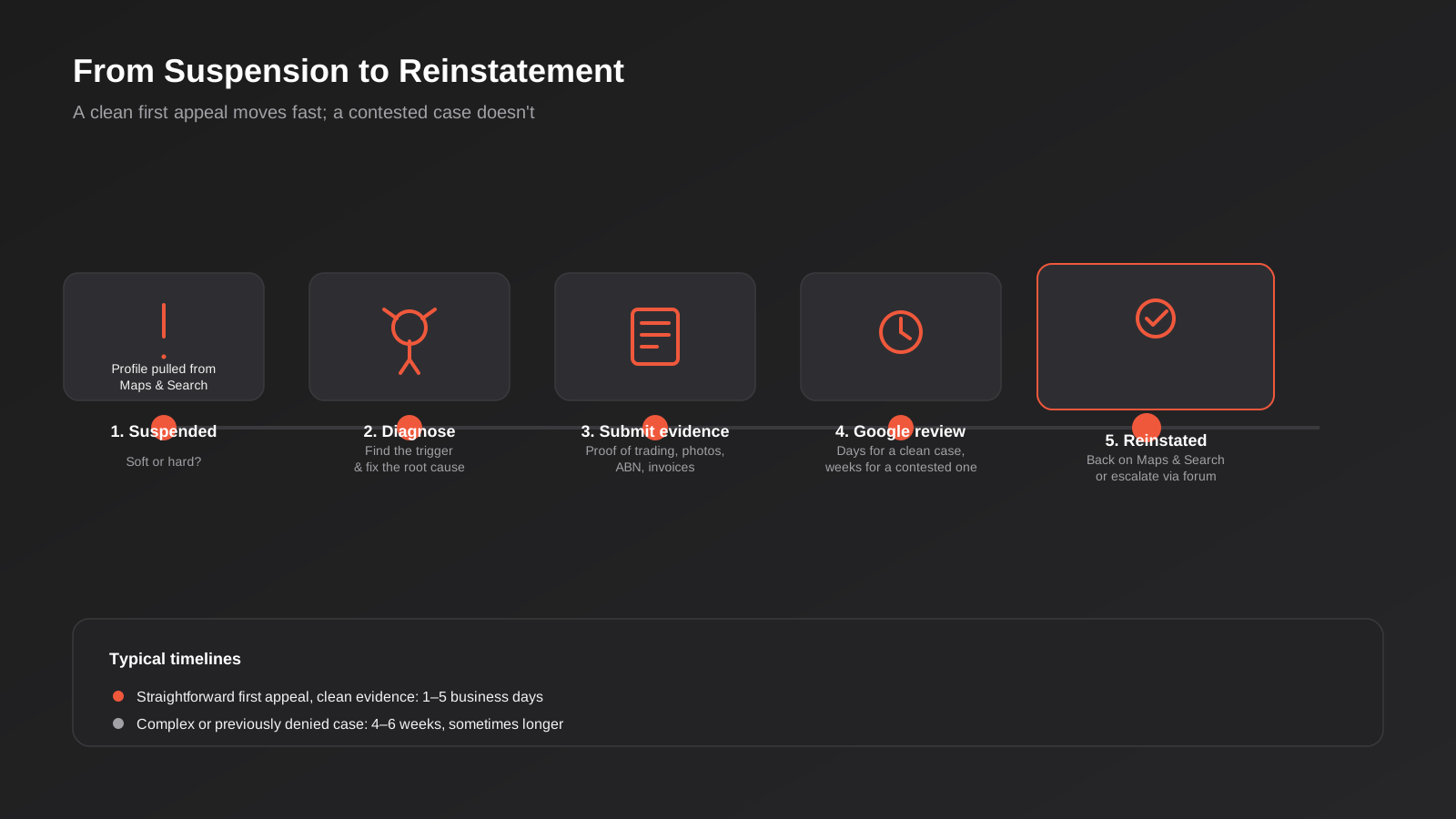
If a profile is suspended, the first step is establishing whether it’s a soft suspension (profile hidden, dashboard still accessible, usually caused by a data mismatch or policy flag) or a hard suspension (dashboard access itself is removed, typically reserved for serious or repeated violations). Soft suspensions are generally resolved by correcting whatever triggered the flag and submitting a reinstatement request with supporting evidence — proof of trading, photos of signage or premises, an ABN lookup, invoices showing the business address. Google has moved toward accepting that evidence directly within the appeal form itself for many account types, which has shortened the process compared to the older flow where evidence went through a separate, slower channel.
Timelines vary a great deal by case complexity. A straightforward first appeal with clear supporting evidence is often resolved within a few business days; a complex case, a profile with a prior violation history, or an appeal that’s already been denied once can run to several weeks and sometimes requires escalation through Google’s Business Profile community forum, where Product Experts with escalation access sometimes intervene on cases stuck in the standard queue. Repeated policy circumvention — creating a new profile to dodge a suspension on the old one — is one of the few things that results in genuinely permanent removal, so it’s worth resisting the temptation to route around a suspension rather than resolving it properly.
Measuring What’s Actually Working
Google Business Profile’s built-in Insights panel is limited compared to a proper analytics platform, but it’s enough to tell you whether the work is landing, provided you look at the right numbers rather than the vanity ones.
The metrics worth watching
Search views split into “direct” (people searching your business name) and “discovery” (people searching a category or product and finding you) is one of the more useful splits available — a rising discovery share means the profile is genuinely winning new visibility rather than just being found by people who already knew the business. Beyond views, the actions that matter are calls, direction requests, website clicks and message conversations, since these are the actual behaviours that lead to revenue rather than a passive impression.
Tying it back to leads, not just visibility
The mistake we see most often at this stage is treating profile views or impressions as the success metric on their own. A profile can show a healthy increase in views quarter on quarter and still be generating fewer actual enquiries if, say, the category drift we covered earlier has started attracting the wrong kind of search intent. Where possible, tie call tracking or a dedicated tracking number to the profile so those calls show up distinctly from other channels in whatever reporting you’re already running, and review conversion — views to actions, actions to genuine enquiries — on the same cadence as the rest of your marketing reporting rather than treating it as a separate, occasionally-checked dashboard.
Common Mistakes We See on Australian Business Profiles
- Choosing a broad, safe primary category instead of the most specific one that actually matches the core service — this alone accounts for a large share of the ranking gap between similar competitors.
- Listing an entire state or region as a service area instead of the specific suburbs actually covered, which dilutes relevance rather than expanding reach.
- Running a storefront listing from a home address, shared office or virtual office with no genuine public-facing premises — a common and avoidable suspension trigger.
- Offering any kind of reward, discount or prize draw entry in exchange for a review, which breaches Google’s policy even where it would satisfy the ACCC’s stricter disclosure-based test.
- Letting the Q&A section sit unmanaged, leaving incorrect or misleading public answers unchallenged for months or years.
- Forgetting to set special hours for Australian public holidays, which suppresses visibility during exactly the hours the business is marked as open by mistake — or closed by mistake.
- Uploading a large batch of photos once and never again, rather than maintaining a steady, modest cadence of updates.
- Operating duplicate listings after a relocation, rebrand or franchise rollout, splitting reviews and ranking signals across two weaker profiles instead of one strong one.
Frequently Asked Questions
Do I need a physical address to set up a Google Business Profile?
No. Businesses without a public-facing premises — most trades, mobile services and many consultants — should set up as a service-area business, which hides the address and instead lists the suburbs or cities covered. Listing a home address as a public storefront when customers don’t actually visit is one of the more common triggers for a suspension review.
How many categories should I add to my profile?
One primary category, chosen as specifically as possible for the core service that makes the business money, plus as many secondary categories as genuinely apply — up to Google’s limit. Only add a secondary category if you actually deliver that service; padding the list with adjacent categories you don’t service dilutes relevance rather than expanding your reach.
Can I offer customers an incentive to leave a Google review?
Not under Google’s policy, even though Australian Consumer Law takes a slightly softer position that would allow a disclosed incentive offered regardless of review outcome. Google bans incentivised reviews outright, and breaching that policy risks individual reviews being removed or the whole profile being flagged. The safer approach is to make leaving a review easy — a direct link, a QR code, a follow-up message — without tying it to any reward.
Why was my Google Business Profile suspended?
The most common causes are a category or business name mismatch with what the business actually does, a storefront listing with no genuine public premises, an unnatural spike in reviews, or a customer-submitted edit that flagged the listing for review. Start by checking whether it’s a soft suspension (dashboard still accessible) or a hard suspension (dashboard access removed), since the resolution path differs.
How often should I post updates to my profile?
Weekly is a realistic, sustainable cadence for most small and mid-sized businesses. Posts don’t appear to directly move local pack position on their own, but they lift click-through once someone is viewing the profile and signal that the business is actively trading, which supports the broader prominence signal.
Does my Google Business Profile affect my website’s organic Google rankings?
Not directly — the local pack and the organic results below it are evaluated separately, driven by different signals. That said, the two reinforce each other in practice: local citations and reviews contribute to broader prominence signals, and a well-optimised profile drives the traffic that a properly built website then needs to convert. Treating them as one connected strategy, as covered in our complete guide to SEO for Australian businesses, outperforms optimising either in isolation.
What’s the difference between this and general local SEO?
Local SEO is the broader discipline — citations, NAP consistency, local landing pages, city-specific content strategy — and Google Business Profile is one component within it, albeit an outsized one. Our local SEO guide for Sydney businesses covers the wider citation and content picture; this guide focuses specifically on the profile itself. Both matter, and neither substitutes for the other.
Where to Start
If you’ve read this far and you’re not sure which of these issues apply to your own profile, the fastest way to find out is a proper audit rather than guessing — category accuracy, completeness, review velocity, duplicate listings and citation consistency all show up clearly once someone actually looks. Most businesses we audit have at least two or three of the issues covered above sitting unaddressed, quietly capping how much of the local pack they could otherwise be winning.
We fold Google Business Profile work into the local SEO layer of our SEO service rather than treating it as a bolt-on, because it performs best managed alongside the rest of a site’s technical and content strategy rather than in isolation. If you want a second opinion on where your own profile stands, or you’re dealing with a suspension you’re not sure how to resolve, our SEO pricing page outlines how that work is scoped — or just get in touch and we’ll have a straightforward look at what’s actually holding your profile back.
Keep reading
Related posts
Psychology Practice Marketing in Australia: Local SEO, Compliant Copy and the Waitlist Problem (2026)
How Australian psychology practices handle local SEO, AHPRA-compliant copy and waitlist triage when they're already at capacity (2026).

Physiotherapy Marketing in Australia: Local SEO, Website Design and Booking (2026)
How Australian physiotherapy clinics win new patients through Google Business Profile, local SEO, website design and real-time booking in 2026.
Local SEO for Veterinary Clinics in Australia: Google Business Profile, Reviews and the Emergency Search (2026)
Veterinary clinic SEO explained: Google Business Profile, review generation and the emergency search most vet websites get wrong.
Got a project you'd like to talk through?
Tell us what you're working on — we'll come back with a plan.
