
Schema Markup for SEO: What Actually Earns Rich Results in 2026
 Jignesh Vagadiya
01/10/2026
21 min read
Jignesh Vagadiya
01/10/2026
21 min read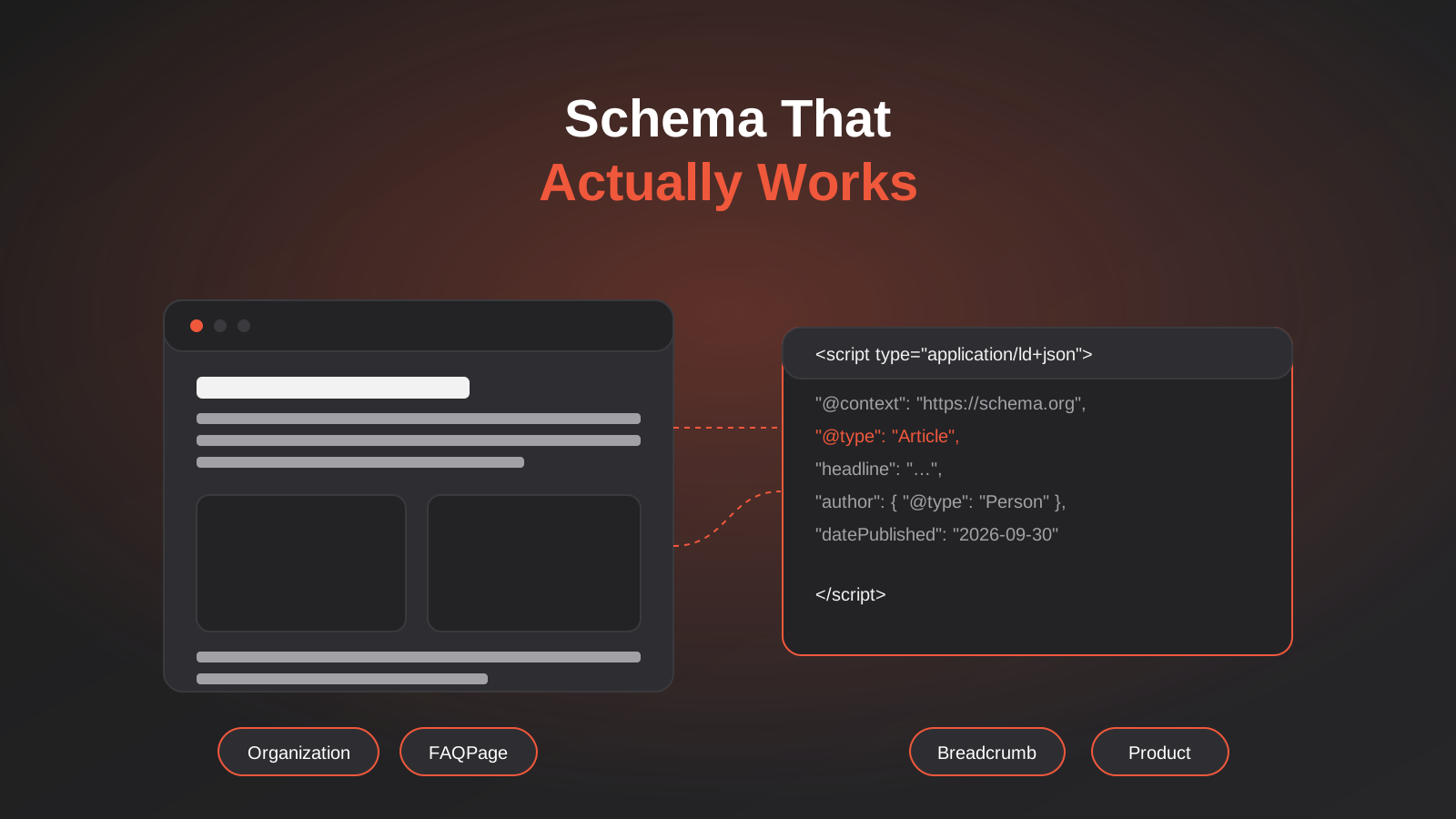
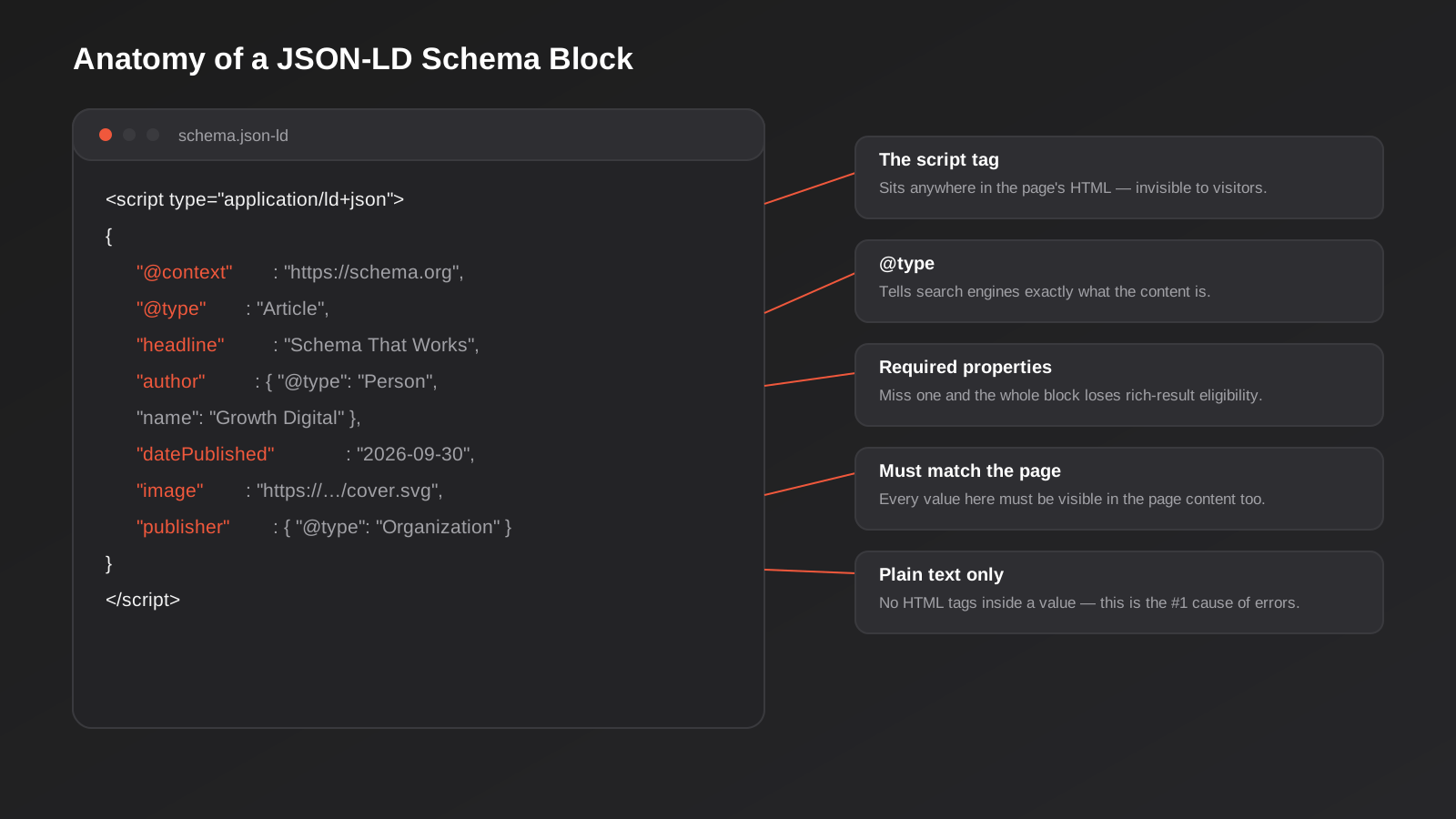
Open the page source on almost any well-built website and, buried somewhere between the header scripts and the footer tracking codes, you will find a block of text that no visitor will ever read. It sits inside a <script type="application/ld+json"> tag, it looks like a chunk of raw data, and it does a specific job: telling Google, Bing and increasingly a handful of AI crawlers exactly what the page in front of them actually is. That block is schema markup, and it is one of the few technical SEO jobs that is genuinely finish-able. You do it once, you do it properly, and it keeps working.
We get asked about it constantly, usually in one of two ways. Either a client has read that schema markup for SEO is “essential in 2026” and wants it added everywhere, or they have read the opposite, that AI search has made it pointless, and want to know if it is worth the effort at all. Both takes are half right. Schema markup will not rescue a page that is thin, slow or poorly targeted, and it will not by itself get you cited by ChatGPT. But implemented correctly, on the right pages, with the right types, it does something narrower and more useful: it removes ambiguity about what your content is, and it opens the door to the rich results that still exist.
This guide covers what schema markup actually does, which types are worth your time in 2026, where the FAQPage hype has quietly gone stale, what the current research says about AI citations, and how to implement and test it properly on a WordPress site without creating the duplicate-schema mess we see on a lot of Australian business websites.
It’s worth being clear about what kind of work this is before going further. Schema markup sits firmly in the technical SEO bucket, alongside things like site speed and crawlability, not in the content or keyword strategy bucket. If you haven’t done the groundwork of understanding what your actual customers search for, no amount of correctly formatted JSON-LD will make up for targeting the wrong topics; that’s a separate exercise, and our keyword research guide is the right starting point if that’s where you’re at. Schema is what you layer on once you already have content worth marking up, tidying up and clarifying what’s already there rather than manufacturing relevance that doesn’t exist.
What Schema Markup Actually Is (and Isn’t)
Structured data is the general concept: formatting information on a page in a consistent, machine-readable way so a computer program doesn’t have to guess what it’s looking at. Schema markup is the specific implementation most businesses mean when they say “structured data” — a shared vocabulary maintained at schema.org that both Google and Bing recognise, covering everything from articles and products to events, recipes and job postings.
There are three ways to add it to a page: Microdata (inline HTML attributes), RDFa (similar, also inline), and JSON-LD (a separate script block). Google has recommended JSON-LD for years, for a simple reason: it doesn’t touch your visible markup. Every major WordPress schema plugin outputs JSON-LD by default now, and if you’re implementing schema in 2026, JSON-LD is the only format worth using. If a developer offers to hand-code Microdata attributes into your templates, that’s extra maintenance risk for no benefit.
What it changes, and what it doesn’t
Schema markup does not directly improve your rankings. Google has said this consistently and it still holds: the presence of valid schema is not a ranking factor in the way page speed or content quality are. What it does is make your page eligible for specific enhanced treatments in the search results, commonly called rich results: star ratings under a product listing, a breadcrumb trail instead of a raw URL, an event date and location, a recipe card with cook time. None of that is guaranteed even with perfect schema. Google’s own structured data guidelines are explicit that adding structured data is a necessary but not sufficient condition for a rich result to display, and eligibility can change without notice.
So the honest value proposition is this: schema markup gives search engines (and other tools reading your page) a clearer, unambiguous description of your content, and where Google chooses to use that for a visual enhancement, it tends to improve your click-through rate rather than your ranking position. If a page is ranking on merit and schema gets it a star rating or a breadcrumb, more of the people who see it in the results will click it. That’s a real, if modest, return for the implementation effort. Our own SEO services treat schema as one part of a broader technical foundation, not a silver bullet on its own.
Schema Markup Types Worth Implementing for SEO in 2026
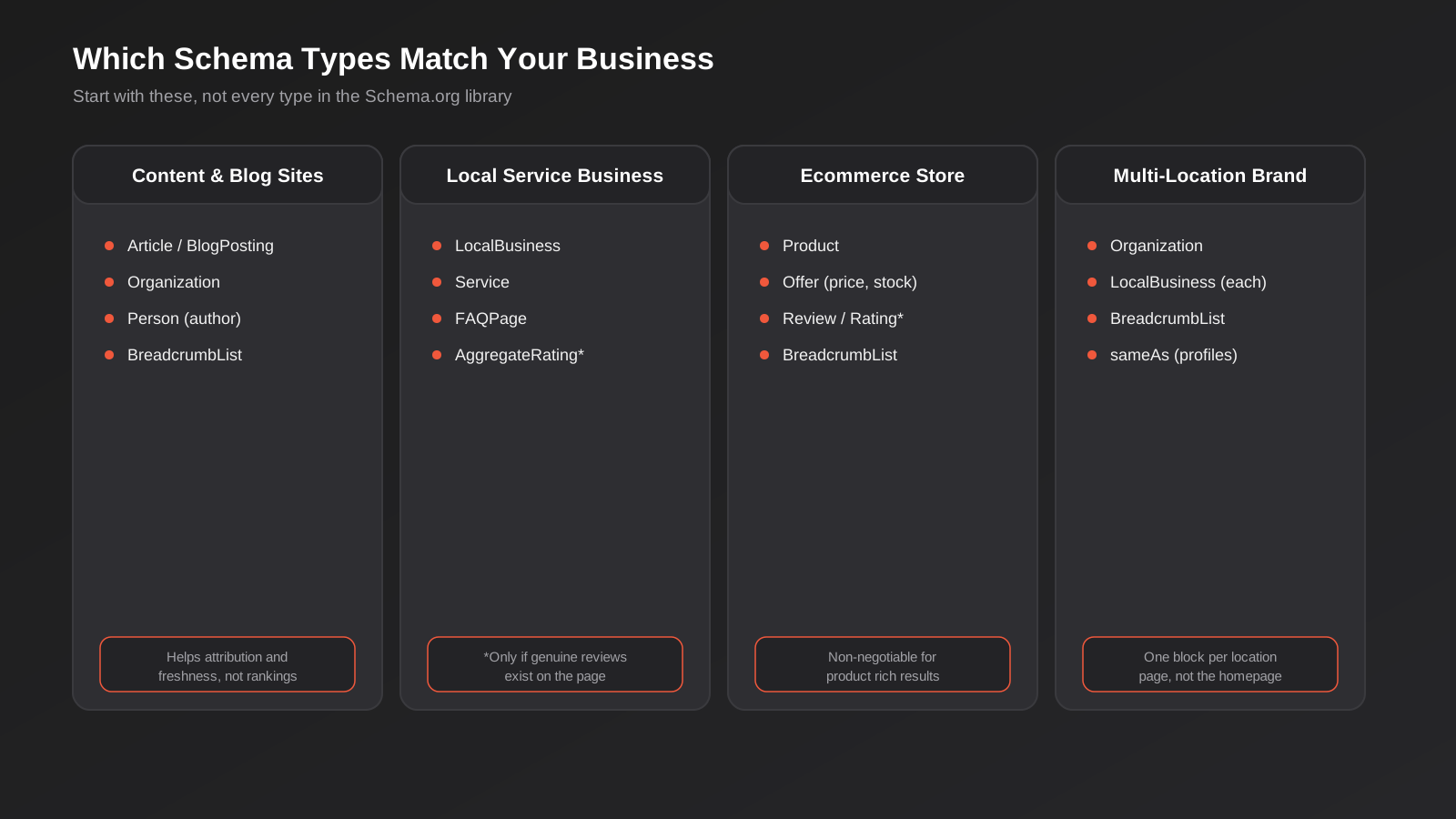
Schema.org lists hundreds of types and thousands of properties. Almost none of them matter for a typical Australian small or mid-sized business site. We keep coming back to the same handful, because they cover most of what a real business website needs to say about itself.
Organization
This is the foundation schema for your business as an entity: legal name, logo, URL, contact details and links to your social profiles via the sameAs property. It doesn’t generate a visible rich result on its own, but it’s how Google starts to build a “knowledge” picture of who you are, which matters for brand search results and for things like the logo that can appear next to your site name. Every site should have exactly one Organization block, usually on the homepage or site-wide in the header.
Article or BlogPosting
For blog content and news-style pages, Article (or its subtype BlogPosting) schema communicates headline, author, publish date, modified date and a featured image. It supports Google’s “top stories” style carousels for eligible publishers, helps with date freshness signals in the results, and gives proper attribution to the author. This is the type you’re looking at right now on this page, and it’s worth getting right on every post: an accurate datePublished and dateModified matter more here than people assume, since a stale date is one of the quieter reasons a page stops getting picked up for “recently updated” style results.
LocalBusiness
If you operate from a physical location, or serve a defined geographic area, LocalBusiness schema (or one of its more specific subtypes, like ProfessionalService or Store) ties your address, phone number, opening hours and service area to your business entity. This is separate from, and complements, a well-optimised Google Business Profile, which is what actually drives the local pack. Schema markup doesn’t replace that work, but consistent NAP (name, address, phone) data across both reinforces the same signals.
Product
For ecommerce, this one isn’t optional. Product schema needs a name, an image, and an offers block with price, currency and availability at minimum. Get this right and you’re eligible for the price and stock-status display in search results; get it wrong (a stale price, a product marked in stock that’s sold out) and you risk exactly the kind of content-mismatch issue that can see rich results pulled sitewide. Most ecommerce platforms and plugins generate this automatically from your product data, which is the safest approach, since it stays in sync with reality by default.
Shopify, WooCommerce and most modern ecommerce platforms handle the core Product block without any extra work, but variants are where implementations commonly fall short. A t-shirt in five sizes and three colours is technically fifteen offers, not one, and marking up only the base product with a single price and stock level can cause Google to show inaccurate availability for a specific variant someone actually wants. If your store sells variant products and you’re seeing “out of stock” flagged in Search Console for items you know are available, this mismatch is the first place to check.
FAQPage, and where the hype has gone stale
This is the one that needs an honest correction, because a lot of what’s written about FAQPage schema online is out of date. For a long stretch, FAQPage markup was one of the easiest ways for any business to earn extra vertical real estate in the search results, with expandable question-and-answer snippets sitting right under a listing. That changed: Google has restricted the FAQPage rich result display to a narrow set of authoritative government and health sites. For most commercial websites, adding FAQPage schema in 2026 will not produce that visual rich result anymore, no matter how well it’s implemented.
That doesn’t make it worthless, but it does change why you’d use it. FAQPage markup, and structured Q&A content more generally, still gets read by AI systems during answer extraction, even where it no longer triggers a classic rich result. If a page has a genuine FAQ section (and this post has one, further down), marking it up costs very little and gives tools parsing the page a clean, unambiguous read of the question-and-answer pairs. Just don’t implement it expecting the old visual snippet back, and don’t stuff a FAQ section onto a page purely to have somewhere to hang the schema. Google has also been explicit that FAQ content needs to genuinely answer the questions on the page itself, not just tick a markup checkbox.
BreadcrumbList
A small, low-effort win. BreadcrumbList schema replaces the raw URL string under your listing with a readable navigation trail (Home > Marketing > SEO, for example), which is both more scannable for the person searching and a small trust signal that the page sits inside a properly structured site. Most WordPress SEO plugins and well-built themes generate this automatically from your page hierarchy, so there’s rarely a reason to skip it.
Review and AggregateRating
Handle this one carefully. Review and AggregateRating schema is what produces the star rating under a listing, and it is also the most heavily policed type in Google’s guidelines, because it’s the one most commonly abused with fake or self-authored reviews. The rule is simple: only mark up reviews that genuinely exist, visibly, on the page itself, sourced from real customers. Do not mark up third-party reviews (from Google, Trustpilot or Facebook) as if they were first-party content on your site; Google’s guidelines explicitly disallow that, and a site caught doing it can lose rich result eligibility entirely, not just for that page.
Other types worth knowing about
Beyond the core set above, a handful of other schema types are worth knowing exist, even if most businesses won’t use them regularly. Event schema is relevant if you run webinars, workshops or physical events, and can surface the date, location and ticket availability directly in search results. VideoObject schema helps if you’re publishing video content on-site rather than just embedding YouTube, giving search engines the duration, thumbnail and upload date. JobPosting schema is worth knowing about specifically if you’re hiring, since Google for Jobs relies on it entirely and it’s one of the few schema types that still reliably produces a prominent, dedicated search result. None of these are worth implementing speculatively; add them when the underlying content genuinely exists, not before.
Does Schema Markup Help With AI Overviews and ChatGPT Citations?
Since AI Overviews, AI Mode and answer engines like ChatGPT and Perplexity became a meaningful source of visibility, a lot of agencies have rebadged schema markup as an “AI SEO” tactic, implying that adding more of it will get you cited more often. The research so far doesn’t support that as a direct, isolated effect. A large-scale study published in 2026 tracked close to two thousand pages that added JSON-LD schema against a matched control group with no schema changes, measuring citation rates across Google AI Overviews, Google AI Mode and ChatGPT. The result: citation movement across all three was statistically indistinguishable from zero. AI Overview citations actually moved slightly negative, while AI Mode and ChatGPT moved slightly positive, but not by an amount that ruled out noise.
There’s a mechanical reason this tracks. When AI chatbots fetch a page directly to answer a question, most are reading the visible, rendered text content, not parsing the hidden JSON-LD block separately. Schema helps search engines catalogue and understand a page at indexing time; it isn’t primarily what an LLM reads at the moment it’s deciding what to cite. If you want to improve your odds of being cited by AI tools, the higher-leverage work is entity clarity, extractable answers written in plain language, and content that’s genuinely earning mentions elsewhere on the web, which we cover in more depth in our guide to AI SEO and getting cited by AI Overviews. This post is the narrower, more technical companion to that one: schema is still worth doing for the reasons above, rich results and unambiguous entity signals, but treat it as maintenance-grade technical SEO, not a citation strategy.
Where the study did find a small, consistent positive movement was AI Overviews and AI Mode specifically over a longer measurement window, which is worth flagging honestly rather than dismissing outright. It’s not enough to call schema a reliable citation lever, but it’s also not nothing, and it lines up with a reasonable theory: Organization and Article schema help Google’s own systems (which power AI Overviews directly, unlike third-party tools like ChatGPT reading your page independently) resolve who you are and what a piece of content covers slightly more confidently than parsing unstructured text alone. That’s a plausible, modest assist, not the headline “schema gets you cited by AI” claim that gets sold. Implement it because it’s good technical hygiene and because rich results still exist for the types that support them. Don’t implement it as your AI visibility strategy; that work lives elsewhere.
How to Implement Schema Markup on a WordPress Website
There are three realistic paths on WordPress, and which one is right depends on how much control you need.
Plugin-generated schema
For most business websites, a dedicated SEO plugin (Rank Math and Yoast are the two most common on Australian WordPress sites) will generate Organization, Article, BreadcrumbList and basic LocalBusiness schema automatically from your existing content and settings, with a UI for filling in the gaps. This is the right starting point for almost everyone, because it stays in sync with your content without ongoing developer involvement, and it’s validated against Google’s current requirements by the plugin authors rather than by you.
Theme-level schema
Some purpose-built or custom WordPress themes generate certain schema types directly in code, often Article, BreadcrumbList, Organization or Person data tied to the theme’s templates. This works well when it’s deliberate and the only source of that schema on the site. It becomes a problem the moment it isn’t the only source.
The most common WordPress schema mistake: duplication
This is genuinely the most frequent issue we find auditing existing WordPress sites: two, sometimes three, separate systems all outputting schema for the same page. A theme generating Article schema in its template code, an SEO plugin also generating Article schema from its own settings, and a page builder plugin adding a third block on top, all with slightly different data. Google doesn’t merge these gracefully. Depending on what’s on the page, you can end up with conflicting values for the same property, duplicate schema blocks of the same type, or one block overriding fields the other one needed. The fix is always the same: pick one source of truth per schema type, and turn the others off. If your theme already handles Article and Person schema in code, don’t also enable that same schema type in your SEO plugin; use the plugin for the types the theme doesn’t cover instead.
Before adding or changing anything, it’s worth doing a quick technical health check on the site generally, since schema issues tend to show up alongside other technical debt on older WordPress builds, not in isolation.
When you need custom JSON-LD a plugin doesn’t generate
Occasionally a page needs a schema type your plugin doesn’t cover out of the box, Event or JobPosting being the two we run into most often. The cleanest approach on WordPress is a small custom field setup (Advanced Custom Fields is the common choice) feeding a JSON-LD block output via a theme template hook, rather than pasting static code into a Custom HTML block. The difference matters: a static block goes stale the moment the event date or job details change, because nobody remembers to update code sitting in a page editor. A field-driven block updates automatically whenever the underlying content does, the same way your plugin-generated Article schema already does. If that’s more development work than you want to take on in-house, it’s a reasonably quick job for a developer who already knows your site, and worth scoping properly rather than improvising with a hand-edited script tag that someone will forget about in six months.
Testing and Validating Your Schema
Implementing schema without testing it is how most of the mistakes below happen. Three tools cover almost everything you need.
Google’s Rich Results Test is the first stop for any page you’ve just added or changed schema on. Paste in the URL (or the raw code) and it tells you which rich result types the page is eligible for, plus a breakdown of errors (which block eligibility entirely) and warnings (recommended but not required fields you’re missing). Run this on a sample of your key page types — one blog post, one product page, one service page — rather than trying to check every URL individually.
Schema.org’s own validator is stricter and more general-purpose. It checks your JSON-LD against the actual schema.org specification rather than specifically against what Google currently supports for rich results, which is useful for catching structural errors even in schema types Google doesn’t display visually.
Search Console’s Enhancements reports are where you find out what’s actually happening at scale, after the fact. Once Google has crawled your schema, the relevant Enhancements report (Products, Breadcrumbs, FAQs, and so on) shows how many valid, warning and error items it found across the whole site, not just one page. This is the tool that catches a plugin update that silently broke schema across every post, which is a more common failure mode than most site owners expect.
Common Schema Markup Mistakes We See
Most schema problems we come across during a technical SEO review fall into one of two buckets: the markup is structurally broken and simply won’t validate, or it’s technically valid but describes something untrue about the page. The first kind is annoying but harmless, you just miss out on the rich result. The second kind is the one worth taking seriously, because it’s the kind Google actively polices.
- Marking up prices, availability or ratings that don’t match what’s actually visible on the page — Google treats this as a guideline violation, not just an error, and it can trigger a manual action affecting the whole site.
- Putting HTML tags, line breaks or formatting inside a JSON-LD text value. Every property value needs to be a plain string; a stray
<br>or<a>tag inside a value can invalidate the entire block. - Running schema from two sources at once (theme plus plugin, or plugin plus page builder) without realising it, producing duplicate or conflicting blocks for the same page.
- Using incorrect date formats. Schema dates need ISO 8601 format (2026-09-30), not “30th September 2026” or “30/09/2026”.
- Adding FAQPage schema expecting the old-style visual rich result to appear, when that display is now restricted to a small set of government and health sites.
- Marking up third-party review platform content (Google reviews, Trustpilot) as if it were first-party Review schema on your own site, which breaches Google’s structured data guidelines.
- Copying a competitor’s schema wholesale rather than generating it from your own content, which often carries over their business name, address or product data by mistake.
- Never testing after implementation, and finding out months later via a Search Console Enhancements report that a plugin update silently broke every Product block on the site.
Frequently Asked Questions
Does schema markup improve my Google rankings?
Not directly. Google has been consistent that valid structured data is not itself a ranking factor. What it does is make a page eligible for rich results like star ratings, breadcrumbs or product pricing in the search listing, which tends to improve click-through rate on pages that are already ranking, rather than moving the ranking position itself.
Is FAQPage schema still worth adding to my pages?
The visual rich result it used to trigger is now restricted to a narrow set of government and health websites, so most businesses won’t see that expandable snippet anymore. It’s still low-cost to implement on a page with a genuine FAQ section, and it gives a clean, structured read of the content to tools that parse the page, but don’t add it expecting the old search-result real estate back.
Will adding schema markup get my content cited by ChatGPT or Google AI Overviews?
A large 2026 study testing this found no statistically meaningful effect on AI citation rates from adding JSON-LD schema alone. Most AI tools read a page’s visible text when deciding what to cite, rather than parsing the hidden schema block. Schema is still worth doing for search engines and rich results; treat AI citation as a separate problem, driven more by content clarity and third-party mentions.
Which schema plugin should I use on WordPress?
Rank Math and Yoast SEO are both solid, widely used choices that generate the core types (Organization, Article, BreadcrumbList) automatically. The plugin itself matters less than making sure it’s the only source of schema for each type on your site. If your theme already outputs a schema type in code, don’t duplicate it in the plugin.
Can adding the wrong schema actually hurt my site?
Yes, in two specific ways. Structural errors (bad JSON, missing required fields) usually just mean you miss out on the rich result, no real damage done. But schema that misrepresents what’s actually on the page, like fabricated ratings or prices that don’t match the visible content, is treated as a guidelines violation and can lead to Google removing rich result eligibility sitewide until it’s fixed, not just on the offending page.
How often does schema markup need to be updated?
Most of it maintains itself if it’s generated dynamically from your content (product price, blog post date, review count), which is why plugin or platform-generated schema is preferable to hand-coded blocks. The main manual check is after any plugin, theme or page builder update: run the Rich Results Test on a few key pages and check your Search Console Enhancements reports periodically to catch anything that broke silently.
Where to Start
If you’ve never touched schema markup, don’t try to implement every type in this guide at once. Start with Organization on your homepage, Article on your blog posts, and LocalBusiness if you operate from a physical location or a defined service area, then validate each with the Rich Results Test before moving on. If you’re running an ecommerce store, Product schema is the one that actually matters for revenue, so prioritise getting that accurate over anything else on this list.
If you already have schema on your site and you’re not sure whether it’s set up correctly, that’s usually a faster fix than starting from scratch. Run your key page types through the Rich Results Test, check your Search Console Enhancements reports for anything sitting in an error or warning state, and look specifically for the duplication problem described above, since it’s the single most common issue we find and one of the easiest to miss without deliberately checking for it. A messy schema setup is rarely a sign the whole thing needs rebuilding; more often it’s one plugin setting that needs switching off.
If you’re not sure whether your current setup has the duplication problem described above, or you want a proper technical SEO review that looks at schema alongside site speed, crawlability and content structure, that’s exactly the kind of audit we run as part of our SEO engagements. Happy to have a look at what’s currently live on your site and talk through what’s actually worth fixing versus what’s fine as-is — get in touch and we’ll walk you through it.
Keep reading
Related posts
Psychology Practice Marketing in Australia: Local SEO, Compliant Copy and the Waitlist Problem (2026)
How Australian psychology practices handle local SEO, AHPRA-compliant copy and waitlist triage when they're already at capacity (2026).

Physiotherapy Marketing in Australia: Local SEO, Website Design and Booking (2026)
How Australian physiotherapy clinics win new patients through Google Business Profile, local SEO, website design and real-time booking in 2026.
Local SEO for Veterinary Clinics in Australia: Google Business Profile, Reviews and the Emergency Search (2026)
Veterinary clinic SEO explained: Google Business Profile, review generation and the emergency search most vet websites get wrong.
Got a project you'd like to talk through?
Tell us what you're working on — we'll come back with a plan.
