
Ecommerce Category Page SEO: Fixing Faceted Navigation and Duplicate Content (2026 Guide)
 Jignesh Vagadiya
24/09/2026
22 min read
Jignesh Vagadiya
24/09/2026
22 min read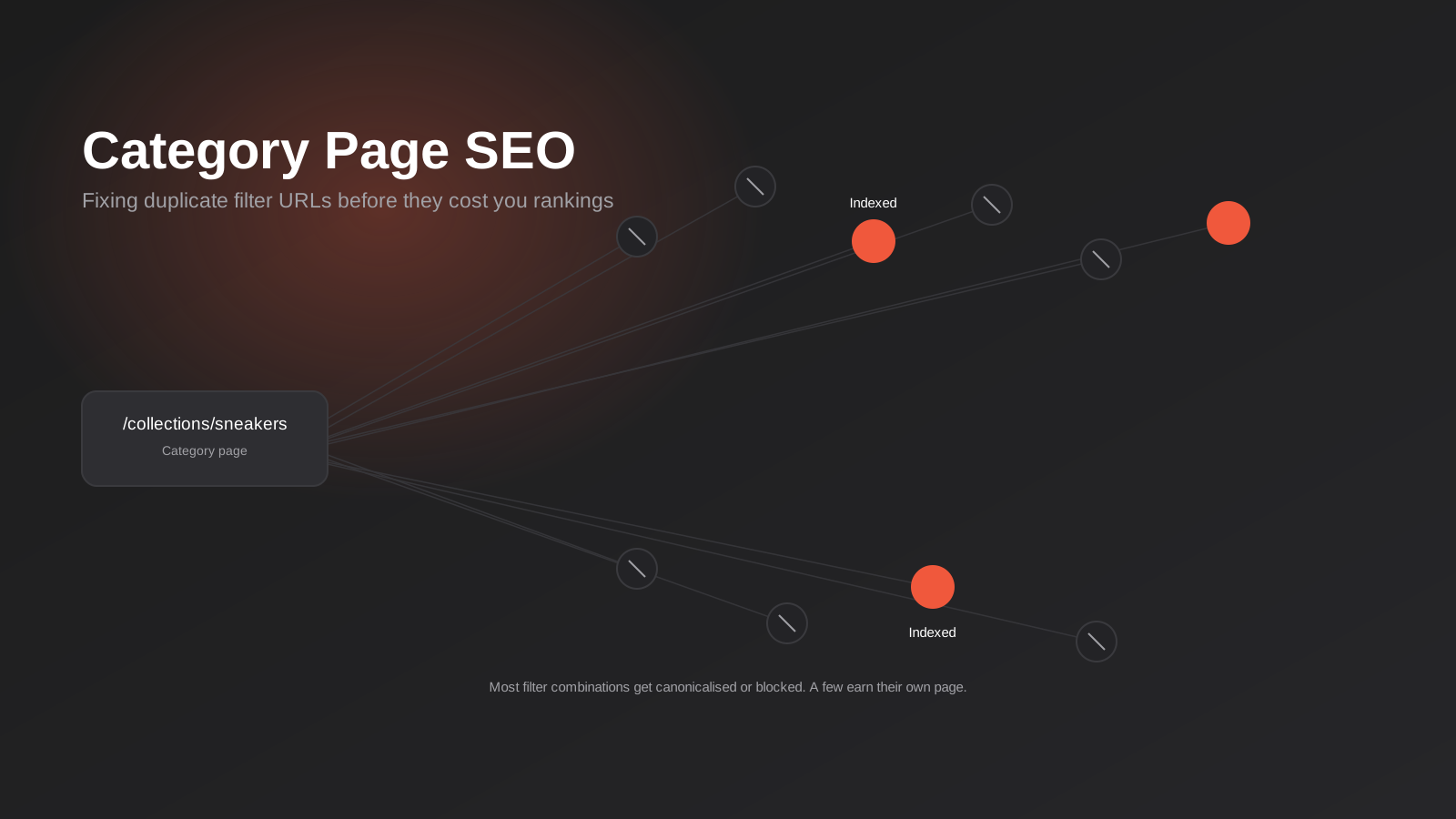
Pull up Google Search Console for most Australian ecommerce stores and you’ll find the same thing: thousands of indexed pages nobody meant to create, sitting alongside category pages that should be carrying real search traffic and aren’t. Click into the coverage report and half of it is filter combinations — /collections/sneakers?colour=black&size=10&sort=price-asc and forty variations of it — all competing quietly against each other and against the one page that was actually meant to rank.
This isn’t a niche technical problem. It’s the default outcome of how modern ecommerce platforms build filter and sort functionality, and it affects Shopify stores, WooCommerce builds and custom-developed catalogues about equally. Nobody sets out to generate 30,000 near-duplicate URLs from six filter options. It just happens, silently, the moment a store adds colour swatches and a price slider to a collection page.
We work on ecommerce category page SEO and Shopify builds often enough to have a fairly settled view on this: category pages are where most of the real search volume in ecommerce lives, and faceted navigation is the single most common reason that volume never converts into rankings. This guide is specifically about ecommerce category page SEO — diagnosing that problem and fixing it properly, not a general SEO primer, and not a conversion piece. If you want the broader SEO fundamentals first, our complete guide to SEO for Australian businesses covers those; this one goes deep on the part that’s specific to stores with filterable catalogues.
Why Category Pages Carry Weight Product Pages Can’t
Product pages are where ecommerce SEO conversations usually start, and they matter, but they’re not where the volume is. A single product page targets a narrow, specific query — a model number, a exact product name, maybe a long-tail variant. Category and collection pages target the broad, high-volume, commercial-intent terms: “women’s running shoes,” “waterproof hiking boots,” “outdoor furniture Perth.” These are searches with real buying intent behind them, searched thousands of times a month in Australia, and they map almost exactly onto how a category page is structured.
That makes category pages the highest-leverage real estate on an ecommerce site. Get one ranking well and it can outperform dozens of individual product pages combined, because it’s catching people earlier in their search, before they’ve settled on a specific product. It also means a broken category page — thin, duplicated, or competing against its own filtered variants — is an expensive problem. You’re not losing a bit of long-tail traffic. You’re losing the page that was meant to carry the store.
The trouble is that category pages are also the part of the site most exposed to faceted navigation, because that’s exactly where filters live. Product pages don’t usually spawn variants of themselves. Category pages do, by design, every time a shopper narrows a list by colour, size, brand or price.
What Faceted Navigation Actually Breaks
Faceted navigation — the filter and sort controls on a collection page — is good for shoppers and, left unmanaged, genuinely damaging for search. Both things are true at once, which is why this isn’t a “remove the filters” problem. It’s a “control what search engines do with the pages filters create” problem.
How a handful of filters multiplies into tens of thousands of URLs
Take a fairly ordinary collection page: five filter groups (colour, size, brand, price band, availability), each with six to eight options, plus three or four sort orders. Combine them and you’re not looking at forty extra URLs. You’re looking at tens of thousands of possible combinations, because filters compound — colour and size and brand and sort order, in every order a shopper might click them. A moderately sized catalogue can generate more filter-URL permutations than it has actual products.
Most of those combinations are near-identical to each other and to the parent category page. “Black sneakers under $100” and “black sneakers under $150, sorted by newest” return almost the same product grid with almost the same content around it. To a crawler, that’s not forty thousand useful pages. It’s forty thousand copies of the same handful of pages, and search engines are explicit that this kind of parameter-driven duplication is one of the most common causes of large-scale duplicate content on ecommerce sites.
Crawl budget, from Googlebot’s side
Crawl budget isn’t infinite, and for a site with a large or frequently updated catalogue it’s a real constraint, not a theoretical one. Every hour Googlebot spends crawling ?colour=navy&sort=price-desc variants is an hour it isn’t spending on new product listings, updated stock, or the category pages you actually want indexed. On a large catalogue, unmanaged faceted navigation can mean the majority of crawl activity goes to pages with no independent value, while genuinely new or changed pages sit undiscovered for weeks.
This matters more for Australian retailers than it might seem, because a lot of local ecommerce is seasonal or stock-driven — new ranges, sale periods, restocks. If Googlebot’s attention is tied up crawling filter permutations, the pages that actually need fast discovery are the ones that suffer.
Keyword cannibalisation between filtered and root pages
The less obvious cost is cannibalisation. If /collections/sneakers and /collections/sneakers?colour=black are both indexable and both loosely relevant to “black sneakers,” you don’t get two chances to rank — you get a diluted chance, because ranking signals (links, engagement, relevance) split across multiple URLs instead of consolidating on one. We see this constantly in ecommerce audits: a store that should be ranking for a category term sits at position 14 not because the content is wrong, but because the ranking signal for that term is spread across six different URLs that all sort of mean the same thing.
The Three-Signal Framework for Fixing It
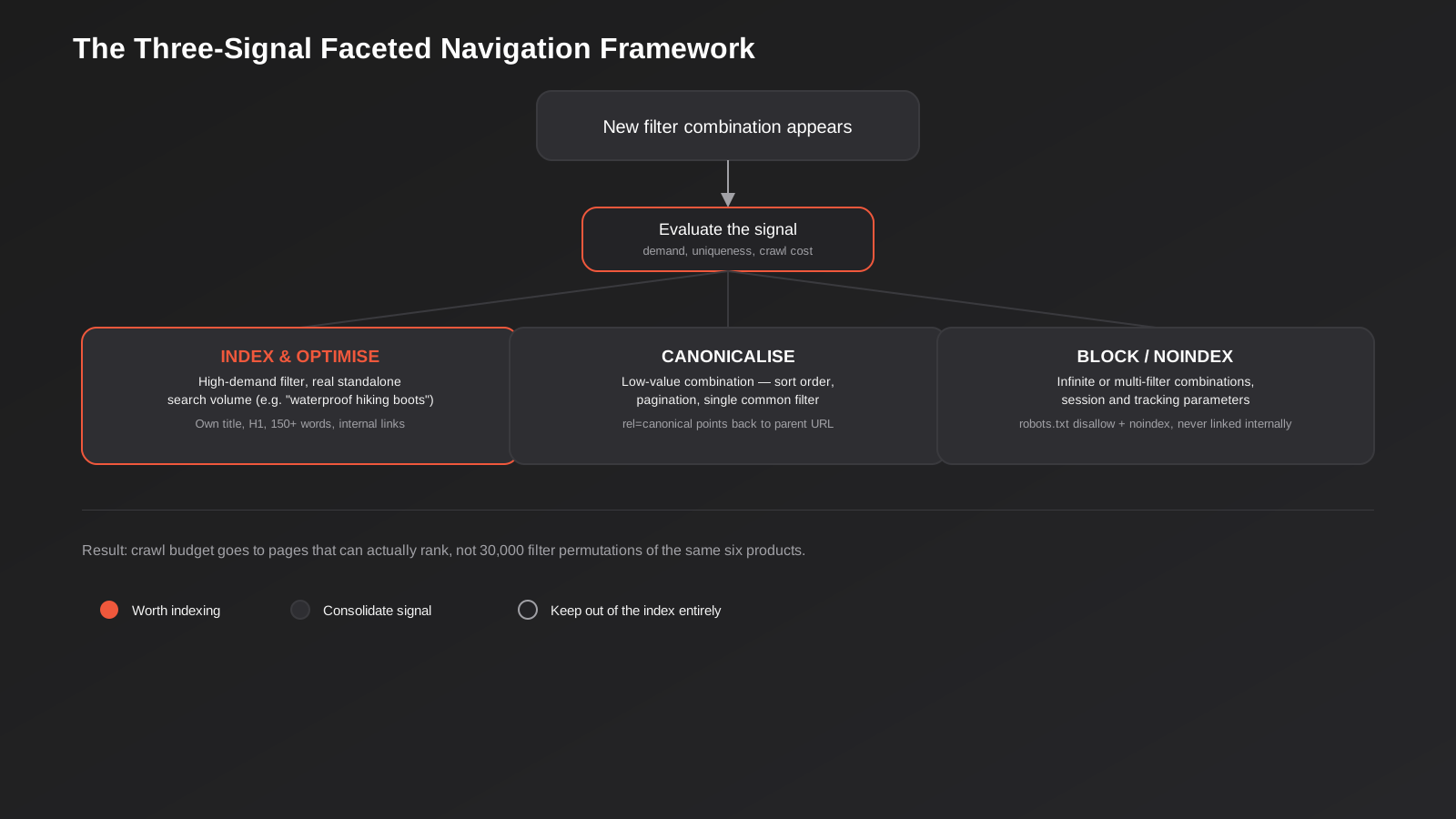
The fix isn’t to disable filters or block search engines from your whole catalogue. It’s to make a deliberate decision about every filter combination, rather than letting the platform default to indexing all of them. In practice that decision comes down to three outcomes.
Index and optimise: filters with real, standalone demand
Some filter combinations genuinely deserve their own indexed page, because people search for that exact combination often enough to justify it. “Waterproof hiking boots” or “women’s size 12 dresses” can carry real, independent search volume — different from the parent category, and worth treating as a page in its own right rather than a filtered view. The test is simple: does this combination have search demand a keyword tool can show you, distinct from the root category? If yes, give it what any category page needs — its own title tag, its own H1, unique intro copy, and internal links pointing to it, not just to the parent.
This is usually a short list. Most stores find somewhere between five and twenty filter combinations per major category that clear this bar. Everything else falls into one of the next two buckets.
Finding out which filters actually have demand
You don’t need an enterprise SEO platform for this. Start with your category names plus each common filter attribute run through a keyword tool — even the free version of Google Keyword Planner will show you whether “black sneakers” or “size 12 dresses” carries meaningful monthly search volume in Australia, separate from the base category term. Cross-check against the Search Console Performance report filtered to your existing category URLs: if a filtered variant is already ranking or getting impressions for a distinct query despite being canonicalised away, that’s a signal it might deserve promotion to its own indexed page rather than staying folded into the parent. The reverse check matters too — if a filter combination you’ve been treating as index-worthy shows near-zero impressions after a few months, it’s a candidate to fold back into the canonicalise bucket. This isn’t a one-off decision; revisit it roughly every six months as search behaviour and your catalogue both shift.
Canonicalise: low-value combinations that should consolidate
Sort orders, pagination, and single common filters that don’t carry independent search demand should point their canonical tag back to the parent category URL. This tells search engines “this page exists for shoppers, but the ranking signal belongs to the main category page, not here.” It’s the single highest-leverage fix in this whole framework, because it consolidates diluted signal back onto the page you actually want to rank, without removing any functionality for shoppers.
Shopify does some of this automatically — it canonicalises certain filtered views back to the base collection — but it doesn’t catch everything, and it doesn’t canonicalise tag-based filter combinations or paginated pages back to page one by default. Don’t assume the platform has this handled; verify it in the rendered HTML.
Block and noindex: infinite or low-value combinations
Multi-filter combinations, session parameters, and anything that can generate effectively unlimited URL variations (three or more filters stacked together, for instance) should be kept out of the index entirely — disallowed in robots.txt where the pattern is predictable, and set to noindex where it isn’t. These pages should never be internally linked to as crawlable hrefs in the first place; filter UI should use JavaScript-driven state changes or rel=”nofollow” links, not plain anchor tags pointing at parameter URLs. If Googlebot can’t reach a URL through a link, it’s far less likely to waste crawl budget finding it another way.
The rule that undoes all of it if you skip it
Internal linking is where most faceted navigation fixes quietly fail. You can set every canonical tag correctly and still leak crawl budget and ranking signal if your own site links to filtered URLs from category pages, footer widgets, or breadcrumb logic. A canonical tag is a hint, not a directive — and a page that’s heavily internally linked sends a much stronger “this matters” signal than a canonical tag sends the opposite. Audit where your filtered URLs are actually being linked from before assuming the technical fix alone will hold.
How This Plays Out on Shopify, WooCommerce and Custom Builds
The framework is the same everywhere. The implementation details aren’t, and this is where a lot of otherwise sound SEO advice falls over — it assumes a platform behaviour that doesn’t match what you’re actually running.
Shopify collections, tags and the default filter behaviour
Shopify handles filtered collection pages reasonably well out of the box — the native Search & Discovery filter app applies canonical tags back to the base collection URL for most filter states. Where it falls short is tag-based collections (URLs like /collections/sneakers/black rather than query parameters), which Shopify treats as genuinely separate, independently indexable collections by default. If you’ve built out tag-based filtering for browsing convenience, check whether each of those tag URLs actually deserves to be its own indexed page under the framework above, or whether several of them should be consolidated. Pagination is the other common gap: Shopify doesn’t canonicalise ?page=2 and beyond back to page one automatically, so paginated collection pages need their own handling — typically a self-referencing canonical on each page rather than pointing everything back to page one, since the products genuinely differ.
If you’re building or rebuilding a Shopify store, this is worth scoping into the build from day one rather than retrofitting after launch — it’s a lot cheaper to configure correctly in the theme than to unwind six months of indexed filter URLs afterwards. It’s one of the technical items we check on every Shopify build we run.
WooCommerce and custom-built stores
WooCommerce’s native filtering is more parameter-heavy by default, which means more of the “block and noindex” bucket and less automatic canonical handling than Shopify provides — you’ll generally need a plugin or custom template logic to get canonical tags and robots directives right at scale. Custom-built storefronts have the most flexibility and the most risk: nothing is handled for you, which means faceted navigation SEO has to be a deliberate part of the technical spec, not an afterthought discovered in a Search Console audit eight months post-launch.
Pagination and Infinite Scroll: The Other Duplication Source
Filters get most of the attention in this conversation, but pagination and infinite scroll cause a related problem that’s worth handling separately, because the fix is different. A 400-product category spread across fifteen paginated pages isn’t duplicate content in the way filter permutations are — each page genuinely shows different products — but it does raise its own questions about which page should rank for the category’s main keyword, and how a crawler is meant to discover products buried on page twelve.
The standard fix is straightforward: each paginated page gets a self-referencing canonical tag (page 2 canonicalises to itself, not back to page 1), a unique but templated title tag that reflects the page number, and normal crawlable links between pages so Googlebot can move through the sequence. What doesn’t work well is infinite scroll implemented purely through JavaScript with no corresponding paginated URLs underneath — if there’s no URL for “page 3” of the product list, a crawler that doesn’t execute scroll events the way a human does may simply never reach those products. The reliable pattern is to build infinite scroll as a progressive enhancement over real paginated URLs: shoppers get the smooth scrolling experience, but each scroll position still corresponds to a crawlable, linkable URL underneath, usually implemented by updating the browser URL via the History API as the shopper scrolls.
A “view all” page — a single URL showing the entire category regardless of size — is sometimes suggested as a simpler alternative to paginating and canonicalising properly. It works for smaller categories but becomes a genuine page-speed problem once a category runs into the hundreds of products, and page speed is its own ranking factor, so the fix can undermine itself past a certain catalogue size. For most mid-sized and larger Australian stores, properly canonicalised pagination is the more reliable long-term approach.
Writing Category Page Content That Actually Earns Its Keep
Fixing the technical duplication problem gets a category page eligible to rank. It doesn’t make it rank. That still comes down to the page having content worth ranking — which, on most ecommerce category pages, is thinner than it should be.
Where the copy goes and how much
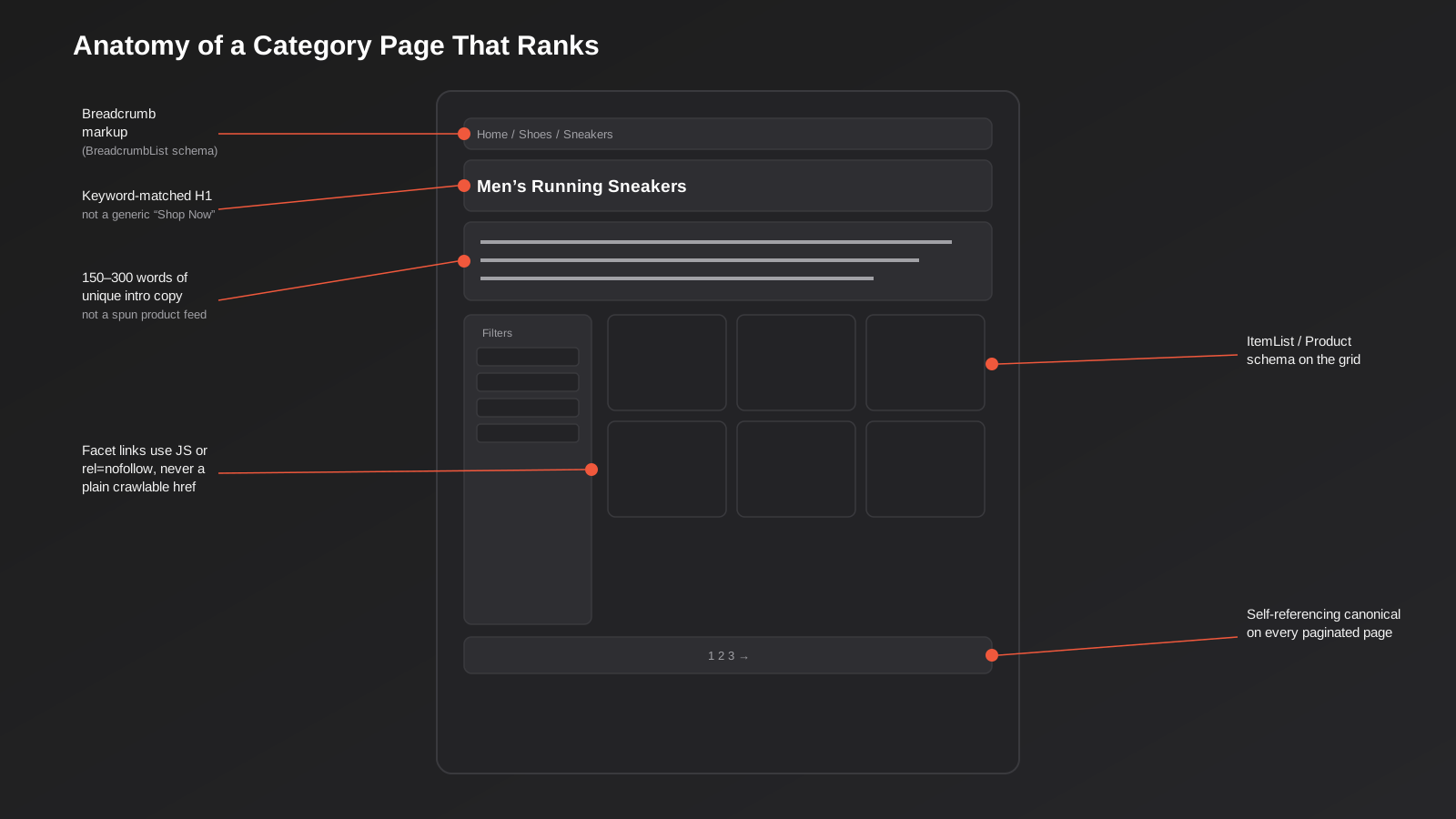
A product grid on its own gives a search engine almost nothing to work with beyond product titles it’s already seen elsewhere on the site. A block of genuinely useful, unique copy — roughly 150 to 300 words — gives it something to actually index and match to a query. Where it sits is a genuine trade-off: above the grid puts it first for crawlers and gives immediate context, but pushes products below the fold for shoppers who came to browse, not read. Below the grid protects the shopping experience but relies on the crawler (and any shopper who scrolls) reaching it. Most stores land on a short framing paragraph above the fold — a sentence or two of orientation — with the fuller content block below the grid, which balances both.
What “unique” actually means across forty near-identical categories
The real difficulty isn’t writing 200 words once. It’s writing genuinely distinct 200 words across a catalogue with forty category pages that are, structurally, quite similar to each other. Templated copy with the category name swapped in reads as thin to both shoppers and search engines — it’s the ecommerce equivalent of doorway pages. The categories that rank are the ones where the copy answers something specific: what actually distinguishes this range, common questions shoppers have when browsing it, sizing or fit notes, care instructions, what makes one style different from another in the same collection. That’s harder to produce than a template, and it’s also the reason category pages with genuinely useful intro content tend to hold their rankings for longer than ones that don’t — there’s substance underneath the product grid, not just a keyword-stuffed paragraph.
It’s also worth treating this as ongoing, not a one-time project. Category pages that were written once and never revisited tend to lose ground over time to competitors who keep refreshing theirs, particularly around seasonal ranges where last year’s copy is visibly stale.
Structured Data and Technical Cleanup
A handful of technical items compound the content and indexation work above, and they’re worth checking off deliberately rather than assuming a theme handles them:
- BreadcrumbList schema on every category page, matching the actual navigation path — this feeds the breadcrumb trail Google often shows in search results instead of a raw URL.
- ItemList or Product schema on the visible product grid, so the products themselves carry structured data even when they’re being displayed inside a category page rather than a dedicated product page.
- A self-referencing canonical tag on every genuinely indexable category and paginated page — not just filtered variants, the “real” pages too, as a safeguard against accidental duplication from tracking parameters or session IDs.
- Clean, descriptive URL structure for the categories that are meant to be indexed — /collections/mens-sneakers rather than a numeric or ID-based path, since the URL itself is a (small) relevance signal.
- An XML sitemap that includes only the category pages you actually want indexed — not a generated sitemap that dumps every filter permutation into it, which happens more often than you’d expect on default platform configurations.
None of these fixes rankings on their own. Together, they remove the friction that stops otherwise good content from being properly understood and credited.
Measuring It Properly
You can’t tell whether any of this worked from ranking position alone, because rankings move slowly and for multiple reasons at once. Three Search Console reports tell you faster and more specifically whether the faceted navigation cleanup is actually working:
- Page indexing (coverage) report — watch the “Indexed” count trend down as filter URLs get canonicalised or noindexed out, and the “Excluded” count (specifically “Alternate page with proper canonical tag”) rise correspondingly. A falling indexed count is a good sign here, not a bad one, if it’s the junk URLs leaving.
- Crawl stats report (under Settings) — check whether Googlebot’s crawl requests are shifting away from parameter-heavy URLs and toward the pages you actually want crawled, and whether average response time or total crawl requests change.
- Performance report, filtered to category-page URLs — track impressions and average position specifically for the category pages you’ve optimised, separate from the site-wide trend, since site-wide numbers can mask category-level movement in either direction.
Give it six to eight weeks minimum before drawing conclusions. Recrawling and reindexing a catalogue of any size doesn’t happen overnight, and judging the fix at the two-week mark is one of the more common ways teams conclude (wrongly) that it didn’t work.
It’s worth keeping a simple before-and-after log rather than relying on memory: the indexed URL count for your main category sections, the top ten category pages by impressions, and average position for your priority category keywords, captured before you start and then monthly afterwards. It doesn’t need to be sophisticated — a spreadsheet is fine — but having the baseline written down is the difference between knowing the fix worked and just having a vague sense that things feel a bit better.
Common Mistakes We See
- Noindexing filter pages that still get linked to internally. A noindex tag on a page your own navigation links to from twenty other pages is fighting itself — fix the internal linking, not just the meta tag.
- Blocking filtered URLs in robots.txt while also setting noindex on them. If robots.txt disallows crawling, Google can’t see the noindex tag on the page at all, so a previously indexed URL can stay indexed indefinitely with no content shown. Pick one mechanism per URL pattern, not both.
- Writing category copy once and never touching it again. Stale intro content on seasonal or frequently refreshed ranges is an easy tell to both shoppers and search engines that the page isn’t actively maintained.
- Treating every filter combination the same way. Blanket noindexing every filtered URL throws away the small number of combinations that do have real independent search demand, along with the genuine junk.
- Assuming the platform has already solved it. Shopify, WooCommerce and most page builders handle part of this by default and leave real gaps — pagination, tag-based collections, and multi-filter stacking are common blind spots across all three.
- Migrating platforms without re-auditing faceted navigation from scratch. URL structures and filter behaviour rarely carry over cleanly between platforms, so a canonicalisation setup that worked pre-migration often needs to be rebuilt, not just redirected.
Frequently Asked Questions
Should I just noindex every filtered URL to keep things simple?
Not quite. It’s a reasonable default for genuinely low-value or infinite combinations, but a blanket noindex policy also throws away the filter combinations that carry real, independent search demand — usually a small percentage of the total, but often meaningful traffic. Run a quick check against a keyword tool for your most common single-filter combinations (colour, size, a key attribute) before deciding they’re all worth excluding.
Will fixing faceted navigation actually move my rankings, or is this just technical housekeeping?
Both, honestly. Canonicalising duplicate URLs consolidates ranking signal onto the pages you want to rank, which tends to help those pages directly. But the bigger, slower effect is crawl efficiency — a search engine that isn’t wasting crawl budget on filter permutations discovers and re-crawls your genuine content faster, which matters more the larger and more frequently updated your catalogue is.
How do I find out how many filter-generated URLs are currently indexed?
Search Console’s Page Indexing report is the most reliable free source — export the list of indexed pages and filter for query parameters or your tag-URL pattern. A site:yourdomain.com.au inurl:sort or similar search operator gives a rough manual check too, though it undercounts because Google doesn’t show every indexed result. For a full picture, a crawl of your own site with a tool that respects robots.txt and canonical tags will show you what’s indexable versus what’s actually indexed.
Does this apply if my store only has a small catalogue?
The mechanics are the same, but the urgency scales with catalogue size and filter complexity. A store with thirty products and two filter groups won’t generate a crawl budget crisis. It can still suffer keyword cannibalisation between a category page and its filtered variants, though, which is worth checking regardless of catalogue size — it’s a quick audit either way.
Is this different from what I’d do for a platform migration?
Related but not the same job. A platform migration is about preserving existing rankings and redirect equity when URLs change wholesale — we’ve covered that process separately in our platform migration SEO checklist. Faceted navigation cleanup is an ongoing technical discipline for a catalogue that isn’t going anywhere, and it’s worth doing whether or not a migration is on the horizon — though it’s also exactly the kind of thing worth re-auditing after one, since filter behaviour rarely survives a platform change unchanged.
Is this an SEO problem or a conversion problem?
Squarely SEO — it’s about what gets indexed and how ranking signal is distributed across a catalogue. It’s worth keeping separate from conversion work on the same pages, like product grid layout, filter usability or checkout friction, which we cover in our ecommerce CRO guide. The two connect — a category page needs to both rank and convert — but they’re solved with different tools and measured with different reports.
Where to Start
If you haven’t looked at this before, start with Search Console’s Page Indexing report and see how many of your indexed URLs are actually filter or sort variants rather than genuine pages. For most stores that have never audited this, the number is higher than expected, and it’s usually the single fastest technical SEO fix available on the site — more contained and lower-risk than a content overhaul, and it tends to show up in crawl efficiency within weeks.
From there it’s a matter of applying the three-signal framework category by category, checking your specific platform’s default behaviour against it, and building out genuine content for the category pages carrying your highest-value search terms. It’s methodical work rather than complicated work, but it does take someone actually looking at the rendered HTML and the indexing reports, not just assuming the platform has it covered.
If you want a second set of eyes on your own category pages and filter setup, our SEO team can run through what’s actually indexed versus what should be, and tell you honestly whether the fix is a quick technical pass or something bigger. Happy to have that conversation without a pitch attached — sometimes the answer really is a few hours of canonical tag cleanup.
Keep reading
Related posts
Psychology Practice Marketing in Australia: Local SEO, Compliant Copy and the Waitlist Problem (2026)
How Australian psychology practices handle local SEO, AHPRA-compliant copy and waitlist triage when they're already at capacity (2026).

Physiotherapy Marketing in Australia: Local SEO, Website Design and Booking (2026)
How Australian physiotherapy clinics win new patients through Google Business Profile, local SEO, website design and real-time booking in 2026.
Local SEO for Veterinary Clinics in Australia: Google Business Profile, Reviews and the Emergency Search (2026)
Veterinary clinic SEO explained: Google Business Profile, review generation and the emergency search most vet websites get wrong.
Got a project you'd like to talk through?
Tell us what you're working on — we'll come back with a plan.
