
Best Shopify Apps for Australian Stores (2026): 6 Compared
 Jignesh Vagadiya
19/10/2026
21 min read
Jignesh Vagadiya
19/10/2026
21 min read
Open the Shopify App Store and you are staring at thousands of listings. Most store owners we talk to have somewhere between eight and twenty apps installed, can name the purpose of about half, and are paying monthly for at least two that do the same job. Apps are where a lot of Shopify stores quietly leak money, and where the few good choices make a real difference to margin, speed and how much of your week disappears into admin.
This guide covers six apps we think are worth a serious look for Australian stores: Klaviyo, Judge.me, Starshipit, A2X, Gorgias and Recharge. They cover the jobs that tend to matter most once a store is trading properly: email and SMS, reviews, shipping, bookkeeping, customer support and subscriptions. We have left out the endless long tail of pop-ups, countdown timers and upsell widgets, because those are easy to find and easy to regret.
Our selection criteria were simple. Each app had to solve a problem that costs real time or money, work properly for a store selling to Australian customers (GST, local couriers, Xero, local payment habits), and have pricing we could verify this month. Prices below come from published pricing pages and listings checked in October 2026; most of these vendors price in US dollars, so confirm the currency and GST treatment at checkout. Every app gets a genuine drawback, because an app list where everything is brilliant is just an advertisement.

Before you install anything: what Shopify already does for free
Shopify has absorbed a surprising amount of functionality over the last few years. Shopify Email handles basic campaigns, Shopify Flow automates internal tasks on every paid plan, Search & Discovery covers filtering and product recommendations, and Shopify Subscriptions is a native subscription option. None of these is as deep as a specialist app, but a store turning over a few thousand dollars a month often needs nothing more.
The rule we use: install a paid app when you can name the specific limit you have hit in the native tool, and what it is costing you. “Everyone uses it” is not a limit. Each app also adds JavaScript or API calls that can slow your storefront, so every unnecessary install has a performance cost on top of the subscription.
Klaviyo: email and SMS marketing
What it is
Klaviyo is an email and SMS platform built around ecommerce data. It reads what customers browse, add to cart, buy and return, then lets you trigger messages from that behaviour. For Shopify stores it is the default recommendation of most agencies, ours included, when email revenue is a serious part of the plan. If you want a broader view of the email market beyond Shopify, our round-up of email marketing platforms for Australian businesses compares the wider field.
What it does well
The data connection to Shopify is the strength. Abandoned cart and browse abandonment flows, post-purchase sequences, back-in-stock alerts and win-back campaigns can all be segmented on actual purchase history rather than guesswork. Segmenting by product category, order value or purchase frequency takes minutes. Reporting ties revenue back to individual flows and campaigns, so you can see which automations earn their keep and which just send noise.
Its template editor is also good enough that most stores do not need an outside designer for day-to-day sends, though a proper branded template build is worth doing once.
Where it falls short
Cost scales with your list, and the way Klaviyo counts has shifted against small senders. Since early 2025 billing has been based on active profiles, meaning everyone you can contact counts, not only the people you emailed this month. A tidy list matters more than it used to. Suppressing long-dormant subscribers can cut the bill without hurting results.
The second drawback is complexity. There is a lot of capability, and a store owner configuring flows alone for the first time can easily build something that looks active and does little. SMS also needs care for Australian senders: the Spam Act requires consent and an unsubscribe route, and per-message rates differ from the US figures quoted in most reviews.
What it costs
There is a free plan for up to 250 active profiles with a limited monthly send allowance. Paid email plans sit at roughly US$20 a month for around 500 profiles and about US$30 for up to 1,000, climbing steadily from there; third-party sources put the Email plus SMS plan from about US$35 a month, with SMS credits billed on top. Klaviyo’s own pricing page uses a slider, so use it to price your actual list rather than relying on anyone’s table, ours included.
Who it suits
Stores with a list of a few hundred upwards that are ready to run proper flows. If you have 200 subscribers and send one newsletter a month, the free plan or Shopify Email is fine. If email should be 20 to 30 percent of revenue, Klaviyo is where that is usually built.
Judge.me: product reviews
What it is
Judge.me collects, displays and syndicates customer reviews, including photo and video reviews. It is the app we see most often on stores that want social proof without a heavy monthly bill.
What it does well
The free plan is genuinely usable. Review request emails go out automatically after delivery, reviews appear on product pages with star ratings in search results, and customers can attach photos. Reviews matter for conversion and for organic visibility: star ratings in Google listings lift click-through, and fresh user-written content on product pages gives search engines something to work with. It also imports reviews from other platforms, which makes switching painless.
Where it falls short
Design control is the weak point. The default widgets look fine but generic, and tighter styling or layout options tend to sit on the paid plan. Themes with heavy customisation sometimes need a developer to make the review blocks sit properly, and we have seen stores leave the default widget in place and end up with something that clashes with the rest of the product page. Review request timing also needs thought: asking before the parcel has arrived, which is easy to do with Australian shipping times, produces irritated customers and thin reviews.
What it costs
A free plan exists, and the paid Awesome plan is listed at around US$15 a month on aggregator sites such as Capterra. We could not confirm the current figure on Judge.me’s own page this month, so check it before budgeting. At that price level, cost is rarely the deciding factor.
Who it suits
Nearly every store with more than a handful of orders a month. It is the one app on this list where our default advice is simply to install it, provided you set the request delay to match your actual delivery times.
Starshipit: shipping and labels
What it is
Starshipit is a shipping platform built for Australia and New Zealand. It connects your store to couriers, prints labels, books pickups, pushes tracking back to customers, and can show live courier rates at checkout. It supports Australia Post and a long list of other local carriers.
What it does well
Local knowledge. Address validation, Australian courier integrations, and sensible rules for choosing a carrier by weight, destination or order value all work the way an Australian warehouse expects. Branded tracking pages and automatic notifications cut “where is my order” emails, which for many stores are the single biggest support drain. Pricing is in Australian dollars, which also removes the exchange-rate drift that comes with US-priced tools.
Where it falls short
Plans are tiered by monthly shipment volume, so a good sales month can push you into the next tier. The entry plan connects to only two couriers, and features some stores treat as essential, such as live rates at checkout, are paid add-ons rather than included. Setting up carrier rules properly takes a few hours, and a store that never does it gets little more than a label printer.
What it costs
Published pricing in Australian dollars: Starter for up to 100 shipments a month is $45 a month billed annually or $50 month-to-month. Starter Plus for up to 500 shipments is $125 annually or $140 monthly. Professional for up to 1,000 shipments is $180 annually or $200 monthly. Higher tiers exist for larger volumes, and a free trial is offered. Live rates at checkout is a $30 add-on. Check the current plan page for the tiers above 1,000 shipments, as third-party listings may be out of date.
Who it suits
Stores shipping a few dozen parcels a month or more, particularly those using more than one courier or fulfilling from their own space. If you only ever use one carrier and Shopify’s own shipping tools cover it, you may not need it yet.
A2X: accounting that reconciles
What it is
A2X takes the sales, fees, refunds and payouts from Shopify and posts them to Xero or QuickBooks as clean settlement summaries that match what lands in your bank account. It solves a specific and painful problem: Shopify payouts bundle many orders, minus fees, minus refunds, so a direct order-by-order sync leaves your books impossible to reconcile.
What it does well
Reconciliation becomes a one-line match per payout rather than an afternoon of detective work. Fees, refunds, shipping and tax land in separate accounts, so your profit and loss reflects reality. For stores that have been pushing every order into Xero as an invoice, switching to settlement-based accounting often cleans up months of mess in one go. Our guide to accounting software for Australian small business covers the Xero versus MYOB versus QuickBooks decision this app sits downstream of.
Where it falls short
It is a summary tool, not a full integration. If you need line-level inventory movements, customer-level invoices in Xero, or stock synced to your accounting system, A2X is only part of the answer and you will need a custom sync alongside it. Pricing is also per sales channel: a business selling on both Shopify and Amazon pays for two subscriptions on the single-channel plans. And tax treatment needs checking by your bookkeeper in the first month, particularly around GST on overseas sales and shipping.
What it costs
Pricing follows monthly order volume. The Shopify App Store listing shows Mini at US$29 a month for up to 200 orders, Basic at US$45 for up to 500, Professional at US$79 for up to 2,000 and Advanced at US$115 for up to 5,000, with further tiers above that. Multi-channel plans are priced separately and start at US$89 a month. Confirm current prices on the listing.
Who it suits
Any Shopify store that uses Xero or QuickBooks and processes more than a few dozen orders a month. Stores needing deeper system-to-system data flow, such as inventory or customer records, should look at a purpose-built Xero and Shopify integration instead of, or on top of, a summary app.
Gorgias: customer support helpdesk
What it is
Gorgias is a helpdesk built for ecommerce. It pulls email, chat, social messages and tickets into one inbox, with Shopify order data sitting beside each conversation so your team can edit an order, refund or cancel without switching tabs.
What it does well
Speed of response. Agents see order history, tracking and customer details alongside the message, and macros handle the repetitive questions (where is my parcel, what is your returns policy) in a click. Rules can tag and route tickets automatically, and an AI agent add-on can resolve routine questions without a human. Users are not priced per seat, which suits teams where several people share support duties.
Where it falls short
Pricing is based on ticket volume, which makes it hard to forecast: a promotion that drives a spike of enquiries pushes you into overage charges. The AI agent is billed separately per resolved conversation, so costs can stack if you are not watching them. It is also unnecessary for small stores; a shared inbox and a handful of saved replies handle a few dozen emails a week perfectly well. And, like most US-built tools, support hours do not align neatly with Australian business hours.
What it costs
Third-party sources list the Starter plan at US$10 a month for 50 tickets, Basic at US$60 for 300 tickets (cheaper on annual billing), and Pro at US$360 for 2,000 tickets, with overage around US$0.36 to US$0.40 per extra ticket. The AI agent is reported at about US$1 per resolved conversation. These come mostly from third-party summaries rather than Gorgias directly, so verify on their pricing page.
Who it suits
Stores handling a few hundred support tickets a month and above, or those where more than one person answers customers. Below that, a shared inbox is cheaper and simpler.
Recharge: subscriptions
What it is
Recharge is a subscription and recurring-billing app for Shopify. It handles subscribe-and-save products, customer self-service portals, and the dunning logic that retries failed payments. For stores selling consumables such as coffee, supplements, pet food or skincare, recurring revenue changes the economics of the whole business.
What it does well
Depth. Customers can skip, swap, pause or change delivery frequency from a portal, which cuts the cancellations you would otherwise lose to inflexibility. Bundles, prepaid plans and discount logic go well beyond what basic tools support, and it integrates with Klaviyo and other marketing apps so subscription events can trigger flows. Failed payment recovery alone often justifies the cost for stores with a decent subscriber base.
Where it falls short
The fee structure is the issue. You pay a monthly fee plus a percentage and a fixed amount on each transaction, so the real cost rises with success. A store processing a few hundred subscription orders a month can land at roughly US$400 a month in total fees on the standard plan. There are also plenty of cheaper alternatives, and Shopify’s own Subscriptions app is free and adequate for simple use. Check your payment gateway compatibility and how failed payments are handled for Australian cards before committing. Our guide to what a Shopify store costs in Australia is useful context for budgeting these ongoing costs alongside the build itself.
What it costs
Sources agree on roughly US$99 a month plus 1.49% and 19 cents per transaction for the standard tier, with a Plus tier at US$499 a month and lower per-transaction rates. A narrow US$25 entry plan exists for brand-new stores with very few subscribers. One source quoted a 1.25% rate in help documentation against 1.49% on the pricing page, so read the billing terms in your own account before approving.
Who it suits
Established stores where subscriptions are a main revenue line, not an experiment. If you are testing demand for a subscribe-and-save option, start with Shopify’s native option and move up once the numbers justify it.
How to choose
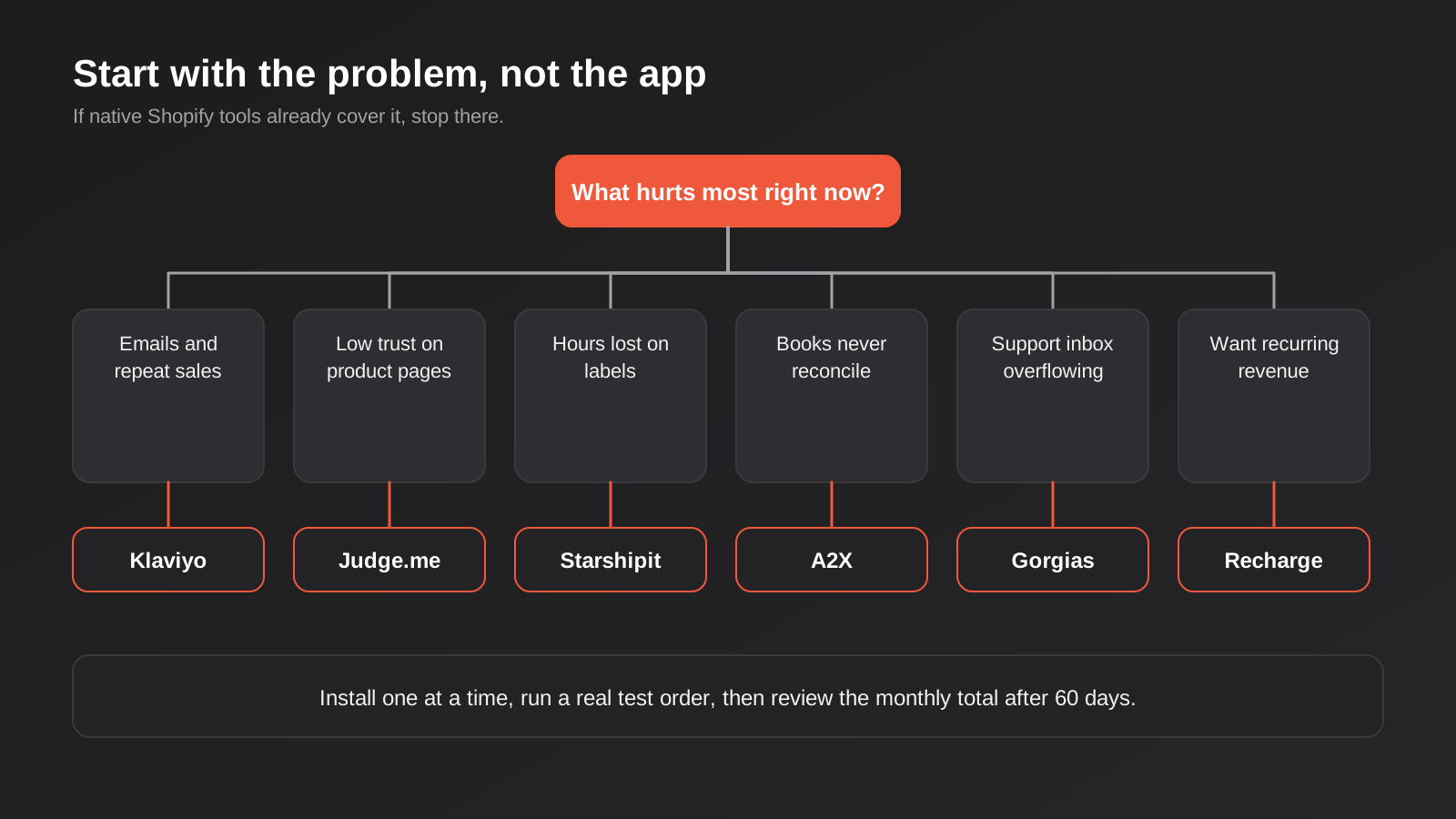
Start with the problem that is costing you the most right now, not with the app list. A store drowning in “where is my order” emails needs better shipping notifications before it needs a helpdesk. A store whose books never reconcile needs settlement accounting before it needs another marketing tool.
A rough order of priority for most Australian stores looks like this:
- First, reviews and basic email: Judge.me and either Shopify Email or Klaviyo’s free plan cost almost nothing and earn their place quickly.
- Second, shipping and accounting once volume climbs: Starshipit and A2X remove hours of weekly manual work.
- Third, the heavier tools: Klaviyo on a paid plan, Gorgias and Recharge when volume or business model justifies them.
Watch the compounding effect. Six reasonable apps at US$30 to US$100 a month each add up to a real line item, and the per-transaction and per-ticket fees on top of the headline price are where bills drift. Set a calendar reminder every quarter to review what you are paying for and cancel anything nobody can justify.
Finally, think about integration. Apps that talk to each other (Recharge feeding Klaviyo, Starshipit pushing tracking to your email flows, A2X reading from Shopify Payments) multiply each other’s value. Apps that do not talk to anything are islands you will end up reconciling by hand.
What a sensible app stack looks like at each stage
Stage matters more than any feature comparison. The same six apps can be exactly right for one store and wasteful for another, so here is how we would sequence them.
Just launched: under about 50 orders a month
Keep it lean. Judge.me on the free plan, Shopify Email or Klaviyo’s free tier, and Shopify’s own shipping tools. At this size your time is better spent on product pages, photography and traffic than on tooling. Bookkeeping can be done by hand each month, and a shared inbox handles support. The total recurring spend on apps should be close to nothing.
Established: a few hundred orders a month
This is where the manual hours start to bite. Shipping labels, reconciling payouts and chasing review requests all take real time, so Starshipit and A2X begin to pay for themselves, and Klaviyo moves from a free plan to a paid one because your list now justifies proper abandoned cart and post-purchase flows. Support is still probably fine in a shared inbox unless several people are answering it.
Scaling: thousands of orders a month
Now ticket volume, payout complexity and retention economics justify the heavier tools. Gorgias makes sense when support is a team job, Recharge when subscriptions are a core revenue line, and the gaps between systems start to look like candidates for custom integration work: stock to ERP, orders to accounting, customers to CRM. App fees at this stage are a meaningful operating cost and deserve a proper annual review.
Questions to ask before you install any app
Our standard checklist is short, and it prevents most of the regret we see later.
- What exact problem is this solving, and how will I know in 60 days whether it worked?
- What does it cost at twice my current volume, not just today? Per-order, per-ticket and per-profile pricing all change the answer.
- Does Shopify already do this natively, even imperfectly?
- What does it add to my page load, and what happens to my theme code if I uninstall it?
- Where does my customer data go, and is the vendor clear about storage and privacy? This matters under the Australian Privacy Act, especially for apps that process customer messages or run AI features.
- How hard is it to leave? Can I export my data, and who owns the customer relationship if I stop paying?
- Does the vendor offer support during Australian business hours, or will a broken checkout sit overnight?
If an app cannot give you straight answers to those, treat that as an answer in itself. The listings with hundreds of reviews and a clear pricing page are almost always the better bet over an unknown with a clever demo video.
Budgeting the ongoing cost
People budget for the build and then forget the running costs. An app stack is a monthly subscription to your own business, and it deserves a line in the forecast. The useful way to price it is as a percentage of revenue rather than a flat figure. If your apps cost 3 to 5 percent of monthly revenue, that is worth examining; if they cost more than your advertising, something has gone sideways.
Annual billing usually saves money where it is offered, as Starshipit’s published rates show, but only commit to a year once an app has proved itself on monthly terms. Watch for usage-based charges too, because they hide inside the same invoice as the flat fee. The headline price is the cheapest your bill will ever be.
One more practical point on review and email apps: both feed off the same customer data, so decide early which tool owns what. If Judge.me sends review requests and Klaviyo also sends a post-purchase email at the same time, customers get two near-identical messages in the same week and reply rates drop on both. Pick one sender for review requests, time it after delivery, and let the other tool stay out of that slot.
The same logic applies to shipping notifications. Starshipit can send tracking emails, Shopify sends its own, and Klaviyo can send a third. Choose the one you want customers to see, switch the others off, and keep the branding consistent. It is a ten-minute job that saves a surprising number of confused support tickets.
Common mistakes
- Installing an app to test it and never removing it. Leftover code often stays in your theme after uninstalling, adding weight to every page.
- Paying for two apps that overlap, typically a review app and a loyalty or marketing suite that both collect reviews.
- Ignoring currency. Most of these tools bill in US dollars, so a US$99 plan costs more than $99 once the exchange rate and card fees are in, and you should confirm how GST is handled on your invoice.
- Choosing on features you will not use. Enterprise-grade helpdesks for a store that gets ten emails a day is a classic.
- Not checking theme compatibility. Some review and subscription widgets need adjusting to display properly in a customised theme.
- Letting email lists grow unchecked. On profile-based billing, dormant contacts cost money every month.
- Skipping the test order. Place a real order through the full flow, including shipping labels, accounting sync and email triggers, before you trust any new app.
Our Own Shopify Apps
We build for Shopify as well as recommending apps. If your problem is wholesale pricing, stock updates or supplier price lists, we publish three apps on the Shopify App Store: GD: Wholesale Pro for B2B pricing and approvals, GD: Inventory Sync Pro for bulk stock updates by SKU, and GD: Price Updater Pro for bulk price changes from a supplier spreadsheet.
Frequently Asked Questions
How many Shopify apps is too many?
There is no magic number, but each app is a cost in money, page speed and maintenance. Most healthy stores we see run somewhere between five and twelve, with every one tied to a job they can name. If you cannot say what an app earns or saves, it is a candidate for removal.
Do Shopify apps slow down my store?
Many do. Apps that inject scripts into the storefront, such as review widgets, pop-ups and chat tools, add load time. Back-office apps like accounting syncs have little effect on customers. Test your speed before and after installing, and remove anything that costs more than it returns.
Are these app prices in Australian dollars?
Only Starshipit publishes in Australian dollars among the six we covered. The others typically quote in US dollars, so budget for the exchange rate and any card fees, and check how GST appears on the tax invoice you will need for your records.
Should I use Shopify’s built-in tools before paid apps?
Usually yes. Shopify Email, Flow, Search & Discovery and the native subscriptions option are free or included in your plan. Move to a specialist app when you hit a specific limit that is costing you sales or time.
Can I switch apps later without losing data?
Mostly, with some work. Review apps usually import and export reviews, email platforms export lists and segments, and accounting syncs can be changed at a period boundary. Subscriptions are the hardest to migrate, because customer payment tokens are tied to the billing provider, so choose carefully there.
When does a custom integration beat an app?
When the app covers most of what you need but a gap keeps costing you manual hours, such as stock levels syncing to accounting, or an ERP that has to be in the loop. At that point a scoped integration is often cheaper than stacking workarounds, and you can compare quotes against what the apps would cost over a year or two.
Where to Start
Write down the three most time-consuming or costly problems in your store this month, then match each to one app from this list, or to a native Shopify tool. Install one at a time, run a real test order, and give it a few weeks of data before judging it. Then review the monthly total honestly.
If you are planning a new store or a rebuild, we can set up the app stack as part of the project, including theme compatibility and the integrations between tools. Our fixed one-time build packages are published on the Shopify pricing page, with Shopify’s own subscription billed separately. If you’ve already got a written quote from another agency for comparable scope, send it through and we’ll do our best to beat it.
Keep reading
Related posts
Best Ecommerce Platforms for Australian Retailers in 2026: Six Options Compared
Six ecommerce platforms for Australian retailers compared honestly: real fees, GST and payments, drawbacks and who each one actually suits.
How to Bulk Update Shopify Prices From a Supplier Price List (Without Breaking Your Catalogue) (2026)
How to update Shopify prices in bulk from a supplier spreadsheet: SKU matching, cost vs sell price, GST, compare-at prices, and a…
How to Update Shopify Inventory in Bulk by SKU: A Spreadsheet Workflow for Multiple Locations (2026)
A practical spreadsheet workflow for updating Shopify stock in bulk by SKU across multiple locations, with the traps that corrupt inventory and…
Got a project you'd like to talk through?
Tell us what you're working on — we'll come back with a plan.
