
Returns and Refunds Automation for Australian Online Stores: Rules, Labels and Credit Notes
 Jignesh Vagadiya
04/11/2026
27 min read
Ask an online store owner what they have automated and you will hear about order confirmations, shipping emails and maybe a stock sync. Ask what happens when a parcel comes back and the answer is usually a pause, then a laugh, then something about a shared inbox and a spreadsheet that Sam updates on Fridays.
Returns are the part of ecommerce operations that most stores build last and build worst. The order flow gets scoped properly because it makes money. The returns flow grows by accretion: a policy page someone wrote in a hurry, a PayPal refund done by hand, a courier label emailed as a PDF, a stock count that is wrong until somebody notices. Each return touches the store, the courier, the warehouse shelf, the payment gateway and the accounts, and every one of those handoffs is a place for a refund to go missing or a unit of stock to vanish.
This guide is about automating that flow properly for an Australian store. We will cover the consumer law that shapes your rules (because it genuinely does), how to design the lifecycle of a return, which decisions are safe to automate and which still need a person, and where the money and stock actually move. It is a practical guide rather than a tool review, and it assumes you sell through something like Shopify or WooCommerce. If you want the wider picture of store operations first, our guide to ecommerce automation for inventory, orders and fulfilment sits one level up from this one.
Why returns automation is the part nobody scopes properly
A forward order is simple in shape. A customer pays, you pick, you pack, you ship. One direction, one event chain, and platforms have spent a decade smoothing it out.
A return runs backwards through the same systems, but it is not the same flow reversed. It has branches that a forward order never has. The item might be faulty, wrong, damaged in transit, or simply not wanted. It might come back sellable, or not. The customer might want money, store credit or a different size. The refund might be partial. The courier might lose the parcel on the way back, in which case you have refunded something you never received. None of these branches is exotic. They are Tuesday.
The consequence is that returns punish manual handling in a way that forward orders do not. A forward order handled by hand is slow. A return handled by hand is slow and error-prone, because the person doing it has to remember a policy, apply the law, check the order, refund the right amount to the right payment method, update stock and tell the accountant. Miss any one step and the books drift away from reality.
Return volumes also vary enormously by category, and published Australian figures are patchy. Fashion and footwear sit well above homewares and consumables, and most of the percentages that circulate online are either global averages or US figures with the country swapped. We would rather you look at your own last twelve months of refunds than anchor on someone else’s number. If your return rate is low and your volume is small, a light touch is fine. The moment returns become a weekly chore for a specific person, that chore is the thing to automate.
Start with the law, because it decides your rules
Before you write a single automation rule, get clear on what you are legally required to do. Plenty of stores build elaborate return logic on a misunderstanding of the Australian Consumer Law (ACL), then have to rebuild it. The short version below is general information drawn from ACCC and state consumer-agency guidance, not legal advice. If your policy is complicated or your products are regulated, check it with a lawyer and against the ACCC’s current guidance.
Two kinds of returns: policy returns and guarantee returns
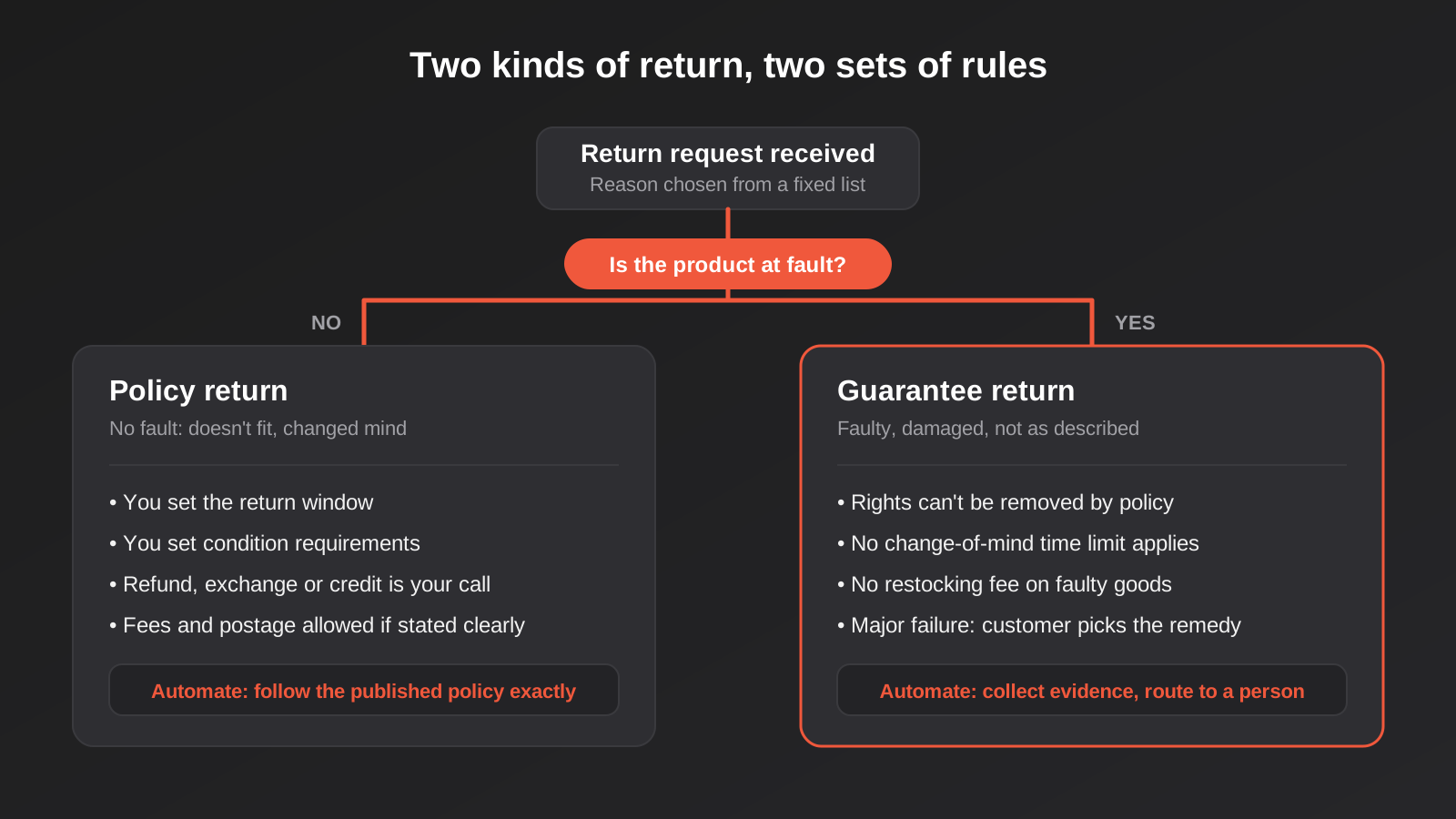
Every return that reaches you falls into one of two buckets, and the whole design of your automation hangs on telling them apart.
Policy returns are change-of-mind returns. The product is fine; the customer no longer wants it, or it did not fit. Under the ACL you are not required to offer a refund for these. What you offer is up to you: a window, a condition, a refund, an exchange, store credit, a restocking fee. The catch is that once you publish a policy, you are expected to honour it as written, so the automation must follow the policy exactly, not approximately.
Guarantee returns are different. The ACL’s consumer guarantees say goods must be of acceptable quality, fit for purpose, match their description and so on. When goods fail a guarantee, the customer has rights that your policy cannot remove. If the failure is minor, you generally get to choose between repairing, replacing or refunding, within a reasonable time. If it is major, the customer chooses. The ACCC’s test for a major failure is, roughly, whether a customer who fully understood the problem would not have bought the product. Several minor problems can add up to a major one.
What this means for automation is blunt: you cannot run one pipeline that treats every return the same way. A rule such as “reject anything outside 30 days” is a legitimate way to handle change-of-mind returns and an unlawful way to handle a faulty product that fails after 31 days. Your intake form has to ask the question that separates the buckets, and your approval rules have to branch on the answer.
What the ACCC has flagged on return pages
The ACCC has reviewed large numbers of Australian retail websites for their return and refund terms and called out recurring problems. The pattern is consistent enough to turn into a checklist for your own site:
- Blanket statements such as “no refunds” or “no returns”, which suggest that consumer guarantee rights do not apply.
- Wording that tells customers they can only have store credit when the product is faulty.
- Restocking fees applied to faulty items.
- Delivery fees described as non-refundable even when the item turns out to be faulty.
- Policies that make the customer pay to send back a faulty product.
None of this is difficult to avoid, but it is easy to automate your way into. A template email that says “as per our policy, no refunds on sale items” sent to someone whose sale item arrived broken is a compliance problem that you built yourself. Review the text your automations send, not just the logic behind them.
Who pays the postage
For change-of-mind returns, you can set the rule: customer pays, you pay, or you deduct a flat fee from the refund. For faulty goods the position is different. As a rule the business should bear the reasonable cost of getting a confirmed-faulty product back, and the original delivery charge is generally part of what gets refunded. This is one of the places where a human decision tends to stay in the loop, because “confirmed faulty” is a judgement. We will come back to that in the approval section.
Map the return lifecycle before you touch a tool
Once the legal split is clear, draw the lifecycle. Not the happy path, the whole thing. A return moves through a small number of states, and each state change is an event that should trigger something specific. If you cannot name the state a return is in, you cannot automate what happens next, and you cannot report on it either.
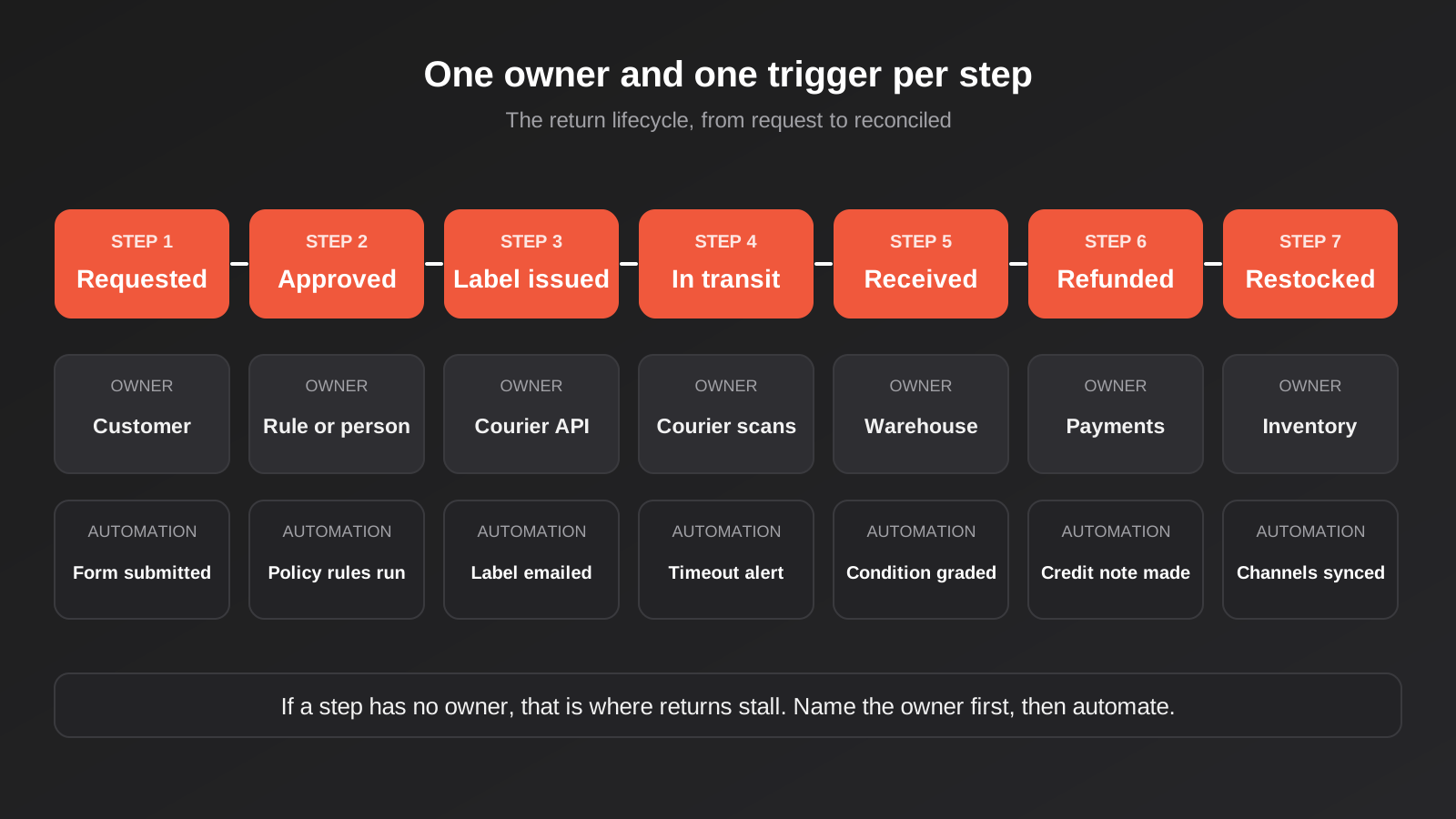
The states we use when scoping this kind of work are these:
- Requested. The customer has submitted a return. Nothing has been promised yet.
- Approved or declined. A rule or a person has decided. Declines need a reason that the customer can read.
- Label issued. A return label or drop-off instruction has gone to the customer.
- In transit. The courier has scanned the parcel. This state needs a timeout, because parcels do not always arrive.
- Received. It has arrived at your warehouse or shopfront.
- Inspected. Someone has checked condition and decided what happens to the stock.
- Refunded or exchanged. Money or a replacement has gone out.
- Restocked or written off. The inventory count reflects reality.
- Closed. Everything above is reconciled in the accounts.
The point of naming them is that each transition has one owner. The customer owns Requested. A rule or a person owns Approved. The courier owns In transit. A human on the warehouse floor owns Received and Inspected, and an automation owns most of what follows, as long as it is fed accurate information. When stores tell us returns are chaotic, the problem is nearly always an unowned transition, typically between Received and Refunded, where a parcel sits on a shelf because nobody has been told it arrived.
Intake: the return request that does half the work
Good automation starts with good data at the front. A return request submitted as a free-text email forces somebody to read it, interpret it, look up the order and reply. A structured request does all of that before a human is involved.
What the form should capture
At minimum: the order number, the specific line items and quantities being returned, the reason (from a fixed list, not free text), and what the customer wants (refund, exchange, store credit). The reason list matters more than people expect. Make it map directly onto your two buckets. Options like “Doesn’t fit” and “Changed my mind” land in the policy bucket. Options like “Arrived damaged”, “Not as described” and “Stopped working” land in the guarantee bucket and should skip your change-of-mind time limits entirely.
For the guarantee bucket, ask for photos. That is reasonable, it speeds up your assessment, and it gives you something to attach to the order. Do not make photos a condition of lodging the return, though. A customer with a faulty item who cannot upload a file still has rights, so the form should let them proceed and flag the gap for a human.
The form should also pull what you already know. The order date, delivery date, payment method, whether the item was on sale and how much was paid are all in your system. Asking the customer to retype them is friction, and it invites errors you will have to correct later.
Native tools, apps or something custom
There are three realistic routes, and the right one depends on how unusual your rules are.
The first is the platform’s own returns feature. Shopify, for instance, offers self-serve returns driven by return rules: you set which items are eligible, how long customers have to ask, and whether return shipping is free or paid. You then approve or decline each request in the admin, and refund and restock after the goods arrive. For a store with a straightforward policy, this covers a lot of ground without any extra software, and it keeps the return attached to the order record. Check the current Shopify documentation for what it supports for your shipping setup, as capabilities differ by region and change over time.
The second is a dedicated returns app. These add branded portals, exchange flows, store credit and label generation. They earn their keep when you need exchanges to work smoothly or you want return reasons reported cleanly. Their pricing models differ, usually by monthly plan or per return, so check the maths against your actual volume.
The third is custom automation built around your platform with a workflow tool or direct API work. That makes sense when your rules do not fit a standard app: bundles, made-to-order items, mixed B2B and retail pricing, supplier-direct fulfilment, or a policy with real exceptions. It is also what you want when returns need to flow into a warehouse system or ERP that off-the-shelf apps do not talk to. If that is where you are heading, our ecommerce automation service covers returns intake, approval rules, refund processing and restocking as part of one connected build.
Approval rules: what to automate and what to leave to a person
The temptation with returns is to automate the decision. Resist it as a blanket goal. The right target is to automate the decisions that are mechanical and route the ones that need judgement.
Rules that are safe to automate
A decision is safe to automate when it depends only on facts your system already holds, the policy is unambiguous, and a wrong answer is cheap to fix. Typical examples:
- A change-of-mind return requested inside the policy window, on a full-price, non-excluded item, below a set order value. Approve and issue a label.
- A request outside the window for a change-of-mind reason. Decline politely, with the policy text, and offer to route to a person if the customer believes the item is faulty.
- An item category you have excluded in your published policy for genuine reasons, such as hygiene-sealed products that have been opened. Decline with the reason.
- A wrong-item-sent claim where the picking record confirms the mistake. Approve, ship the right item, and let the customer keep or return the wrong one by your rule.
Auto-declines deserve special care. A decline sent by a machine reads as cold and, if the rule is wrong, it can read as unlawful. Always include the specific reason, the relevant policy wording and a clear way to reach a human. Never let an auto-decline be the last word on a guarantee claim.
What should reach a person
Some returns need a human, and building the escalation properly is part of the automation, not an afterthought:
- Anything in the guarantee bucket where the fault is disputed or unclear.
- High-value orders, where the cost of getting it wrong is large.
- Customers with an unusual return history, which we cover below.
- Requests that fall outside every rule you wrote.
- Safety-related issues, which may carry reporting obligations of their own.
The mechanics of putting an approval step into a workflow, and deciding which steps deserve one, are covered in our guide to human-in-the-loop automation. The returns version of that advice is simple: the human should receive a complete case, with the order, the reason, the photos, the customer’s history and a suggested action, so that deciding takes thirty seconds rather than ten minutes of digging.
Labels and the courier leg
Once a return is approved, the customer needs a way to send it back. This is where a lot of returns automation quietly adds cost or friction, so decide the model deliberately.
You can generate a prepaid label and email it, use a courier’s returns product with a drop-off or QR-code flow, or let the customer arrange their own postage and reimburse them. Each has trade-offs. Prepaid labels give you tracking and control but cost money on every return, including the ones you did not strictly have to pay for. Customer-arranged postage costs you less and removes tracking, which leaves you with no evidence of dispatch if a parcel goes missing.
Whatever you choose, make the label part of the record. The tracking number should be stored against the return, and the courier’s scan events should move the return between states. An In transit state that depends on someone checking a tracking page is just a manual task wearing a disguise. If you use Australia Post or another carrier through a shipping platform, the practical details of rates, labels and carrier accounts are in our guide to shipping carrier integration for Australian ecommerce. Returns services usually need to be enabled on the carrier account separately, with their own pricing, so confirm this before you promise customers a prepaid label.
Add a timeout. If a return has been In transit for, say, fourteen days with no scan, something is wrong. Trigger a message to the customer, and an alert to your team. Without that rule, returns that never arrive just sit in the system indefinitely, and the customer assumes you have the item and are ignoring them.
Receiving and inspection: the step automation cannot skip
This is the step stores most often try to automate away, and it is the one that causes the most expensive mistakes. A refund issued the moment a courier scan says “delivered” assumes the box contains the right item in the right condition. Sometimes it does not.
The better pattern is a lightweight but real receiving step. Someone scans the return, confirms the contents against the return record, and records a condition grade: resalable as new, resalable as second grade, needs refurbishing, or write-off. That grading drives everything downstream: whether stock goes back on the shelf at full price, whether it goes to an outlet bin, and whether the refund is full or reduced.
Here the law matters again. For change-of-mind returns under your own policy, you can reasonably reduce a refund for items returned used or damaged, provided your policy says so clearly. For goods that failed a consumer guarantee, you cannot deduct for the very condition that made them faulty. Your grading screen should therefore know which bucket the return belongs to, and the automation should refuse to suggest a deduction on guarantee returns.
You can speed receiving up without removing the judgement. A barcode scan that opens the return record, a dropdown for condition, a photo from a phone and a single button to confirm. That takes the person under a minute, and it produces the clean event that the refund and restock automations are waiting for.
Refund and restock: where the money and the stock move
Receiving triggers three things at once: the customer gets their money (or replacement), the inventory count changes, and the accounts need to record the reversal. If any of the three is missed, the three systems disagree, and the disagreement usually surfaces weeks later during a stocktake or at month end.
Refund mechanics
Refund to the original payment method unless the customer chooses otherwise and your policy allows it. Most gateways let you refund through their API, and your store platform typically triggers that for you when you issue a refund inside the admin. The details differ: some payment methods refund instantly, some take days to reach the customer’s statement, and buy-now-pay-later providers have their own refund processes that you need to notify. Tell the customer the realistic timeframe so they do not write in after three days.
Partial refunds are where bugs breed. A return of two items from a five-item order that used a discount code, where shipping was charged, and GST applies, produces a refund amount that is not just the item prices. Decide in advance how discounts are apportioned across lines and whether shipping comes back, and encode that rule once, rather than leaving it for each person to calculate by hand.
Then guard against doing it twice. Automations retry when something times out, and a retried refund call that is not protected can pay the customer twice. The principle that prevents this, giving every refund a unique key so a repeat attempt is recognised and ignored, is the same one we describe in our piece on idempotency and retries in automations. It matters more for refunds than almost anything else, because a duplicate refund is real money leaving the bank.
Restocking logic
Restock only after inspection, and restock into the right place. A returned item graded as new goes back into sellable inventory. A second-grade item might go into a separate SKU or location so it does not get shipped to a full-price customer by accident. A write-off should reduce the count by nothing (it was never added back) and be recorded as a loss with a reason code, because that data is useful later.
If you sell across several channels or from a warehouse system as well as the store, the restock has to reach all of them. A unit restocked in the store but not in the marketplace listing is still “out of stock” there. Stock accuracy across channels is its own discipline, and returns are one of the main ways it breaks.
The accounting entry
A refund is not just money going out. In your books it is a credit note against the original invoice or sale, with GST adjusted accordingly, and a reversal of the cost of goods sold if the stock is back on the shelf. If you run Xero, the usual pattern is that the store platform’s refund creates a credit note and an allocation against the original invoice. Where that sync is missing or half-working, your accountant ends up reconciling refunds by hand against bank statements, which is a miserable job and a common reason stores come to us. Our overview of the Xero and Shopify integration explains what should sync and where it tends to go wrong.
Exchanges and store credit
Exchanges look like a friendly alternative to refunds, and commercially they often are. They are also harder to automate than a plain refund, because one return now creates a new order.
The clean design treats an exchange as two linked events: the return of the original item and a fresh order for the replacement, with the price difference settled either way. Decide when the replacement ships. Shipping it on approval is generous and fast, and it exposes you to the risk that the original never comes back. Shipping it on receipt is safer and slower. Many stores split it by customer value or history, which is a good example of a rule that is easy to automate once you have decided it.
Store credit is useful when it is genuinely the customer’s choice, sometimes with a small bonus as an incentive. It becomes a problem when it is imposed. For change-of-mind returns you can offer credit instead of cash if your policy says so. For faulty goods you cannot force it on a customer who is entitled to a refund. Credit also has its own paperwork: balances, expiry rules and the liability it represents on your books. Keep the ledger inside one system and make the automation read from it, rather than letting codes scatter across emails.
Abuse, serial returners and fraud
A small number of customers return a disproportionate share of orders. Some are buying several sizes on purpose. Some are wardrobing. Some are running refund fraud with empty boxes or swapped items. A good system helps you see the pattern without turning every customer into a suspect.
Useful signals include return rate per customer, the ratio of returned to purchased value over a period, repeated “not received” claims, and refund requests that arrive just before the policy window closes. Use them to route, not to punish. A flag can send a return to a person for a closer look, require inspection before refunding rather than on scan, or switch off prepaid labels for that customer. Do not auto-ban or auto-decline on a score alone, and be careful about guarantee returns, where the customer’s rights do not depend on their history.
There is also a privacy angle if your scoring gets sophisticated. Automated decisions that significantly affect individuals attract scrutiny under Australian privacy law, and recent reforms are tightening that. Our article on automated decision-making and the Privacy Act goes through what to document. For most stores, a simple, transparent set of flags with a human making the final call keeps you well clear of trouble.
Keeping the customer informed
Most returns contact is not a complaint about the return. It is someone asking where their refund is. Cut that traffic by sending a message at each meaningful state change: request received, approved with label, parcel scanned, parcel received, refund issued. Each message should say what happens next and roughly when.
Write these in plain language. Avoid pasting the whole policy into every email; link to it. State the refund timeframe honestly, including the part you do not control (banks and card issuers take their own time). And keep a route to a human on every message, because a customer who is stuck in an automated loop will find your phone number eventually, and they will be unhappy when they do.
Reporting: what your returns data should tell you
Once returns flow through defined states with structured reasons, you get something most stores lack: usable data. Review it monthly rather than letting it pile up.
- Return rate by product. A single SKU with a high return rate usually has a sizing chart, photo or description problem that is cheaper to fix than to keep refunding.
- Reason codes over time. A jump in “arrived damaged” points at packaging or a carrier. A jump in “not as described” points at your product pages.
- Time in each state. If Received to Refunded averages nine days, you have found your bottleneck and your complaints.
- Net recovery. What share of returned value goes back to full-price stock, and what share is discounted or written off.
- Cost per return. Postage, handling time, payment fees and lost margin, added up per return. Most owners have never calculated it.
This is also the strongest argument for the exercise. Automation that merely moves refunds faster saves time. Automation that tells you why products come back saves money, because you can act on the cause.
Build, buy or bolt together: a sensible way to choose
There is no universal answer, but a few questions settle it for most stores.
If your policy is standard, your volume is modest and you sell one product type through one platform, start with the platform’s native returns tools and a good set of email templates. Resist the urge to buy more software than the problem needs. If you need a branded portal, smooth exchanges and reporting out of the box, a returns app is probably worth its fee. If your rules are unusual, you sell through several channels, you run a warehouse system or you need returns to flow cleanly into accounting and stock, a custom or semi-custom build is where the effort pays off.
Whichever route you take, the cost is mostly in the thinking: the policy decisions, the edge cases, the exception handling and the testing. The tool is rarely the expensive part. We scope this kind of work around how many systems are involved, how many branches your policy has and how much monitoring you need afterwards, and our automation pricing page sets out what moves a quote up or down.
If you do build custom, test against awkward cases before launch: a partial return on a discounted multi-item order, a faulty item past the change-of-mind window, a parcel that never arrives, a payment method that cannot be refunded directly, a duplicate webhook. A returns flow that only works for the clean example is the one that fails on the third real customer.
Common mistakes
- Treating every return as change of mind. A single time-limit rule applied to faulty goods is the fastest route to an unlawful policy.
- Publishing “no refunds” wording. Blanket statements are exactly what regulators have flagged. State your change-of-mind terms, and acknowledge that guarantee rights remain.
- Refunding on courier scan. Delivered does not mean correct. Inspect first, except where you have deliberately chosen to refund faster and accepted the risk.
- Charging restocking fees or return postage on faulty items. It looks like routine policy and it is a recurring finding in consumer-law reviews.
- Ignoring partial refund maths. Discount apportionment, shipping and GST on multi-item orders are where totals quietly go wrong.
- No protection against duplicate refunds. Retries and repeated webhooks are normal. Without a unique key per refund, they cost you money.
- Restocking blindly. Putting damaged goods back into sellable inventory means the next customer receives them.
- Skipping the accounting leg. If credit notes are not created automatically, someone reconciles by hand every month.
- Auto-declining without a way out. Every automated refusal needs a stated reason and a route to a person.
- Never reviewing the data. A returns system that nobody reads is a faster way of losing the same money.
Frequently Asked Questions
Do I have to offer refunds for change-of-mind returns in Australia?
No. The Australian Consumer Law does not require a refund when a customer simply changes their mind about a product that is not faulty. You can choose to offer returns and set your own terms, such as a time limit, condition requirements and whether the remedy is a refund, exchange or credit. Once you publish those terms you should follow them, and they cannot be written in a way that removes a customer’s consumer guarantee rights for faulty goods.
Can I charge a restocking fee or make customers pay return postage?
For change-of-mind returns under your own policy, generally yes, provided the policy states it clearly. For goods that fail a consumer guarantee, no: restocking fees on faulty items are a known problem area, and the business is generally expected to bear the reasonable cost of returning a confirmed-faulty product. Because the position depends on the facts of each case, get specific advice if you are unsure.
Which returns are safe to fully automate?
The mechanical ones: change-of-mind requests inside the policy window on eligible items, confirmed picking errors, and clearly excluded categories. Anything involving a disputed fault, a high-value order, an unusual customer history or a safety concern should go to a person, who receives a complete case file so the decision is quick.
Is the native Shopify returns feature enough, or do I need an app?
For a simple policy it often is. Shopify’s self-serve returns use return rules for eligibility, time limits and shipping, and you approve, refund and restock from the admin. Apps become worthwhile when you want branded portals, smoother exchanges, store credit or stronger reporting. Custom automation makes sense when your rules, channels or back-office systems do not fit either. Check current Shopify documentation, as features vary by region.
How do returns connect to Xero or MYOB?
A refund should produce a credit note against the original sale with GST adjusted, and a matching entry when the refund is paid out. Where the integration handles this, reconciliation is quick. Where it does not, someone matches refunds against bank lines manually. The key is to test partial refunds and discounted multi-item orders, since those are the cases that most often produce mismatched totals.
How do I stop serial returners without breaking the law?
Use data to route rather than to punish. Flag unusual return patterns so a person reviews them, require inspection before refunding, or change the label arrangement for that customer. Keep your published policy as the basis for decisions, never override guarantee rights because of someone’s history, and keep a human making the final call on anything that significantly affects the customer.
Where to Start
Do not start with software. Start with a one-page description of your returns policy as it actually operates, including the exceptions that live in somebody’s head. Split it into policy returns and guarantee returns, write down who owns each state a return passes through, and note where it currently stalls. That page is most of the design work, and it will tell you quickly whether native tools are enough or whether you need something built.
From there, automate in the order that removes the most pain: structured intake first, then approval rules for the clear-cut cases, then the refund, restock and accounting steps that follow receiving. Add the reporting last, once there is data worth reading. If you would like a second pair of eyes on your current process, we are happy to talk it through with no obligation.
Our automation pricing page explains how we quote this kind of work: one fixed price after a proper conversation, scoped against your systems and your policy.
Worth being upfront about the commercial side: because we run lean as a specialist agency rather than carrying a large account-management layer, our fixed quotes typically come in below the Australian averages covered in this guide. If you’ve already got a written quote from another agency for comparable scope, send it through and we’ll do our best to beat it.
Keep reading
Related posts

Best Job Management Software for Australian Trade Businesses (2026)
Six job management tools for Australian trades compared: ServiceM8, Tradify, Fergus, AroFlo, simPRO and Jobber, with real drawbacks and pricing models.
Best CRM for Australian Small Business (2026): 6 Compared
Six CRMs compared for Australian small businesses: free plans, AU data hosting, real costs, Xero fit and the drawbacks vendors skip.
Time Zones, Daylight Saving and Public Holidays: Why Australian Automations Fire at the Wrong Time (2026)
How a 9am automation fires at the wrong time across Australian time zones, daylight saving and state public holidays, and how to…
Got a project you'd like to talk through?
Tell us what you're working on — we'll come back with a plan.
