
Human-in-the-Loop Automation: Where to Put an Approval Step (and Where Not To) (2026)
 Jignesh Vagadiya
21/10/2026
26 min read
Jignesh Vagadiya
21/10/2026
26 min read
The first automation most businesses regret is not the one that breaks. It is the one that works perfectly and does the wrong thing at speed. A refund workflow that approves every request under $500, including the fourteen from the same customer. An AI assistant that sends a confident reply to a supplier quoting the wrong price list. A bank-detail update that flows straight from an email into the payment run because the rule said it was fine.
The usual response is to bolt on a person: “just have someone approve it first”. That sounds sensible and it is how most approval steps get built, which is exactly why so many of them end up useless. Put a human in the wrong place and you get a bottleneck that nobody wants to own. Put them in the right place, with the right information, and you get automation that is both fast and safe to trust.
This guide is about that placement problem, which sits at the heart of any human in the loop automation. We build workflows and AI integrations for Australian businesses, and the approval step is where a surprising amount of our design time goes. We will cover how to decide which steps deserve a human, the approval patterns that hold up in real use, how to build the pause-and-resume mechanics in Zapier, Make and n8n, and how to stop a good approval process decaying into a rubber stamp. If you are earlier in the journey and still choosing what to automate, start with our post on what to automate first and come back.
What “human in the loop” actually means in a business workflow
The phrase gets used loosely, so it helps to be specific. In an automation, a human in the loop is a point where the workflow deliberately stops and waits for a person before it continues. Not a notification that something happened. A pause that the next step depends on.
That distinction matters because a surprising number of “approval workflows” are really just notifications with good intentions. A Slack message that says “refund issued, shout if this looks wrong” is a report. The money has already gone. An approval gate is a message that says “refund of $430 is waiting, approve or decline”, and nothing happens until someone answers.
Three different jobs a person can do
Treating all human steps as “approvals” leads to bad design, because a person can play three quite different roles in a workflow, and each needs different tooling.
- Approve or decline. The system has already worked out what it wants to do. The person says yes or no. This suits discrete, well-defined actions like paying an invoice, issuing a refund or publishing a page.
- Review and edit. The system produces a draft, such as an email reply, a quote or a summary, and the person can change it before it goes out. This is the natural fit for AI-generated content, where the output is usually close but occasionally wrong in ways only a person who knows the customer would spot.
- Supply what is missing. The workflow gets stuck because it lacks a fact it cannot find or infer, such as which cost centre a purchase belongs to, or whether a customer is the one with the similar name. The person fills the gap and the workflow resumes.
Many builds only implement the first and then force the other two through it. A reviewer who can only click approve or decline, when what they want to do is fix one line of a draft, will either approve something imperfect or decline something fine and redo it by hand. Neither is the outcome you wanted from automating it.
Why it matters more now that AI writes the first draft
Rule-based automation fails in predictable ways. If the rule is wrong, it is wrong every time, and you tend to find out quickly. AI-driven steps fail differently: they are right most of the time and wrong occasionally in ways that look plausible. That makes the question of where a person sits far more important than it used to be. We cover the access and permissions side in our guide to AI agent security, which includes approval gates as one control among several. This post goes deeper on the gate itself: when to use one, how to build it, and how to keep it honest.
Deciding which steps deserve a human
The most common mistake is gating by type of tool. “Anything that sends an email needs approval.” “Anything touching the accounting system needs approval.” It feels tidy and it produces exactly the wrong result: a mass of low-stakes approvals that drown the few that matter.
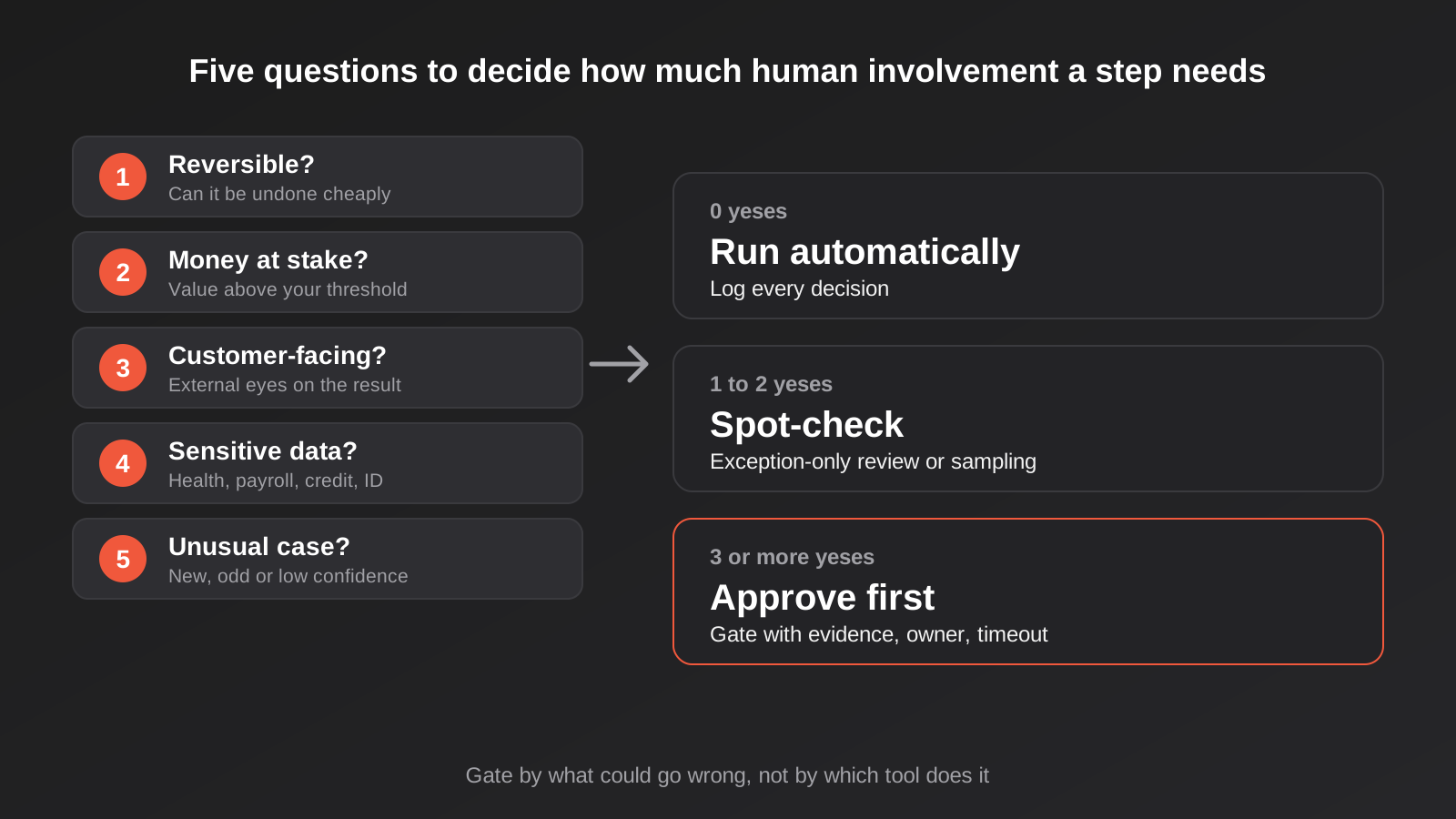
A better approach is to gate by what could go wrong. We run through five questions for each step, and the number of yeses tells us roughly how much human involvement it needs.
Can it be undone?
Reversibility is the single best predictor. Tagging a contact, creating a draft or adding a row to a sheet can be undone in seconds. Sending an email, paying a supplier, deleting a record or publishing something to a customer cannot be undone, or can only be undone with an awkward follow-up. Irreversible steps are the strongest candidates for a gate. If a step is reversible and cheap to reverse, a gate usually costs more than the mistakes it would catch.
How much money or exposure sits behind it?
A $12 refund and a $4,800 refund can be the same workflow with very different risk. Dollar thresholds are one of the cleanest ways to split the paths: below the line the automation proceeds, above it a person is asked. The same logic applies to exposure that is not strictly money, such as a contract clause, a discount that sets a precedent, or a message to a major account.
Who will see the result?
An internal summary that is slightly off wastes a minute. The same error in a message to a customer, a regulator or a supplier is visible and sometimes permanent. External visibility raises the stakes, particularly for AI-written text, where tone and accuracy both matter. A common compromise is to let the automation act freely on anything internal and hold anything customer-facing for review until it has earned trust.
Does it touch sensitive or regulated data?
Health information, payroll, credit decisions and anything involving identity documents deserve more care than a newsletter signup. In Australia there is also a legal layer for automated decisions that significantly affect people. We unpack it in our guide to automated decision-making and the Privacy Act, and one of its practical lessons applies here: a human who simply clicks through system recommendations does not automatically take a decision out of scope. The review has to be real.
Is this case unusual?
Even a step that is safe 95 per cent of the time has a tail. New customers, unfamiliar suppliers, amounts well outside the normal range, a model reporting low confidence, a field that failed validation: these are signals that the case is not the one the automation was designed around. Routing the unusual ones to a person while the routine ones sail through is the pattern that gives you both speed and protection.
Turning the answers into a treatment
In practice we sort steps into three groups. Steps where nearly every answer is “no” run automatically, with logging so you can look back. Steps with one or two yeses get a lighter touch, usually exception-only review or sampling (more on that below). Steps with several yeses, especially irreversible plus external plus money, get an approval gate before anything happens. If you find that every step in a workflow lands in the third group, the workflow probably should not be automated end-to-end yet, and the honest answer is a smaller automation with more human involvement.
Approval patterns that hold up in real use
Once you know a step needs a person, you still have to choose how. These are the patterns we reach for most, roughly from heaviest to lightest.
Approve before acting
The classic. The workflow prepares the action, pauses, and executes only after a yes. Use it for irreversible, high-value steps: payments above a threshold, contract sends, deletions, price changes across a catalogue. The cost is latency, so it needs a clear owner and a sensible timeout (covered below), otherwise requests age quietly in someone’s inbox.
Draft, then edit and send
The system writes, the person finishes. For AI-assisted replies, proposals and summaries this is usually better than a bare approve button, because it respects the fact that most drafts need a small tweak rather than a rejection. The reviewer sees the draft in context (the original message, the customer record) and either sends it or edits and sends it. This pattern also builds a useful record: how often drafts are changed tells you how good the automation really is.
Exception-only review
The automation handles everything it is confident about and sends only the doubtful cases to a person. An invoice that matches a purchase order within tolerance gets coded and queued; one that does not match goes to a human with the mismatch highlighted. This is where most of the value in accounts payable automation comes from, because the routine 80 per cent disappears from people’s days and the exceptions get proper attention.
Sampling and spot-checks
For steps that are low-risk individually but matter in aggregate, review a slice rather than everything. Check one in twenty auto-coded transactions, or a handful of AI-tagged enquiries each Friday. The aim is not to catch every error but to notice drift: the point at which the automation starts being wrong more often than it used to be. Sampling also keeps a new automation honest in its first weeks, when you do not yet know its failure modes.
Two-person rules for the dangerous few
A small number of actions justify two approvers: changes to supplier bank details, large payment runs, access grants to sensitive systems. These are the actions fraudsters target, and a second person who must independently confirm removes a single point of failure. Keep the list short, or people will treat it as bureaucracy and route around it.
Notify-and-undo windows
Some actions are acceptable to run automatically as long as they can be reversed for a short period. The automation acts, tells a person, and offers a “cancel” link that works for an hour or a day. It is a reasonable middle ground for reversible, mildly sensitive steps, but only if the undo is real. If cancelling means a person has to untangle three systems by hand, it is not an undo window, it is a notification.
Designing the approval message people will actually act on
An approval step lives or dies on the message the reviewer receives. If it takes three clicks and a tab-hunt to find out what is being asked, the request will sit, or worse, get approved on trust. A good approval message answers six things without the reviewer having to go anywhere else.
- What is about to happen. Plain language, specific: “Refund $430.00 to the card ending 4417 for order 10382”, not “Refund request pending”.
- Why it was flagged. “Over the $250 auto-approve limit” or “Customer has had two refunds this month”. The reviewer should know which rule sent it to them.
- The evidence. The original request, the order history, the invoice and purchase order side by side. Put the evidence before the system’s recommendation, so the reviewer forms a view before being nudged.
- The exact parameters. If an AI agent proposes to call a tool, show the actual values it will send, not a paraphrase. Paraphrases hide mistakes.
- What each choice does. Approve, decline, and, where it makes sense, edit or ask a question. Say what happens next in each case.
- Who else can see it. Make it clear whether the request has gone to one person or a group, and what happens if nobody answers.
Delivery channel matters as much as content. Reviewers answer where they already work, and for most teams that is Slack, Microsoft Teams or email. Putting approve and decline buttons straight into the message removes friction, but a button that can be clicked from a phone while the reviewer is half-paying attention should be reserved for decisions where a quick yes is genuinely reasonable. For the heavier ones, link out to a page that shows the full context.
Building the pause in Zapier, Make and n8n
The three mainstream tools handle pausing differently, and the differences affect cost, reliability and how much glue you have to write. Details change quickly in this space, so check each vendor’s current documentation and plan limits before committing to a design. What follows is our working knowledge of how the approaches differ.
Zapier
Zapier has a built-in Human in the Loop feature. It lets a Zap pause on a Request Approval step, where reviewers can approve, decline or change the data, or a Collect Data step, where a person supplies missing information that later steps can use. You can choose whether a rejection stops the Zap or lets it continue down another path, and reviewers can be notified by email, Slack or a second Zap. Two practical points: reviewers need access to the Zap, and the plan requirements and billing treatment of these steps have changed over time, so confirm them on the current pricing page. For straightforward approvals on a small team it is the least effort of the three.
n8n
n8n handles this with “send and wait for response” operations on messaging nodes such as Slack and Gmail, plus a general Wait node that can resume from a webhook call. Execution stops at that node and resumes when the reviewer answers, and in the Slack case the output records who responded. n8n also supports requiring human approval before an AI agent runs particular tools, which is the control you want when an agent can send, pay or delete. This area is moving fast and community reports suggest rough edges, particularly when approval is combined with agent tool calls, so test the exact combination you intend to use on your own version rather than assuming it behaves as the documentation reads. If your data must stay in your own environment, n8n’s self-hosting option is a real advantage here, since approval requests often contain the very records you least want to leave it.
Make
Make has a Human in the Loop app, but its availability and plan restrictions have been limited in the past, so check where it stands before designing around it. The pattern we see used in practice, and the one that works regardless of plan, is to split the process into two scenarios. The first does the intake and sends the request, with approve and decline links that call a webhook. The second sits behind that webhook, receives the answer, and carries on. It is more to build and maintain than a native pause, but it has an upside: you control the state, the expiry and the audit record yourself. Avoid the tempting shortcut of a loop that polls for an answer, which burns operations for no benefit.
When the tools are not enough
Once approvals get complicated (multiple approvers, delegation when someone is on leave, approval limits by role, a proper audit trail), a general workflow tool starts to feel like the wrong place to keep the logic. At that point a small purpose-built approval screen, or an internal tool that holds the queue, is often cleaner. And where the thing being approved is an action proposed by an AI agent connected to your systems, the permission model should sit in the connection layer, which is the idea behind our MCP development work: the agent can propose, but the sensitive tools require a sign-off before they execute.
Making the pause safe: state, timeouts and double clicks
The mechanics of waiting are where approval workflows quietly go wrong. A pause is not free: time passes, data changes, people click twice, and reviewers go on leave. Five things need deliberate design.
Give every request an ID and a state
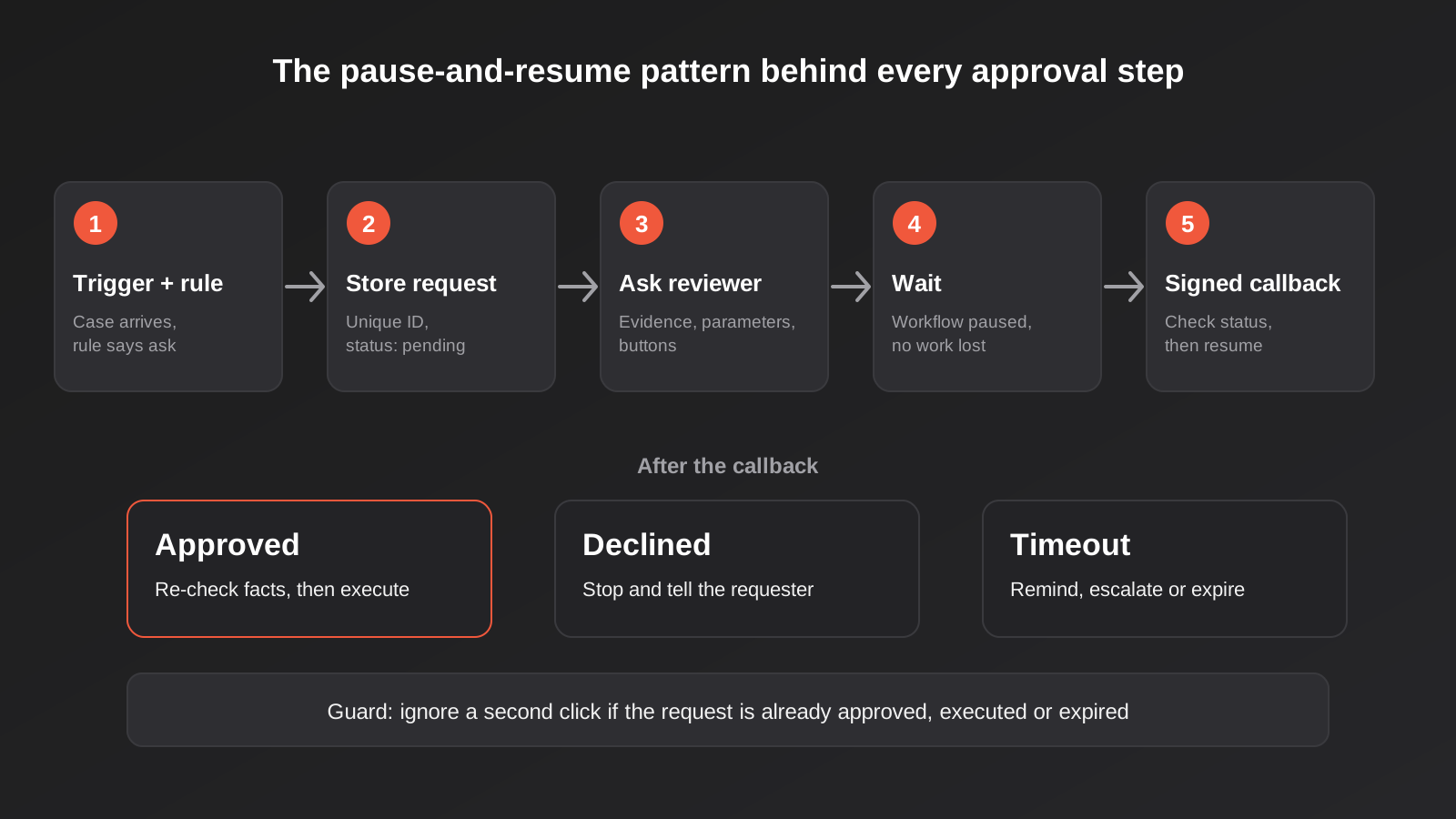
Each approval request should have a unique ID and a record of its status: pending, approved, declined, expired, executed. Store it somewhere durable, even if that is just a table or a spreadsheet to begin with. This record is what lets you answer “what happened to that refund?” months later, and it is the thing that stops duplicate processing.
Guard against double clicks and replays
Approve links get clicked twice. Slack buttons get tapped on a laggy connection. Emails get forwarded. When an answer arrives, the first thing the handler should do is check the request’s status and mark it as being processed before doing anything else. If it is already approved or executed, stop. This is the same discipline that prevents duplicate invoices from retried automations, which is why idempotency matters in any workflow that can be triggered twice.
Re-check the facts before you execute
An approval is a decision about the world as it looked at the moment of the request. If the approval arrives three days later, the order may have shipped, the invoice may have been paid another way, or the customer’s details may have changed. Before the workflow acts on a yes, have it re-read the relevant record and confirm that the situation still matches what was approved. If it does not, route back to a person with the difference explained.
Decide what silence means
Every approval step needs a timeout behaviour, chosen on purpose. Options include escalating to another approver, sending a reminder, expiring the request and telling the requester, or, in rare low-risk cases, proceeding by default. The one option you should almost never choose by accident is “wait forever”. Open requests that nobody is watching are a hidden backlog and, in the case of customer-facing work, a hidden service failure.
Secure the callback
The link or webhook that carries “approved” back into your workflow is an entry point into your systems. If anyone can guess or forge it, anyone can approve their own request. Use unguessable tokens tied to a single request, expire them, and verify signatures where the platform provides them. An approval endpoint should be treated as one of the more sensitive webhooks you run.
Approval fatigue and automation bias
Here is the uncomfortable part. A human step that is approved ninety-nine times out of a hundred is usually not providing ninety-nine per cent safety. It is providing the appearance of it. Two separate effects are at work, and it helps to name them.
Approval fatigue comes from volume. When a person is asked to approve forty things a day, attention drops, review gets faster, and clicking becomes reflex. Automation bias comes from perceived authority. When a system is usually right, people stop checking it, and a confident recommendation makes disagreeing feel unreasonable. Both are well documented in fields like aviation and medicine, and both apply to the person looking at your refund queue.
The fixes are mostly design, not discipline. Telling people to “pay more attention” does not work. What does:
- Ask less often. Tune the thresholds so only genuinely uncertain or high-stakes cases come through. If a reviewer sees fifty requests and five matter, raise the bar until they see ten and eight matter.
- Show evidence first, recommendation second. Let the reviewer form a view before being told what the system thinks.
- Vary what they see. Occasionally slip in a known-bad test case. If it gets approved, you have learned something about the process without a customer paying for it.
- Measure the approval rate. A reviewer who approves 100 per cent of requests is either seeing an excellent system or not reviewing. Track the override and edit rates alongside.
- Measure time to decision. Decisions that take two seconds on a request that needs thirty are a signal. So are requests that take two days.
- Rotate and share the load. The same person reviewing the same queue every day for a year will stop seeing it.
None of this means gates are a bad idea. It means a gate is a control that has to be maintained, like any other. Review the numbers monthly. If an approval step has had a ninety-eight per cent approval rate for six months, either raise the auto-approve threshold and take it out of people’s days, or accept that it is serving a compliance purpose and make sure the review is real. Our guide to automation monitoring and alerting covers the wider set of signals worth watching, and approval metrics belong on the same dashboard.
The Australian angle: privacy, payments and records
A few local points are worth keeping in mind when you design approval flows. None of this is legal advice, and where the stakes are high you should talk to your lawyer or accountant.
Automated decisions about people
From 10 December 2026, new transparency requirements under the Privacy Act apply to certain decisions made or substantially informed by computer programs using personal information. A real human review step can change how a decision is categorised, but only if the person genuinely engages with the evidence and can depart from the recommendation. Logging what the reviewer saw and what they chose is useful evidence for that. Again, the earlier post on the Privacy Act and automated decisions goes through how to assess your own workflows.
Payments and bank details
Business email compromise, where a fraudster poses as a supplier and asks to change bank details, is a well-known and costly scam for Australian businesses. The control that works is procedural: a change in payee details should never be actioned from the same message that requested it. A good approval flow forces a verification step through a known channel, such as calling the supplier on a number already on file, and requires a second person to confirm. Automating the paperwork around that is fine. Automating away the verification is not.
Records and audit trails
Your approval record can double as an audit trail: who approved, when, what they saw, and what happened as a result. That helps with internal controls, with accountants and auditors, and with the dispute that arrives eight months later. Store it somewhere that survives staff turnover and tool changes, not only in the history of one person’s Slack account or a workflow tool’s run log, which may be pruned after a short retention period.
A worked example: refunds and supplier changes in a mid-sized business
To make this concrete, here is how we would approach a hypothetical online retailer with a small finance team. This is an illustration of the thinking, not a client case study.
The retailer wants to automate two things. First, refund requests that arrive through a helpdesk. Second, supplier detail updates that arrive by email. Both are currently handled by hand and both feel slow.
For refunds, we would run the five questions. A refund is irreversible once the money leaves, so that is one yes. The value ranges widely, so money gets a yes above a threshold. It is visible to the customer, a third yes for the reply, though the reply is a template. Personal data is involved but not especially sensitive. Novelty depends on the customer: a first-time buyer with a large refund is unusual, a loyal customer with a small one is not. The result is a tiered design. Under the threshold, for customers with a clean history and an order that matches the stated reason, the refund runs automatically and logs the decision. Above the threshold, or where the customer has several recent refunds, a person gets an approval message with the order, the history and the reason, and approves or declines with one click. A sample of the automatic ones is reviewed each week.
For supplier changes, almost every answer is yes: irreversible, high value, externally exploitable, sensitive. This one gets the heavy treatment. The workflow does not change anything. It creates a task, notifies the finance lead, and requires a recorded call-back to a number already on file before a second person approves. The automation prepares the paperwork and tracks the status; the verification stays human on purpose.
Notice that the same business ends up with three different treatments: full automation with logging, approval with context, and a manual control with automated support. That is the normal outcome. The aim is not to put a person everywhere or nowhere, but to put them exactly where their judgement changes the result.
Common mistakes
- Gating by tool instead of by risk. “Everything that sends an email needs approval” produces a flood of low-stakes requests and trains people to click without reading.
- Using notifications and calling them approvals. If the action has already happened, a person who can say “stop” after the fact is not a gate.
- Offering only approve or decline. Reviewers want to fix a line, ask a question or reassign. Without those options, they approve imperfect work or reject good work.
- Hiding the evidence. A message that says “approve this refund?” with no order history forces the reviewer to go hunting, or to guess.
- Showing the recommendation first. Leading with “recommended: approve” anchors the reviewer. Show the facts, then the suggestion.
- No timeout behaviour. Requests that wait forever become a silent backlog. Decide on reminders, escalation and expiry in advance.
- Not handling double clicks. Without a status check, a second click can execute the action twice.
- Acting on stale approvals. A yes given on Monday about Monday’s data should not be executed blindly on Thursday.
- Insecure approval links. A guessable or unsigned callback lets anyone with the URL approve a request.
- Never measuring the gate. If you do not track approval rates, edit rates and time to decision, you cannot tell a working control from a rubber stamp.
- Leaving the approver undefined. “The team” is not an owner. Name a person or role, and a backup.
Frequently Asked Questions
What is a human-in-the-loop workflow?
It is an automated process that deliberately pauses at defined points so a person can approve, edit or supply information before it continues. The pause is part of the logic: the next step does not run until the person responds, or until a timeout rule decides what happens instead. A notification sent after the fact is not human in the loop.
Which automation steps should always need approval?
There is no universal list, but steps that are irreversible, involve significant money, are visible to customers or regulators, or touch sensitive data are the strongest candidates. Changes to supplier bank details, large payments, bulk deletions and contract sends usually qualify. The test is what happens if the step goes wrong, not what kind of tool performs it.
Can Zapier, Make and n8n all do approval steps?
Yes, in different ways. Zapier has a built-in Human in the Loop feature with approval and data collection steps. n8n offers send-and-wait operations on messaging nodes and a Wait node that resumes from a webhook. Make users commonly split the process into two scenarios joined by a webhook, and Make also has a Human in the Loop app whose availability has varied by plan. Vendor features and plan limits change, so check current documentation before you design around any of them.
How do I stop approvals becoming a rubber stamp?
Reduce how often people are asked, show evidence before the recommendation, and track approval rate, edit rate and time to decision. A reviewer who never declines or edits anything may not be reviewing. Consider occasionally inserting a known-bad test case, and rotate reviewers so the queue does not become invisible. If a gate approves nearly everything for months, either raise the auto-approve threshold or make sure the review is genuinely substantive.
What should happen if nobody responds to an approval request?
Decide it in advance. Common choices are a reminder after a set time, escalation to a backup approver, expiry with a message to the requester, or, only for low-risk actions, proceeding by default. Waiting indefinitely is the option to avoid, because unanswered requests turn into an invisible backlog and, for customer-facing work, a service failure nobody notices.
Does adding a human reviewer remove the need to disclose automated decisions under the Privacy Act?
Not automatically. The guidance on the new automated decision-making rules indicates that a human at the end of the chain does not necessarily take a process out of scope, particularly where the person mostly accepts what the system recommends. A reviewer who engages with the evidence and can and does depart from the recommendation is in a stronger position. If you are unsure how your workflows are categorised, ask a privacy lawyer.
Where to Start
Pick one workflow that already worries you, such as refunds, supplier changes, or AI-written customer replies, and run the five questions over each of its steps. Write down which steps are reversible, which carry real money, which a customer will see. You will probably find that most steps can run unattended and that one or two deserve a proper gate with a good message, a named owner and a timeout. Build that, log the decisions, and look at the approval and edit rates after a month. That is a small project, and it teaches you more about where a person belongs than any amount of planning.
If you would like help designing approval steps that people will actually use, or rebuilding ones that have turned into a bottleneck, that is the kind of work we do in our workflow automation practice. We scope each project individually and quote a fixed price before work starts, and you can see how that works on our automation pricing page.
Worth being upfront about the numbers: automation work here has no published price list, so we cannot point to a single figure. What we can say is that because we run lean as a specialist agency rather than carrying a large account-management layer, our fixed quotes typically come in below Australian agency averages. If you’ve already got a written quote from another agency for comparable scope, send it through and we’ll do our best to beat it.
And if you are not sure whether a particular step needs a person or can safely run on its own, send us a short description of the workflow. We are happy to talk it through with no obligation.
Keep reading
Related posts

Changing Live Automations Safely: Staging, Version Control and Rollback for Zapier, Make and n8n (2026)
How to draft, test, release and roll back changes to live Zapier, Make and n8n automations without breaking invoices, orders or customer…

Peppol E-Invoicing for Australian Businesses: Automating Accounts Payable From Structured Invoices (2026)
Peppol e-invoicing in Australia: what is and isn't mandatory, how to pick an access point, and how to automate accounts payable once…

Clean Your Data Before You Automate: A Practical Guide to CRM Data Cleanup for Australian Businesses (2026)
Connecting systems on messy data copies the mess everywhere. Here's how to clean, match and merge records before you automate or integrate.
Got a project you'd like to talk through?
Tell us what you're working on — we'll come back with a plan.
