
Ecommerce Automation for Australian Online Stores: Inventory, Orders and Fulfilment Without the Manual Grind (2026)
 Jignesh Vagadiya
31/08/2026
20 min read
Jignesh Vagadiya
31/08/2026
20 min read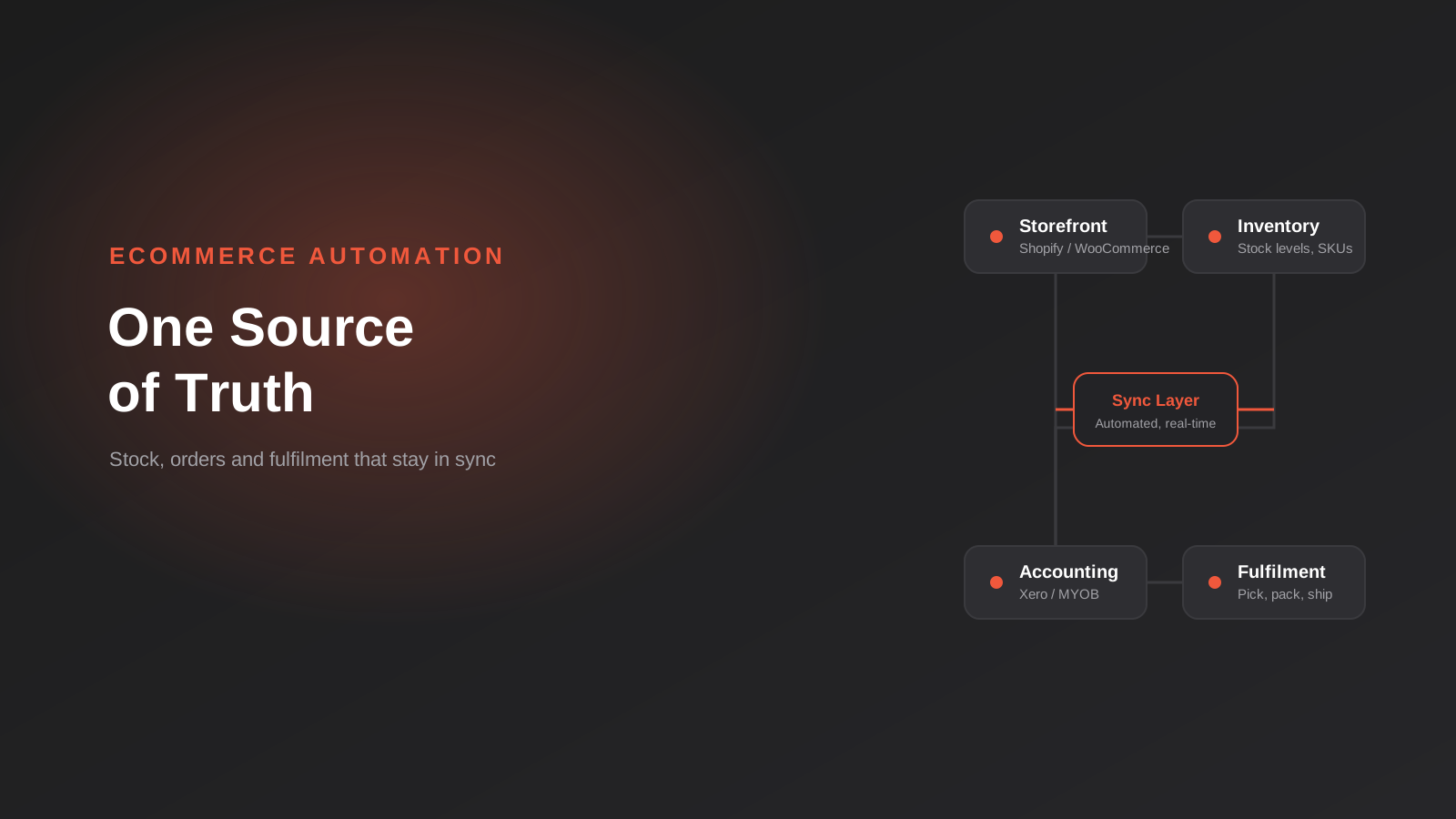
Every ecommerce store owner we talk to has the same 2am problem at some point: the website says twelve units in stock, the warehouse has three, and someone just paid for eight. Nobody did anything wrong. Three different systems just stopped agreeing with each other, and nobody noticed until a customer did.
This is what most people actually mean when they ask about “ecommerce automation,” even if they don’t put it in those words. It’s rarely about chatbots or flashy AI features on the storefront. It’s about getting the boring, high-stakes plumbing right — inventory counts, order data, invoices, shipping labels — so the same information doesn’t have to be typed into four different places by four different people, each one a chance to get it wrong.
We’ve built this plumbing for stores running on Shopify, WooCommerce and custom platforms, syncing everything from stock levels to GST-coded invoices in Xero and MYOB. This guide covers what actually needs to connect, where the connections break in practice, and how to work out what to automate first when you can’t do everything at once.
What “Ecommerce Automation” Actually Covers
The term gets used loosely, so it’s worth being precise about what we mean. Ecommerce automation is the set of systems and rules that move order and stock data between the places a store actually operates — without a person manually re-entering it. It sits underneath the storefront, not on top of it. Customers never see it directly, but they feel it every time an order ships on time, a refund lands without three follow-up emails, or a product doesn’t get oversold because two channels thought they each had the last unit.
The four systems that need to agree on the same numbers
Almost every automation problem we’re asked to fix comes down to four systems that are meant to be talking to each other and aren’t, or are talking with a lag that causes real damage:
- The storefront (Shopify, WooCommerce, or a marketplace channel like Amazon or Catch) — where the order is placed and the customer experience lives.
- Inventory or stock control — whether that’s the storefront’s own inventory module, a dedicated inventory management system, or a warehouse management system.
- Accounting (Xero, MYOB, or QuickBooks) — where the sale needs to become a GST-correct invoice, and COGS needs to hit the right account.
- Fulfilment — an in-house warehouse process or a third-party logistics (3PL) provider who needs to know what to pick, pack and ship, and needs to tell the customer when it’s done.
Get all four in sync and a store can genuinely run itself for routine orders. Leave any one of them connected by “someone checks it each morning” and you’ve got a standing liability that grows every time order volume grows. This is exactly the gap our ecommerce automation work is built to close — not by replacing these systems, but by making sure they stay honest with each other.
The Real Cost of Doing This by Hand
Manual order processing scales in a particularly unforgiving way. At low volume — a handful of orders a day — one person can comfortably check stock, update the spreadsheet, raise the invoice and hand the packing slip to whoever’s doing fulfilment that day. It’s slow, but it works, and the error rate is low because there aren’t many chances to make a mistake.
The trouble starts well before a store feels “big.” Somewhere between a few dozen and a few hundred orders a day, the same manual process needs more people to keep up, and every extra person handling the same order is another handoff where something can get missed, mistyped, or duplicated. Growth in order volume doesn’t scale the error rate linearly — it compounds it, because more people are touching more steps under more time pressure. A business that was comfortable at 30 orders a day can find itself genuinely struggling at 150, not because the product changed, but because the operations underneath it were never designed to handle more than a spreadsheet and good intentions.
The costs show up in a few predictable places: oversold stock that has to be refunded or backordered, invoices that don’t match what was actually charged, GST reporting that takes a bookkeeper hours longer than it should each quarter, and customer service time spent chasing down “where’s my order” questions that a proper tracking-email trigger would have answered automatically. None of these are dramatic on their own. Added up over a year, they’re usually the single biggest hidden cost in a growing store’s operations.
There’s also a less obvious cost: the person doing the manual work is usually the same person who should be spending their time on things that actually grow the business — sourcing better products, improving the customer experience, negotiating with suppliers. Every hour spent copying an order into a spreadsheet is an hour not spent on any of that. We’ve sat in enough operations meetings to know this is rarely framed as an automation problem at the time. It gets framed as “we need to hire,” which is sometimes true, but just as often the better answer is removing the repetitive work rather than adding a person to keep doing it.
Inventory Sync: Where Most Automations Quietly Break
Inventory is the first thing most stores try to automate, and it’s also where the most subtle failures happen — because a broken inventory sync doesn’t throw an error message. It just quietly shows the wrong number until a customer pays for something that isn’t there.
Single-channel stock is easy. Multi-channel stock is where it gets real
If a store only sells through one channel, stock sync is almost a non-issue — the platform’s own inventory count is the source of truth. The moment a business adds a second sales channel — a marketplace listing, a wholesale portal, an in-store POS — that single source of truth stops existing unless something is actively keeping every channel updated in near real time. This is the point where “we’ll just check stock manually each morning” stops being a viable strategy, because by the time someone checks, three channels have already sold against the same three units.
The failure patterns we see most often
A few specific problems come up again and again in stock and order syncs between Shopify or WooCommerce and accounting platforms like Xero and MYOB:
- Duplicate orders in the accounting system, usually because a connector re-processes an order after it’s edited, or fires twice on a payment retry.
- Inventory counts that don’t match between the storefront and the accounting or warehouse system, often because the sync only runs on a schedule (hourly, or on payout) rather than in real time.
- Incorrect GST coding on synced invoices, which is easy to miss until a BAS reconciliation turns up discrepancies.
- Refunds and partial refunds that don’t flow through, so the accounting system still shows the original sale value even after money has gone back to the customer.
- Customer matching failures, where a connector can’t tell whether a Shopify customer is the same person as an existing contact in the accounting system, so it creates duplicates instead of updating the right one.
Most of these aren’t caused by bad software. They’re caused by a messy starting point — an inconsistent product catalogue, a chart of accounts that was never mapped properly to how the store actually sells, or an integration that was set up once and never revisited as the product range grew. The fix almost always starts with cleaning up the data on both sides before automating the connection between them, not after.
Getting Orders Into Xero or MYOB Without Someone Re-Typing Them
For most Australian stores, this is the automation that pays for itself fastest, because bookkeeping time is expensive and re-keying sales data is exactly the kind of repetitive, rules-based task that shouldn’t need a person.
What a clean order-to-accounting flow actually looks like
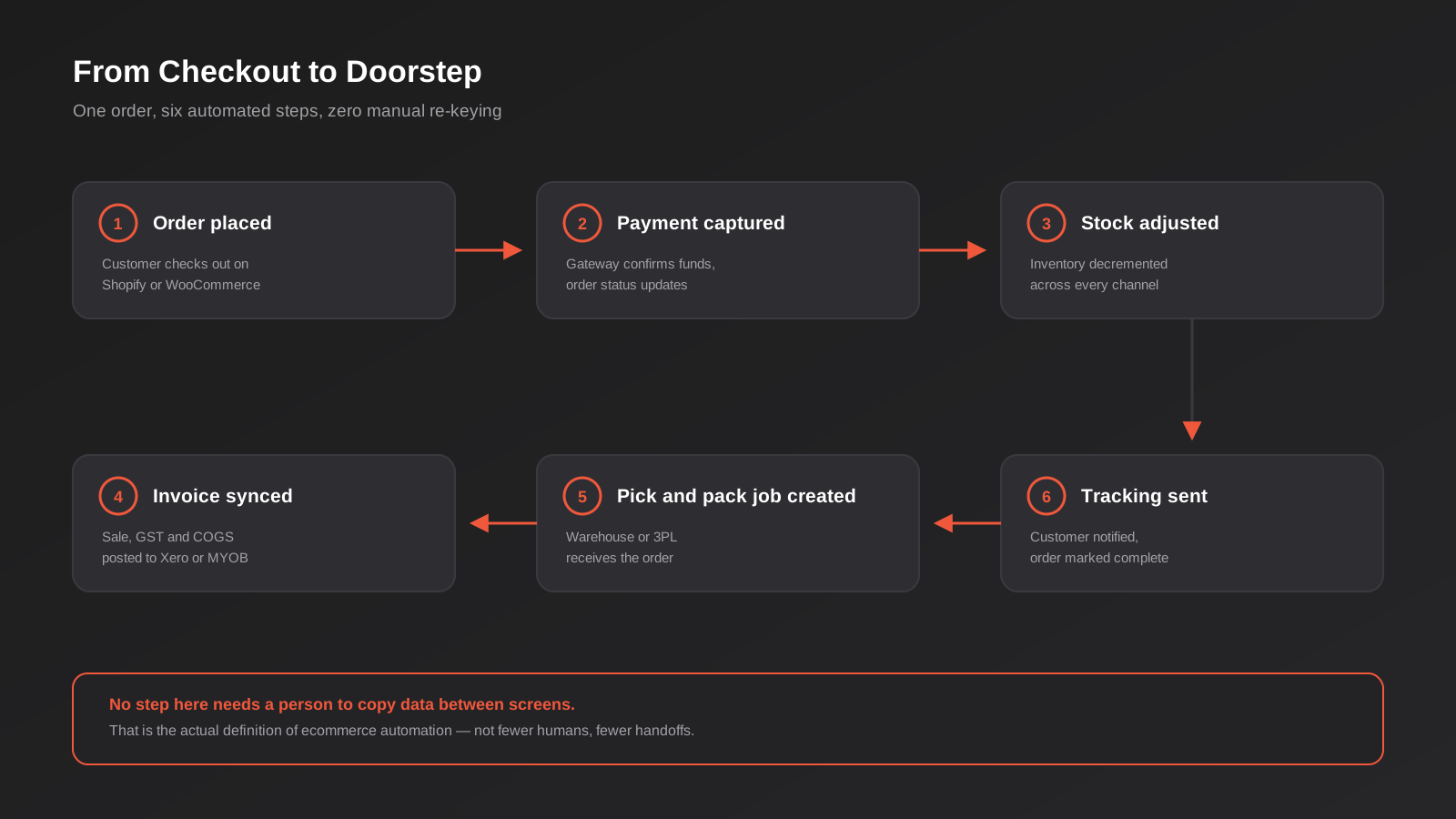
Done properly, every completed order should generate an invoice in Xero or MYOB automatically, with the correct GST treatment, the sale allocated to the right revenue account, and the cost of goods sold posted against inventory. Payment gateway fees should reconcile against the actual payout, not the gross order value, so the numbers a bookkeeper sees match what actually landed in the bank account. None of this should require anyone to open a spreadsheet.
Where reconciliation breaks down
The most common reconciliation headaches come from timing mismatches rather than the sync itself failing outright. A payment gateway might batch and pay out daily rather than per-order, which means a naive integration tries to match individual sales against a lump-sum deposit and fails. Orders that get manually adjusted after the fact — a discount applied after checkout, a partial refund processed outside the normal flow — often don’t get picked up by the sync at all, leaving the accounting system with stale numbers. The practical fix is to build the sync around the payout structure your payment provider actually uses, not around an idealised one-order-one-transaction model that doesn’t match reality.
This is also where a lot of stores hit the ceiling of what an off-the-shelf Shopify app can do. The generic connectors handle the common case well and the edge cases badly, which is fine until your business is generating a steady stream of edge cases — multi-currency sales, split shipments, wholesale terms that don’t fit a retail invoice template. We’ve built custom syncs for stores in exactly this position, including direct integrations like our Xero and Shopify integration work, where the goal is matching the automation to how the business actually invoices, not the other way around.
GST deserves a specific mention here, because it’s the part Australian stores get caught out on most often. A sync that was configured correctly at launch can start producing wrong GST codes the moment a business adds an export order, a wholesale customer with different tax treatment, or a product category that should be GST-free. The connector doesn’t know the rule changed — it just keeps applying the mapping it was given. Whoever owns the automation needs to revisit that mapping whenever the product range or customer base changes, not just at setup.
Fulfilment: From Pick List to Tracking Number
Fulfilment automation gets less attention than inventory or accounting, but it’s often where customers notice the difference most directly — because it’s the part of the process that determines how fast an order actually arrives, and whether the customer hears anything about it in between.
In-house warehouse automation vs a 3PL
There are two broad models here, and the automation needs are different for each. If fulfilment happens in-house, the automation goal is turning a paid order into a pick list and packing slip without anyone manually building it, then updating stock the moment it’s picked rather than at end of day. If fulfilment is outsourced to a third-party logistics provider, the goal shifts to a clean handoff — the 3PL’s system needs the order details the moment it’s ready to ship, and your store needs the tracking number and shipped status the moment the 3PL has it, without a person relaying that information between two portals.
What good fulfilment automation actually triggers
A well-built fulfilment automation typically handles: creating the shipping label and pick job the moment payment clears (not when someone remembers to check the orders queue), selecting the right carrier and service level based on order weight, destination or customer-selected shipping option, updating the order status and inventory the instant the item is packed, and emailing the customer a tracking link without anyone needing to copy it from a courier’s dashboard. None of these are complicated individually. The value is in having all of them fire in sequence, automatically, for every order, including the ones that come in outside business hours.
Carrier selection is worth calling out separately, because it’s where a lot of stores leave money and time on the table without realising it. Manually choosing a courier for each order based on rough guesswork tends to either overpay for speed nobody asked for, or underdeliver on orders that needed to move faster. An automated rule set — based on weight, destination postcode, order value or a customer’s chosen shipping tier at checkout — makes that decision consistently every time, and it can be adjusted centrally when carrier pricing or service levels change, rather than relying on whoever’s packing orders that day to remember the current rules.
When Off-the-Shelf Apps Aren’t Enough
Shopify’s app store and WooCommerce’s plugin ecosystem cover the common integration patterns well — connect to Xero, connect to a courier, connect to a popular inventory tool. Where they run out of road is anywhere your business doesn’t match the common pattern: a custom pricing structure, a legacy system that doesn’t have a ready-made connector, a workflow that spans more than two systems at once, or high enough order volume that a generic app’s rate limits or batching schedule become a real bottleneck.
This is usually where an ERP enters the picture. Businesses running NetSuite, Cin7, Unleashed or a similar system typically need inventory, orders and financials flowing between the storefront and the ERP as a single connected process, not three separate point-to-point integrations bolted on over time. Our ERP integration work exists for exactly this situation — where an off-the-shelf connector genuinely can’t do what the business needs, and the answer is a properly built integration rather than another workaround app layered on top of the last one.
It’s also worth being honest about when custom integration isn’t the right call. If a store is doing under fifty orders a week and running one sales channel, a well-configured off-the-shelf app is usually the better investment — the cost of building something custom won’t be recovered in time saved. Custom integration earns its cost once order volume, channel count or system complexity reaches a point where the generic tools start creating more manual cleanup than they save. Our comparison of workflow automation tools covers this trade-off in more general terms if you’re weighing up a no-code platform against custom development for a specific process.
There’s a useful middle ground worth knowing about too, between “install an app” and “build a fully custom integration.” A no-code or low-code automation platform can often stitch together two systems that don’t have a native connector to each other, without the cost of ground-up development. This works well for lower-volume, lower-complexity workflows — a daily stock-level export triggering a reorder alert, say. It tends to become the wrong tool once volume gets high enough that per-task pricing adds up, or the workflow needs error handling and retry logic more sophisticated than a visual builder can express cleanly. Knowing which side of that line your store is on is most of the decision.
Building Your Automation Roadmap
Most stores can’t automate everything at once, and trying to is how automation projects stall halfway through. The useful question isn’t “what can we automate” — almost everything can be automated eventually — it’s “what should we automate first.” We work through this with clients using two simple factors: how often the task happens, and what it costs the business when it goes wrong.
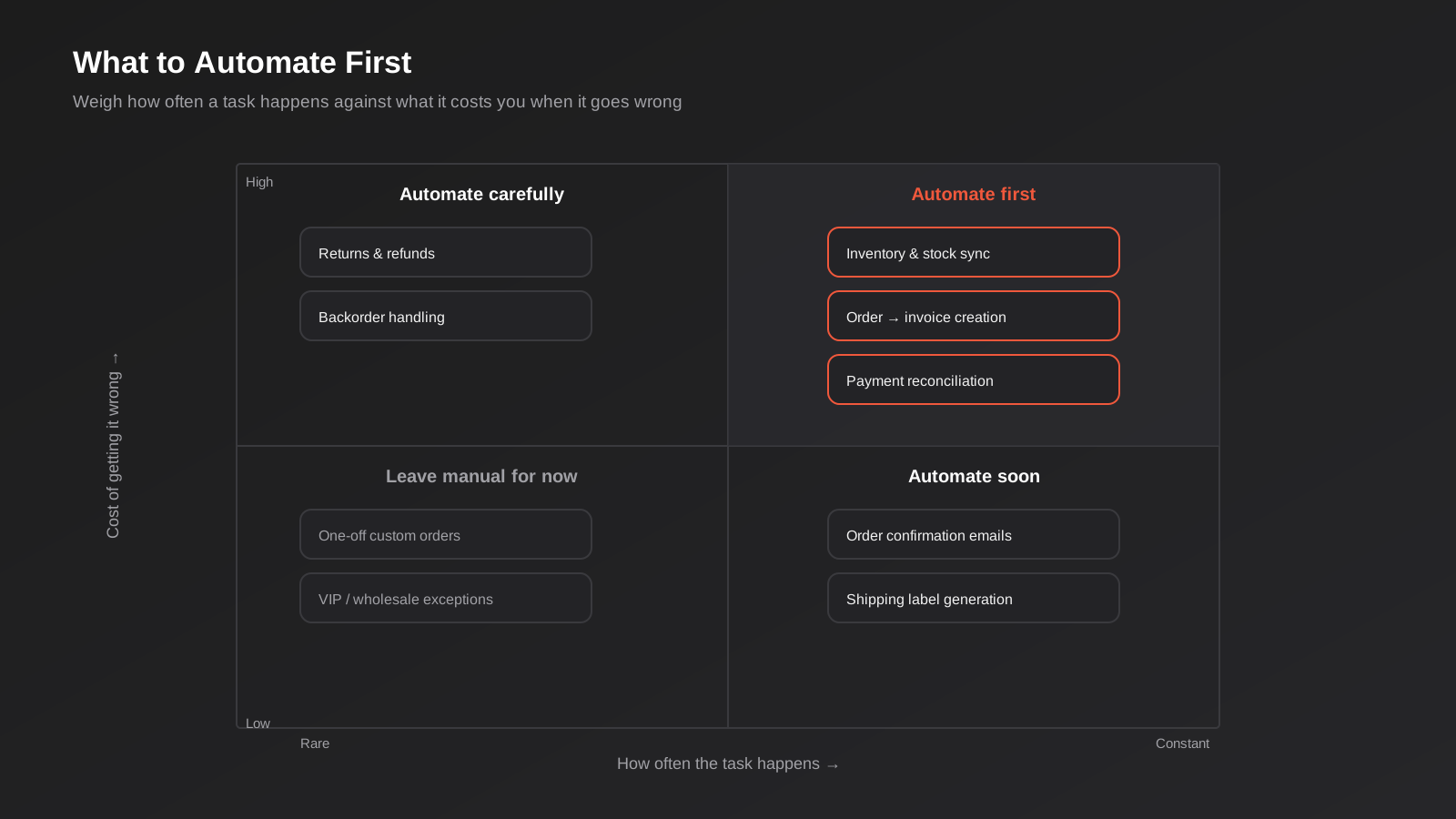
Tasks that happen constantly and are expensive to get wrong — inventory sync, order-to-invoice creation, payment reconciliation — are almost always the right place to start, because they compound the fastest and the payoff shows up quickly. Tasks that are frequent but low-stakes, like order confirmation emails or standard shipping labels, are worth automating soon after, mostly for time saved rather than risk avoided. Rare but high-stakes tasks, like returns and backorder handling, deserve automation eventually, but they need more careful design because the edge cases matter more than the volume. Genuinely rare, low-stakes exceptions — a one-off custom order, a VIP account with special terms — are usually fine left manual indefinitely. Automating those tends to cost more in engineering time than it ever saves.
Measuring Whether the Automation Is Actually Paying Off
It’s easy to automate a process and never check whether it actually worked. A few weeks in, the honest question to ask isn’t “does it run” — it’s “did it change anything that matters.” We look at three things with clients after an automation goes live.
Time actually freed up
The clearest measure is the simplest one: how much time did the task take before, and how much does it take now, including the time spent checking the automation’s work. In the first few weeks, factor in review time honestly — a new sync usually needs someone spot-checking orders daily until it’s proven itself. That review time should shrink over the following month as confidence builds. If it doesn’t shrink, something in the automation isn’t actually reliable yet, and it’s worth finding out why before declaring the project finished.
Error rate, not just speed
A process that runs faster but still produces the same rate of stock discrepancies or invoice corrections hasn’t actually solved the underlying problem — it’s just done the same mistakes more quickly. Track the specific errors that were the reason for automating in the first place (oversells, GST miscodes, missed tracking emails) and watch whether the count trends down over the following one to two billing cycles. This is a better signal than almost anything else, because it directly reflects the cost the automation was meant to remove.
Whether it holds up under load
Automation that works cleanly at normal volume can behave differently during a sale, a product launch, or a seasonal peak like EOFY or the pre-Christmas rush. This is the real test, and it’s worth deliberately watching the first high-volume period after an automation goes live rather than assuming steady-state performance will hold. If a sync starts falling behind or throwing errors specifically when order volume spikes, that’s a capacity or rate-limit problem worth fixing before the next peak, not an occasional glitch to tolerate.
Common Mistakes We See
- Automating on top of a messy catalogue. Inconsistent SKUs, duplicate products and an unmapped chart of accounts will break a sync no matter how well the integration itself is built. Clean the data first.
- Treating a payout-based sync as real-time. Many accounting connectors update on a payment gateway’s payout schedule, not per-order. If your business needs same-day inventory accuracy, check what schedule the tool actually runs on before relying on it.
- Not testing edge cases before going live. Partial refunds, split shipments and manually adjusted orders are where most syncs fail. Run a handful of deliberately messy test orders through the system before trusting it with real customers.
- Automating everything at once. Big-bang automation projects are harder to debug when something goes wrong, because there are more moving parts to check. Automate the highest-impact process first, confirm it’s solid, then move to the next.
- No one owns the automation after launch. Integrations drift — a platform updates its API, a new product category doesn’t map cleanly, a courier changes its label format. Someone needs to actually watch the first few weeks of automated orders and be responsible for it afterwards.
- Choosing a tool based on price instead of fit. The cheapest connector is rarely the cheapest option once you count the hours spent manually fixing what it gets wrong every week.
- Ignoring what happens during peak periods. A sync that’s comfortably keeping up on a normal Tuesday can fall behind during a sale or the pre-Christmas rush, when order volume and support requests both spike at once. Test under load before you need it to hold up.
Frequently Asked Questions
How much does ecommerce automation cost for a small Australian store?
It depends heavily on scope. Connecting Shopify or WooCommerce to Xero or MYOB with an established app can be relatively inexpensive to configure. Custom integration work — syncing an ERP, building a bespoke fulfilment workflow, or handling multi-channel inventory — costs more because it’s genuinely bespoke engineering, not configuration. The right way to think about it is against the labour cost it replaces: if manual order processing is costing several hours a week in staff time, that’s the budget the automation needs to beat, not an arbitrary number.
Can I automate inventory sync without changing platforms?
In most cases, yes. Inventory automation is usually built on top of your existing storefront and accounting platform via their APIs, rather than requiring a platform migration. Migration only becomes necessary if the current platform genuinely can’t support the integration you need — which is uncommon for Shopify and WooCommerce, and more common with older or heavily customised legacy systems.
What’s the difference between a Shopify app and a custom integration?
A Shopify app is built to handle the common case for thousands of different stores, which makes it fast to install but inflexible when your business doesn’t fit the standard pattern. A custom integration is built around your specific systems, order volume and edge cases, which costs more upfront but handles the situations a generic app can’t — multi-currency sales, wholesale pricing, split shipments, or connecting to an ERP that doesn’t have a ready-made app. The practical test is whether you’ve already hit a wall with an app’s settings screen and found there’s no option for what you need — that’s usually the point where custom work starts making financial sense.
How do I know if my current automation is actually working properly?
The clearest signs of a broken or incomplete sync are stock counts that occasionally don’t match between systems, invoices that need manual correction before they’re sent, and customer service tickets about missing tracking information. If any of these happen regularly rather than as rare exceptions, the automation is covering the easy cases and quietly failing on the harder ones.
Does automating fulfilment mean I need a 3PL?
No — fulfilment automation works whether you’re shipping from your own warehouse or using a third-party logistics provider. The automation itself is about the trigger and handoff (payment clears, pick list generates, tracking gets emailed), not about who’s physically packing the box. Moving to a 3PL is a separate operational decision that usually comes down to volume and storage cost, not automation readiness.
Should I automate everything before I scale, or scale first and automate as I go?
Automate the highest-frequency, highest-cost processes before you scale, and treat the rest as ongoing work rather than a one-off project. Trying to fully automate every process before growing usually delays growth for no good reason. Trying to scale on entirely manual processes usually means the operations team is firefighting by the time you notice the problem. The priority framework earlier in this guide is designed to help you pick the right order.
Where to Start
If you’re not sure where your own store’s automation gaps are, the fastest way to find out is usually to trace one real order, manually, from the moment it’s placed to the moment it’s marked complete in every system it touches. Every place a person has to stop and re-type something, check a second screen, or manually decide what happens next is a candidate for automation. Most stores find three or four of these without much effort.
We’ve built ecommerce automation for stores at very different stages — some just connecting Shopify to Xero properly for the first time, others integrating a full ERP across inventory, orders and fulfilment. If you want a second opinion on where your own setup has gaps, or you’re trying to work out whether an off-the-shelf app will actually cover what your business needs, we’re happy to have a conversation about it. There’s more detail on our approach on the ecommerce automation page, and if platform choice itself is still an open question, our guide to Shopify for Australian ecommerce brands is a good companion read alongside this one.
Keep reading
Related posts

Changing Live Automations Safely: Staging, Version Control and Rollback for Zapier, Make and n8n (2026)
How to draft, test, release and roll back changes to live Zapier, Make and n8n automations without breaking invoices, orders or customer…

Peppol E-Invoicing for Australian Businesses: Automating Accounts Payable From Structured Invoices (2026)
Peppol e-invoicing in Australia: what is and isn't mandatory, how to pick an access point, and how to automate accounts payable once…

Clean Your Data Before You Automate: A Practical Guide to CRM Data Cleanup for Australian Businesses (2026)
Connecting systems on messy data copies the mess everywhere. Here's how to clean, match and merge records before you automate or integrate.
Got a project you'd like to talk through?
Tell us what you're working on — we'll come back with a plan.
