
Quote and Proposal Automation for Australian Service Businesses: From Enquiry to Signed Job
 Jignesh Vagadiya
02/11/2026
23 min read
Someone asks for a quote on a Tuesday morning. By Friday, three things have usually happened: the enquiry has sat in a shared inbox, a half-finished Word document has been saved as “Quote v3 FINAL (2)”, and the prospect has quietly booked a call with whoever replied first. Nobody did anything wrong. The quote just depends on one person finding an hour they don’t have.
Quote and proposal automation is the unglamorous fix for that. It isn’t about replacing the judgement that goes into pricing a job. It’s about removing the copy-paste, the re-keying, the chasing and the “did they ever accept this?” archaeology that surrounds the judgement. Done well, the price still comes from a person who knows the work. Everything before and after that moment happens on its own.
This guide to quote automation in Australia is for service businesses, trades, consultancies, suppliers and agencies that quote before they invoice. We’ll cover the pipeline from enquiry to paid invoice, how to structure your pricing data so a machine can use it, where the quote should actually live, which steps deserve a human sign-off, and the mistakes that turn a tidy automation into a source of embarrassing errors. If you’re earlier in the journey and still deciding what to automate at all, our guide to what to automate first is a better starting point.
Why quoting is the most under-automated step in the sales process
Most businesses have automated the edges. Enquiry forms land in a CRM, invoices come out of accounting software, and reminders go out on a schedule. The middle, where a person turns a vague request into a priced, signed commitment, is often still a manual craft. That’s partly because quoting feels bespoke. Every job is a bit different, so it seems impossible to systemise.
It’s less bespoke than it feels. If you pull your last twenty quotes into a folder and read them side by side, you’ll find that perhaps 80 per cent of the text is identical, the line items come from a short list, and the variation sits in a handful of inputs: quantity, site, complexity, timeline. Those inputs are what a person should be deciding. The rest is assembly.
Where the time actually goes
When we map a quoting process with a client, the effort rarely sits where they expect. Writing the scope is usually quick, because the person quoting knows the work. The slow parts are around it:
- Finding the right previous quote to copy from, then editing out the previous customer’s details (and occasionally missing one).
- Re-typing customer details that already exist in the CRM or accounting system.
- Looking up current prices, supplier costs or day rates in a spreadsheet that may or may not be up to date.
- Getting an internal approval by text message or a hallway conversation, with no record of who agreed to the discount.
- Following up three days later, if anyone remembers.
- Re-entering the accepted quote into the accounting system to raise the deposit invoice.
Every one of those steps is a place where a quote can be late, wrong or forgotten. They’re also the steps that automation handles well, because they’re about moving known data from one place to another.
What slow quoting costs you
We won’t quote a statistic here, because the effect varies a lot by industry and we’d rather not invent a number. The pattern is easy enough to see in your own data, though. Pull the list of quotes you sent last quarter, note how long each took from enquiry to sent, and compare that with which ones were won. For most service businesses the fast quotes win more often than the slow ones, even when the slow ones were better priced. Part of that is the buyer’s urgency, which is real. Part of it is that a fast, clear quote signals a business that is organised, and buyers read that as a proxy for how the job will go.
The quote-to-cash pipeline, step by step
Think of the whole thing as a pipeline with seven stages. Some are automatic, some need a person, and the skill is in deciding which is which. The diagram below shows the version we usually start from.
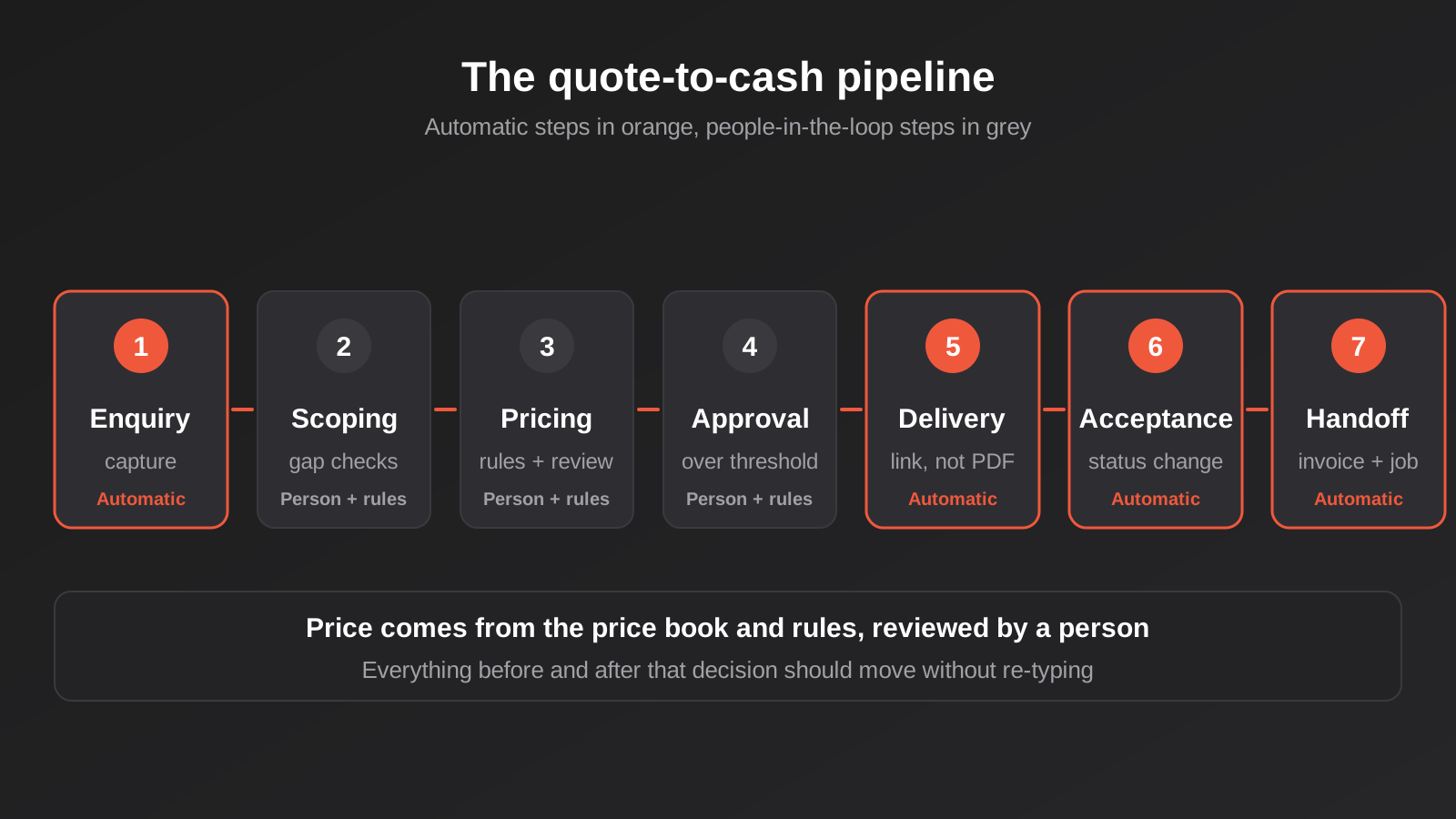
1. Enquiry capture
The enquiry should land in one place, structured. A contact form that sends a free-text email to a shared inbox is the root of a lot of quoting pain, because someone has to read it and decide what’s missing. A better form asks the three or four questions that drive price (job type, location, size, rough timing) and writes them straight into CRM fields. If you use phone calls or walk-ins as well, give staff a short internal form that creates the same record, so every enquiry has the same shape no matter how it arrived.
The automation at this stage is small: create or match the contact, create a deal or job record, assign an owner, and send the customer an acknowledgement that says when they’ll hear back. If your CRM setup is still patchy, our notes on CRM and sales automation cover the groundwork that makes the rest of this reliable.
2. Scoping and missing-information checks
This is where a person usually steps in, but automation can still help by flagging gaps. If the enquiry says “bathroom renovation” and gives no square metres, the system can send a short follow-up asking for it before anyone spends time on a quote. A simple rule (required fields for this job type are blank, so send the questionnaire) removes a lot of back-and-forth.
3. Pricing
The price gets calculated from your price book and rules, then reviewed. We’ll spend a section on this below, because it’s where most projects either work or don’t.
4. Approval
Anything above a threshold, below a margin floor, or outside the standard scope goes to a named approver before the customer sees it. Everything else can go straight out.
5. Delivery
The quote is generated from a template, branded, and sent with a link rather than an attachment, so you can see whether it was opened and keep one live version.
6. Acceptance
The customer accepts online. Acceptance changes the quote’s status, which in turn triggers everything downstream.
7. Handoff to invoicing and delivery
The accepted quote becomes a deposit or full invoice in your accounting software, a job in your scheduling or project tool, and a task for whoever delivers the work. No one retypes anything.
Structure your pricing data before you automate anything
If your prices live in the head of one experienced estimator, or in a spreadsheet with seven tabs and colour-coded cells, automation will faithfully reproduce the mess. The most valuable work in a quote automation project is often not technical at all. It’s getting the pricing logic written down and into a form a system can read.
A price book that someone owns
A price book is a list of the things you sell, each with a code, a description, a unit, a price and ideally a cost. For a tradie it might be labour rates and common materials. For a consultancy it’s day rates and fixed-fee packages. For a supplier it’s SKUs with tiered pricing. What matters is that there is one list, one owner, and a known process for changing it. If three people can edit prices and none of them tell the others, the automation will quote whichever version it was pointed at.
Where the price book lives depends on the tools you use. It might be products in your CRM, items in Xero or MYOB, or a table in a small custom app. The important thing is that the quote pulls from it rather than from typed numbers.
Rules, not magic
Most pricing logic can be expressed as a short set of rules. A few examples of the kind we see:
- Travel is charged beyond 30 km from the depot, at a per-kilometre rate.
- Jobs under a minimum value get a call-out fee.
- Volume above a threshold unlocks a tier discount.
- After-hours work carries a loading.
- Certain combinations of items are incompatible, so the quote flags them.
Write them in plain English first, and read them back to the person who does the quoting today. They will remember three exceptions you missed. That conversation is worth more than the code, and it’s the reason we like to do it before choosing tools.
GST, terms and the details that make a quote enforceable
A few Australian specifics belong in the template rather than in someone’s memory. Be clear whether prices are GST-inclusive or exclusive, and show the GST amount. State the validity period. Include your payment terms, deposit requirements and variation process. If you’re an ABN holder quoting other businesses, include your ABN. And note the difference between a quote (a fixed offer the customer can accept) and an estimate (an approximation), because your template should say which one it is. If you’re unsure how your terms read in law, have a lawyer review the template once. It’s a one-off cost that every future quote benefits from.
One related point: the quote is not the tax invoice. A tax invoice has its own requirements, and for sales above the ATO’s threshold (currently $82.50 including GST) the buyer can ask for one and you need to provide it. Treat the quote as the offer and the invoice as the legal tax document, and let your accounting system generate the latter.
Where should the quote live?
There are four common homes for a quote, and the right one depends on where the rest of your data already is. We’d rather help you use what you have than push a new platform, so this is how we usually think about it.
In the CRM
Several mainstream CRMs include quote tools, with templates, line items from a product library, e-signature and payment collection. This is the natural choice when the CRM is already where your team lives, because the deal, the contact and the quote are all in one place and stage changes can drive automation without any glue. The limits tend to show up in complex pricing rules, in tax handling that doesn’t quite match Australian expectations, and in the cost of higher plan tiers that unlock the quoting features. Check these against your actual needs before committing.
In the accounting system
Xero, MYOB and similar tools have quoting features that convert directly into invoices. For a small business with simple, repeatable offerings, this is hard to beat: the price list is already there, GST is handled properly, and acceptance turns into an invoice with a click. The trade-off is that these tools are not sales tools. Pipeline visibility, follow-up automation and proposal design are limited, so many businesses end up quoting in the accounting tool and tracking the sale somewhere else, with the two out of sync. Our Xero integration work often exists to close exactly that gap.
In a dedicated proposal tool
Proposal platforms are strong on presentation, content libraries, analytics on who opened what, and e-signature. They suit consultancies and agencies where the document is a persuasive piece in its own right. They usually integrate with CRMs and accounting tools, but each integration is another thing to maintain, and per-user pricing can add up as your team grows. Many are priced in US dollars, so check the Australian dollar cost and how they treat GST.
In a custom tool
Sometimes none of the above fits. A manufacturer with configurable products, a business with pricing driven by a complex formula, or a firm that needs the quote tied to its own job system may be better served by a small custom quoting app. The sensible way to approach this is as a narrow internal tool, not a grand platform. Our piece on custom software versus off-the-shelf covers how to weigh that decision honestly, and you should expect an off-the-shelf option to win more often than software developers like to admit.
Whichever you choose, pick one system as the source of truth for the quote itself. The most common failure we see is a quote that exists in two places with slightly different numbers.
Approvals and guardrails
Automation makes it easy to send quotes quickly. It also makes it easy to send wrong quotes quickly, so the guardrails matter more, not less.
What should trigger a human check
Start with a short list and tighten it as you learn. Reasonable triggers include:
- Total value above a set amount.
- Gross margin below your floor.
- Any discount above what a salesperson is authorised to give.
- Non-standard payment terms.
- A customer flagged as high-risk, or one with an overdue balance.
- Any line item entered manually rather than chosen from the price book.
That last one is a useful tripwire. A manual line item isn’t forbidden, but it means the price book is missing something, and either the quote or the book needs attention.
Making approval fast enough to use
An approval step that takes two days defeats the purpose. Send the approver a message with the key facts (customer, total, margin, the reason it was flagged) and two buttons. Capture who approved, when, and any comment, and store that on the quote record. If you want to go deeper on how to design these checkpoints, our article on human-in-the-loop approval workflows goes through the patterns, including what to do when an approver doesn’t respond.
The life of a quote: statuses that drive automation
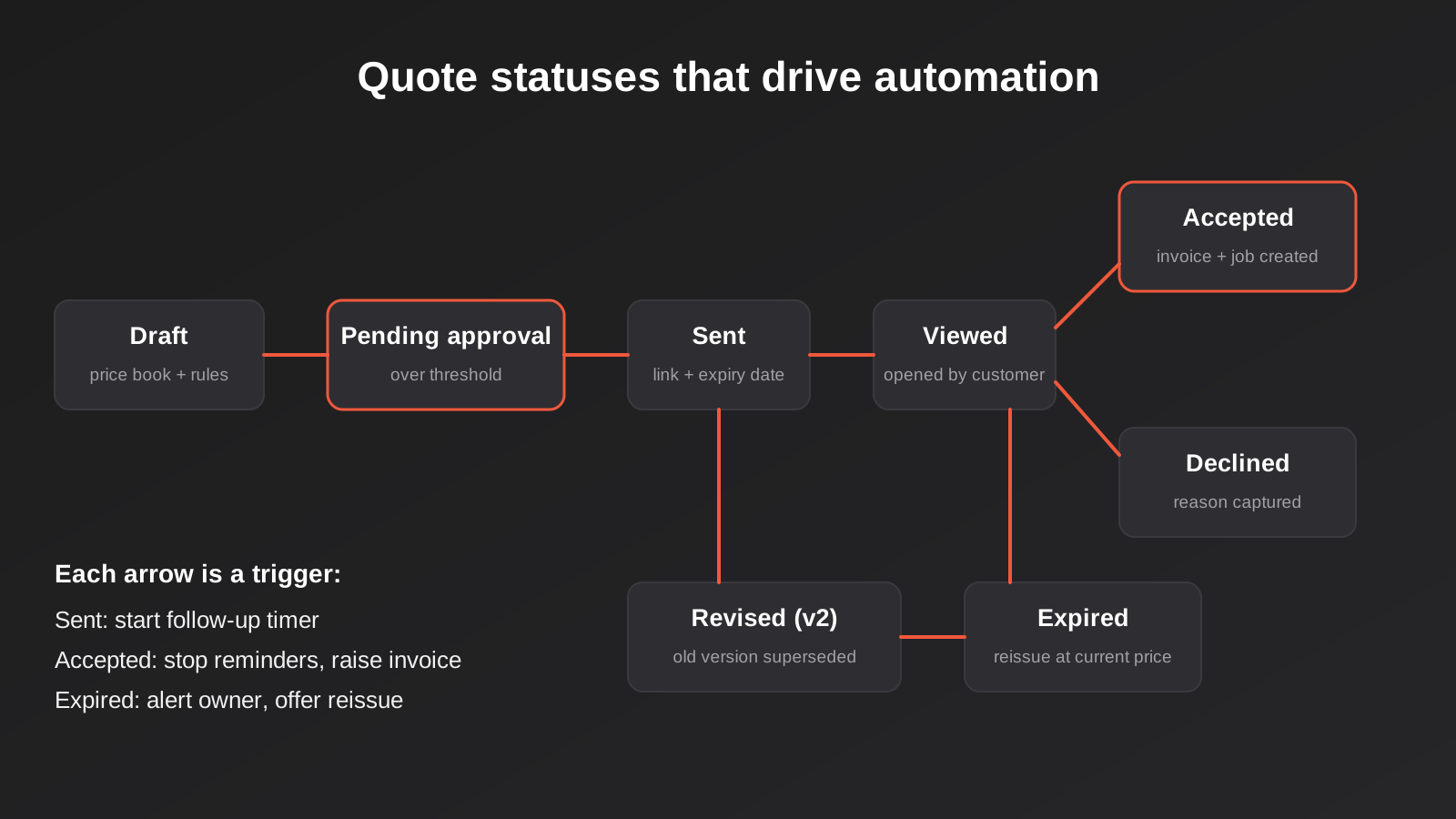
A quote is not a static document. It moves through states, and each state change is a moment where something should happen. Modelling these states explicitly is what makes the follow-up and handoff automation reliable.
Version control without chaos
Customers ask for changes. A good system treats a revision as a new version of the same quote, keeps the old one for the record, and makes sure only one version can be accepted. The ugly alternative is two PDFs in an email thread and an argument later about which price applied. If you only take one thing from this section, make it this: the customer should always be looking at a link to the current version, and old versions should say clearly that they’ve been superseded.
Expiry
Quotes should expire, and the expiry should be visible to the customer and enforced by the system. Material and labour costs move, and an open-ended quote is a free option for the buyer. When a quote expires, mark it so, notify the owner, and make it easy to reissue at current prices rather than quietly honouring a stale one.
Follow-ups that don’t feel like spam
This is the part of quote automation with the best return for the least effort. A short sequence tied to the quote status works well: a note the day after sending to check it arrived, a nudge when the customer has opened the quote a couple of times without accepting, and a reminder shortly before expiry. Keep each message short, written in your voice, and addressed from a real person. Stop the sequence immediately on acceptance, decline or reply.
A caution on the rules: these follow-ups are part of dealing with a specific request, not general marketing, so they sit more comfortably than a newsletter would. Still, don’t let a quote follow-up slide into promotional content, and always honour an unsubscribe or a request to stop. If you’re unsure where the line sits for your business, get advice on the Spam Act and your privacy obligations.
Acceptance and the handoff to invoicing
Acceptance is the moment the automation pays for itself, because it’s where most businesses currently do the most re-typing.
What acceptance should trigger
When a customer accepts, the system should do these things without anyone touching a keyboard:
- Lock the accepted version and record the timestamp and the acceptor’s details.
- Move the deal to won in the CRM.
- Create the deposit or first-stage invoice in the accounting system, with the right items, GST treatment and payment terms.
- Create the job, project or order in the system your delivery team uses.
- Notify the owner and the delivery lead.
- Send the customer a confirmation with next steps.
Australian law generally accepts electronic signatures and online acceptance for most commercial agreements, but there are exceptions and your own terms matter, so confirm with your lawyer that your acceptance wording works as you intend.
Progress claims and staged invoicing
Deposits are straightforward. Larger jobs with staged payments or progress claims are harder, because each stage needs its own invoice tied back to the quote. Build the stage schedule into the quote itself (for example 30 per cent on acceptance, 40 per cent at a milestone, 30 per cent on completion) and let each stage create its invoice when the milestone is marked complete. That keeps the quote as the single record of what was agreed.
Don’t create the invoice twice
Webhooks get delivered more than once. People double-click. A workflow that times out gets retried. If your invoice creation step isn’t designed for that, you’ll eventually bill someone twice, which is a quick way to lose their trust. The fix is to give every accepted quote a unique reference and check for an existing invoice with that reference before creating one. We wrote this up properly in our article on idempotency and duplicate invoices, and it’s worth reading before you build anything that writes to your accounts.
Where AI helps, and where it shouldn’t be trusted
AI tools are now good enough to be useful in quoting, as long as you give them the right jobs.
Good jobs for AI
- Reading the enquiry. Extracting job type, location, size and dates from a free-text email or form and filling the CRM fields, so nobody has to.
- Drafting the scope narrative. Turning structured inputs into a first draft of the description of work, which a person edits.
- Spotting gaps. Noticing that a request mentions something your standard scope doesn’t cover and flagging it for a person.
- Summarising. Producing a two-line summary of a quote for an approver who has thirty seconds.
Poor jobs for AI
Letting a language model set prices unsupervised is the obvious one. Prices should come from your price book and rules, which are deterministic and auditable. A model can be wrong in ways that look entirely plausible, and a plausible wrong price in a document your customer can legally accept is an expensive mistake. The same goes for interpreting contract terms or deciding discount eligibility. Use AI to prepare information for the rules and for the human, not to replace either. If you want to see how this kind of boundary is set in practice, our custom AI integrations page explains how we approach it.
Three illustrative setups
These are composites we’ve built from common patterns, not case studies of particular clients. They’re here to show how the same pipeline flexes to different businesses.
A small trade business
A plumbing or electrical business with a handful of staff. Enquiries arrive by web form and phone. The setup: the form and a staff entry screen both write to the CRM; a price book of common jobs and materials lives in the accounting software; the quote is built in the accounting tool, where GST is already handled; acceptance converts it to a deposit invoice; and a simple automation posts the won job to the team’s schedule. The approval rule is short: anything over a set value, or anything with a manual line, goes to the owner. This setup is deliberately modest, because the business doesn’t need more.
A B2B supplier with tiered pricing
A distributor selling to trade customers with customer-specific price lists and volume breaks. Quotes are generated from the ERP or inventory system’s pricing, because that’s where customer-specific pricing is held. The automation reads the customer’s price list, applies the volume tier, checks stock, and produces the quote for a salesperson to review. Acceptance creates a sales order directly. The hard part here is integration, not the quote document itself, and it is the sort of work that sits close to our ERP integration practice.
A consultancy or agency
A services firm selling scoped projects and retainers. The proposal is a persuasive document with case material, scope, timeline and fees. A proposal tool holds the content library, the CRM holds the deal, and the fee tables come from standard rate cards with a margin check. Acceptance triggers a project in the delivery tool and a billing schedule in accounting. Here the main gain is consistency and speed of assembly, not calculation.
How to tell whether it’s working
Before you build, record a baseline. After launch, track a small number of measures and review them monthly.
- Time to quote: hours from enquiry received to quote sent. Track the median, not the average, so one outlier doesn’t distort it.
- Win rate: quotes accepted divided by quotes sent, ideally split by job type or value band.
- Quote-to-invoice time: from acceptance to deposit invoice issued. This should collapse to minutes.
- Revisions per quote: a high number points to unclear scoping upfront.
- Errors: quotes needing correction after sending. Track these honestly, since automation should reduce them.
- Staff time: a rough estimate of hours spent per quote before and after.
Be careful about attributing a change in win rate to the automation alone. Markets move, and your pricing may have changed at the same time. Time to quote and error rates are the cleaner signals. If you want a structured way to think about return, our framework for measuring automation ROI sets out the approach.
Common mistakes
- Automating a process nobody has written down. If the estimator can’t explain how a price is set, the system can’t either. Document the rules first.
- Letting the price book drift. A price list without an owner goes stale within months, and automation then spreads the stale prices faster than a person ever could.
- Two sources of truth. A quote edited in the CRM and again in the accounting tool will disagree. Choose one home and treat the other as a copy.
- No approval rules, or rules so strict everything is flagged. The first sends bad quotes; the second makes people bypass the system.
- Sending PDFs instead of links. You lose visibility, version control and the ability to expire the offer.
- Follow-ups that keep going after the customer has replied. Always stop sequences on any reply or status change.
- Forgetting GST and terms in the template. Check inclusive versus exclusive pricing, validity, deposit terms and ABN display on every template.
- Creating invoices without duplicate protection. Retries and double-clicks happen, so guard against them.
- Letting AI set prices. Use it to read and draft, not to decide.
- Skipping a pilot. Run the new process on one job type for a few weeks, compare with the old, then extend.
- Ignoring the lost-quote data. Capturing why quotes were declined costs one dropdown and tells you more about your pricing than any report.
Frequently Asked Questions
What is quote automation?
It’s using software to handle the repeatable parts of quoting: capturing the enquiry, pulling prices from a price book, generating the document, routing approvals, sending and following up, and turning an accepted quote into an invoice and a job. A person still decides the price for anything unusual. The automation removes the copying, re-keying and chasing around that decision.
Do I need a CRM before I can automate quotes?
Not strictly. A business that quotes in Xero or MYOB can get a lot of value from the accounting tool’s quote-to-invoice feature alone. A CRM becomes worth adding when you want pipeline visibility, automated follow-ups, or when several people share the sales process. Start with the simplest setup that removes your biggest bottleneck.
Is an electronic acceptance legally binding in Australia?
Generally, yes. Commonwealth and state electronic transactions laws recognise electronic signatures and online acceptance for most commercial dealings, provided the method is reliable and the parties agreed to it. There are exceptions for certain document types, and your terms of acceptance matter, so have a lawyer confirm your template works the way you expect. This is general information, not legal advice.
Can we automate quotes for highly custom jobs?
You can automate the surrounding steps even when the price needs human judgement. The enquiry capture, the checklist of missing information, the document assembly, approvals, follow-up and invoice creation all still apply. The estimator supplies the number, and the system handles the rest. Fully automatic pricing only suits work where the price can be written as rules.
How long does a quote automation project take?
It depends mostly on how clear your pricing logic is and how many systems need connecting. A simple CRM-to-accounting flow for one job type can be live in a few weeks. A configurable-product quoting tool tied to an ERP is a longer project. In both cases we’d suggest piloting on one job type first, then expanding.
What happens if the automation breaks halfway?
That’s a design question to settle upfront. Each step should be able to retry safely, failures should alert a named person instead of failing silently, and the quote record should show exactly where a run stopped. A well-built flow can be re-run from the failed step without creating duplicate invoices or sending a second email to the customer.
Where to Start
You don’t need to automate the whole pipeline at once, and we’d suggest you don’t. A sensible first step is small and low-risk: pull your last twenty quotes, write down the steps from enquiry to deposit, and mark which ones are copying or chasing and which ones are genuine judgement. That list usually shows where one or two changes (a structured enquiry form, a proper price book, quote status that triggers the invoice) would return most of the time.
If you’d like a second pair of eyes on that, we’re happy to talk it through with no obligation. Tell us how you quote today and which systems are involved, and we can say what we’d automate, what we’d leave alone, and what it would involve. Automation projects are scoped individually, and you can see how we approach cost on our automation pricing page.
Because we run lean as a specialist agency rather than carrying a large account-management layer, our fixed quotes typically come in below Australian agency averages. If you’ve already got a written quote from another agency for comparable scope, send it through and we’ll do our best to beat it.
Keep reading
Related posts
Best Job Management Software for Australian Trade Businesses (2026)
Six job management tools for Australian trades compared: ServiceM8, Tradify, Fergus, AroFlo, simPRO and Jobber, with real drawbacks and pricing models.
Best CRM for Australian Small Business (2026): 6 Compared
Six CRMs compared for Australian small businesses: free plans, AU data hosting, real costs, Xero fit and the drawbacks vendors skip.
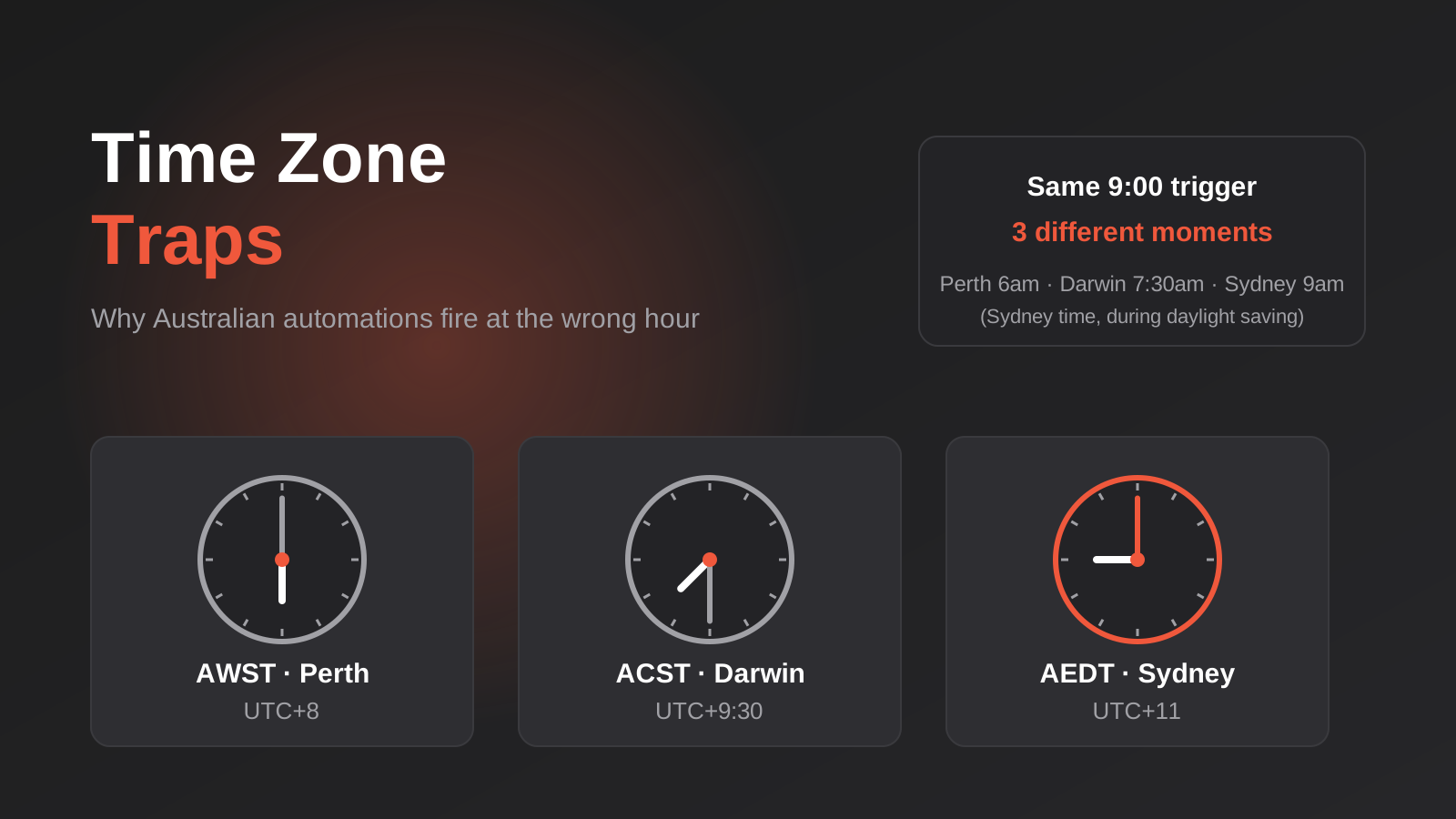
Time Zones, Daylight Saving and Public Holidays: Why Australian Automations Fire at the Wrong Time (2026)
How a 9am automation fires at the wrong time across Australian time zones, daylight saving and state public holidays, and how to…
Got a project you'd like to talk through?
Tell us what you're working on — we'll come back with a plan.
