
Email Deliverability in Australia: The SPF, DKIM, DMARC and Spam Act Guide for 2026
 Jignesh Vagadiya
03/10/2026
22 min read
Jignesh Vagadiya
03/10/2026
22 min read
A client came to us convinced their email provider was broken. Open rates had fallen from the high twenties to single digits over about six weeks, nothing had changed in their templates, and their list hadn’t grown or shrunk in any unusual way. The provider wasn’t broken. Gmail had quietly started sending a growing share of their campaigns straight to spam, and nobody on their team had looked at a DMARC report in over a year.
This is an email deliverability problem, and it’s happening to a lot of Australian businesses right now — most of them don’t know it until revenue from email drops off a cliff. Since February 2024, Gmail and Yahoo have been enforcing a set of authentication and hygiene rules that used to be optional best practice. Microsoft has followed with its own version. The rules keep tightening each year, and 2026 has brought the tightest thresholds yet on spam complaints and sender reputation. If you’re sending marketing emails, invoices, receipts, password resets or any kind of automated notification from your business domain, these rules apply to you whether you’ve heard of them or not.
We build and maintain email systems for Australian businesses as part of our email marketing work, and deliverability problems are one of the most common things we get called in to fix after the fact — usually once a business has noticed their numbers have quietly collapsed. It’s also one of the first things worth getting right if you’re still working out where to start with marketing automation, because none of the flows you build matter if the emails never reach an inbox. This guide covers what SPF, DKIM and DMARC actually do, what Gmail and Yahoo now require, what the Spam Act 2003 requires separately under Australian law, and how to actually diagnose a deliverability problem instead of guessing at it.
Why email deliverability became urgent in 2026
For most of email’s history, authentication was a nice-to-have. You could send from an unauthenticated domain and still land in the inbox most of the time, because spam filtering mostly looked at content and sender history. That changed in February 2024 when Google and Yahoo jointly rolled out new requirements for anyone sending bulk mail to Gmail.com and Yahoo.com addresses. The rules weren’t a suggestion — senders who didn’t comply started seeing temporary failures and outright rejections.
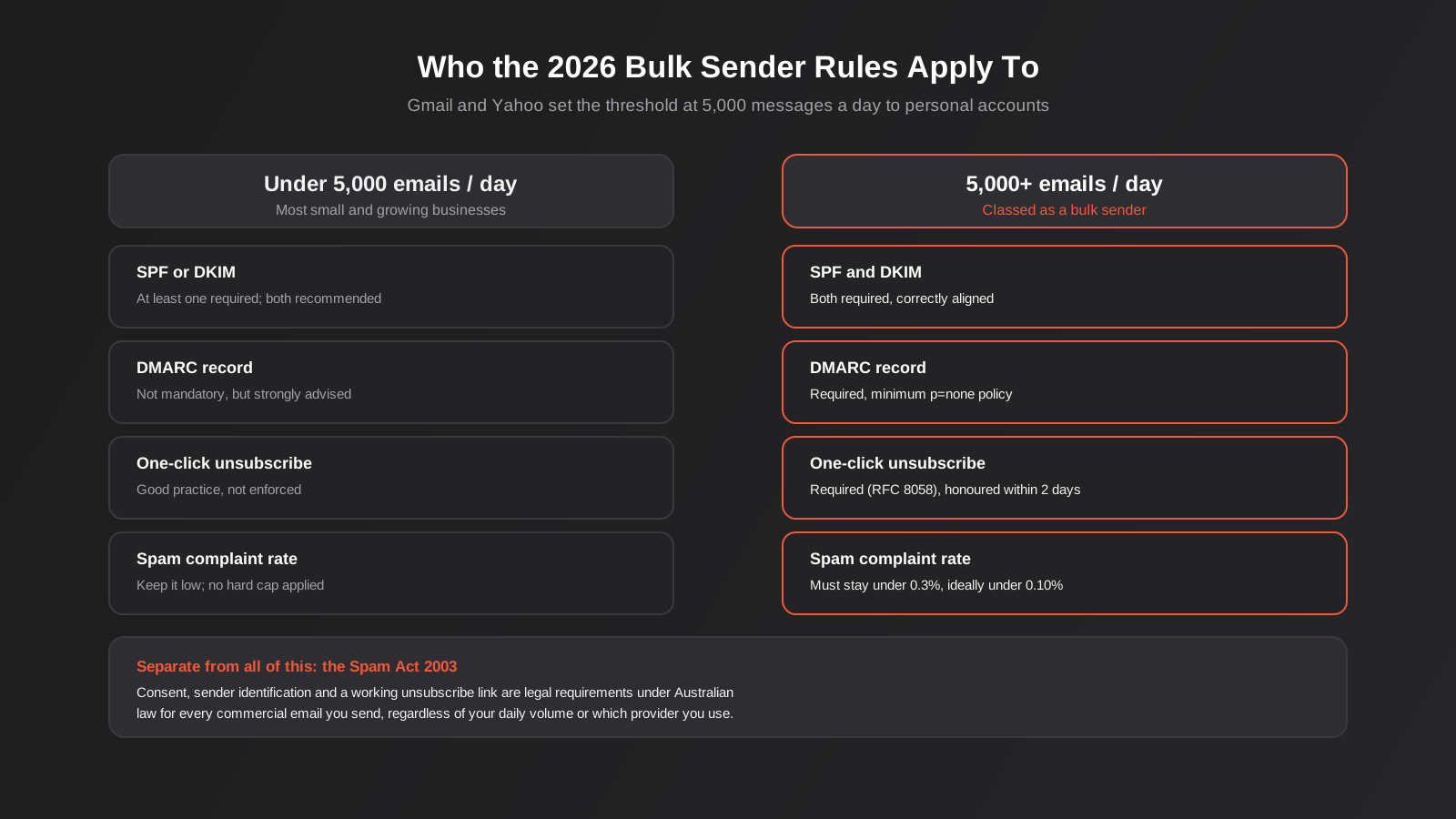
The threshold that triggers the strictest rules is 5,000 messages a day to personal accounts at a single provider. Cross that and you’re a “bulk sender” in Google and Yahoo’s eyes, which brings mandatory SPF, DKIM and DMARC, one-click unsubscribe, and a spam complaint rate that has to stay under 0.3%. Sit under that threshold and the rules are lighter, but they haven’t gone away — Google still expects SPF or DKIM at a minimum, and in practice, inbox placement increasingly rewards full authentication regardless of volume.
What’s changed heading into 2026 isn’t the existence of these rules — they’re now two years old — it’s how tightly they’re enforced and how much weight recipient behaviour carries. Spam complaint thresholds that used to be aspirational are now treated as the baseline a stable sender has to clear. Engagement — opens, clicks, replies, how often people mark you as spam or just delete without opening — now drives inbox placement more directly than almost anything else. A technically perfect DMARC setup won’t save a sender list full of people who stopped caring about your emails eighteen months ago.
Who this actually affects
It’s tempting to read “5,000 emails a day” and assume this is a problem for enterprise senders only. In practice, a lot of small and mid-sized Australian businesses cross that line without realising it, especially once you count transactional email — order confirmations, shipping updates, password resets, invoice reminders — alongside marketing campaigns. An ecommerce store with 2,000 customers sending a weekly newsletter plus order and shipping emails can clear 5,000 a day during a sale period without anyone noticing. And even businesses that never cross the threshold are affected by the broader shift: mailbox providers are applying similar signals to everyone, just with softer enforcement below the line.
SPF, DKIM and DMARC, actually explained
These three acronyms get thrown around constantly and explained badly just as often. Each one does a different job, and understanding the difference matters because fixing a deliverability problem means knowing which of the three is actually failing.
SPF — who’s allowed to send
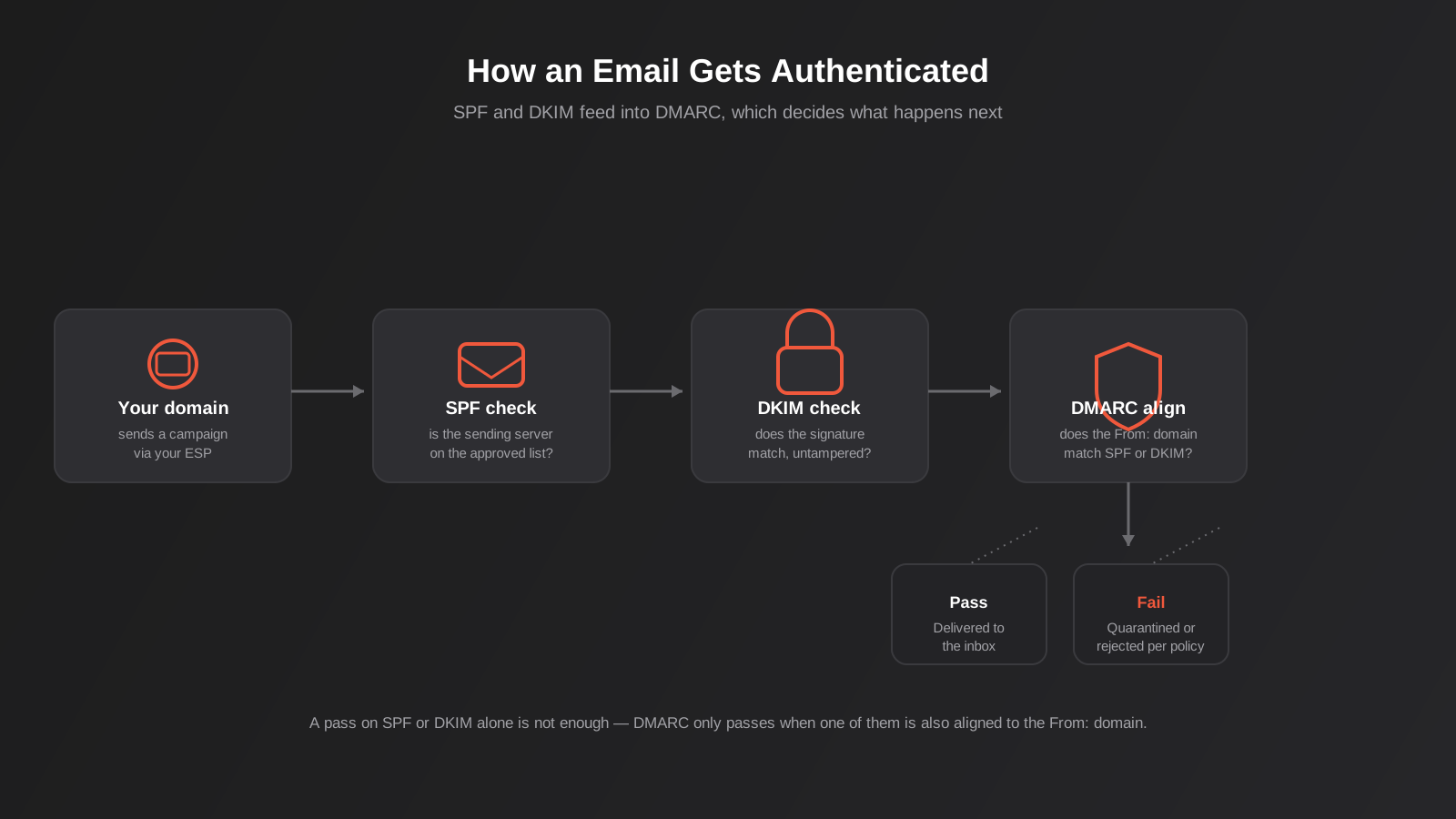
Sender Policy Framework is a DNS TXT record that lists which mail servers are authorised to send email on behalf of your domain. When a receiving server gets a message claiming to be from yourdomain.com.au, it checks the SPF record for that domain and asks: is the server that actually sent this message on the approved list?
A typical SPF record looks something like v=spf1 include:_spf.google.com include:sendgrid.net ~all. It names Google Workspace and SendGrid as approved senders and tells receivers to soft-fail (the ~all) anything else. The practical trap with SPF is that every tool you use to send email on your behalf — your CRM, your email marketing platform, your invoicing software, your help desk — needs to either be included in that record or send through a provider that’s already listed. Businesses that add a new marketing tool and forget to update their SPF record usually don’t notice until deliverability quietly drops, because SPF failures alone don’t always block delivery — they just weaken your authentication posture.
SPF also has a hard technical limit worth knowing about: a receiving server will only follow 10 DNS lookups when evaluating an SPF record. Businesses that have added one too many include: statements over the years — one for the CRM, one for the invoicing tool, one for the support platform — can quietly break their own SPF record by exceeding that limit, at which point SPF fails for everything, not just the newest addition.
DKIM — proof the message wasn’t altered
DomainKeys Identified Mail attaches a digital signature to each outgoing message, generated using a private key your sending platform holds. The receiving server looks up the matching public key in your DNS records and checks whether the signature is valid. If it is, the server knows two things: the message really was signed by someone holding your private key, and nothing in the signed content was altered in transit.
Unlike SPF, which authorises servers, DKIM authorises content — it travels with the message itself, which is why it survives being forwarded in a way SPF often doesn’t. Setting up DKIM means adding a CNAME or TXT record your email platform generates for you; almost no business writes this by hand. The common failure mode is simpler: businesses switch platforms, set up the new one, and never remove or deactivate the old DKIM key, or they never activate DKIM signing on the new platform at all because it looked “done” once the DNS record was added.
DMARC — the policy that ties them together
DMARC is where SPF and DKIM actually start protecting your domain, rather than just existing. On their own, SPF and DKIM only report pass or fail for the server and signature. DMARC adds a crucial extra check called alignment: the domain in the visible From: address has to match either the SPF domain or the DKIM signing domain. Without that alignment check, someone could theoretically pass SPF by sending from a completely unrelated but authorised domain while spoofing your From: address, and old-style SPF-only checking wouldn’t catch it.
A DMARC record also tells receiving servers what to do when a message fails alignment, via three policy levels:
- p=none — monitor and report failures, but deliver the message anyway. This is the minimum Gmail and Yahoo require from bulk senders, and the right starting point for anyone setting DMARC up for the first time.
- p=quarantine — send failing messages to spam/junk instead of the inbox.
- p=reject — refuse the message outright. This is the end state you want once you’re confident every legitimate sending source is authenticated, because it’s what actually stops someone spoofing your domain to send phishing emails to your customers.
The progression matters. Businesses that jump straight to p=reject without first running p=none for a few weeks and reviewing the aggregate reports it generates often discover, too late, that a legitimate system — an old CRM integration, a finance tool sending remittance advices, an event platform sending confirmations — wasn’t properly authenticated and is now having its mail silently rejected.
What Gmail and Yahoo actually require in 2026
The rules split cleanly around that 5,000-messages-a-day-to-personal-accounts threshold, and it’s worth being precise about what changes on either side of it, because a lot of the confusion we see comes from businesses applying the strict bulk-sender rules to themselves when they don’t need to, or — more dangerously — assuming the lighter rules apply when they’ve actually crossed the line.
Under the threshold
If you’re sending under 5,000 messages a day to Gmail or Yahoo personal addresses combined, the formal requirement is just SPF or DKIM — not necessarily both, and DMARC isn’t mandatory. In practice we’d never recommend stopping there. Setting up all three takes a web developer or your hosting provider an hour or two, and the gap in inbox placement between “minimally compliant” and “fully authenticated” has been widening every year since 2024, regardless of which side of the threshold you sit on.
At or above the threshold
Cross 5,000 messages a day and the requirements become mandatory, not advisory:
- SPF and DKIM both configured and passing.
- A DMARC record published, at minimum at
p=none. - Alignment between your From: domain and your SPF or DKIM domain.
- One-click unsubscribe (the technical standard is RFC 8058) on every marketing message, with requests honoured within roughly two business days.
- A spam complaint rate kept under 0.3%, monitored through Google Postmaster Tools.
That 0.3% figure is the hard enforcement line, but it’s not a target to aim for — it’s the point at which things get actively worse for you. Deliverability specialists generally treat 0.10% as the real benchmark for a healthy, stable program heading into 2026, with anything creeping toward 0.3% treated as an active warning sign rather than an acceptable baseline.
One-click unsubscribe is not the same as an unsubscribe link
This trips up more businesses than almost anything else in the bulk sender rules. A footer link that takes someone to a web page where they confirm their email, select which lists to leave, and click a confirm button satisfies the Spam Act’s unsubscribe requirement, but it does not satisfy Gmail and Yahoo’s one-click standard. RFC 8058 requires a List-Unsubscribe header that lets the mail client itself process the unsubscribe with a single action, with no login and no landing page required. Most reputable email marketing platforms — Klaviyo, Mailchimp, ActiveCampaign, and others — now add this automatically, but custom-built transactional email systems and some older marketing automation setups often don’t, and nobody notices until a bulk sender audit flags it.
The legal layer most of this ignores: the Spam Act 2003
Everything above is about technical mail delivery rules set by private companies — Google, Yahoo, Microsoft. Separately, and in addition, Australian businesses sending commercial electronic messages are bound by the Spam Act 2003, enforced by the Australian Communications and Media Authority (ACMA). This isn’t optional best practice; it’s federal law, and it applies regardless of whether you send 50 emails a month or 50,000 a day. Getting your SPF, DKIM and DMARC perfectly configured does nothing to protect you from a Spam Act breach — they’re entirely separate obligations that happen to both live in the same inbox.
The Act is built around three core rules, and ACMA has been enforcing them more actively in recent years, with penalties that currently reach into the millions of dollars for serious or repeated breaches.
Rule one: consent
You need consent before sending a commercial electronic message, and the burden of proving you had it sits with you, not the recipient. Consent comes in two forms. Express consent is explicit — someone ticked an unchecked signup box, filled in a form that clearly stated they’d receive marketing emails, or agreed verbally in a way you can document. Inferred consent is narrower than most businesses assume: it covers an existing business relationship (a recent purchase, an active service arrangement) or an email address the person has conspicuously published in connection with their business, and even then only for messages relevant to that context. Buying or scraping a list and emailing it does not meet either bar, no matter how the list was described to you when you acquired it.
Rule two: identify
Every commercial message has to clearly identify who sent it and include accurate contact details — not a no-reply address that bounces, and not a generic sender name with no way to trace it back to an actual business. This sounds trivial until you look at how many automated transactional and marketing emails quietly fail it by using a sending domain or display name that has nothing identifiable about the actual business behind it.
Rule three: unsubscribe
Every message needs a functional unsubscribe facility that’s free to use, stays working for at least 30 days after the message was sent, and gets honoured within five business days of the request. This is a lower bar than Gmail and Yahoo’s one-click requirement for bulk senders, which is exactly why it’s worth having both: an RFC 8058 List-Unsubscribe header for the mailbox providers, and a working, low-friction unsubscribe link in the email body for the people actually reading it, which also happens to satisfy the Spam Act.
If you’re building out welcome sequences, abandoned cart flows or lifecycle segmentation as part of a broader automation program, these compliance basics need to be baked into the templates from day one rather than bolted on later — we cover the strategy side of that build in our guide to email marketing automation, and the sending infrastructure in this piece sits underneath all of it.
Sender reputation: the part no DNS record fixes
Authentication gets you through the door. What happens after that is governed by sender reputation, which mailbox providers build up per domain and per sending IP based almost entirely on how recipients behave. You can have flawless SPF, DKIM and DMARC and still land in spam if your reputation is poor, because authentication proves you are who you say you are — it says nothing about whether people actually want to hear from you.
The signals that build or damage reputation
Opens and clicks are positive signals, but they’re a lagging indicator in an age of automatic image loading and privacy-focused email clients that pre-fetch content, so they’re weighted less heavily than they used to be. What matters more now: how often people mark you as spam, how often they delete without opening, how often messages bounce outright, and how consistent your sending pattern is over time. A domain that sends steadily and gets engaged with consistently builds reputation. A domain that sends nothing for three months and then blasts a 40,000-person list in one afternoon looks exactly like what a spammer’s sending pattern looks like, authenticated or not.
List hygiene is not optional housekeeping
Every address on your list that never opens, never clicks and never engages is a liability sitting in your sending reputation, not a dormant asset waiting to be reactivated. Addresses that have gone quiet for six to twelve months should be moved into a re-engagement sequence and then suppressed if that doesn’t work, not left in the main send list indefinitely. For contacts who’ve stopped engaging with email altogether, it’s often worth weighing up whether SMS is a better channel for time-sensitive messages rather than continuing to push email at a segment that’s clearly tuned out. Old, purchased or scraped lists are the single fastest way to tank a domain’s reputation — a high proportion of invalid addresses on a list translates directly into bounce rates that mailbox providers read as a strong spam signal.
Warming up a new sending domain
A brand-new domain or a domain that’s switching to a new email platform has no sending history, and mailbox providers treat unknown senders cautiously by default. Sending your full volume on day one — particularly to a large list — is one of the most common ways businesses accidentally trigger spam filtering on a domain that would otherwise be fine. The standard approach is to ramp volume gradually over two to four weeks, starting with your most engaged subscribers (recent purchasers, frequent openers) and expanding outward as positive engagement signals accumulate, rather than sending to the full list immediately.
Diagnosing a deliverability problem
When a client’s open rates drop and nobody can say why, we work through the same sequence every time, roughly in order of how likely each thing is to be the actual cause.
Check the DNS records first
A free DMARC analyser or any SPF/DKIM lookup tool will tell you within minutes whether the records exist, whether they’re syntactically valid, and whether your current sending platform is actually included in your SPF record. This catches a surprising number of cases outright — a tool was swapped out eighteen months ago and the SPF record was never updated, or DKIM was configured on the old platform and never re-enabled on the new one.
Read your DMARC aggregate reports
If you’ve got a DMARC record published (even at p=none), you’re receiving aggregate reports from every major mailbox provider showing exactly which sending sources are passing and failing alignment. These reports are genuinely unreadable as raw XML, so most businesses need a free DMARC monitoring tool to parse them into something legible. This is usually where the actual culprit shows up — a specific platform, a specific IP range, a specific sending pattern that’s failing while everything else passes.
Check Google Postmaster Tools and spam complaint rate
If you send meaningful volume to Gmail addresses, Google Postmaster Tools (free, just needs domain verification) shows your actual reputation standing, spam rate and IP reputation directly from Google’s side — not a third-party estimate. This is the single most useful tool for understanding whether Gmail specifically has a problem with your sending, as distinct from a general deliverability issue affecting everyone.
Look at engagement trends over time, not a single send
A sudden spike in bounces or a sharp drop in opens across one campaign is often just a bad subject line or a send-time issue. A gradual decline over weeks or months, consistent across multiple campaigns, points to reputation or list hygiene. Pulling up engagement by send over the last six months, rather than reacting to the most recent campaign in isolation, usually makes the real pattern obvious.
Common mistakes we see
- Treating SPF as “done” after setup and never revisiting it. Every new tool that sends email on your behalf — a new CRM, a new invoicing platform, a new event system — needs adding to the SPF record, and the 10-lookup limit means old, unused includes should be removed rather than left to accumulate.
- Jumping straight to a DMARC reject policy. Moving to
p=rejectbefore reviewing aggregate reports atp=nonefor several weeks risks silently blocking a legitimate system nobody remembered to authenticate. - Confusing a standard unsubscribe link with one-click unsubscribe. A footer link that loads a preference centre page satisfies the Spam Act but not Gmail and Yahoo’s RFC 8058 bulk sender requirement — you need both, and they’re not interchangeable.
- Buying or scraping email lists. Beyond the Spam Act consent breach, purchased lists carry high bounce and spam-complaint rates that damage sender reputation for every other email you send from that domain, including ones your actual customers want.
- Sending in bursts after long silences. A dormant domain that suddenly sends a large campaign looks like spam behaviour to mailbox providers, regardless of authentication status. Consistent, regular sending builds reputation far better than sporadic large blasts.
- Never looking at DMARC reports once they’re set up. Publishing a DMARC record and then ignoring the reports it generates means you’ll find out about an authentication failure from a drop in revenue, not from the data that was telling you weeks earlier.
- Assuming a low sending volume means none of this applies. The Spam Act’s consent, identification and unsubscribe rules apply to every commercial email sent to an Australian address, with no volume threshold at all.
Frequently Asked Questions
Do I need SPF, DKIM and DMARC if I only send a few hundred emails a month?
Gmail and Yahoo’s mandatory bulk sender rules only kick in at 5,000 messages a day to personal accounts, so technically, no. In practice we’d still set up all three. It takes very little time for whoever manages your DNS, and inbox placement for authenticated senders has been consistently better than for unauthenticated ones since the 2024 rule changes, regardless of volume. There’s also no downside — SPF, DKIM and DMARC at p=none cost nothing to run and only ever help.
What’s the difference between a DMARC record failing and an email bouncing?
A bounce means the message couldn’t be delivered to the mailbox at all, usually because the address is invalid or the recipient’s mailbox is full. A DMARC failure means the message was delivered to the mail server but failed the alignment check between your From: domain and your SPF or DKIM authentication, and was then handled according to your policy — delivered anyway at p=none, sent to spam at p=quarantine, or refused outright at p=reject. They’re unrelated problems with unrelated fixes.
We switched email marketing platforms recently — could that be why our open rates dropped?
Very likely, yes. This is one of the most common causes we see. The new platform needs its own SPF include and its own DKIM signature activated; if either was missed during the switch, or if the old platform’s DKIM record was removed before the new one was fully verified, authentication can fail silently. A new sending domain or IP through the new platform also starts with no reputation history, which on its own can soften inbox placement for the first few weeks even with perfect authentication, until engagement data builds back up.
Does having a good DMARC setup protect us from being accused of spamming under the Spam Act?
No — they’re entirely separate. DMARC, SPF and DKIM are technical authentication standards set by mailbox providers to verify sender identity and prevent spoofing. The Spam Act 2003 is Australian law governing consent, sender identification and unsubscribe rights for commercial messages. A business can have perfect technical authentication and still breach the Spam Act by emailing people without consent, and conversely, a business with full Spam Act compliance can still land in spam folders if its technical authentication is missing or broken.
How long does it take to see results after fixing SPF, DKIM and DMARC?
Technical fixes themselves — correcting SPF, activating DKIM, publishing a DMARC record — take effect as soon as DNS propagates, usually within a few hours. Inbox placement improvement is slower, because mailbox providers rebuild sender reputation gradually based on ongoing engagement rather than instantly re-rating a domain the moment a DNS record changes. Most businesses see a meaningful improvement within two to four weeks of consistent sending once the technical fixes are in place, assuming list hygiene and engagement are otherwise healthy.
Can our web developer set up SPF, DKIM and DMARC, or do we need a specialist?
Anyone comfortable editing DNS records at your domain registrar or hosting provider can add the SPF and DKIM records your email platform generates — it’s usually a copy-paste job once you know which value goes where. Writing a sensible DMARC policy and actually reading the reports it generates benefits from someone who’s done it before, mainly because the all-or-nothing jump straight to a strict policy is where most self-managed setups go wrong. If you’re not confident interpreting aggregate reports, it’s worth getting a second set of eyes before tightening policy.
Where to start
If you haven’t checked your SPF, DKIM and DMARC status in the last six months, that’s the first thing to do today — it takes a few minutes with any free lookup tool and tells you immediately whether you have a real problem or not. If you’re already past 5,000 emails a day across marketing and transactional mail combined, check your spam complaint rate in Google Postmaster Tools next, because that’s the number that determines whether Gmail actively works against you.
Beyond the technical setup, it’s worth having someone look at your list hygiene, your sending consistency and whether your unsubscribe flow actually meets both the Spam Act’s requirements and Gmail and Yahoo’s one-click standard — the two aren’t the same thing, and most businesses only have one of them properly in place. If any of this sounds like it needs a proper look rather than a quick DNS check, we’re happy to have a conversation about where your setup actually stands and what fixing it would involve as part of our broader marketing automation work — no pressure, just a second set of eyes on something that’s easy to get wrong and expensive to leave broken.
Keep reading
Related posts
Best Email Marketing Platforms for Australian Businesses (2026): 6 Compared
Six email marketing platforms compared for Australian businesses — real pricing, ecommerce depth and AU data hosting, from Mailchimp to Vision6.
Email vs SMS Marketing: Which Channel Should Your Australian Business Use? (2026)
Email or SMS? Real Australian cost benchmarks, ACMA's new Sender ID Register rules, and a practical framework for which message suits which…
Email Marketing Automation That Actually Makes Money: Welcome Flows, Abandoned Cart and Segmentation for Australian Businesses (2026)
A practical guide to email marketing automation for Australian businesses: welcome flows, abandoned cart recovery, segmentation, compliance and what to measure.
Got a project you'd like to talk through?
Tell us what you're working on — we'll come back with a plan.
