
Marketing Automation for Australian Businesses: Where to Actually Start (2026)
 Jignesh Vagadiya
15/09/2026
21 min read
Jignesh Vagadiya
15/09/2026
21 min read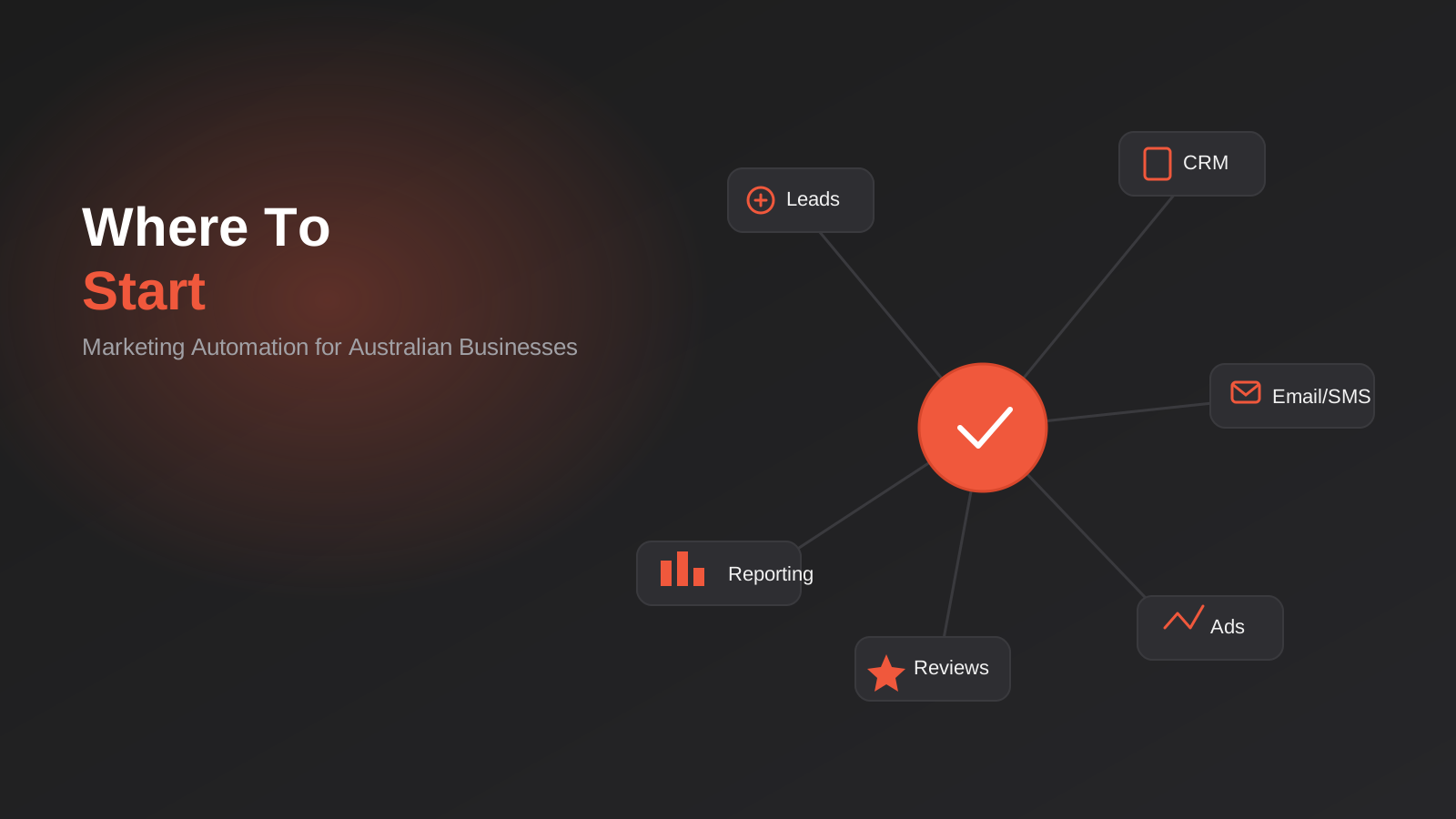
Ask five business owners what marketing automation means and you will get five different answers. One thinks it is an email newsletter that sends itself. Another thinks it is a chatbot. A third bought a platform eighteen months ago, used it for a single welcome email, and now pays a monthly subscription for a tool that does almost nothing. None of them are wrong, exactly — they have each bumped into one corner of something much bigger, and mistaken the corner for the whole room.
We wrote separately about email marketing automation — welcome flows, abandoned cart recovery, segmentation, the mechanics of one channel done properly. This post is about the bigger picture that sits around it: what marketing automation for Australian businesses actually involves across all six jobs it does, the order to build them in, how to pick a platform without overpaying for features you will not use, and where the budget most often gets wasted. If email is the room, this is the house.
The honest starting point is that most businesses do not need a marketing automation platform. They need two or three specific workflows built properly, in the right order, on top of data that is not a mess. The platform is a means to that end, not the goal itself. Get the order wrong and you end up exactly like the business owner above — a $60 a month subscription, one email template, and a nagging sense that automation was supposed to do more than this.
What Marketing Automation Actually Means (Beyond Email)
Marketing automation is the set of rules that move a prospect through your business without a person manually pushing every step. Someone fills in a form, and instead of sitting in an inbox until Monday, a sequence of things happens automatically: an acknowledgement goes out, a task is created for the right salesperson, a scoring value updates, and a tag gets applied that determines what they see next. None of that requires email specifically. Email is just the most visible and most commonly built piece, because it is cheap and every platform does it.
The Six Jobs Marketing Automation Actually Does
Strip away the marketing language and there are really only six distinct jobs, and every automation workflow you will ever build falls into one of them:
- Speed to lead — acknowledging and routing a new enquiry the moment it arrives, before a human gets to it.
- Nurture — staying in front of people who are interested but not ready to buy, across whichever channel they actually respond to.
- Lead scoring and handoff — working out who is warm enough to talk to and getting them to a salesperson before the moment passes.
- Reputation and reviews — asking happy customers for a review or referral at the point they are most likely to say yes.
- Retargeting and audience sync — keeping your ad platforms updated with who is a lead, who is a customer, and who should be excluded.
- Reporting and attribution — knowing which channel and which workflow actually produced revenue, not just activity.
Every platform comparison article, every vendor pitch and every internal debate about “what should we automate next” eventually maps back to one of those six things. If a proposed automation does not fit neatly into one of them, it is probably a nice-to-have rather than something worth building yet.
Where It Overlaps With CRM and Sales Automation
Marketing automation and CRM and sales automation are drawn as separate boxes in most agency diagrams, ours included, but in practice they share a border and a lot of businesses trip on exactly that seam. Marketing owns the top of the funnel — nurture, scoring, retargeting. Sales owns the bottom — pipeline stages, follow-up cadences, quoting. The handoff between the two, the moment a marketing-qualified lead becomes a sales-qualified one, is where most automation projects either click into place or fall apart.
We covered the CRM side of this in detail in our CRM automation guide, including the five workflows that matter most once a lead is in the system. What that post does not cover, and what belongs here, is everything that happens before a lead is qualified enough to hand to sales at all — the marketing-side automation that decides who gets handed over, and when.
The Right Place to Start (In Order)
This is the part most vendors skip, because it is not exciting and it does not demo well. But the order genuinely matters. Build these out of sequence and you end up polishing a nurture sequence for leads that are already going cold because nobody acknowledged them for six hours.

Job 1: Speed to Lead
Response time to a new enquiry is the single biggest lever in most businesses’ entire marketing stack, and it is also the cheapest thing to automate. A lead that gets a response within five minutes converts at a meaningfully higher rate than one that waits an hour, and the gap only widens from there. This does not need to be clever. It needs an instant acknowledgement (email, SMS, or both), a notification to whoever owns that lead, and if you run a call-heavy business, a missed-call text-back so nobody falls through the cracks between 5pm and the next morning.
If your team currently manually checks a shared inbox for new leads and replies “when they get a chance,” this is where every marketing automation project should begin, full stop. It costs almost nothing to build and it is the workflow most likely to show up in revenue within the first month.
Job 2: Nurture That Isn’t Just Email
Most leads are not ready to buy the day they enquire. Nurture is the set of touches that keeps you in front of them until they are, and it works best as a genuinely multi-channel sequence rather than a single email drip. A practical nurture sequence for a considered purchase might look like: an immediate email with the information they asked for, an SMS two days later if they have not engaged, a retargeting ad picking up anyone who visited a key page but did not convert, and a check-in call task created for sales after two weeks of silence.
The mistake we see constantly is nurture built as a single channel in isolation — usually email, because it is the easiest to set up — while the ad account and the sales team run their own separate, uncoordinated version of the same follow-up. The person on the other end experiences this as three disconnected businesses talking at them, not one coordinated one.
Job 3: Lead Scoring and the Handoff to Sales
Once nurture exists, you need a way to tell which leads are actually warming up. Lead scoring assigns points for behaviour — opening emails, visiting pricing pages, requesting a demo, downloading a spec sheet — and triggers a handoff to sales once a threshold is crossed. This is where the platform choice starts to matter, because basic email tools handle scoring poorly or not at all, while CRM-native platforms like HubSpot or ActiveCampaign build it in as a core feature.
Get the threshold wrong in either direction and you create a real problem: too low, and sales gets flooded with unqualified leads and starts ignoring the notifications entirely; too high, and genuinely warm prospects sit in a nurture sequence for weeks while a competitor calls them first. Start conservative, watch what actually converts over the first month or two, and adjust the scoring rules based on real outcomes rather than guesswork.
Job 4: Reviews and Reputation
This is the job most businesses skip entirely, and it is one of the cheapest to automate. A simple workflow — trigger a review request by SMS or email a set number of days after a purchase or job completion, route unhappy responses to a private feedback form instead of a public review, and route happy ones to Google or the platform that matters most for your industry — can meaningfully shift review volume within a quarter. It is not glamorous, but for local and service businesses in particular, review volume and recency directly affects how much of that lead-generation work upstream (SEO, Google Ads, word of mouth) actually converts.
Job 5: Retargeting and Ad Audience Sync
Every ad platform performs better with a clean audience, and manually exporting and uploading customer lists is a job nobody does consistently. Automating the sync between your CRM and your ad accounts — so that customers are automatically excluded from acquisition campaigns, leads are automatically added to a retargeting audience, and high-value existing customers feed a lookalike audience — is a genuinely underrated automation because it touches paid media spend directly. A stale audience list is quietly wasting ad budget on people who already bought, every single day it goes unfixed.
Job 6: Reporting and Attribution
The last job, and the one that should come last, is pulling all of the above into a single view that shows what is actually working. This is not about a fancier dashboard for its own sake — it is about being able to answer a specific question when someone asks it: did that nurture sequence actually produce revenue, or did it just produce email opens? We wrote a full guide to this specific problem in our reporting and data automation guide, including the tools and delivery cadences that work in practice. Building reporting before the first five jobs exist is building a dashboard with nothing meaningful on it; building it after is how you decide what to invest in next.
Choosing a Platform Without Overpaying
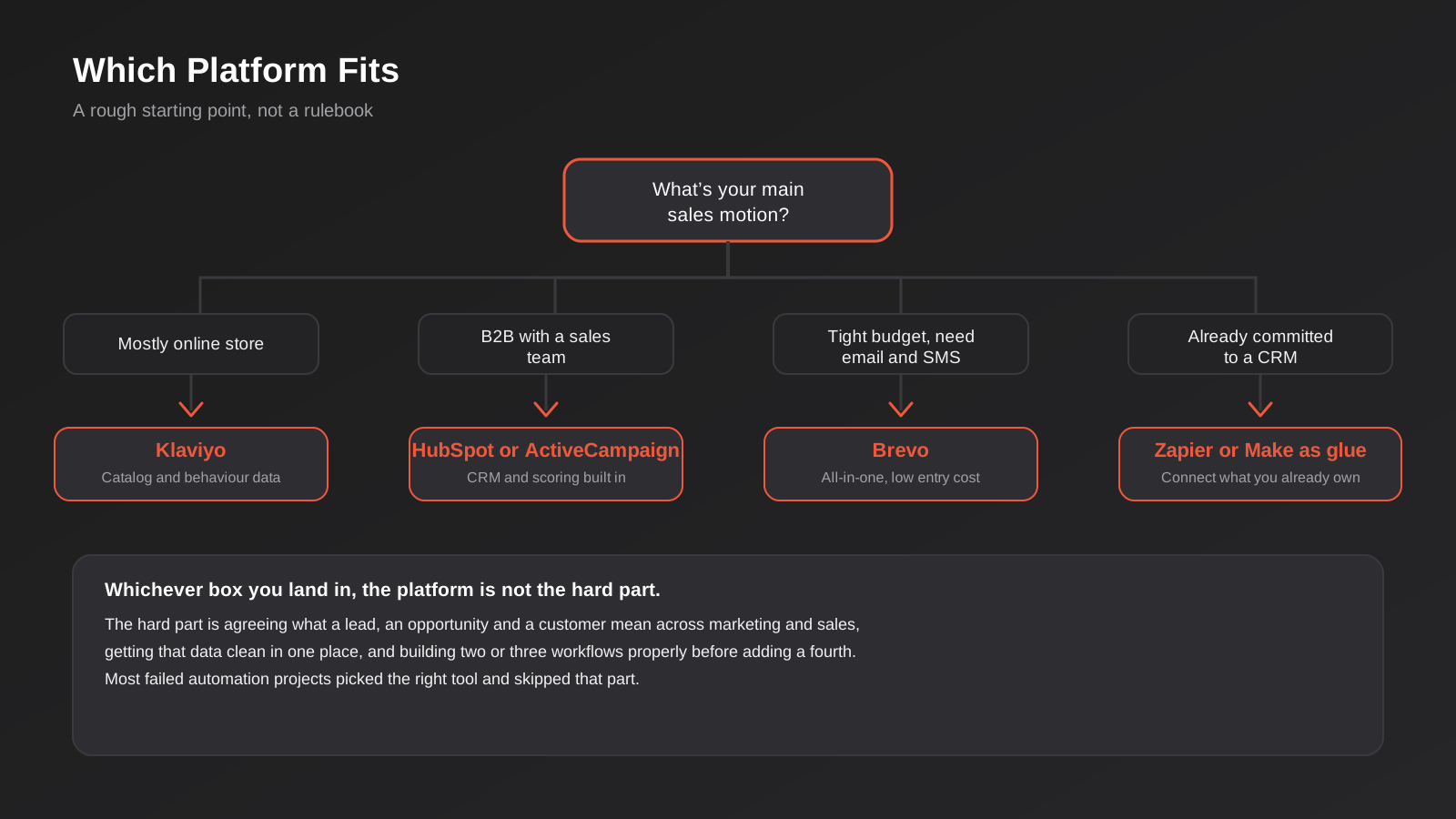
The platform market is loud and every vendor’s pricing page is designed to make comparison difficult. Here is the honest, unsponsored version. HubSpot is strong when you have a sales team that needs a CRM and marketing automation working from the same record, but its entry-level tier is deliberately limited — real automation usually means paying for a Professional plan, which is a serious jump in price. ActiveCampaign covers most of the same automation depth at a fraction of the cost and is our default recommendation for SMB service businesses that do not need a full enterprise CRM. Klaviyo is built specifically around ecommerce data — product catalogues, purchase history, predicted next purchase date — and if most of your revenue comes through an online store, it is worth the higher price over a generic email tool. Brevo (formerly Sendinblue) is the pragmatic choice for a tight budget that still needs email, SMS and basic automation in one place.
The Hidden Cost Nobody Mentions in the Pricing Table
Every vendor comparison focuses on the monthly subscription, but the number that actually determines total cost of ownership is contact volume, not the base plan. Most platforms price on the number of contacts or emails sent, and a business that grows its list from 2,000 to 20,000 contacts over two years can find its “affordable” $49 a month plan has quietly become a $400 a month plan, with no change in what the platform actually does for them. Before committing to a platform, look at its pricing tiers three steps ahead of where your list is today, not just where it sits now. This is also where the migration cost gets ugly — moving a large, automation-dependent contact list and its workflow history to a different platform later is a genuinely painful project, so it pays to get this decision closer to right the first time.
Where It Connects to Broader Workflow Automation
Marketing automation rarely stays contained to a marketing platform for long. The speed-to-lead workflow needs to create a task in whatever system your sales team actually works from. The review request workflow needs to know a job was marked complete in your field service or booking software. The retargeting sync needs a live feed from your CRM, not a manually exported CSV. These connections are general-purpose workflow automation problems more than marketing-specific ones, and they are usually where a Zapier, Make or n8n layer earns its keep sitting underneath or alongside whichever marketing platform you choose. Treating marketing automation as an island that only talks to itself is a common reason a platform that looks powerful in a demo ends up doing far less in practice.
When You Don’t Need a New Platform at All
If you already run a CRM you like, the answer is often not a new marketing automation platform but a connective layer that makes the CRM do more. Tools like Zapier, Make and n8n exist to glue systems together without a platform migration. This route suits a business that has already invested time getting a CRM set up properly and does not want to re-platform just to get marketing automation on top of it. It is also, in our experience, the option most likely to be underestimated by business owners who assume “marketing automation” always means buying a new subscription.
Australian Compliance Considerations
Every automated message you send is still subject to the Spam Act 2003 for email and equivalent obligations for SMS, enforced by the ACMA: consent has to be genuine (pre-ticked boxes and buried opt-ins do not count), every message needs a working unsubscribe mechanism, and unsubscribes have to be actioned within a reasonable window, not sat on until the next campaign. This gets more complicated once you add SMS into a multi-channel nurture sequence, because SMS carries a lower tolerance for irrelevant messages before a recipient reports it as spam, which can affect your sender reputation for every future campaign. Build consent capture and channel preference into your very first workflow, not as an afterthought once ACMA or a platform’s compliance team asks a question.
How This Actually Gets Built
The technical build behind marketing automation is less about the platform’s interface and more about getting the data feeding it right. Three things determine whether a workflow works reliably or breaks in ways nobody notices for weeks.
One Source of Truth for Contact Data
Every workflow above depends on knowing, unambiguously, who a person is and what stage they are at. If your website form, your CRM and your ad platform each have a slightly different record for the same person — a typo’d email here, a duplicate entry there — automation rules start making decisions on bad data, and the failure mode is invisible. Nobody gets an error message when a nurture email goes to the wrong segment; it just quietly under-performs. Before building anything beyond speed-to-lead, it is worth an afternoon auditing how contact records get created and merged across your systems.
Triggers, Not Schedules
The difference between a scheduled campaign and a genuine automation is the trigger. A scheduled email goes out to everyone on Tuesday regardless of where they are in their journey. A triggered workflow fires because something happened — a form was submitted, a page was visited, a purchase was made, a set number of days passed since the last interaction. Triggered workflows are what actually produce the “automation” part of marketing automation; scheduled campaigns are just a newsletter with better software behind it. If your platform’s main use today is scheduled sends, you have bought automation software and used it as a broadcast tool.
Test With a Small Segment Before Turning It On For Everyone
Automated workflows fail loudly when they are wrong — a wrongly configured trigger can email your entire list at 2am, or send the same abandoned cart reminder six times in a day. Every new workflow deserves a test run against a small internal segment or a handful of real contacts who have agreed to be guinea pigs, checking timing, personalisation fields and exit conditions before it goes live against your full list. This is a five-minute step that gets skipped constantly under deadline pressure, and it is the single most common cause of the “why did this customer get eleven emails in a row” support ticket.
What It Costs and How Long It Takes
Platform subscriptions for a small to mid-sized Australian business typically run from around $30 a month for an entry-level tool to $800-plus a month once you need a Professional-tier CRM-integrated platform with a meaningful contact list. That is the visible cost. The less visible cost is build time: a properly configured speed-to-lead workflow can be built in a day or two once the platform is chosen; a full six-job automation program, built and tested in the right order, realistically takes six to twelve weeks of staged work, not a weekend. Businesses that try to compress this into a single sprint tend to end up with workflows that technically exist but were never properly tested, which is worse in some ways than not having them at all, because it creates a false sense that the problem is solved.
Agency-led builds typically charge either a fixed project fee for the initial six-job build (commonly somewhere in the $3,000–$15,000 range depending on complexity and how many systems need connecting) or a smaller monthly retainer to build and refine workflows progressively. Either model beats a DIY build that never quite gets past job one, which is the most common outcome we see when this gets left to “whoever has a spare afternoon” internally.
On timeline, it is worth setting realistic expectations rather than hoping for an overnight transformation. Speed to lead tends to show a measurable difference within the first few weeks, simply because response time is such a direct lever. Nurture and scoring take longer to judge fairly, because you need enough leads to move through the sequence to see a pattern rather than a handful of anecdotes. A sensible way to think about it: budget the first month for build and testing, the second and third months for watching real behaviour and adjusting triggers and thresholds, and treat anything before month three as too early to declare a workflow a success or a failure.
Common Mistakes
- Buying the platform before defining the workflow. The tool gets chosen based on a demo or a recommendation, then the business tries to retrofit its actual process to whatever that platform does well, instead of the other way around.
- Building nurture before speed to lead. A beautifully designed six-email sequence is worthless if the lead who triggered it waited four hours for a human reply and already booked with a competitor.
- Treating email and SMS nurture as separate projects. When marketing runs email and someone else runs SMS with no shared logic, customers get contacted twice about the same thing or missed entirely.
- No exit conditions on workflows. A nurture sequence that keeps emailing someone after they have already bought, or after they have replied asking to be left alone, does real reputation damage.
- Ignoring consent capture until a compliance question forces the issue. Retrofitting proper opt-in tracking onto an existing contact list is far harder than building it in from day one.
- Skipping the small-segment test. Every workflow should run against a handful of contacts before it runs against thousands.
- Measuring activity instead of revenue. Open rates and click rates are useful diagnostics, but the only number that ultimately justifies the platform cost is whether workflows are producing sales, bookings or qualified pipeline.
- Choosing a platform based on list size today, not in two years. Contact-based pricing tiers can turn an affordable plan into an expensive one as the list grows, and migrating a mature automation setup later is far more disruptive than choosing carefully up front.
Frequently Asked Questions
Is marketing automation the same thing as email marketing automation?
No. Email marketing automation is one channel within the broader discipline. Marketing automation also covers lead scoring, SMS, retargeting audience sync, review requests and reporting — email is usually the first piece built because it is the cheapest, but it is not the whole picture. If you have already built email flows and want the mechanics of that specific channel, our email marketing automation guide covers welcome sequences, abandoned cart recovery and segmentation in more depth than we go into here.
What’s the difference between marketing automation and CRM automation?
Marketing automation generally owns the top of the funnel — nurturing and scoring leads before they are ready for a salesperson. CRM and sales automation takes over from there — pipeline stages, quoting, follow-up cadences once someone is a qualified opportunity. In practice the two need to share data constantly, and a lot of platforms (HubSpot, ActiveCampaign) blur the line deliberately by offering both in one system. See our CRM and sales automation page for how we scope that side of the work.
How much does marketing automation cost for a small Australian business?
Platform subscriptions typically start around $30–$100 a month for entry-level tools and climb to several hundred or more once you need CRM integration and a larger contact list. Build costs on top of that vary: a single speed-to-lead workflow might take a day, while a full program covering all six core jobs is more realistically a six-to-twelve week staged project, whether built internally or through an agency.
Which platform should I start with if I have no automation at all today?
It depends on your sales motion more than your industry. Ecommerce-heavy businesses generally get the most value from Klaviyo because of its catalogue and purchase-behaviour data. B2B businesses with a sales team usually do better on HubSpot or ActiveCampaign, which build CRM and scoring in natively. If budget is the main constraint and you need email and SMS in one place, Brevo is a reasonable starting point. If you already have a CRM you are happy with, look at connecting it with Zapier or Make before you consider replacing it.
Can I automate marketing without a developer?
Most of the six core jobs can be built inside a platform’s own visual workflow builder without custom code, particularly speed-to-lead, basic nurture and review requests. Where it usually needs technical help is connecting systems that were not built to talk to each other — syncing a CRM to an ad platform, or pulling data into a custom report — which is more of an integrations job than something the automation platform handles on its own.
How do I know if marketing automation is actually working?
Look past open and click rates to revenue-adjacent numbers: how many leads a workflow touched before converting, how much faster leads are being contacted, whether review volume has grown, and whether retargeting audiences are current rather than months stale. Building a proper attribution view, covered in our reporting and data automation guide, is the only reliable way to separate a workflow that is genuinely producing revenue from one that just looks busy.
What should I automate first if I only have budget for one workflow?
Speed to lead, without exception. It is the cheapest of the six jobs to build, usually deployable inside an existing CRM or form tool without a new platform, and it addresses the single biggest driver of whether a lead converts at all: how quickly you respond. Every other workflow on this list assumes leads are being captured and acknowledged properly in the first place, so it is also the foundation the rest of the program gets built on.
Where to Start
If none of the six jobs above exist yet, start with speed to lead. It is the cheapest to build, the fastest to show a result, and it does not require picking a platform you might regret in six months. From there, add nurture, then scoring, then the rest in roughly the order we have laid out — not because it is the only order that works, but because it is the order that gets a return on each step before you invest in the next one.
If you already have a platform and it feels like it is doing less than it should, the fastest diagnostic is usually a short audit: which of the six jobs actually exist as working, tested automations, and which are theoretical. We do this kind of review for businesses regularly, alongside the platform selection and build work itself when a project calls for it. If you want a second opinion on marketing automation for Australian businesses you have already built, or a straight answer on where to start if you have nothing yet, we are happy to have that conversation — no pressure, no lock-in pitch.
Keep reading
Related posts

Changing Live Automations Safely: Staging, Version Control and Rollback for Zapier, Make and n8n (2026)
How to draft, test, release and roll back changes to live Zapier, Make and n8n automations without breaking invoices, orders or customer…

Peppol E-Invoicing for Australian Businesses: Automating Accounts Payable From Structured Invoices (2026)
Peppol e-invoicing in Australia: what is and isn't mandatory, how to pick an access point, and how to automate accounts payable once…

Clean Your Data Before You Automate: A Practical Guide to CRM Data Cleanup for Australian Businesses (2026)
Connecting systems on messy data copies the mess everywhere. Here's how to clean, match and merge records before you automate or integrate.
Got a project you'd like to talk through?
Tell us what you're working on — we'll come back with a plan.
