
Best Project Management Tools for Australian Small Teams (2026)
 Jignesh Vagadiya
21/10/2026
21 min read
Jignesh Vagadiya
21/10/2026
21 min read
Most small teams do not pick project management software. They inherit it. Someone starts a Trello board for a website job, someone else sets up a Notion page for the same job, the bookkeeper keeps a spreadsheet, and six months later nobody can say where a task actually lives. The tool was never the problem. The problem is that the choice was never made on purpose.
We get pulled into these situations a lot, usually from the other side: a business wants an automation or an integration built, and the first thing we need to know is where work is tracked and who owns each stage. The answer is often “a bit of everything”. So this round-up is written from the point of view of people who have to connect these tools to other systems, not just click around in them. We care about how a tool behaves when you export from it, automate against it, and pay for it as the team grows.
Here is how we chose the six. Each had to work for a team of roughly three to thirty people, have a paid plan a small business can reasonably afford, and have a real integration story (an API, webhooks, or a solid Zapier, Make or n8n connector). We left out tools built mainly for large enterprises and tools aimed at one narrow trade. We also have no affiliate arrangements with any of them, which is why every entry has a proper drawback. Prices below are list prices in US dollars as reported by third-party pricing guides in October 2026. Vendors change them often and the exact figure you see at checkout, including GST and any card currency conversion, can differ, so treat our numbers as a guide to the shape of the pricing rather than a quote.
The Six Tools at a Glance
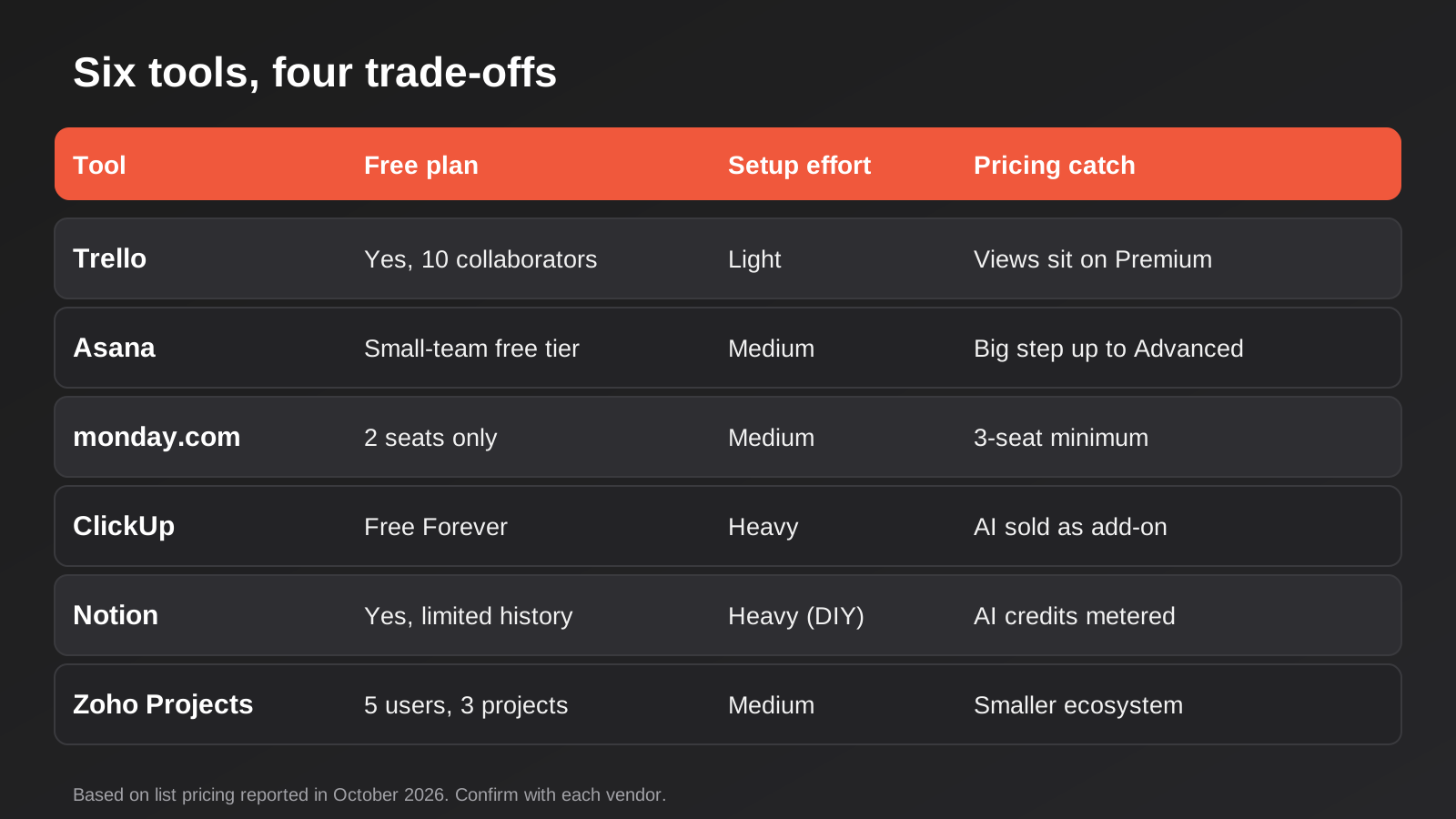
Before the detail, a quick orientation. Trello is the simplest and cheapest. Asana is the most structured. monday.com is the most visual and the most aggressively sold. ClickUp does the most for the least money and asks the most of you in return. Notion is a workspace first and a task tool second. Zoho Projects is the quiet value option that rarely makes the lists written by US publishers.
The matrix above compares them on the things we see decide real projects: how generous the free plan is, how much setup the tool needs before it is useful, and whether the pricing has a catch. It deliberately avoids scoring features out of ten, because a score hides the trade-off. A tool with fewer features is often the better pick for a team that will actually use it.
Trello
What it is. Trello is a board-and-card tool. Work moves across columns, and that is more or less the whole idea. It is owned by Atlassian, and its simplicity is the product.
What it does well. You can explain it to a new starter in two minutes, which matters more than any feature list. Contractors, clients and part-timers can be added without a training session. Its free plan has historically been generous: current pricing guides describe up to ten collaborators and ten boards per workspace, with unlimited cards. The power-ups and the built-in automation (Butler) cover the repetitive jobs a small team actually has, like moving a card when a checklist is complete or assigning someone when a card lands in a column.
Where it falls short. Trello gets awkward the moment work has dependencies, shared resources or reporting needs. A board with two hundred cards across five stages is a wall. Cross-project views, workload management and proper reporting sit on the higher plans or in add-ons, and at that point you are paying to stretch a tool beyond its shape. The free plan also caps automation runs each month, and teams that lean on automation hit that ceiling faster than they expect.
What it costs. Free to start. Standard is reported at about US$5 per user per month on annual billing (about US$6 monthly), and Premium at about US$10 annually (about US$12.50 monthly). Premium is where the calendar, timeline, table and dashboard views arrive.
Who it suits. Small teams running one clear process: a content pipeline, a job board for a trade business, a simple client onboarding flow. If your work is a line of cards moving left to right, Trello is hard to beat on cost and adoption.
Asana
What it is. Asana is a structured work management tool built around tasks, projects, and the relationships between them. It offers list, board, timeline and calendar views over the same underlying tasks.
What it does well. Asana is strong at making responsibility explicit. Every task has an owner and a due date, and dependencies are a first-class feature rather than a workaround. For teams where “who is doing this and by when” is the recurring argument, that discipline pays for itself. Forms that create tasks, rules that route work, and a reasonably clean API make it a comfortable tool to integrate with. Reporting and portfolios across projects are better than what you get from Trello at a comparable stage.
Where it falls short. It is easy to over-engineer. We see teams spend a month building custom fields, rules and templates before anyone has done a week of real work in the tool. The step from the entry plan to the plan with advanced reporting, goals and workload is steep. Pricing guides report Starter at around US$10.99 per user per month on annual billing and Advanced at around US$24.99, so a ten-person team that needs the higher plan is looking at a noticeably bigger bill. Reports also disagree on the limits of the free tier, which tells you it has moved around over time. Check what you actually get before building on it.
What it costs. Starter is reported at about US$10.99 per user per month billed annually (about US$13.49 on monthly billing), and Advanced at about US$24.99 annually (about US$30.49 monthly). Enterprise tiers are quoted individually.
Who it suits. Teams of eight or more with several projects running at once, agencies and professional services firms that need to see workload, and anyone whose projects have genuine task dependencies. It is a poor fit for a three-person team with one workflow.
monday.com
What it is. monday.com is a configurable work platform built on boards that look like spreadsheets but behave like databases. It has expanded well beyond project management into CRM, service desk and dev products.
What it does well. It is the best-looking tool here and the one non-technical staff tend to enjoy using, which should not be dismissed. Dashboards come together quickly, status columns are intuitive, and the automation recipes are approachable. The board model is flexible enough to hold a project tracker, a lightweight CRM and a content calendar in the same account. Integrations are plentiful.
Where it falls short. The pricing mechanics are the catch. Paid plans are reported to have a three-seat minimum and to scale in steps rather than one seat at a time, so a team of six can find itself paying for ten. Automations are reported to start at the Standard plan rather than Basic, which means the cheapest paid tier is lighter than it looks on the pricing page. Costs rise quickly as you add products and seats. And because it can model almost anything, teams drift into building a system nobody documented.
What it costs. A free plan for up to two seats is reported. Paid plans, annual billing, are reported at about US$9 (Basic), US$12 (Standard) and US$19 (Pro) per seat per month, with monthly billing costing more. Some Australian-facing comparisons quote local-currency figures that differ from these, so confirm at checkout.
Who it suits. Teams who want a visual, dashboard-led tool and have someone willing to own the setup. It works well for marketing and operations teams of five to twenty who will use it daily. If your team is a solo operator plus a contractor, you will pay for features you do not need.
ClickUp
What it is. ClickUp is a work platform that tries to replace several tools at once: tasks, docs, whiteboards, goals, time tracking and chat. It is deliberately dense.
What it does well. Value. Pricing guides report a free-forever plan and paid plans starting at about US$7 per member per month on annual billing, which is hard to match for the amount of functionality. Custom fields, multiple views, dependencies, time tracking and automation are available without the pricing cliffs of some competitors. For a team that wants one tool to hold tasks and documentation together, it genuinely delivers.
Where it falls short. It is a lot. New users regularly report feeling overwhelmed, and our own experience of watching small teams adopt it matches that: the first two weeks are a configuration exercise, and if nobody is in charge of the setup, every person ends up with their own view of the workspace and their own habits. The AI features are sold as a separate add-on, with sources quoting different prices (somewhere between about US$5 and US$9 per member per month), so a quoted plan price is not always the final one. The free tier also limits storage and automation runs.
What it costs. Free Forever plan. Unlimited reported at about US$7 per member per month annually (about US$10 monthly) and Business at about US$12 annually (about US$19 monthly). AI is extra.
Who it suits. Small, technically comfortable teams that want maximum capability per dollar and are willing to spend a fortnight configuring it properly. It is a poor choice if the people using it are reluctant adopters who just want a to-do list.
Notion
What it is. Notion is a flexible workspace of pages and databases. Project management is something you build inside it, using database views, rather than a built-in feature set.
What it does well. It is the best tool on this list for keeping documentation and tasks in the same place. Meeting notes link to projects, projects link to clients, and clients link to a wiki, all without leaving the page. For knowledge-heavy small teams, such as consultancies, creative studios and early-stage product teams, that integration is the point. The free plan is workable for a very small team, and the paid entry plan is reported at about US$10 per member per month on annual billing.
Where it falls short. Notion makes you design your own system, and a loosely designed Notion workspace decays fast. Task features such as dependencies, workload views and robust reporting are thinner than in the purpose-built tools. Notifications are weaker than you would want in a fast-moving team. The AI features are billed in a way that has changed several times, with sources describing metered credits on top of seat pricing, so budget for it separately if you plan to use it. The Business plan is reported between US$18 and US$20 per member per month annually, and the free plan limits version history and guest access.
What it costs. Free plan available. Plus at about US$10 per member per month annually (about US$12 monthly). Business at roughly US$18 to US$20 annually. Enterprise is quoted.
Who it suits. Teams of two to fifteen whose work is as much thinking and writing as it is task execution. If your team lives in documents, Notion is the natural home. If your team lives in deadlines and handovers, look elsewhere.
Zoho Projects
What it is. Zoho Projects is the project management product in the wider Zoho suite. It covers tasks, milestones, Gantt charts, time sheets and issue tracking, and connects naturally to Zoho’s CRM, Books and Desk products.
What it does well. Price and breadth. Pricing guides report a free plan for up to five users and three projects, and paid plans starting at about US$4 per user per month on annual billing (about US$5 monthly). That is low enough that a ten-person team can afford the mid-tier plan with Gantt charts and time tracking. If you already use another Zoho product, the integrations come without glue code, and time sheets that feed straight into invoicing are useful for service businesses.
Where it falls short. The interface feels older and less polished than the others, and the community of templates, tutorials and third-party connectors is smaller. Staff who are used to Asana or monday.com sometimes find it clunky. Support experiences vary, and some of the more advanced functionality is split across Zoho products, which can mean paying for more than one subscription. Because it is less commonly chosen, finding an experienced consultant or a ready-made Zapier recipe takes more effort.
What it costs. Free plan for small teams. Premium reported at about US$4 per user per month annually (about US$5 monthly), Enterprise at about US$9 annually (about US$10 monthly), and a higher tier at about US$14 to US$15.
Who it suits. Cost-conscious service businesses that need time tracking and Gantt charts, and teams already on Zoho CRM or Books. Less suitable for teams where adoption depends on a modern-feeling interface.
What the Pricing Pages Do Not Tell You
Every tool here advertises a per-seat price, and every one of them has a real cost that is larger than that number. It helps to work these out before you are three months into a rollout.
The first is time. A tool with a low licence fee can still cost more than a pricier one if it takes your most organised person two weeks to configure. Put a rough dollar figure on that time. A tool you can set up in an afternoon and that the team adopts in a week is cheaper than a powerful one that nobody finishes configuring.
The second is the add-on layer. Several of these vendors now sell AI features separately or meter them with credits, and the pricing for that has shifted repeatedly over the past year. If AI summaries or automated task creation are part of why you are buying, ask for the all-in monthly cost for your team size with those features switched on, and ask what happens when you run out of credits mid-month.
The third is growth steps. Seat pricing looks linear until it is not. A tool that moves in blocks of seats, or that locks the features you need behind the second paid tier, turns a modest quote into a large one the day your team grows from eight to eleven. Ask for the price at your team size now and at one and a half times that size.
The fourth is integration cost. A native integration is free to switch on. A connection that needs a middleware subscription, or a developer to handle webhooks and rate limits, is a recurring cost. If your project tool has to talk to your accounting system or CRM, put that in the comparison. The tools differ a lot in how friendly their APIs are, and a tool that is a few dollars cheaper per seat can lose that advantage fast if every integration needs custom work.
The fifth is switching later. Moving between project tools is rarely a clean export and import. Task history, comments, attachments and relationships between items often arrive flattened or not at all. That is not a reason to stay stuck with the wrong tool, but it is a reason to run a proper trial with real work before you commit a whole team, and to keep a copy of anything you would hate to lose.
Finally, there is the question of who else needs to see the work. Clients, contractors and part-time staff are the people most likely to push you onto a higher plan. Some vendors treat them as free guests with limited access, some charge a full seat, and some sit in between. If your business is service-based and clients check progress, this single line item can decide which tool is affordable.
How to Choose
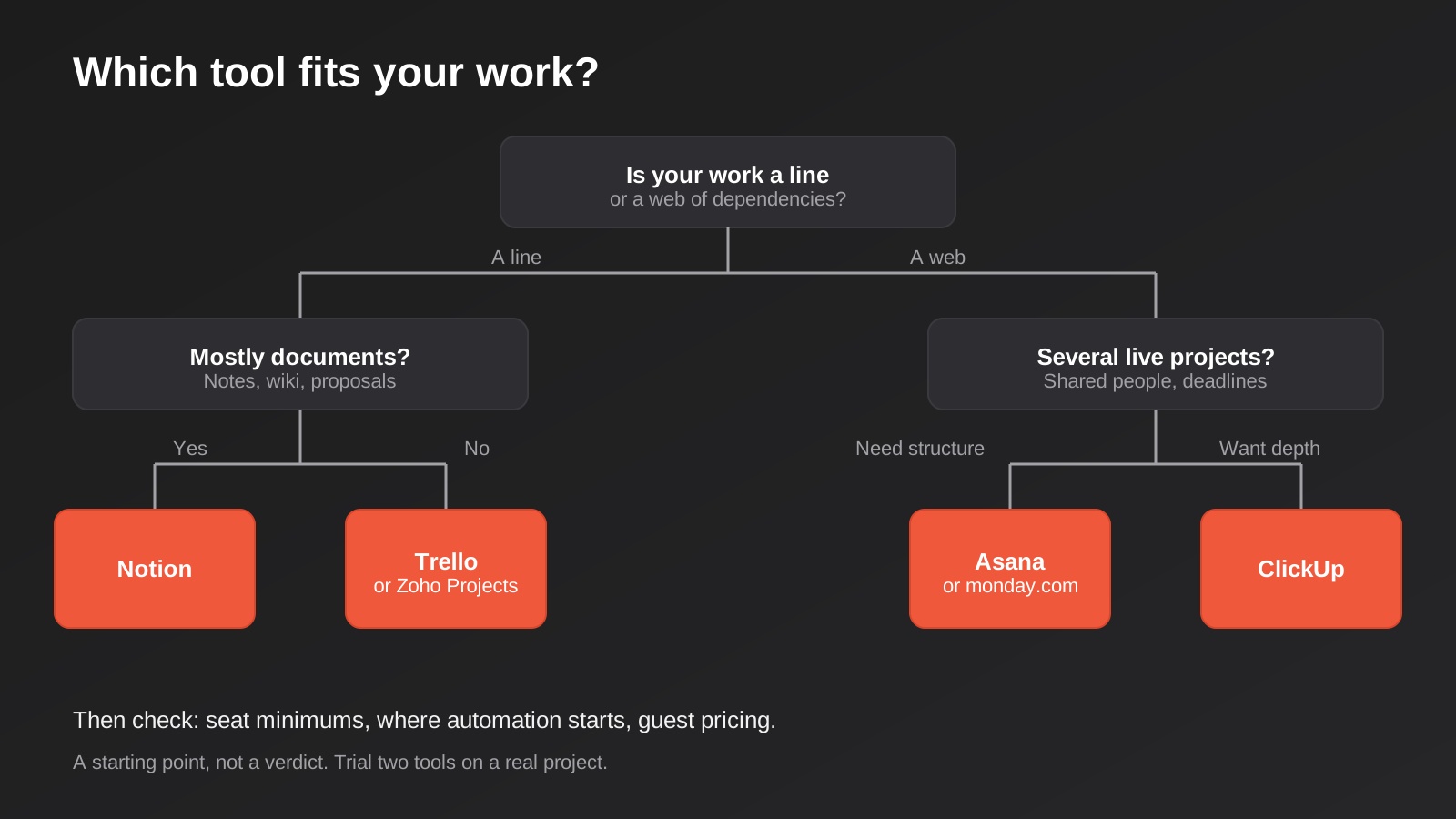
Start with the shape of your work, not the feature list. Three questions sort most teams.
First, is your work a line or a web? A line is a sequence of stages where each piece of work moves in one direction: enquiry, quote, job, invoice. Trello and Zoho Projects handle that well. A web is a set of projects with shared people, dependencies and deadlines that affect each other. That is where Asana, monday.com and ClickUp earn their cost.
Second, how much of your work is documents? If a large share of your week is writing proposals, notes and procedures, and tasks are secondary, Notion fits. If tasks are the main event and documents are an attachment, it does not.
Third, who will own the setup? Every tool on this list becomes a mess without a person responsible for how it is configured. If you have nobody like that, choose the simplest tool that meets your needs. A tool with fewer options cannot be misconfigured as badly.
Then check the commercial details that quietly change the answer:
- Seat minimums and seat steps. A three-seat minimum is irrelevant to a team of ten, and decisive for a solo owner with one contractor.
- Where automation starts. If you plan to automate handovers, confirm which plan includes it and how many runs you get a month.
- Guests and clients. Some tools charge for external collaborators and some do not. If clients need to see progress, check this before you commit.
- Price per head over three years, not one. Multiply the per-seat price by your realistic team size at the end of year two, not today.
- Currency and GST. Pricing is usually listed in US dollars. Check whether GST is added at checkout, and whether your card charges a foreign transaction fee. Over a year on a team plan, both are visible.
- Where your data lives. If you hold client information that carries privacy obligations, ask each vendor in writing where data is stored and whether that can be limited to a region. We were unable to confirm Australian data residency for these tools from public sources, so ask rather than assume.
If you also need to connect your project tool to other systems, such as a CRM or an accounting package, read our round-up of workflow automation tools for Australian businesses alongside this one, because the automation layer often decides which project tool is easiest to live with. And if the contact data that feeds your projects sits in a CRM, our guide to the best CRM for Australian small businesses covers that side.
When a Tool Is Not the Answer
Sometimes the reason a team keeps changing tools is that the process itself is unclear. If three people disagree about what “done” means for a job, no software resolves it. Write down the stages of your most common job first, and name an owner for each. Then pick the tool that makes that process easiest.
And sometimes the opposite is true: your process is clear, but no off-the-shelf tool fits it, because it depends on your own pricing rules, your own approvals, or data that sits in several systems. That is the point where a purpose-built portal or internal tool can cost less than the combined workarounds. We cover that decision in our guide to no-code and low-code versus custom development. If you land on the custom side, our web app development pricing page explains how that work is scoped.
Common Mistakes
- Choosing by free plan alone. A generous free tier tells you what the vendor wants you to try, not what you will need in a year. Look at the paid plan you will probably end up on.
- Letting every person pick their own view. A shared tool where each person has a private configuration is just several private tools sharing a login. Agree on statuses, naming and who can create new fields before you invite the whole team.
- Building the perfect system before using it. Run one real project in the tool, then adjust. Teams that spend a month on templates usually discover on day two that the first design was wrong.
- Ignoring the exit. Before you commit, export a project and look at what you get. If you cannot export tasks, comments and attachments in a usable form, you are locked in more than you realise.
- Buying seats for people who only need to look. Many tools let you invite guests or viewers free or cheaply. Putting every stakeholder on a paid seat is the fastest way to double the bill.
- Forgetting the automation layer. If a task changing status needs to trigger an invoice, a notification, or a CRM update, check the integration before you choose the tool, not after.
- Treating the tool as the project plan. Software holds a plan. It does not create one. A tool configured around unclear responsibilities will make the lack of clarity more visible, not fix it.
Frequently Asked Questions
What is the best project management tool for a small Australian business?
There is no single best, but there is usually a best fit. For a team of three to six with one main process, Trello or Zoho Projects tends to be enough and costs the least. For ten or more people running several projects, Asana, monday.com or ClickUp are more appropriate. For a team that mostly writes and documents, Notion is the better home. Decide on the shape of your work first, then trial two tools for a fortnight with real jobs.
Are free project management plans good enough?
For a very small team with one process, often yes. Trello, ClickUp, Notion and Zoho Projects all offer free plans that can carry a real workload, with limits on things like automation runs, storage and history. Free plans stop working when you need reporting, dependencies, guest access or serious automation. Plan on moving to a paid plan within a year and price that in from the start.
Do these tools charge GST?
Vendors usually list prices in US dollars, and how tax is applied for Australian customers depends on the vendor and how you buy. Many add GST at checkout. Check the final amount before you enter a card, and ask your bookkeeper how to treat it. Also factor in any foreign currency fee on the card you use.
Can I connect my project tool to Xero, my CRM or my website forms?
Usually yes, through the tool’s own integrations or through a connector such as Zapier, Make or n8n. The real question is how much logic you need in between. Simple one-way triggers, like a new form submission creating a task, are straightforward. Two-way syncs where fields can change in either system are harder to get right and deserve proper design. Connections like that are a big part of our automation work.
How long does it take to roll out a new tool across a team?
The software can be set up in a day. The habit takes weeks. Expect a fortnight of reminders and fixes before the team stops working around the tool. Start with one team and one process, agree on a few rules, and add more only when the first set is working.
Should I switch tools if my team is unhappy with the current one?
Not before you diagnose why. If the complaint is that tasks are hard to find, that may be a naming and structure problem that any tool would inherit. If the complaint is that the tool cannot do something specific, such as dependencies or time tracking, then switching can be justified. Run the new tool alongside the old one on a single live project before you migrate everything.
Where to Start
Pick two candidates from this list, not six. Run one real, current project in each for two weeks with the people who will actually use them, and judge them on whether the team opens them without being reminded. Check the paid plan you would land on, the seat rules, and what an export looks like.
If the harder part of your situation is connecting the tool to the rest of your business, such as a CRM, your accounting software or your website, that is the work we do. Have a look at our automation pricing page to see how we scope it, or get in touch and tell us what you are trying to join up.
Keep reading
Related posts

Changing Live Automations Safely: Staging, Version Control and Rollback for Zapier, Make and n8n (2026)
How to draft, test, release and roll back changes to live Zapier, Make and n8n automations without breaking invoices, orders or customer…

Peppol E-Invoicing for Australian Businesses: Automating Accounts Payable From Structured Invoices (2026)
Peppol e-invoicing in Australia: what is and isn't mandatory, how to pick an access point, and how to automate accounts payable once…

Clean Your Data Before You Automate: A Practical Guide to CRM Data Cleanup for Australian Businesses (2026)
Connecting systems on messy data copies the mess everywhere. Here's how to clean, match and merge records before you automate or integrate.
Got a project you'd like to talk through?
Tell us what you're working on — we'll come back with a plan.
