
Webhook Security: How to Stop Your Automation Endpoints Becoming the Weak Link (2026)
 Jignesh Vagadiya
18/10/2026
22 min read
Jignesh Vagadiya
18/10/2026
22 min read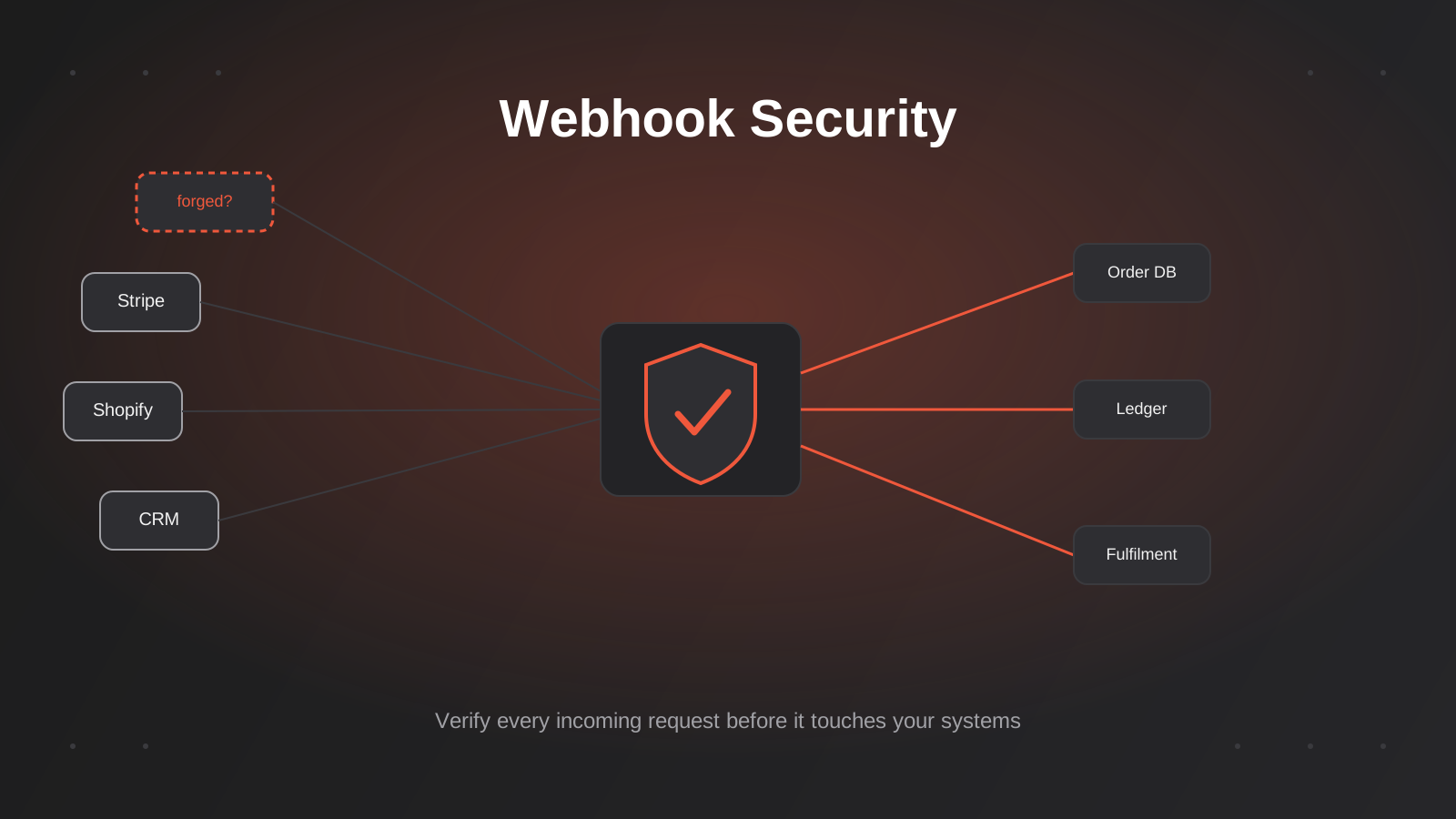
Try this on your own stack: open whatever tool receives your Stripe, Shopify or CRM webhooks right now, and ask what actually stops someone else from POSTing a fake payload to that same URL. If the honest answer is “nothing, as long as they guess the address,” your webhook security has a hole in it, and you are not alone. Most small and mid-sized Australian businesses wire up a webhook the day they need it to work, watch the data land where it should, and never come back to ask whether it only accepts data from where it should.
That gap matters more than it used to. We have spent the past few months writing about how webhooks work as a sync pattern, how to stop automations duplicating invoices on retry, and how AI agents are starting to call business systems directly. All of that assumes the webhook endpoint itself is trustworthy. It usually isn’t, by default. Zapier’s own Catch Hook trigger returns a 200 response to literally anything sent to it, genuine or not, before your Zap has even run. Make and n8n aren’t meaningfully different out of the box. n8n shipped a real vulnerability in its Stripe Trigger node where incoming requests weren’t checked against the stored signing secret at all — anyone who found the URL could fire the workflow.
This isn’t a theoretical security exercise for enterprises with a SOC team. It’s a practical gap in the automation stack a lot of our clients are already running — the same Zapier, Make and n8n workflows that process orders, update CRM records and trigger refunds. We’re writing this one because almost nobody explains it in plain terms for the business actually running the automation, rather than the platform selling the integration. Here’s what an exposed webhook actually risks, and the specific, unglamorous controls that close it.
What a Webhook Actually Trusts
A webhook is a URL you publish, and an instruction that says “when something happens, send a POST request here.” That’s the entire contract. Unless you add something on top of it, the receiving endpoint has no way to tell the difference between a genuine notification from Stripe and a POST request from anyone else who found or guessed the URL.
In practice the URL behaves like a bearer token. Whoever has it can trigger whatever logic sits behind it. That’s a problem for three overlapping reasons:
- Webhook URLs leak more easily than people expect — they end up in browser history, support tickets, Slack messages, screen-recorded demos, and sometimes in client-side JavaScript or public GitHub repos.
- They’re often guessable or enumerable when a platform generates them with predictable patterns, and some no-code tools make the endpoint URL visible in exported workflow JSON.
- Most webhook receivers are wired to do something consequential — update a database, issue a refund, change an order status, send a notification to a customer, kick off a fulfilment process. A forged request doesn’t just pollute a log; it changes real business state.
The fix isn’t to hide the URL better. Obscurity isn’t a control, it’s a delay. The fix is to make the endpoint verify, cryptographically, that a request actually came from the system it claims to be from, and that it hasn’t been tampered with or replayed. That’s what the rest of this guide covers.
The Core Defence: HMAC Signature Verification
Almost every payment provider, ecommerce platform and SaaS tool that sends webhooks you’d actually care about — Stripe, Shopify, GitHub, Slack, Xero — signs its requests using HMAC (Hash-based Message Authentication Code). The idea is simple even though the name sounds intimidating.
How signing actually works
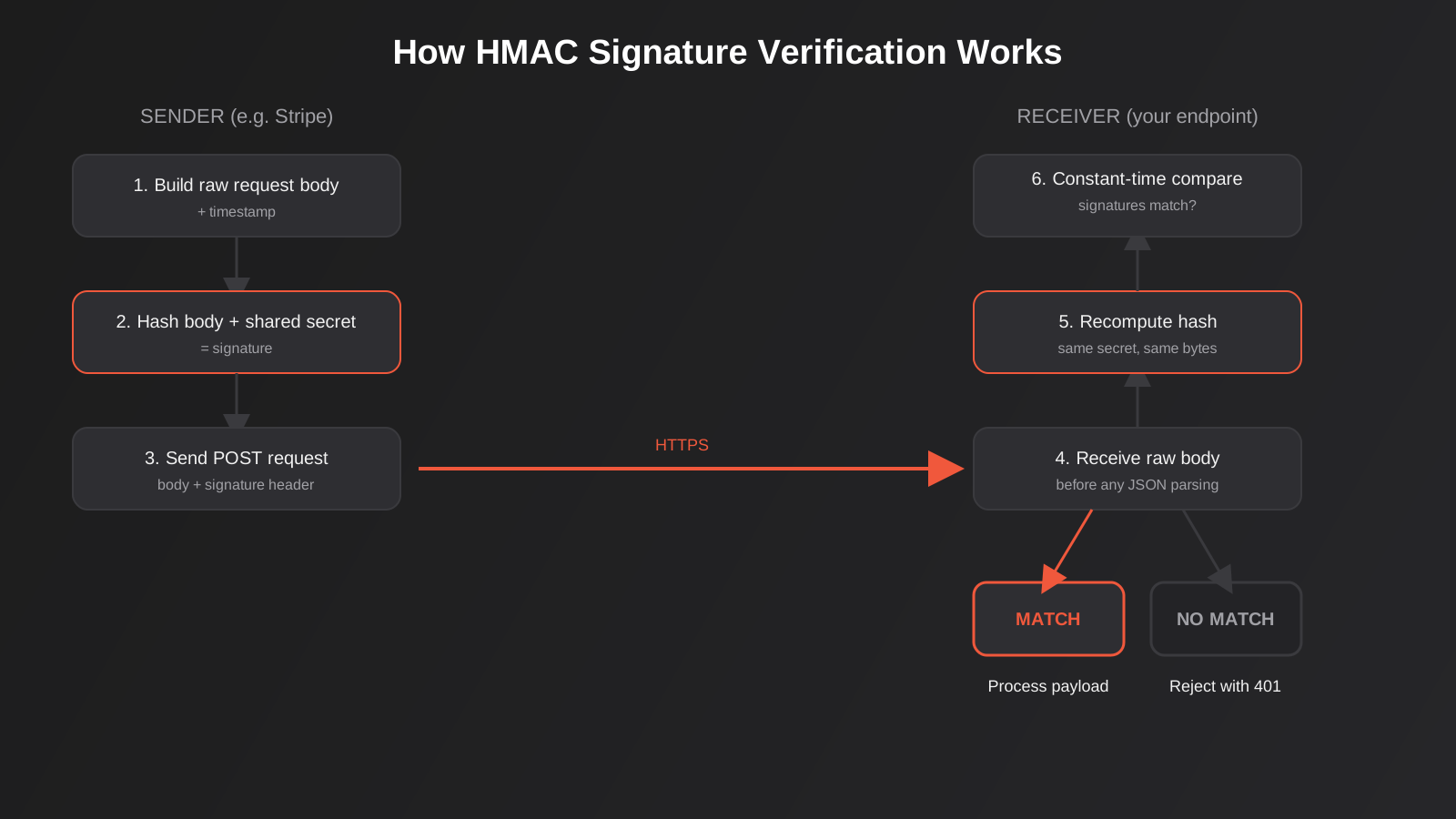
Both sides — the platform sending the webhook and your endpoint receiving it — already know a shared secret, generated when you set up the webhook. When the platform sends a request, it:
- Takes the exact raw body of the request (and sometimes a timestamp) it’s about to send.
- Runs it through a hash function combined with the shared secret, producing a signature — a fixed-length string that’s practically impossible to reproduce without knowing the secret.
- Attaches that signature in a request header, alongside the normal payload.
Your endpoint, on receipt, performs the identical calculation using the same secret and the raw body it received, then compares its own result against the signature in the header. If they match, the payload hasn’t been altered in transit and it genuinely came from someone who holds the shared secret. If they don’t match, reject the request before you parse it, log it as a payload, or hand it to any business logic.
What different providers actually sign
The detail varies enough between providers that copying one implementation to another silently breaks it. Stripe signs a string made of the timestamp, a period, and the raw request body, and sends it in a Stripe-Signature header with multiple comma-separated fields. Shopify sends an X-Shopify-Hmac-SHA256 header computed over the raw body alone, base64-encoded rather than hex. GitHub sends a hex digest in X-Hub-Signature-256. Slack signs a version prefix, timestamp and raw body joined together, and expects you to reject anything outside a short time window.
None of this is exotic, but it means you read the specific provider’s documentation for the header name, the encoding (hex vs base64), and exactly what gets concatenated before hashing. Get any one of those details wrong and verification either fails on every legitimate request or — worse — silently passes everything because your comparison logic has a bug that always returns true.
Why the raw body matters
This trips up more implementations than anything else on this list. Most frameworks parse the incoming JSON body into an object before your code ever sees it, and if you re-serialise that object to verify the signature, the re-serialised JSON won’t byte-for-byte match what the sender actually hashed — different key ordering, different whitespace, different number formatting. Verification fails against genuine requests. The fix is to capture the raw, unparsed request body specifically for signature verification, before any JSON parsing middleware touches it, and verify against that.
Constant-time comparison
The comparison step has its own quiet failure mode. A naive string comparison (signature === computedSignature in most languages) typically returns as soon as it finds the first mismatched character. That means a correct signature takes marginally longer to reject than one that’s wrong in its very first byte — and that timing difference is measurable over enough requests, in theory letting an attacker guess a valid signature one byte at a time. Every mainstream language has a constant-time comparison function built for exactly this (crypto.timingSafeEqual in Node, hmac.compare_digest in Python, hash_equals in PHP). Use it instead of the default equality operator whenever you’re comparing a signature, a token, or anything else where timing could leak information.
Stopping Replay Attacks
A valid signature proves a request was genuinely signed with the right secret at some point. It doesn’t prove it’s happening now. If an attacker captures a legitimate, correctly-signed webhook request — off an unencrypted network, a compromised logging system, or a browser history — they can replay that exact request later and your endpoint will verify it as valid, because cryptographically, it is. This is a replay attack, and signature verification alone doesn’t stop it.
Timestamp windows
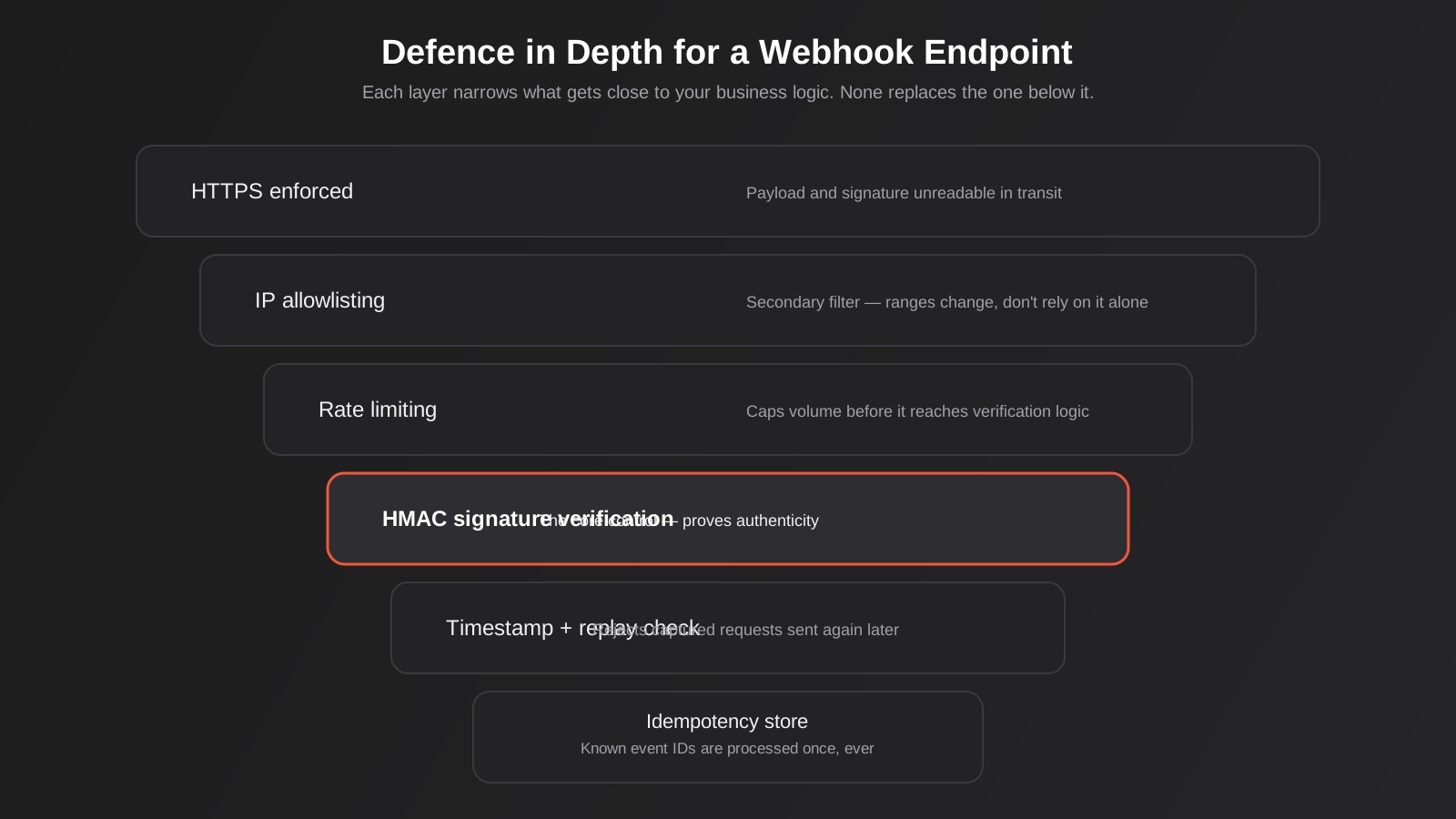
Most signing schemes that account for this include a timestamp as part of what gets signed, which is why Stripe and Slack both build one in. Your endpoint checks that timestamp against the current time and rejects anything outside a short window — five minutes is the commonly recommended default, generous enough to cover normal network delay and clock drift, tight enough that a captured request is useless shortly after it’s seen. This single check closes most of the practical replay risk with very little engineering effort.
Idempotency as the second layer
A timestamp window reduces the replay risk but doesn’t eliminate it — a request replayed within that window still passes. The second layer is tracking which specific event IDs you’ve already processed and refusing to act on one twice, which is exactly the problem we covered in our piece on idempotency and retries in automation workflows. Most webhook payloads carry a unique event ID. Store processed IDs (with a sensible expiry, matching or exceeding your timestamp window) and treat a repeat as a no-op, not an error and not a re-run. This is the same mechanism that stops a provider’s own automatic retries from double-processing an order, and it happens to close the replay gap as a side effect.
Secret Management and Rotation
None of the above matters if the shared secret itself is handled carelessly. A few practical rules we apply on every integration we build:
- Never hardcode secrets in source control. Pull them from environment variables or a proper secrets manager (AWS Secrets Manager, Google Secret Manager, Doppler, or even your hosting platform’s encrypted environment variables). A secret committed to a public or even private repo should be treated as compromised and rotated, not just removed in a later commit — git history remembers.
- Fail closed, not open. If your application starts up and the expected signing secret environment variable is empty or missing, the webhook handler should refuse every request, not quietly skip verification. We’ve seen the opposite built by accident — a conditional that only checks signatures “if a secret is configured” — which is secure in production and wide open the moment a deployment misses an environment variable.
- Support secret rotation without downtime. Rotating a signing secret matters after a suspected leak, a staff departure with access, or just as routine hygiene. Build your verification to accept either a current or a previous secret for a short overlap window, so you can update the secret on the sending platform and your own endpoint without a moment where requests fail because the two sides are out of sync.
- Keep the secret out of logs. It sounds obvious until a debug log statement dumps the full request headers, including the signature and whatever else sits alongside it, into a logging platform that half the team has access to.
A worked example of a rotation
Say you suspect a signing secret leaked through a contractor’s laptop. The safe sequence looks like this: generate a new secret on the sending platform’s side without deleting the old one (most providers that support rotation let you have two active at once for exactly this reason); update your endpoint to accept a signature computed with either the old or the new secret; wait out a window comfortably longer than the provider’s maximum retry delay, so any in-flight deliveries signed with the old secret still verify; then disable the old secret on the sending side and remove it from your endpoint’s accepted list. Skip the overlap step and you’ll either reject genuine webhooks sent in the gap, or worse, leave the compromised secret valid for longer than necessary because you didn’t want to risk breaking anything by disabling it straight away.
Where Zapier, Make and n8n Actually Leave You Exposed
This is the part that’s relevant to most Australian businesses running automation, because it’s rarely a custom-built API endpoint that’s exposed — it’s the no-code platform sitting in the middle of a workflow automation stack.
Zapier’s standard “Webhooks by Zapier” Catch Hook trigger does not verify signatures on incoming requests, and it always responds with a 200 status code regardless of what it received — genuine, malformed, or outright forged. That matters in two ways: first, there’s no native rejection path, so a forged request still kicks off your Zap unless you add your own check; second, because the 200 has already been sent, a failed check inside the Zap can only stop that run from doing anything further, it can’t tell the real sender anything went wrong. The practical workaround is to use “Catch Raw Hook” instead of the default trigger, which preserves the raw body and headers, and add a Code step early in the Zap that recomputes the HMAC and halts the Zap if it doesn’t match.
Make and n8n are built more like general automation platforms than pure no-code connectors, which gives you more room to add verification logic yourself, but they don’t do it automatically either. n8n had a documented vulnerability (CVE-2026-21894) in its Stripe Trigger node specifically because incoming requests weren’t checked against the stored Stripe signing secret at all — anyone who discovered the webhook URL could send a plain POST request and trigger the workflow as if Stripe had sent it. The fix shipped in a later version, but it’s a useful reminder that “the platform handles webhooks” is not the same claim as “the platform verifies webhooks,” even for a well-known trigger type built specifically for a well-known provider.
The practical pattern we use
For anything that matters — payments, order status changes, anything touching customer data — we don’t let the no-code platform’s native trigger be the first thing that sees the request unverified. Two options work well depending on the complexity of the automation:
- Verify inside the workflow, as early as possible. Use the raw/catch-hook variant of the trigger, add a code step immediately after it that recomputes the signature and halts on mismatch, and only let subsequent steps run on a pass. This keeps everything inside the one tool, which is the simplest option for small teams.
- Put a thin verifying gateway in front. For higher-stakes integrations, a small custom endpoint (a lightweight serverless function is usually enough) receives the raw webhook first, verifies the signature and timestamp properly with a 401 rejection path, and only forwards genuine requests on to Zapier, Make or n8n. This is more setup, but it means a forged request gets a real rejection rather than a 200 and a silently-halted Zap, and it keeps the verification logic in one reviewable place instead of duplicated across every workflow that needs it.
Which one makes sense depends on how many webhook-triggered workflows you’re running and what they touch. If you’re not sure which side of that line your business sits on, that’s a scoping conversation worth having before the next workflow gets built rather than after an incident.
Make’s HTTP and webhook modules sit somewhere in between: a Custom Webhook in Make can be configured with its own validation step using a parse JSON or set variable module early in the scenario, which gives you a similar pattern to Zapier’s Code step workaround, but it’s still something you build yourself rather than something switched on by default. The practical takeaway across all three platforms is the same — “webhook trigger” and “verified webhook trigger” are different features, and only one of them is usually built in.
Defence in Depth: The Other Layers
Signature verification is the control that actually authenticates a request. The following don’t replace it, but they reduce how often an attacker gets close enough to try.
IP allowlisting, used carefully
Several major providers publish the IP ranges their webhooks originate from (Stripe and GitHub both do), and you can restrict your endpoint to only accept connections from those ranges at the network or firewall level. Treat this as a secondary filter, not a substitute for signature checks — published ranges change, some are shared cloud infrastructure rather than dedicated blocks, and IP spoofing, while harder over the open internet than it sounds, isn’t impossible. It’s a cheap extra layer, not a reason to skip the cryptographic one.
HTTPS, enforced not assumed
Every webhook endpoint should run over HTTPS, with HTTP requests either redirected or rejected outright, never silently accepted. This stops the payload and the signature itself being readable in transit. Most hosting platforms and API gateways default to this now, but it’s worth confirming explicitly rather than assuming, particularly on an older custom endpoint that predates the rest of your infrastructure.
Rate limiting on the endpoint itself
A webhook endpoint is still a public URL that accepts POST requests, which makes it a plausible target for sheer volume — not necessarily to break in, but to flood your automation with enough requests to exhaust a rate-limited downstream API, fill a queue, or run up usage-based billing on whatever processes the payload. A basic rate limit per source IP or per signature-validated client, rejecting excess with a 429, costs little to add and closes an easy denial-of-service path.
Watch for silence, not just errors
An attacker probing your endpoint, or a provider’s webhook silently failing to fire, both look the same from inside most no-code tools: nothing happens. We’ve written separately about monitoring Zapier, Make and n8n workflows for exactly this reason — a workflow that stops receiving webhooks doesn’t throw an error anywhere by default, it just quietly stops updating records. Pair signature rejections with actual alerting (a spike in 401s from your verification step is worth knowing about immediately, not discovering in a monthly log review).
AI Agents and MCP Servers Raise the Same Problem
This isn’t just a webhook problem anymore. As businesses start giving AI agents direct access to internal systems — through MCP servers that let a model call real tools against a real CRM, ERP or support platform — the same question applies in the other direction: what proves a request claiming to come from an authorised agent, or carrying an authorised instruction, actually is one? An MCP server exposing a “create refund” or “update customer record” tool without verifying the calling context is the same unlocked gate as a webhook endpoint with no signature check, just with a model sitting on the other side of it instead of a forged HTTP request. The engineering discipline is identical: verify the caller cryptographically, don’t rely on the URL or tool name being secret, and fail closed when verification can’t happen. If you’re scoping an MCP integration, this is worth raising in the same conversation as the rest of your access controls, not bolted on afterwards.
Designing Webhook Endpoints That Fail Closed
A handful of design habits make the difference between an endpoint that’s secure by default and one that’s secure only when every condition lines up correctly:
- Verify before you parse. Check the signature against the raw body first. Don’t JSON-parse, validate business fields, or touch a database before you know the request is genuine.
- Reject with the correct status code. A failed verification should return a 401 or 403, not a 200 with an internal flag nobody looks at. Where a platform’s native trigger forces a 200 regardless (Zapier’s Catch Hook, for one), make sure the rejection still happens loudly inside the workflow logic and is monitored.
- Log the rejection, not the full payload. Record that a verification failed, the source IP, and the timestamp, for pattern detection. Don’t persist the full body of a request you’ve just decided not to trust — if it’s malicious, you don’t want it sitting in a log store either.
- Treat the secret’s absence as a hard stop, not a soft one. Build the check so a missing or empty secret variable at startup means the handler refuses everything, every time, rather than defaulting to an open gate.
- Test the rejection path, not just the success path. Most testing effort goes into confirming a valid webhook is processed correctly. Deliberately send a request with a bad signature, an old timestamp, and a replayed event ID as part of your test suite, and confirm each one is actually rejected.
Common Mistakes
- Relying on the webhook URL being hard to guess, with no signature check behind it at all.
- Re-serialising the parsed JSON body before computing the signature, which breaks verification against genuine requests because the re-serialised bytes don’t match what was actually signed.
- Using a plain equality operator to compare signatures instead of a constant-time comparison function.
- Checking the signature but not the timestamp, leaving a captured request replayable indefinitely.
- Hardcoding the signing secret directly in a Zap, Scenario or workflow definition that gets exported, duplicated, or shared with a contractor.
- Assuming a no-code platform verifies webhooks automatically because it has a trigger built specifically for that provider.
- Rotating a leaked secret on the sending platform without a transition window, causing every in-flight or slightly-delayed webhook to fail verification during the changeover.
- Logging full request payloads (including signature headers and sometimes customer data) into a logging tool with broad internal access.
Frequently Asked Questions
Do I need to worry about this if I only use Zapier or Make, not custom code?
Yes, if the workflow touches anything consequential — payments, order or account status, customer data. The no-code layer doesn’t remove the need for verification, it just means the verification logic sits inside a Code/script step within the workflow (both Zapier and Make support this) rather than in a standalone application. If a workflow is purely informational, like forwarding a form submission to a Slack channel for someone to read, the risk of a forged request is much lower and the effort may not be worth it. If it triggers a refund, updates a CRM record, or changes order status, it’s worth the half-day of setup.
What’s the actual cost of adding signature verification to an existing workflow?
For a straightforward webhook where the provider documents its signing method clearly (Stripe, Shopify, GitHub), adding verification inside an existing Zap, Scenario or n8n workflow is usually a small, scoped piece of work — typically well under a day for one workflow, including testing the rejection path. It scales up if you’re verifying webhooks from a provider with sparse documentation, or if you’re building a verifying gateway in front of several workflows at once rather than adding the check inside each one individually.
Is IP allowlisting enough on its own, without signature verification?
No. IP allowlisting restricts where requests can originate from at the network level, but published IP ranges change, some providers route webhooks through shared cloud infrastructure rather than dedicated addresses, and it says nothing about whether the specific payload has been tampered with in transit. Use it as an additional layer alongside signature verification, not instead of it.
How long should a replay window be?
Five minutes is the figure most commonly used across providers that build timestamp checks into their signing scheme, and it’s a sensible default for most business workflows — generous enough to absorb normal network delay and minor clock drift between systems, tight enough that a captured request becomes useless almost immediately. If your systems are prone to clock drift (self-hosted servers without reliable NTP sync are the usual culprit) you may need a slightly wider window, but widening it should be a deliberate decision, not a workaround for an underlying time-sync problem.
What happens if I rotate a webhook secret without planning for it?
Any webhook sent in the window between updating the secret on your endpoint and updating it on the sending platform (or vice versa) will fail verification, because the two sides are signing and checking with different secrets. For a provider that retries failed deliveries, you might just see a burst of temporary failures that resolve once both sides match. For one that doesn’t retry, that window can mean genuinely lost events. The fix is accepting both the old and new secret for a short, deliberate overlap period while you update both sides, then retiring the old one.
Does this apply to webhooks we send out, not just ones we receive?
Yes, in the mirror image. If your business sends webhooks to clients, partners or other systems, you should be signing your own outgoing payloads the same way Stripe or Shopify sign theirs, so your recipients can verify them. If you’re exposing an API that partners integrate against more generally, the equivalent questions about authentication are worth working through in our guide to OAuth vs API keys for business integrations, which covers the outbound-facing side of this same problem.
We’ve never had an incident. Is this still worth fixing?
Probably, and the lack of an incident isn’t strong evidence either way — an unverified webhook endpoint that’s never been probed looks identical to one that’s secure, right up until it isn’t. The honest way to think about it is cost versus exposure: verification for one or two payment- or order-related webhooks is usually a few hours of work, while the downside of a forged request triggering a refund, cancelling an order, or writing bad data into a CRM scales with how automated and unattended that workflow is. The workflows worth fixing first are the ones that act without a human checking the result.
Where to Start
Good webhook security doesn’t need to be complicated, just deliberate. Start by listing every webhook endpoint currently live in your business — the ones inside Zapier, Make or n8n workflows, and any custom ones a developer has set up directly. For each one, check honestly whether it verifies a signature at all, and if it does, whether that verification actually covers the raw body, a timestamp check, and a constant-time comparison, or just a surface-level check that happens to work on the happy path. Most businesses find at least one webhook that’s been trusting the URL alone since the day it was built.
If you’d like a second set of eyes on your integration and API setup — whether that’s hardening an existing Zapier or n8n workflow, or scoping a custom webhook gateway for something higher-stakes — we’re happy to have a conversation about what that actually looks like for your systems, no pressure to sign up for anything on the spot.
Keep reading
Related posts
POS Integration for Australian Retail and Hospitality: Stock, Sales, Settlements and Getting the Books to Agree (2026)
How point-of-sale integration works for Australian retailers and hospitality venues: stock sync, daily sales posting, settlements and fees, and keeping the books…
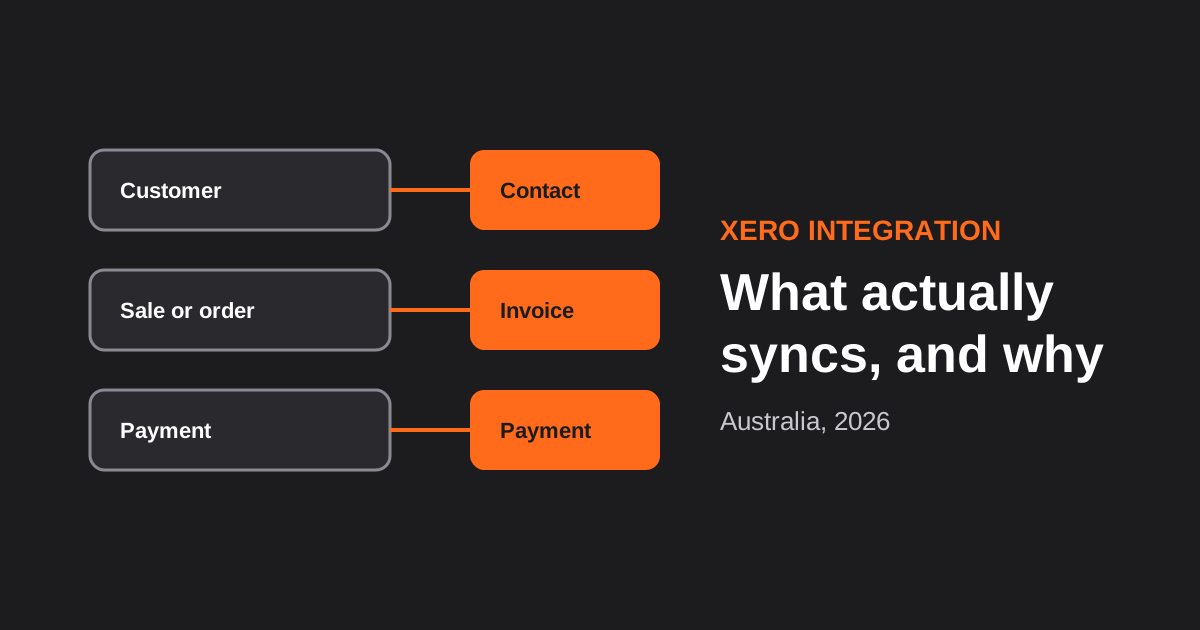
Xero Integration for Australian Businesses: What Actually Syncs, GST Mapping and the Mistakes That Break Reconciliation (2026)
How a Xero integration really works in Australia: what to sync, how to map invoices, payments, refunds and GST, and the mistakes…

CRM Integration for Australian Businesses: What to Connect First and How to Do It Properly (2026)
A practical guide to CRM integration for Australian businesses: what to connect first, which way data should flow, native vs middleware vs…
Got a project you'd like to talk through?
Tell us what you're working on — we'll come back with a plan.
