
Shopify vs WooCommerce: Which Should Australian Businesses Choose in 2026?
 Jignesh Vagadiya
27/09/2026
21 min read
Jignesh Vagadiya
27/09/2026
21 min read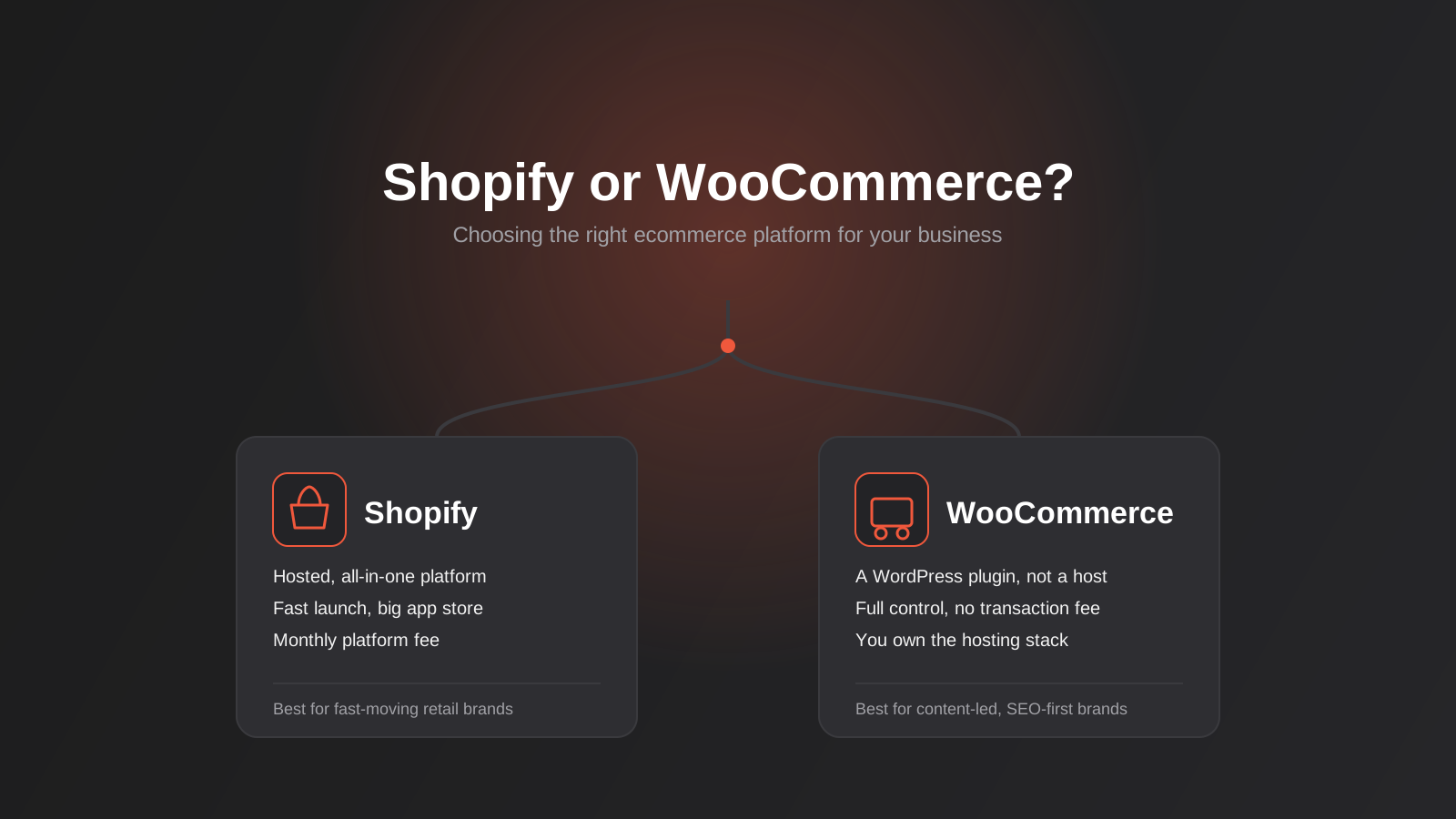
Every few weeks a client calls us with the same question, usually after a friend or a competitor has told them their platform is the “wrong” one. They’ve read a forum thread, watched a YouTube comparison, and now they’re not sure if the store they spent six months building is holding them back. Most of the time it isn’t — but the question underneath it is a fair one, and it’s worth answering properly rather than with a one-line opinion.
Shopify and WooCommerce are the two platforms Australian businesses actually end up choosing between. Wix and Squarespace get ruled out once a store needs real product volume or custom logic, and BigCommerce and Magento show up mostly in enterprise conversations. For everyone else — a growing retailer, a service business adding a shop, a wholesaler moving online — it comes down to these two, and the right answer depends on things that rarely make it into a quick comparison article.
We’ve built and migrated stores on both, so this isn’t a theoretical exercise for us. This guide walks through what actually separates the two platforms, what each one really costs once you add up everything beyond the sticker price, where SEO and content genuinely diverge, and how to work out which one fits the business you’re running — not the business a comparison chart assumes you’re running.
What Actually Separates Shopify and WooCommerce
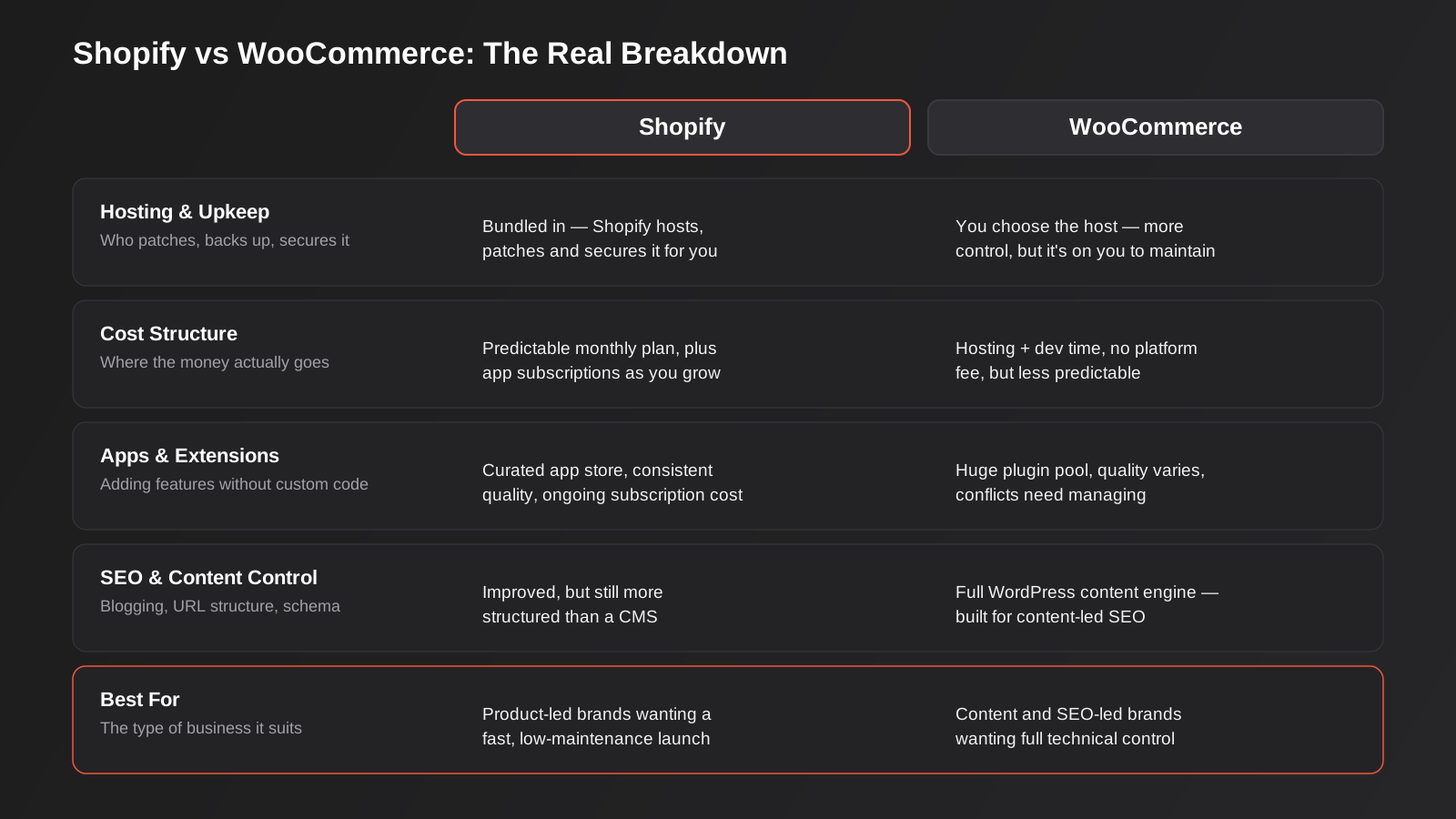
The comparison gets confusing fast because Shopify and WooCommerce aren’t the same kind of thing. Shopify is a complete, hosted commerce platform — you sign up, pay a monthly fee, and everything from the server to the checkout to the SSL certificate is handled for you. WooCommerce is a free plugin that turns a WordPress website into a store. It doesn’t host anything, secure anything, or back anything up on its own. That distinction explains almost every other difference on this page.
Hosting and Who’s Responsible When Something Breaks
On Shopify, if the checkout goes down at 11pm on Black Friday, that’s Shopify’s problem to fix, and historically they’ve been good at keeping the lights on during peak traffic because thousands of other merchants are relying on the same infrastructure at the same time. You don’t choose a server region, you don’t manage a firewall, and you don’t get paged when a plugin update breaks something at 2am.
On WooCommerce, you’re responsible for that stack, or someone you pay is. That means choosing a host that can actually handle ecommerce traffic (not the cheapest shared hosting plan you can find), keeping WordPress core, PHP, WooCommerce and every extension patched, and having backups that you’ve actually tested a restore from. None of this is difficult with the right setup, but it’s real ongoing work that doesn’t happen by itself. We’ve inherited more than one WooCommerce store that hadn’t been updated in over a year, and the fix always costs more than staying current would have.
The App and Plugin Ecosystem
Shopify’s app store is curated and reasonably consistent in quality, because every app has to work within Shopify’s platform rules. You’ll pay a subscription for most of the ones that matter — reviews, subscriptions, upsells, advanced shipping rules — and those subscriptions add up, but installation is usually a five-minute job with low risk of breaking the site.
WooCommerce sits inside the broader WordPress plugin ecosystem, which is enormous and wildly uneven. There’s a free or low-cost plugin for almost anything you can imagine, which is genuinely powerful, but quality control is left entirely to you. Two plugins that both modify checkout behaviour can conflict in ways that only show up when a customer tries to complete an order, and diagnosing that requires someone who actually knows WordPress, not just WooCommerce.
Checkout and Payments
Shopify’s checkout is fast, mobile-optimised out of the box, and continually tested against millions of transactions, which is one of the platform’s genuine strengths — checkout conversion is where a lot of revenue quietly leaks away on weaker setups. If you use Shopify Payments, you avoid the extra transaction fee Shopify charges for using a third-party gateway; if you need a specific Australian payment provider or BNPL option Shopify Payments doesn’t support well, that fee becomes part of the cost equation.
WooCommerce checkout is fully customisable and there’s no platform transaction fee at all — you only pay whatever your payment gateway charges. The trade-off is that “fully customisable” cuts both ways: a well-built WooCommerce checkout can convert brilliantly, and a poorly built one (too many plugins fighting for the same real estate) can quietly cost you sales for months before anyone notices.
Either way, checkout should support the payment methods Australian shoppers actually expect: cards, PayPal, and at least one buy-now-pay-later option like Afterpay or Zip if your average order value and product type suit it. Shopify has these well integrated as native or near-native options. WooCommerce supports all of them through gateway plugins, which work well but need to be kept updated alongside everything else in the stack.
The Real Cost of Each Platform (Not Just the Monthly Fee)
This is where most comparisons go wrong, because they compare Shopify’s monthly plan price to “WooCommerce is free” and stop there. Neither number reflects what a business actually spends across a year.
Shopify’s True Cost of Ownership
The plan fee is only the entry price. On top of it, most stores run several paid apps — a review app, an email/SMS app, maybe a subscription or bundling app — and those subscriptions typically add up to more than the base plan itself once a store has real functionality. If you’re not using Shopify Payments, add the additional transaction fee on every sale. If you want a genuinely custom theme rather than a modified template, add development time, because Shopify’s theme language (Liquid) still needs a developer who knows it well to do anything beyond swapping colours and images.
What you get in exchange is predictability. Hosting, security patching and uptime are bundled in, so the unpredictable cost of “something broke and we need emergency help” is much lower than on a self-hosted platform. For a lot of business owners, that predictability alone is worth paying for.
WooCommerce’s True Cost of Ownership
There’s no platform fee, which is the number everyone quotes. But you’re paying for hosting (and it needs to be hosting built for ecommerce traffic, not a $5/month shared plan), a security plugin or service, regular maintenance, and premium plugins for anything beyond the basics — product filtering, advanced shipping, subscriptions. Add developer time for theme customisation and for the maintenance work that WordPress sites need over time as plugins and core software get updated.
The total often lands lower than Shopify once a store has significant app spend, particularly for stores with high order volume where Shopify’s percentage-based transaction fees (if you’re not on Shopify Payments) start to bite. But it’s a less predictable number, and it depends heavily on whether you’ve got someone competent looking after it. A neglected WooCommerce store is a genuine liability — unpatched plugins are one of the most common ways small business websites get compromised.
Transaction Fees and Payment Gateways
This is worth its own callout because it’s the cost businesses most often miss when comparing quotes. Shopify Payments removes the extra transaction fee, but it’s not available or competitive for every business type, and some Australian merchants prefer a different provider for settlement speed or specific BNPL integrations. Run the maths on your actual expected monthly revenue and average order value before assuming either platform is cheaper — at low volume the difference is negligible, at high volume it’s a real line item.
SEO and Content: Where the Platforms Genuinely Differ
This is the area where we see the most confident misinformation. Both platforms can rank well — we’ve got clients doing solid organic numbers on each — but the ceiling and the effort required to get there aren’t identical.
Blogging and Content Marketing
WooCommerce runs on WordPress, which is the most capable content management system available for anyone. If your growth strategy depends on publishing guides, buying advice, or category-level content that ranks and drives organic traffic, WordPress is built for exactly that, and it’s the same reason this article you’re reading exists on a WordPress site. Shopify has improved its blogging tools considerably over the years, but it’s still a commerce platform with a blog bolted on, not a content platform with a store attached. If content is core to how you plan to grow, that’s a meaningful difference, not a marginal one.
Site Speed and Core Web Vitals
Shopify’s hosted infrastructure gives every store a reasonably strong speed baseline without any real effort, which matters because page speed and responsiveness feed directly into how Google evaluates a page’s user experience. WooCommerce speed is entirely dependent on hosting quality, theme choice and plugin discipline — a well-built WooCommerce store on good hosting can outperform a bloated Shopify theme stacked with a dozen apps, but it takes deliberate work to get there rather than coming free with the platform. We’ve written a full breakdown of what actually moves these numbers in our Core Web Vitals guide, and the same principles apply whichever platform you’re running.
URL Structure and Technical Control
Shopify locks certain URL structures in place — product URLs sit under /products/ and collections under /collections/, and you can’t fully flatten that structure even with workarounds. It’s not usually a ranking problem on its own, but it removes a layer of control some SEO strategies want. WooCommerce gives you full control over URL structure, redirects, canonical tags and schema markup because you’re working directly with the underlying CMS rather than through a platform’s constraints. For most stores this doesn’t decide the outcome, but for businesses running an aggressive SEO strategy with a lot of custom taxonomy, the extra control is genuinely useful.
Structured Data and Product Markup
Both platforms can output product, review and organisation schema, which matters for rich results and for how AI answer engines interpret your catalogue. The difference is in how much control you have over it. Shopify themes generate schema automatically, but editing exactly what gets output usually means editing theme code, which limits how much a non-developer can tune it. On WooCommerce, dedicated SEO plugins expose schema settings directly in the editor, so a marketing team can adjust product and breadcrumb markup without touching a template file. Neither approach is wrong, but if you expect to be making frequent, hands-on adjustments to structured data as your catalogue grows, WordPress’s plugin layer generally makes that easier to do without developer involvement each time.
Design, Customisation and Managing Your Store Day to Day
Cost and SEO get most of the attention in these comparisons, but the day-to-day experience of running the thing matters just as much, especially for the person who’ll actually be logging in every morning to process orders and update listings.
Theme Flexibility and Custom Design
Shopify’s theme store has improved a lot, and with Shopify’s Online Store 2.0 architecture, you can go a long way with sections and blocks before you need custom Liquid development. But there’s still a ceiling: some layout and interaction patterns simply aren’t possible without custom theme code, and a developer who knows Liquid well isn’t interchangeable with a general web developer — it’s a specific skill set with its own quirks.
WooCommerce inherits WordPress’s entire theming and page-builder ecosystem, which means far more design freedom in principle. In practice, that freedom is a double-edged sword. A page builder stacked on top of a theme stacked on top of WooCommerce can turn into a slow, fragile combination if it isn’t built carefully, which is exactly why WooCommerce sites get an unfair reputation for being sluggish — the platform isn’t inherently slow, but a badly assembled one certainly is. Done properly, with a lean theme and disciplined plugin choices, a WooCommerce store can look and perform exactly as well as a custom Shopify build, often for less ongoing licensing cost. If a highly distinctive, conversion-focused design is the priority regardless of platform, that’s really a design and UX question as much as a platform one.
Managing Your Store on the Go
Shopify’s mobile admin app is genuinely good — processing orders, checking sales, and managing inventory from a phone is smooth and well supported, and it’s one of the platform’s underrated strengths for a business owner who isn’t sitting at a desk all day. WooCommerce’s mobile experience depends on the WordPress app, which covers content and basic order management reasonably well but isn’t purpose-built for retail operations the way Shopify’s app is. For a business owner who wants to run day-to-day operations largely from a phone, this is a real, practical difference that’s easy to overlook until you’re standing in a warehouse trying to check stock on your phone.
Multi-Channel Selling and Australian Tax Handling
Two areas that rarely make it into generic global comparisons but matter a lot in an Australian context: how easily you can sell beyond your own website, and how cleanly the platform handles GST.
Selling Across Marketplaces and Social Channels
Shopify has invested heavily in native and near-native integrations with sales channels — Instagram and Facebook Shops, TikTok Shop, Google, and point-of-sale for physical retail all connect with comparatively little friction, syncing inventory back to a single source of truth. That matters for a lot of Australian retailers who sell through their own site, a market stall, and social channels simultaneously and need stock levels to stay accurate everywhere.
WooCommerce can do all of this too, but through third-party plugins of varying quality rather than tightly built-in channels, which means more setup work and more moving parts that can drift out of sync if not monitored. For a business planning genuinely multi-channel retail from day one, Shopify’s approach generally means less integration risk. For a business selling primarily through its own site, this difference matters far less.
GST and Local Compliance
Both platforms can handle GST correctly, but the path differs. Shopify Tax (and its earlier tax settings) covers Australian GST calculation reasonably well out of the box for standard cases, including correctly applying GST to digital products where required. WooCommerce needs a tax plugin or careful manual configuration of tax classes to get the same result, which is entirely manageable but is one more thing that needs to be set up correctly and checked when tax rules or product categories change. Neither platform replaces the need to get your GST registration and BAS reporting process right with your accountant or bookkeeper — the platform just needs to calculate and record it accurately at the point of sale.
Which Platform Fits Which Kind of Business
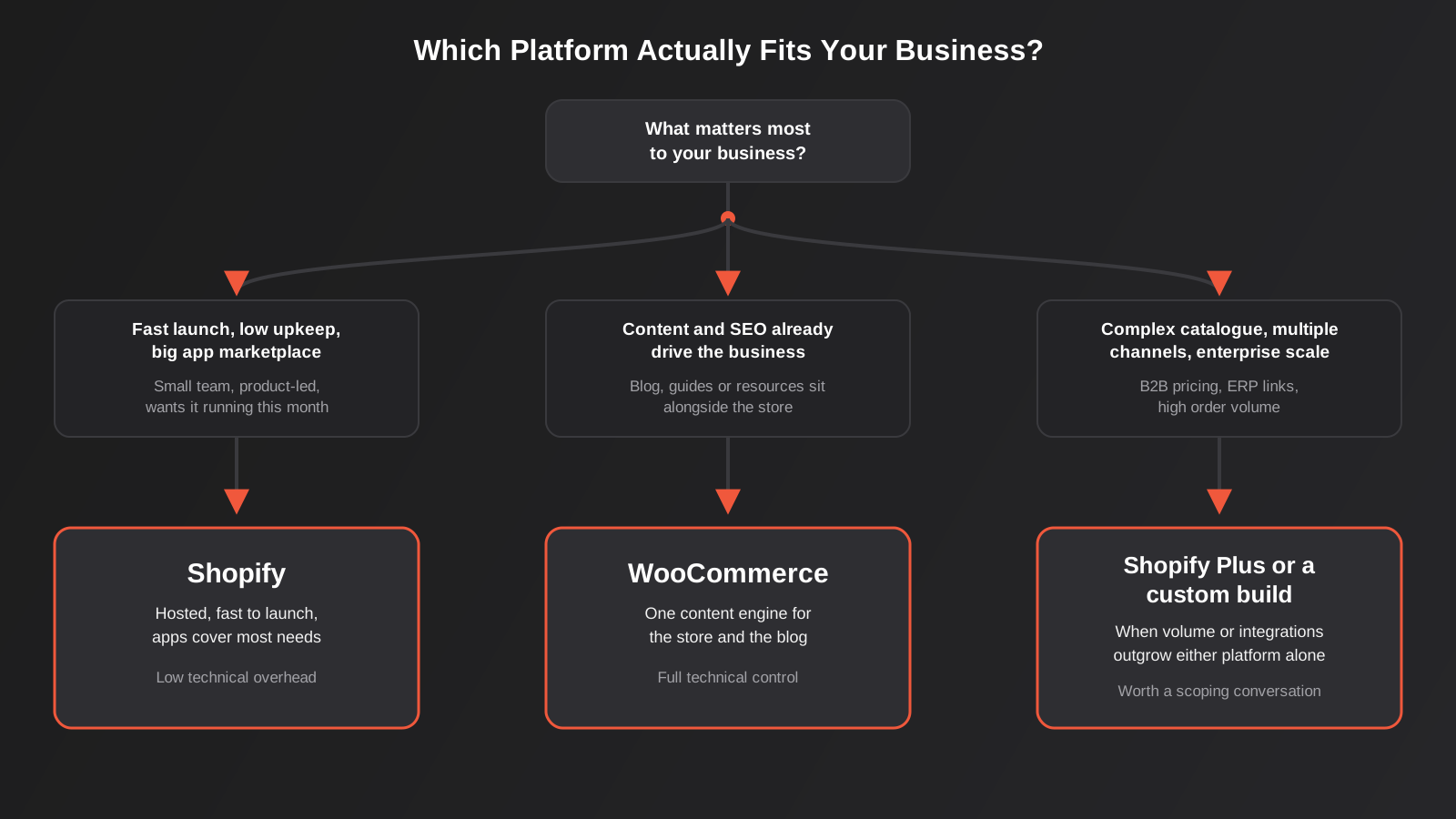
Once you strip away the platform loyalty that shows up in most online debates, the decision usually comes down to three or four honest questions about how your business actually operates.
When Shopify Is the Right Call
If you’re launching a product-led brand and want to be selling within weeks rather than months, if you don’t have (and don’t want to hire) someone to manage server-level maintenance, and if your growth plan leans on paid ads and social selling rather than long-form content and organic search, Shopify is very likely the right platform. It’s also the stronger option once you’re running a large catalogue with complex variants, or you’re preparing to scale into Shopify Plus for enterprise-level volume and B2B functionality.
When WooCommerce Is the Right Call
If content and organic search already are, or need to become, a core part of how customers find you, WooCommerce’s home inside WordPress is a real structural advantage. It’s also the better fit if you already have a WordPress site with traffic and rankings you don’t want to sacrifice by splitting your brand across two systems, if transaction-fee-free checkout matters at your volume, or if you need bespoke functionality that would require expensive custom app development on Shopify but is a well-supported plugin (or a straightforward custom build) inside WordPress.
When Neither Is Right
Sometimes the honest answer is that both platforms are the wrong tool. A business with genuinely complex B2B pricing tiers, deep ERP integration requirements, or order volume that pushes into the tens of thousands a month can hit real ceilings on either platform. That’s usually a conversation about Shopify Plus, a headless build, or custom ecommerce development rather than a straight pick between the two consumer-facing options — and it’s worth having that conversation before committing rather than after you’ve outgrown a platform twice.
A Quick Gut Check
If you’re still unsure after weighing all of this, a useful shortcut is to ask which mistake you’d rather make. Choosing Shopify when WooCommerce would have suited you better usually costs you some ongoing app fees and a slightly less flexible content setup — annoying, but rarely fatal. Choosing WooCommerce without the maintenance discipline to support it usually costs you a security incident, a slow site, or an expensive clean-up project down the track. Neither mistake is catastrophic if caught early, but they’re not symmetrical, and it’s worth being honest with yourself about whether you actually have the time, budget or team to keep a self-hosted platform properly maintained before you commit to one.
Migrating Between Platforms Without Losing Rankings or Data
A lot of the businesses who come to us aren’t choosing a platform from scratch — they’re on one and weighing whether to move to the other. Migration is where the real risk sits, because a botched move can tank organic traffic for months even when the new platform itself is a perfectly good fit.
The parts that go wrong most often: URL structures changing without proper 301 redirects mapped one-to-one from old to new, product descriptions and metadata not carrying across cleanly, historical order and customer data getting mangled in the export/import process, and nobody checking that every previously-indexed page has somewhere sensible to redirect to. We handle WooCommerce to Shopify migrations regularly, and the projects that go smoothly are the ones where the redirect map and SEO audit happen before the switch, not as a clean-up job after. If you’re weighing a move, our platform migration SEO checklist covers the specific technical steps in more depth than we can fit here.
It’s also worth saying plainly: migrating platforms is rarely the fastest fix for a store that isn’t performing. We’ve seen businesses migrate from WooCommerce to Shopify (or the reverse) expecting a sales lift, when the actual problem was product photography, pricing, or a checkout with too much friction — issues that exist independently of which platform hosts them. Rule those out first.
Common Mistakes We See When Businesses Choose a Platform
- Choosing based on what a competitor uses, without checking whether that competitor’s business model (content-led vs. product-led, order volume, team size) actually matches their own.
- Underestimating WooCommerce maintenance as a one-off setup cost rather than an ongoing responsibility that needs a plan and, usually, a person or agency behind it.
- Assuming “Shopify is more expensive” or “WooCommerce is free” without adding up apps, plugins, hosting and transaction fees on either side.
- Migrating platforms to fix a conversion problem that has nothing to do with the platform — usually pricing, offer, photography or checkout friction.
- Skipping a proper redirect map during migration and watching months of SEO work disappear in a Google Search Console coverage report.
- Picking a platform for where the business is today and ignoring where it’s realistically heading in two or three years, then facing a second migration sooner than expected.
- Stacking multiple checkout, upsell or page-builder apps and plugins that all touch the same part of the customer journey, then wondering why the site feels slow and inconsistent.
- Treating GST and tax configuration as a set-and-forget step rather than something to re-check whenever product categories, shipping regions or new sales channels change.
Frequently Asked Questions
Is Shopify or WooCommerce better for SEO?
Neither platform has a hard ranking advantage on its own — we have clients ranking well on both. WooCommerce, built on WordPress, generally gives more flexibility for content-heavy SEO strategies (blogging, custom URL structures, granular schema control), while Shopify’s hosted infrastructure gives every store a decent technical baseline with less setup effort. If your growth plan depends heavily on organic content, WooCommerce’s home inside WordPress is a genuine structural advantage; if you’re running a leaner content strategy, the gap matters much less.
Which platform is cheaper to run, Shopify or WooCommerce?
It depends entirely on your app and plugin needs and your order volume. Shopify’s plan fee is predictable but app subscriptions and transaction fees (if you’re not using Shopify Payments) add up quickly. WooCommerce has no platform fee, but hosting, security, premium plugins and developer time for maintenance are real ongoing costs. At low-to-moderate volume the totals often land closer together than people expect; at high volume, transaction fee structure becomes the bigger factor.
Can I move my existing Shopify or WooCommerce store to the other platform later?
Yes, and it’s a common project for us, but it needs to be planned properly. Products, customer data, order history and URLs all need to be mapped and migrated with 301 redirects in place, or you risk losing search rankings and breaking links from existing marketing. It’s rarely a same-day switch and should be scoped as a proper technical project, not a quick export/import.
Do I need a developer for either platform?
For a basic store using an existing theme and standard apps or plugins, many business owners manage day-to-day content themselves on either platform. Once you need custom functionality, a bespoke design, complex integrations with accounting or inventory systems, or ongoing security maintenance (particularly on WooCommerce), it’s worth having a developer involved, at least for the initial build and periodic maintenance.
Is WooCommerce actually free?
The plugin itself is free, but running a real store on it isn’t. You’ll need hosting suited to ecommerce traffic, an SSL certificate (usually included with good hosting), a payment gateway, and in most cases a handful of premium plugins for things like advanced shipping rules, product filtering or subscriptions. “Free” describes the software licence, not the total cost of running the store.
What’s the right platform for a business just starting out with ecommerce?
If you want to launch quickly with minimal technical overhead and don’t yet have a content or SEO strategy driving traffic, Shopify is usually the faster, lower-risk starting point. If you’re building a brand where content and organic search are core to the plan from day one, or you already have a WordPress site with existing traffic, starting on WooCommerce can save you a migration down the track.
Does Shopify or WooCommerce handle GST better for Australian stores?
Both can calculate GST correctly once set up properly. Shopify Tax handles standard Australian GST scenarios well out of the box, including digital products in most cases. WooCommerce needs a tax plugin or manually configured tax classes to achieve the same accuracy. Either way, it’s worth having your accountant or bookkeeper sanity-check the setup against your actual GST registration and product mix rather than assuming the default configuration is correct for your business.
Where to Start
If you’re weighing this decision for a new store, the most useful next step isn’t picking a platform in isolation — it’s mapping out your actual growth plan for the next two to three years (content-led or product-led, expected order volume, whether integrations with accounting or inventory systems are on the horizon) and matching the platform to that, not to whichever one a competitor happens to use. If you’re already on one platform and wondering whether the other would serve you better, it’s worth a proper audit before any migration decision, because the cost of moving needs to be weighed honestly against the problem you’re actually trying to solve.
We work across both Shopify and WooCommerce builds, and we’re just as happy telling a prospective client to stay where they are as we are recommending a move. If you want a second opinion on which platform actually fits your business, or a scoping conversation about a migration you’re considering, get in touch and we’ll talk it through properly before you commit to anything.
Keep reading
Related posts
Best Ecommerce Platforms for Australian Retailers in 2026: Six Options Compared
Six ecommerce platforms for Australian retailers compared honestly: real fees, GST and payments, drawbacks and who each one actually suits.
How to Bulk Update Shopify Prices From a Supplier Price List (Without Breaking Your Catalogue) (2026)
How to update Shopify prices in bulk from a supplier spreadsheet: SKU matching, cost vs sell price, GST, compare-at prices, and a…
How to Update Shopify Inventory in Bulk by SKU: A Spreadsheet Workflow for Multiple Locations (2026)
A practical spreadsheet workflow for updating Shopify stock in bulk by SKU across multiple locations, with the traps that corrupt inventory and…
Got a project you'd like to talk through?
Tell us what you're working on — we'll come back with a plan.
