
Self-Hosting n8n in Australia: Cloud vs Self-Hosted, Real Costs, Security and Backups (2026)
 Jignesh Vagadiya
31/10/2026
24 min read
Somebody on your team has found n8n, built three workflows on the free trial, and now wants to know why you’re paying per execution when the software is “free” if you run it yourself. It’s a fair question, and the honest answer is that the software is free in roughly the way a puppy is free. The licence fee is zero. Everything after that is a decision about who gets up when it breaks.
We run and support n8n for clients, some on n8n’s own cloud and some on servers we or the client control, so we’ve seen both versions go well and go badly. The ones that go badly almost always share a pattern: a workflow tool got installed on a cheap server in an afternoon, quietly became load-bearing for invoicing or lead handling, and nobody ever wrote down where the encryption key lives. This guide to self-hosting n8n is about avoiding that pattern, and about working out whether self-hosting is even the right call for your business before you spin anything up.
If you’re still choosing between Zapier, Make and n8n as tools, start with our comparison of Zapier, Make and n8n. This post assumes n8n is already on your shortlist and goes narrower and deeper: cloud versus self-hosted, what a sensible self-hosted setup looks like, what it costs in practice, and what the Australian-specific wrinkles are.
What “self-hosted n8n” actually means
n8n is source-available workflow automation software. You can use it two ways. n8n runs a hosted version (n8n Cloud) where they operate the servers, apply the updates and handle backups. Or you can download the Community edition and run it on infrastructure you control: a virtual machine, a container platform, a server in your office cupboard, whatever you like.
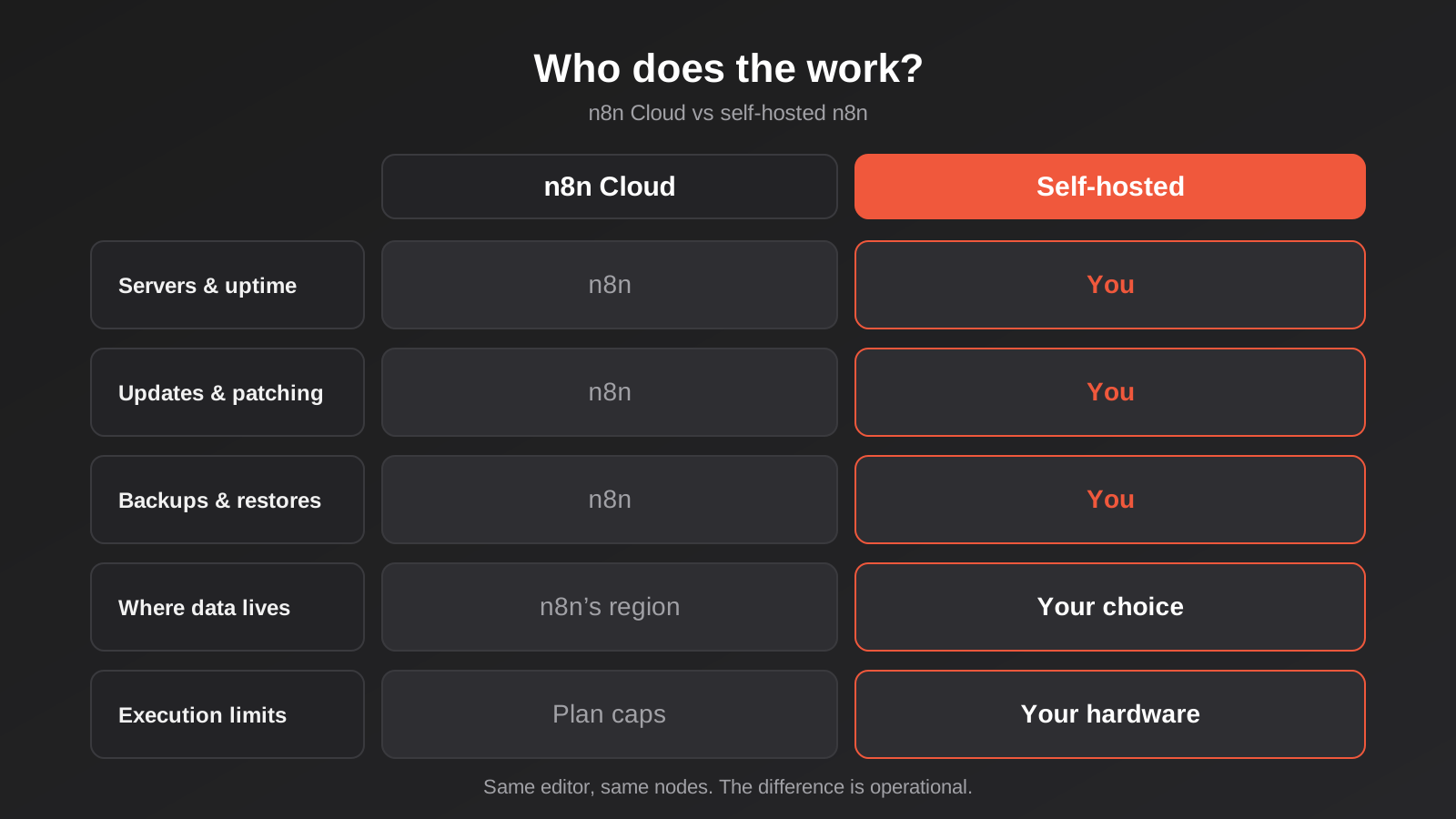
Both versions use the same visual editor and the same library of integration nodes. A workflow built on one can be exported as JSON and imported into the other. The difference is entirely operational. In the cloud version, someone else answers the question “is the server up, patched and backed up?” In the self-hosted version, you do, or whoever you pay to do it.
The licence is not the same as open source
This catches people out. n8n’s core is released under a “fair-code” licence called the Sustainable Use License. It is source-available, which means you can read the code and run it, but it is not an OSI-approved open source licence. As we understand it, the grant covers using n8n for your own internal business purposes, or for personal and non-commercial use. A few files, marked with an enterprise suffix in their names, sit under a separate paid licence and unlock features such as some advanced access controls.
For a business automating its own processes, that’s straightforward: you’re fine. The grey zone appears when you start building automations for clients. Running n8n internally to serve your own operations is one thing. Hosting an n8n instance, connecting it to your customers’ accounts using their credentials, and charging for access to it as a product is another, and n8n has a separate commercial arrangement for embedding and white-labelling. Where exactly the line falls depends on the specifics, so if you’re an agency or software vendor, read n8n’s current licence and FAQ yourself and, if it matters commercially, ask n8n directly or get legal advice. Do not rely on a blog post, including this one, for that.
Cloud versus self-hosted: what you’re really comparing
Most comparison articles reduce this to a price table. The price matters, but it’s the smaller half. The bigger half is a list of jobs that move from n8n’s staff to yours.
What n8n Cloud costs and where it pinches
n8n Cloud is priced in euros on tiers set by monthly executions. At the time of writing, the entry tiers sit in the tens of euros per month for a few thousand executions, stepping up through a mid tier for around ten thousand, with a much larger jump for the business tier that covers tens of thousands. Treat any figures you read in blog posts, ours included, as indicative and check n8n’s own pricing page before you budget, because the plans and limits have shifted before and secondary sources disagree on the details.
An “execution” in n8n is one run of a whole workflow, regardless of how many steps are inside it. That’s a friendlier model than per-task pricing, where a ten-step workflow burns ten units each time. It means a complex workflow that runs rarely is cheap, and a simple workflow that polls every minute can chew through your allowance fast. A workflow that checks for new orders every minute is roughly 43,000 executions a month before it has done any actual work.
The pinch points on cloud are the execution cap, the plan-level limits on concurrent runs, and the fact that your data passes through n8n’s infrastructure in whichever region they operate. For many businesses none of these matter. For some, one of them is the whole reason they’re reading this.
What self-hosting costs once you count everything
The server is the cheap part. A small virtual machine capable of running n8n with a proper database costs somewhere in the range of a coffee habit to a decent lunch habit per month, depending on size and provider. Add managed Postgres if you want someone else to look after the database, a backup storage bucket, a domain, and possibly a monitoring service. Realistically, a sensible small setup lands in the low tens to low hundreds of dollars a month in infrastructure, depending on how much you buy as managed services versus build yourself.
The expensive part is attention. Someone has to:
- apply n8n updates, which arrive frequently, and read the release notes before doing so
- patch the operating system and the container runtime underneath it
- watch disk space, memory and the database
- test restores, not just take backups
- renew certificates and keep DNS correct
- respond when a workflow fails at 2am on the day payroll runs
If that someone is a contractor on a retainer, price the retainer. If it’s your internal developer, price a slice of their week, honestly. If it’s “whoever set it up”, price the day it breaks and they’re on leave.
Where the break-even actually sits
Self-hosting wins on raw software cost at volume, and wins quickly once you’re past the mid tier. Several of the cost comparisons you’ll find online show the crossover arriving almost immediately for high-volume use. That’s true as far as it goes. It’s also misleading, because those comparisons usually cost the server and leave out the person.
A more honest way to frame it: cloud is cheaper than self-hosting until the execution allowance becomes a real constraint or a compliance requirement forces your hand. Below a few thousand executions a month, cloud is almost always the better deal once you count a single hour of someone’s time. Above tens of thousands, or where workflows are heavy and long-running, self-hosting starts to pay for the person who looks after it. In between, it’s a judgement call, and the tiebreaker is usually not cost at all.
When self-hosting makes sense (and when it doesn’t)
We tend to recommend self-hosting for one of four reasons, and to talk clients out of it for most others.
Good reasons to self-host
Data control. If workflows move client records, health information, financial data or anything your contracts say must stay in Australia, running n8n in an Australian cloud region (or on your own network) gives you a clean answer for auditors and for your own peace of mind. More on this in the next section.
Volume. If you’re running high-frequency workflows, processing large batches, or moving heavy payloads, the per-execution ceiling on cloud plans becomes the limiting factor, and self-hosted n8n has no such cap other than the hardware you give it.
Reaching internal systems. If n8n needs to talk to a database, ERP or file server that isn’t exposed to the internet, running it inside your network is far simpler than opening holes for a cloud service. This is common with older on-premise ERPs, and it’s one reason self-hosted n8n shows up in our workflow automation projects for manufacturers and distributors.
Custom nodes and tight integration. If you need to install community nodes, run your own code, or wire n8n tightly into other services you host, self-hosting gives you the freedom to do it.
Bad reasons to self-host
“It’s cheaper” is the most common, and it’s wrong more often than people expect, for the reasons above. “We want to learn it” is fine for a sandbox and a poor basis for the thing that sends your invoices. “Our developer says it’s easy” is true for the first install and untrue for year two. And “we don’t trust the cloud” deserves a second look: a small business running its own server is often less secure than a vendor with a dedicated security team, not more.
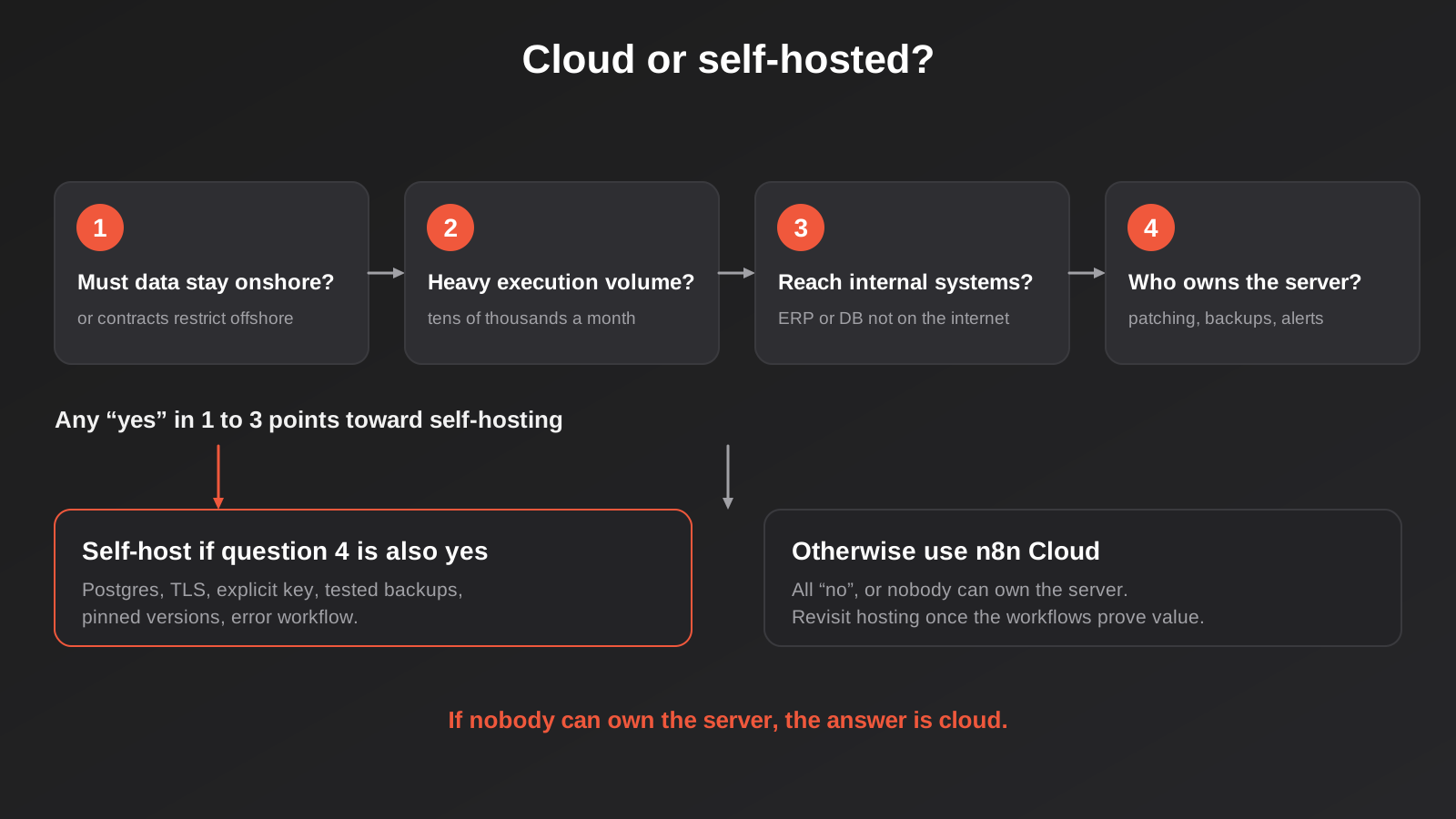
If you have no one who can own the server, use cloud. That’s not a failure of ambition. A well-run cloud workflow beats a neglected self-hosted one every time.
Data residency, the Privacy Act and where your workflows run
Australian businesses cannot simply assume that “the cloud” means Australia. Under the Privacy Act, an organisation that discloses personal information to an overseas recipient generally remains accountable for how that recipient handles it (this is the cross-border disclosure principle, APP 8). A workflow tool that passes customer names, emails, job notes or invoices through servers in another country is part of that picture.
The practical questions are the same whichever tool you choose:
- Which region does the workflow engine run in, and where is execution data stored?
- Do execution logs keep a copy of the data that passed through each node?
- Which sub-processors (hosting, error tracking, backups) touch that data?
- What do your client contracts and industry rules say about offshore processing?
Check n8n’s current documentation and trust pages for where Cloud workspaces are hosted and what the data processing terms say, since that can change. If the answer isn’t acceptable for your data, self-hosting in an Australian region of a major cloud provider (Sydney and Melbourne regions are available from the large providers) gives you a defensible position: the engine, the database and the logs all live onshore.
One thing people miss: hosting n8n in Australia does not make the whole workflow onshore. If a workflow calls an AI model API, posts to a US-based SaaS tool or sends an email through an overseas provider, the personal information leaves anyway. Data residency is a property of the whole path, not of one box on the diagram. We cover the AI side of this in our guide to where AI data actually goes.
A production setup that doesn’t fall over
The quick-start command on n8n’s site gets you a working instance in a couple of minutes. That instance uses an embedded SQLite database, runs as a single process, and is perfectly adequate for trying things out. It is not what you want running payroll exports. Here’s what changes when it matters.
Use Postgres, not SQLite
SQLite is a single file. It’s fine for one process and a handful of workflows, but it struggles under concurrent writes, it’s awkward to back up consistently while the app is running, and n8n’s own guidance recommends Postgres for anything beyond experimentation. Queue mode, covered below, is not recommended with SQLite at all. Starting on Postgres from day one saves you a database migration later, which is a job nobody enjoys doing with live workflows.
Put it behind a reverse proxy with TLS
Run n8n behind a reverse proxy such as Caddy, Nginx or Traefik, terminate HTTPS there, and tell n8n its public address using its webhook URL setting. Get this wrong and the webhook URLs displayed in the editor won’t match what the outside world can reach, which produces confusing failures where test webhooks work and production ones don’t. Websocket support also needs to be enabled in the proxy or the editor will behave oddly.
Set and safeguard the encryption key
n8n encrypts the credentials you store (API keys, OAuth tokens, database passwords) using an encryption key. If you don’t set one explicitly, it generates one on first start and keeps it in a file inside the instance’s data folder. Lose that file, restore a database backup onto a fresh server, and every stored credential becomes unreadable. You will be re-entering every connection by hand, and some of those, like OAuth grants, need the original account owner to click through again.
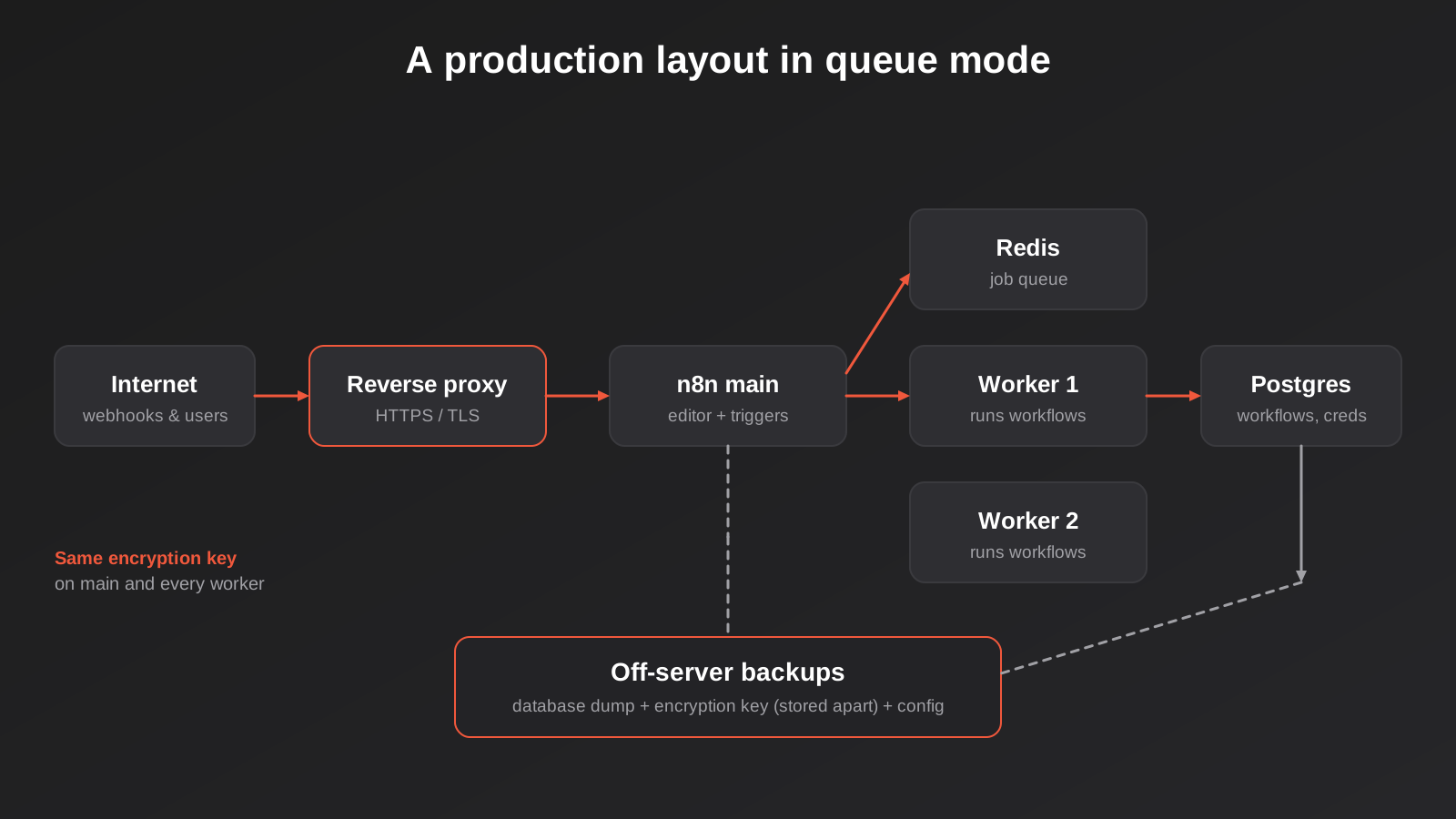
Set the key explicitly through environment configuration, store a copy in your password manager or secrets store, and make sure it’s documented as part of your restore procedure. This single step prevents the most common self-hosting disaster we see. In queue mode, the same key has to be present on the main instance and on every worker, otherwise the workers can’t decrypt the credentials they need.
Move to queue mode when volume demands it
By default, n8n runs workflow executions inside the same process that serves the editor. A heavy execution can slow the interface, and if the process restarts mid-run, the execution in flight is lost. Queue mode splits the job: the main instance receives triggers and puts jobs on a Redis-backed queue, and separate worker processes pick them up. You can add workers as volume grows, and a job held in the queue can be picked up by another worker if one dies.
It adds moving parts: Redis, Postgres, the main instance and one or more workers, all of which need to share configuration. Be wary of anyone who sets it up for a business running a few hundred executions a day. Complexity is a cost, and you pay it every time something needs diagnosing. A single well-sized instance on Postgres handles more than most small businesses will ever throw at it. Reach for queue mode when you see the editor slowing during busy runs, when you need to isolate long-running workflows from time-sensitive ones, or when losing in-flight executions is genuinely expensive.
Some details worth knowing before you commit: queue mode does not support keeping binary data (files, attachments) on the local filesystem, so you’ll typically point it at object storage. And the more advanced high-availability setups, with multiple main instances, sit behind n8n’s paid enterprise licence rather than the free Community edition.
Control how much execution history you keep
Every execution n8n runs can be stored along with the data that flowed through it. That’s wonderful for debugging and terrible for disk space and privacy. A busy instance that saves every successful run will fill its database faster than you’d think, and the stored data can include customer details you’d rather not hold indefinitely.
Use n8n’s pruning settings to delete old executions automatically after a set age or count, and consider saving execution data only for failures on high-volume workflows. Defaults have changed between versions and sources disagree on what they are, so check the current documentation rather than assuming. From a privacy angle, think of execution history as a second copy of your data that you’re responsible for, and set its retention to match what you’d say in a privacy policy.
Security when self-hosting n8n: the part you now own
A workflow automation server is an unusually attractive target. It holds credentials to your CRM, accounting software, email and payment tools, and its entire purpose is to take actions with them. Compromise it and an attacker doesn’t need to break into each system separately; the keys are all in one place. That’s true of any automation platform, but with the cloud version the vendor carries most of the defence. With self-hosting, you carry it.
Keep the editor off the open internet
The editor and the webhook endpoints are different things and should be treated differently. Webhooks and form triggers need to be reachable by outside services. The editor, with its login screen, usually does not. Where you can, put the editor behind a VPN, an identity-aware proxy or an IP allowlist, and expose only the specific webhook paths that need to be public. Enforce strong passwords and two-factor authentication on every user, and remove accounts when people leave.
Patch on a schedule, because the advisories keep coming
n8n has had a steady run of security advisories, including several rated critical, some affecting self-hosted deployments through things like expression handling and webhook processing. Many of the serious ones require an authenticated user, which is a reason to limit who has editor access, but not a reason to skip updates. We’re not going to list advisory numbers here because they date quickly; read the security advisories on n8n’s GitHub repository directly.
The practical conclusion is simple. Decide how often you’ll update (we suggest at least monthly, sooner for security releases), who is responsible, and how you’ll test the update first. Running a version from eighteen months ago because “it works” is the self-hosting equivalent of leaving the front door unlocked because nobody’s robbed you yet.
Lock down the webhooks you do expose
Every public webhook is a door. Use authentication where the sender supports it, verify signatures on incoming calls from services that provide them, and don’t trust payload contents blindly. We go into this in detail in our post on webhook security and signature verification, and it applies whether your endpoint lives on n8n or anywhere else.
Be deliberate about code, community nodes and credentials
- Code nodes let a workflow author run arbitrary JavaScript or Python. Anyone who can edit workflows can run code on your server. Limit editor access accordingly, and consider disabling nodes you don’t need.
- Community nodes are third-party packages. They’re convenient and unvetted. Treat installing one the way you’d treat adding a dependency to your own software, because that’s what it is.
- Credentials should be scoped as narrowly as the connected system allows. If a workflow only needs to read invoices, give it a read-only API key. If the instance is ever breached, the damage is bounded by what those keys can do.
- Environment access from expressions and nodes can expose secrets in the environment. Restrict it where the version allows.
If AI agents are part of your workflows, add another layer of care: an agent with tool access can be talked into things. The same principles of narrow permissions and human approval apply. Our piece on MCP development covers how we think about giving AI agents controlled access to business systems, and n8n can sit on either side of that arrangement, as a client calling tools or as a server exposing workflows as tools.
Backups you’ve actually tested
A backup you haven’t restored is a hope. For a self-hosted n8n you need to be able to rebuild the whole thing from scratch, and that means backing up several separate pieces:
- The database. Workflows, credentials (encrypted), users, settings and execution history all live here. Take regular logical dumps or use your provider’s point-in-time recovery, and store copies off the server, ideally in a different account.
- The encryption key. Without it the database backup holds credentials you can’t read. Store it separately from the database backup. If an attacker gets both, they get everything, so keep them in different places with different access.
- Your configuration. Docker Compose files, environment settings, proxy config. Put these in version control (without the secrets in them).
- Binary data and any local files your workflows rely on.
- Workflow exports. A second, independent copy of your workflows as JSON, ideally pushed automatically to a Git repository. This is also your change history, which helps when someone edits a live workflow and breaks it.
Then do the dull part: once a quarter, restore to a scratch server and check that workflows open, credentials decrypt and a test execution succeeds. Write down how long it took. That number is your real recovery time, and it’s usually worse than people guess.
If you also build automations on other platforms, the same principles apply across all of them. We’ve written separately about protecting CRM, accounting and ecommerce data, which covers the systems your workflows connect to.
Updating without breaking live workflows
n8n ships updates often. Some are fixes, some add nodes, and occasionally one changes how a node behaves in a way that breaks workflows relying on the old behaviour. Major version changes in particular have included breaking changes that needed attention before upgrading.
A workable routine:
- Pin your container image to a specific version tag, never “latest”. An unattended pull of latest is how a Tuesday-night restart turns into a Wednesday-morning outage.
- Read the release notes between your version and the target, looking specifically for breaking changes and deprecated nodes.
- Restore a recent backup to a staging instance, upgrade that first, and run your critical workflows against test data.
- Take a fresh backup of production immediately before upgrading, so rollback means restoring a known-good state.
- Upgrade in a quiet window, and watch executions for a day afterwards.
This overlaps with the discipline in our guide to changing live automations safely, which goes further into staging environments and rollback for any workflow platform.
Monitoring: knowing before your customers do
Self-hosted means nobody is watching unless you set it up. There are two layers to cover.
Infrastructure. Is the server up? Is the disk filling? Is memory exhausted? Is the database accepting connections? Is the certificate about to expire? A simple uptime check against a health endpoint, plus disk and memory alerts, catches most of the dull disasters. In queue mode, also watch the queue depth and whether workers are alive.
Workflows. A healthy server can still be running broken workflows. Build an error workflow that triggers whenever any other workflow fails and sends the details somewhere a human will see them. Add heartbeat checks for workflows that should run on a schedule, so silence is itself an alert. The failure mode that costs real money is rarely a loud crash. It’s the workflow that quietly stopped running three weeks ago and nobody noticed until a customer asked where their order was. Our post on automation monitoring for Zapier, Make and n8n covers this layer in detail.
Common mistakes
- Running on SQLite in production. It works until the day it doesn’t, and migrating later is harder than starting on Postgres.
- Not setting the encryption key explicitly. The auto-generated one lives on a disk you may lose.
- Using the “latest” image tag. You’ll upgrade whether you meant to or not.
- Exposing the editor to the internet with a weak password and no two-factor authentication.
- Taking backups but never testing a restore.
- Saving every execution forever. Disk fills, and you’re quietly holding years of customer data.
- Giving every workflow an admin-level API key because it was quicker than scoping a narrow one.
- Letting one person be the only one who knows how it works.
- Adopting queue mode too early, adding Redis and workers to solve a problem you don’t have.
- Comparing server cost to cloud cost and ignoring the labour entirely.
- Assuming an Australian server means an onshore workflow when the workflow calls overseas APIs.
- Selling client work on a self-hosted instance without reading the licence terms.
Frequently Asked Questions
Is self-hosted n8n really free?
The Community edition carries no licence fee for internal business use, but running it is not free. You pay for the server, the database, backup storage and, most significantly, the time of whoever looks after it. Some advanced features sit behind a paid enterprise licence. For many small businesses, n8n Cloud turns out cheaper once the maintenance time is counted.
Can I use self-hosted n8n to build automations for my clients?
Building workflows for clients and running them on infrastructure you control is common, but n8n’s licence limits certain commercial uses, particularly hosting n8n as a product that customers connect their own accounts to. The line depends on the exact arrangement, so read n8n’s current licence and FAQ, ask n8n directly if you’re unsure, and take legal advice if it affects your pricing model.
Does hosting n8n in Australia satisfy the Privacy Act?
Not by itself. Running the engine and its database onshore removes one cross-border disclosure, but the Privacy Act looks at where personal information goes overall. If a workflow sends data to an overseas SaaS tool, AI model or email provider, that’s still a disclosure you remain accountable for. Map the full data path, and get advice if you handle sensitive information.
What server size do I need?
For a single instance on Postgres running modest workloads, a small virtual machine with a couple of CPU cores and a few gigabytes of memory is a typical starting point. Heavy workflows, large payloads or queue mode with several workers need more. Start small, monitor memory and CPU, and scale on evidence. Memory is usually the constraint that bites first.
Can I move from n8n Cloud to self-hosted later, or the reverse?
Yes, in both directions. Workflows can be exported and imported as JSON. The friction is in credentials, which generally need re-creating on the new instance, and in anything that references the instance’s own URL, such as webhook addresses registered with third-party services. Plan a cut-over window and test each integration afterwards.
Is self-hosted n8n less secure than the cloud version?
It isn’t inherently less secure, but the responsibility shifts to you. A well-patched instance, kept off the open internet, with strong access controls and scoped credentials can be very safe. A neglected one on a default install is a real risk, because the platform holds keys to many of your systems. The deciding factor is the quality of your operations, not the hosting model.
Where to Start
Before you provision anything, answer four questions on paper: where must the data live, how many executions a month do you realistically expect, does n8n need to reach systems that aren’t on the internet, and who will own the server in a year’s time. If the honest answer to the last one is “nobody in particular”, start on n8n Cloud, build the workflows, and revisit hosting once the automations have proven their value. Moving later is entirely possible.
If self-hosting is the right call, treat the first week of setup as the real project, not an afterthought: Postgres, TLS, an explicit encryption key, off-server backups, a pinned version and an error workflow, all in place before the first business-critical workflow goes live. That is a day or two of work done properly, and it saves you from the 2am call.
We build and look after automations on both models through our workflow automation service, and you can see how we scope that work on our automation pricing page. If you’d like a second opinion on a hosting decision or a setup you’ve already got running, get in touch for a conversation. There’s no pressure and no obligation to work with us afterwards.
Worth saying plainly: because we run lean as a specialist agency rather than carrying a large account-management layer, our fixed quotes typically come in below the Australian averages covered in this guide. If you’ve already got a written quote from another agency for comparable scope, send it through and we’ll do our best to beat it.
Keep reading
Related posts
Best Job Management Software for Australian Trade Businesses (2026)
Six job management tools for Australian trades compared: ServiceM8, Tradify, Fergus, AroFlo, simPRO and Jobber, with real drawbacks and pricing models.
Best CRM for Australian Small Business (2026): 6 Compared
Six CRMs compared for Australian small businesses: free plans, AU data hosting, real costs, Xero fit and the drawbacks vendors skip.
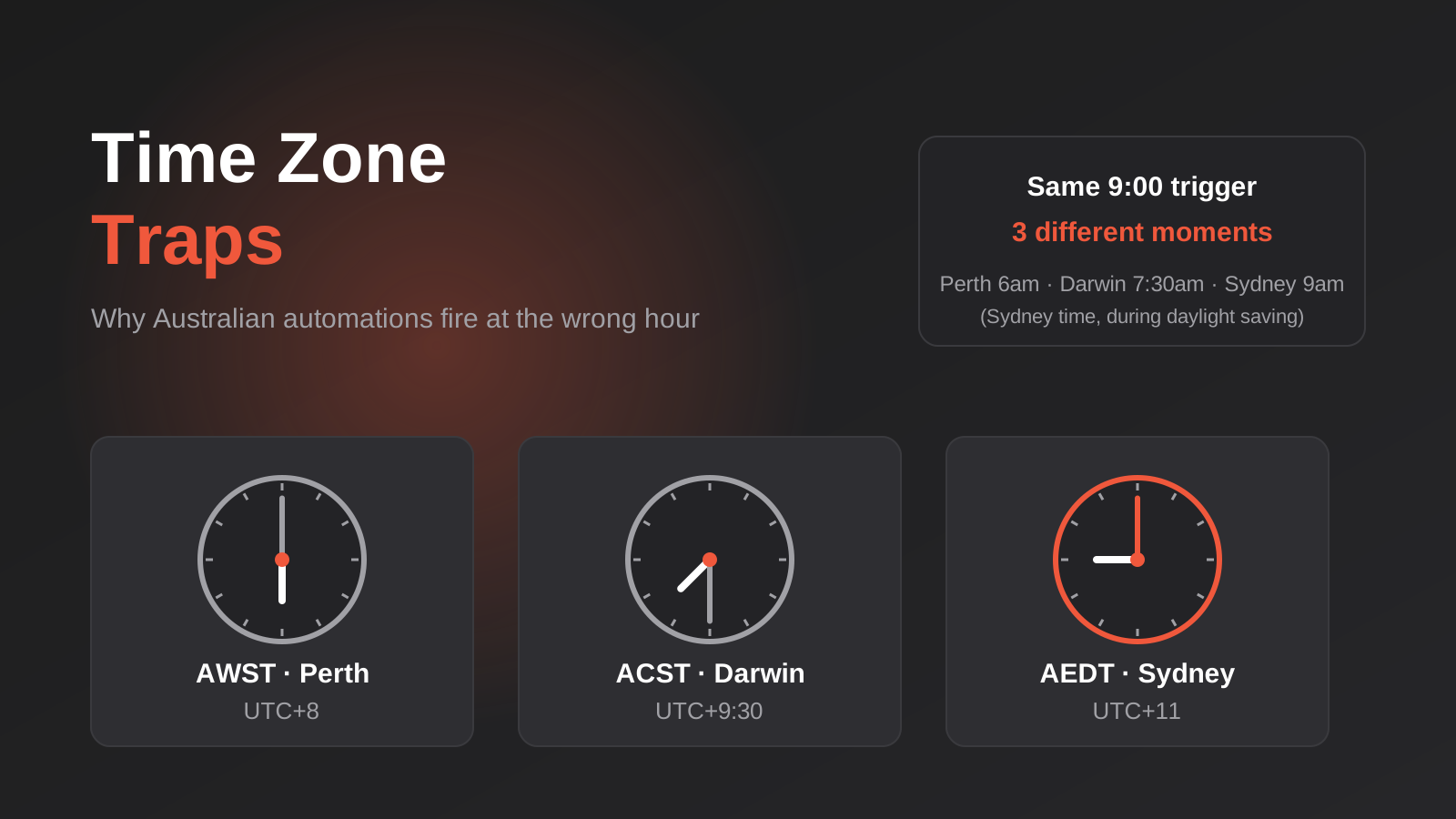
Time Zones, Daylight Saving and Public Holidays: Why Australian Automations Fire at the Wrong Time (2026)
How a 9am automation fires at the wrong time across Australian time zones, daylight saving and state public holidays, and how to…
Got a project you'd like to talk through?
Tell us what you're working on — we'll come back with a plan.
