
How Much Does It Cost to Build an App in Australia? A 2026 Price Guide
 Jignesh Vagadiya
21/10/2026
13 min read
Jignesh Vagadiya
21/10/2026
13 min read
The most common mistake we see when a business prices an app is comparing quotes for the wrong thing. One agency quotes $30,000 for “an app”. Another quotes $120,000 for “an app”. Both are being straight with you. The first is pricing a handful of screens that read from a simple backend. The second is pricing logins, payments, push notifications, an admin panel and a live connection to your accounting system. The word “app” covers all of it, and the specification behind the word is what actually sets the price.
So how much does it cost to build an app in Australia in 2026? This guide gives you honest ranges rather than one magic number, explains what moves a build from the cheap end to the expensive end, and flags the running costs that rarely appear in the first quote. Everything below is broader market context so you can sanity-check a quote that’s already in your inbox. If you’d like to talk through your own project, our mobile app development service page explains how we scope and build.
How Much Does It Cost to Build an App in Australia?
Across Australian agency rate cards and published cost guides, three bands hold up in 2026. Treat the bottom of each as lean but genuinely usable, and the top as fully featured.
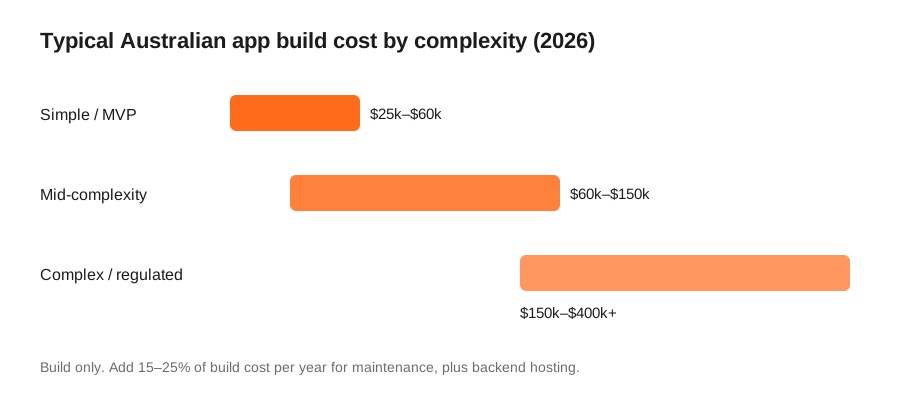
- Simple app or MVP (a few core screens, one main job, basic sign-in, a small backend): roughly $25,000–$60,000. This is the tier for finding out whether people will actually use the thing before you build it out properly.
- Mid-complexity app (user accounts and roles, payments or bookings, push notifications, an admin panel, two or three integrations): roughly $60,000–$150,000. Most genuinely useful business and customer apps land here.
- Complex or regulated app (real-time data, many user types, sensitive or health information, heavy integration, audit requirements, offline-first field use): $150,000–$400,000 and up, scoped on functionality rather than any template.
These are build costs only. They don’t include the backend you’ll pay to host every month, the yearly maintenance an app needs to keep working, or the store fees. We cover those further down, because they’re where the first-year budget usually goes wrong.
A useful way to place your own idea: count workflows, not screens. A customer who books a time and pays is one workflow, even if it spans five screens. A trade-customer app that handles account pricing, ordering, order history and a sync to your ERP is four or five workflows wearing a small screen count. If your brief reads like one sentence but that sentence hides a lot of work, you’re probably nearer the middle tier than the bottom one.
What Drives the Cost of an App
Native or cross-platform
A native build means separate iPhone and Android apps, written in each platform’s own tools. A cross-platform build, using a framework such as React Native or Flutter, shares most of the code across both. Cross-platform commonly saves somewhere in the region of 20–35% against building two native apps, and it halves the number of codebases you maintain afterwards. Native earns its extra cost when you need deep hardware access, demanding graphics, or the very latest platform features on day one. For most business apps, cross-platform is the sensible default, and it’s worth asking any agency why they’d recommend otherwise.
Do you need an app at all?
Sometimes the cheapest correct answer is a progressive web app, which installs on a phone’s home screen, works offline for many tasks and is built once for every device. It can’t do everything, and App Store presence or certain hardware features genuinely need native. We’ve compared the trade-offs in PWA vs native app for Australian businesses, and it’s worth ruling a PWA in or out before you price native as the default.
The backend nobody sees
Most of an app’s cost isn’t the screens. It’s the server behind them: accounts, data storage, business rules, notifications, file uploads, and the APIs the app talks to. An app that only displays content is cheap. An app that stores customer data, calculates things, and stays in step with your other systems is mostly a backend project with a phone-shaped front end. If you already run a CRM, accounting package or ERP, expect the integration to be one of the larger line items, which is why we scope API and systems integration as its own piece of work.
User roles and admin tooling
Every extra type of user (customer, staff member, manager, admin) multiplies the screens, the permissions and the testing. And the admin panel, the part your customers never see, is often a second application in its own right. Businesses budget generously for the customer-facing half and then discover staff can’t run the app without emailing a developer for every change.
Payments, privacy and compliance
Taking payments in-app, or storing health or other sensitive personal information covered by the Australian Privacy Principles, adds work that never shows up as a visible feature: secure storage, access logging, retention rules, and usually a security review before launch. It’s necessary work, and a common reason two apps that look identical in a mockup are priced very differently.
Design depth
A clean app built from standard components costs noticeably less than one with a fully custom interface, bespoke animation and a design system built from scratch. Neither is wrong. Custom design is a branding decision as much as a technical one, and it’s worth deciding deliberately rather than letting it creep into the scope.
Where the team is based
Senior developer rates in 2026 run roughly $180–$250 an hour in Sydney and Canberra and $150–$210 in Melbourne and Brisbane, with lower blended rates where offshore delivery is involved. Location matters less than scope, but it explains why two reputable teams can land thousands of dollars apart on the same brief. What matters more is who is managing the build. An offshore team with a local lead who owns requirements and quality can work well. The same team with no local layer tends to surface later as misunderstood requirements and missed Australian specifics such as GST handling or local payment methods.
What You’ll Pay After the App Is Built
A build price is the start of the cost, not the end of it. Budget for these from day one.
- Maintenance: plan on roughly 15–25% of the build cost per year. Apple and Google release new operating system versions every year, and an app that isn’t updated eventually breaks or gets pulled from the store. A $90,000 app carries something like $13,000–$22,000 a year before you add a single new feature.
- Backend hosting: typically $50–$500 a month depending on traffic, data volume and how much background processing happens.
- Store accounts: Apple’s developer program is currently US$99 a year and Google Play is a one-off US$25. Check both for current terms.
- Store commissions: if you sell digital goods or subscriptions inside the app, Apple and Google take a share (commonly 15–30%, with reduced rates for smaller developers). Physical goods and real-world services are generally treated differently, so check the current rules for your model.
- Third-party services: push notification providers, SMS, maps, analytics, crash reporting and similar tools often have usage-based pricing that grows with your user count.
- Support and updates: bug fixes, small improvements and the occasional emergency patch. Ask whether this is a retainer, a block of hours or billed ad hoc.
Ways to Bring the Price Down Without Cutting Corners
- Launch one job, not ten. Almost every over-budget app began as a feature list instead of a single task the app does well. Ship that task, learn from real users, then fund the rest from what you’ve learned. Our MVP development guide covers what’s safe to cut and what isn’t.
- Go cross-platform. Unless you have a specific reason for native, a shared codebase is the most reliable saving available.
- Buy the boring parts. Sign-in, payments, email and basic analytics all have mature, inexpensive building blocks. Spend custom development time on what’s unique to your business.
- Start with fewer roles. If the long-term vision has five user types but two prove the concept, build for two.
- Write the scope down first. A written specification, even a rough one, keeps every quote comparable and stops your own “can we also add…” requests from quietly inflating the project.
- Consider whether off-the-shelf already does it. If a configured product covers 90% of your need, custom is the expensive option for the last 10%. Our custom software vs off-the-shelf framework walks through where the break-even usually sits.
How Agencies Price an App
Fixed price suits a well-defined scope such as an MVP: one number for a specified feature set, with a change-request process for anything new. Without that process, “fixed price” quietly becomes “fixed price for whatever we originally guessed”. Time and materials suits an evolving product, because requirements nearly always shift once real people use the app. You pay for hours worked, ideally with regular demos and a rolling estimate so you can redirect early. A dedicated team retainer suits an ongoing product with a steady pipeline of work, and makes little sense for a small app. Whichever model you’re offered, milestone payments protect you: be wary of any arrangement that asks for most of the money before you’ve seen working software.
None of these is inherently better. The useful question is how well defined your request is. A fixed price on an unstable product breeds change-order friction, and open-ended hourly billing on a tightly scoped MVP breeds budget anxiety for no reason.
What a Proper App Quote Should Tell You
- A defined feature list, not “user accounts and an admin area”, with what the admin panel can and can’t do.
- Named integrations, each scoped individually. “We can connect to anything” means the integration work hasn’t been looked at yet.
- Ownership. You should own the source code, the store developer accounts and the backend hosting accounts, registered in your business’s name.
- The testing approach: which real devices and OS versions, and whether you can review a test build on your own phone before launch.
- Store submission handled and priced, including what happens if the first review is rejected.
- A post-launch support window and a clear line between a free bug fix and billable new work.
- A change-request process so scope changes have an agreed path.
A quote missing some of these isn’t automatically a red flag, since some teams fill detail in during a discovery workshop. But it does mean you can’t compare it fairly with a more detailed quote yet. Ask for the gaps to be filled before price alone decides anything.
Common Budgeting Mistakes
- Budgeting the build and forgetting the running costs. Maintenance and hosting are real, annual costs that belong in next year’s budget.
- Pricing it like a website. A website is priced on pages and design. An app is priced on workflows, data and logic.
- Building every nice-to-have before launch. Every feature added before you have users is a guess.
- Choosing the cheapest quote without asking what it leaves out. The gap is almost always in testing depth, admin tooling, documentation or support, none of which show up in a demo.
- Letting the agency hold the keys. If the developer account, code or hosting sits in someone else’s name, leaving them later becomes expensive and awkward.
- Skipping the “should this even be an app?” question. A good share of projects are better served by a PWA or a web app. Our custom web app cost guide shows what that path costs.
Frequently Asked Questions
How much does it cost to build an app in Australia?
A simple app or MVP typically costs $25,000–$60,000 in Australia in 2026. A mid-complexity app with accounts, payments or bookings, an admin panel and a few integrations usually runs $60,000–$150,000, and complex or regulated apps can reach $150,000–$400,000 or more. The figure that matters is the one that comes back after your workflows, user roles and integrations have been scoped, not a range from any guide, this one included.
Is it cheaper to build one app for iPhone and Android?
Yes. A cross-platform build shares most of its code between both platforms, which commonly saves in the region of 20–35% compared with two separate native apps, and leaves you with one codebase to maintain. Native is still the right call for demanding graphics, deep hardware access, or when you need the newest platform features immediately, but it should be a reasoned choice rather than the default.
What does it cost to keep an app running each year?
Plan on roughly 15–25% of the original build cost per year for maintenance, bug fixes and OS compatibility updates, plus backend hosting that typically runs $50–$500 a month. Add the Apple and Google developer account fees and any usage-based third-party services such as SMS or maps. Apps that skip this budget tend to stop working properly after a major iOS or Android release.
How long does it take to build an app?
A focused MVP often takes two to four months from kick-off to store submission, while a mid-complexity app commonly takes four to eight months. Complex builds take longer, and any timeline needs buffer for store review and for your own feedback rounds, which are frequently the slowest part. Treat any estimate given before discovery as a rough guide only.
Should I build an app or a progressive web app?
If your users mostly need forms, bookings, ordering, dashboards or account access, a progressive web app can do the job for a lower cost, with one build covering every device. If you need App Store presence, heavy offline use, background processing or hardware access such as Bluetooth, native or cross-platform is the better fit. It’s worth deciding this before pricing anything, because it changes the budget more than almost any other choice.
Do I own the app once it’s built?
You should. At the end of a standard project you should own the source code, the Apple and Google developer accounts and the backend hosting accounts, all registered in your business’s name. If an agency keeps any of these by default, ask why, and find out what it would cost to move away from them later.
Where to Start
If you came here asking what an app would cost for your own idea, the honest answer is still “it depends on the workflows, the integrations and the roles”, but you now know how each of those moves the number. The price that matters comes from a properly scoped brief, not a market average. A one-page description of the single job your app does, who uses it, and which systems it needs to talk to is enough to get quotes you can actually compare.
When you’re ready to scope a real project, our mobile app development page explains how we work from discovery to store launch, and our custom software development service covers the wider picture if the app is one part of a larger system. If you’d rather start with numbers across all our services, the pricing overview is the place to look.
Keep reading
Related posts
How Much Does a WooCommerce to Shopify Migration Cost in Australia? A 2026 Price Guide
What a WooCommerce to Shopify migration costs in Australia in 2026: real price ranges by store complexity, hidden costs and how to…
How Much Does an AI Chatbot Cost in Australia? A 2026 Pricing Guide
What an AI chatbot costs in Australia in 2026: three pricing tiers, the running costs people miss, and how to compare quotes…
How Much Does Custom Software Development Cost in Australia? Build Cost vs Five Years of Licences (2026)
What custom software development costs in Australia in 2026: ranges by project type, integration costs, running costs, and how the build compares…
Got a project you'd like to talk through?
Tell us what you're working on — we'll come back with a plan.
