
PWA vs Native App: Which Should Australian Businesses Build in 2026?
 Jignesh Vagadiya
03/09/2026
21 min read
Jignesh Vagadiya
03/09/2026
21 min read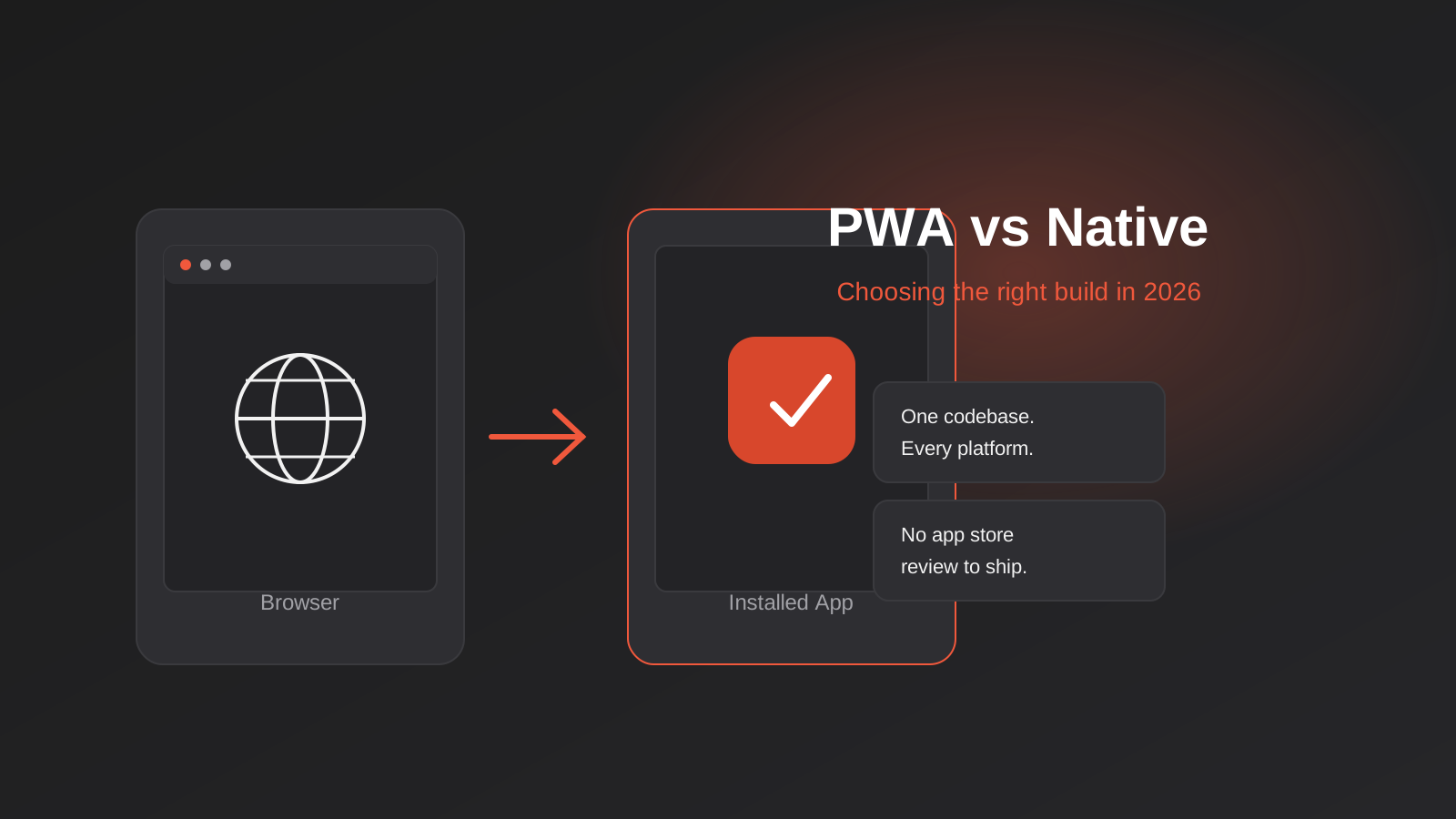
Somewhere in the first meeting about “building an app,” someone always says the word “app” like it means one thing. It doesn’t. A client comes to us wanting a loyalty program, a booking tool, a staff rostering system, or a product catalogue their reps can use on-site, and by the third sentence they’ve already assumed the answer is a native iOS and Android build with a listing in both app stores. Sometimes that’s right. More often, for the businesses we work with in Australia, it’s the more expensive answer to a question nobody actually asked.
Progressive Web Apps have been technically possible since Chrome added service worker support back in 2015, but 2026 is the first year we’d call them a default-serious option rather than a compromise. Push notifications work reliably on Android and, with real caveats, on iOS. Offline caching is solid. Install prompts are less clunky. And the cost gap between a PWA and a native build has only widened as native development, testing and app store compliance have gotten more involved, not less.
This isn’t a “PWAs are the future, native apps are dead” piece — that framing is lazy and it’s wrong for a decent slice of businesses. What follows is the PWA vs native app decision framework we actually walk clients through: what each option genuinely gets you, where the real cost and capability differences sit in 2026, and how to tell which one your business needs before you commit budget to either.
What a PWA Actually Is (and Isn’t)
A Progressive Web App is a website built to behave like an app. Three technical pieces make that happen: a web app manifest (a small JSON file that tells the browser the app’s name, icon and colours so it can be added to a home screen), a service worker (a background script that intercepts network requests, caches assets and enables offline behaviour), and HTTPS, which is non-negotiable for service workers to run at all. Build those three things properly on top of a normal website or web app, and a browser will offer to install it — no app store, no review process, no separate codebase for Android and iOS.
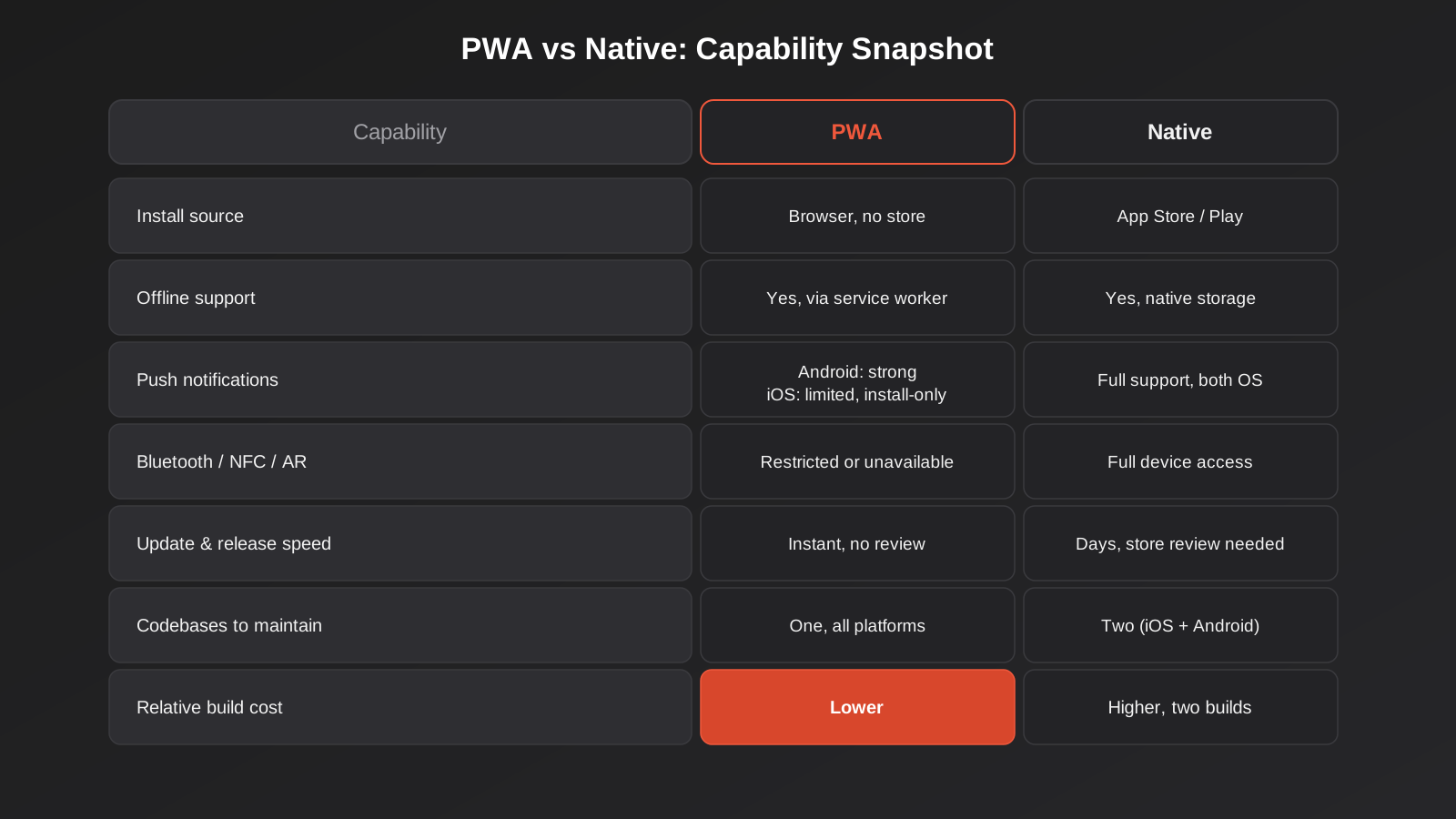
What you get after installation looks and feels close to a native app. It sits on the home screen with its own icon. It opens in its own window without browser chrome. It can work offline for previously visited content. It can send push notifications, subject to platform limits we’ll get into. What it doesn’t get you is a listing in the App Store or Google Play by default (though it’s technically possible to wrap one and submit it), and it doesn’t get you full access to every device API a native app can touch.
How installation actually works in 2026
On Android, Chrome will prompt eligible PWAs to install with a banner or an “Add to Home Screen” option, and the installed app behaves almost identically to a native one in the app drawer. On desktop, Chrome and Edge support the same install flow from the address bar. iOS is where it gets more particular: Safari supports PWA installation, but the prompt is buried under the Share menu rather than surfaced automatically, and users have to know to look for it. That single UX gap is the biggest reason PWA adoption still lags on iPhone compared to Android, and it’s something we plan around rather than pretend isn’t there.
What a PWA can’t do
Background location tracking, Bluetooth and NFC access, deep integration with device contacts or calendars, and full background sync are either unavailable or meaningfully restricted in a PWA, particularly on iOS. Apple has historically been slower to expose these web APIs than Google, largely because opening them up reduces the App Store’s gatekeeping role — worth knowing when you’re scoping something that leans on hardware.
What You Get With a Native App
Native apps are built with platform-specific tooling — Swift or Objective-C for iOS, Kotlin or Java for Android, or a cross-platform framework like React Native or Flutter that compiles down to something closer to native than a wrapped website. They run directly on the operating system with full access to whatever APIs Apple and Google expose to developers, which today is substantially more than what’s available through a browser.
Genuine device access and performance
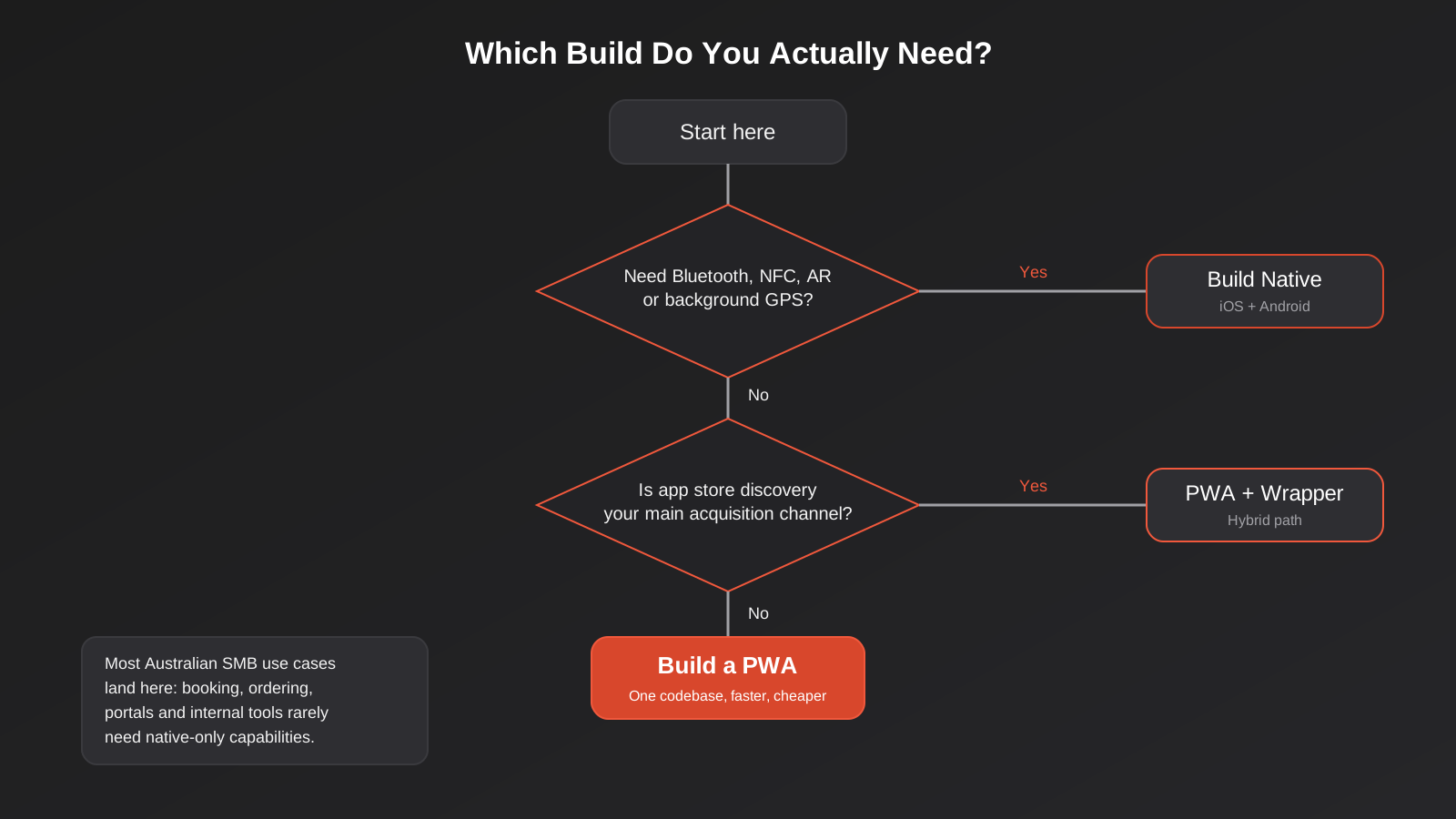
If your app needs the camera for augmented reality, continuous background GPS tracking, Bluetooth peripheral pairing, biometric authentication tied to secure hardware, or heavy local processing like video editing or 3D rendering, native is still the more reliable path. Performance for graphics-intensive work — games, AR, anything doing real-time rendering — remains meaningfully better on native, even as the web platform closes the gap for everyday business apps.
Store distribution and discovery
This is the argument clients raise most often, and it’s legitimate: being discoverable in the App Store or Google Play is a real acquisition channel, particularly for consumer apps competing on category browsing or search within the store itself. A PWA doesn’t get that unless you specifically build and submit a wrapped version, which reintroduces some of the native overhead you were trying to avoid.
The ongoing cost of two codebases
The part that surprises first-time app builders isn’t the initial build cost, it’s what happens after launch. A native app built for both iOS and Android is, practically speaking, two separate products (unless you’re using a cross-platform framework, which reduces but doesn’t eliminate this). Every feature gets built twice, tested twice, and every OS update — which Apple and Google ship on their own schedule, not yours — can break something that needs a fix and a fresh submission through app review.
The Real Cost Comparison for Australian Businesses
Numbers here vary a lot by scope, so treat any figure as a rough band rather than a quote. As a general pattern we see reflected across the industry and in our own project scoping, a comparable feature set built as a native app for both iOS and Android typically runs several times the cost of the same functionality built as a single PWA codebase, mostly because you’re paying for duplicate development, duplicate QA across device types, and two separate app store submission and review cycles rather than one continuous deployment pipeline.
Developer day rates in Australia for this kind of work commonly sit in a similar range whether the build is web or native — the cost difference comes from the number of codebases and platforms being maintained, not from web development being intrinsically cheaper per hour. A PWA ships from one codebase to every device with a modern browser: Android, iOS, Windows, macOS. There’s no app store review gating a bug fix — you push an update and, with a properly configured service worker, users get it on their next visit, sometimes without even needing to reopen the app.
The other cost that’s easy to underweight is app store fees. Apple and Google both take a cut of in-app purchase revenue — historically up to 30%, with reduced rates for smaller developers or subscription apps past their first year. A PWA processing payments through its own gateway or an embedded checkout sidesteps that entirely, which matters a lot for a subscription or ecommerce business modelling margin.
When a PWA Is the Right Call
In our experience, a PWA is the stronger choice when most of the following are true:
- You need one build that works across Android, iOS and desktop without maintaining separate codebases
- The app doesn’t depend on deep hardware access — Bluetooth, NFC payments, continuous background location, or AR
- Speed to market and validating demand matter more than a polished app store presence on day one
- You already have a website or web app that a PWA layer can be built on top of, rather than starting from nothing
- The primary use case is content, booking, ordering, account management, or an internal tool rather than a hardware-driven experience
- You want instant updates without waiting on app store review for every fix
This covers a genuinely large share of what Australian SMBs actually need: a customer-facing ordering app for a hospitality group, a booking and loyalty app for a services business, a field staff tool for logging jobs, or a B2B ordering portal for wholesale customers. None of that needs Bluetooth or AR. It needs to be fast, reliable offline in patchy signal, and cheap enough to iterate on without a six-figure budget. If what you actually need is custom software full stop — not specifically a mobile experience — it’s worth stepping back further to our decision framework for custom software vs off-the-shelf, since the PWA question only matters once you’ve settled that a bespoke build is the right call at all.
When You Actually Need Native
Native earns its cost when the app’s core value depends on something a browser genuinely can’t do well yet. That includes apps built around continuous background location tracking (delivery and logistics apps that need to know where a driver is even when the app isn’t open), anything using Bluetooth to pair with hardware (fitness devices, POS terminals, medical devices), apps requiring deep calendar or contacts integration, and anything where App Store or Play Store discovery is genuinely the primary customer acquisition channel — a consumer app competing for downloads in a crowded category, for instance.
Performance-sensitive apps also lean native: real-time multiplayer games, apps doing heavy on-device machine learning inference, or anything processing video or complex graphics locally. If your product is genuinely mobile-hardware-dependent rather than mobile-convenient, don’t fight it — build native and budget accordingly.
There’s also a category of business where native makes sense for reasons that have nothing to do with technical capability: brand perception in categories where customers expect an app store presence as a baseline signal of legitimacy, or where a major platform partner or franchisor mandates a native build as part of a broader system. Those are valid business reasons even when the technical case for native alone wouldn’t be strong enough to justify the cost on its own.
How This Plays Out for Different Australian Business Types
The framework above is useful in the abstract, but it lands better with a few real patterns we see repeatedly.
Hospitality and food service
A cafe group or restaurant chain wanting an ordering and loyalty app almost never needs native. The core job — browse a menu, place an order, collect a stamp or points, get notified when a reward’s ready — is entirely achievable through a PWA, and the offline caching means the menu still loads even on patchy in-venue wifi. We’d only push toward native if there’s a specific reason, like integrating with a proprietary kitchen display system that only ships a native SDK.
Trades and field service
Field teams logging jobs, photos and timesheets from sites with unreliable reception are a strong PWA use case precisely because of the offline-first pattern — data entered without signal queues locally and syncs the moment the device reconnects. The one place this tips toward native is when the workflow depends on continuous background GPS tracking for fleet or job-site location, which iOS in particular restricts more tightly for web apps than for native ones.
B2B wholesale and ordering portals
Trade customers reordering stock, checking account balances or tracking deliveries are using a functional tool, not browsing an app store looking for one. A PWA sitting on top of the ERP or inventory system — the same kind of connection we cover in our guide to ERP integration — gets that customer a fast, installable ordering experience without the overhead of native builds for a relatively small, known user base who were never going to discover the app through a store listing anyway.
Professional services and internal tools
Client portals, internal dashboards and staff tools are close to the purest PWA case there is: a known, logged-in user base, no need for store discovery, and a strong preference for instant updates over app store release cycles when the business itself is the one asking for changes. We’d be surprised if a genuinely internal tool ever needed to be native rather than a PWA, barring an unusual hardware requirement.
The Hybrid Path Most Businesses Actually Take
The honest answer for a lot of businesses isn’t “PWA or native,” it’s “PWA first, native later, if ever.” We’ve built several projects this way: launch as a PWA to validate the concept, get it in front of real users fast, and iterate on feedback without app store review slowing every change down. If the product proves out and hardware access or store discovery genuinely becomes the limiting factor, that PWA codebase doesn’t get thrown away — tools like Capacitor let you wrap the same web codebase in a thin native shell, submit it to the app stores, and add specific native plugins only for the features that actually need them, while the bulk of the app remains the web code you’ve already built and tested.
This is also exactly the pattern we’d recommend for anyone testing a new product idea rather than adding a channel to an established one. Building the smallest workable version of a mobile experience as a PWA is a natural fit for MVP development — you get a real, installable, testable product in front of users in weeks rather than months, and you spend real development budget only once you know the concept has legs, rather than committing to two native codebases on a hypothesis.
What This Looks Like in Practice
Once the decision is made, the actual build has a fairly consistent shape for a PWA, and it’s worth understanding even if you’re briefing a developer rather than building it yourself, because it explains where the real engineering effort goes in a PWA development project.
The manifest and install experience
The web app manifest defines the app’s name, icon set (usually several sizes, including a maskable icon for Android’s adaptive icon shapes), theme colour, and display mode — typically “standalone” so it opens without browser address bar or tabs. Getting the icon and splash screen right across Android, iOS and desktop takes more care than it sounds like it should, because each platform renders them slightly differently.
Service workers and offline strategy
This is the real engineering work. A service worker needs a caching strategy that matches what the content actually is: cache-first for static assets like fonts and icons that rarely change, network-first with a cache fallback for content that should be fresh when possible but usable when offline, and a background sync queue for anything the user submits while offline — an order, a form, a status update — so it sends automatically once connectivity returns rather than silently failing. Getting this wrong is the most common reason a PWA feels unreliable; getting it right is what makes one feel genuinely resilient in the field.
Push notifications and the iOS gap
Android has supported web push notifications for PWAs for years, with reliable delivery through Chrome. iOS added support more recently and it comes with real constraints: notifications only work for PWAs the user has actually installed to their home screen (not just visited in Safari), and permission has to be requested carefully since iOS users see far fewer push prompts than Android users and are quicker to deny one that appears unprompted or too early in the experience. If push notifications are core to your app’s value — order updates, appointment reminders — test the iOS install-and-notify flow specifically before you assume it’ll work the way the Android version does.
Connecting it to systems that already exist
A PWA is rarely a standalone thing — it’s usually a new front end on top of a CRM, inventory system, booking platform or payment gateway you already run. That’s an integration project as much as a front-end build, and it’s where a lot of PWA projects go over budget if the API work wasn’t scoped properly up front. If your PWA needs to talk to several existing systems — stock levels, customer records, payment processing — it’s worth scoping that API integration work as its own line item rather than assuming it’s a footnote to the app build.
Testing across real devices, not just browser dev tools
Chrome DevTools will simulate offline mode and mobile viewports well enough for early development, but a PWA needs proper testing on actual Android and iOS hardware before launch, specifically around the install flow, notification permissions and how the app behaves when it’s backgrounded and reopened after the connection has changed. Safari’s WebKit engine handles service workers and storage quotas differently enough from Chrome that a PWA which behaves perfectly in Chrome DevTools can still surprise you on an actual iPhone, particularly around cache storage limits, which iOS enforces more aggressively than Android.
Data and session handling
Because a PWA runs inside a browser engine rather than a fully sandboxed native container, it’s worth being deliberate about how sensitive data is cached and where session tokens are stored — the same web security fundamentals apply, but the caching layer a service worker introduces is an extra surface to think through if the app is handling anything like payment details, health information or other data with compliance obligations attached. None of this makes a PWA less secure than native by default; it just means the caching strategy needs to explicitly exclude sensitive responses from the cache rather than caching everything indiscriminately for speed.
Measuring whether it’s actually working
Standard web analytics tools track PWA usage the same way they track a website, with the added ability to distinguish installed-app sessions from browser sessions if it’s set up correctly. The metrics worth watching are install rate against total visitors, return visit frequency for installed users versus browser-only users, and push notification opt-in and click-through rates if notifications are part of the app’s value. If install rate is low, that’s usually a discoverability or prompt-timing problem rather than a sign the PWA approach was wrong — worth diagnosing before assuming the underlying decision needs revisiting.
Common Mistakes
- Assuming “app” automatically means native. Plenty of briefs default to native because that’s the word people know, without anyone testing whether the use case actually needs it.
- Not testing the iOS install flow with real users. A PWA that works beautifully on Android can fail commercially if iPhone users never discover the “Add to Home Screen” option, since it isn’t surfaced the way Android’s install banner is.
- Skipping an offline strategy entirely. Building a PWA that simply shows an error page when the connection drops throws away the main advantage of the approach over a plain website.
- Underestimating the API and integration work. The front end is often the smaller half of the project; connecting it properly to existing business systems is where most of the real effort and risk sits.
- Choosing native for store discovery when the app has no organic discovery strategy anyway. If nobody’s going to find the app by browsing the App Store regardless, that argument for native doesn’t actually apply to your situation.
- Building a wrapped native shell around a PWA that was never optimised to be one. Wrapping a slow, unoptimised website in Capacitor and calling it an app doesn’t fix the underlying performance problem — it just hides it inside an app icon.
- Ignoring push notification permission timing. Asking for notification permission the moment the app opens, before the user has any reason to want them, is the fastest way to get permanently denied on both platforms.
Frequently Asked Questions
Can a PWA send push notifications on iPhone?
Yes, as of recent iOS versions, but only once the user has actually added the PWA to their home screen — a notification prompt won’t work for someone just browsing the site in Safari. Apple also applies stricter limits on how and when permission can be requested compared to Android, so the request needs to be timed carefully and tied to something the user clearly wants, like order updates they’ve opted into.
Is a PWA actually cheaper than a native app, or is that oversold?
It’s genuinely cheaper in most cases, mainly because you’re maintaining one codebase instead of two (or three, counting a separate web presence). The saving compounds after launch too — every new feature and bug fix is built once, not twice, and there’s no app store review cycle gating deployment. The gap narrows if your native app needs a cross-platform framework and minimal platform-specific code, but it rarely closes entirely.
Can a PWA be listed in the App Store or Google Play?
Yes, with extra work. Tools like Capacitor or Trusted Web Activities on Android let you wrap a PWA in a thin native container and submit it through the normal app store process. It’s a reasonable path if store discovery matters but you still want a single underlying codebase — just budget for the wrapping, native-specific testing, and ongoing store compliance as separate work from the core PWA build.
Will a PWA work properly with no internet connection?
It can, if the offline strategy is built properly. A service worker caches the assets and data the app needs, and a background sync queue holds anything the user submits offline until connectivity returns. This needs to be designed deliberately for your specific use case — it isn’t automatic, and a PWA built without this work will simply fail when the connection drops, the same as a normal website.
How long does a PWA build usually take compared to native?
For comparable functionality, a PWA is typically faster to build and ship because there’s one codebase, no app store review cycle to wait on, and testing happens across browsers rather than physical device farms for two separate operating systems. Exact timelines depend entirely on scope, but the difference is usually measured in weeks, not days — and it compounds with every feature added after launch.
Do we need a PWA if we already have a mobile-responsive website?
Not necessarily. A responsive website already covers people who just want to browse or complete a task in a browser. A PWA is worth the extra investment specifically when you want an installable home-screen presence, offline reliability, or push notifications — things a plain responsive site doesn’t provide even when it works well on mobile.
Can we start with a PWA and move to native later without rebuilding everything?
In most cases, yes. If the PWA is built on reasonably standard web technology, tools like Capacitor can wrap the existing codebase in a native container and add specific native plugins only where they’re genuinely needed, rather than starting the whole product again. It’s not a completely free transition — you’ll still do native-specific testing and handle app store submission — but it’s a fraction of the cost of building two separate native apps from a blank page.
Where to Start
The right starting point isn’t “PWA or native” — it’s a clear list of what the app genuinely needs to do, which use cases matter most on day one, and which device capabilities are actually load-bearing versus nice to have. Most of the Australian businesses we work with land on a PWA, or a PWA with a native wrapper added later, once we’ve gone through that list together. Some don’t, and that’s a fine outcome too — the point is making the call based on what the app has to do, not on which word sounds more impressive in a pitch.
If you’re weighing this up for your own business, we’re happy to talk through the specifics of what you’re trying to build and give you a straight answer on which path fits, before either of us commits to a build.
Keep reading
Related posts
Who Owns Your Custom Software? Source Code, IP and Handover for Australian Businesses (2026)
Paying for custom software doesn't mean you own it. What Australian contracts must say about code ownership, licences, handover and escrow.
Role-Based Access Control for Client Portals and Internal Tools: A Practical Guide
RBAC for client portals and internal tools: roles, record-level isolation and audit logs explained — a practical guide for growing Australian businesses.
Single Sign-On for Australian Businesses: When SSO Is Worth the Setup
SSO for growing Australian businesses: SAML vs OAuth vs OIDC explained, how to pick an identity provider, costs, and rollout mistakes to…
Got a project you'd like to talk through?
Tell us what you're working on — we'll come back with a plan.
