
How Much Does a WooCommerce to Shopify Migration Cost in Australia? A 2026 Price Guide
 Jignesh Vagadiya
24/10/2026
23 min read
Jignesh Vagadiya
24/10/2026
23 min read
Ask three Australian agencies what it costs to move a WooCommerce store to Shopify and you will get three numbers that look like they describe different projects. One says $2,500. Another says $9,000. The third wants a scoping call first and will not commit to a figure until they have seen your plugin list. All three can be honest. "Migration" covers everything from pushing 80 products through a free import tool to rebuilding a ten-year-old store with subscriptions, wholesale pricing and a hand-patched checkout, and the price follows the work.
This guide puts real Australian ranges on it, explains what moves the number, and shows you how to read a quote so you can tell a properly scoped one from one that is cheap because it leaves things out. The ranges come from what Australian agencies and independent cost guides publish in 2026. Those sources are mostly agencies with something to sell, so treat the figures as a map of the market rather than a price list, and we flag where the evidence is thin.
One boundary before we start. This is about the cost of the move itself, not the cost of building a new Shopify store from scratch. If you are starting fresh, our guide to what a Shopify store costs in Australia is the better read. If your main worry is rankings, our platform migration SEO checklist goes deeper on that side of the job than we will here.
What a WooCommerce to Shopify Migration Costs in Australia
Here are the working ranges, in Australian dollars and excluding GST unless a source said otherwise. They are project prices for the migration and rebuild, paid once, and they do not include Shopify’s own subscription or the apps you will add.
- Simple store, theme-based design: roughly $3,000–$6,000. A smaller catalogue (a few hundred products at most), few plugins, a premium or stock theme with light customisation, standard shipping and payments. One Melbourne agency publishes this band, and a separate Australian cost guide lands on the same bottom edge.
- Mid-complexity store: roughly $6,000–$15,000. A larger catalogue with variants, a custom or heavily modified design, several integrations, a proper redirect map across hundreds or thousands of URLs, and years of order history to bring across.
- Complex or integrated store: $15,000 and up, and some agencies start their enterprise tier around $20,000. Think active subscriptions, B2B or wholesale pricing rules, ERP or inventory system connections, multiple currencies or storefronts, and custom features that have no Shopify equivalent.
- Freelancer-led moves: usually cheaper, with published samples (not Australian-specific) clustering nearer $2,000. That can be a good deal for a simple store with a freelancer who has done it before. It is a risk for anything with real SEO value or live order flow.
- Do-it-yourself with an app: from the cost of a migration tool, which is often a few dozen dollars at the entry level and rises with the number of records, plus your own time.
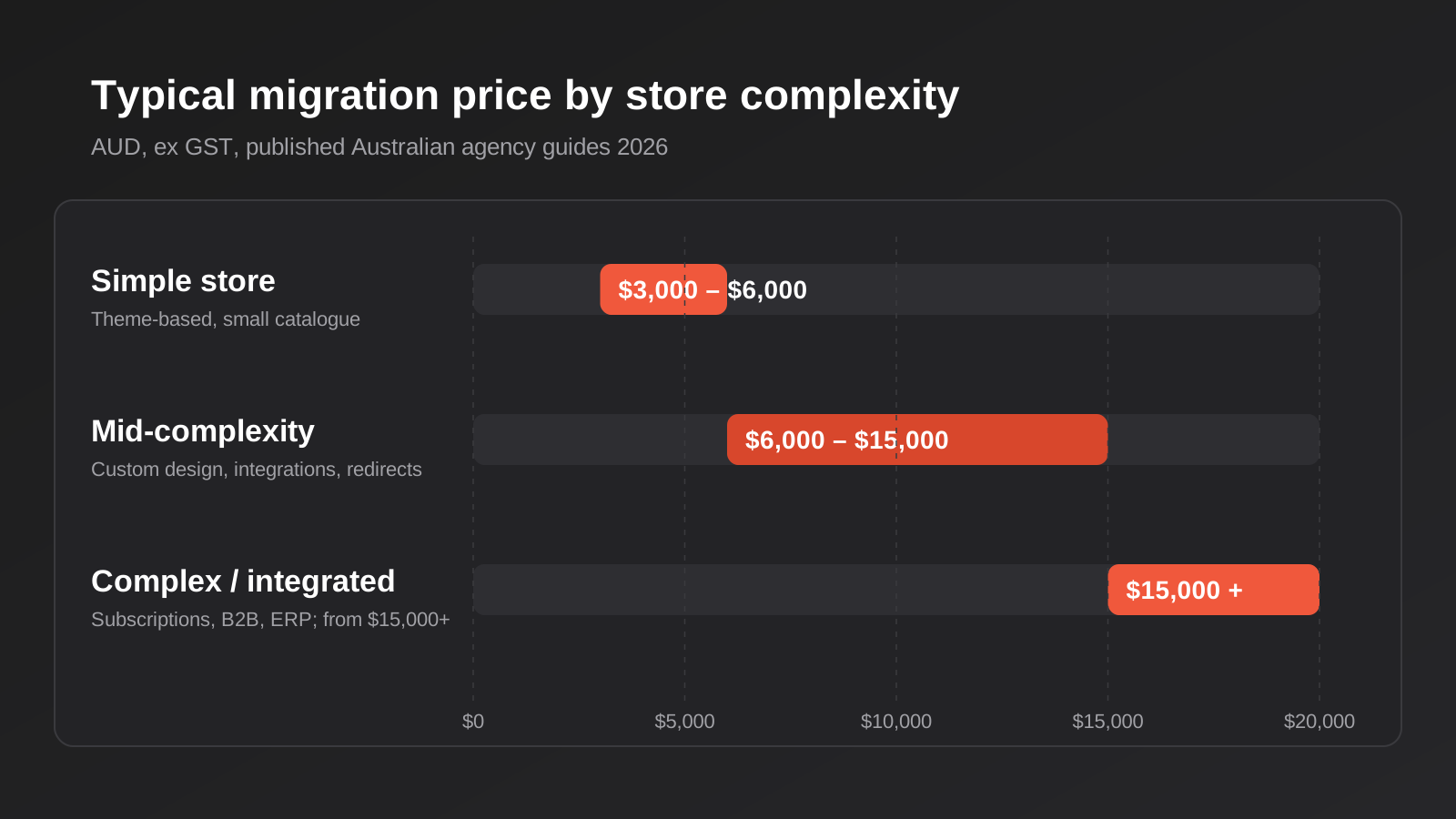
Notice how wide each band is. A $9,000 spread inside "mid-complexity" is not agencies being vague. It reflects how much variation sits underneath the label "migration". The sections below explain where that variation comes from.
How much weight to put on these numbers
Be honest about the evidence. There is no independent survey of what Australian stores actually paid for a WooCommerce migration. What exists is agency pricing pages, agency blog posts and a handful of comparison sites, and several international guides quote in US dollars without saying so. We have kept to the figures that are explicitly Australian or that several sources agree on. Where a number appears in only one place, as with the $20,000-plus enterprise tier, we have said so.
A good sanity check is to ask any agency you speak to for the last three migrations of a similar size to yours and what drove the price on each. If they can talk through that without hesitating, the number they give you is probably grounded in real work.
The do-it-yourself route, and where it stops working
Shopify offers a free store migration app, and third-party tools such as Cart2Cart and LitExtension price by the number of records moved, with entry prices in the tens of dollars. Spreadsheet-based tools such as Matrixify give you more control over how data is mapped. For a store with a modest catalogue and no history that matters, an owner who is comfortable with spreadsheets can get products and customers across for very little money.
Where it stops working is everything the tool does not do. A migration app moves records. It does not decide how your WooCommerce categories become Shopify collections, rebuild your checkout customisations, replace the six plugins that quietly run your store, write redirects for every old URL, or test that a repeat customer’s order history still looks right. Published reviews of the automated tools sometimes mention missed fields, such as brands or categories that did not come across, and prices that were wrong after import. The tool is cheap. The checking is where the cost sits, and if you skip it the bill arrives later as lost orders or lost rankings.
What Drives the Price Up or Down
When two quotes for the same store differ by thousands, the gap almost always traces back to one or more of the factors below. They are also the questions to answer for yourself before you ask anyone to quote, because the quote can only be as accurate as the brief.
1. Catalogue size and how messy it is
The number of products matters less than people expect. What matters is how they are structured. Fifty simple products take an afternoon. Fifty products with five attributes each, nested variations and per-variant pricing take far longer, because WooCommerce attributes and Shopify options and variants do not map one to one. Shopify also limits how many options and variants a product can carry, so a product that sprawls in WooCommerce may need to be split or restructured. If your catalogue has years of inconsistent naming, duplicate SKUs or missing images, the clean-up is often the largest hidden line in the project.
2. Customer and order history
Moving customers is straightforward. Moving order history properly is not. Historic orders need their line items, taxes, shipping and statuses to land in a form that is still useful for reporting and for customer service. Some stores decide they only need the last two years. Others, particularly B2B and subscription businesses, need all of it. Every extra year of history adds mapping and checking work, and customers will need a password reset flow, because passwords are hashed in a way that does not transfer.
3. Plugin replacement
A mature WooCommerce store usually runs on a stack of plugins: for bundles, wholesale pricing, product add-ons, shipping rules, loyalty points, reviews, filtering. Each one needs a decision. Shopify may do it natively, a paid app may replace it, or it may need custom development. This audit is where migrations are won or lost, and where a lot of the price difference between quotes comes from. A quote that has not asked for your plugin list has not priced your store.
4. Design: rebuild, adapt or reskin
Your WooCommerce theme will not come across. Shopify themes are built differently, so the front end is a rebuild in every case. The question is how ambitious that rebuild is. Installing and configuring a premium theme sits at the low end. A custom design that matches an existing brand closely, or a redesign you have been meaning to do anyway, sits much higher. Some stores treat the migration as the moment to refresh the site, which is sensible, but it should be priced as design work rather than hidden inside the migration line.
5. Subscriptions and recurring billing
Active WooCommerce Subscriptions are one of the hardest things to move. Billing cycles, stored payment methods and renewal dates all have to survive, and in many cases customers must re-authorise a payment method because card tokens cannot always be transferred between gateways. Expect this to add real cost, and to need a customer communication plan so you do not lose subscribers through confusion.
6. Integrations with the rest of your business
Most stores are connected to something: an accounting package, a warehouse or inventory system, a shipping platform, a CRM, a point-of-sale. Those connections have to be rebuilt or replaced, and testing them against live data takes time. A common one for Australian stores is order and payout syncing with Xero, which has its own GST mapping and fee-handling quirks. We cover that in more detail on our Xero and Shopify integration page. Anything involving an ERP is a larger piece of work again, and often better scoped as its own line in the quote.
7. SEO, URLs and redirects
WooCommerce and Shopify structure their URLs differently. Products move from a path like /product/name/ to /products/name, categories become collections, and blog posts, tag pages and attachments all need a destination. Redirects work only for URLs that no longer resolve, so the plan has to account for every address you want to keep. One agency guide claims that missing redirects routinely cost stores 20 to 50 per cent of organic traffic within weeks. We would not quote that figure as a law of nature, but the direction is right: a store that ranks for hundreds of products has a lot to lose, and the redirect map, metadata transfer and post-launch crawl check are what protect it. These tasks scale with the size of the site, which is why a high-traffic store costs more to move than a quiet one of the same catalogue size.
8. Payment gateways and checkout
If you currently use a gateway that Shopify does not support natively, or you rely on buy-now-pay-later options, local bank transfer flows or custom checkout fields, the checkout needs attention. Shopify’s own payments product is the simplest path, and using a third-party gateway instead can attract an extra transaction fee on top of the gateway’s own charges. The right answer depends on your volumes, but the decision needs to be made before launch, not on launch day.
9. Content beyond products
A blog with several hundred articles, landing pages built in a page builder, downloadable resources, a knowledge base. All of that is migration scope, and it is easy to forget when you are focused on the shop. Page-builder content in particular rarely transfers cleanly and often has to be rebuilt by hand.
10. Markets, currencies and languages
An Australian-only store charging in Australian dollars is the simplest case. Add New Zealand shipping, multiple currencies, tax rules for overseas buyers or a translated storefront, and each one adds configuration and testing. Shopify handles markets well, but the set-up still takes someone’s time.
Costs That Sit Outside the Quote
A migration quote covers the project. It does not cover what you pay afterwards, and some of those costs are new. This is the part of the budget that surprises people, so it deserves its own section.
Your Shopify subscription
Shopify bills you directly, and the agency does not control it. Published Australian figures put the three main plans at around A$56 a month for Basic, A$149 for Grow and A$575 for Advanced on monthly billing, with annual billing bringing the effective monthly cost down by roughly a quarter on some sources and less on others. Shopify Plus is quoted at wildly different amounts across third-party sites, from roughly A$2,900 to A$3,700 a month, so confirm on Shopify’s own pricing page before you plan around any of this. Card processing fees are separate again and depend on the plan.
Compare that with your current hosting, because the saving is real for some stores. A WooCommerce site on decent managed hosting often costs less per month than Shopify’s subscription, but it also tends to need paid plugins, developer retainers for updates and security patches, and the occasional emergency. What you are comparing is total cost of ownership, not one line of the invoice.
Apps
This is the biggest change for most merchants. Plugins you bought once or paid for annually become apps billed monthly. Reviews, subscriptions, wholesale pricing, upsells, advanced filtering and loyalty programmes commonly cost $15–$100 or more each month, and the total adds up quickly. One Australian guide suggests an all-in running cost of $250–$1,500 or more a month once platform, apps and care are combined. That range is wide because stores differ, but the principle holds: price the apps before you commit, and do it as part of the plugin audit.
A theme licence and a few stragglers
If you start from a premium theme, there is a one-off licence fee. Add stock photography, any domain or email changes, and fees for services like a product feed or a returns portal. None of them are large, but they should not be a surprise.
Overlap and parallel running
Your WooCommerce hosting and plugin licences usually have to stay live until the cutover is complete and the data is verified. Plan to pay for both platforms for a few weeks, and do not cancel the old site the day you launch. Keep it available, even offline, until you are confident nothing was missed.
Your own time
The invoice is not the whole cost. Someone on your side will need to review the product data, approve designs, test checkout, and answer questions during the project. A migration that sits waiting on content or decisions drags out and costs more on both sides. If you cannot spare the time, say so up front, because a good agency will scope the project around it.
The Pricing Models, Explained
Knowing how a quote is built tells you a lot before you read the detail. Migrations are usually sold in one of four ways.
Fixed price for a defined scope
The most common for small and mid-sized stores. You get a number against a written scope: how many products, which integrations, what is in and out. It suits you because you can budget with confidence. The catch is that a fixed price is only as good as the scope behind it. If the discovery was shallow, the agency either pads the price to cover its risk or raises change requests later. Ask what happens if the plugin audit turns up something that was not in the brief.
Paid discovery, then a fixed quote
Some agencies charge a small fee up front for a technical audit of your current store, then quote the build against what they found. This is often the more honest approach for complicated stores, because it replaces guesswork with evidence. The fee is usually credited against the project if you proceed. Be wary of agencies who give you a firm price for a complex store without ever looking inside it.
Time and materials
You pay for hours worked, usually with an estimate and a cap. It suits projects with real uncertainty, such as legacy custom code nobody has documented. The downside is that you carry the risk of overruns, so insist on regular budget reporting and a clear point at which the agency must stop and check in.
Per-record tooling
Automated migration tools charge by the number of products, customers and orders moved. That is fine as a line item inside a larger project. It is not a quote for a migration on its own, because it prices the data transfer and nothing else.
What a Good Migration Quote Should Include
A quote that can be compared is a quote that says what you are paying for. Before you accept one, check that it names each of these.
- A plugin and functionality audit. Every plugin and custom function on the current store, and what replaces each one. If this is missing, the price is a guess.
- Data scope, stated in numbers. How many products, customers and orders are being migrated, and how many years of order history. "All your data" is not a scope.
- Catalogue mapping. How categories, tags, attributes and variations will translate to collections, tags and variants.
- Design approach. A configured theme, a customised theme or a bespoke build, with a clear statement of how many templates are in scope.
- Redirect mapping. A redirect for every URL you want to keep, tested with a crawler before launch, and a metadata transfer so titles and descriptions come across.
- Integrations. Each connected system named, and whether the quote includes rebuilding it or only reconnecting an existing app.
- Payments and shipping set-up. Which gateways, which shipping rules, and who tests them.
- A staging rehearsal. A full trial run on a copy before the real cutover, so problems show up when they are cheap.
- A rollback plan. What happens if something goes badly wrong in the first hours after launch.
- Post-launch support. How many weeks of monitoring and fixes are included, and what happens after.
- Training and handover. Whether your team gets shown how the new store works.
- GST and payment terms. Stated clearly, with milestones tied to deliverables rather than dates alone.
Reading three quotes side by side
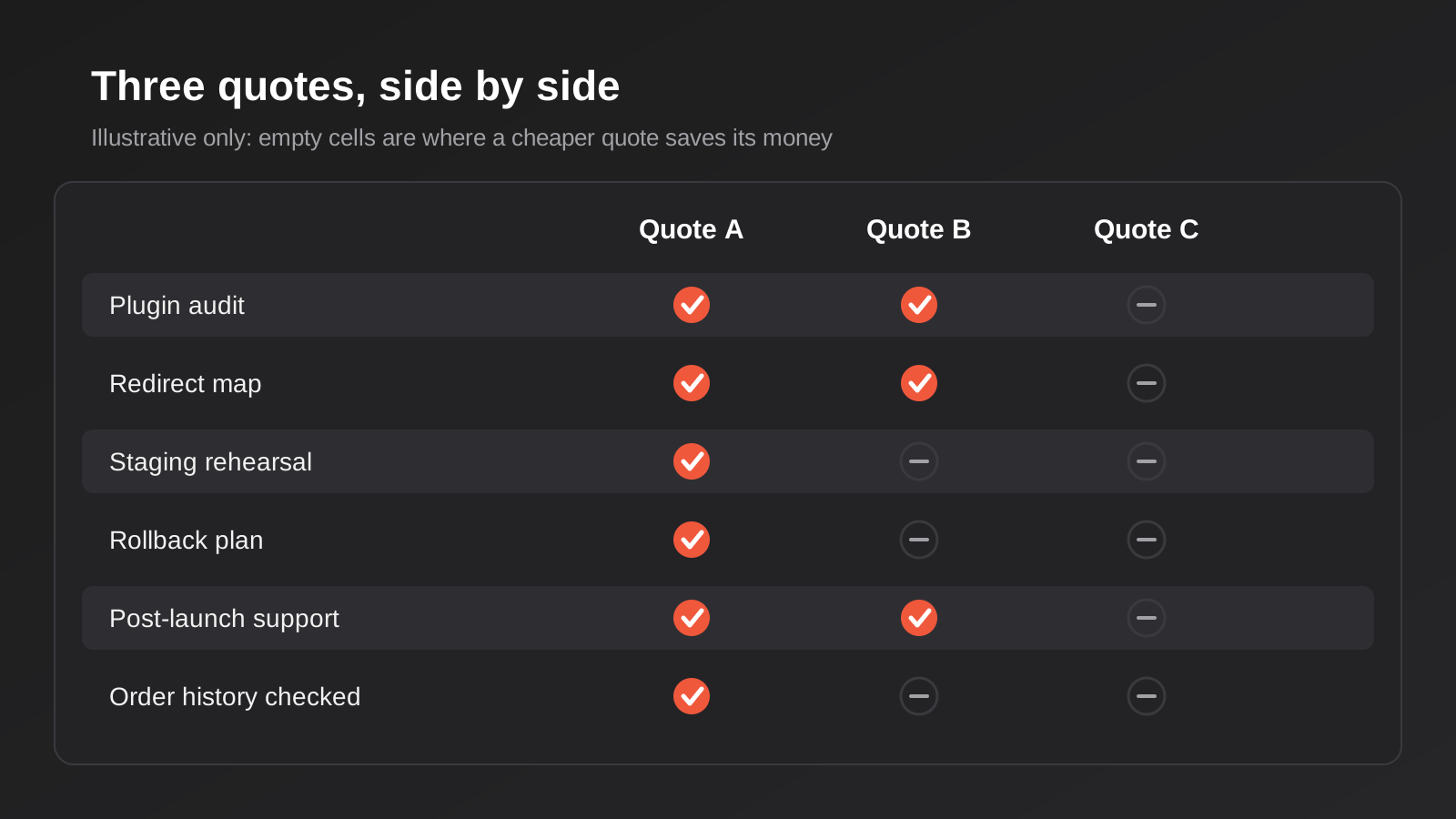
When you have three quotes, put them in a table with the same rows: price ex GST, data scope, plugin audit, design approach, redirect mapping, integrations, staging, rollback, support period. Blank cells tell you more than the headline price. If one quote is $2,500 cheaper than the others and has four empty rows, you have found out where the saving comes from. If two quotes are close in price but one is far more specific about what is and is not included, favour the specific one. Vague proposals produce vague delivery, and disputes usually start in the gap between what you assumed and what was written down.
What a Cheap Migration Quote Usually Leaves Out
There are legitimate low-cost migrations, especially for a small store with a clean catalogue. But when a quote lands well below the bands above, one of a few things is usually going on.
The redirects are thin or missing. This is the most damaging omission and the hardest to spot, because the store looks fine at launch. The damage shows up in Search Console over the following weeks. If a quote does not mention a redirect map in specific terms, ask.
There is no staging rehearsal. Running the migration straight onto the live store saves time and money and removes the safety net. If data maps wrongly, you find out with customers watching.
The data transfer is automated and unchecked. An import tool runs, someone glances at the result, and the project is declared done. Missing variants, mangled descriptions and orders with the wrong totals are common outcomes when nobody reconciles the numbers against the source.
Plugins are ignored. The new store launches without the wholesale pricing, bundle logic or shipping rules the old one had, and you discover the gap when customers complain. It is cheaper to replace those on purpose during the project than in a panic afterwards.
Support ends at launch. The first week after cutover is when the odd problems surface. A quote with no post-launch monitoring has left the riskiest period unaccounted for.
The reverse also holds. The most expensive quote is not automatically the safest, and some of what large agencies charge is overhead rather than protection. What you want is to see what each dollar buys.
Timeline, Timing and Cash Flow
Cost and time are linked, because agency time is what you are buying. Smaller, simpler stores can move in a few weeks. We see most mid-market WooCommerce stores take around eight to twelve weeks from kick-off to launch, with the longer end for stores carrying subscriptions, several gateways or years of history. Anyone offering a heavily customised store in a fortnight is either cutting steps or working from a very clean starting point.
Timing matters as much as duration. Do not schedule a cutover in the weeks before Black Friday, Christmas or any seasonal peak where a hiccup would cost you serious revenue. The sensible window is a quiet trading period, with enough runway after launch to fix issues before the next rush. If you must migrate close to a peak, ask for a more conservative plan and be ready to pay for extra monitoring.
On cash flow, most agencies bill migrations in milestones: a deposit, a payment at design approval, a payment at staging sign-off and a final payment at launch. That structure protects both sides, as long as each milestone is tied to something you can verify. Be cautious of a quote that asks for most of the money before any work is visible.
Should You Migrate at All?
A cost guide that assumes you should migrate is not much use, so a brief word on the other side. WooCommerce is a capable platform, and plenty of stores run it well. Migration usually makes sense when you are fighting hosting performance during sales, spending more each month patching and fixing plugin conflicts than the platform would cost, or struggling with a checkout that has been stitched together over the years. It makes less sense when your store is stable, your developer is reliable and the main driver is that Shopify seems like the thing to do.
Some businesses also split the difference: keep WordPress for content and move only the commerce side to Shopify. That is a legitimate option, and it changes the shape of the project because the blog and marketing pages stay put. If you are still weighing platforms, our comparison of Shopify and WooCommerce for Australian stores sets out the trade-offs without a migration sales pitch.
Common Mistakes When Budgeting a Migration
- Budgeting for the build and forgetting the running costs. Add up the Shopify plan, the apps and any care plan before you decide the move saves money.
- Choosing on price alone. The cheapest quote and the best-value quote are rarely the same. Compare scope first, then price.
- Skipping the plugin audit. It feels like a delay. It is the cheapest insurance in the project.
- Moving everything, including rubbish. Dead products, test orders and ten years of abandoned carts do not need to come across. Cleaning first lowers the cost and the risk.
- Treating redirects as a launch-day chore. They need to be mapped, tested and checked after launch, not thrown together on the last afternoon.
- Cancelling WooCommerce too early. Keep the old store and its backups until you have reconciled orders, customers and revenue figures.
- Migrating into a peak trading period. A quiet fortnight is worth more than a perfect schedule.
- Not setting up tracking on day one. Analytics, conversion events and ad pixels need to be live at launch, or you lose the comparison data you need to see whether the move helped.
- Letting the project drift. Delays on your side with content and approvals raise the cost on theirs. Agree who owns each decision and by when.
- Accepting a quote with no written scope. If it is not written down, you cannot hold anyone to it.
Frequently Asked Questions
How much does it cost to migrate from WooCommerce to Shopify in Australia?
Published 2026 Australian figures put a simple, theme-based migration at about $3,000–$6,000, a mid-complexity store at roughly $6,000–$15,000, and complex or integrated stores at $15,000 or more, usually excluding GST. The spread comes from catalogue structure, plugin replacement, order history, integrations and the amount of redirect and SEO work. Ongoing Shopify and app costs are separate.
Can I migrate from WooCommerce to Shopify for free?
You can move basic data with Shopify’s free store migration app or an inexpensive third-party tool, and for a very small store that may be enough. What it will not do is rebuild your design, replace your plugins, write redirects or test the result. Those jobs still need time, whether yours or an agency’s, so free describes the transfer, not the project.
Will I lose my Google rankings if I move to Shopify?
Not necessarily, but the risk is real and it is mostly about redirects and metadata. Old product, category and blog URLs need to point to their new equivalents, titles and descriptions need to carry across, and the result should be crawled before and after launch. Expect some short-term movement even on a clean migration, and monitor Search Console for several weeks.
How long does a WooCommerce to Shopify migration take?
Simple stores can move in a few weeks. Most mid-sized stores take eight to twelve weeks from kick-off to launch, and stores with subscriptions, several payment gateways or years of order history sit at the longer end. Delays in supplying content or approving designs are the most common reason a project runs over.
Is Shopify cheaper to run than WooCommerce?
It depends on your setup. Shopify’s subscription is a predictable monthly fee, but apps add up and transaction fees apply if you use a third-party gateway. WooCommerce can look cheaper until you count hosting, premium plugins, security and developer time. Compare the total cost of running each over a year, not a single line on the bill.
Do I have to pay for two platforms at once?
Usually, for a short time. Your WooCommerce hosting stays live while the new store is built and verified, and many agencies recommend keeping it available for a few weeks after launch as a reference and a fallback. Once your orders, customers and revenue figures reconcile, you can wind it down.
Where to Start
Before you ask anyone for a quote, spend an hour on a one-page brief. Count your products, active customers and orders, and decide how many years of history you really need. List every plugin on the store and what it does. Write down the systems connected to it, the payment gateways you use and the five landing pages that bring in the most organic traffic. Then pull your top URLs from Search Console, so you can see exactly what needs protecting.
Send the same brief to every agency you speak to and ask each of them to answer the same questions: what would you move, what would you replace, how will you protect the URLs, how will you test it and what happens after launch. The agencies that engage with the specifics of your store are the ones worth continuing the conversation with. The ones that reply with a number and nothing else are telling you how closely they have looked.
For the build side of the work, our Shopify pricing page shows what our fixed store packages cover, which gives you a reference point for the rebuild portion of any quote. For the move itself, our WooCommerce to Shopify migration page explains how we approach it, and we scope each one against the actual store.
Worth putting a number on it: because we run lean as a specialist agency rather than carrying a large account-management layer, our fixed quotes typically come in below the Australian averages covered in this guide. If you’ve already got a written quote from another agency for comparable scope, send it through and we’ll do our best to beat it.
Keep reading
Related posts
How Much Does an AI Chatbot Cost in Australia? A 2026 Pricing Guide
What an AI chatbot costs in Australia in 2026: three pricing tiers, the running costs people miss, and how to compare quotes…
How Much Does Custom Software Development Cost in Australia? Build Cost vs Five Years of Licences (2026)
What custom software development costs in Australia in 2026: ranges by project type, integration costs, running costs, and how the build compares…

How Much Does It Cost to Build an App in Australia? A 2026 Price Guide
What it costs to build a mobile app in Australia in 2026: realistic ranges by complexity, what drives the price, cross-platform vs…
Got a project you'd like to talk through?
Tell us what you're working on — we'll come back with a plan.
