
Design Systems: Do You Actually Need One? A Practical Guide for Australian Businesses (2026)
 Jignesh Vagadiya
16/09/2026
21 min read
Jignesh Vagadiya
16/09/2026
21 min read
A client asked us last month why their new hire had rebuilt the same dropdown menu three different ways across three pages of the same site. Nobody had told her not to — there was no version to copy from, no rule to follow, just whatever the previous developer had shipped and moved on from. Multiply that by every button, form field and card layout on a growing website or app, and you get the quiet, compounding mess that most businesses call “just how the site is.”
That mess has a name in design circles: design debt. And the fix people reach for — a design system — has become one of those terms that gets thrown around a lot, usually by people selling something. Some businesses genuinely need one and are years overdue. Plenty of others would be wasting money building one right now, and a simpler component library or even a tidy style guide would do the job just as well.
This guide is about telling the difference. We’ll cover what a design system actually contains, the specific signs that tell you it’s time, what one costs in Australia in 2026, how to build one without turning it into a six-month side project that never ships, and the mistakes we see most often when businesses try to do this themselves.
Most of what gets written about design systems is aimed at large product teams — Atlassian, Shopify, Google Material — and reads like it was written for a hundred-person engineering org with a dedicated systems team. That’s not who this is for. The useful version of this decision applies just as much to a fifteen-person business running a website, a customer portal and a handful of landing pages, where the stakes are smaller but the underlying problem — inconsistent UI, wasted rebuild time, a rebrand that touches forty files instead of four — is exactly the same.
What a Design System Actually Is (and Isn’t)
The phrase gets used loosely enough that it’s worth being precise. A design system is a coded, maintained library of components — buttons, inputs, cards, navigation, modals — built from a shared set of visual rules, documented well enough that a designer or developer can pick them up and use them correctly without asking someone else first. It lives partly in a design tool like Figma and partly in code, and the two are meant to stay in sync.
That’s different from a few things it often gets confused with.
Design System vs Style Guide vs Brand Guidelines
Brand guidelines are the broadest of the three. They cover strategy, tone of voice, logo usage and the visual identity at a conceptual level — the kind of document a marketing team hands to an external agency so a campaign doesn’t look off-brand. We’ve written separately about the difference between brand identity and visual identity, and a design system sits downstream of both.
A style guide is narrower: colours, type, logo lockups, spacing rules, usually as a static PDF or a page of examples. It tells a designer what things should look like. It doesn’t tell a developer how to build them, and it doesn’t come with working code.
A design system includes a style guide’s content but goes further — it’s functional, not just descriptive. Instead of a picture of a button, you get an actual button component with defined states (default, hover, disabled, loading), built once and imported everywhere it’s needed. That’s the difference that actually matters for a growing business: a style guide gets read once and forgotten; a design system gets used every time someone ships a screen.
What’s Actually Inside One
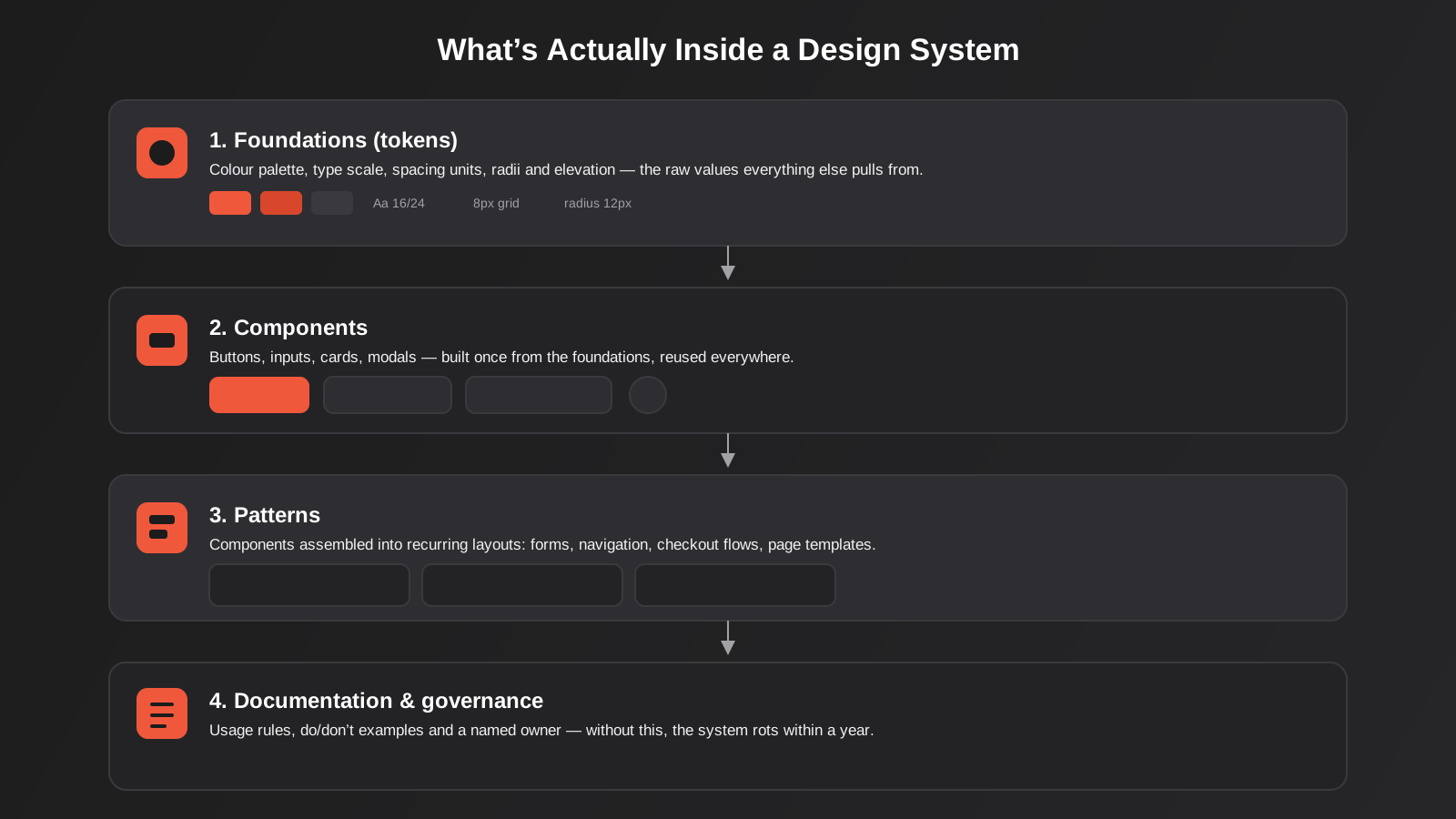
Strip away the jargon and a design system is four layers, each built on the one below it.
- Foundations (or “tokens”) — the raw values: your colour palette, type scale, spacing units, border radii, shadows. These get defined once as variables, not hard-coded into every component.
- Components — buttons, form fields, cards, tooltips, modals, navigation bars. Each one is assembled from the foundations and built to handle every state it needs to handle.
- Patterns — components combined into recurring layouts: a checkout flow, a settings form, a dashboard card grid, a search results page.
- Documentation and governance — the usage rules, the do/don’t examples, and critically, a named person or team responsible for keeping it current.
Most businesses that attempt a design system and abandon it within a year build the first two layers and skip the fourth entirely. Without an owner, the system drifts out of sync with what’s actually shipped within a couple of quarters, and everyone quietly goes back to copying and pasting.
Naming matters more than it sounds like it should. A token called “orange” breaks the moment the brand introduces a second orange for a different purpose — a warning state, say. A token called “primary-500” or “action-default” describes the role the colour plays rather than the colour itself, which means the underlying hex value can change during a rebrand without anyone needing to rename or re-map a single component. This one habit, applied consistently from the start, is the difference between a system that survives a visual refresh and one that has to be rebuilt during it.
The Signs You Actually Need One
Design systems have a well-documented failure rate — most estimates put successful, still-maintained systems at well under half of everything started. The most common reason isn’t bad execution. It’s starting too early, before the pain the system is meant to solve actually exists yet.
The Rule of Three
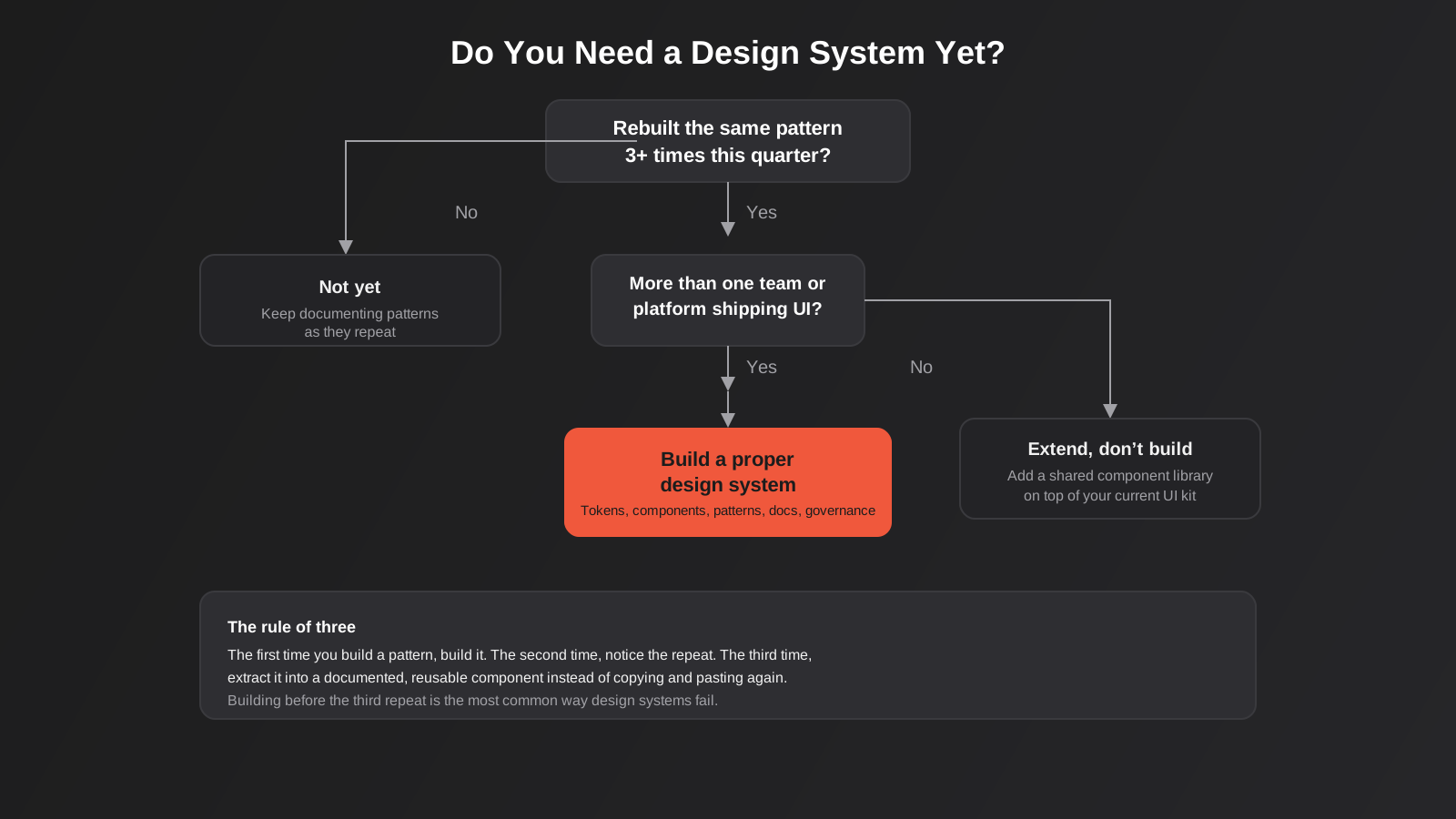
The rule of three is a genuinely useful filter: the first time you build a UI pattern, you just build it. The second time you need something similar, you notice the repeat but it’s still faster to copy the old code than to formalise it. The third time, that’s the signal — extract it into a proper, documented, reusable component instead of copying and pasting again. If you haven’t hit that third repeat on more than a handful of patterns, you’re probably not ready for a full system yet, and that’s fine.
Symptoms of Design Debt
In practice, these are the things that tell us a client has crossed the line from “would be nice” to “actively costing you money”:
- Two or more people or teams are shipping UI independently — an in-house developer and an agency, a product team and a marketing team, or separate teams for web and app — and their output doesn’t match.
- Every new feature or landing page takes noticeably longer to build than it should, because nobody can find or trust the last version of a similar component.
- QA keeps finding the same category of bug (a form validation state, a broken hover state) in slightly different places because it was implemented slightly differently each time.
- A rebrand or visual refresh means touching dozens of files individually instead of updating a handful of shared tokens.
- New hires take weeks to become productive because there’s no reference for “how we build things here.”
If three or more of those are true, the ROI case is usually straightforward. Organisations that adopt a mature design system report meaningfully faster time to market and lower combined design and development costs, and the productivity gain compounds — designers using a system reliably complete tasks faster than those working from scratch each time, because the decisions are already made.
There’s a quieter symptom worth naming too: nobody trusts the current UI enough to reuse it. When a developer starts a new page from a blank file rather than duplicating an existing one, that’s usually not laziness or a lack of process — it’s a reasonable response to a codebase where the existing components are inconsistent enough that copying one forward feels riskier than starting fresh. That instinct, multiplied across a team, is exactly what a design system is meant to fix.
When You Don’t Need One Yet
If you’re a single-founder business, a small team shipping one website with one designer and one developer, or a startup that’s still finding product-market fit and changing its UI weekly, a full design system is very likely premature. The rule for most teams in this position is to extend, not build: adopt an existing component library (Shadcn, Radix, Material, or whatever suits your stack), theme it to match your brand, and hold off on the documentation and governance overhead until the patterns you’re repeating are actually stable. Building a bespoke system before your product has settled means rebuilding the system every time the product changes — which is the opposite of the time saving you were chasing.
What It Costs and Who Builds It
Pricing a design system is harder than pricing a website, because the scope is genuinely variable — a system for a five-page marketing site with one product is a different job to one covering a web app, a customer portal and a marketing site across three teams.
Realistic Australian Cost Ranges
As a rough guide for 2026, based on scope rather than headline day rates:
- A foundational token set plus a core component library (10–25 components, covering the essentials: buttons, inputs, cards, navigation, modals, alerts) typically runs from the low five figures for a lean build up to the mid five figures for a more polished, fully documented version with Figma and code kept in sync.
- Extending an existing open-source component library with your brand’s tokens and a handful of custom components is meaningfully cheaper — often a few thousand dollars — because you’re not building primitives from scratch.
- A full enterprise-grade system covering multiple products, accessibility auditing, a published component package, and ongoing governance can run well into six figures over its first year, though that scale is rarely justified outside larger, multi-product organisations.
The honest answer to “what should this cost me” is: price the problem, not the deliverable. A design system that saves your team two days a week of rebuilding the same patterns pays for itself in a few months at almost any of the ranges above. One built because it sounded like the professional thing to do, for a team that wasn’t hitting design debt yet, is money that could have gone into the product itself. If you want a general sense of how this compares to other web and design spend, our pricing guide breaks down typical ranges across design, development and marketing services.
In-House vs Agency vs Hybrid
Three realistic paths, and each suits a different situation:
- In-house build makes sense if you already have a senior designer and developer working closely together and the system only needs to serve your own product. It’s the cheapest option in cash terms but the slowest, because it competes for time with everything else on the roadmap.
- Agency build is faster and brings pattern-library experience from other clients, which matters more than it sounds — a lot of the early decisions (token naming conventions, component API design) have already been made wrong by someone else, and an experienced team won’t repeat those mistakes.
- Hybrid — an agency scaffolds the foundations, core components and documentation structure, then an in-house team extends it — is what we recommend most often for growing businesses. It gets the expensive, easy-to-get-wrong groundwork done properly, then hands over something a smaller internal team can maintain without needing design-system specialists on staff permanently.
Questions to Ask Before You Scope This
Whoever ends up quoting the work, walk in with answers to these, because they change the price more than anything else:
- How many distinct products or surfaces need to share the system — one website, or a website plus an app plus a customer portal?
- Is there an existing brand identity and visual language to work from, or does that need defining first? A system built before the brand is settled tends to need reworking once it is.
- What’s the current tech stack, and does it already lean on an open-source component library that can be extended rather than replaced?
- Who, realistically, will own this after handover — and do they have the time genuinely allocated, not just the title?
- Is accessibility compliance a hard requirement (government, education, healthcare, larger enterprise) or a nice-to-have? This materially changes the testing and component-build effort.
How to Build One Without Over-Engineering It
The single biggest mistake in this space is building top-down: someone decides the business needs a design system, blocks out six weeks, and starts drawing every component the team might conceivably need. Most of those components never get used, the six weeks becomes four months, and momentum dies before anything ships. The better approach works from evidence, not ambition.
Start With an Audit, Not a Library
Before anyone opens Figma to draw a new component, audit what already exists. Screenshot every button, form and card currently live across your site or app. You’ll typically find far more variation than anyone expected — five slightly different primary buttons, three card border-radius values, a handful of orphaned colours that don’t appear anywhere in the brand palette. This audit does two things: it tells you exactly which patterns are repeated often enough to justify formalising (the rule of three, applied with evidence instead of guesswork), and it gives you a realistic starting scope instead of an imagined one.
Tokens First, Components Second
Define your foundations before you draw a single component. Colour tokens (not just “orange” but “primary-500”, “primary-600”, with clear escalation for hover and active states), a type scale with defined line-heights, an 8-point spacing scale, and consistent radius and shadow values. This sounds like unnecessary ceremony until you try to update a brand colour six months later and realise it’s hard-coded in forty different places instead of one variable. Tools like Tokens Studio for Figma let you define these once and sync them into code, which is where most of the “46% cost reduction” style statistics you’ll read about design systems actually come from — not the components themselves, but not having to touch forty files to change one value.
Documentation People Actually Use
Documentation that lives in a Google Doc nobody opens is documentation in name only. The pattern that works: document each component next to where it lives in code (Storybook is the standard tool for this — every component gets its own interactive “story” showing its states, so a developer can see and test it without digging through the app itself), and keep the rules short. A do/don’t example with one sentence of explanation beats three paragraphs of prose every time, because nobody reads the prose under deadline pressure.
Governance — Who Owns It After Launch
This is the step almost everyone skips, and it’s the one that determines whether the system is still being used in eighteen months. Someone needs to own three ongoing jobs: reviewing requests for new components (and pushing back on one-off additions that should just be a variant of something that already exists), auditing the live product periodically to catch drift, and communicating changes when tokens or components get updated. This doesn’t need to be a full-time role for a small-to-mid-sized business — often it’s a few hours a month bolted onto a senior designer or developer’s existing responsibilities — but it needs to be someone’s explicit job, not an assumption that “someone” will keep it tidy.
Tools of the Trade
The tooling landscape has settled enough by 2026 that most teams land on a similar stack. Figma remains the design layer for the overwhelming majority of teams, with Tokens Studio (formerly Figma Tokens) as the near-default plugin for managing design tokens and syncing them to code via Git. On the code side, Storybook is the standard for documenting and testing components in isolation, regardless of whether the underlying framework is React, Vue or something else. For the component primitives themselves, most new builds in 2026 start from an existing open-source foundation — Radix or Shadcn for React teams, Material for Android-aligned products — rather than building buttons and dropdowns completely from scratch, because accessibility and keyboard-navigation behaviour is already solved in those libraries and re-solving it rarely adds value.
None of this tooling is the hard part. Teams get into trouble skipping the audit and governance steps above, not from picking the wrong plugin.
One decision worth making early is how the components actually get distributed to developers. Smaller teams often just keep components in the main codebase and import them directly, which is simple but means every project using the system needs to be on the same repository. Larger or multi-product setups usually publish the component library as a private npm package with proper semantic versioning, so a change to the button component can roll out to the marketing site in one sprint and the customer portal in the next, rather than forcing every consumer to update on the same day. Getting this wrong the first time isn’t fatal, but it’s one of the more expensive things to change later, so it’s worth deciding deliberately rather than defaulting to whatever’s quickest that week.
Measuring Whether It’s Working
A design system is an investment, and like any investment, it should be possible to point to evidence it’s paying off. The metrics that actually mean something:
- Component adoption rate — what proportion of live UI is actually built from system components versus one-off custom code. Below roughly 70–80% after the first year, something in the rollout or documentation isn’t working.
- Time-to-ship on new features or pages, tracked before and after. This is the number that justifies the spend to whoever holds the budget.
- Bug rate on UI-related issues, particularly repeated categories like inconsistent form validation or broken responsive behaviour — these should drop noticeably once components are centralised.
- Design-to-development handoff time — how long it takes a developer to turn an approved design into shipped code, which should shrink once both sides are working from the same component library instead of translating a static mockup by eye.
If none of these are improving six months in, that’s not necessarily a sign the system was a bad idea — it’s usually a sign adoption stalled, which loops back to governance and documentation rather than the initial build quality.
Component adoption is easier to measure than it sounds. A quick codebase search for how many times a raw HTML button or a one-off styled div appears versus how many times the actual Button component gets imported gives a rough but honest picture in about ten minutes, without needing any specialist tooling. Run that same search again a quarter later and you’ll know immediately whether the system is being adopted or quietly ignored.
Common Mistakes
- Building every component you can imagine before shipping anything. Start with the handful of components that appear on every page — buttons, inputs, cards, navigation — and add the rest as real need appears.
- Treating it as a design-only project. A design system that exists only in Figma and was never handed to developers with working code isn’t a design system, it’s a mood board with extra steps.
- No named owner after launch. Systems without an accountable maintainer drift out of sync with the live product within a couple of quarters and quietly stop being trusted.
- Copying someone else’s system wholesale. A component library built for a SaaS dashboard doesn’t map cleanly onto an ecommerce storefront or a marketing site. Borrow structure, not content.
- Skipping the audit. Teams that jump straight to building components almost always rebuild patterns that didn’t need formalising and miss ones that desperately did.
- No accessibility baked in from the start. Retrofitting keyboard navigation, focus states and screen-reader labelling onto components that are already in wide use is far more expensive than building it in from day one.
- Confusing “consistent” with “identical.” A good system still allows sensible variation — a marketing landing page and a settings form don’t need to look the same, they need to share the same underlying language.
- Letting one-off “just this once” exceptions pile up. Every exception someone approves under deadline pressure becomes precedent for the next person. A system with twenty silent exceptions within its first year isn’t really a system any more, it’s the same inconsistency with extra documentation sitting unused beside it.
Frequently Asked Questions
Do small businesses need a design system?
Almost never in the full sense described here. If you’re a small business with one website and no in-house development team, a tidy style guide and a themed off-the-shelf component library will do everything you need at a fraction of the cost. A full design system earns its keep once multiple people or teams are independently shipping UI and the inconsistency between their output is visible to customers or costing real development time.
What’s the difference between a design system and a UI kit?
A UI kit is usually a static set of design assets — a Figma file of components you can copy, without the coded implementation or the governance behind it. A design system includes a UI kit as its design-facing layer but pairs it with working, maintained code and documentation, so the same component looks and behaves identically whether a designer is mocking it up or a developer is shipping it.
How long does it take to build a design system?
A lean, well-scoped foundational system (tokens plus 10–20 core components, documented) typically takes four to eight weeks once the audit is done. Anything promising a comprehensive system in two weeks is either working from an existing template with minimal customisation or setting you up for a rebuild later. Extending an existing open-source library instead of building from scratch can shrink this to two to three weeks. The timeline moves less on component count and more on how much internal review and sign-off each token decision needs — a business with one decision-maker moves noticeably faster than one where the system has to be approved by marketing, product and engineering separately.
Can we use a design system with WordPress or Shopify instead of a custom-built product?
Yes, though the scope looks different. On a block theme, a design system tends to focus on a shared set of custom blocks, colour and typography tokens defined in theme.json, and documented usage rules for content editors, rather than a full component library with interactive states. It’s still worth doing if multiple people edit the site and the visual inconsistency between pages is becoming obvious — it just costs less and moves faster than a full product design system.
Who should own the design system once it’s built?
Ideally a senior designer and senior developer jointly, with one of them holding final say on new additions. In smaller teams this is often a part-time responsibility layered onto an existing role rather than a dedicated headcount. What matters is that it’s a named, accountable person rather than an implicit assumption that the system will maintain itself.
Does a design system replace the need for a UX/UI designer?
No — if anything it changes what a designer spends time on. Instead of redrawing the same button and form patterns for every new screen, a designer working from a system spends more time on the harder, higher-value problems: user flows, information architecture and the genuinely new interface problems the system doesn’t already solve. We cover the broader principles behind that kind of design work in our guide to UX/UI design principles that actually convert.
Where to Start
If you recognise more than a couple of the design-debt symptoms above, the first useful step isn’t hiring anyone or opening Figma — it’s the audit. Spend half a day screenshotting every button, form and card currently live on your site or app and lay them side by side. That single exercise usually tells you, more honestly than any sales pitch will, whether you’re looking at a genuine design system project or a much smaller tidy-up.
We build these both ways — full systems for teams that have outgrown ad hoc UI, and lighter component libraries for teams that just need consistency without the overhead — and our design systems service covers both ends of that range. And if what you’re actually describing is a shakier visual identity rather than inconsistent UI components, it’s worth starting with our branding and visual identity work instead, since a design system built on an unsettled brand tends to need reworking anyway. If you’re not sure which one you actually need yet, that’s a reasonable place to start the conversation. Get in touch and we’ll help you work out the real scope before anyone quotes you a number.
Keep reading
Related posts
Dark Patterns in Website Design: What Australia’s Unfair Trading Practices Law Means for Your Site
Dark patterns in website design explained: what counts, how Australia’s incoming unfair trading practices law applies, and what to build instead.
Graphic Design for Australian Businesses: What You Actually Need (and When Canva Stops Being Enough)
What graphic design actually covers for Australian businesses, real 2026 pricing, and a practical framework for when DIY tools stop being enough.
UX/UI Design Principles That Actually Convert: A 2026 Guide for Australian Websites
A practical guide to the UX and UI design principles that genuinely move conversion — friction, hierarchy, trust signals and a five-point…
Got a project you'd like to talk through?
Tell us what you're working on — we'll come back with a plan.
