
WhatsApp Business API Automation for Australian Businesses: Orders, Bookings and Support (2026)
 Jignesh Vagadiya
14/10/2026
21 min read
Jignesh Vagadiya
14/10/2026
21 min read
A Melbourne allied health clinic we spoke with recently was running appointment reminders through a mix of manual texts and a receptionist checking a spreadsheet twice a day. Half their no-shows happened on days the receptionist was out sick. Switching the reminders to WhatsApp didn’t fix the spreadsheet — it fixed the part where a human had to remember to send anything at all.
That’s the gap most Australian businesses hit with WhatsApp. Everyone already has the app on their phone, and plenty of businesses already reply to customers on it. The jump from “we use WhatsApp” to “WhatsApp runs part of our operation automatically” is a different piece of infrastructure entirely, with its own pricing model, its own compliance obligations, and its own failure modes if you wire it up badly.
We’ve covered AI chatbot platforms and AI chatbots for customer support on this blog before, and both touch on messaging channels in passing. This one is narrower and more technical: how WhatsApp Business API automation actually gets built in Australia, what it costs under Meta’s current pricing structure, and the compliance rules that catch businesses who treat a Meta template approval as a free pass.
The app and the platform are not the same product
The confusion starts here, and it’s worth being blunt about it. WhatsApp Business — the free app you download from the App Store — and the WhatsApp Business Platform, usually called the API, solve different problems.
What the free app actually limits
The app is built for a single person managing a single phone, with a handful of productivity features bolted on: a catalogue, quick replies, labels, and basic auto-replies for away messages. It works fine for a sole trader or a two-person team fielding a manageable volume of enquiries by hand.
It falls over the moment more than one person needs to answer messages from the same number, or the moment you want a message sent automatically because something happened in another system — an order shipped, a booking was confirmed, an invoice is overdue. The app has no API to connect to. There is nothing for a workflow automation tool to call, and no way to trigger a reply from outside the app itself.
What the Platform unlocks
The WhatsApp Business Platform gives you a phone number connected to an API instead of a single device. Multiple staff can work from a shared inbox, messages can be read and sent programmatically, and — critically for this post — incoming messages can trigger a webhook that a workflow tool picks up and acts on.
Meta doesn’t sell platform access directly to most businesses. You go through a Business Solution Provider, usually shortened to BSP — a company Meta has approved to provision numbers, host the technical integration, and in most cases give you a dashboard on top of the raw API. Twilio, 360dialog, Gupshup and Interakt are the names that come up most often; we’ll come back to how they differ.
How WhatsApp Business API automation pricing actually works in 2026
This is the part that trips up budgets, because the model is genuinely different from SMS or email and it has changed more than once since the Platform launched. Get this wrong in a proposal and you’ll either scare a client with an inflated number or blow through a real budget by October.
Four message categories, not one flat rate
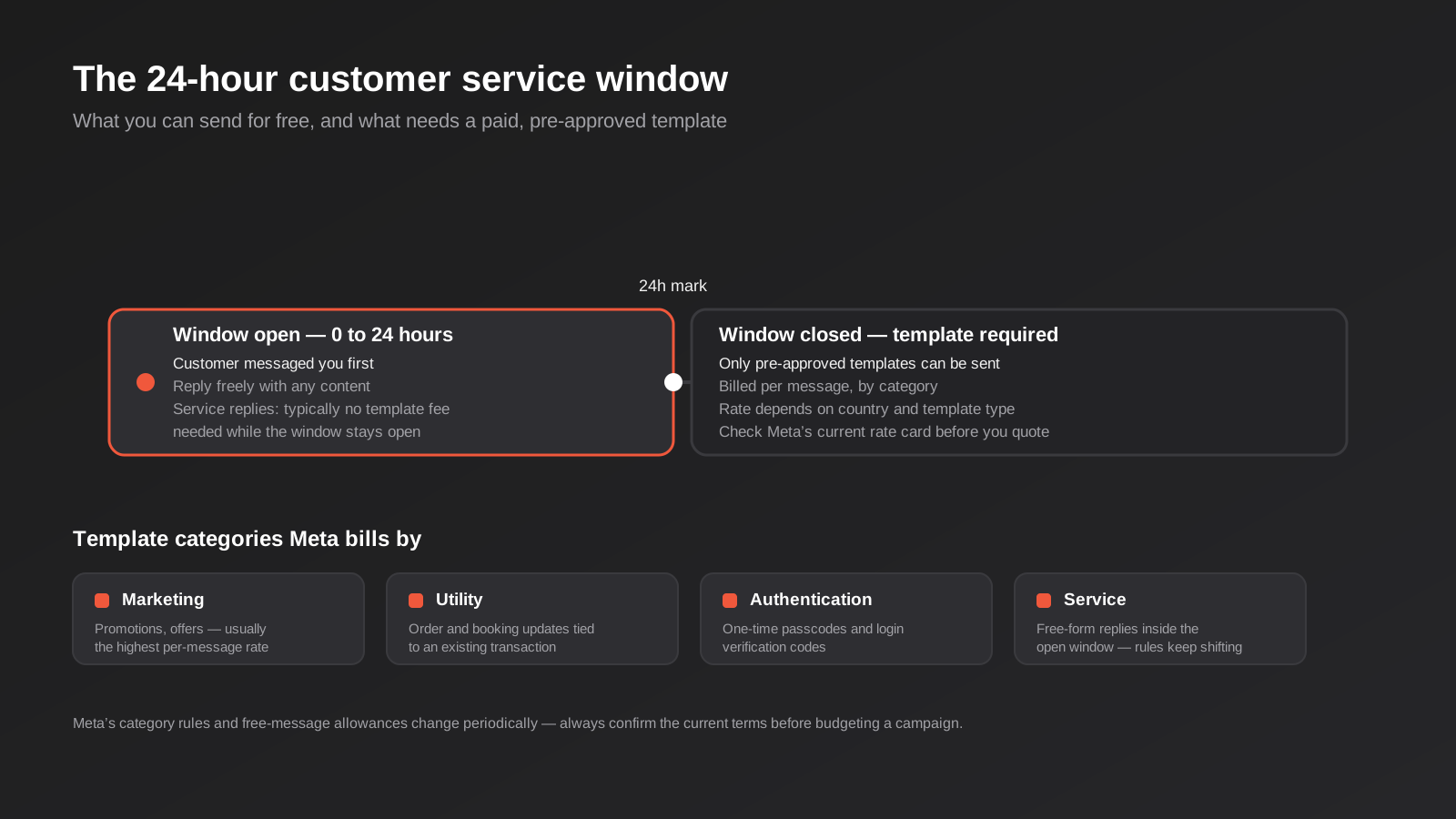
Meta bills by template message category, and the rate depends on both the category and the recipient’s country. The categories are:
- Marketing — promotions, offers, re-engagement. Usually the highest per-message rate, because it’s the category closest to advertising.
- Utility — updates tied to an existing transaction: order confirmations, shipping updates, booking reminders, payment receipts.
- Authentication — one-time passcodes and login verification codes.
- Service — free-form replies you send inside an open conversation window, rather than a pre-approved template.
The diagram below shows how the categories sit alongside the mechanism that actually determines whether you’re billed at all: the 24-hour customer service window.
The 24-hour window is the mechanism that matters most
When a customer messages you first, a 24-hour customer service window opens. Inside that window you can reply with whatever content you like — no template, no pre-approval. Once the window closes, you can only reach that customer again with a pre-approved template message, and that template gets billed according to its category.
This is why so many WhatsApp automations are designed around keeping the window open: a booking confirmation sent the moment someone enquires costs nothing extra if it lands inside the window, but the same message sent two days later as a cold follow-up needs a Utility template and a per-message fee.
Meta has adjusted exactly what’s free inside that window more than once since the Platform launched, including changes through 2025 and 2026 that narrowed some of the previously free allowances for service and utility messages. Rate cards and category rules are also revised periodically. Don’t budget a campaign off a blog post — yours included — without checking Meta’s current Business Platform pricing page for the live rate card and category definitions.
What a BSP charges on top of Meta’s fees
Meta’s per-message rate is only part of the bill. Your BSP charges separately for the platform itself — typically a monthly subscription somewhere in the range of $40 to $150+ depending on the provider and your conversation volume, plus in some cases a markup on top of Meta’s own per-message rate. A handful of providers advertise “no markup” pricing where you pay Meta’s rate directly plus a flat platform fee; others bundle everything into one number that’s simpler to budget but harder to audit.
Ask every BSP you’re quoting for the actual breakdown: platform fee, any markup percentage, and what happens to the bill if your volume doubles. We’ve seen businesses budget for the platform fee and completely miss that a successful marketing broadcast to a few thousand customers can cost more in Meta’s per-message fees than the entire monthly platform subscription.
Choosing a BSP: API-first or all-in-one
Every BSP sits somewhere on a spectrum between “raw API access with no dashboard” and “full inbox, broadcast and automation platform with the API hidden underneath.” Where you should land depends entirely on who’s going to maintain this once it’s live.
API-first providers
Providers like 360dialog and Twilio give you direct, low-markup access to the Platform with minimal built-in tooling. There’s no shared inbox out of the box, no visual flow builder, and often no AI chatbot layer — you’re expected to build those yourself or bolt on a separate tool. This suits a business with development resource (in-house or an agency partner) that wants to wire WhatsApp into existing systems precisely, rather than adopt someone else’s dashboard. It’s also usually the cheaper option per message at volume.
All-in-one platforms
Providers like Interakt, AiSensy and Gupshup bundle the API with a shared team inbox, broadcast tools, basic chatbot builders and template management in one interface. You pay more for the convenience, but a non-technical team can run day-to-day operations — sending broadcasts, managing templates, triaging conversations — without touching code. For a business that just needs staff logging in and replying to customers, with automation as a layer on top rather than the whole point, this is usually the better starting point.
Neither type of provider publishes much specific to Australia — AUD pricing, local support hours, or where your conversation data is actually stored. Ask directly. If data residency matters for your industry, get it in writing before you sign, not after.
What a contract actually locks you into
Contract length often matters more than the headline monthly fee. Some BSPs sell month-to-month, others want a 12-month commitment in exchange for a lower rate, and switching providers later means re-verifying your business on the new platform and, in some cases, a short gap in service while the number migrates across. Before signing anything, ask what happens to your approved templates, your conversation history and your phone number if you leave — a surprising number of contracts are vague on exactly this point, and it’s the point that costs the most to discover after the fact.
The automation patterns that actually earn their keep
Once the Platform is connected, the question becomes what to automate first. In our experience these five patterns cover most of the value, roughly in order of how quickly they pay for themselves.
Order and booking confirmations
An order placed on your store, or a booking made through your calendar, triggers a Utility template confirming the details. Because it’s tied to a transaction the customer just initiated, it usually lands inside the 24-hour window and qualifies for the Utility category rather than Marketing — the cheaper end of the rate card. This is the single highest-value automation for ecommerce and services businesses, and it’s the one customers actively prefer over email, because WhatsApp messages get opened.
Appointment reminders
Clinics, trades and salons lose real revenue to no-shows, and a WhatsApp reminder sent 24 and 2 hours before an appointment consistently outperforms email reminders on open rate. Build in a reply option — “Reply CONFIRM or CANCEL” — and the reply re-opens the service window, letting your workflow tool update the booking system without another template fee.
Support triage and FAQ deflection
A workflow can read the incoming message, match it against common questions (hours, pricing, order status), answer the ones it’s confident about, and hand everything else to a human. This overlaps with what we’ve written about AI chatbots and virtual assistants more broadly, but WhatsApp adds a wrinkle those web-widget chatbots don’t have: every automated reply outside the open window is a billed message, so a chatbot that drags conversations out costs more than one that resolves quickly or hands off fast.
Abandoned cart and payment reminders
A cart abandoned for an hour, or an invoice sitting unpaid for a week, can trigger a Utility or Marketing template nudging the customer back. These work well, but they’re also the pattern most likely to drift into Marketing-category territory (and Marketing-category compliance obligations) if the message reads as promotional rather than transactional. We’ll get to why that distinction matters in the compliance section below.
Review requests and post-service feedback
Sent a day or two after a job is completed or an order is delivered, a WhatsApp review request reliably gets a higher response rate than the same ask by email, simply because it lands somewhere the customer actually opens. The workflow is straightforward — a job marked complete in your field service or booking system triggers the request — but it’s worth routing negative responses to a staff member rather than straight to a public review link, so a frustrated reply becomes a service recovery conversation instead of a one-star review posted before anyone’s had the chance to fix it.
Connecting WhatsApp to your CRM and booking system
An automation that sends messages but doesn’t write anything back into your CRM or booking system only solves half the problem. The team member who picks up a WhatsApp conversation tomorrow needs to see what’s already been said, what stage the order or booking is at, and whether a human has already promised something the system doesn’t know about yet.
Why the conversation needs to live in one place
Without this link, WhatsApp becomes a second, disconnected record of customer interactions that nobody else in the business can see. A salesperson works a lead in the CRM, support answers the same customer on WhatsApp with no idea a deal is in progress, and nobody notices until the customer points it out. This is the same problem CRM and sales automation solves for every other channel — WhatsApp just needs to be plumbed into it rather than treated as a separate inbox.
What this looks like in practice
In most builds we’ve seen work well, every inbound and outbound WhatsApp message gets logged as an activity against the matching contact or deal record, matched by phone number. A new number with no match creates a new lead automatically rather than sitting invisible in the BSP’s own inbox. And any status change in the CRM or booking system — a quote accepted, a job rescheduled — can trigger the next WhatsApp message in the sequence, rather than someone remembering to send it manually. Once that link exists, WhatsApp stops being a separate channel and becomes one more interface into the same customer record everything else already updates.
Building it: Zapier, Make, n8n or custom
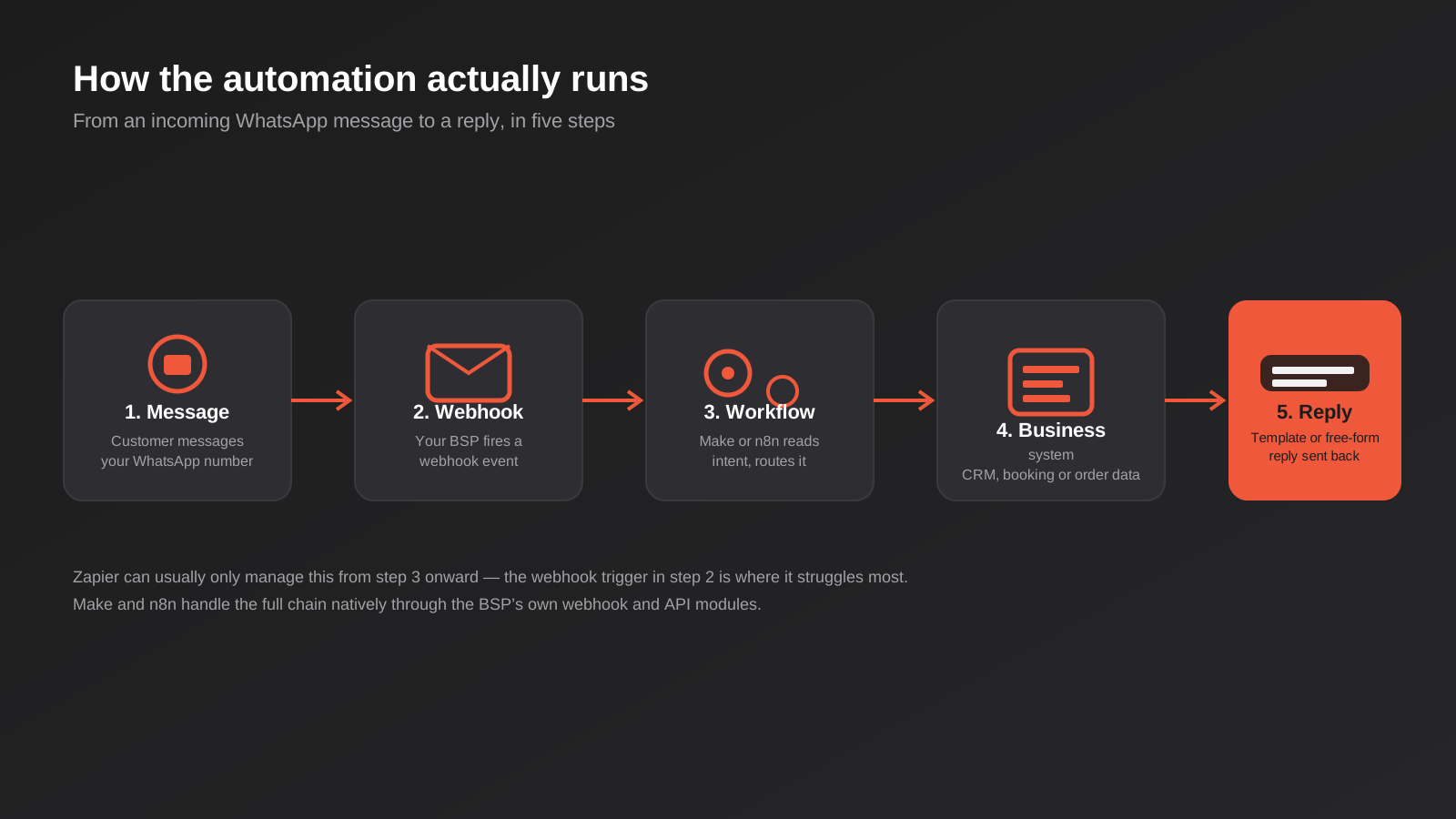
We’ve written a full comparison of workflow automation tools for Australian businesses, and the short version carries over to WhatsApp with one extra wrinkle: not every platform handles the WhatsApp side equally well. The tool you pick here isn’t really a WhatsApp decision at all — it’s a decision about how the rest of your automation stack is built, and WhatsApp just needs to slot into whatever that answer already is.
Where Zapier falls short
Zapier has no native WhatsApp Business Platform trigger. You end up routing through a third-party connector, a BSP’s own Zapier app (where one exists), or a webhook caught by a separate tool and forwarded in. It’s workable for simple one-way automations — send a template when an order ships — but gets awkward fast once you need to read and respond to incoming messages, because that’s exactly the part Zapier wasn’t built to catch natively.
Why Make and n8n fit better
Make handles webhooks and conditional branching natively, which suits the “read the incoming message, decide what it means, route accordingly” logic WhatsApp automation needs. n8n goes further: it has dedicated nodes for providers like Twilio and Gupshup, can be self-hosted, and at meaningful volume is substantially cheaper than a per-operation SaaS platform. If your WhatsApp automation is going to sit inside a broader stack of connected systems, both are a more natural fit than Zapier for this particular channel.
When to go custom against the BSP’s own API
Once you’re sending high volumes, need sub-second routing logic, or want WhatsApp woven tightly into a purpose-built system rather than a general automation tool, building directly against the BSP’s API is worth the extra development time. This is squarely API integration work rather than workflow-tool configuration, and it’s the point where we’d usually recommend an agency build and hand over documentation, rather than a team maintaining brittle no-code logic for something business-critical.
A rough rule of thumb: if you’re sending low thousands of messages a month and the logic is a handful of straightforward rules, a no-code platform is the right call and will stay the right call for a long time. If you’re past tens of thousands of messages a month, or the routing logic genuinely needs to branch on more than a few conditions, the maintenance cost of a sprawling no-code workflow usually ends up higher than a properly built custom integration would have been — it just arrives gradually instead of as one upfront bill.
Staying compliant: the Spam Act, ACMA and template approval
This is the section most WhatsApp automation guides skip, and it’s the one that actually determines whether your campaign is legal in Australia. Meta’s rules and Australian law are two separate sets of obligations, and passing one says nothing about the other.
The Spam Act treats WhatsApp as a commercial electronic message channel
The Spam Act 2003 covers commercial electronic messages sent to an Australian address, and ACMA’s guidance treats instant messaging services — WhatsApp included — the same way it treats SMS and email for this purpose. If a message contains promotional content, it’s commercial, and a message that’s mostly factual but includes any promotional element can be assessed as commercial overall. That matters directly for the abandoned-cart and payment-reminder patterns above: the moment a transactional nudge includes a discount code to bring the customer back, it risks being read as a marketing message.
Consent comes in two forms, and one text message can’t create it
The Act recognises express consent (the customer actively opted in) and inferred consent (there’s an existing relationship and the message relates directly to it — an order they placed, an account they hold). ACMA’s own guidance leans toward express consent being the safer standard. The trap businesses fall into: you cannot send a WhatsApp message asking someone to opt in to WhatsApp messages, because that message is itself the thing requiring consent. Consent has to be captured somewhere else first — a checkout checkbox, a booking form field, a signed intake form — before the first message goes out.
A Meta template approval is not proof of Spam Act compliance
Meta approves templates against its own content policy, checking that a Utility template is genuinely transactional and a Marketing template is labelled as such. That approval process has nothing to do with Australian consent law. A perfectly Meta-compliant Marketing template sent without the right consent trail is still a Spam Act breach. Treat the two checks as fully separate: Meta decides whether your message can be sent on the Platform at all; the Spam Act decides whether you were allowed to send it to that person in the first place.
Sender identification and opt-out
Every commercial message needs to identify who sent it and how to be contacted, and needs a working way to opt out — honoured within five business days under the Act. In practice this means your WhatsApp number should be clearly tied to your business (verified Business Platform numbers display a business name and, often, a green tick once verified), and a reply like “STOP” needs to actually remove that customer from future automated sends, not just from the current workflow run. Build the unsubscribe handling into the automation itself, not as a manual process someone has to remember to run.
ACMA enforces the Act and penalties for a breach can run into the hundreds of thousands of dollars for a single contravention. For a channel businesses often treat as low-risk because “it’s just WhatsApp,” that’s a wider gap than most realise between how casual the channel feels and how seriously the law treats it.
Where the conversation data actually sits
Under Australian Privacy Principle 8, a business is responsible for what happens to personal information it discloses overseas, even when a third party is holding it. WhatsApp conversation content and metadata typically move through Meta’s own infrastructure and then through your BSP’s platform, and neither necessarily keeps that data within Australia by default. If you’re in a regulated industry, or you’ve made specific privacy representations to customers, ask your BSP directly where conversations are stored and processed, and get it in writing rather than assuming a global platform defaults to local hosting.
Common mistakes
- Building on the free app, then trying to bolt on automation. The app has no API. Decide upfront whether this needs to be the Platform, because migrating a live number across later means re-verification and a gap in service.
- Treating Meta’s template approval as a compliance tick. It checks content policy, not Australian consent law. You still need your own consent trail.
- Letting marketing content hide inside a utility template. A discount code tacked onto an order confirmation can tip the whole message into Marketing category — and Marketing-category consent requirements — without anyone deciding that on purpose.
- Not designing for template rejection. Meta rejects templates that don’t match their stated category or that read as disguised marketing. Build approval time into your launch plan; it isn’t instant.
- Picking a BSP based on the lowest sticker price alone. A cheap platform fee with no shared inbox, no audit trail and no local support can cost more in staff time than a pricier all-in-one platform.
- No human handoff path. An automated flow that can’t recognise when it’s out of its depth, and route to a person, turns a convenience into a complaint generator.
- Ignoring the 24-hour window in campaign timing. Sending a “thanks for your order” message two days late means paying for a template that could have been free.
- Using a personal mobile number as the business WhatsApp number. It can’t be verified as a business, can’t be shared across a team, and can’t be migrated to the Platform without starting again.
Frequently Asked Questions
Do I need the WhatsApp Business API, or is the free app enough?
If one person can realistically handle every conversation by hand and nothing needs to trigger automatically from another system, the free app is enough. The moment you need more than one person answering from the same number, or you want an order, booking or payment event to trigger a message without someone manually sending it, you need the Platform (API) through a Business Solution Provider.
How much does WhatsApp Business API automation actually cost in Australia?
Expect a BSP platform fee from roughly $40 to $150+ a month depending on the provider and volume, plus Meta’s per-message fees for any template sent outside the 24-hour window, which vary by category and country. On top of that, building the automation itself — whether through Make, n8n or a custom integration — is a separate cost. Get an exact breakdown from your BSP before budgeting, since markup structures differ significantly between providers.
What’s the difference between a Utility and a Marketing template?
A Utility template relates to a transaction the customer already started — an order update, a booking reminder, a payment receipt. A Marketing template promotes something — an offer, a sale, a re-engagement nudge. Utility templates are typically cheaper and carry lower compliance risk; adding promotional content to what should be a Utility message can push it into Marketing territory and trigger stricter consent requirements under the Spam Act.
Can Zapier handle WhatsApp Business API automation?
Partially. Zapier has no native WhatsApp Business Platform trigger, so reading and routing incoming messages usually means going through a third-party connector or a webhook caught elsewhere. Simple one-way sends — triggering a template when an order ships — are manageable. Two-way conversational automation is generally easier to build in Make or n8n, both of which handle webhooks and conditional logic more natively.
Is sending WhatsApp marketing messages legal in Australia?
Yes, provided you have the right consent, identify your business clearly, and provide a working opt-out honoured within five business days — the same Spam Act 2003 obligations that apply to commercial SMS and email. Meta’s own template approval doesn’t establish this consent; you need your own record of when and how each customer opted in, separate from the WhatsApp platform itself.
Which is better for WhatsApp automation: an API-first provider or an all-in-one platform?
It depends on who maintains it. API-first providers like 360dialog or Twilio give lower-cost, direct access but expect you to build your own inbox, chatbot and reporting layer. All-in-one platforms like Interakt or Gupshup cost more but let a non-technical team manage conversations, broadcasts and templates without custom development. A business with in-house or agency development support usually gets more value from the API-first route; a business that just needs staff logging in and replying is usually better served by an all-in-one platform.
Does WhatsApp automation replace our CRM or help desk?
No, and treating it that way is where a lot of builds go wrong. WhatsApp automation works best as a channel wired into the systems you already run — your CRM, booking software or help desk — rather than a standalone inbox nobody else can see. The automation should log conversations back into those systems and pull from them to personalise replies, not become a second source of truth that drifts out of sync with everything else.
Where to start
The businesses that get the most out of WhatsApp automation don’t start by automating everything at once. They pick the single highest-friction manual task — usually booking reminders or order confirmations — wire that up properly with a compliant consent trail from day one, and expand from there once it’s proven out. Starting narrow also means you find out quickly whether your chosen BSP and workflow tool actually fit together before you’ve built five automations on top of the wrong foundation.
If you’re weighing up whether WhatsApp automation is worth building into your stack, or you’ve already got a BSP account sitting half-configured, we’re happy to have a conversation about what it would actually take for your business — no pressure, just a practical look at where it fits alongside whatever automation you’ve already got running.
Keep reading
Related posts

Changing Live Automations Safely: Staging, Version Control and Rollback for Zapier, Make and n8n (2026)
How to draft, test, release and roll back changes to live Zapier, Make and n8n automations without breaking invoices, orders or customer…

Peppol E-Invoicing for Australian Businesses: Automating Accounts Payable From Structured Invoices (2026)
Peppol e-invoicing in Australia: what is and isn't mandatory, how to pick an access point, and how to automate accounts payable once…

Clean Your Data Before You Automate: A Practical Guide to CRM Data Cleanup for Australian Businesses (2026)
Connecting systems on messy data copies the mess everywhere. Here's how to clean, match and merge records before you automate or integrate.
Got a project you'd like to talk through?
Tell us what you're working on — we'll come back with a plan.
