
Shopify Scripts Are Gone: How to Rebuild Your Checkout Logic With Shopify Functions
 Jignesh Vagadiya
01/11/2026
21 min read
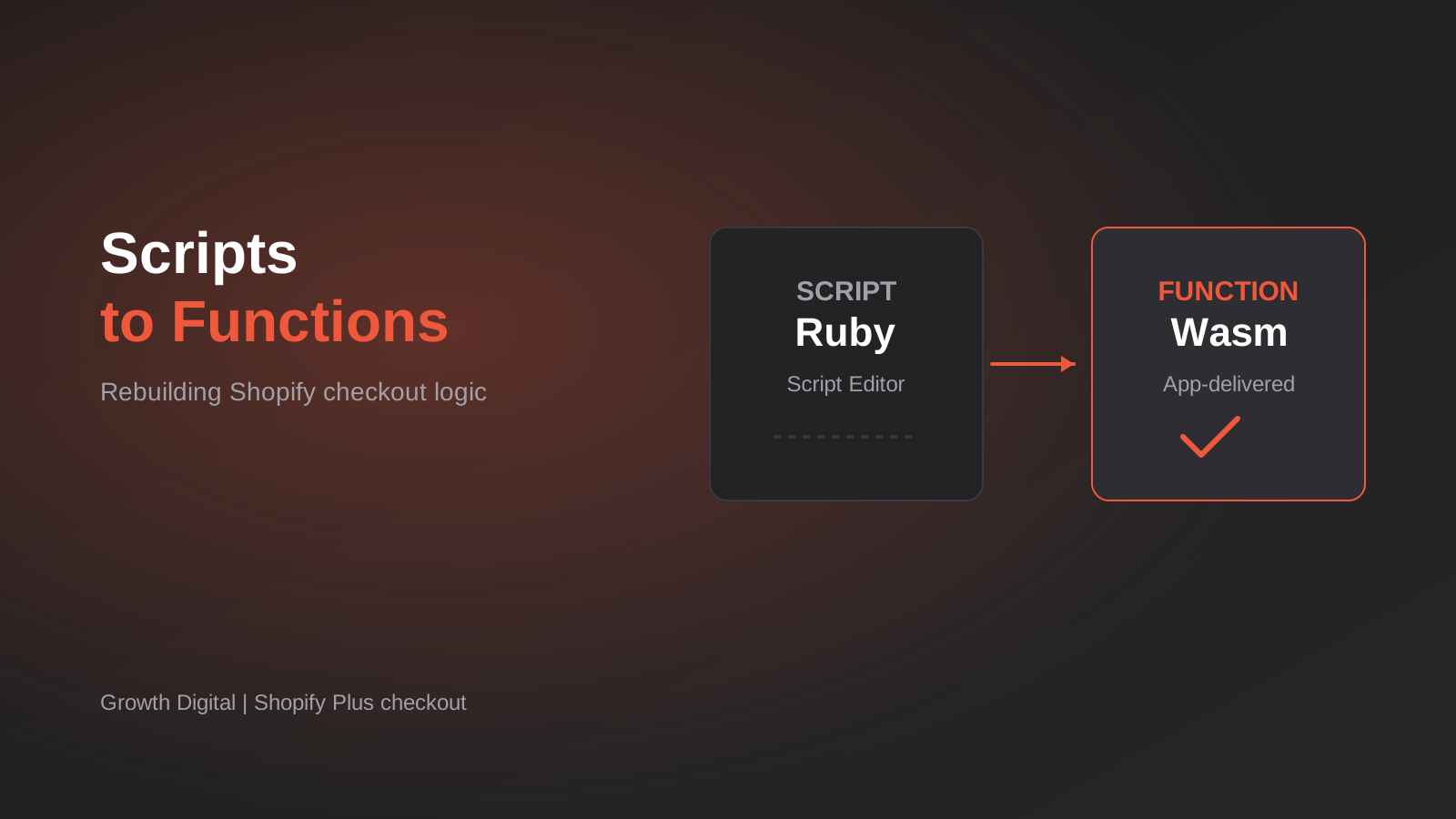
If your Shopify Plus store ever had a Ruby script quietly doing something clever at checkout, a tiered discount, a hidden shipping rate, a payment method that disappeared for certain customers, then somebody wrote that logic years ago and probably left. It worked, so nobody touched it. Shopify’s published cutoff for Scripts was 30 June 2026, and that date has now passed. If that logic has not been rebuilt, your checkout is either behaving differently from how you think it is, or you are one of the stores that found out the hard way.
The replacement is Shopify Functions. On paper it is a straightforward swap. In practice it is a rewrite, because Functions are not Scripts with a new coat of paint. They run in a different place, in a different language, with different inputs, different limits and a different way of being configured. Merchants who treated the migration as a copy-and-paste job are the ones now ringing agencies with a broken discount stack and an angry wholesale customer.
This guide is for Australian Plus merchants and the developers or agencies looking after them. We will walk through how to find what your old Scripts were doing, how each type maps onto a Function, what behaves differently, and how to cut over without breaking the checkout that pays your wages. One caveat up front: Shopify changes its developer platform frequently, and the limits and plan rules below are our understanding of how things stand. Check the current Shopify developer documentation before you commit to a build.
What Actually Changed When Scripts Ended
How Scripts worked
Scripts were small Ruby programs, written in the Script Editor app, that ran when a customer moved through the cart and checkout. There were three flavours: line item scripts that changed prices and discounts, shipping scripts that renamed, hid or repriced delivery rates, and payment scripts that reordered or hid payment methods. They were a Shopify Plus feature, which is why this is mostly a Plus conversation.
The appeal was how direct they were. You opened an editor, pasted in some Ruby, published it and the logic was live. There was no app to deploy and no build step. That convenience is also why so many stores ended up with scripts nobody could explain. A rule added during a sale three years ago can still be sitting there, quietly applying itself.
What Functions are
A Shopify Function is a small program that Shopify runs on its own infrastructure at a specific point in the commerce flow. You write it, compile it to WebAssembly, and ship it inside an app. When the relevant moment arrives, Shopify hands the function a chunk of data about the cart (which you specify with a GraphQL query), the function returns a list of operations, and Shopify applies them. The function does not call out to your servers, does not make network requests, and does not remember anything between runs.
That last point is the heart of the difference. A Script could, in theory, carry quirky state around in a session. A Function is a pure calculation: same input, same output, every time. It is faster and more predictable for it, and it works across more surfaces than Scripts ever did, but it forces you to think about your business rules as data in and decisions out.
Functions are also the supported way to customise checkout behaviour going forward. If you have been relying on older customisation methods, treat this migration as the moment to look at all of it together rather than patching one piece at a time.
Audit First: Finding Every Script That Was Doing Work
Before anyone writes a line of Rust or JavaScript, you need a written list of what your checkout used to do. This sounds obvious. It is also the step most teams skip, because the Script Editor makes it feel like the list already exists. It does not. The code tells you what the script does, not whether anyone still wants it to.
Where to look
Start with the Script Editor itself, if you can still reach it, and export or copy every published script. Then look wider. Check your theme for hardcoded messaging that explains a script’s behaviour to customers (“Free shipping over $150 for wholesale accounts”). Check support tickets and order notes for complaints that hint at special rules. Ask whoever runs wholesale, because they will know about the arrangements that were never written down.
Also check for third-party apps that were quietly layering on top of Scripts. Some discount and shipping apps called into Script behaviour, and when Scripts stopped, they may have changed how they work without much announcement.
Classify what you find
For each script, write down four things: what it did, who it applied to, why it exists, and whether the business still wants it. Then sort the list into three buckets.
- Still needed and well understood. These go straight onto the rebuild list.
- Still needed but nobody knows exactly why it works the way it does. These need a conversation with the business before you rebuild, otherwise you will faithfully reproduce a bug.
- Dead. A rule for a promotion that ended in 2023, a workaround for a carrier you no longer use. Delete and move on.
In our experience the dead bucket is bigger than people expect, and clearing it is the cheapest saving in the whole project. Every Function you do not build is one you do not have to test, maintain or explain to the next developer.
Mapping Script Types to Function APIs
The three Script types do not map one-to-one onto Functions. Shopify split the territory differently, so one old Script can turn into two Functions, and two old Scripts can sometimes collapse into one. The diagram below shows the general mapping we work from. Treat it as a starting point and confirm each API against the current documentation, because Shopify adds and renames these regularly.
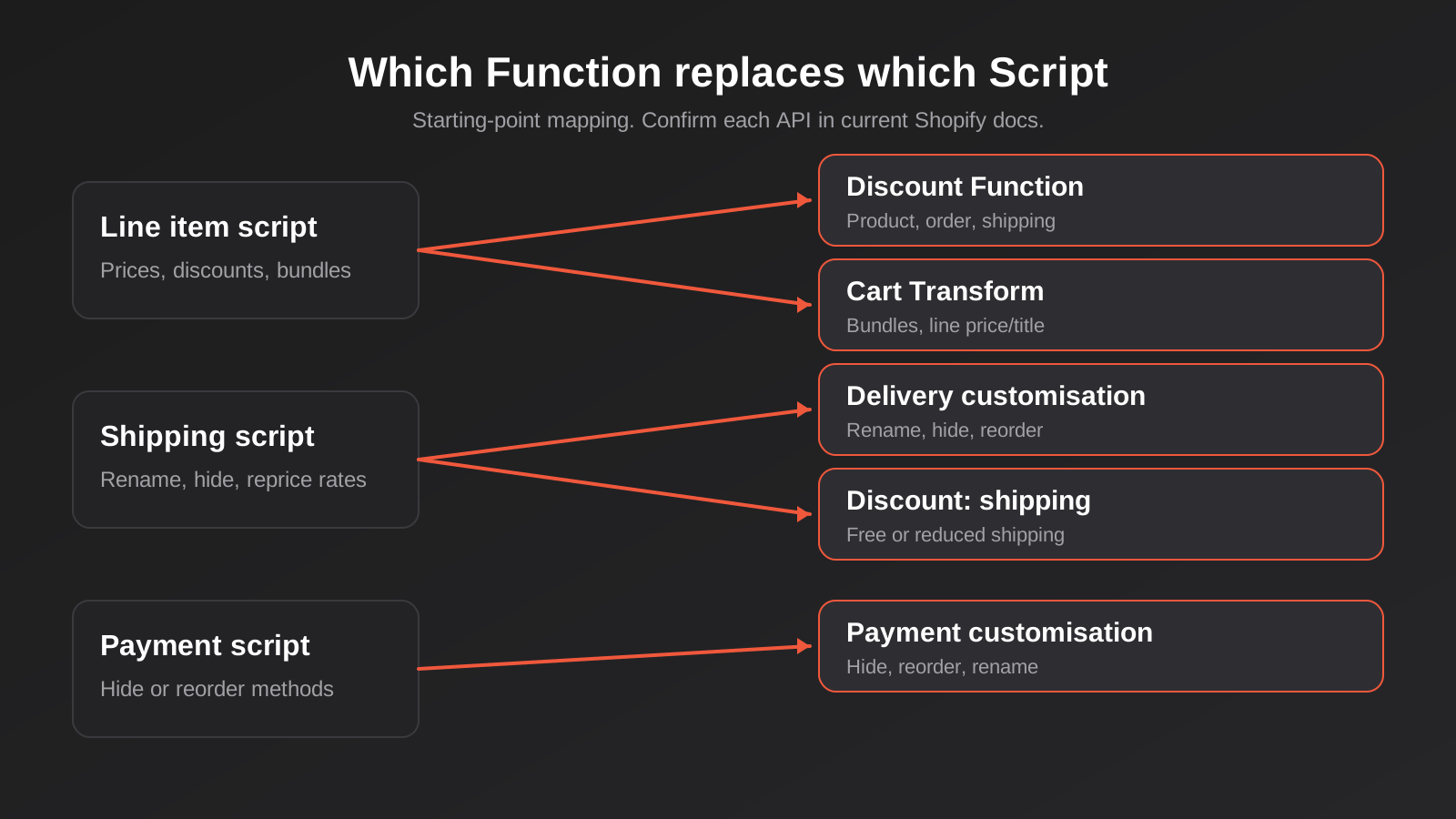
Line item scripts: discounts and cart transforms
Line item scripts did two jobs that Shopify now separates. Some changed what a customer paid through a discount (10 per cent off a collection, buy three and save, a tiered price for a customer tag). Others changed what the cart contained or how it was presented (bundling items together, expanding a bundle into its components, updating a title or price on a line).
Discount logic belongs in a discount Function. These can target products, the order as a whole, or shipping, and they show up in the Shopify admin as discounts, which means your merchandising team can create, schedule and end them without a developer. That is a real improvement over Scripts, where any change was a code edit.
Logic that reshapes the cart itself, such as merging items into a bundle or setting a custom price on a line, is a job for the Cart Transform Function. One thing to know early: as we understand it, a store can have only one Cart Transform Function installed at a time. If you also run an app that uses Cart Transform for bundles, you cannot simply add your own alongside it. That constraint has sunk more than one planned architecture, so check it on day one.
Shipping scripts: delivery customisation and shipping discounts
Shipping scripts usually fell into two groups. The first renamed, reordered or hid delivery options (“hide Express Post to PO boxes”, “rename the freight option to ‘Pallet delivery, 3 to 5 business days'”). That is the delivery customisation Function. The second discounted shipping (“free shipping over $200 on mainland addresses”), and that is covered by a discount Function targeting shipping.
Australian shipping rules tend to be fussy, with remote postcodes, Tasmania and Bass Strait freight, and bulky goods that cannot go by satchel, so delivery logic is often where the most hidden business knowledge lives. Do not trust the old code to be complete. Ring the person who packs the boxes.
Payment scripts: payment customisation
Payment scripts hid or reordered payment methods based on cart or customer details. The common Australian examples are hiding buy-now-pay-later options on large orders, hiding card payments on wholesale accounts that must pay on terms, or pushing bank transfer for high-value carts to avoid card fees. The payment customisation Function covers this. Expect to configure it per store rather than as a generic app, because the rules are almost always specific to how the business gets paid.
Plan rules matter
Which plan you are on affects what you can build. As we understand current rules, Functions distributed through public apps can be used across plans, while custom apps that run certain checkout Functions, such as delivery, payment and validation customisations, are tied to Shopify Plus. Because Scripts were Plus-only, most stores reading this are already on Plus, but a store that has since downgraded or is weighing a downgrade needs to check before assuming its rebuilt logic will keep running.
Where Functions Behave Differently From Scripts
This is the section that saves rework. Most failed migrations were not caused by a developer who could not write the logic. They were caused by assumptions carried over from how Scripts behaved.
Input is something you ask for
A Script had the cart and customer objects available in a fairly generous way. A Function only sees what its input query asks for. If your rule depends on a customer tag, a product metafield, a variant’s weight and the delivery address province, every one of those has to be requested explicitly, and each added field has a small cost. Design the query around the rules, not the other way round, and keep it as lean as the logic allows.
Configuration lives in data, not code
The healthy pattern with Functions is to keep the rules themselves in configuration, usually metafields attached to the discount or the function, and keep the code generic. A tiered pricing rule becomes “read the tier table from this metafield and apply it” rather than a block of if-statements with numbers baked in. The benefit is that changing a threshold from $200 to $250 no longer needs a deploy. The catch is that you now need somewhere sensible to edit that configuration, which usually means a small admin interface inside an app.
Hard limits on execution
Functions run under tight execution budgets, with limits on instruction count, memory and the size of input and output. Shopify publishes the current numbers, and they have been revised over time, so look them up rather than trusting a blog post, including this one. What matters in practice is that a rule which loops over every line item and every tier for a cart with a few hundred lines can approach those limits. Large wholesale orders are exactly where that happens. Write the logic to do the minimum work, and test with your biggest realistic cart, not a tidy three-item one.
No network calls, no state
A Function cannot fetch the live exchange rate, ask your ERP whether a customer is on credit hold, or check a loyalty balance. Anything it needs has to be in the input it was given. For some rules that means pushing data into Shopify ahead of time. A customer’s credit status becomes a customer metafield that your integration updates, and the Function reads it. If your old Script worked around this limitation with a clever trick, the trick will not survive the move.
Discount interaction is its own topic
When several discounts could apply to one cart, Shopify has rules for which combine and in what order. Scripts often handled this by being a single script that did everything. Functions are separate pieces, so the combination behaviour becomes a configuration question: which discount classes can stack with which. Two rules that were harmonious inside one Script can now double up or knock each other out. Map out your intended combinations in a table and test every cell.
Rounding and GST
Rounding is where “close enough” turns into customer service tickets. A Script that rounded a tier price to the nearest five cents will not do it automatically in a Function. And in Australia, whether prices display GST-inclusive, how a percentage discount interacts with tax, and how that appears on a tax invoice all need to match what your accountant expects. Test the cents.
A Migration Process That Does Not Break Checkout
Because Scripts have already stopped, you are not migrating live logic in parallel any more. You are rebuilding missing behaviour. That changes the risk profile. The danger now is less “we switched something off by accident” and more “we rebuilt something slightly wrong and it has been charging the wrong price since Tuesday”. The process below is built around catching that before customers do.
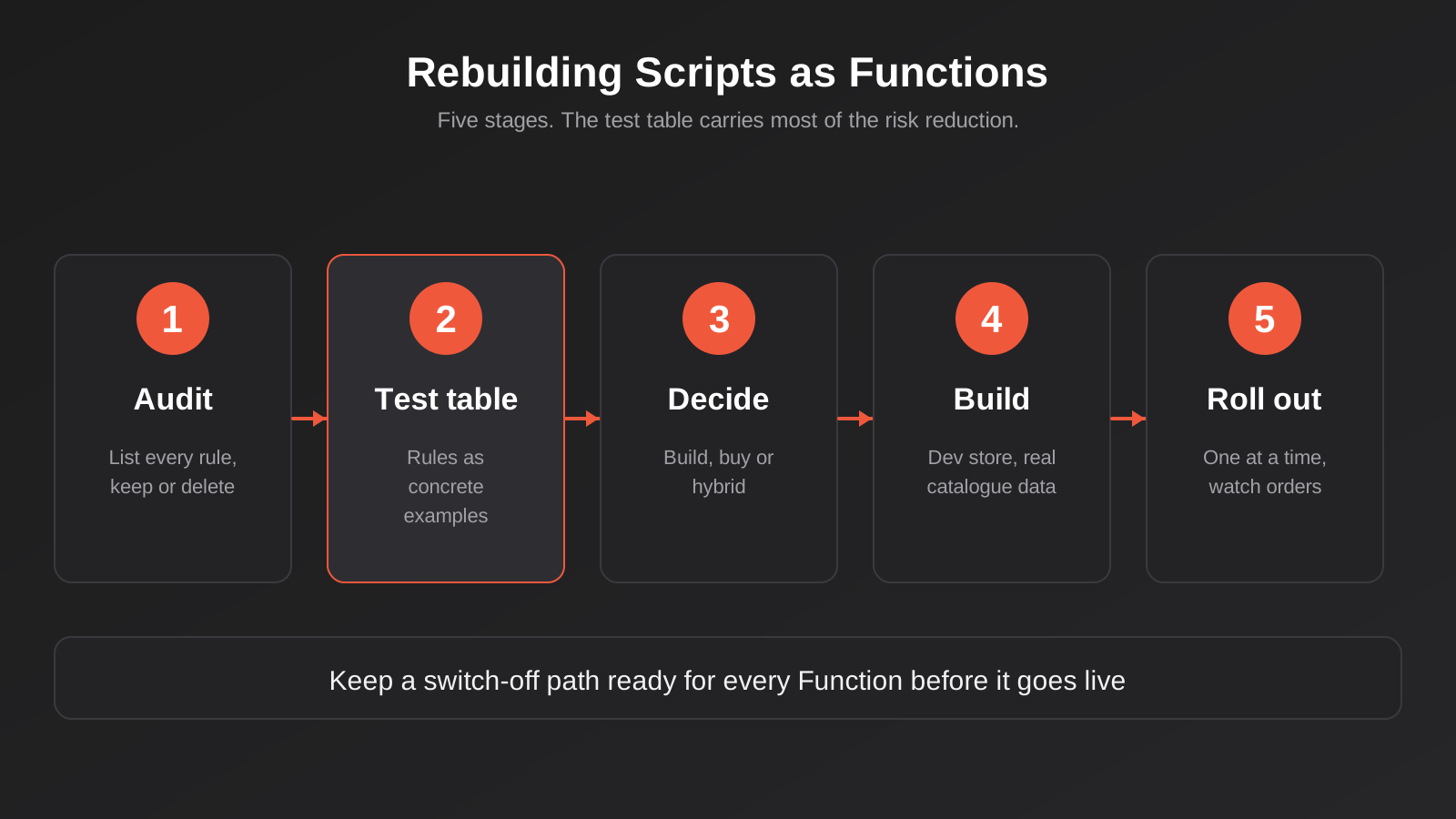
Stage 1: Write the behaviour down as test cases
Take your audited list and turn every rule into concrete examples. “Wholesale customers get 20 per cent off, minimum six units” becomes five or six rows: five units (no discount), six units (discount), a mixed cart, a retail customer with six units, a wholesale customer with a discount code. The table becomes your acceptance criteria, and it is far more useful than the code ever was as documentation of what the business wanted.
Stage 2: Decide build, buy or hybrid
Not every rule needs custom code. Many common patterns, such as volume discounts, bundles and shipping thresholds, are covered by established apps that are themselves built on Functions. We cover the trade-offs in the next section, but make the decision rule by rule rather than for the whole project.
Stage 3: Build against a development store
Use a development store or a duplicate with a realistic copy of your catalogue, customer tags and metafields. A Function tested against a tiny sample catalogue will not tell you how it behaves with your real data quirks: the variant with no weight set, the customer with two tags, the product in four collections.
Stage 4: Run the test table, then break it
Execute every row of your test table by hand or, better, automate it against the Function’s input and output. Then go looking for what you did not list. Empty carts, carts with only digital products, international addresses, gift cards in the mix, a discount code on top of an automatic discount. Most of the interesting bugs live at the edges.
Stage 5: Roll out with a way back
Activate one Function at a time rather than all at once, watch real orders for a few days, and keep the ability to switch each one off quickly. A discount Function can be deactivated from the admin; know where that switch is before you need it. We write more about staging and rollback habits for live business automation in our guide to change management for live automations, and the same discipline applies directly here.
Wholesale and B2B Logic: The Place Most Rebuilds Go Wrong
Wholesale pricing is the single most common thing we find hiding in old Scripts. A tag on the customer account triggers a discount tier, a minimum order quantity gets enforced, certain payment methods disappear. It was a neat trick, and it was fragile, because the whole arrangement hung on a tag someone had to remember to apply.
Shopify’s native B2B features, with company accounts, catalogues and price lists, now cover a lot of what people used Scripts to fake. If your wholesale logic was essentially “this group of customers sees different prices”, it is worth asking whether native catalogues replace the Script entirely, with no Function required. We walked through that decision in how to set up wholesale pricing on Shopify, including who qualifies, how to structure tiers and what to do about GST.
Where you still need a Function is for rules that native price lists cannot express: quantity-break discounts that depend on the mix of products in the cart, minimums that apply per collection, or payment terms that vary by account. Shopify’s documentation indicates automatic discount Functions can work with B2B sessions and can detect the purchasing company on the cart, which lets you scope a rule to specific accounts. Behaviour in this area has shifted across releases, including around orders that go through as drafts for review, so test your exact ordering flow rather than relying on a summary.
If you would rather not build any of this yourself, we publish a free-to-start app for the common case. GD: Wholesale Pro handles wholesale pricing, B2B sign-up with approval and bulk rate updates from a spreadsheet, and it is a reasonable first step before commissioning custom Function work.
Build, Buy or Hybrid
After Scripts, a lot of merchants swung to the opposite extreme, installing three or four discount and shipping apps to cover for lost logic. That works for a while and then catches up with you in app fees, theme performance and a checkout where nobody can say which app is responsible for which behaviour.
When an app is the right answer
Buy when the rule is common and the app does it well. Standard volume discounts, free-shipping bars, basic bundles and simple payment hiding are all well-trodden. A good app also gets maintained when Shopify changes the platform, which is a real cost you avoid. The questions to ask are whether it is built on Functions (and not on a workaround that may break), what its monthly cost looks like at your order volume, and whether it can express your edge cases or only the happy path.
When custom is justified
Build when the rule is genuinely particular to your business: pricing driven by a combination of product attributes and customer agreements, delivery rules tied to your own warehouse network, or logic that must read data your integration pushes into Shopify. Custom also makes sense when the alternative is stacking several apps to approximate one rule, because a single purpose-built Function is easier to reason about than three apps whose interactions you have to guess.
The hybrid that usually wins
Most stores end up with an app for the commodity rules and one small custom app holding the two or three Functions that represent actual competitive advantage. The custom app is small enough to keep tidy and the commodity rules stay someone else’s problem. If that sounds like the shape of your store, our Shopify and Shopify Plus development work covers custom apps and Functions as part of normal builds, and the same thinking applies whether you are weighing no-code against custom more generally.
Testing and Monitoring After Launch
A Function that passes its test table can still misbehave in production, because production has data your test store does not. Plan for the first few weeks as a monitoring period, not a finish line.
Watch real orders
For the first week, review a sample of orders each day, focusing on the ones where your Functions should have fired. Check the discount applied, the shipping rate shown, the payment methods offered. A short checklist and ten minutes a day is enough. You are looking for the order that looks one dollar off.
Use the logs
Shopify surfaces Function run logs and errors in the Partner dashboard for your app, including cases where a Function failed or produced output Shopify rejected. A Function that errors does not always stop checkout; depending on type, it may simply do nothing, which looks like a missing discount rather than an error. Set a habit of checking those logs after every deploy.
Keep a change log
Write down every configuration change: who changed the threshold, when, and why. The old Scripts failed partly because nobody knew their history. Do not recreate that problem in a new place.
Common Mistakes
- Rebuilding every Script without asking whether the business still wants it. Old promotions and dead workarounds get faithfully re-created, then maintained forever.
- Translating Ruby line by line. Functions are a different model, and a literal port usually ends up slow, hard to configure and over the execution limits.
- Hardcoding thresholds and rates in the code instead of configuration, so every small change needs a developer and a deploy.
- Ignoring the one-Cart-Transform limit until two apps need it at the same time.
- Testing only the happy path with a three-item cart, then discovering the problem on a 200-line wholesale order.
- Letting discounts stack by accident because combination rules were never mapped out.
- Forgetting GST and rounding, so prices are right in the cart and wrong on the tax invoice.
- Stacking four apps to patch gaps and ending up with a checkout nobody can debug.
- Relying on a third-party blog (including this one) for platform limits instead of the current Shopify documentation.
- Going live on a Friday afternoon with no tested way to switch the Function off.
Frequently Asked Questions
Did Shopify Scripts actually stop working?
Shopify’s published cutoff for Scripts was 30 June 2026. Several agency guides give the same date, though some older material quotes earlier ones, and checkout.liquid has its own separate timeline. Check Shopify’s current help centre for the exact status of your store, and check your checkout directly rather than assuming. If a discount, shipping rate or payment rule has stopped behaving as expected, a retired Script is the first thing to rule out.
Do I need a developer, or can I use an app?
For common rules such as volume discounts, free-shipping thresholds and basic bundles, an app built on Functions is often enough and cheaper over the first couple of years. You need a developer when the rule is particular to your business, depends on data from your own systems, or when stacking apps would leave you with a checkout nobody can debug. Many stores need both.
What language are Shopify Functions written in?
Functions compile to WebAssembly, so in principle any language that targets it can work. In practice Rust and JavaScript are the well-supported paths, with Shopify providing tooling and templates for both. Rust tends to give you more headroom against the execution limits, while JavaScript is easier to staff. The better choice depends on how heavy your logic is and who will maintain it.
Can a Function call my ERP or an external API?
No. Functions cannot make network requests, so anything they need must already be in the input. The usual pattern is to sync the relevant data from your ERP into Shopify metafields on a schedule or via webhooks, then have the Function read it. That works well, but it means your integration becomes part of the checkout’s correctness, so it needs monitoring.
How long does rebuilding Scripts as Functions take?
It depends far more on how many rules you have and how well they are understood than on the code itself. A store with two or three straightforward rules can often be sorted in days. A store with years of accumulated wholesale arrangements can take several weeks, most of it spent on the audit and test table. The writing of the Functions is usually the shorter part.
Will native B2B features replace my wholesale Scripts?
Often, partly. If your Script mainly gave certain customers different prices, native catalogues and price lists may cover it without any custom code. If it enforced minimums by collection, mixed-cart quantity breaks or account-specific payment rules, you will probably still need a Function or an app. Work through your list rule by rule rather than deciding for the whole store.
Where to Start
Start with the audit, and keep it boring. One page: every rule your checkout used to apply, who it applied to, whether the business still wants it, and one row of test cases per rule. Do that before anyone opens a code editor, and the build itself becomes a much smaller job. If you are already past the cutoff and something looks wrong, begin with the rule that touches money directly, which is usually discounts, then shipping, then payment methods.
If you would like a second pair of eyes, we are happy to look at what your store does today and tell you honestly which rules need custom work, which an app can cover, and which are better deleted. There is no pressure to build anything with us. You can see how we scope Shopify work on our Shopify pricing page, which covers our fixed-price store builds; custom app and Function work is scoped separately once we understand the rules involved.
We don’t publish a set price for custom Function work, because it depends entirely on how many rules you have and how tangled they are. What we can say is that we run lean as a specialist agency rather than carrying a large account-management layer, so we keep those quotes tight. If you’ve already got a written quote from another agency for comparable scope, send it through and we’ll do our best to beat it.
Keep reading
Related posts

Security Testing for Custom Software: Pen Tests, Scanning and What to Check Before Launch (2026)
What security testing custom software needs before launch: scanning, permission tests and pen tests, what they cost in Australia, and how to…
Data Migration for Custom Software: Moving Off Spreadsheets and Legacy Systems Without Losing Records (2026)
How to plan a data migration to new custom software: cleaning, mapping, reconciliation, cutover strategy and rollback, so nothing goes missing on…
Audit Logging for Custom Software and Automations: What to Record, What to Leave Out and How Long to Keep It
Audit logging for custom software and automations: what to record, what to leave out, and how long to keep logs under Australian…
Got a project you'd like to talk through?
Tell us what you're working on — we'll come back with a plan.
