
Internal AI Assistants for Australian Businesses: Turning Company Documents Into Instant Answers (2026)
 Jignesh Vagadiya
16/09/2026
21 min read
Jignesh Vagadiya
16/09/2026
21 min read
A new hire starts on Monday and by Wednesday has asked four different people how quoting works for repeat clients. Two answers agree. One is out of date. One person just says “check with Sarah.” None of this is anyone’s fault — the real answer exists somewhere, probably in a pricing doc from eighteen months ago, a Slack thread nobody can find, and half a sentence in the onboarding PDF. It just isn’t anywhere a person can actually get to it in under ten minutes.
Most of the AI attention inside a business goes to the customer-facing side. Chatbots answer questions on the website. Voice agents pick up the phone so leads stop going to voicemail. We’ve written about what actually works there, and it’s a fair place to start because customers are the ones paying the bills. But staff spend more time every week hunting for internal answers than most businesses realise, and almost none of that time gets the same attention, budget or tooling as the customer experience does.
This piece is about the other side of the same technology: an internal AI assistant built for your own team, pointed at your own documents, answering the questions that currently get answered by whoever happens to be free, whoever remembers, or whoever wrote the original doc and has since left the company. We’ll cover what these assistants actually are, where they genuinely help, how to build one that people trust enough to use twice, and the mistakes that turn a promising pilot into an ignored bot nobody opens after week two.
What an Internal AI Assistant Actually Is
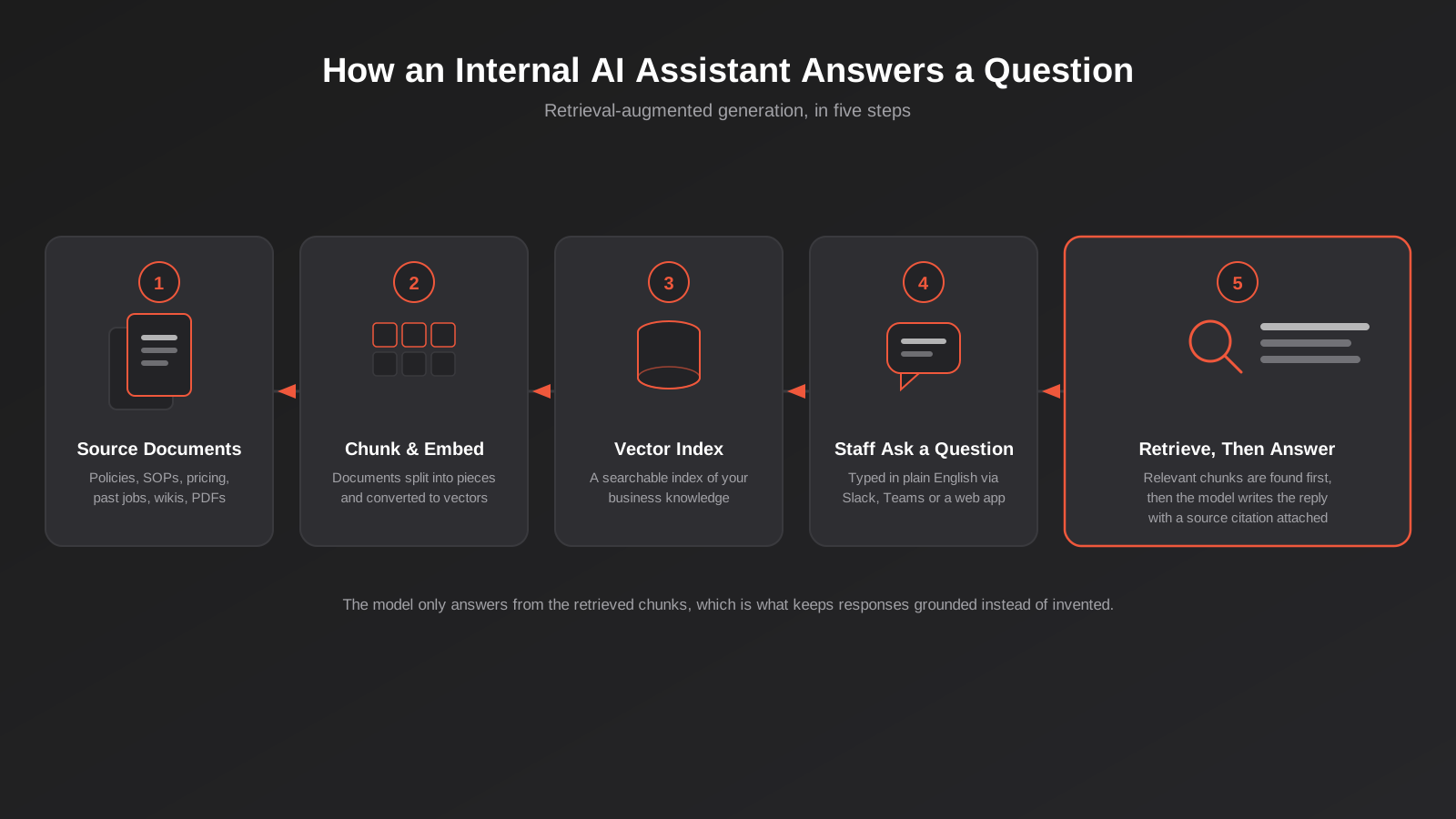
An internal AI assistant is a chat interface, usually sitting inside Slack, Microsoft Teams or a simple internal web page, that answers staff questions by searching your own business documents first and then writing a response grounded in what it found. Ask it how to process a refund over $500, what the current warranty terms are for a particular product line, or what the standard markup is on a rush job, and it should come back with an answer plus a link to the source document it pulled from. That last part matters more than the answer itself, and we’ll come back to why.
It’s a different job to a customer chatbot
A customer-facing chatbot has to be polished, on-brand, careful with what it promises, and able to hand off to a human the moment things get complicated or a complaint shows up. An internal AI assistant answers to a much smaller, much more forgiving audience: your own staff, who already understand the business, already know when an answer sounds wrong, and are asking because they want the fastest correct answer, not a pleasant conversation. That changes the design goals. Tone matters less. Coverage and accuracy matter more. A blunt, correct, sourced answer beats a warm, vague one every time in this context, which is the opposite of what you’d optimise a customer chatbot for.
The mechanism is retrieval, not a bigger FAQ page
Most internal assistants worth building run on retrieval-augmented generation, usually shortened to RAG. The name sounds more complicated than the idea. Your documents get broken into smaller chunks and converted into a format that can be searched by meaning rather than exact keyword match. When someone asks a question, the system first finds the handful of chunks most likely to contain the answer, then hands those chunks to a language model and asks it to write a response using only that material. The model isn’t answering from general knowledge or guessing based on training data — it’s summarising what it was just shown, with a citation back to where that came from.
This is a meaningfully different architecture to a plain chatbot that’s just been given a big prompt and told to “act like our company.” That approach drifts, invents plausible-sounding answers, and can’t point to a source because there isn’t one. Retrieval-first design is what makes an internal AI assistant trustworthy enough for someone to actually change their behaviour and ask it instead of pinging a colleague.
Why This Is Worth Solving Now
None of this is new in concept. Enterprise search and knowledge management tools have existed for two decades and mostly disappointed everyone who bought them. What’s changed is the cost and quality of the underlying pieces. Turning a document into a searchable vector used to require a data science team and a meaningful budget. Now it’s a few lines of configuration in tools plenty of small teams can run themselves, and the language models doing the final write-up are good enough to produce a genuinely useful answer rather than a keyword-matched paragraph dump.
The business reasons haven’t changed much, they’ve just kept compounding. Most Australian businesses we work with have documentation scattered across Google Drive, SharePoint, an intranet nobody updates, a wiki that stopped being maintained around the time the person who built it left, and a dozen pinned Slack messages that count as “the real answer” because everyone’s too busy to move them anywhere more permanent. Hybrid and remote work removed a lot of the hallway conversations that used to patch over gaps in written documentation. And every time an experienced staff member leaves, a chunk of institutional knowledge that was never written down properly leaves with them.
An internal assistant doesn’t fix bad documentation on its own, and we’ll be blunt about that later on. But it does something documentation on its own never managed: it meets people where they already are, in a chat window, with a specific question, instead of asking them to know which folder to look in.
There’s also a quieter cost that rarely makes it into a business case but is real all the same. Every time someone interrupts a colleague to ask something that’s already written down somewhere, both people lose focus, not just the time spent answering. Multiply that by a team of any size and the accumulated cost of “quick questions” is genuinely large, even though it never shows up as a line item anywhere. It’s the same reason a good internal wiki was always worth building, except the wiki only ever helped the people willing to search it properly, and most people, reasonably, would rather just ask.
What It’s Genuinely Good At
Where it earns its keep
The clearest wins are for questions that have a correct, stable answer that already exists in writing somewhere, but where finding that writing takes longer than it should. Policy and procedure lookups are the obvious starting point — leave entitlements, expense limits, who’s authorised to approve what. Pricing and quoting rules are another strong candidate, especially in businesses where quotes depend on a matrix of exceptions that live in someone’s head and a spreadsheet they built three years ago. Technical documentation for internal tools, past project or job history for trades and services businesses, and onboarding material for new starters all sit in the same bucket: information that’s genuinely already written down, just badly organised or badly indexed.
It also does well as a first-line answer for IT and HR questions that repeat constantly — how to request equipment, how to book leave, what the VPN setup process is — freeing whoever currently fields those questions to do less repetitive explaining and more of the work only a person can do.
Where it still falls over
It’s weak on anything that changes faster than your documents get updated. If stock levels, current job status or today’s roster live in an operational system rather than a static document, a document-only assistant will confidently tell staff something that was true last week. That’s a real limitation, not a minor one, and it’s the point where some businesses need to go further than plain RAG and give the assistant a way to query live systems directly rather than just search old documents — something we cover properly in our explainer on MCP servers, which is the protocol most modern tools use to give an AI agent that kind of live access safely.
It’s also only as good as what it’s reading. Feed it two contradictory versions of the same policy and it will confidently pick one, or worse, blend them into something that was never actually approved. And it’s no good at judgement calls. “What discount can I offer this client” has a documented answer if there’s a documented discount policy. “Should I offer this particular client a discount” is a decision, not a lookup, and an assistant that tries to answer both the same way will eventually get one badly wrong.
How to Build One Properly
Start with your real sources, not everything at once
The instinct on day one is to connect everything — every shared drive, every wiki page, every old proposal — on the theory that more data means better answers. It doesn’t. It means more noise, more contradictions, and a much harder job separating the current, correct version of a policy from three superseded drafts still sitting in the same folder. Start with one or two sources that are genuinely current and genuinely used: the policy manual that HR actually maintains, the pricing sheet that sales actually references, the SOPs that operations actually follows. Get that working well enough that people trust it, then expand.
This is also the point to be honest about document quality. If the source material is contradictory, outdated or missing entirely for a topic, no amount of clever retrieval fixes that. Sometimes the most useful outcome of a first pilot is a list of documents that need a proper owner and a review date, which is a less exciting result than “we launched an AI assistant” but is often the thing that was actually broken.
It’s worth deciding upfront who owns keeping each source current, because this is the piece that quietly determines whether the assistant is still useful in six months or has drifted back into the same unreliable state as the documents it was built from. A policy manual with no owner slowly falls out of date the same way it always did — the assistant just repeats the stale version faster and with more confidence than a person searching manually would have. Assign a named owner per source before launch, not after someone notices the assistant quoting last year’s figures.
Permissions are the part that gets skipped
This is the mistake we see most often, and it’s the one with the worst consequences. A document store usually has permissions built in — not everyone in the business can open the HR folder or see individual salary reviews. When that content gets pulled into a search index for an assistant, it’s easy for those permissions to get flattened, so that anyone who asks the assistant the right question gets an answer sourced from a document they were never meant to see. This isn’t a hypothetical edge case; it’s one of the first things a reasonably careful staff member will stumble onto by accident, and one of the first things a not-so-careful one will go looking for on purpose.
Before anything goes live, map out who can see what in the source systems and confirm the assistant respects the same boundaries, either by only indexing content that’s appropriate for company-wide access, or by building permission checks into the retrieval step itself so the assistant only searches documents the person asking is actually allowed to open. This is more setup work than most off-the-shelf demos make it look like, and it’s not optional.
Three ways to actually build it
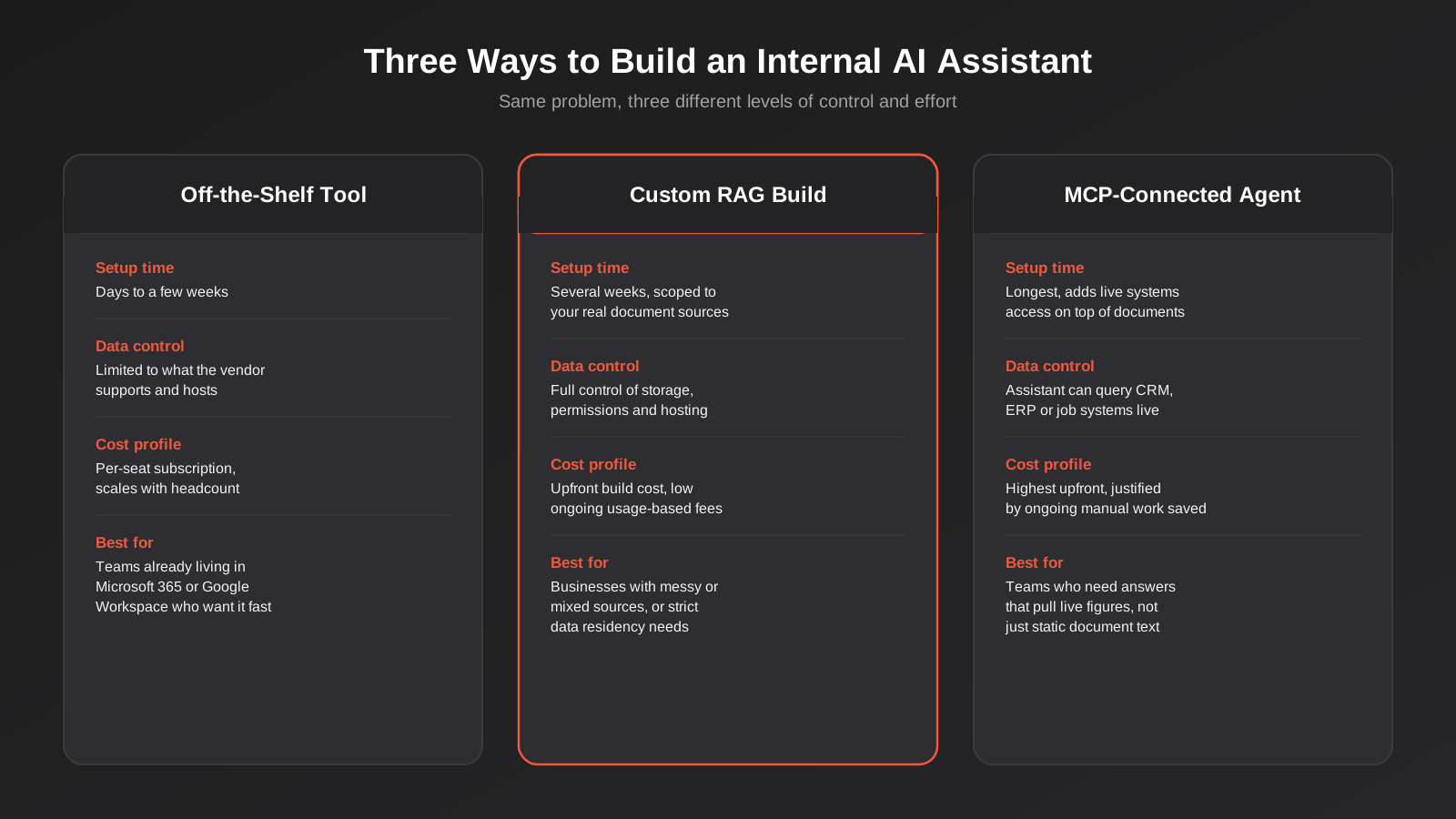
There are three realistic paths, and the right one depends on how messy your document sources are and how much control you need over where the data goes.
An off-the-shelf platform, built into tools like Microsoft 365 or Google Workspace, is the fastest route if your business already lives inside one of those ecosystems and your documents are reasonably well organised within it. Setup is measured in days to a few weeks, cost scales per seat, and you’re trusting the vendor’s handling of permissions and data rather than controlling it yourself.
A custom RAG build gives you full control over what gets indexed, where the data is stored and how permissions are enforced, at the cost of a proper build project rather than a subscription toggle. This is the right call when your documents are spread across several disconnected systems, when you have specific data residency requirements, or when the off-the-shelf tools simply don’t reach the systems your business actually uses.
An MCP-connected agent goes a step further again, giving the assistant the ability to query live systems — a CRM, a job management tool, an ERP — rather than only searching static documents. This is the option worth exploring once the document-based assistant is working well and the next obvious question from staff is something that lives in a system, not a file. We go deeper into what that build actually involves on our MCP development page if you want to see how the pieces fit together technically.
Where it should actually live
The single biggest predictor of whether an internal AI assistant gets used is whether it shows up where people already work. A separate web app that staff have to remember exists and log into separately gets opened once, out of curiosity, and then forgotten. The same assistant available as a Slack or Teams command gets used constantly, because asking it a question takes the same two seconds as pinging a colleague, minus the wait for a reply. If your team runs most of its day-to-day communication through one of those platforms, build the assistant into it rather than building a destination people have to choose to visit.
Rolling it out without killing trust in week one
The first impression matters disproportionately. If the first three questions someone tries get a vague or wrong answer, most people won’t give it a fourth try — they’ll quietly go back to asking a colleague and tell that colleague the assistant “doesn’t work.” That reputation is hard to undo once it sets in, even after the underlying problem is fixed.
The practical fix is to launch to a small group first, ideally the same team whose documents you indexed, and actively collect the questions it gets wrong before opening it up more broadly. Most failures in the first few weeks trace back to one of two causes: the source document genuinely didn’t contain a clear answer, or the retrieval step pulled the wrong chunk because the document was poorly structured. Both are fixable, but only if someone is actually reviewing the failed queries rather than assuming silence means it’s working. A short weekly look at what people asked and how well it answered, for the first month or two, does more for long-term adoption than any amount of upfront tuning.
Tell staff plainly what it’s good for and what it isn’t. An assistant introduced as “ask it anything” will get asked things it was never built to answer and will disappoint people through no fault of its own. Introduced as “ask it about leave policy, expense limits and the pricing matrix,” it meets expectations and builds trust from a narrower, more reliable base before you expand its scope.
How to Tell If It’s Actually Working
It’s easy to launch an internal AI assistant and never really know if it’s pulling its weight, because unlike a customer-facing tool there’s no obvious revenue number attached to it. A few practical signals are worth tracking from day one rather than trying to reconstruct them later.
Usage frequency is the simplest one: is it being asked questions daily, or did the initial curiosity die off after the first week? A steep drop-off after launch almost always points back to a bad early experience rather than staff genuinely having no more questions. Question deflection is the more meaningful number for teams like HR, IT or a central ops desk — are the same five repetitive questions that used to land in their inbox now getting answered by the assistant instead, freeing that time for work that actually needs a person? And a periodic review of logged questions the assistant couldn’t answer well is arguably the most useful ongoing signal of all, because it tells you exactly which documents need attention next, rather than guessing.
Direct staff feedback matters more here than in most software rollouts, simply because trust is fragile and self-reported. A quick thumbs up or down on each answer, reviewed weekly rather than left to accumulate, catches problems while they’re still small and gives you a running record of where the source material is thin.
Security, Privacy and Governance for Australian Businesses
An internal assistant that touches HR records, financial documents or client information is handling personal and commercially sensitive information, which means the Privacy Act 1988 and the Australian Privacy Principles apply the same way they would to any other system storing that data. The OAIC has been clear that businesses adopting AI tools are expected to think through privacy impact before deployment, not after a problem surfaces, which in practice means knowing exactly what data the assistant can access, where that data is processed and stored, and who can see the logs of what staff have been asking it.
Data residency is worth confirming explicitly rather than assuming. Some platforms process and store data entirely within Australian data centres; others route requests through infrastructure overseas, which matters more for some industries and some document types than others. If you’re in a regulated sector, or the assistant will touch client files, get a straight answer on this before you commit rather than after the pilot is already indexing sensitive material.
Access logging is worth treating as a governance requirement rather than a nice-to-have. Knowing who asked what, and which documents were pulled in to answer, gives you an audit trail if a sensitive answer ever needs to be traced back, and it’s the same log that tells you where the assistant is being relied on most heavily and where it’s barely used at all.
The other governance piece worth building in from day one is an honest “I don’t know.” A well-configured assistant should decline to answer, or clearly flag low confidence, when the retrieved material doesn’t actually cover the question, rather than stitching together a plausible-sounding guess. Combined with visible source citations on every answer, this is what keeps staff able to sanity-check what they’re being told instead of treating the assistant as an unquestionable authority. An assistant that’s wrong occasionally but always shows its working is far safer than one that’s right slightly more often but gives no way to check.
Common Mistakes We See
Most of the internal assistants that end up abandoned fail for one of a small handful of predictable reasons, almost all of them about process rather than the underlying technology. The model itself is rarely the weak link.
- Connecting every document source on day one instead of starting with one or two that are genuinely current, which buries good answers under outdated ones
- Skipping the permissions audit and only discovering the gap when someone finds a document they shouldn’t have been able to see
- Treating launch as the finish line, when the source documents still need an owner and a review schedule or the assistant’s answers slowly go stale
- Rolling it out to the whole business at once instead of piloting with one team, fixing what doesn’t work, and expanding from a working example
- Letting the assistant guess when it doesn’t have a good source, instead of configuring it to say so clearly
- No usage guidance for staff, so some people over-trust every answer and others never bother trying it after one bad first experience
- Nobody reviewing the questions it gets wrong, so the same gaps in the documentation keep producing the same bad answers month after month
Frequently Asked Questions
What’s the difference between an internal AI assistant and a customer-facing chatbot?
They’re built for different audiences with different tolerances. A customer chatbot has to manage brand tone, escalate sensitive situations to a human, and be very careful about what it promises, because a mistake is visible to someone outside the business. An internal assistant answers to staff who already understand context, mainly need speed and accuracy, and can sanity-check an answer against what they already know. We cover the customer-facing side in detail in our guide to AI chatbots for customer support.
How long does it take to build one?
A focused pilot on one or two well-maintained document sources, answering questions for one team, can be working in a few weeks. Expanding it across the business, adding permission controls properly, and connecting it to live systems rather than static documents takes considerably longer and should be scoped as its own project once the pilot proves the concept.
Can it search across Google Drive, SharePoint and Slack at the same time?
Technically yes, most modern platforms support connecting several sources at once. Whether you should do that on day one is a different question. We’d generally recommend starting with your single most reliable source, proving the assistant gives trustworthy answers from it, and adding further sources once you’re confident in the process for keeping each one current and correctly permissioned.
Does the data need to be hosted in Australia?
Not automatically, but it’s worth confirming for any business handling client information, health data or anything covered by industry-specific regulation. Ask any platform you’re evaluating exactly where data is processed and stored, and get that in writing rather than assuming based on where the company is headquartered.
What happens if the assistant gives a wrong answer?
If it’s built properly, every answer comes with a citation back to the source document, so a wrong answer is checkable rather than a black box. The bigger risk isn’t an occasional wrong answer with a visible source — it’s an assistant configured to guess confidently when it has no good source at all, which is why that behaviour needs to be explicitly designed against rather than left to chance.
Is this the same thing as an MCP server?
Related but not identical. A document-based internal assistant searches static content using retrieval-augmented generation. MCP is a protocol that lets an AI agent connect to and act on live business systems — querying a CRM, checking stock levels, creating a task — rather than just reading documents. Many businesses start with a document assistant and later extend it with MCP connections once they need answers that come from live data rather than a file. Our MCP servers guide goes into that distinction in more depth.
What does an internal AI assistant typically cost to build?
It depends heavily on which of the three build paths you choose and how many sources you connect. An off-the-shelf platform is usually the cheapest to start, priced per seat per month, but that cost scales with headcount over time. A custom build carries a larger upfront cost tied to scoping, integration and permission work, with lower ongoing fees after that. The honest answer is that a proper quote needs to know your document sources, your headcount and whether you need live systems access before it means anything — anyone quoting a fixed number without asking those questions first is guessing.
Where to Start
The businesses that get real value from an internal assistant almost always start narrow: one team, one or two genuinely current document sources, and a clear sense of the three or four questions that currently waste the most time answering. That’s a very different starting point to “connect everything and see what happens,” and it’s the difference between a pilot people keep using and one that quietly gets abandoned.
If you’re weighing up whether this is worth doing for your team, or you’ve already tried a version of it that didn’t stick, we’re happy to talk through what a properly scoped version would actually involve for your systems and documents. You can see how we approach AI chatbots and assistants more broadly, or get in touch and we’ll have an honest conversation about whether this is the right next step or whether your time is better spent tidying up the documentation first.
Keep reading
Related posts
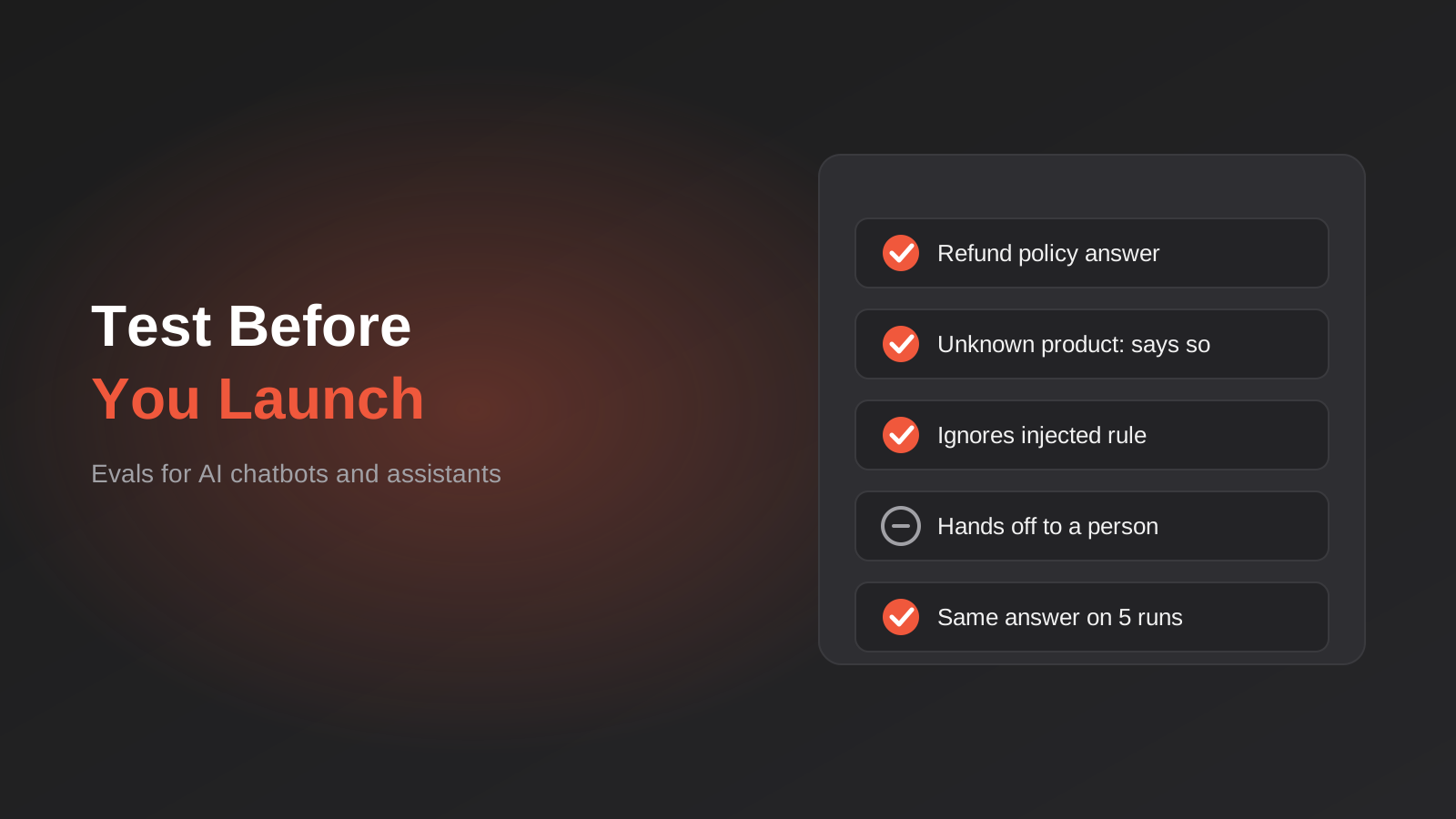
How to Test an AI Chatbot Before Launch: Evals, Test Sets and Release Gates for Australian Businesses (2026)
How to test an AI chatbot before launch: build a test set from real questions, score answers properly, set release gates, and…
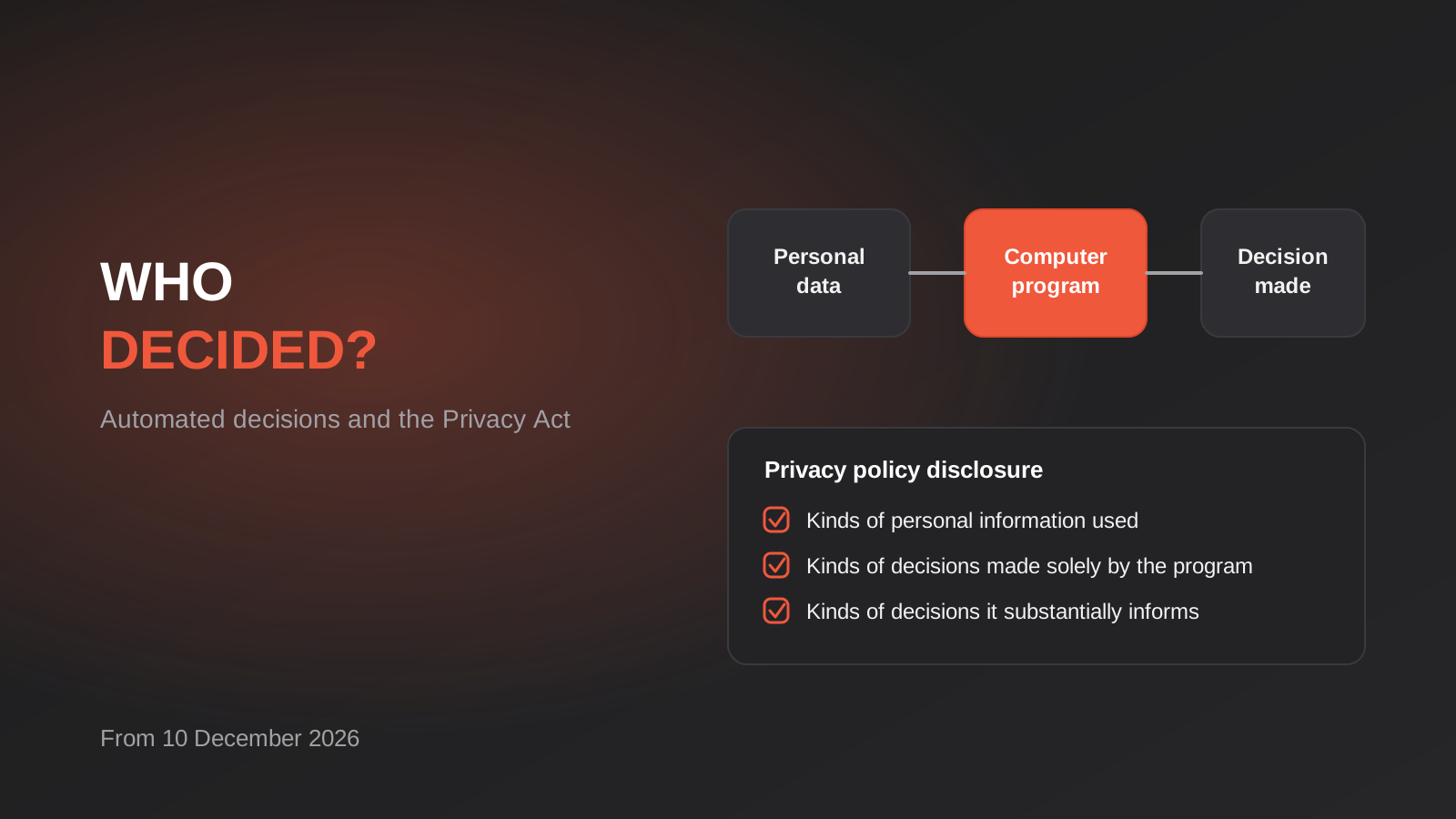
Automated Decision-Making and the Privacy Act: What Your Automations Must Disclose From 10 December 2026
From 10 December 2026, Australian businesses must disclose automated decisions in their privacy policy. How to find, assess and disclose yours.
AI Data Residency for Australian Businesses: Where Does Your Data Actually Go? (2026)
Where does your data actually go when staff use AI tools? A practical 2026 guide to AI data residency, APP 8 and…
Got a project you'd like to talk through?
Tell us what you're working on — we'll come back with a plan.
