
API Rate Limits: Why Integrations Break at Scale (2026)
 Jignesh Vagadiya
04/10/2026
21 min read
Jignesh Vagadiya
04/10/2026
21 min read
Somewhere around the third or fourth system you connect to Xero, someone on the team notices a batch of invoices that simply didn’t sync overnight. Not an error, not a bounce — they just didn’t arrive. By the time anyone traces it back, the cause is almost always the same: the integration asked for more than the platform was willing to give it, got told to slow down, and nobody had written any code to listen.
That’s an API rate limit doing exactly what it’s designed to do. Every API worth using — Xero, Shopify, Salesforce, Zoho, HubSpot, MYOB — caps how many requests you can fire at it in a given window. It’s not a bug, and it’s not something you can argue your way out of with a support ticket. It’s a deliberate constraint, and once a business has more than one or two integrations talking to the same system, it’s one of the most common reasons automation quietly stops being reliable.
We’ve built enough of these integrations now to have a pretty firm view: rate limiting isn’t an edge case you handle if you have time left in the project. It’s a design constraint you plan around from day one, the same way you’d plan around a database schema or an authentication flow. This guide goes through what API rate limits actually are, how they break integrations in practice, the patterns that handle them properly, and the real limits you’ll hit on the platforms Australian businesses use every day.
None of this is new or exotic engineering — rate limiting has existed since the first public APIs. What’s changed is how many systems a typical growing business now has talking to each other. A business running Xero, a CRM, an ecommerce platform and two or three automation tools has, without anyone really deciding it, built a small network of integrations that all share a handful of finite request budgets. The maths that didn’t matter at five integrations starts mattering a great deal at fifteen.
What an API rate limit actually is
A rate limit is the API provider protecting its own infrastructure from being overwhelmed by any single client, and protecting every other client sharing that infrastructure from your traffic spikes. Without it, one misbehaving integration syncing ten thousand products at 3am could degrade the platform for everyone else using it at the same time. Rate limits exist so that doesn’t happen.
Platforms implement this a few different ways, and the model matters because it changes how you should architect around it.
Fixed window limits
The simplest model: you get a fixed number of requests per time window, and the counter resets at the boundary. Xero works this way — a set number of calls per minute, and a separate daily ceiling that resets at midnight UTC. The catch with fixed windows is the boundary itself. If you burn your whole minute’s allowance in the last second before the window resets, then immediately burn the next minute’s allowance in the first second of the new window, you’ve effectively sent two minutes’ worth of traffic in about two seconds. Some platforms tolerate this, some don’t.
Leaky bucket / token bucket limits
This is the model Shopify uses, and it’s worth understanding properly because it’s the one that confuses people most. Picture a bucket with a fixed capacity — say, 40 request “tokens.” Every request you make consumes one token. The bucket refills at a steady rate (for Shopify’s REST API, roughly 2 tokens per second) regardless of whether you’re using them or not. As long as your average request rate stays under the refill rate, you can burst up to the bucket’s capacity without being throttled. Go over, and you start getting 429 responses until the bucket has leaked enough to let more through.
The diagram below shows how this actually plays out end to end — the part most integrations get wrong isn’t the bucket itself, it’s what happens to the requests that overflow it.

Cost-based and concurrency limits
Shopify’s GraphQL Admin API takes this further with a cost-based model: every query is assigned a “cost” based on its complexity (how many fields, how many connections, how deep the nesting), and that cost is deducted from your bucket instead of a flat one-token-per-request charge. A simple query might cost one point; a sprawling query pulling nested variants, metafields and inventory levels across hundreds of products might cost hundreds. On top of time-based limits, some platforms also cap how many requests can be in flight at once — Xero’s concurrency limit of five simultaneous calls per organisation is a good example. You can be well under your per-minute allowance and still get throttled because six requests happened to be open at the same moment.
One detail that trips up a lot of integrations: these numbers aren’t fixed forever. Platforms revise their rate-limiting rules as their own infrastructure changes, and a limit that held steady for years can shift with a major API version release. If an integration was built against an older API version, it may be sitting on a legacy limit that newer integrations built against the current version don’t have — or vice versa, where the older version is actually more generous and a well-intentioned upgrade quietly tightens things. It’s worth checking the changelog, not just the current docs, before assuming last year’s architecture still matches this year’s rules.
How API rate limits actually break things in practice
The theory is simple enough. What makes rate limiting a genuine operational risk is how quietly it fails. A 500 error gets noticed — it’s loud, it shows up in logs, someone gets paged. A 429 is different. Handled properly, it’s a normal, expected response that a well-built integration absorbs without anyone noticing. Handled badly, it looks like data just didn’t show up.
The silent gap
This is the pattern we see most often. An integration loops through a batch — say, two hundred orders to sync to an ERP — and partway through, the platform starts returning 429s. If the code doesn’t specifically catch that status and retry, it either crashes the whole batch (better, because at least it’s visible) or, worse, logs the failure and moves on to the next record without anyone flagging it. A week later, someone reconciling accounts notices forty orders are missing from the ERP, with no obvious reason why. Tracing a silent rate-limit failure after the fact is one of the more frustrating pieces of integration debugging there is, because the failed requests usually aren’t retained anywhere — they just didn’t happen.
“It worked in testing”
Rate limits are a scale problem, which means they’re almost invisible during development. Ten test records, run manually, never come close to a limit. The same code pointed at a full product catalogue or a historical order backfill behaves completely differently. We’ve seen integrations that ran perfectly for months on day-to-day volume and then fell over the first time someone ran a one-off bulk export or a catalogue-wide price update — exactly the kind of job that’s easy to forget needs the same throttling discipline as the regular sync.
Shared limits across multiple integrations
Most platforms apply the limit at the account or organisation level, not per app. If you’ve got an accounting sync, a reporting tool and a custom automation all pulling from the same Xero file, they’re all drawing from the same 60-calls-a-minute allowance. One of them running an aggressive sync can starve the others, and because each integration only sees its own requests, none of them individually looks like the problem. This is a genuinely common failure mode once a business has stacked up a few years of automation without anyone keeping a full inventory of what’s connected to what.
Retries that make the problem worse
The instinctive fix — retry immediately when you get a 429 — is usually the worst possible response. Immediate retries add more load to a system that just told you it’s already overloaded, and if several processes are all retrying on the same tight loop, you get a thundering herd that keeps the rate limit tripped far longer than a single burst would have. This is closely related to the retry logic problems we see cause duplicate records; if you’re not careful, a naive retry can also resubmit a request that technically succeeded but whose response got lost, which is exactly the scenario covered in our piece on idempotency and retries causing duplicate invoices, orders and emails.
Architecting around rate limits properly
Handling API rate limits well doesn’t require exotic engineering. The patterns below are well established and, used together, cover the vast majority of real-world integration volume without ever touching a rate limit’s ceiling.
Read the headers the API is already giving you
Most platforms tell you exactly where you stand on every single response, if you bother to look. Common headers include X-RateLimit-Limit (your ceiling), X-RateLimit-Remaining (what’s left in the current window) and, critically, Retry-After on a 429 response — which tells you, in seconds, exactly how long to wait before trying again. An integration that reads Retry-After and waits the specified time is self-correcting. An integration that ignores it and guesses is gambling.
Exponential backoff with jitter
When there’s no explicit wait time to follow, exponential backoff is the standard fallback: wait one second, then two, then four, then eight, doubling each time a retry also fails, up to a sensible ceiling. “Jitter” means adding a small random offset to each wait so that if ten requests failed at the same instant, they don’t all retry at the same instant too. Without jitter, backoff just synchronises the thundering herd instead of preventing it.
Queue your own requests before you hit the wall
Backoff reacts after you’ve already been throttled. A request queue with its own pacing logic prevents the throttling in the first place, by never sending requests faster than the platform’s refill rate to begin with. In practice this means putting outbound API calls through a queue (a proper job queue, or even just a rate-limited worker) rather than firing them straight from whatever process generated them. This is the single biggest architectural difference between an integration that occasionally gets throttled under load and one that never does.
Batch wherever the API lets you
A huge share of rate-limit problems come from doing something record-by-record that the platform offers a bulk endpoint for. Updating two hundred product prices one REST call at a time burns two hundred tokens; Shopify’s bulk operations API or a well-constructed GraphQL mutation can do the same job for a fraction of the cost. Before writing a loop, it’s always worth checking whether the platform has a batch, bulk or bulk-query equivalent — most mature APIs do, specifically because this is such a common pain point.
Cache what doesn’t need to be fetched again
Reference data — tax rates, shipping zones, product categories, a customer’s basic profile — often gets re-fetched far more often than it actually changes. A short-lived cache (minutes to hours, depending on how stale the data can safely be) can remove a large share of read traffic without any risk to data accuracy. This matters more than it sounds: a lot of integrations spend their rate-limit budget re-confirming things they already knew.
Circuit breakers for sustained outages
Backoff handles a transient blip. A circuit breaker handles the case where an endpoint is consistently failing — after a threshold of repeated failures, the integration stops sending requests altogether for a cooldown period, rather than continuing to retry into a wall. This protects both the platform you’re calling and your own system’s resources, and it turns a sustained outage into a clean, visible pause instead of a long tail of failed retries.
Prefer webhooks to polling wherever they exist
A lot of rate-limit pressure is self-inflicted by polling for changes that haven’t happened. If a platform offers webhooks, having it push updates to you as they occur is almost always lighter on your rate-limit budget than repeatedly asking “anything new?” We go through this trade-off properly, including the hybrid approach most integrations end up needing, in webhooks vs polling for real-time data sync.
Watch throttle rates, not just error rates
Most monitoring setups alert on hard failures and ignore everything else, which means a rate limit problem can sit there for weeks, quietly adding latency, before it tips over into something that actually breaks. It’s worth tracking 429 counts as their own metric, separate from genuine errors, and setting a threshold alert on them the same way you would on error rate or response time. A sync job that’s throttled on 2% of requests is working as designed. One that’s throttled on 40% of requests is about to become a visible problem, and it’s much cheaper to catch that trend early than to diagnose it after someone notices missing data.
Real API rate limits you’ll actually run into
Published limits change as platforms update their APIs, so treat the figures below as a starting point for scoping, not a permanent contract — always check current documentation before committing to an architecture. We’ve picked Xero, Shopify and Salesforce/Zoho because between them they cover the three rate-limiting models Australian businesses are most likely to run into — a fixed window, a leaky bucket, and a pooled daily allocation — but the same questions are worth asking of HubSpot, MYOB, QuickBooks or whatever else sits in your stack: is the limit per minute or per day, is it shared across every connected app, and what happens to a request that arrives just as the window resets.
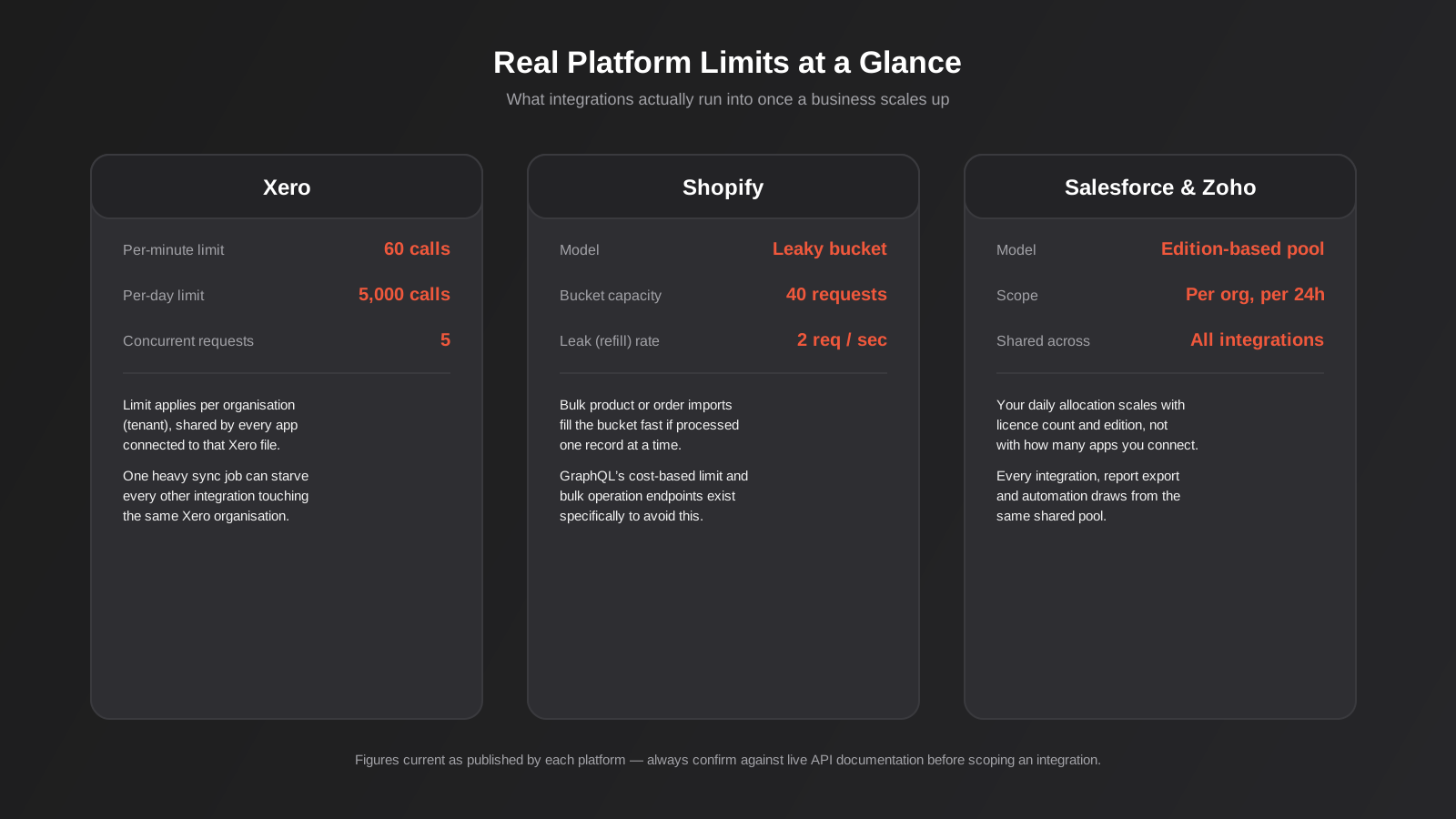
Xero applies a fixed-window limit of 60 calls per minute and 5,000 calls per day, per organisation, with a maximum of five concurrent requests. The daily cap resets at midnight UTC, which is worth remembering if you’re scheduling an overnight batch job — it’s easy to accidentally plan a sync that assumes Australian Eastern time resets. Because the limit is per organisation rather than per app, every integration a business has connected to that Xero file is drawing from the same pool.
Shopify uses the leaky bucket model on its REST Admin API — a 40-request bucket that refills at roughly 2 requests per second for standard stores (higher on Plus). The GraphQL Admin API uses cost-based limiting instead, where complex queries consume more of the budget than simple ones. Bulk operations exist specifically so that large catalogue or order jobs don’t have to compete for REST or GraphQL budget at all.
Salesforce and Zoho both allocate API calls as a pooled daily total tied to your licence count and plan edition, shared across every integration, report export and automation touching that org — rather than a simple per-minute figure. This makes them a bit harder to reason about up front, because the number that matters depends on commercial decisions (how many seats, which edition) as much as technical ones. It’s a conversation worth having with whoever manages the platform relationship before scoping new integration work, not something to discover after go-live.
Whichever platform you’re connecting to, this is exactly the kind of detail that needs to be scoped before a build starts, not discovered during it — it’s a standard part of how we approach API and systems integration work, and it’s one of the main reasons a seemingly simple “just connect these two systems” project needs a proper discovery phase.
Where no-code tools fit into this
Zapier, Make and n8n all sit between you and the platform’s rate limit, and they handle it with varying degrees of transparency. Zapier will generally queue and retry a throttled step automatically, but if you’re on a plan with a low task-per-minute ceiling of your own, you can hit Zapier’s limit before you ever reach the destination platform’s. Make’s data-transfer model makes it a bit easier to see exactly where a bottleneck sits, operation by operation. n8n, being self-hosted or more code-adjacent, gives you the most direct control — you can build backoff and queuing logic explicitly into a workflow — but that also means nothing happens automatically unless you build it.
The short version for rate limiting specifically: no-code tools reduce how much of this you have to build yourself, but they don’t remove the underlying constraint, and a sufficiently large sync job can still trip a destination platform’s limit regardless of which orchestration tool is driving it. A well-configured no-code workflow and a custom-built queue are solving the same problem; the no-code version just hides more of the plumbing from view, which is fine right up until something goes wrong and someone needs to see it.
When rate limits mean you need a different architecture entirely
Sometimes the answer isn’t better backoff logic — it’s recognising that the integration pattern itself doesn’t fit the volume involved. A few signals worth paying attention to:
- You’re polling a platform every few minutes “just in case” something changed, and most polls return nothing new. Switching to webhooks, or at minimum lengthening the poll interval and relying on a manual sync button for urgent cases, usually buys back most of your budget.
- A nightly batch job is creeping later and later as data volume grows, because it’s serialising requests that could be parallelised within the concurrency limit, or failing to use bulk endpoints at all.
- Multiple integrations are independently hitting the same platform, each unaware of the others’ traffic. At that point the fix isn’t fixing each integration — it’s introducing a single integration layer (an iPaaS, a dedicated sync service, or a shared queue) that all of them go through, so there’s one place managing the shared budget instead of several processes blindly competing for it.
- You’re scoping an ERP integration that needs to move large historical volumes during migration, which is a fundamentally different load profile to steady-state daily sync and usually needs its own throttling plan, often run during off-peak hours with explicit platform sign-off for a temporary limit increase where that’s on offer. A migration that moves years of transaction history in a single weekend is a completely different engineering problem to a nightly incremental sync, and treating them the same way — same code, same pacing, same assumptions — is one of the more expensive mistakes we see in platform migration projects.
Common mistakes
- Treating a 429 as an application error. Logging it as a failure and alerting on it the same way you’d alert on a 500 creates alert fatigue and hides the real problem, which is pacing, not correctness.
- Retrying immediately, in a tight loop, with no delay. This is the single most common cause of a short throttle turning into a sustained one.
- Ignoring the
Retry-Afterheader and guessing a wait time instead. The platform is telling you exactly what it wants; overriding that with a fixed guess either wastes time waiting too long or gets you throttled again by not waiting long enough. - Building and testing against tiny data volumes only. Rate limiting is a scale problem. If nobody has run the integration against a realistic production-sized batch before go-live, the limit hasn’t actually been tested.
- Assuming each integration has its own private allowance. On most platforms the limit is per account or per organisation, not per app connected to it — plan with that shared budget in mind from the start.
- Skipping bulk endpoints in favour of a simple loop. It’s quicker to write a loop that calls the same endpoint two hundred times than to learn a bulk API, right up until it starts failing in production.
- No monitoring on throttle rates. If nobody’s watching how often an integration gets a 429, a creeping problem looks identical to a healthy one until the day it isn’t.
Frequently Asked Questions
What’s the difference between rate limiting and throttling?
They’re closely related and often used interchangeably. Strictly, rate limiting is the rule (how many requests you’re allowed in a given window), and throttling is what happens when you exceed it — the platform slows, delays or rejects further requests until you’re back under the limit. In day-to-day conversation, “we got throttled” and “we hit the rate limit” mean the same thing.
Can we just ask the platform for a higher rate limit?
Sometimes, but it’s rarely the right first move. Some platforms offer higher tiers tied to a paid plan (Shopify Plus stores get a larger bucket, for instance), and some will grant a temporary increase for a specific migration window if you ask in advance. But a higher limit just moves the ceiling further away — it doesn’t fix an integration that’s inefficient with the budget it already has, and most businesses find that fixing the architecture (batching, caching, queuing) solves the problem permanently, where a higher limit only delays it.
How do we know if rate limiting is actually causing our sync problems?
Check your integration’s logs or error tracking for HTTP 429 responses, and check whether they cluster around specific events — a bulk import, a scheduled nightly job, a busy sales period. If your logging doesn’t capture response codes at all, that’s the first thing to fix, because without it you’re debugging blind. A good iPaaS or custom integration layer should be logging every throttled request, not silently swallowing it.
Do webhooks have rate limits too?
The outbound webhook delivery itself is usually not something you need to throttle, since the platform is sending to you, not the other way around. But your own system receiving a sudden burst of webhooks (say, a flash sale generating hundreds of order-created events in a minute) needs to be able to process that burst without falling over, and whatever you do in response to each webhook — like looking up or updating a record in a third system — is still subject to that third system’s rate limit. Webhooks shift where the volume shows up; they don’t make it disappear.
Does this matter for a small business with only one or two integrations?
Less, but not never. A single well-behaved integration syncing modest daily volumes is unlikely to come close to most platforms’ limits. The risk shows up as a business grows — more integrations, more data, more automation stacked on top of the same accounting or CRM platform — and it’s much cheaper to build with sensible pacing from the start than to retrofit it once something’s already breaking under load.
Who’s responsible for handling rate limits — us, or the platform we’re integrating with?
The platform sets and enforces the limit; handling it gracefully is the responsibility of whoever builds the integration on your side. A well-built custom integration or a properly configured no-code workflow should never produce a visible failure from rate limiting — at worst, a large job takes a little longer to finish because it’s pacing itself correctly.
Where to start
If you’ve never actually checked whether your integrations are hitting rate limits, that’s the first step — look at the error logs or ask whoever built the integration to pull the 429 count for the last month. Most businesses are surprised by what they find, in both directions: some discover a problem they didn’t know about, others find their current setup is handling it fine and the risk is purely theoretical for now.
If you’re planning a new integration — connecting a CRM to an ERP, syncing an ecommerce platform to accounting software, or building something more custom — rate limits are one of the things worth scoping properly before a single line of code gets written, alongside authentication, data mapping and error handling. We’ve written separately about the broader picture of connecting CRM, ERP, payments and inventory systems if you’re still deciding on the overall shape of the integration.
If any of this sounds like it’s already happening in your business — silent gaps, a nightly job that keeps getting later, an integration that “just sometimes” misses records — it’s rarely a sign the platform is unreliable. More often it’s a sign the integration was built for the volume it had on day one, and nobody’s revisited the pacing logic since the business grew past it. That’s a fixable problem, usually without touching the parts of the integration that already work.
We’re happy to have a look and talk through what’s actually going on. No pressure, just a conversation about what we’re seeing and what it would take to fix properly.
Keep reading
Related posts

POS Integration for Australian Retail and Hospitality: Stock, Sales, Settlements and Getting the Books to Agree (2026)
How point-of-sale integration works for Australian retailers and hospitality venues: stock sync, daily sales posting, settlements and fees, and keeping the books…
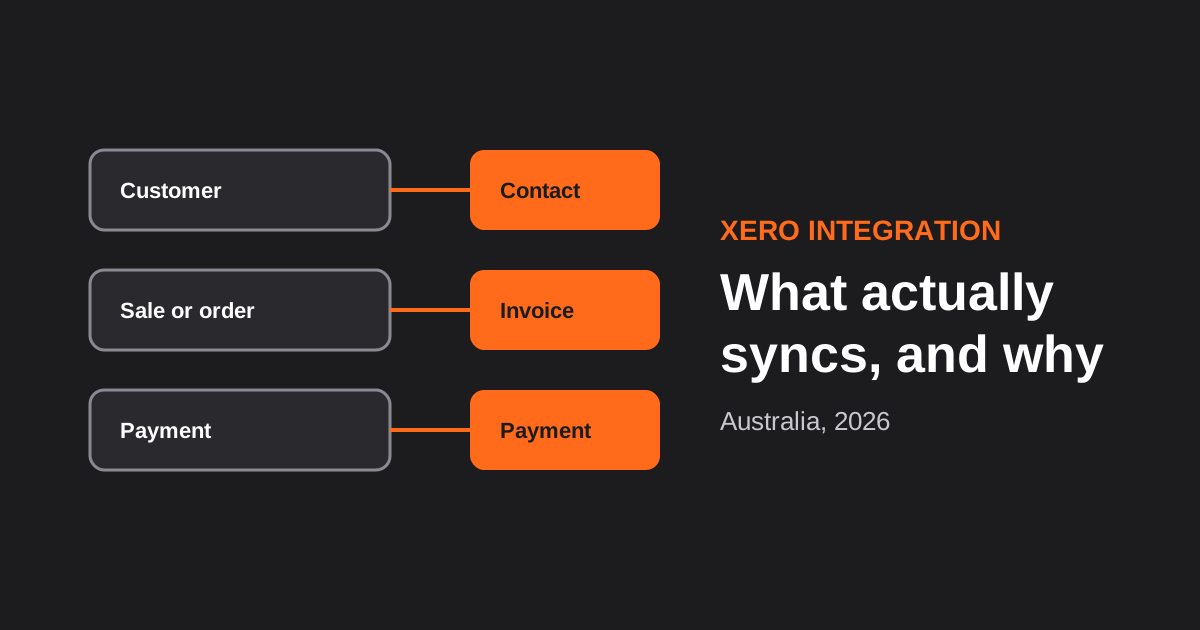
Xero Integration for Australian Businesses: What Actually Syncs, GST Mapping and the Mistakes That Break Reconciliation (2026)
How a Xero integration really works in Australia: what to sync, how to map invoices, payments, refunds and GST, and the mistakes…

CRM Integration for Australian Businesses: What to Connect First and How to Do It Properly (2026)
A practical guide to CRM integration for Australian businesses: what to connect first, which way data should flow, native vs middleware vs…
Got a project you'd like to talk through?
Tell us what you're working on — we'll come back with a plan.
