
Amazon Ads for Australian Sellers: Costs, Campaign Types and Whether It’s Worth the Spend (2026)
 Jignesh Vagadiya
11/10/2026
21 min read
Jignesh Vagadiya
11/10/2026
21 min read
We get asked about Amazon a lot more than we used to. Usually it’s a client who already sells through Shopify or WooCommerce and has started listing the same products on Amazon Australia, watched a trickle of organic orders turn into something worth paying attention to, and then opened the Advertising Console for the first time and had no idea what they were looking at. Sponsored Products, Sponsored Brands, Sponsored Display, DSP — four names for four very different tools, each with its own eligibility rules, its own attribution window and its own idea of what counts as a “good” result.
The short version is that Amazon Ads Australia is growing fast — local advertising revenue was up around 61–62% in the year to December 2025, making it the fastest-growing ad platform operating here. But “it works” isn’t the same as “it’s worth it for you.” A lot of Australian sellers set up a Sponsored Products campaign, watch ACoS climb past 50% in the first month, and quietly turn it off, assuming it doesn’t work for their category. Often it does — they just launched it wrong, measured it wrong, or expected month-one numbers that only show up in month three.
This guide is for Australian sellers already on Amazon, or seriously considering it, who want a straight answer on what the ad formats actually do, what they cost here, and how to tell — honestly, with real numbers — whether the spend is paying for itself.
What Amazon Ads actually is, and why it’s not like Google or Meta
Every other paid channel we write about — Google Ads, Meta, LinkedIn — interrupts someone doing something else to introduce them to your product. Amazon Ads does the opposite. The shopper has already decided to buy something in your category; they’ve typed a search term into a marketplace built for one purpose, and they’re scrolling a results page full of near-identical options. Your ad isn’t creating demand. It’s competing for a sale that’s already going to happen, just maybe not to you.
That changes almost everything about how the channel should be judged. A Google Ads campaign for a brand nobody’s heard of can still be worth running if it introduces the product to people who’ll buy later through other channels. An Amazon ad that never converts is just money spent to lose a sale to the competitor one row down. There’s no brand-building consolation prize baked into the metric the way there sometimes is elsewhere — which is exactly why the measurement section further down matters more here than on most channels.
It also means Amazon Ads is pay-to-play inside an ecosystem you don’t fully control. Amazon decides what “relevance” means for the auction, changes placement rules without much notice, and can disapprove your ad for a listing issue that has nothing to do with the ad itself. Sellers who treat it like a second Google Ads account, with the same cadence and the same mental model, tend to get frustrated fast.
The three core ad formats
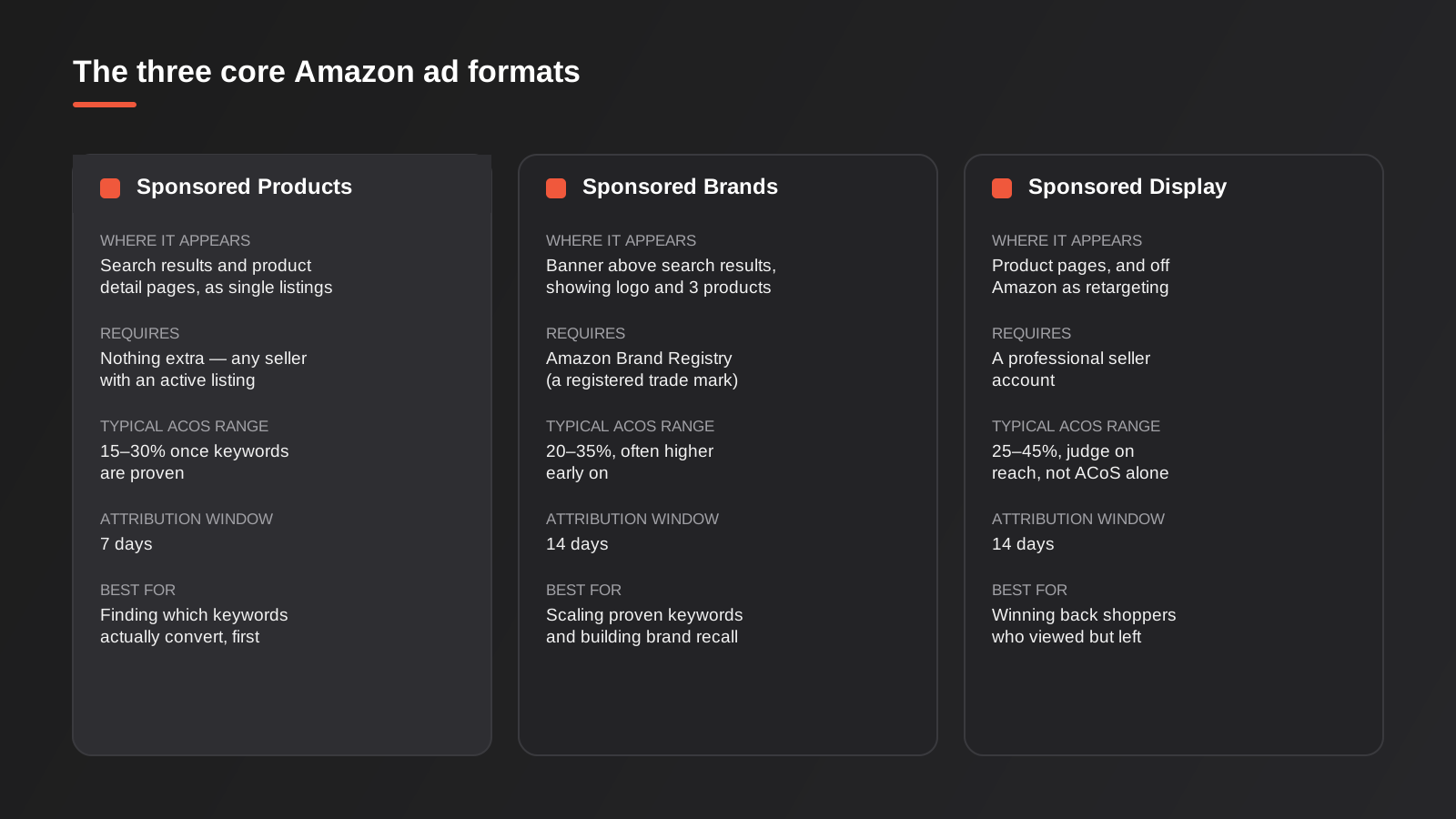
Most sellers only ever need to understand three formats. A fourth, Amazon DSP, exists for a smaller set of bigger spenders — we’ll get to it. Here’s how the three core formats actually differ.
Sponsored Products
This is where almost every seller starts, and for most categories it’s where most of the budget should stay. Sponsored Products puts a single listing into search results and onto competitors’ product pages, labelled “Sponsored” the same way a Google Shopping ad is labelled. There’s no eligibility requirement beyond having an active, buyable listing, which is why it’s the default entry point.
You can target it two ways. Automatic targeting hands Amazon’s algorithm the keyword matching and lets it decide which search terms your ad shows against — useful for discovery, close to useless for control. Manual targeting lets you bid on specific keywords or specific competitor ASINs, with the usual match type options (broad, phrase, exact) that anyone who’s run Google Ads will recognise immediately. The standard play is to run an automatic campaign for two to three weeks purely to harvest search term data, then move the terms that actually convert into a manual campaign where you can control bids properly and add negative keywords to the automatic campaign so it stops wasting spend on them.
Sponsored Brands
Sponsored Brands shows up as a banner above or alongside search results, carrying your logo, a custom headline and up to three products in a single unit. It’s built for brand presence rather than single-SKU conversion, and it requires Amazon Brand Registry — which in turn requires a registered trade mark. That’s a real gate for a lot of smaller Australian sellers: if your brand name isn’t trademarked with IP Australia, Sponsored Brands and Sponsored Display are both off the table until it is, which usually takes a few months and is worth starting earlier than you think if you’re planning to scale on Amazon.
Once you’re eligible, Sponsored Brands is best layered on top of Sponsored Products rather than run alone. Use it to scale the keywords Sponsored Products has already proven convert, and to put your brand name in front of shoppers who are currently comparing you against competitors by name — defensive brand-term bidding matters more on Amazon than almost anywhere else, because the competitor’s “Sponsored” listing can sit directly above your own organic one.
Sponsored Display
Sponsored Display is Amazon’s retargeting and audience layer. It shows on product detail pages (including competitors’ pages), and — this is the part sellers often don’t realise — off Amazon entirely, on other sites and apps through Amazon’s ad network, to people who viewed your listing but didn’t buy. It requires a professional selling account but not Brand Registry, which makes it more accessible than Sponsored Brands.
The honest take on Sponsored Display is that ACoS alone understates its value. It’s doing a job similar to Meta retargeting — nudging someone who already showed intent back to complete the purchase — so judging it purely on in-session conversion misses what it’s recovering further down the funnel. It’s rarely the first format to turn on, but it’s usually the first one worth adding once Sponsored Products is established and converting.
What Amazon Ads Australia actually costs
There’s no official Amazon-published rate card for Australia, and most of what gets quoted online is seller-reported, so treat the following as a working range rather than gospel. Cost-per-click for Sponsored Products in the Australian marketplace generally runs from around 10 cents up to $3 or more, with the most contested keywords in competitive categories — supplements, phone accessories, kitchenware — pushing past $6. Cost-per-thousand-impressions on Sponsored Brands and Sponsored Display sits roughly between $1 and $15, again heavily category-dependent. Amazon also applies GST at 10% to ad spend billed to Australian accounts, which is easy to miss when you’re comparing a monthly invoice to a budget set without it.
The number that actually matters early on is launch ACoS, and it’s higher than most first-time sellers expect: 40–60% in the first 30 to 90 days for a new listing or a new brand is normal, not a sign something’s broken. Amazon’s algorithm needs conversion data before it can target efficiently, and a brand-new listing has none. The mistake we see most often is a seller judging week-two ACoS against a 20% target pulled from a blog post, concluding the channel doesn’t work, and switching it off before the algorithm has had a chance to learn.
Category matters more on Amazon than on almost any other ad platform, because you’re not just competing for attention — you’re competing inside Amazon’s own merchandising priorities. Beauty, health and household and personal care categories are currently the strongest performers on the platform in Australia, with skin care, hair care and body care leading; grocery and pantry staples lag well behind. If you’re in one of the stronger categories, treat the benchmarks above as a floor, not a ceiling — competition for the best keywords will be fiercer, but so is buyer intent.
It’s also worth budgeting ad spend as one line item inside the total cost of selling on Amazon, not in isolation. A professional seller account runs a flat monthly fee, Amazon takes a referral fee of roughly 8–15% of the sale price depending on category, and FBA storage and fulfilment fees apply on top if you’re using Fulfilment by Amazon. A healthy-looking ACoS can still leave very little margin once referral fees, fulfilment costs and the ad spend itself are all stacked against the sale price — work the full stack of costs out per unit before setting an ACoS target, rather than picking a round number off a blog post.
How Amazon’s search ranking actually works
Amazon’s ranking system (often still referred to by its old A9 name, now evolved considerably) isn’t trying to show shoppers the most relevant product in some abstract sense — it’s trying to show them the product most likely to result in a completed sale, because every completed sale is revenue for Amazon too. That single fact explains most of what otherwise looks like strange or inconsistent behaviour in both organic rank and ad performance.
The factors that matter most are conversion rate on the listing, historical sales velocity, click-through rate from search results, price competitiveness against similar listings, and how complete and keyword-matched the listing content is — title, bullet points, backend search terms and increasingly A+ Content. None of this is static. A listing’s organic rank moves in response to recent performance, which is why the relationship between ads and organic position matters so much: a well-run Sponsored Products campaign that lifts sales velocity on a listing can measurably improve that same listing’s organic rank over the following weeks, because Amazon’s algorithm reads the sales spike as evidence of relevance. This is sometimes called the Amazon flywheel, and it’s the real argument for running ads even on a listing that’s already ranking reasonably well organically — the ad spend isn’t just buying today’s sale, it’s feeding tomorrow’s organic position.
The flip side is that the same mechanism punishes you for going out of stock. A stockout doesn’t just pause sales; it resets the sales velocity signal Amazon has been building, and listings often come back from a stockout with meaningfully worse organic rank than they had going in, even after inventory is replenished. If you’re running ads to drive sales velocity, inventory planning has to keep pace — a successful ad campaign that outpaces your stock levels can do more long-term damage to the listing than if you’d never advertised it at all.
ACoS vs TACoS: the metric that actually tells you if it’s working
This is the part that trips up sellers who come from Google or Meta, where “track ROAS” is close to the whole story. On Amazon, ACoS on its own can genuinely lie to you.
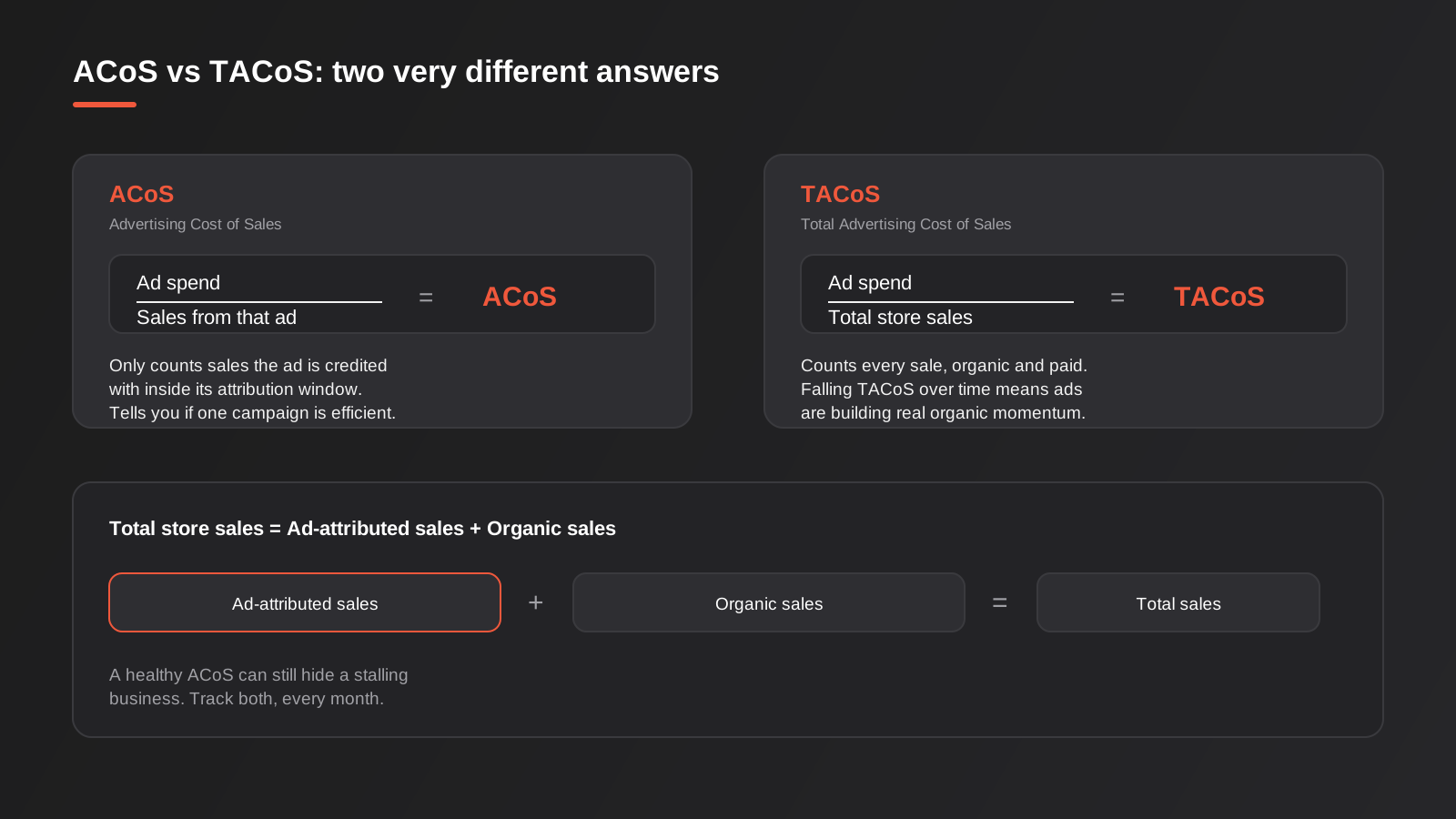
ACoS, Advertising Cost of Sales, is ad spend divided by the sales Amazon attributes to that ad, inside its attribution window — 7 days for Sponsored Products, 14 for Sponsored Brands and Sponsored Display. It tells you whether a specific campaign is efficient. It tells you nothing about whether your Amazon business as a whole is actually growing, because it only looks at the slice of sales the ad gets credit for.
TACoS, Total Advertising Cost of Sales, is ad spend divided by total store sales — organic and paid combined. This is the number that should actually drive decisions. A seller running a healthy 18% ACoS on Sponsored Products can still be in trouble if organic sales are flat or falling and every sale on the listing increasingly depends on the ad being on. Conversely, a seller nervous about a 45% ACoS on a brand-new campaign can be perfectly fine if TACoS is trending down month over month, because that means the ad spend is successfully building organic rank and reviews that will eventually let it pull back.
Our practical advice: track ACoS weekly, per campaign, to catch waste fast. Track TACoS monthly, at the account or listing-family level, as the actual scorecard for whether Amazon is becoming a more or less efficient part of the business. If TACoS keeps climbing quarter over quarter with no sign of levelling off, that’s the real signal to question the channel — not a single bad ACoS week.
Get the listing right before you fund traffic to it
This is the step sellers most often skip, because it feels like delaying the “real” work of setting up campaigns. It isn’t a delay — it’s the single biggest lever on whether any ad spend converts at all. An ad can only be as good as the listing it points to, and Amazon’s own ranking signals (covered above) reward exactly the same things a converting listing needs anyway.
A few non-negotiables before turning ads on: a title that leads with the main keyword and brand rather than marketing fluff, at least five bullet points that answer the actual buying questions (size, material, compatibility, what’s in the box), seven or more images including at least one lifestyle shot and one showing scale or use, and A+ Content if you have Brand Registry, which measurably lifts conversion rate on most listings that add it. Reviews matter enormously and can’t be manufactured quickly or safely — incentivised reviews breach Amazon’s terms of service and risk the account, not just the listing — so a brand-new listing with zero reviews should expect a materially lower conversion rate than an established one, and budget its first ad test accordingly rather than panicking when the numbers look worse than a competitor’s.
If the listing genuinely isn’t converting organic traffic it already gets, more ad spend won’t fix that. It’ll just buy more visits to the same broken page, at a worse ACoS than a seller who fixed the page first.
Campaign structure that actually works
The sequence that holds up across most categories looks like this:
1. Research with automatic targeting
Run a low, flat bid automatic campaign for two to three weeks purely to collect search term data. Don’t try to optimise it — its only job is to tell you which real customer search terms lead to a sale, which is almost always a wider and stranger list than the keywords you’d have picked yourself.
2. Harvest into manual exact-match campaigns
Pull every search term that converted into its own manual campaign, bid it on exact match, and add it as a negative to the automatic campaign so you stop paying twice for the same click. This is the single highest-leverage habit in Amazon Ads account management, and the one most sellers skip once they’re busy.
3. Add broad and phrase match for discovery
Once exact match is converting reliably, layer in broad and phrase match campaigns at lower bids to keep finding new converting terms, feeding them back into exact match as they prove out. This is an ongoing cycle, not a one-off setup task.
4. Defend your brand terms
Bid on your own brand name and close product variants, even though it feels wasteful to pay for traffic that should be free. Competitors routinely bid on well-known brand names, and the cost of losing that click is usually higher than the cost of the bid.
5. Layer in Sponsored Brands and Display once eligible
Add Sponsored Brands on proven keyword sets to build awareness and defend category search terms, and Sponsored Display to retarget product-page visitors who didn’t convert. Both work better on top of a proven Sponsored Products foundation than as a standalone strategy.
Placement bid adjustments and dayparting
Once a campaign is converting, two levers are worth tuning beyond the base keyword bid. Amazon lets you add a percentage bid adjustment for “top of search” placement specifically, separate from product pages and rest-of-search — top of search typically converts noticeably better but costs more per click, and for a proven keyword it’s usually worth paying the premium rather than leaving the placement to chance. Dayparting, running ads only during the hours your category actually converts (evenings for impulse categories, business hours for B2B-leaning products) isn’t native to Amazon’s interface the way it is in Google Ads, but can be approximated with scheduled bid changes or third-party bid management tools once spend is high enough to justify the extra layer of management.
Seasonal pacing: Prime Day and the end-of-year peak
Amazon Australia’s calendar has two periods that behave differently from the rest of the year and need budget and bids planned ahead of time rather than reacted to. Prime Day, now typically run as a multi-day event around July, sees a surge in both traffic and competition for ad placements — cost-per-click climbs across most categories as every seller in your space bids up to capture the volume, so a flat daily budget that works fine in May can exhaust itself by lunchtime during Prime Day. The end-of-year peak running from Black Friday through Cyber Monday into the December gift-buying window behaves similarly, with the added complication of shipping cutoffs affecting which listings are even worth advertising in the final week before Christmas.
The practical fix is raising daily budgets and bids ahead of both periods rather than during them, since campaigns capped by budget stop serving entirely once the daily spend limit is hit, often in the first few hours of a high-traffic day. It’s also worth reviewing inventory levels before committing to higher ad spend in these windows — driving a sales spike you can’t fulfil risks the stockout and organic-rank damage covered above, at exactly the time of year when the lost sales are most expensive.
Amazon DSP: when sellers graduate to it
Amazon DSP (Demand-Side Platform) is a programmatic buying tool that places display and video ads across Amazon-owned properties and third-party sites and apps, using Amazon’s shopping and browsing data for targeting. It’s a genuinely different tool from Sponsored Display — broader reach, more complex setup, and traditionally access-gated behind a managed-service relationship or a meaningful monthly spend commitment, though self-service options have opened up over time.
DSP makes sense once you’ve got Sponsored Products and Sponsored Brands running efficiently and you’re trying to build upper-funnel awareness or retarget at a scale the sponsored formats can’t reach — think established brands with real catalogue depth, not a seller with three SKUs testing the waters. Its attribution also behaves differently: it credits views as well as clicks over a 14-day window, so it needs its own TACoS-style line in reporting rather than being blended in with Sponsored Products performance. For most of the Australian sellers we work with, it’s a future-stage decision, not a starting point.
Is Amazon Ads worth it for your business?
A few honest filters, in order:
Do you already sell on Amazon organically, even a little? Ads amplify an existing listing’s conversion rate, reviews and content — they don’t fix a listing that doesn’t convert. If your product page has no reviews, thin images and a weak title, fix the listing before you fund traffic to it.
Does your margin have room for a 40–60% launch ACoS? If your product margin can’t absorb that for a quarter while the algorithm learns, you’ll pull the plug before it has a chance to work. This is the single most common reason Amazon Ads “doesn’t work” for a seller — the test window was too short and the budget too thin to survive it.
Is your category one Amazon shoppers actually browse for, or one they search for by brand elsewhere first? Categories with strong on-platform browsing behaviour (beauty, home, health) tend to reward ad spend faster than categories where Amazon is a secondary, price-comparison stop after a decision’s already been made on your own site or elsewhere.
Can you track TACoS, not just ACoS, from week one? If you’re only going to look at campaign-level ACoS, you’re flying partially blind. Set up the reporting before you spend the first dollar, not after three months of data you can’t properly interpret.
If those four answers are mostly yes, Amazon Ads is very likely worth testing properly — meaning a real budget, run for a full quarter, not a token $500 spend judged after two weeks.
Common mistakes
- Judging a new campaign’s ACoS after one or two weeks instead of giving the algorithm 30–90 days of conversion data to learn from.
- Running automatic targeting indefinitely instead of harvesting search terms into manual campaigns, which leaves bids impossible to control.
- Launching ads on a listing with no reviews, weak images or a thin title, then blaming the ad format when conversion rate stays low.
- Ignoring TACoS entirely and optimising purely for campaign-level ACoS, which can hide a business that’s becoming more dependent on paid traffic over time.
- Skipping Brand Registry and a trade mark application, then discovering Sponsored Brands and Sponsored Display aren’t available right when the brand is ready to scale.
- Not bidding on your own brand terms, and watching a competitor’s sponsored listing sit above your organic one on your own product name.
- Forgetting to budget the 10% GST applied to Australian ad spend, which quietly inflates the real cost-per-click against the number in the dashboard.
- Treating Sponsored Display purely as a conversion channel and judging it on ACoS alone, missing the retargeting value it adds further down the funnel.
Frequently Asked Questions
Do I need Amazon Brand Registry to advertise on Amazon Australia?
Not for Sponsored Products, which any seller with an active listing can run. Brand Registry — which requires a registered trade mark with IP Australia — is required for Sponsored Brands and for most Sponsored Display placements. If you’re not yet registered, it’s worth starting the trade mark application early, since approval typically takes a few months and gates two of the three main ad formats.
What’s a realistic Amazon Ads budget to start testing with in Australia?
Enough to survive a 40–60% ACoS for 60–90 days without panicking. For most small sellers that’s a few thousand dollars in total spend over the quarter, not per week. A budget that only covers two or three weeks of testing will almost always get switched off before the algorithm has learned enough to perform efficiently.
Should I run Amazon Ads if I also run Google Shopping or Performance Max for the same products?
Usually yes, and they rarely cannibalise each other much — a shopper searching inside Amazon has already chosen to buy on-platform, which is a different intent to someone searching Google first. We cover how Google Shopping ads and Performance Max compare in a separate guide if you’re weighing both channels at once; the two budgets should be managed and reported separately rather than blended.
Why is my ACoS good but my Amazon sales aren’t actually growing?
This is exactly the gap TACoS is built to catch. A healthy campaign-level ACoS only tells you that specific campaign is efficient relative to the sales it’s credited with — it says nothing about whether your overall listing is gaining organic momentum or quietly becoming more dependent on the ad being switched on. Start tracking TACoS monthly if you haven’t already.
Is Amazon Ads worth it for a small Australian seller with only a handful of SKUs?
It can be, provided the listings themselves are already solid — decent images, a handful of reviews, a title that matches real search terms — and the margin can absorb a genuine 60–90 day test. It’s a poor fit for a brand-new listing with zero reviews and thin margin, where ad spend is more likely to be masking a listing problem than solving one.
Do I need an agency to manage Amazon Ads, or can I run it myself?
Plenty of sellers run Sponsored Products themselves early on — the interface isn’t hard to learn. Where it gets harder to DIY well is the ongoing search-term harvesting discipline, Brand Registry and trade mark coordination, and reading TACoS against the rest of the business rather than in isolation. That’s usually the point sellers bring in outside help, not the initial campaign setup.
Where to start
If you’re already selling on Amazon Australia and haven’t touched advertising yet, the lowest-risk starting point is a modest automatic Sponsored Products campaign, run for a few weeks purely to collect search term data, before you commit real budget to manual campaigns. If you’re earlier than that — still deciding whether Amazon is worth building out as a channel at all alongside your own online store or a platform like Shopify — it’s worth working out where Amazon actually fits your margin and category before spending anything on ads at all.
We help Australian ecommerce businesses figure out where Amazon fits against their other channels, and set up the ad structure and TACoS reporting properly from day one rather than letting it drift into guesswork. If that’s useful, get in touch and we’ll have a straight conversation about whether it’s worth testing for your category specifically.
Keep reading
Related posts
Best Ecommerce Platforms for Australian Retailers in 2026: Six Options Compared
Six ecommerce platforms for Australian retailers compared honestly: real fees, GST and payments, drawbacks and who each one actually suits.
How to Bulk Update Shopify Prices From a Supplier Price List (Without Breaking Your Catalogue) (2026)
How to update Shopify prices in bulk from a supplier spreadsheet: SKU matching, cost vs sell price, GST, compare-at prices, and a…
How to Update Shopify Inventory in Bulk by SKU: A Spreadsheet Workflow for Multiple Locations (2026)
A practical spreadsheet workflow for updating Shopify stock in bulk by SKU across multiple locations, with the traps that corrupt inventory and…
Got a project you'd like to talk through?
Tell us what you're working on — we'll come back with a plan.
