
Subscription Billing Automation for Australian Businesses: Stopping Failed Payments From Draining Recurring Revenue (2026)
 Jignesh Vagadiya
30/09/2026
23 min read
Jignesh Vagadiya
30/09/2026
23 min read
Somewhere in your Stripe or Chargebee dashboard right now there’s a number that nobody in the business has looked at this month: failed payments. Not refunds, not churn you decided on — just charges that didn’t go through, sitting quietly in a queue, slowly turning into cancelled subscriptions if nothing happens to them. For most subscription businesses we’ve looked at, that number is worth somewhere between 5% and 10% of monthly recurring revenue. Nobody chose to lose it. A card expired, a bank flagged a transaction, someone’s account ran low the day the charge hit — and unless something automated catches it, that customer quietly falls off the books looking exactly like someone who churned on purpose.
This is a different problem to the one most Australian businesses have already solved. If you invoice clients for one-off work or ongoing retainers, you’ve got an accounts receivable problem — chasing a human being who owes you money and may or may not intend to pay it. We’ve written about that accounts receivable automation problem in detail elsewhere, and it’s worth reading if that’s your situation. Subscription billing is a different animal entirely. Nobody’s avoiding you. The customer wants the product, the money is almost always there, and the entire job is a technical and communication problem: catch the failure, retry it sensibly, get the customer’s attention if the card genuinely needs updating, and do it all without the emails reading like threats.
We build this kind of workflow for Australian SaaS companies, membership sites, subscription box businesses and agencies running retainer billing through Stripe, GoCardless or Xero’s recurring invoices. This is what subscription billing automation actually involves, where the native tools stop being enough, and how to build a retry and dunning workflow that recovers revenue instead of annoying the customers you’re trying to keep.
What Subscription Billing Automation Actually Covers
“Billing automation” gets used as a catch-all, so it’s worth splitting it into the pieces it’s actually made of. Most businesses need all of these eventually, but they don’t need to build them at the same time.
Recurring charge automation and proration
The baseline layer: a customer’s card gets charged automatically on their renewal date, without a human generating an invoice or manually running a transaction. Almost every subscription billing tool does this out of the box — Stripe Billing, Chargebee, Recurly, GoCardless, Xero’s repeating invoices paired with a payment gateway. The part that trips businesses up isn’t the charge itself, it’s proration: what happens when a customer upgrades mid-cycle, adds a seat, or downgrades halfway through a billing period. Get this wrong and you either undercharge (which nobody notices until the accountant does) or overcharge (which someone always notices, and quickly). Proration logic is one of the more genuinely fiddly parts of a billing build, and it’s worth testing explicitly rather than trusting the default behaviour of whichever platform you’re on, because the defaults differ between tools in ways that matter. A customer who upgrades from a $49 to a $99 plan eleven days into a thirty-day cycle should see a specific, calculable charge for the remaining nineteen days at the new rate — not the full new price, and not a charge that silently waits until the next renewal. Stripe and Chargebee both calculate this automatically, but the behaviour differs slightly between them, and if you’ve ever migrated between billing platforms it’s worth checking a handful of real upgrade and downgrade scenarios before trusting the new system’s numbers against the old one.
Usage-based and metered billing
A growing number of Australian SaaS and platform businesses bill on usage — API calls, seats that fluctuate month to month, storage consumed, transactions processed — rather than a flat recurring fee, and this changes the shape of the billing automation problem in a way flat-fee subscriptions don’t face. The charge amount isn’t known in advance, which means usage needs to be metered and aggregated reliably before an invoice can even be generated, and a failure in that aggregation step shows up later as a billing dispute rather than an immediate, obvious error. Stripe’s metered billing and similar features in Chargebee and Recurly handle the mechanics of turning usage events into invoice line items, but the automation work that actually matters is upstream of that: making sure every usage event reliably reaches the billing platform in the first place, with no silent gaps from a dropped webhook or a service outage. A dunning workflow built for usage-based billing also needs to expect variable charge amounts rather than the same figure every cycle, which affects how you present a failed-payment notice — a customer needs to see exactly what they’re being asked to pay and why, not a generic “your payment failed” message with no context.
Payment retry logic — what most people mean by “dunning”
This is the part with the actual revenue attached to it. When a charge fails, something needs to decide whether to try again, when, how many times, and what to tell the customer at each attempt. Done badly, this is a single retry the next day and one generic email. Done properly, it’s a sequence that adapts to why the payment failed, spreads retries across different times of day, and escalates its tone and channel the longer the account goes unresolved. We’ll walk through the actual cadence further down, because getting the shape of this right is most of the value in the whole project.
Card and payment method updates
Related but distinct from retries: getting the customer to actually fix the underlying problem when a retry genuinely can’t succeed — an expired card, a card that’s been cancelled, a bank account that’s closed. Stripe, Braintree and a handful of other processors offer account updater services that silently refresh card details behind the scenes when the card network has newer information on file, which quietly recovers a meaningful slice of failures before the customer even notices anything went wrong. For everything the account updater can’t fix automatically, you need a hosted payment update page — never a form embedded in an email, and never a request to reply with card details, both of which are exactly the pattern phishing emails imitate, and Australian customers are increasingly wary of anything that looks like it.
Trial conversion and cancellation flows
The same retry-and-communicate logic that recovers a failed renewal also applies at the edges of the subscription lifecycle: a trial that’s about to convert to paid needs a heads-up and a working card on file before the first real charge fires, and a cancellation — whether the customer asked for it or the account finally lapsed after a failed payment — needs its own sequence, distinct from dunning, aimed at winning the customer back rather than collecting money from them. We treat these as related builds rather than the same workflow, because the tone and goal are different: dunning is trying to collect on a subscription the customer still wants; a win-back sequence is trying to re-earn a subscription they’ve already let go.
Why Failed Payments Happen — and Why They’re Not All the Same Problem
The single biggest mistake in dunning workflows we see is treating every decline identically. A decline code isn’t just a yes-or-no signal — it tells you whether retrying is likely to work at all, and building one retry schedule for every failure wastes effort on the declines that won’t recover while under-serving the ones that need a different kind of nudge entirely.
Soft declines
A soft decline means the card itself is fine, but something about that specific attempt didn’t work: insufficient funds at that exact moment, a bank’s fraud filter flagging an unfamiliar recurring charge, a brief network timeout between the processor and the issuing bank, or a daily spending limit that happened to be reached. These are, in a real sense, timing problems rather than payment problems. Try again at a different time — often a different day, sometimes even a different hour — and a large share simply go through, because whatever caused the failure has already resolved itself.
Hard declines
A hard decline means retrying the same card the same way will keep failing, because something about the card itself has actually changed: it’s expired, it was reported lost or stolen and reissued with a new number, the issuer has declined your business specifically, or the account behind it has been closed. No amount of retry scheduling recovers this. The only path back is getting the customer to update their payment details, which means the automated response needs to change immediately — stop retrying, start asking.
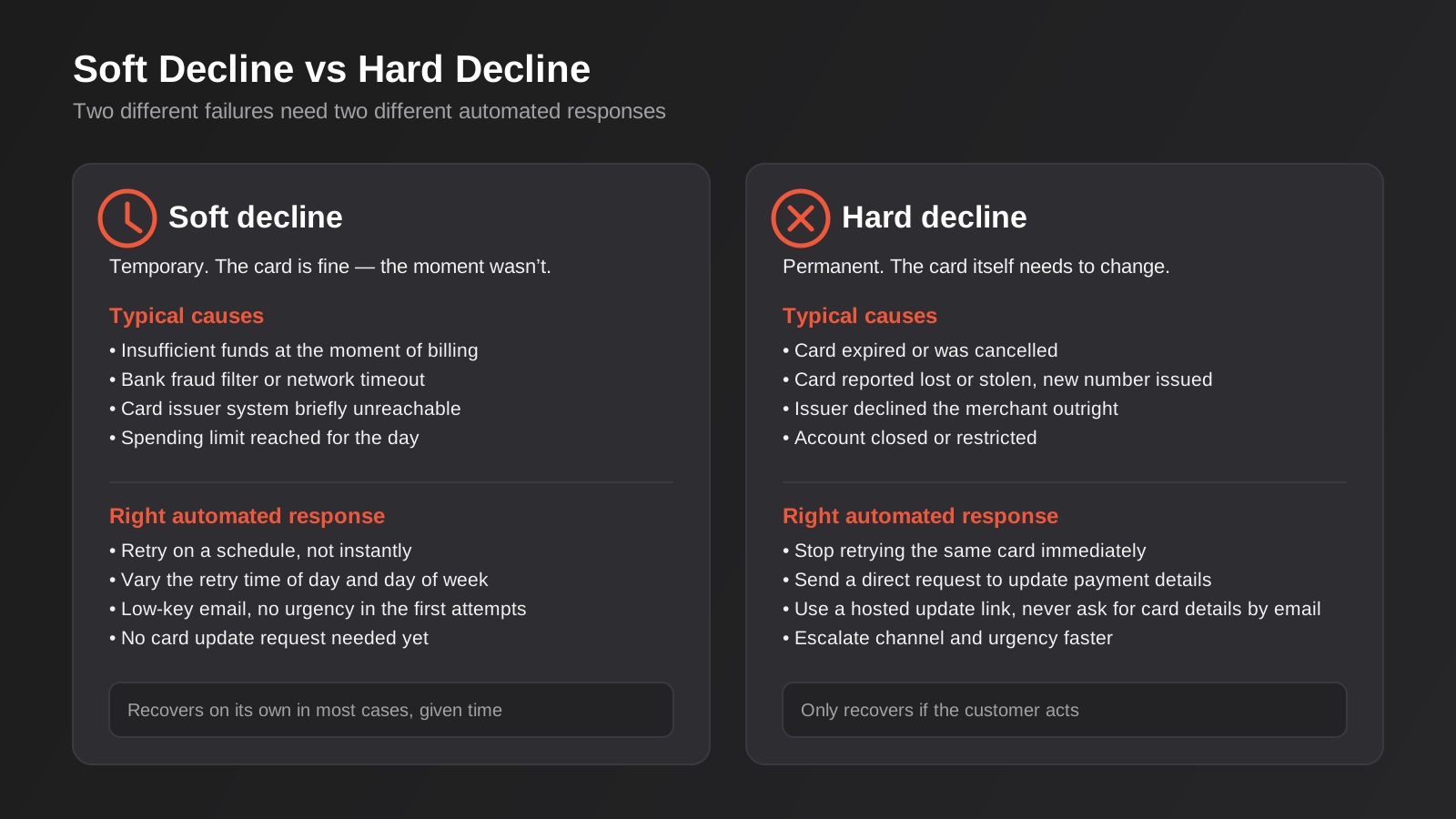
Most billing platforms surface a decline code or category on every failed charge — Stripe’s decline_code reference is a good example — and a workflow that reads that code before deciding what to do next will consistently outperform one that just retries everything the same way three times and gives up. This is the single highest-leverage piece of logic in the entire build, and it’s frequently skipped because it takes slightly more setup than a flat retry schedule.
Building a Retry and Dunning Workflow That Doesn’t Read Like a Threat
Once the decline type is being read correctly, the workflow itself is a sequence of retries and messages that escalate gradually. Most native billing tools (Stripe Billing’s Smart Retries, Chargebee’s dunning management, Recurly’s revenue recovery) give you a version of this out of the box. The differences that actually matter show up in the details.
Smart retry timing
A fixed schedule — retry every three days, three times — is better than nothing but leaves real recovery on the table. The better approach varies retry timing based on the decline reason and, where the data supports it, the time of day and day of week a given customer’s payments have historically succeeded. Stripe and a few other processors offer machine-learning-optimised retry timing for exactly this reason, and it’s worth turning on if your platform supports it, because the uplift over a flat schedule is consistently measurable rather than marginal.
The messaging ladder
This mirrors the same principle we cover in our accounts receivable automation guide for overdue invoices, but the tone needs to be calibrated differently, because a subscription customer usually didn’t choose to stop paying — their card just failed. The first message should barely register as a problem: a low-key “just so you know, your last payment didn’t go through, we’ll try again automatically” note, with no action required and definitely no red text. Only later in the sequence, once a genuine card update is needed, should the message become a direct ask with a clear, hosted link to fix it. Get this order backwards — lead with urgency on a soft decline that was always going to resolve itself — and you train customers to distrust every billing email you send, including the ones that actually need a response.
Grace periods, downgrades and pausing instead of cancelling
The question of what happens to access while a payment is unresolved matters more than most businesses initially think. Cutting access off at the first failed charge is aggressive and usually unnecessary — most soft declines resolve within days. A grace period, where the customer keeps full access while retries run in the background, protects the relationship and gives the retry logic time to work. Once the grace period genuinely ends, a lot of subscription businesses find that pausing or downgrading — rather than fully cancelling — keeps the door open at lower cost: the account stays associated with the customer, their data and settings are preserved, and reactivating is a single successful charge away rather than a full resignup.
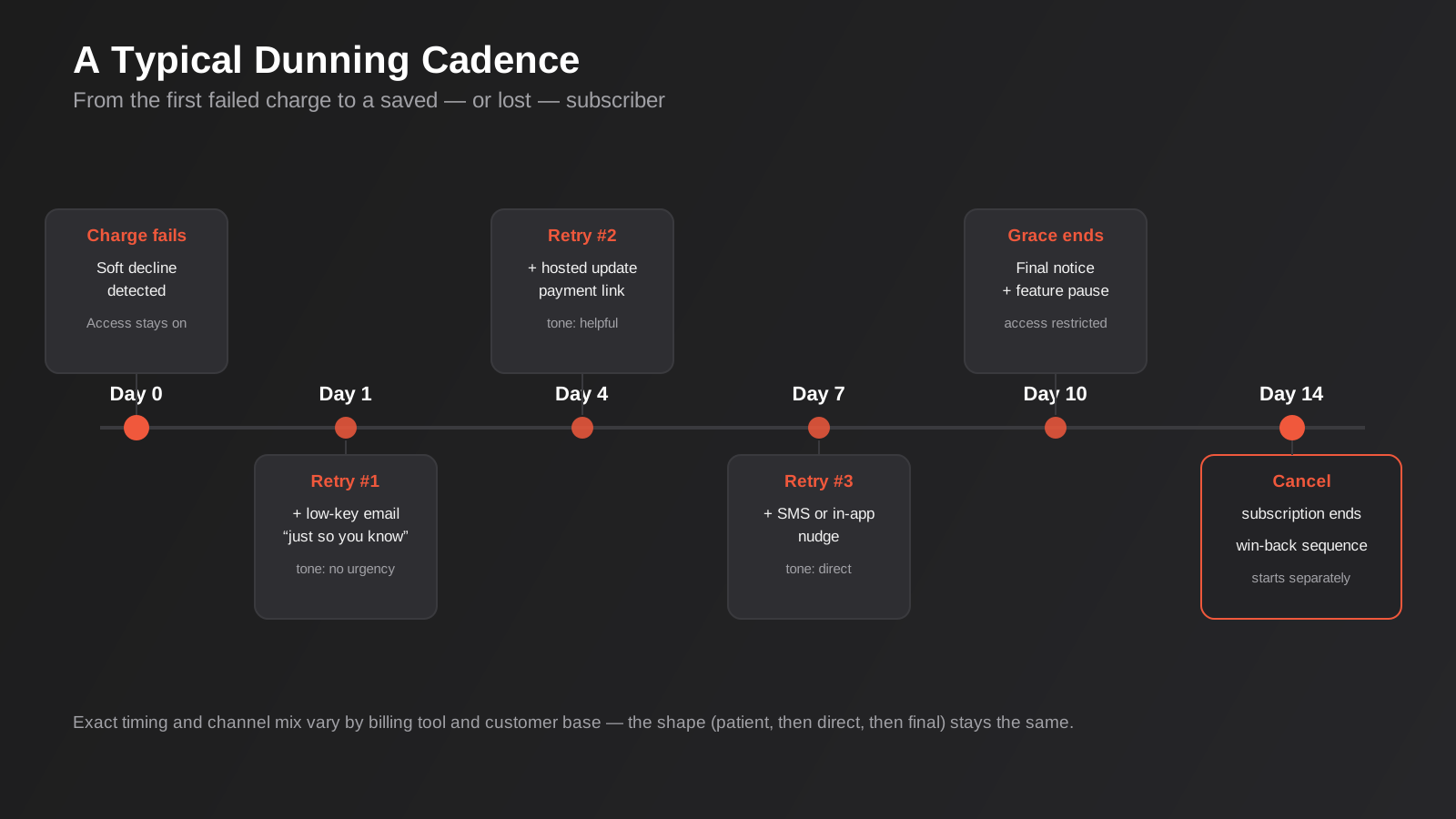
A sensible cadence for a monthly subscription usually looks something like this: charge fails on day zero and access stays on; a low-key retry and email land around day one; a second retry around day four comes with a hosted update-payment link, still helpful in tone; a third retry around day seven adds an SMS or in-app nudge if you have those channels available, with language that’s direct without being alarming; by day ten, if nothing’s resolved, a final notice goes out alongside a feature pause; and by day fourteen the subscription actually cancels, at which point a separate win-back sequence — not a continuation of the dunning messages — takes over. The exact days move depending on your billing cycle and how price-sensitive your customer base is, but the shape holds: patient, then direct, then final.
Where This Lives: Native Billing Tools, Xero Repeating Invoices, or a Custom Workflow
For the large majority of subscription businesses, the right answer is the dunning management already built into your billing platform. Stripe Billing, Chargebee, Recurly and similar tools have spent years refining retry timing and messaging specifically for this problem, and reinventing it rarely beats what’s already there. If you’re on one of these and haven’t actually gone into the dunning settings, that’s the first thing worth doing before considering anything custom — a surprising number of businesses are running the platform default, which is usually a flat, un-tuned retry schedule rather than the smarter option sitting one settings tab away.
Where Xero’s repeating invoices fall short
Plenty of Australian agencies and service businesses run retainer billing through Xero’s repeating invoice feature paired with GoCardless or Stripe for direct debit collection, rather than a dedicated subscription billing platform — and for straightforward, fixed-fee retainers, that’s a reasonable setup. Where it runs out of road is exactly the areas this guide has covered: Xero doesn’t distinguish a soft decline from a hard one, doesn’t vary retry timing intelligently, and its native reminder emails weren’t built for the tone a failed subscription payment actually needs. For a handful of retainer clients, that’s a manageable gap to fill manually. Past a few dozen active subscriptions, it starts costing real recovered revenue.
Where a custom workflow earns its cost
We get involved when a business has outgrown what a native tool offers but doesn’t want to migrate its entire billing stack to solve one problem. That usually means a workflow automation build sitting on top of the existing billing platform’s webhooks — Stripe fires a payment_failed event, the workflow reads the decline code, decides the retry and messaging path, and writes status back into whatever system your team actually looks at, whether that’s a CRM, a support tool or an internal dashboard. It also covers cases the native dunning tools don’t handle well by default: multi-currency subscriptions, usage-based billing with variable charge amounts, or a business running subscriptions through more than one payment processor and needing one consistent dunning experience across both. Getting billing events talking reliably to the rest of your stack is fundamentally an API integration problem as much as a billing one, and it’s usually the part that takes longer than the retry logic itself.
There’s also a genuinely useful middle tier worth naming: keeping your billing platform’s native dunning switched on for the retry and payment-recovery mechanics, but building a thin layer on top that pushes at-risk accounts into your CRM and sales automation workflows — so an account manager sees a high-value customer heading toward cancellation before it happens, rather than finding out after the fact from a churn report. For subscription businesses selling into other businesses rather than consumers, this human-in-the-loop layer on top of the automated dunning often recovers accounts that pure automation alone would have lost, because a phone call from an account manager carries weight an email simply doesn’t.
GST and Tax Invoices for Recurring Subscriptions
One detail that trips up Australian subscription businesses more often than it should: a recurring charge still needs a valid tax invoice if GST applies, and that obligation doesn’t pause just because the payment failed and retried three times before it succeeded. If your subscription price is quoted GST-inclusive, which the Australian Consumer Law effectively requires for anything marketed to consumers, the automated invoice generated after a successful retry needs to show the same GST-inclusive figure the customer originally signed up for — not a recalculated amount that happens to look different because a partial charge or a currency conversion touched it along the way. For charges above $82.50 (GST-inclusive), the automatically generated receipt needs to qualify as a proper ATO-compliant tax invoice, with your ABN, the GST amount clearly shown, and a description that actually matches what the customer bought, and it’s worth checking this is genuinely happening rather than assuming your billing platform’s default receipt template covers it, because several of the popular ones needed manual configuration to get right for Australian tax invoice rules specifically.
The other detail worth building in deliberately: when a retry succeeds days or weeks after the original billing date, the invoice and tax invoice should carry the date the payment actually cleared, not the original scheduled date, because that’s the date that matters for both your BAS reporting and the customer’s own bookkeeping if they’re claiming the expense. It’s a small thing, and it’s exactly the kind of small thing that turns into an annoying reconciliation problem for both sides if nobody thought about it when the dunning workflow was being built.
Measuring Whether It’s Actually Working
Turning on dunning automation and assuming it’s helping isn’t good enough — a handful of numbers tell you whether it’s genuinely recovering revenue or just generating email traffic customers ignore.
Involuntary churn rate
The percentage of customers who cancel specifically because of a payment failure, as distinct from customers who actively chose to leave. This is the number dunning automation exists to move, and it’s worth tracking separately from your overall churn rate, because lumping the two together hides exactly what you’re trying to measure. If involuntary churn is a large share of total churn, that’s a strong signal the dunning workflow — not the product — is where the immediate opportunity sits.
Payment recovery rate
Of the charges that initially failed, what percentage eventually succeeded through retries or a customer updating their card? This is the most direct measure of whether the retry logic and messaging are actually doing their job. Multi-channel dunning — combining email with SMS or in-app messaging at the later stages — consistently recovers a meaningfully higher share of failed payments than email alone, which is one of the clearer arguments for adding a second channel even if it feels like overkill for a smaller subscriber base.
Net revenue retention, seen through a billing lens
Net revenue retention usually gets framed as a product and expansion metric — upgrades and downgrades among existing customers — but failed payments quietly erode it in a way that’s easy to miss, because a lost customer from a card failure looks identical in most reporting to one who churned for a genuine reason. If you want visibility into how much of your revenue movement is billing-driven versus product-driven, that’s a dashboard worth building properly rather than reconstructing from memory every board meeting; we’ve covered how to set that kind of reporting up in our guide to reporting and data automation, and it’s worth reading alongside this one if churn reporting is currently a manual export.
Common Mistakes We See
- One retry schedule for every decline. Retrying a hard decline on the same dead card three times wastes the attempts that should have gone toward getting the customer to actually update their payment details.
- Leading with urgency on the first attempt. A soft decline that was always going to resolve itself doesn’t need a red “payment failed” subject line — that tone should be earned by later attempts, not spent on the first one.
- Cutting off access immediately. An instant hard cancellation on the first failed charge punishes customers for a timing problem that had nothing to do with them, and it’s a common reason subscription businesses see complaints from otherwise loyal customers.
- No account updater or hosted update link. Asking a customer to reply to an email with new card details, instead of a proper hosted payment page, looks exactly like a phishing attempt and trains your best customers to ignore your billing emails entirely.
- Treating the win-back sequence as more dunning. Once a subscription has actually cancelled, continuing to send payment-failure language misses the point — that customer needs a reason to come back, not another reminder about the card that failed weeks ago.
- Not separating involuntary churn from voluntary churn in reporting. If leadership can’t see how much churn is payment-driven versus a genuine product or pricing decision, the case for investing in dunning automation never gets made, because the problem stays invisible inside a single churn number.
Frequently Asked Questions
Is this the same thing as accounts receivable automation?
No, and the difference matters for how you build it. Accounts receivable automation deals with invoices sent to customers who owe you money and haven’t paid yet, where the reminder ladder is genuinely chasing a decision. Subscription billing automation deals with recurring charges where the customer wants the product and the money is almost always there — the problem is a failed card, not a reluctant payer. We’ve covered the accounts receivable side separately, referenced earlier in this guide, and most businesses running both eventually want them talking to each other rather than built as two disconnected systems.
Do we need custom development, or does our billing platform already handle this?
Check your platform’s dunning settings before building anything. Stripe Billing, Chargebee and Recurly all include retry logic and messaging that’s genuinely well built, and a lot of businesses are simply running the untuned default rather than the smarter configuration available in the same settings panel. Custom work earns its cost once you need decline-aware routing across multiple payment processors, usage-based billing with variable amounts, or dunning status feeding into a CRM or support tool the native platform doesn’t integrate with.
How much revenue does this actually recover?
It varies by business and by how well the previous setup was tuned, but failed payments typically represent a meaningfully larger share of monthly recurring revenue than most subscription businesses assume before they look closely, and involuntary churn from payment failures is consistently reported as a significant slice of total churn across the subscription industry. The honest answer is to measure your own payment recovery rate and involuntary churn rate before and after tuning the workflow — that tells you far more than an industry-wide average would.
Should we suspend access as soon as a payment fails?
Generally no, at least not immediately. A grace period where access stays on while retries run in the background gives soft declines time to resolve themselves without punishing a customer for a timing issue that wasn’t their fault. Suspending or downgrading access makes more sense once the grace period has genuinely ended and the customer hasn’t responded to a direct request to update their payment details.
Is SMS worth adding for payment failures, or is email enough?
Email handles the early, low-key stages fine. Once a customer genuinely needs to update a card — usually after a hard decline, or once retries have run their course on a soft one — a second channel like SMS or an in-app notification noticeably improves how many people actually act, simply because it’s harder to leave unread than one more email in a crowded inbox. It’s worth reserving for the later, more urgent stages rather than using it from the very first failed charge.
What’s the difference between pausing and cancelling a subscription?
Cancelling ends the subscription outright, usually removing the customer’s data, settings and access, and getting them back means a fresh signup. Pausing or downgrading keeps the account associated with the customer at a reduced or zero cost, so reactivating is a single successful charge rather than starting over. For a lot of subscription businesses, defaulting to pause instead of cancel after a failed dunning sequence quietly improves win-back rates, because the friction to come back is so much lower.
Do we still need to issue a tax invoice when a retry succeeds late?
Yes — the GST obligation attaches to the sale, not to whichever attempt happened to clear the card, so a successful retry still needs a proper tax invoice for charges above $82.50 GST-inclusive. Worth checking is whether your billing platform’s automated receipt actually qualifies as one by Australian rules (ABN, GST amount shown, accurate description) and whether it uses the date the payment actually cleared rather than the original scheduled billing date, since that’s what matters for BAS reporting on both sides.
Where to Start
Before building anything, pull your failed payment numbers for the last three months and look at them properly: what share of monthly recurring revenue do failed charges represent, how many are soft declines versus hard declines, and how many actually recover today versus how many quietly become cancellations. That split tells you more about where the opportunity sits than any tool comparison will. For most businesses, the first real step is simply going into your existing billing platform’s dunning settings and checking whether you’re running the tuned option or the untuned default — a surprising number of subscription businesses have never actually looked.
Where we come in is the businesses that have outgrown what the native settings offer — multiple payment processors, usage-based billing, or dunning status that needs to reach a CRM or support tool the billing platform doesn’t talk to natively. It’s rarely a case of replacing what you’ve got; more often it’s connecting the systems that already work individually so failed payments get handled consistently wherever they happen. If that sounds like where you’re at, we’re happy to look at what you’re running today and talk through what’s actually worth building first.
Keep reading
Related posts

Changing Live Automations Safely: Staging, Version Control and Rollback for Zapier, Make and n8n (2026)
How to draft, test, release and roll back changes to live Zapier, Make and n8n automations without breaking invoices, orders or customer…

Peppol E-Invoicing for Australian Businesses: Automating Accounts Payable From Structured Invoices (2026)
Peppol e-invoicing in Australia: what is and isn't mandatory, how to pick an access point, and how to automate accounts payable once…

Clean Your Data Before You Automate: A Practical Guide to CRM Data Cleanup for Australian Businesses (2026)
Connecting systems on messy data copies the mess everywhere. Here's how to clean, match and merge records before you automate or integrate.
Got a project you'd like to talk through?
Tell us what you're working on — we'll come back with a plan.
