
How to Increase Local SEO Click-Through Rate: You’re Ranking, So Why Isn’t Anyone Clicking? (2026)
 Jignesh Vagadiya
21/08/2026
21 min read
Jignesh Vagadiya
21/08/2026
21 min read
Somewhere in this business’s Google Business Profile dashboard, or buried in a Search Console export nobody’s opened in months, there’s a number that explains the whole problem: high impressions, decent position, terrible click-through rate. It’s one of the more frustrating states a local business can be in — you’ve done the work to show up, and the phone still isn’t ringing.
We’ve written before about how to actually rank in local search — Google Business Profile setup, citation consistency, suburb-level strategy, the mechanics of getting into the local pack in the first place. That guide answers “why can’t I get found.” This one answers a different, later-stage question: you’re found, you’re ranked, so why is nobody tapping through? Ranking and clicking are governed by different signals, and a business can nail one while quietly leaking the other for years without noticing.
This guide is about that second problem — local search click-through rate (CTR). We’ll cover the specific profile, listing, and psychological factors that decide whether someone clicks your business or the one next to it, plus how to actually measure whether you have a CTR problem at all before you go rebuilding things that aren’t broken.
Why Ranking and Clicking Are Two Different Problems
Google’s local ranking algorithm and a searcher’s clicking decision run on almost entirely separate inputs. Ranking is mostly about relevance, distance, and prominence — category match, proximity to the searcher, review signals in aggregate, citation consistency, on-page relevance. Clicking is a split-second human decision made by someone scanning three to six listings on a phone screen, usually while distracted, often while standing in a car park or on hold with someone else. They’re not evaluating your SEO. They’re pattern-matching for trust and convenience in about two seconds.
That mismatch is why you’ll see businesses sitting in position two or three of the local pack with a click-through rate under 2%, while a competitor in position four or five is pulling double digits. Position matters — being visible at all is the precondition for everything else — but once you’re in the pack, the deciding factors shift to things Google’s ranking algorithm treats as secondary or doesn’t weight for ranking purposes at all: whether you have real photos, whether your reviews look current and responded-to, whether your hours are visible and you’re showing as open right now, and whether the two-line snippet next to your name gives someone a reason to pick you over the listing above or below.
This is also why “just rank higher” isn’t always the right fix. If your CTR at your current position is well below what similar local businesses achieve, the highest-leverage work isn’t more link building or more citations — it’s fixing what happens in the two seconds after someone sees your listing. That’s cheaper, faster, and often has a bigger revenue impact than chasing one more ranking position.
We see this pattern constantly in audits: a client comes to us convinced their local SEO “isn’t working” because leads have stalled, and the first thing we check isn’t rankings at all — it’s the gap between impressions and clicks. More than once we’ve found a business sitting at position two for its main service term, with search volume that should be generating dozens of weekly actions, converting at a rate closer to what you’d expect from position seven or eight. Nothing about their ranking was broken. Their listing simply gave nobody a reason to choose it over the two options either side of it. That’s a completely different repair job to a ranking problem, and it’s usually a faster one.
Optimising Google Business Profile Photos and Categories for Click Appeal
Your Google Business Profile is doing most of the visual heavy lifting in local search results, and most businesses treat it like a form to fill in once and forget. Two elements inside it — photos and categories — have an outsized effect on whether your listing gets a second look.
Photos that make people stop scrolling
Google surfaces a thumbnail from your profile directly in local pack and Maps results. If that thumbnail is the default grey pin, a blurry logo screenshot, or a stock photo that looks like every other listing on the page, you’ve given searchers zero reason to trust what they’re about to click. Businesses with a genuine, recent, well-lit photo — the actual shopfront, the actual team, the actual product on the actual counter — consistently out-click generic or absent imagery, because the photo is doing the same job a shopfront window does on a street: it tells you what kind of place this is before you walk in.
A few things worth getting right specifically for CTR, not just for the profile in general:
- Set a primary photo that’s a real, current exterior or interior shot — not a logo, not a generic stock image, and not a photo that’s several years and one shopfront renovation out of date.
- Upload new photos regularly rather than in one batch and never again. Profiles with recent upload activity read as active businesses, both to Google and to the searcher scanning thumbnails.
- Encourage and lightly moderate customer-uploaded photos. Real customer photos read as more credible than professionally staged ones, and volume itself is a trust signal.
- Avoid photos that are technically compliant but visually indistinguishable from a competitor’s — a generic tool-on-a-bench shot for every tradie in the category doesn’t differentiate you from the five other tradies using the same stock angle.
Picking the right primary and secondary categories
Category selection affects both which searches you show up for and how your listing is labelled and filtered in the interface — and a mismatched category quietly tanks CTR even when it doesn’t tank ranking. A business that sells itself as “Cosmetic Dentist” when someone searches “teeth whitening near me” reads as a precise match. The same business filed under the generic “Dentist” category reads as a less specific, less relevant option next to a competitor whose category exactly mirrors the search — even if both are ranking in similar positions for that query.
Get specific with your primary category rather than defaulting to the broadest option, and layer in secondary categories that reflect the actual services people search for. Google increasingly surfaces category-derived labels and attributes directly in the local pack interface, and those labels are part of what a searcher scans before deciding where to tap.
Review Volume, Recency, and Response as a CTR Driver
Star rating gets most of the attention in conversations about reviews, but it’s only one of three variables doing the work, and on its own it’s a weak signal. A 5.0 rating built on four reviews reads as thinner and less trustworthy to most searchers than a 4.7 built on three hundred. Volume, recency, and whether the business actually responds are doing as much or more of the persuasive work as the star count itself.
Why review count matters as much as star rating
Review count functions as a proxy for scale and trustworthiness independent of the rating attached to it. Searchers have learned, correctly, that a handful of five-star reviews is easy to fake or easy to be an outlier, while three hundred reviews averaging 4.6 represents a much larger, harder-to-manipulate sample. If your review count is meaningfully behind the listings around you in the pack, that gap is worth closing before you worry about squeezing another tenth of a star out of your average — a steady review-request process after every job or transaction will move the count faster than almost anything else on this list.
Recency signals freshness
A profile where the newest review is fourteen months old reads as a business that might not still be trading, might have changed hands, or might no longer be as good as those older reviews suggest. Google itself will sometimes surface “X reviews in the last month” style freshness cues, and searchers scanning manually notice review dates even when they’re not consciously looking for them. A steady trickle of new reviews — even a handful a month — keeps a profile looking alive in a way that a large but stagnant review bank doesn’t.
Responding to reviews, especially the negative ones
Review responses are visible directly in the expanded listing view, and an owner who responds — particularly to a negative review, calmly and specifically — is one of the more persuasive trust signals available on a local listing. It demonstrates the business is actively managed and shows how it handles things going wrong, which matters more to a cautious searcher than a perfect record would. A profile with zero owner responses, next to one where every review gets a considered reply, will lose the click even at an identical star rating.
Writing Title Tags and Meta Descriptions for Local Intent
Outside the local pack itself, your organic listing’s title tag and meta description are the entire pitch. Get the searcher’s intent wrong here and even a page ranking on page one will get skipped in favour of a less-well-ranked competitor whose snippet simply looks more relevant to what was typed.
Title tag formulas that work for local searches
Local intent searches are usually one of a few shapes: “[service] + [suburb]”, “[service] near me”, or “[service] + [urgency qualifier]” like “emergency” or “same day”. Your title tag needs to visibly answer whichever of those shapes the searcher is likely typing, not just describe your business in the abstract. “Home — Bright Smiles Dental Studio” tells a searcher nothing about intent match. “Cosmetic Dentist in Parramatta | Same-Day Appointments — Bright Smiles Dental” answers the query almost word for word, and that kind of literal match is part of what earns the click, separate from whatever ranking benefit it brings. If you haven’t already mapped the exact phrases your local customers search, our guide to keyword research for SEO covers how to find them before you start rewriting tags.
A few practical rules that consistently improve local title tag performance:
- Lead with the service and location, not the business name — put the name at the end unless it’s already a recognised local brand.
- Include a genuine differentiator where you have one — “24/7”, “same-day”, “licensed”, “family-owned since 1998” — rather than generic filler adjectives.
- Keep it under roughly 60 characters so it doesn’t truncate on mobile, where most local searches happen.
- Avoid duplicating the exact same title across multiple location or service pages — each page should answer a distinct query shape.
Meta description structure that earns the click
The meta description doesn’t influence ranking, but it’s arguably more important for CTR than the title, because it’s where you get room to actually make a case. The strongest local meta descriptions do three things in roughly 150–160 characters: confirm the service and location match, offer a concrete proof point (years trading, review count, a guarantee, licensing), and give a reason to act now rather than keep scrolling. A vague, corporate-sounding description that could belong to any business in any suburb will get outperformed every time by one that reads like it was written by someone who actually understands the searcher’s situation.
Schema Markup That Can Trigger Rich Local Results
Structured data doesn’t guarantee a rich result, but it’s the precondition for one, and rich results are one of the more reliable ways to make an organic listing visually outcompete the plain blue links around it.
LocalBusiness schema essentials
A properly implemented LocalBusiness schema block — with accurate name, address, phone, opening hours, price range, and geo-coordinates — gives Google the structured version of the same information a searcher is scanning for manually. Get the opening hours and price range fields populated correctly and consistently with what’s on your Google Business Profile; mismatches between structured data and your GBP listing are a common, easily missed source of confusing or suppressed rich results.
Review and aggregateRating schema
Where you have genuine, verifiable reviews on-site, aggregateRating schema can surface star ratings directly in the organic snippet — visually distinct from every plain listing around it. This is one of the highest-impact CTR levers available in organic local search, because a visible star rating catches the eye before a searcher even reads the title. It has to be built on real, disclosed review data; fabricated or unverifiable review markup violates Google’s structured data guidelines and risks a manual action, which is a far worse outcome than a mediocre CTR.
FAQ schema for extra SERP real estate
Well-matched FAQ schema on service pages can, in some cases, expand your organic listing with expandable question-and-answer rows directly in the results, which increases the physical footprint your listing occupies on the page. A bigger, more informative listing draws the eye and gives the searcher more reasons to click before they even reach the second result. Google has scaled back how liberally it grants FAQ rich results over the past few years, so treat this as a genuine content improvement — answering real questions your customers actually ask — rather than a markup trick layered onto thin content.
The Psychology of Choosing One Local Listing Over Another
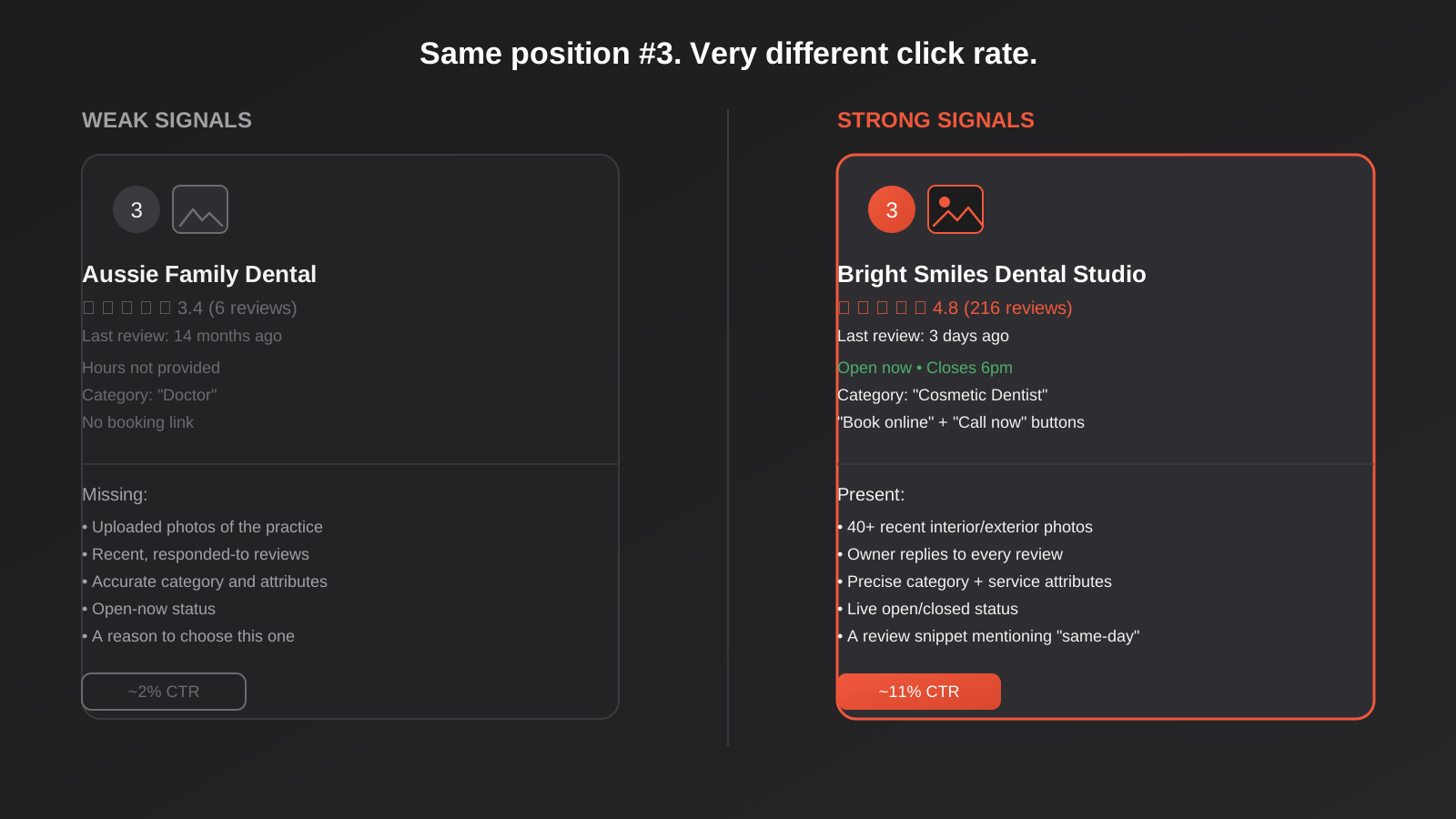
Strip away the technical layer and local CTR is ultimately a psychology problem: what makes a distracted person, scanning three to six near-identical options on a small screen, choose one over the rest. A handful of factors do most of the work.
Price transparency
Local searches for services — trades, health, professional services — carry a lot of latent anxiety about being overcharged, especially for anything urgent. A listing that signals price transparency, whether through a visible price range in the profile, “free quotes” language in the snippet, or clear pricing on the linked page, reduces that anxiety directly at the point of decision. Businesses that hide pricing entirely, forcing a call just to find out the ballpark, lose a meaningful share of price-sensitive searchers to a competitor willing to show a number. If pricing is something you’re still figuring out how to present publicly, our SEO pricing page is a reasonable model for the kind of transparency that builds trust before someone ever picks up the phone.
Hours and open-now status
“Open now” is one of the strongest single trust and urgency signals in local search, particularly for anything with an immediate need behind it — a burst pipe, a toothache, a locked-out car. A listing showing “Closed” or with no hours at all gets mentally deprioritised in under a second, even if it would have answered the phone. Keep hours accurate, including holiday and seasonal adjustments, because an incorrectly marked “closed” status during actual trading hours is an entirely avoidable way to lose a click you’d otherwise have won.
Review snippet content
Google sometimes surfaces a short excerpt from a review directly under a local listing, and the content of that excerpt matters more than most businesses realise. A snippet that happens to mention “same-day”, “fixed it fast”, or “fair price” is doing active selling on your behalf at the exact moment of decision. You can’t fully control which snippet gets pulled, but you can influence the odds by encouraging customers to mention specifics — speed, price fairness, a particular staff member, a specific outcome — rather than leaving reviews at generic “great service, highly recommend” territory, which gives Google nothing distinctive to surface.
Decision fatigue and the fear of picking wrong
Most local searchers aren’t comparing your business against one alternative — they’re comparing it against three, four, or five near-identical options in a stressful moment, and the underlying fear driving the decision is rarely “which is best” so much as “which one won’t waste my time or rip me off.” That’s why the strongest-converting listings tend to remove friction rather than oversell — a visible licence number, a clear service radius, an honest mention of typical turnaround time. Anything that reduces the cognitive load of deciding gets rewarded, because a hesitant searcher under time pressure will often default to whichever listing requires the least additional thinking to trust.
Mobile-Specific Local CTR Factors
The overwhelming majority of local searches happen on a phone, often with high intent to act immediately, which makes mobile-specific behaviour worth treating as its own category rather than an afterthought to desktop optimisation.
Click-to-call button placement and usage
On mobile, the local pack surfaces a direct call button next to your listing before a searcher ever reaches your website. For a large share of urgent local searches, that call button is the entire conversion event — the website click never happens at all, and if you’re only measuring website clicks as your CTR metric, you’re blind to a huge share of your actual local performance. Making sure your phone number is correct, consistently formatted, and matched exactly between your GBP profile and your website (a basic but frequently broken NAP consistency issue) directly affects whether that call button works as intended.
Directions button and map behaviour
Similarly, a large share of mobile local intent resolves through the directions button rather than a website visit, especially for retail, hospitality, and anything where the searcher intends to physically show up. An accurate pin location, a correctly formatted address, and photos that make the location recognisable from the street all affect whether someone taps “directions” with confidence or hesitates and checks a competitor instead. If your pin location is off by even a block in a dense commercial strip, you’re quietly losing walk-in traffic that never shows up in any web analytics tool.
How to Measure Local CTR
None of the above is worth acting on until you know whether you actually have a CTR problem, and if so, where. Local CTR data lives in two separate places, and most businesses only ever check one of them.
Reading Google Business Profile Insights
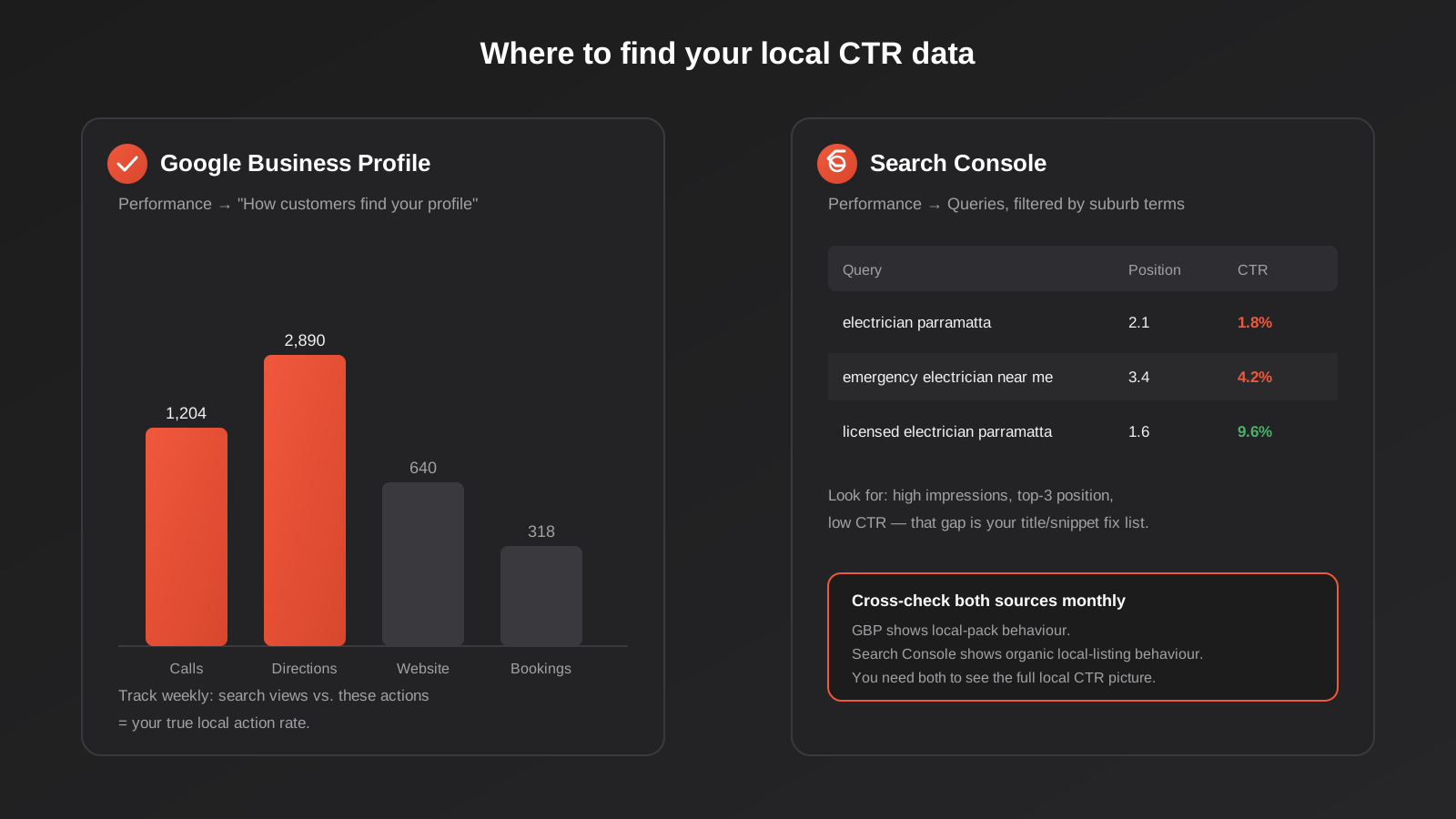
Inside your Google Business Profile dashboard, the Performance section (labelled “How customers find your profile” in some views) breaks down search views against the specific actions people took — calls, direction requests, website clicks, and booking clicks where applicable. This is where you find the mobile behaviour that Search Console can’t see: someone who called directly from the pack never generated an organic click at all. Watch this section over weeks, not days — local search volume is naturally lumpy — and look specifically at the ratio of total search views to total actions taken. A low and declining action rate against stable or growing views is the clearest possible sign of a CTR problem rather than a visibility problem.
Filtering Search Console for local queries
In Search Console’s Performance report, filter your queries to suburb names, “near me”, and service-plus-location combinations, then sort by impressions. What you’re hunting for is queries with meaningful impression volume, a genuinely good average position — top three, ideally top one or two — and a CTR well below what that position should typically produce. That gap between “should be getting clicked at this position” and “is actually getting clicked” is your prioritised fix list: it tells you exactly which pages need a title tag and meta description rewrite first, rather than guessing across your whole site.
Cross-check both sources monthly rather than relying on either alone. GBP Insights shows you local-pack behaviour; Search Console shows you organic local-listing behaviour further down the page. A business can have a strong GBP action rate while its organic local pages are quietly underperforming, or vice versa, and you’ll only catch that by looking at both side by side.
Common Mistakes That Kill Local Click-Through Rate
- Treating the Google Business Profile as a set-and-forget listing — no new photos, no fresh posts, no review requests for months at a time, which reads as an inactive or possibly closed business.
- Using the broadest possible category instead of the most specific one that accurately describes the primary service, which weakens the perceived relevance match against more precisely categorised competitors.
- Leaving hours blank or letting them go stale after a seasonal or trading change, which either hides the open-now signal entirely or actively shows “closed” during real trading hours.
- Never responding to reviews, particularly negative ones, leaving a visible gap next to competitors who clearly manage their reputation actively.
- Writing title tags around the business name instead of the service-plus-location query shape searchers are actually typing.
- Hiding pricing entirely and forcing every price-sensitive searcher to call just to find out whether the business is even in their budget.
- Letting NAP details drift out of sync between the website, the GBP profile, and directory citations, which breaks click-to-call and directions reliability without any obvious symptom on the website itself.
- Measuring CTR from Search Console alone and missing the large share of local intent that resolves through a direct call or directions tap and never touches the website.
Frequently Asked Questions
What’s a good local search click-through rate?
It varies heavily by position, industry, and whether you’re measuring local pack actions or organic clicks, so there’s no single universal benchmark worth chasing. As a rough guide, organic listings in positions one to three commonly see CTRs somewhere in the 5–15% range depending on query type and competitiveness, dropping off sharply from position four onward. The more useful benchmark is your own listing against similarly positioned competitors in your category and area — if you’re ranking well but sitting well below what that position typically produces, that gap is the number worth fixing.
Can I improve local CTR without changing my ranking position?
Yes, and for most businesses this is the faster, cheaper win. Photos, category accuracy, review volume and recency, title tags, meta descriptions, and schema markup all affect CTR without touching your ranking algorithmically. Many businesses see a measurable increase in calls and website clicks from CTR-focused fixes within weeks, well before any ranking movement, because these changes act directly on the searcher’s decision rather than on Google’s ranking signals.
Does responding to negative reviews actually help click-through rate?
Yes, more than most businesses expect. A calm, specific, non-defensive response to a negative review is visible to anyone who expands the listing, and it demonstrates active management in a way five-star reviews alone can’t. Searchers scanning several listings tend to trust a business with a handful of negative reviews that are professionally handled over one with a suspiciously spotless record and no visible owner engagement at all.
How often should I update my Google Business Profile photos?
Aim for a steady trickle rather than one large upload followed by silence — a handful of new, genuine photos every month keeps the profile looking active and gives Google fresh material to surface. Prioritise photos that reflect current reality: a renovated shopfront, current team members, current stock or menu items. An outdated primary photo that no longer matches what a customer sees on arrival can hurt trust more than having no photo at all.
Does schema markup guarantee a rich result in Google?
No. Schema markup is a prerequisite that makes a rich result possible, but Google decides independently, on a query-by-query and even user-by-user basis, whether to actually render one. Implementing accurate LocalBusiness and aggregateRating schema meaningfully improves your odds and costs nothing to add, but it should be treated as good technical hygiene rather than a guaranteed CTR lever on its own.
Why does Search Console show a low CTR even though I rank well for local terms?
A few common causes: your title tag and meta description don’t clearly match the local intent behind the query, a competitor at a similar or lower position has stronger visual signals like star rating schema, a large share of the demand is being satisfied directly in the local pack or through click-to-call before anyone reaches the organic results at all, or the query itself has genuinely low commercial intent despite the impression volume. Cross-referencing with your Google Business Profile Insights usually clarifies which of these is actually happening.
Where to Start
If you’re ranking reasonably well and still not getting the calls, don’t start by rebuilding your local SEO from scratch — start by finding out whether you actually have a CTR problem. Pull your Google Business Profile Insights and your Search Console local queries side by side, look for the gap between position and action rate, and work down the list in this guide from there: photos and categories first, since they’re free and fast, then reviews, then title tags and meta descriptions, then schema.
If that audit turns up more than you have time to action — or you’d rather have someone who does this daily run the diagnosis — that’s the kind of work our SEO team handles for clients across Australia, alongside the broader ranking work covered in our local SEO guide. Get in touch and we’ll tell you plainly whether your problem is visibility, clicks, or both.
Keep reading
Related posts
Psychology Practice Marketing in Australia: Local SEO, Compliant Copy and the Waitlist Problem (2026)
How Australian psychology practices handle local SEO, AHPRA-compliant copy and waitlist triage when they're already at capacity (2026).

Physiotherapy Marketing in Australia: Local SEO, Website Design and Booking (2026)
How Australian physiotherapy clinics win new patients through Google Business Profile, local SEO, website design and real-time booking in 2026.
Local SEO for Veterinary Clinics in Australia: Google Business Profile, Reviews and the Emergency Search (2026)
Veterinary clinic SEO explained: Google Business Profile, review generation and the emergency search most vet websites get wrong.
Got a project you'd like to talk through?
Tell us what you're working on — we'll come back with a plan.
