
Headless Commerce for Australian Ecommerce: When It’s Actually Worth the Cost (2026)
 Jignesh Vagadiya
08/10/2026
21 min read
Jignesh Vagadiya
08/10/2026
21 min read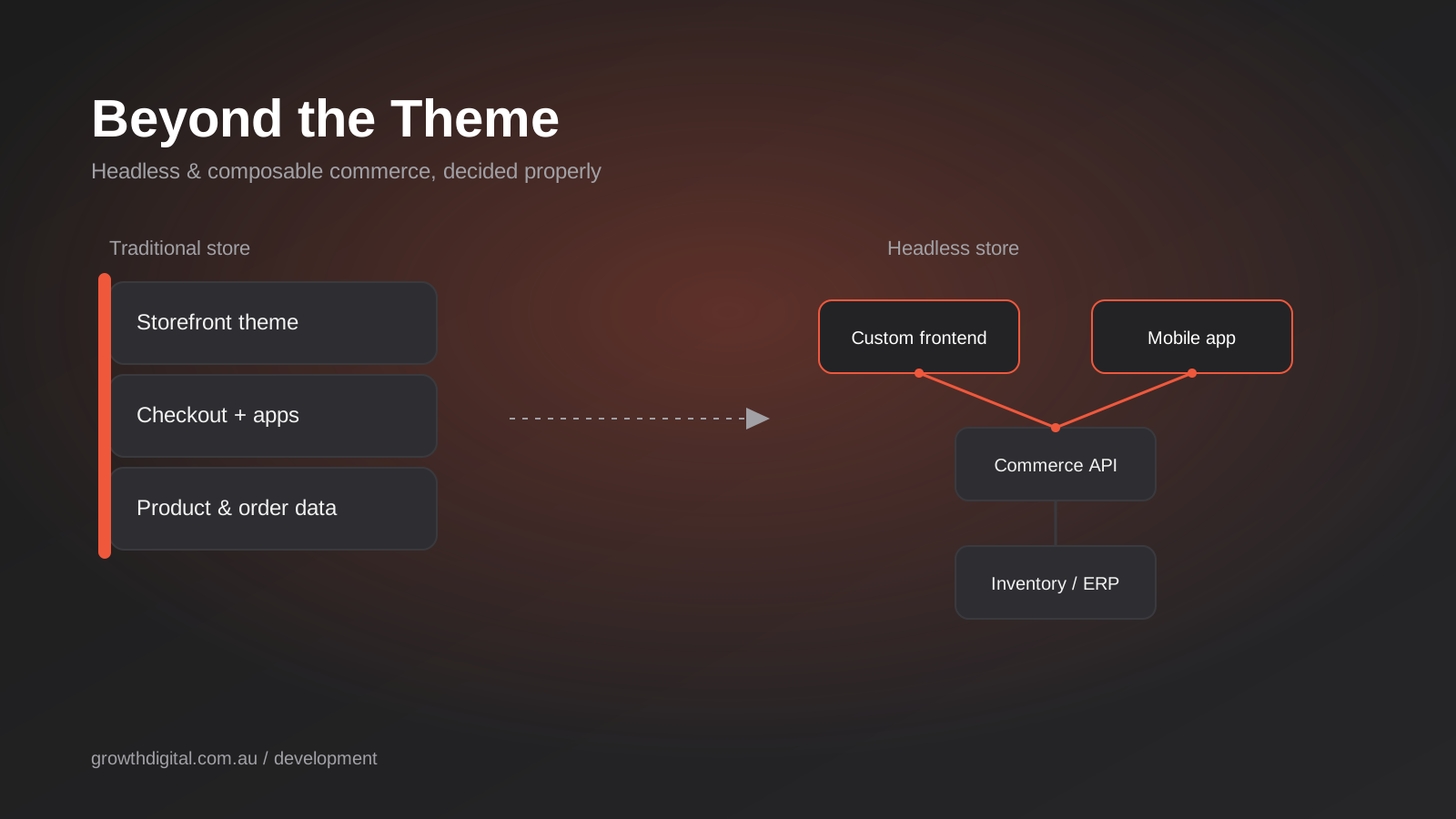
Somewhere around month eighteen, most growing Shopify or WooCommerce stores hit the same wall. The theme that looked sharp at launch now feels generic. The app store bill has crept past the platform subscription itself. Someone on the team has started saying the word “headless” in meetings, usually after reading a case study from a brand ten times their size, and nobody is quite sure whether that word describes a real fix or an expensive distraction.
We get asked about headless and composable commerce more often than the actual build volume justifies. Most Australian stores that ask don’t need it yet, and a few that aren’t asking probably should be thinking about it. The gap between those two groups isn’t about ambition or budget — it’s about a handful of concrete, checkable facts most people never get told before they sign off on a quote.
This is the framework we actually use when a client raises it: what headless and composable mean once you strip out the vendor language, what it costs in Australia right now, the real signs you’ve outgrown your platform rather than just your theme, and a straight answer on when the switch pays for itself. If you’re still deciding between Shopify and WooCommerce in the first place, that’s a separate and more foundational decision — we’ve covered it in our Shopify vs WooCommerce comparison. This article picks up from the other side of that decision, once a platform has already started to feel small.
What “Headless” Actually Means (Because the Marketing Has Muddled It)
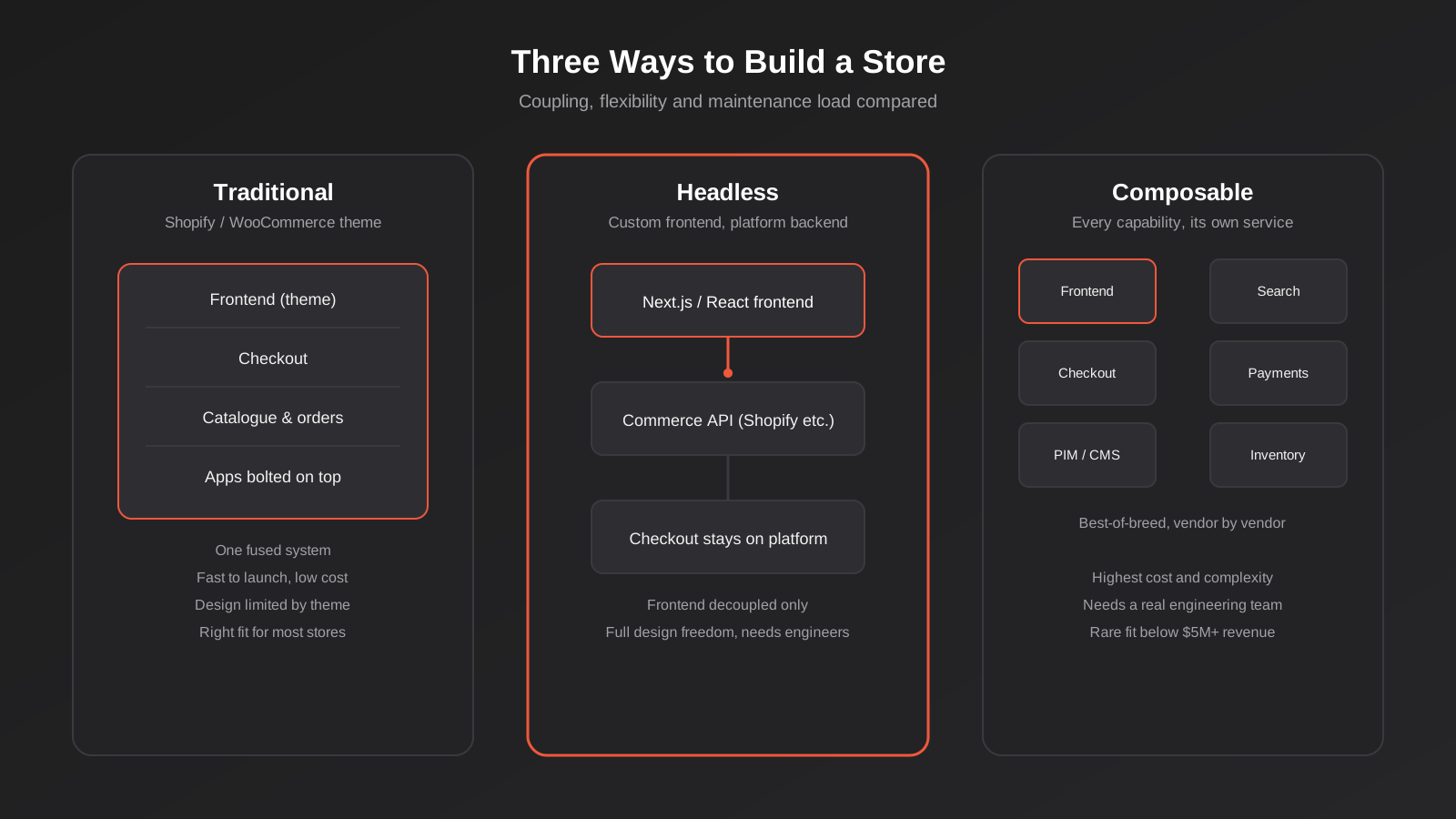
Headless commerce means one specific thing: the frontend — the part customers see and click through — is separated from the backend that handles catalogue, inventory, orders and checkout logic. Instead of a theme rendering pages the way Shopify or WooCommerce decides, a custom-built frontend (usually in a framework like Next.js or Nuxt) pulls data from the platform through an API and renders it however the business wants. The backend keeps doing its job. The frontend stops being bound by what the theme engine allows.
That’s it. It’s an architecture decision about where the dividing line sits, not a feature, not a platform, and not automatically faster or better. A lot of the content you’ll find on this topic treats “headless” as a synonym for “modern” or “enterprise-grade,” which is exactly the framing that leads businesses to buy more architecture than they need.
Headless vs Composable vs Traditional
Composable commerce goes further than headless. Where headless decouples only the frontend, composable treats every commerce capability — search, checkout, payments, product information, promotions, inventory — as its own independent service, each chosen from a different specialist vendor and stitched together with APIs. Every composable stack is headless by definition, because the frontend has to be separate for the rest of the pattern to work. But plenty of headless stacks aren’t composable — they keep Shopify or another platform as a single backend and only decouple the presentation layer. That distinction matters because the two options sit at very different points on the cost and complexity curve, and a lot of pitches blur them together deliberately.
A traditional build — a Shopify or WooCommerce theme with apps layered on top — is the baseline nearly every store starts from. It bundles frontend and backend into one connected system that the platform vendor maintains for you. That bundling is the whole value proposition: you trade some design flexibility for a system that mostly runs itself.
Where Shopify and WooCommerce Fit Into This
Both platforms can serve as a headless backend without you leaving them entirely. Shopify’s Hydrogen framework and Oxygen hosting let a store keep Shopify’s checkout, payments, fraud protection and admin while swapping out the theme layer for a custom-built storefront — and that path doesn’t require Shopify Plus, contrary to what some headless-focused agencies imply. WordPress and WooCommerce can run the same way: WordPress serves content and product data through its REST API or WPGraphQL while a separate frontend, often built in Next.js, handles the actual storefront. In both cases, you’re not ripping out the platform. You’re changing what renders the pages people see.
The Real Signs You’ve Outgrown Your Platform
Before we talk about cost, it’s worth separating the problems headless actually solves from the problems people hope it will solve. We see a lot of the second kind. A tired-looking store, a slow checkout, or a design the founder is sick of looking at are real problems, but they’re theme and optimisation problems, not architecture problems. Rebuilding headless to fix them is like re-piping a house because you don’t like the paint colour.
App and Plugin Costs Are Now a Line Item
This is the clearest financial signal, and it’s one most businesses only notice once someone adds it up. Stores running six to ten apps on Shopify commonly end up paying somewhere between $450 and $650 a month in app fees alone — often more than the platform subscription itself. On WooCommerce, the equivalent cost shows up as plugin licences, a steadily growing list of premium extensions, and the dev hours spent keeping them from conflicting with each other after every WordPress core update. If you’re already paying for a review app, a subscriptions app, a currency converter, a bundle builder and a page speed app, and none of them talk to each other cleanly, you’re paying a composable-style tax without getting composable-style control. That’s worth putting in front of whoever owns the P&L before any headless conversation starts.
You’ve Hit a Design or UX Ceiling
Themes rely on sections, blocks and shortcodes that were built to cover the common cases well and the unusual ones poorly. If your product requires an interactive configurator, a highly custom checkout step, a non-standard navigation pattern, or a storytelling layout that doesn’t map onto any section your theme ships with, you’ll notice the ceiling quickly. The honest test here isn’t “do I want something that looks different” — a new theme or a design refresh usually solves that. It’s “does the thing I need to build simply not exist as a configurable option, no matter which app I install.”
You’re Running Multiple Storefronts or Channels
A single store with a native mobile app, a kiosk experience, a wholesale portal and a consumer site, all needing to share the same catalogue and inventory but present it completely differently, is a genuine headless use case. So is running several regional or brand-specific storefronts off one product catalogue. The pattern here is structural: you need the same data rendered in meaningfully different ways across more than one surface, and a theme can only ever render one surface at a time.
Performance Is Costing You Conversions at Scale
At genuinely high traffic and SKU counts, a custom frontend built and cached specifically for your catalogue can outperform a general-purpose theme doing the same job. But this only bites at scale most Australian stores haven’t reached. A well-optimised Shopify 2.0 theme or a properly cached WooCommerce build on decent hosting gets to sub-second load times for the vast majority of stores without touching the architecture at all. If your Core Web Vitals are poor, the far more likely culprits are unoptimised images, too many third-party scripts, and render-blocking app embeds — all fixable on the platform you’re already on.
What Headless Commerce Actually Costs in Australia
Pricing here is genuinely wide, and most of the published figures are from US or UK agencies quoting in their own currency with their own labour costs baked in. Treat every number below as a planning range, not a quote, and get a scoped figure from whoever will actually build it before committing budget.
The Build
A straightforward headless storefront — one custom frontend, one commerce backend, a reasonable set of integrations — tends to land somewhere between $50,000 and $150,000 depending on catalogue complexity, how much custom functionality is involved, and whether design work is bundled in or scoped separately. Larger or more ambitious builds with multiple storefronts, custom search, or heavy personalisation logic can run well past that. The platform side is often cheaper than people expect: Shopify’s Hydrogen framework carries no licence fee and Oxygen hosting is included with a standard paid Shopify plan, so you don’t need Shopify Plus purely to go headless. Plus becomes relevant for other reasons — multi-currency at scale, higher API limits, more checkout customisation — not as a hard requirement for Hydrogen itself.
The Ongoing Bill Nobody Mentions in the Pitch
This is the part that catches businesses out twelve months in. A themed store is maintained by the platform vendor as part of your subscription. A headless store is maintained by you, or by whoever you’re paying to maintain it. That means dependency upgrades, quarterly API version bumps, and framework updates that occasionally break something, on a recurring schedule, indefinitely. It also means the easy app-store features you took for granted — a reviews widget, a size chart app, an exit-intent popup — mostly stop being drop-in installs. Each one now needs custom integration work against your frontend, because the plug-and-play ecosystem that makes Shopify and WooCommerce apps so convenient was built for themed stores, not custom ones. Budget for this as an ongoing line item, typically in the range of a part-time to full-time developer’s attention, not a one-off project cost that ends at launch.
There’s a third cost category that rarely makes it into the initial quote: tooling and hosting for the frontend itself. Beyond the commerce platform’s own fees, a headless build typically adds hosting for the frontend application (Vercel, Netlify or similar), a content delivery network, possibly a headless CMS subscription for marketing content, and monitoring or error-tracking tools. Individually these are modest — often somewhere between $200 and a few thousand dollars a month depending on traffic — but they’re new recurring costs on top of what the platform already charges, not a replacement for it. Shopify’s own hosting for a headless frontend can reduce this specific line item, but WooCommerce-based builds generally carry the full stack of extra tooling.
How Businesses Actually Move to Headless
Almost every headless failure we’ve seen traces back to treating it as a single big-bang rebuild rather than a staged change. The businesses that get a good outcome tend to follow a similar sequence, whether they’re moving off Shopify, WooCommerce or a legacy platform entirely.
Start with a Pilot, Not a Full Rebuild
Rebuilding an entire storefront headless in one pass means the business runs blind on performance, SEO impact and conversion rate until the whole thing ships. A better pattern is to pilot headless on one section first — a landing page series, a single high-traffic category, or a new product line — while the rest of the store stays on the existing theme. This proves out the technical approach, surfaces integration problems early, and gives the team a real before-and-after comparison on the metrics that actually matter, before the full budget is committed.
Keep Checkout and Payments on the Platform
The highest-risk, highest-compliance part of any commerce stack is the checkout: PCI compliance, fraud screening, tax calculation, payment gateway integrations and local payment methods like Afterpay or Zip. Rebuilding that from scratch adds significant risk for very little customer-facing benefit, since customers rarely notice or care what technology powers checkout as long as it’s fast and trustworthy. Almost every sensible headless implementation we scope keeps checkout on the platform (Shopify’s hosted checkout, or WooCommerce’s native flow) and only decouples the browsing and discovery experience in front of it.
Plan the Content and Merchandising Workflow Before You Build
This is the step that gets skipped most often, and it’s usually the one that causes friction for months afterward. In a themed store, a merchandiser can reorder a collection, swap a banner, or adjust a product description directly in the admin, with no developer involved. In a custom headless build, that same change might require a developer, unless the team specifically designs a content workflow — often through a headless CMS layered on top of the commerce backend — that gives non-technical staff the same self-service ability. Scoping this properly from day one is far cheaper than retrofitting it once the team is six months into feeling locked out of their own site. This is also exactly the kind of system integration work that benefits from being scoped alongside the business’s other API and systems integrations, rather than treated as a separate, isolated project.
How a Headless Commerce Build Actually Fits Together
Once a business has a genuine reason to go headless, the technical shape is fairly consistent across most implementations we scope, whether the backend is Shopify, a WooCommerce REST/GraphQL setup, or a dedicated headless commerce platform.
The Frontend Layer
This is almost always a React-based framework — Next.js is the dominant choice for Shopify Hydrogen builds and WooCommerce headless builds alike, with Nuxt (Vue) as the main alternative. It handles rendering, routing, and the actual visual experience, and it’s where all of the custom design work customers will actually notice lives. It calls out to the commerce backend for everything — product data, stock levels, pricing, cart state — rather than storing any of that itself.
The Commerce Backend
For most Australian businesses going headless, the backend stays Shopify or WooCommerce rather than switching to an enterprise composable platform like commercetools. This keeps checkout, payment processing, fraud screening, tax calculation and PCI compliance on infrastructure the platform vendor already maintains and has tested at scale — which is exactly the part you don’t want to rebuild from scratch. The frontend talks to this layer through the Storefront API (Shopify) or the REST/GraphQL API (WooCommerce), pulling exactly the data it needs for each page.
Where Composable Goes Further
A genuinely composable stack replaces individual pieces of that backend with specialist services: a dedicated search provider instead of the platform’s native search, a separate product information management (PIM) system for complex catalogues, a standalone payments orchestration layer, a headless CMS for content pages. Each service does one job well and is swapped independently when a better option comes along. The cost is that you now own the integration between every one of those services, and when something breaks, you’re debugging across vendor boundaries instead of calling one support line. This is the step that genuinely needs an in-house or dedicated engineering team, which is why most of the credible guidance on composable commerce points to it being a fit for businesses already past several million dollars in annual revenue, not a starting point.
The Trade-offs Nobody Puts on the Homepage
What You Gain
- Full design freedom — the frontend isn’t constrained by theme sections, app embed positions, or template limitations
- The ability to serve multiple frontends (web, native app, kiosk, wholesale portal) from one catalogue and inventory source
- Faster perceived performance when the frontend is purpose-built and properly cached for your specific catalogue and traffic pattern
- Freedom to swap individual pieces of the stack later without a full platform migration, if built with that in mind from the start
What You Give Up
- The app-store convenience that makes Shopify and WooCommerce genuinely easy to run — most apps need custom integration work instead of a one-click install
- A chunk of your team’s independence — content and merchandising changes that a store manager could make directly in a themed admin may now need a developer
- The platform vendor’s maintenance safety net — framework upgrades, dependency patching and API version migrations become your responsibility, continuously
- Time to market — a headless build takes meaningfully longer to launch than configuring an existing theme, even a heavily customised one
None of this makes headless a bad choice — it makes it a specialised one. The businesses that get real value from it are the ones who went in clear-eyed about which column of trade-offs they were signing up for, rather than hearing “full design freedom” and skipping past “you now own the maintenance.” The framework below is how we keep that trade-off honest before any build work starts.
A Practical Decision Framework
We run every headless conversation through roughly the same filter. None of these questions are about ambition or taste — they’re about whether the trade-offs above actually pay for themselves.

Revenue is the first and roughest filter, not because smaller stores can’t benefit technically, but because the payback maths rarely works below it. The commonly cited threshold — roughly $5 million in annual revenue — isn’t a rule, but it reflects a simple reality: a $50,000–$150,000 build plus an ongoing maintenance cost needs a large enough revenue base for the expected conversion or capability gains to clear that bar within a reasonable payback period. Below it, the same budget usually buys more growth spent on marketing, conversion optimisation, or a genuinely well-executed theme.
If app and plugin costs have become a real, recurring line item eating into margin — not just an annoyance, but a number someone in finance has flagged — that’s a legitimate second signal, because it means you’re already paying for complexity you could be designing on your own terms instead. Add a structural need: multiple storefronts, a native app sharing the same catalogue, or a UX requirement no theme or app combination can deliver. And check, honestly, whether the business has or can fund an ongoing engineering capability, not just a one-off build budget. If all four line up, scoping a headless build properly is worth the conversation. If even one is missing, the better use of that budget is almost always fixing the actual bottleneck on the platform you’re already running.
For stores already weighing a bigger platform question — not just frontend architecture but whether to move off Shopify, WooCommerce or a legacy system entirely — that’s a related but separate decision with its own risks around data integrity and SEO continuity, which we’ve set out in our platform migration guidance. Headless is an architecture change within a platform relationship; a migration ends that relationship. Don’t let a sales conversation blur the two.
Common Mistakes We See
- Going headless to fix a design problem. A tired theme or a founder’s design frustration is almost always solvable with a new theme, a design system refresh, or targeted development work — not a full architecture change. We’d rather tell a client that than take the bigger project.
- Underbudgeting for ongoing maintenance. Treating headless as a one-off project cost rather than an ongoing engineering commitment is the single most common reason headless builds become expensive regrets. The build quote is only ever half the real number.
- Going composable when headless would do. Replacing every backend capability with a specialist vendor multiplies integration complexity for marginal gain when the platform’s native checkout, search or inventory already does the job perfectly well.
- Underestimating lost app-store convenience. Teams used to installing a Shopify app in ten minutes are frequently surprised when the headless equivalent needs a developer and a sprint, for a feature that used to cost thirty dollars a month and no engineering time at all.
- Skipping the revenue and margin maths. Chasing a case study from a brand doing ten times the revenue, without checking whether the same payback period applies at a much smaller scale, is how perfectly healthy businesses end up with an architecture they can’t afford to maintain.
- Building headless without a content or merchandising plan for non-developers. If store managers lose the ability to make everyday changes without a developer, the operational cost shows up every week, not just at launch, and it compounds quietly until someone finally notices how much slower the team has become.
- Rebuilding everything at once instead of piloting. A full-scope headless relaunch with no staged rollout means SEO, conversion rate and performance risk all land simultaneously, on launch day, with no earlier data point to compare against.
- Not deciding this alongside the bigger build-vs-buy question. Headless is one specific answer to a broader question — whether to build custom or buy off-the-shelf — that’s worth working through properly first, which we cover in our custom software vs off-the-shelf framework.
Frequently Asked Questions
Do I need Shopify Plus to go headless?
No. Shopify’s Hydrogen framework and Oxygen hosting work on standard paid Shopify plans, not just Plus. Plus becomes relevant for other reasons at scale — higher API rate limits, advanced checkout customisation, multi-currency handling — but it isn’t a technical requirement for building a headless storefront on Shopify.
Is headless commerce faster than a themed store?
It can be, when the frontend is purpose-built and properly cached for your specific catalogue, but it isn’t automatically faster. A poorly built headless frontend can be slower than a well-optimised theme, and a well-optimised theme with proper image compression and minimal third-party scripts already reaches sub-second load times for most stores. Performance comes from the build quality, not the architecture label.
Can WooCommerce run headless?
Yes. WordPress and WooCommerce expose product, order and customer data through the REST API and WPGraphQL, which a separate frontend — typically built in Next.js — can consume. WordPress effectively becomes a headless CMS and commerce data source while the frontend handles everything the customer sees.
What’s the real difference between headless and composable commerce?
Headless only decouples the frontend from the backend — the backend can still be one platform, like Shopify or WooCommerce, handling everything else. Composable goes further and treats every commerce capability (search, payments, PIM, checkout) as an independently chosen service. Every composable stack is headless, but not every headless stack is composable, and composable carries significantly more integration cost and complexity.
How long does a headless build take compared to a themed store?
A themed Shopify or WooCommerce store, even heavily customised, can typically launch in weeks. A headless build involves custom frontend development against commerce APIs and generally takes several months, depending on catalogue complexity, integrations and how much custom functionality is involved. Factor this timeline into any launch date or seasonal deadline before committing.
What revenue does a business need before headless makes sense?
There’s no official cut-off, but a commonly cited planning threshold in the industry is around $5 million in annual revenue, because that’s roughly where the expected gains from a $50,000–$150,000-plus build and its ongoing maintenance cost have enough sales volume to pay back within a reasonable period. Businesses below that are usually better served by optimising their existing theme and trimming app bloat first.
What does the ongoing maintenance actually involve, in practice?
It typically means someone watching and applying framework updates (Next.js or Nuxt release cycles), tracking the commerce platform’s API version deprecations so integrations don’t silently break, patching dependencies for security issues, and building or fixing the custom integrations that replaced what used to be one-click apps. Most businesses handle this with either a part-time contracted developer or a retainer arrangement with the agency that built it, rather than a full in-house hire, unless the store is large enough to justify one.
Where to Start
If you’re weighing this seriously, start with the four questions in the framework above, not a vendor pitch. Pull your actual app and plugin spend for the last three months, check it against your current revenue, and be honest about whether your real problem is the theme, the architecture, or something simpler like page speed or checkout friction. Most of the time, the fix is smaller and cheaper than headless. Sometimes it genuinely isn’t.
We build both — well-optimised Shopify and WooCommerce stores for businesses who don’t need to go headless yet, and custom headless storefronts for the ones who’ve outgrown the theme for real, structural reasons. If you want an honest read on which side of that line your business actually sits on, talk to our ecommerce development team and we’ll walk through your numbers before we talk architecture.
Keep reading
Related posts
Who Owns Your Custom Software? Source Code, IP and Handover for Australian Businesses (2026)
Paying for custom software doesn't mean you own it. What Australian contracts must say about code ownership, licences, handover and escrow.
Role-Based Access Control for Client Portals and Internal Tools: A Practical Guide
RBAC for client portals and internal tools: roles, record-level isolation and audit logs explained — a practical guide for growing Australian businesses.
Single Sign-On for Australian Businesses: When SSO Is Worth the Setup
SSO for growing Australian businesses: SAML vs OAuth vs OIDC explained, how to pick an identity provider, costs, and rollout mistakes to…
Got a project you'd like to talk through?
Tell us what you're working on — we'll come back with a plan.
