
Best AI Chatbot Platforms for Australian Businesses (2026): 6 Compared
 Jignesh Vagadiya
13/10/2026
21 min read
Jignesh Vagadiya
13/10/2026
21 min read
Every AI chatbot vendor pitch sounds roughly the same: trained on your business, answers questions instantly, qualifies leads while you sleep. What almost none of them lead with is what the thing actually costs once your customers start using it, or where the conversation data goes after a visitor hits send. We get asked to untangle both of those questions on a near-weekly basis, usually after a business has already signed up for a free trial and started getting confused by the pricing page.
This isn’t a build-vs-buy argument. If you want a chatbot trained specifically on your FAQs, tone and systems with a human handoff designed around your actual escalation paths, that’s a custom build, and we’ve written separately about what AI chatbots for customer support actually do well. This guide is for the other decision: which off-the-shelf platform to run the bot on, before anyone touches the conversation design.
We looked at six platforms Australian businesses actually shortlist in 2026 — Intercom, Zendesk, Tidio, Freshchat, Chatbase and Ada — and compared what they cost once you include the fees vendors don’t put on the pricing page, what each is genuinely good at, and where each one falls over. Consider it our shortlist of the best AI chatbot platforms in Australia right now, for the specific jobs each one actually suits. None of this is sponsored and none of it is the vendor’s own marketing copy.
What “AI chatbot” actually means in 2026
The term got stretched thin over the last few years, and vendors haven’t exactly fought to narrow it back down. Three different things get sold under the same banner, and knowing which one you’re buying changes the whole evaluation.
A rule-based bot follows a decision tree you (or a consultant) built: if the visitor clicks “pricing,” show this message; if they type “refund,” route to a human. These are cheap, predictable and dumb — they can’t handle a question phrased differently from how you anticipated it.
An LLM-powered chatbot reads your help docs, FAQs and website content, then generates an answer in natural language instead of matching keywords. This is what most of the platforms in this guide are now selling as their core product — Intercom’s Fin, Tidio’s Lyro, Freshworks’ Freddy AI Agent. It’s a real improvement on rule-based bots, but it still answers from a defined knowledge base rather than acting on your systems.
An AI agent goes a step further and takes actions — looking up an order status in your systems, rescheduling a booking, updating a CRM record — rather than just answering a question. Ada and the higher tiers of Intercom and Zendesk are pushing hard into this territory, usually at a steep price difference from the plain chatbot tier. If you’re trying to work out whether your business needs a chatbot or something closer to an autonomous agent wired into your actual tools, that’s a separate decision worth making deliberately rather than by accident through a pricing tier upsell.
There’s a fourth thing worth naming because vendors rarely do: hallucination risk doesn’t disappear just because a platform is “AI-powered” rather than a basic script. An LLM-based bot generates its answer rather than retrieving it verbatim, which means it can produce a confident, plausible, wrong answer if its knowledge base is thin or outdated on a particular topic. The platforms that handle this well let you scope the bot tightly to approved content and force an escalation when it’s uncertain, rather than letting it fill gaps with something that merely sounds right. That control is a feature worth testing in a trial before you commit a contract term to it, not something to assume every “AI chatbot” does equally well.
What actually matters for an Australian business
Most comparison content treats this as a US SaaS decision with a currency conversion bolted on. Three things change meaningfully once you’re buying for an Australian business.
Where the conversation data actually goes
Every vendor in this space will tell you their application is secure. Almost none of them will volunteer, unprompted, where the underlying language model actually runs. These are separate questions, and the gap between them is where most of the real risk sits.
A chatbot platform can host its application in Sydney while still sending every customer message to a model running in the US for inference. Storage location, processing location and sub-processor access are three separate facts, and a vendor can satisfy one while quietly failing the other two. Under APP 8 of the Privacy Act, sending personal information to an overseas recipient isn’t banned — but you’re required to take reasonable steps to ensure that recipient handles it consistently with the Australian Privacy Principles, and you generally remain accountable if they don’t. If your business is in a regulated sector (financial services under CPS 234/CPS 230, health, legal), that accountability extends to vetting the chatbot vendor as a material service provider, not just ticking a box on their security page.
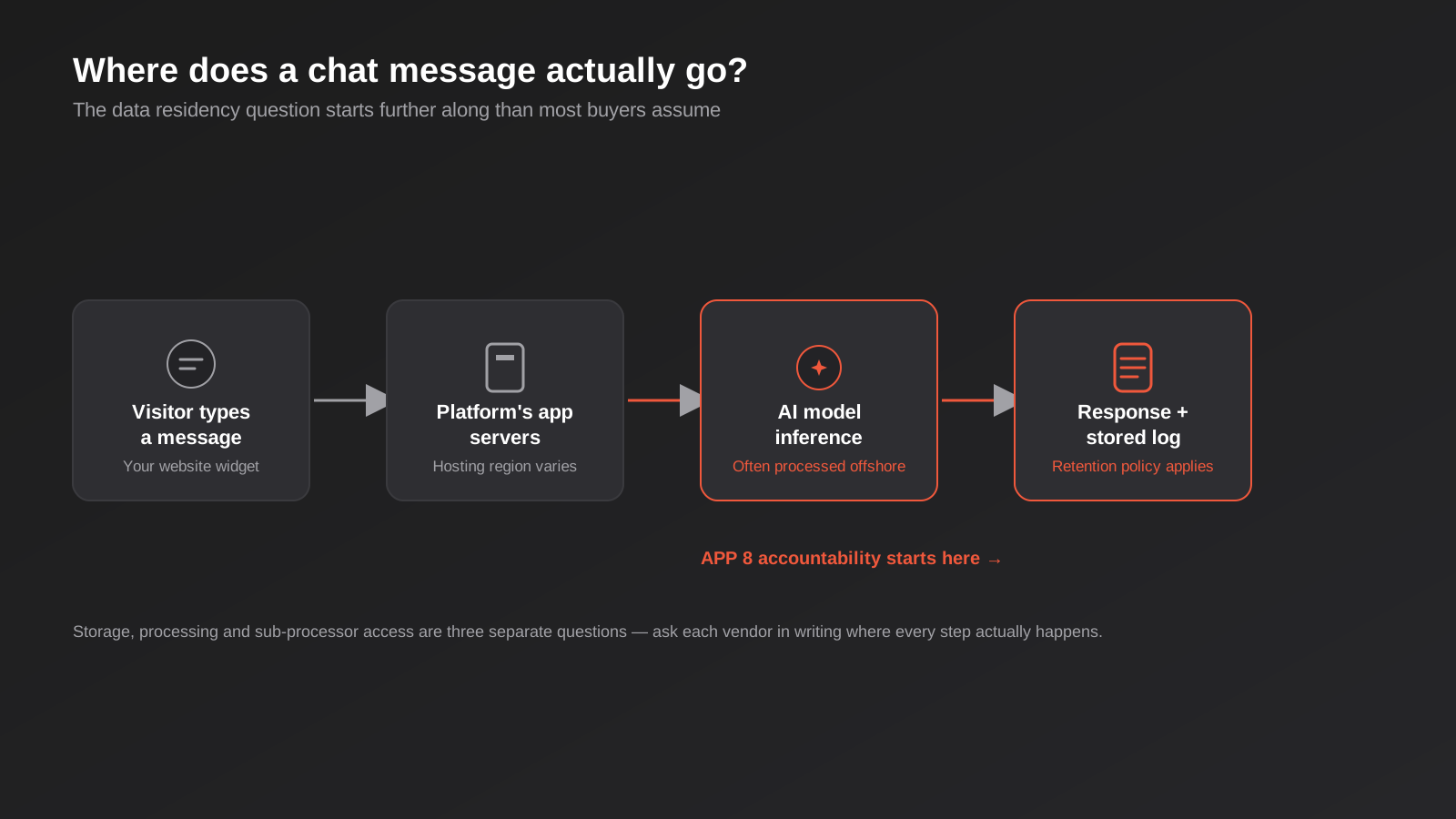
The practical move is to ask every shortlisted vendor, in writing, three specific things: where is the application hosted, where does the AI model physically process the conversation, and does any of that data train a shared model used by other customers. Get the answer in an email or a contract clause, not a sales call, because sales reps are not always briefed accurately on the back end.
The pricing page is rarely the real price
Almost every platform in this category now runs a hybrid pricing model: a seat fee for your human agents, plus a separate usage-based fee for what the AI actually does. The usage fee is where quotes diverge wildly from the headline number, and it’s billed in a handful of genuinely different ways depending on the vendor:
- Per resolution — you pay only when the bot is judged to have solved the query. Intercom’s Fin works this way, and the definition of “resolved” has become a point of friction, because some vendors count a conversation as resolved if the visitor simply stops replying, not only when they confirm the answer helped.
- Per session — you pay for each conversation window regardless of whether the bot actually answered the question. Freshworks’ Freddy AI Agent is metered this way, which is a materially different economic bet than paying per outcome.
- Per conversation volume tier — a fixed monthly allowance (say, 50 or 1,000 AI conversations) with overage charged above it, which is how Tidio’s Lyro and most of the budget-tier platforms price their AI add-on.
- Custom quote — no public pricing at all, with annual minimums negotiated per account. This is Ada’s model, and it means you can’t actually compare it against the others until you’re in a sales process.
None of these models is wrong, but they’re not interchangeable, and a vendor’s “from $29/month” headline is doing a lot of quiet work to avoid mentioning which one applies to you. We’d also flag a basic but easy-to-miss point: nearly every one of these platforms quotes in USD. Build a 10–15% buffer into any AUD budget for exchange rate movement across a contract term, on top of GST, which most of these vendors won’t be charging at the point of sale if they have no local presence.
GST, contract terms and who you’re actually billing against
Most of these vendors have no Australian business presence, bill in USD, and won’t automatically add GST at the point of sale — which doesn’t mean GST obligations disappear, it means the responsibility for reverse-charge or import-related GST treatment sits with your business, not theirs. Flag this to your bookkeeper before the first invoice lands, not after. It’s also worth reading the cancellation terms before you sign anything annual: several of these platforms discount meaningfully for annual commitment, which is a reasonable trade if you’re confident in the platform, and a genuine trap if you’re still validating whether an AI chatbot is the right investment at all. Where possible, run the first three to six months month-to-month, even at a worse headline rate, until you’ve seen a real month of conversation volume and resolution quality.
Time zone coverage is the actual selling point, not the AI
For a lot of the Australian businesses we work with, the real value of any of these platforms isn’t the cleverness of the AI — it’s that a visitor browsing at 11pm on a Tuesday gets an answer instead of a contact form that gets looked at the next business day. If that’s genuinely your main use case, weight the comparison toward setup speed and reliability on the basics (hours, pricing, availability questions) over the platforms chasing agentic complexity you may not need yet.
The six best AI chatbot platforms in Australia, compared
Pricing below reflects figures reported across multiple vendor and third-party sources at the time of writing. Several of these vendors don’t publish transparent pricing, figures conflict between sources, and quotes change — treat every number here as a starting point for your own conversation with the vendor, not a quote.
Intercom (Fin AI)
Intercom built its name on a polished support inbox, and Fin is its AI resolution layer sitting on top of it. It’s a strong pick if you want AI chat living in the same interface your support team already works from, with a genuine attempt at outcome-based pricing rather than charging for conversations that go nowhere.
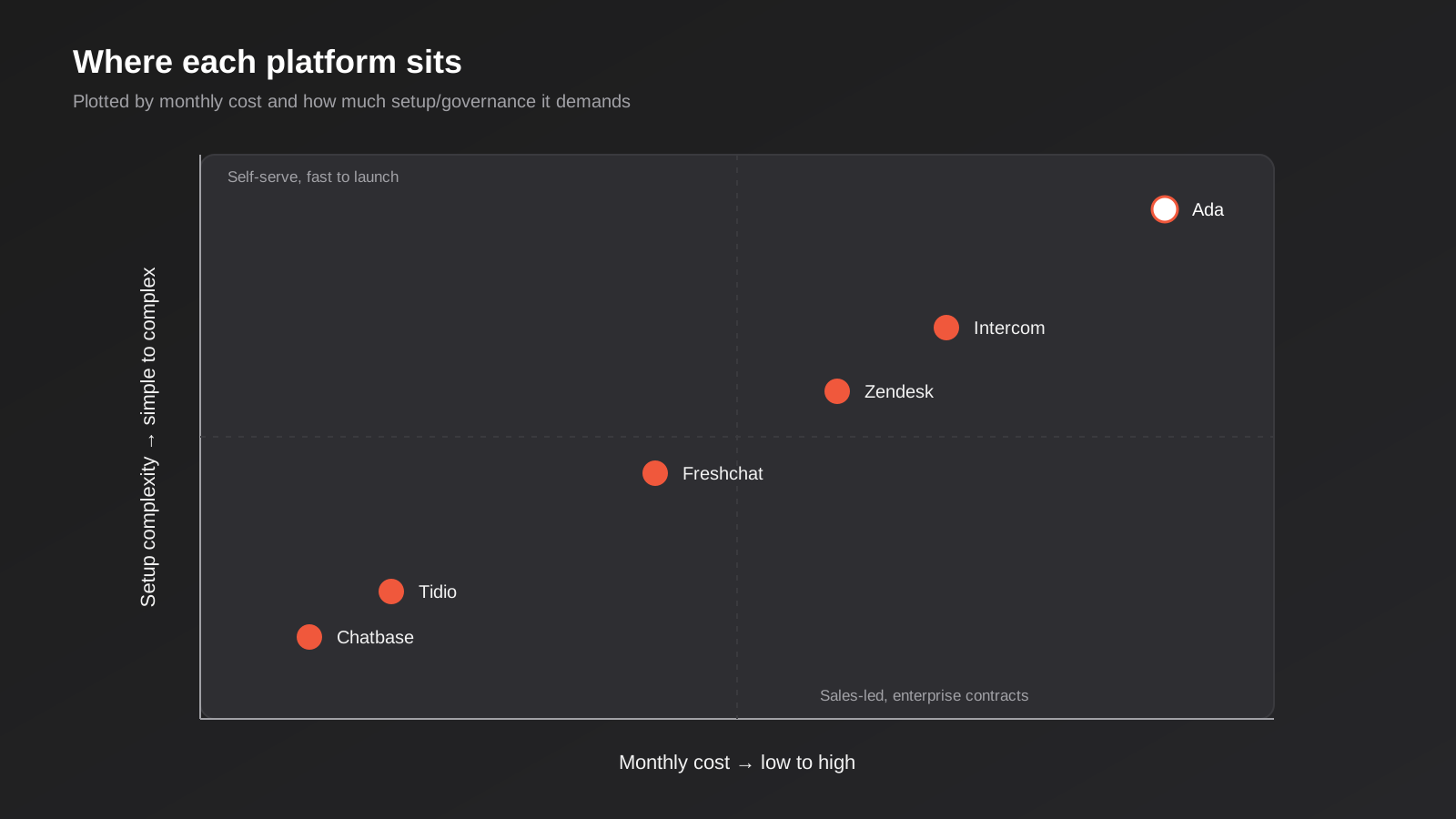
Seat pricing is reported in the rough range of $29 (Essential) to $85 (Advanced) to $132 (Expert) per seat per month, with Fin billed separately per resolution at roughly US$0.99. The catch that generates the most complaints: some “resolutions” are counted when a visitor simply stops replying rather than confirming the bot actually helped, which means your bill can grow faster than your actual resolution rate. Intercom reportedly offers a startup discount in the first year for eligible businesses, worth asking about if you qualify.
Zendesk (AI Agents)
Zendesk’s pitch is straightforward: if your support team already lives in Zendesk tickets, its AI agents layer on top without forcing a platform switch. That’s genuinely the whole case for choosing it over a standalone bot — the value is continuity, not a better model.
Pricing is per-agent, and this is one of the harder platforms to pin down before a sales call: reported figures range from roughly $55/agent/month on the base plan to AI-specific tiers quoted anywhere from $19 to $149/agent/month depending on source, with some reports citing per-resolution charges around $1.50 on top. If you’re not already committed to Zendesk’s ticketing stack, there’s little reason to choose it purely for the AI layer over a platform built AI-first.
Tidio (Lyro AI)
Tidio is the cheapest genuine entry point into an AI resolution layer rather than a rule-based widget dressed up as one. Its free plan reportedly covers 50 billable conversations and 10 seats, and paid tiers start from around $24/month billed annually, with the Lyro AI add-on priced from roughly $32.50/month for 50 AI conversations.
The honest drawback: Lyro is an AI layer bolted onto a live-chat tool built for small teams, and it doesn’t scale as gracefully once your conversation volume climbs into the thousands per month. For a small business testing whether an AI chatbot is worth running at all, it’s a sensible, low-risk starting point. For a business that already knows it needs volume, it’s a tool you’ll likely outgrow.
Freshchat (Freddy AI Agent)
Freshworks bundles its Freddy AI Agent into Freshchat, which makes sense if you want AI chat alongside a broader Freshdesk helpdesk rather than buying a standalone bot and a separate ticketing system. Seat pricing is reported around $19 (Growth), $49 (Pro) and $79 (Enterprise) per agent per month, with AI usage metered by session rather than resolution, at roughly $49 per 100 sessions.
That session-based metering is the detail to actually understand before signing: you pay per conversation the bot handles, whether or not it actually resolves the query, which is a meaningfully different bet from Intercom’s resolution-based model. A Freddy Copilot agent-assist add-on is priced separately again, at roughly $29 per agent per month, so budget for it as its own line item rather than assuming it’s bundled.
Chatbase
Chatbase sits at the self-serve end of the market: point it at your website or help docs, and it builds a bot trained on that content without a sales call or an onboarding project. For a straightforward FAQ bot or a business testing the waters before committing budget, it’s the fastest and cheapest way to get something live.
What you give up for that speed is depth: native CRM handoff, booking integrations and the conversation-design tooling the enterprise platforms offer are thinner here. It’s a genuinely good fit for simple deflection use cases, and a poor fit the moment you need the bot to qualify a lead and hand it cleanly into your CRM — which is where a platform like Intercom or a custom build earns its higher price.
Ada
Ada is built for support operations large enough to need an AI agent platform with real governance, workflow branching and automation depth, not a chat widget with AI bolted on. It’s sales-led, with no public pricing, and reported figures put annual minimums somewhere in the tens of thousands of dollars, scaling into six figures for larger enterprise deals depending on volume and integrations — though these figures come from third-party estimates, not Ada’s own published pricing, so confirm directly before assuming they apply to you.
If your business is small enough that this guide is useful to you at all, Ada is very likely overkill. It earns its place on this list because we get asked about it by larger clients comparing it against Zendesk and Intercom’s top tiers, not because it suits most Australian SMBs.
One platform worth a mention precisely because it’s no longer a safe pick: Drift, long a fixture in this comparison, is being wound down following its acquisition by Salesloft and a subsequent merger with Clari, with the sunset of the standalone product announced in March 2026. If a vendor or a consultant is still actively recommending Drift as a new purchase, that’s worth questioning.
What this actually costs at real volume: a worked example
Headline pricing is easiest to misjudge once actual conversation volume enters the picture, so it’s worth running the numbers rather than trusting the “from $X” line on a pricing page. Take a hypothetical Australian business handling 500 chat conversations a month — a realistic number for a small ecommerce store or a service business with moderate website traffic. Using the publicly reported unit figures cited earlier in this guide, purely as an illustration of how the different billing models behave at the same volume, not as a quote:
- Freshchat, metered at roughly $0.49 per session regardless of resolution, would land around $245/month in AI usage alone for 500 sessions, before any seat fees for your human agents.
- Intercom’s Fin, billed per resolution at roughly US$0.99, would cost meaningfully less if only a portion of those 500 conversations resolve without a human — say 60%, or 300 resolutions, landing around US$297/month in AI usage — but climbs toward the Freshchat figure as your resolution rate improves, which is a strange incentive to sit with.
- Tidio’s Lyro, priced in fixed conversation blocks rather than a linear per-unit rate, would need at least two or three tiers above its published 50-conversation entry point to cover 500 a month, and the per-block rate at that volume isn’t publicly listed — which itself is useful information: get a quote at your actual volume before assuming Tidio stays the cheapest option once you scale past its entry tier.
None of this tells you which platform to pick in isolation — a business handling 50 conversations a month would see an entirely different ranking, and one handling 5,000 a month would see a different one again. The point is that the ranking changes with your actual volume, which is exactly why asking each vendor to model pricing against your specific number, rather than their example use case, is the single most useful thing you can do before signing anything.
Quick comparison at a glance
- Intercom (Fin AI) — best if you already run support through Intercom’s inbox and want resolution-based AI pricing; watch the “assumed resolution” billing quirk.
- Zendesk (AI Agents) — best if your team already lives in Zendesk tickets; pricing is genuinely hard to pin down before a sales call.
- Tidio (Lyro AI) — best cheapest real entry point into AI resolution for a small team; doesn’t scale gracefully past a few hundred conversations a month.
- Freshchat (Freddy AI Agent) — best if you want AI chat bundled with a Freshdesk helpdesk; session-based billing charges you even when the bot doesn’t resolve anything.
- Chatbase — best for a fast, self-serve FAQ bot trained on your own content with no sales call; thin on CRM and booking integrations.
- Ada — best for large support operations needing enterprise governance and workflow depth; no public pricing and likely overkill below real enterprise scale.
How to actually choose between them
Run the decision through three filters in order, rather than starting with a feature comparison — most of the features listed on vendor sites overlap more than the marketing suggests.
Start with what’s already in your stack
If your support team already runs tickets through Zendesk or Freshdesk, the path of least resistance is almost always that vendor’s own AI layer, not a switch to a standalone bot platform. The integration tax of running two separate systems — duplicate conversation history, inconsistent reporting, a second login your team has to remember — usually outweighs whatever marginal quality difference exists between competing AI models at this point in the market.
Match the pricing model to your actual conversation volume
A business running 200 conversations a month should not be evaluating Ada. A business running 20,000 a month on a flat per-seat plan with no usage ceiling is quietly subsidising a vendor’s margin. Estimate your realistic monthly conversation volume before you take a sales call, and ask each vendor to model their pricing against that specific number — not their example use case.
Decide where the bot needs to hand off, before you pick the platform
The platforms in this guide differ a lot in how cleanly they pass a qualified lead or an escalated ticket into the rest of your business. If the bot’s job includes qualifying leads into your CRM, map that handoff before comparing chatbot features — the platforms with weaker CRM integrations (Chatbase, Tidio on lower tiers) will cost you more in manual re-entry than they save in licence fees. We’ve written a separate, practical comparison of CRM platforms for Australian small business if that handoff is the part you haven’t sorted yet, and our CRM & sales automation work usually starts exactly at this intersection — getting a qualified lead out of a chat widget and into a rep’s queue without someone retyping it.
Worth flagging for anyone thinking further ahead than this year’s chatbot purchase: the direction most of these vendors are heading is AI agents that can take actions across several of your systems at once, not just answer from one knowledge base. That’s increasingly being built on protocols like MCP, which standardise how an AI agent gets permissioned, auditable access to the tools it needs rather than every integration being a one-off. If you’re evaluating a chatbot purchase alongside a broader question of how AI should connect to your business systems, it’s worth understanding what MCP development actually involves before you lock into a vendor’s proprietary integration approach for the next three years.
Common mistakes we see businesses make
- Comparing the headline seat price across vendors without modelling the usage-based AI fee against your actual conversation volume — the cheap-looking plan is sometimes the expensive one once volume is applied.
- Choosing a platform on brand recognition rather than what it’s actually built for — Zendesk because everyone’s heard of it, when the business has no existing ticketing system to anchor that choice.
- Never asking in writing where the AI model processes conversation data, and assuming “hosted securely” answers a question it doesn’t actually answer.
- Budgeting for the licence fee and forgetting the ongoing cost of maintaining the knowledge base — a bot trained once in week one and never updated again drifts out of date within a quarter.
- Skipping the handoff design entirely, so the bot has no clean way to admit it doesn’t know something and loop in a human, which does more damage to trust than not having a bot at all.
- Launching and walking away — nobody reviews the conversation logs after the first month, so a bot confidently giving a slightly wrong answer runs unnoticed for weeks.
- Assuming the Privacy Act’s small business exemption automatically applies and skipping the APP 8 question altogether, without checking whether it actually covers the specific data the bot handles.
- Buying enterprise-tier governance features (Ada, Zendesk’s top tier) for a use case that’s genuinely just an FAQ bot, and paying ongoing for capability nobody on the team uses.
Frequently Asked Questions
Is the “$20 a month” plan I keep seeing actually $20 a month?
Almost never, once the AI layer is doing real work. Most of these platforms separate a seat fee from a usage-based AI fee, and the usage fee is where your actual bill lives. Ask every vendor to quote against your realistic monthly conversation volume before you compare headline prices.
Do any of these platforms store or process data in Australia?
Not reliably, and rarely by default. Application hosting, data storage and AI model inference can sit in three different places even within the one vendor, so get the specific answer in writing for each location rather than assuming “secure” means “local.” Offshore processing isn’t prohibited under the Privacy Act, but APP 8 puts the accountability for how that data is handled back on your business.
What’s the real difference between an AI chatbot and an AI agent?
A chatbot answers questions from a defined knowledge base. An agent takes actions — looking up an order, updating a CRM record, rescheduling a booking — which requires it to have permissioned access to your actual business systems, not just your help docs. Most platforms are marketing both under the same “AI” label, so check which one you’re actually being quoted.
Should we buy one of these platforms or build a custom chatbot instead?
If a standard FAQ or lead-qualification flow covers your use case, buying is almost always faster and cheaper than building. A custom build earns its cost when the conversation logic, tone or system integrations are genuinely specific to how your business runs, or when none of the off-the-shelf platforms will touch your particular combination of systems. Our AI chatbot build service exists for that second case — it’s worth a conversation before you assume you need it.
How long does it actually take to get one of these live?
A self-serve platform like Chatbase or Tidio can be live within days once your content is in reasonable shape. Platforms requiring CRM integration, custom conversation design or enterprise approval (Zendesk, Intercom, Ada) typically run three to six weeks in practice, mostly spent on integration and testing rather than the bot itself.
What happens when the bot gives a wrong answer?
Every AI system gets something wrong occasionally. The platforms that handle this well let you scope the bot to answer strictly from an approved knowledge base and escalate anything outside it to a human, rather than letting the model improvise. If a platform doesn’t give you granular control over that fallback behaviour, that’s a real limitation worth weighing against its price.
Where to start
Picking from the best AI chatbot platforms in Australia only gets you halfway there — the harder part is matching one to your actual volume, systems and budget. If you’re still at the stage of working out which platform fits those, that’s a conversation worth having before you sign anything — vendor sales calls aren’t exactly incentivised to tell you when their own product is the wrong fit. We regularly help Australian businesses work through this exact comparison, including the parts that don’t show up on a pricing page, like where the data actually goes and what the real total cost looks like at your conversation volume.
If what you actually need is something none of these six platforms quite cover — a bot trained specifically on your systems, with a CRM handoff built around how your sales team actually works — that’s a different and more specific conversation. Either way, we’re happy to look at what you’re trying to solve and tell you honestly whether an off-the-shelf platform gets you there, or whether it’s worth building something that actually fits.
Keep reading
Related posts

Changing Live Automations Safely: Staging, Version Control and Rollback for Zapier, Make and n8n (2026)
How to draft, test, release and roll back changes to live Zapier, Make and n8n automations without breaking invoices, orders or customer…

Peppol E-Invoicing for Australian Businesses: Automating Accounts Payable From Structured Invoices (2026)
Peppol e-invoicing in Australia: what is and isn't mandatory, how to pick an access point, and how to automate accounts payable once…

Clean Your Data Before You Automate: A Practical Guide to CRM Data Cleanup for Australian Businesses (2026)
Connecting systems on messy data copies the mess everywhere. Here's how to clean, match and merge records before you automate or integrate.
Got a project you'd like to talk through?
Tell us what you're working on — we'll come back with a plan.
