
Lead Scoring and Lead Routing Automation: Getting the Right Lead to the Right Rep, Fast (2026)
 Jignesh Vagadiya
05/10/2026
21 min read
Jignesh Vagadiya
05/10/2026
21 min read
A lead comes in through the website form at 4:47pm on a Friday. Nobody sees it until Monday morning, because it sat in a shared inbox nobody was watching, or it landed in the CRM with no owner and no urgency flag. By the time someone calls, the person has already spoken to two competitors and picked one. This isn’t a marketing problem and it isn’t really a sales problem either — it’s a plumbing problem. The lead had nowhere defined to go, and nothing told anyone it mattered.
We see this constantly in Australian businesses that have outgrown “someone checks the inbox.” They’ve got a CRM. They’ve got a few lead sources — the website, Google Ads, a referral partner, maybe a trade show list twice a year. What they don’t have is a consistent, automatic answer to two questions: is this lead worth chasing right now, and whose job is it to chase it? Those two questions are lead scoring and lead routing, and they’re different problems that get solved with different logic, even though most CRM setup guides mash them into one vague “set up automation” step.
This post is a deep dive into just those two mechanisms — how to build a scoring model that doesn’t collapse into noise, how to write routing rules that survive a rep going on leave, and where the whole thing actually lives in your tech stack. If you haven’t picked a CRM yet or set up the broader automation around it, our CRM automation guide covers choosing a system and the five workflows that matter most; this post picks up from there and goes deep on the one workflow that breaks first as lead volume grows — lead scoring, and the lead routing automation that acts on it.
Lead Scoring and Lead Routing Are Two Different Problems
It’s worth being precise about this because the two get conflated constantly in CRM documentation, and the conflation is exactly why so many setups end up half-working. Scoring answers “how good is this lead.” Routing answers “who should deal with it.” A lead can score very highly and still need to be routed somewhere specific — the enterprise account goes to the senior rep even if a smaller, equally “hot” lead goes to whoever’s next in the queue. Treating them as one combined rule (“if score > 80, assign to Dave”) works until Dave’s on leave, or until you have two reps, or until you want different routing logic for different products.
What lead scoring actually does
Lead scoring assigns a number (or a tier — cold, warm, hot) to a lead based on how likely it is to convert and how much it’s worth chasing right now. It’s built from two broad categories of signal that get combined into one score:
- Fit signals — is this the kind of customer we actually want? Company size, industry, location, job title, budget range if it’s known, how they answered a qualifying question on the form.
- Behaviour signals — is this person acting like someone ready to buy? They requested a quote versus downloaded a generic guide, they visited the pricing page three times, they opened and clicked the follow-up email, they replied to a message.
A lead can be a perfect fit and completely cold (a dream customer who just signed up to a newsletter and has shown no further intent), or a terrible fit and highly engaged (someone outside your service area who’s opened every email you’ve sent). Good scoring models keep these two axes somewhat separate rather than mashing everything into a single number from the start, because the action you take differs: a poor-fit, highly engaged lead often needs to be filtered out entirely, not routed to a rep at all.
What lead routing automation actually does
Routing takes a lead that’s passed whatever bar you’ve set and decides, automatically, which human (or queue, or follow-up sequence) it goes to. The rule set is usually built from some combination of:
- Territory or account ownership — existing customers go to their account manager, new enquiries in a postcode range go to the rep who covers that area.
- Capacity and fairness — round robin, or weighted by how many open deals a rep is already carrying.
- Skill or product line — the enquiry is about a product only one rep sells, or a service tier only senior staff quote on.
- Deal size or lead score — above a certain score or estimated value, it skips the queue and goes straight to a team lead.
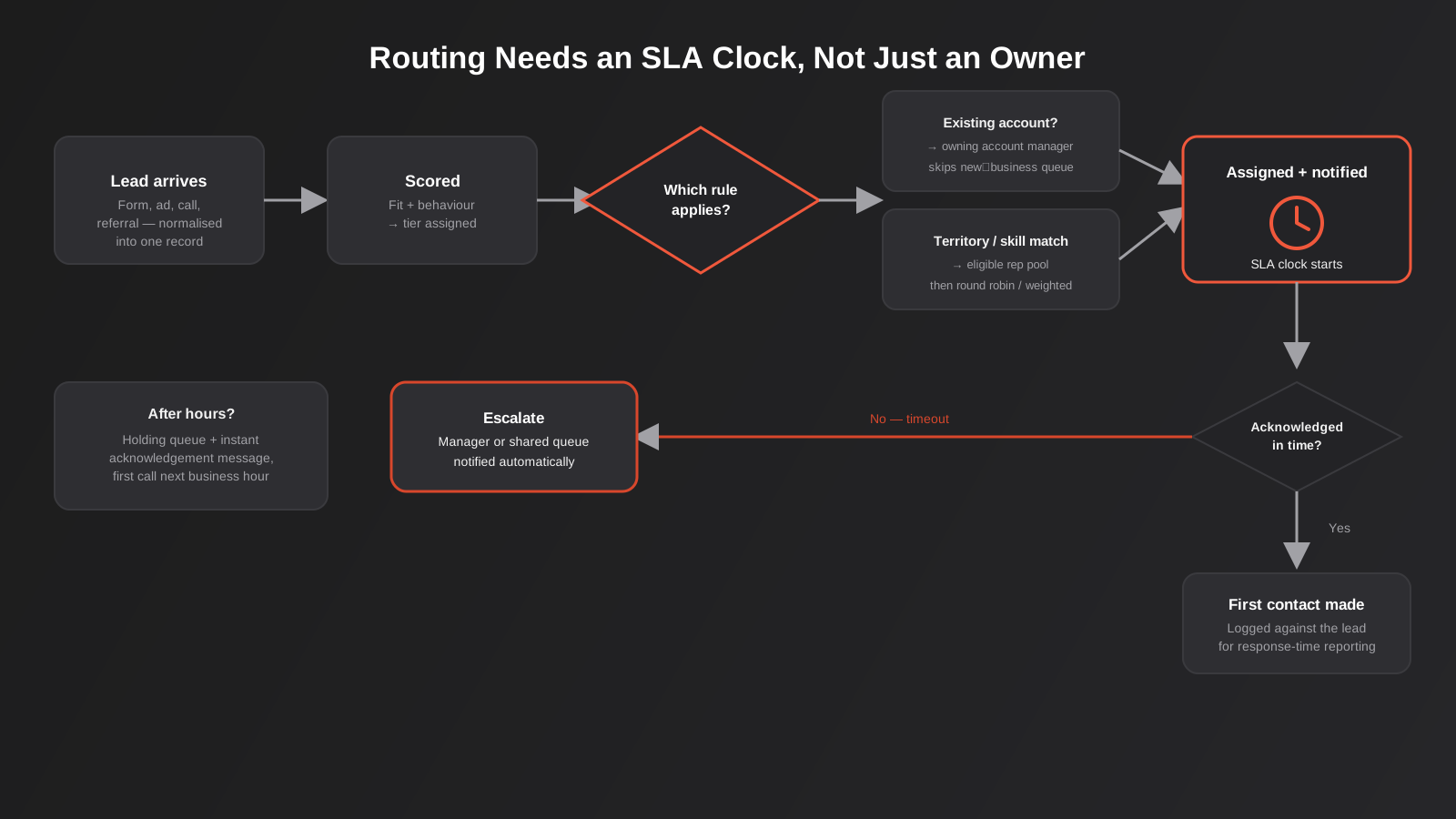
The output of routing isn’t just “assigned to” — it should also trigger a notification (Slack, SMS, a CRM task with a due time) and start a response-time clock. Routing without an SLA attached is just reassigning the inbox problem to a different person.
Why This Breaks Down as Businesses Grow
At low volume, a founder or office manager can eyeball every lead and just know who should get it. That works fine for the first twenty or fifty leads a month. It stops working at a fairly predictable point: when leads start arriving from more than one source, when there’s more than one person who could reasonably take them, or when anyone takes a day off.
The research on this is old but consistently reproduced: a widely cited Lead Response Management study, later picked up by Harvard Business Review, found that contacting a lead within five minutes made a rep roughly 21 times more likely to qualify it than contacting it after thirty minutes, and that the odds of ever making contact dropped sharply after the first hour. More recent industry figures put the average B2B response time at well over a day, even though most buyers say they expect a reply within minutes to an hour. Whatever the exact multiplier in any one study, the direction is never in dispute: speed to first contact is one of the strongest predictors of whether a lead converts at all, and speed is exactly what manual triage destroys the moment volume or headcount increases.
We also see a second, quieter failure mode: leads don’t go unanswered, they go to the wrong person. A reseller enquiry lands with the rep who handles direct customers. A support question gets treated as a sales lead and chased for two weeks. An existing customer asking about an upgrade gets logged as new business and routed to someone who’s never spoken to them. None of this shows up as “the lead was ignored” in your reporting — it shows up as a slow, confusing experience that quietly tanks conversion rate without an obvious root cause.
Building a Scoring Model That Doesn’t Overcomplicate Things
The most common mistake we see in lead scoring setups isn’t too little sophistication — it’s too much. Someone builds a 40-point rubric with scores for every form field, every email open, every page visit, and six months later nobody trusts the number because it was tuned once and never touched again. A scoring model earns its complexity over time; it shouldn’t start complicated.
Start with fit, because it’s the cheapest signal
Fit scoring is almost entirely available at the point of lead capture, which makes it the easiest place to start and the hardest to get wrong. Useful fit signals for most B2B and considered-purchase businesses:
- Company size or revenue band, if it’s asked on the form or inferable from the domain.
- Industry, especially if you have industries you serve well and industries you consistently lose or churn.
- Geography, if service area or time zone genuinely limits who you can serve.
- Stated budget range or project size, even as a rough bracket.
- Job title or seniority, where the decision-maker versus researcher distinction matters.
Keep fit scoring as a short checklist, not a spreadsheet. Three to six fields is usually enough to separate “worth a human’s time” from “not right now,” and it’s simple enough that whoever owns the CRM can explain the logic in one sentence to a new hire.
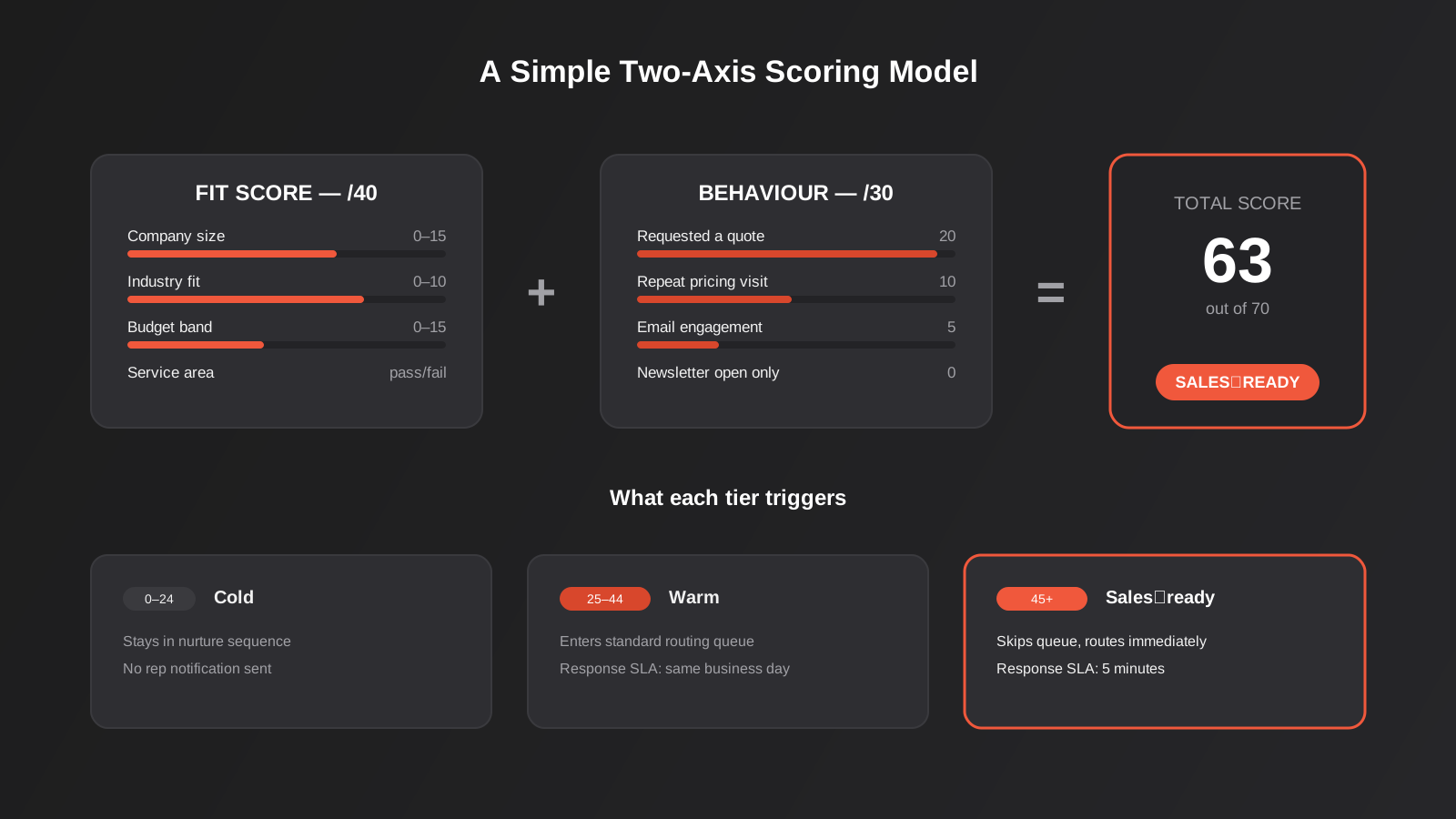
A worked example for a mid-sized B2B services business might look like this: company size scores 0 to 15 points (0 for solo operators, 15 for 50+ staff), industry fit scores 0 to 10 (10 for the three industries that make up most of their best accounts, 0 for industries they’ve learned to avoid), stated budget band scores 0 to 15, and service area scores either 10 or a hard disqualifier depending on whether the postcode is covered. That’s a maximum fit score of 40, which is deliberately not the full scale — it leaves room for behaviour to matter. The exact weightings are less important than the discipline of writing them down and agreeing on them before launch, because the argument about whether industry should be worth 10 points or 15 is a five-minute conversation now and a confusing retrofit in six months.
Layer behaviour on top, sparingly
Behavioural scoring adds the urgency dimension: a good-fit lead who requested a quote this morning is not the same priority as a good-fit lead who downloaded a checklist eight months ago and has gone quiet. Behaviour points should decay — an action from today should count for more than the same action from last quarter — and they should be weighted toward actions that actually correlate with buying intent in your business, not generic engagement. Opening a newsletter is a weak signal. Visiting the pricing page twice in a week, replying to a sales email, or booking a call are strong ones. If you’re not sure which behaviours matter, pull ten closed-won deals and ten closed-lost ones from the last six months and look at what each group actually did before the outcome — it’s usually more revealing than guessing.
Continuing the worked example: a behaviour score out of 30 might award 20 points for requesting a quote or pricing call directly, 10 for visiting the pricing page more than once in a week, 5 for opening two or more emails in a sequence, and nothing for a single newsletter open. Combine the two axes — fit out of 40, behaviour out of 30, total out of 70 — and set three bands: below 25 stays in nurture, 25 to 45 is warm and goes into a standard queue, above 45 is sales-ready and triggers immediate routing with the shortest SLA. The bands matter more than the raw number; reps should never need to interpret a score, only react to the tier it produces.
Build in disqualifiers, not just points
Some signals should remove a lead from the active queue outright rather than just lowering its score: a free personal email domain on a B2B form, a competitor’s domain, a location you don’t service, a budget field left at the lowest bracket when your minimum engagement is well above it. Modelling these as hard disqualifiers rather than negative points keeps the main score meaningful and stops obviously-wrong leads from clogging a rep’s queue while still technically scoring “warm.”
Routing Rules That Actually Survive Contact With Reality
A routing setup that works in the design document and falls over in week three usually fails for one of a handful of predictable reasons: it assumes a rep roster that never changes, it has no fallback for after-hours or leave, or it was built around headcount of two and never revisited at headcount of eight. Below are the routing models we build most often, roughly in order of how much complexity they need to justify themselves.
Round robin
The simplest model: leads rotate evenly through a list of reps. It’s fair, it’s easy to audit, and it’s the right starting point for a small team where every rep can handle any lead. Its weakness is that it treats every rep as equally available and every lead as equally matched to whoever’s next, which stops being true the moment reps specialise or carry different workloads.
Weighted or capacity-based routing
Instead of a strict rotation, leads go to whichever eligible rep currently has the lightest open pipeline, or weighted shares based on seniority, ramp-up stage, or part-time hours. This matters once a team has a mix of senior closers and newer reps still ramping, where pure round robin either overloads the newest person or starves the most effective one.
Territory and account-based routing
Geography-based routing is common for field service and trade businesses — a Perth enquiry shouldn’t go to the Brisbane-based rep. Account-based routing matters for any business with existing customers: a lead from an existing account’s domain or contact record should route to whoever already owns that relationship, not into the new-business queue, regardless of what the enquiry is about. This is one of the more common gaps we find during an automation audit — the rule exists for brand-new leads but nobody built the “is this an existing customer asking something new” check, so account managers find out about upsell opportunities from the customer rather than the CRM.
Skill and product-line routing
Where reps specialise by product, service line, or language, routing needs to match the enquiry content to the right skill before it reaches a capacity or round-robin layer. This usually means tagging the lead source or form with a product field and keeping a simple lookup table of which reps are eligible for which tag — simple to build, easy to forget to update when someone changes role.
Overflow, after-hours and the fallback no one builds
Every routing setup needs an answer for what happens when the assigned rep doesn’t acknowledge the lead within the SLA, and what happens outside business hours. The two most common fallback patterns: escalate to a manager or shared queue after a defined timeout (fifteen minutes is typical for inbound sales enquiries), and route after-hours leads to a holding queue with an automatic acknowledgement message rather than silence until 9am. The acknowledgement message matters more than it seems — a lead who gets an instant “thanks, we’ll call you first thing” is far less likely to call a competitor overnight than one who hears nothing.
Where This Actually Lives in Your Tech Stack
Most CRMs — HubSpot, Zoho, Salesforce, Pipedrive — have native scoring and assignment features, and for a lot of businesses that’s genuinely the right place to build this logic, because it keeps scoring and routing visible to the sales team inside the tool they already live in, and it avoids an extra system to maintain. Native assignment rules are usually enough for round robin, simple territory rules, and basic point-based scoring.
Where we reach for middleware — workflow automation built on Zapier, Make, or n8n — is when the logic needs to pull in a signal the CRM doesn’t natively have, when leads arrive from multiple sources that need to be normalised into one shape before scoring, or when the notification side needs to hit Slack, SMS, and a phone dialler rather than just an in-CRM task. A typical pattern: a form submission or ad lead hits a webhook, gets enriched (company size lookup, domain check against a disqualifier list), scored, written into the CRM with the score and tier set, and only then does the CRM’s native assignment and notification rules take over. The CRM stays the system of record and the place reps work from; the automation layer just does the enrichment and scoring the CRM can’t do on its own.
If your lead sources and CRM are already connected through point-to-point integrations rather than a proper middleware layer, it’s worth getting that foundation solid before adding scoring logic on top — scoring rules built on an unreliable or duplicate-prone data feed will produce confidently wrong scores, and that’s a harder problem to debug than a missing scoring model in the first place.
Normalising lead sources before you score anything
One detail that trips up a lot of otherwise well-designed scoring models: leads rarely arrive in one consistent shape. A website form, a native lead ad form on a social platform, an inbound phone call logged by reception, and a referral typed in manually by a partner all carry different fields, different levels of completeness, and in the case of native ad lead forms, often arrive with a lag because the platform batches delivery rather than pushing instantly. If your scoring model expects a budget field that only the website form collects, every lead from every other source scores artificially low by default, not because it’s a worse lead but because the data was never there to score.
The fix is a normalisation step before scoring runs — a workflow automation layer that maps each source’s fields onto one common lead record, fills gaps with sensible defaults or an enrichment lookup rather than leaving them blank, and flags which fields are missing so routing logic can account for incomplete data (for instance, routing an incomplete-but-promising lead to a rep with instructions to qualify the missing fields on the first call, rather than scoring it low and letting it sit). This is invisible when it’s working and is almost always the actual root cause when a business says “our lead scoring doesn’t work” — the scoring logic is usually fine; the inputs feeding it aren’t consistent.
Where AI genuinely adds something here
Predictive lead scoring — a model that learns from your historical closed-won and closed-lost data rather than a fixed point rubric — is one of the few places where adding AI to an existing CRM workflow earns its complexity, provided there’s enough historical data to train on (realistically a few hundred closed deals at minimum). It’s also useful on the content side of routing: classifying free-text enquiry fields into product categories or urgency levels for skill-based routing, which a fixed dropdown can’t always capture because people don’t write enquiries the way forms expect. Both are narrower, more defensible uses of AI than bolting a chatbot onto the form and hoping it improves conversion.
Common Mistakes We See
- One combined rule instead of two layers. “If score > 80, assign to Dave” breaks the moment Dave’s away, you hire a second rep, or you want different routing for a different product line. Keep scoring and routing as separate, composable steps.
- No SLA attached to the assignment. Assigning a lead without a response-time expectation and an escalation path just moves the bottleneck from the inbox to an individual rep’s queue.
- Scoring models nobody revisits. A rubric built once during setup and never checked against actual won and lost deals drifts out of relevance within a year, usually without anyone noticing because the score still produces a number — it just stops meaning anything.
- No disqualification path. Treating every lead as routable, including obvious spam, wrong-region enquiries, and competitor fishing, wastes rep time and makes response-time metrics look worse than the real pipeline is.
- Forgetting the existing-customer check. Routing every new enquiry into the new-business queue, including ones from existing customers, breaks account ownership and annoys the people who already pay you.
- No after-hours or overflow handling. A routing rule that only works Monday to Friday, nine to five, silently fails on every lead that arrives outside those hours — which, depending on the business, can be a third or more of total volume.
- Building it all in the CRM’s native automation when the logic has outgrown it, or building it all in middleware when the CRM could have handled it natively. Both directions add unnecessary fragility; the right split depends on where the signals and the notifications actually need to live.
Measuring Whether It’s Actually Working
Scoring and routing are easy to set up and quietly forget about, which is exactly how they decay. Three numbers are worth tracking on an ongoing basis rather than just at launch: time to first contact (from lead creation to the first logged call or email, not just assignment), the proportion of leads that get reassigned manually after automated routing (a high rate means your rules don’t match reality), and conversion rate by score tier (if your “hot” tier doesn’t convert meaningfully better than your “warm” tier, the model needs recalibrating, not more points added to it). These numbers usually already exist in the CRM; the gap is almost always that nobody built a recurring view of them, rather than a missing data source. For the broader context of where lead scoring sits alongside the rest of a marketing automation build, our guide on marketing automation for Australian businesses is worth reading alongside this one, since scoring often starts life as a marketing automation feature before sales operations takes ownership of it.
Frequently Asked Questions
Do we need lead scoring if we only get a handful of leads a week?
Probably not a formal points-based model. At low volume, a simple qualification checklist and a single routing rule (or just “it always goes to the owner”) usually beats a scoring model that nobody has enough data to tune properly. Scoring earns its complexity once volume or team size makes manual triage genuinely slow or inconsistent — for most of the businesses we work with, that’s somewhere around a few dozen leads a week across more than one person who could take them.
Should marketing or sales own the lead scoring model?
Jointly, in practice, even though one team usually holds the keys. Marketing typically owns the behavioural signals because they come from campaigns and website activity marketing runs; sales needs to sign off on the fit criteria and the score threshold that counts as “ready,” because they’re the ones who’ll stop trusting the handoff if the threshold is set too low. The most common breakdown we see is marketing building a scoring model in isolation and sales quietly ignoring the “hot” flag because it’s proven unreliable.
How often should we recalibrate the scoring model?
A light check against actual won and lost deals every quarter is a reasonable default, with a proper review any time the business changes meaningfully — a new product line, a new target market, a pricing change. The warning sign that it’s overdue is usually visible in the data before anyone thinks to check: if conversion rate stops correlating with score tier, the model has drifted.
Can we build lead routing without buying a dedicated routing tool?
For most small to mid-sized teams, yes. Native CRM assignment rules combined with a workflow automation layer (Zapier, Make, or n8n) for the enrichment and notification steps covers the large majority of routing patterns described above. Dedicated routing platforms earn their cost at larger scale — complex territory hierarchies, very high lead volume, or routing across multiple CRMs — which is a smaller slice of the market than the tools’ marketing suggests.
What’s a reasonable SLA for responding to a routed lead?
Five minutes is the benchmark that shows up repeatedly in lead response research, and it’s realistic for inbound enquiries during business hours with proper routing and notifications in place. It’s not realistic around the clock for every business, which is why the after-hours and overflow handling matters as much as the routing rule itself — an honest, fast acknowledgement outside the five-minute window beats a silent gap followed by a call the next morning.
Does this apply to B2C lead volume too, or only B2B sales teams?
The mechanics apply to both, though the signals differ. B2C businesses — real estate, trades, allied health — tend to rely more on behavioural and urgency signals (enquiry type, time of day, specific service requested) than firmographic fit, and routing is more often about territory, availability, or which staff member has a gap in their calendar than about account ownership. The underlying problem — a lead with nowhere defined to go and no urgency flag — is identical.
Where to Start
If you’re not sure whether your business needs a formal scoring model yet, start by pulling your actual lead response times for the last month — most CRMs can report this, even if nobody’s looked. That number alone usually tells you whether this is worth prioritising right now or whether a simpler fix (one routing rule, one SLA) will cover it for a while yet.
We work with Australian businesses on exactly this layer of their CRM — scoring models that reflect how deals actually close, routing rules that hold up when the team changes, and the reporting that tells you whether it’s working six months later. If you want a second opinion on your current setup or want to talk through what a build would look like for your lead volume, get in touch with our CRM and sales automation team and we’ll talk it through.
Keep reading
Related posts

Changing Live Automations Safely: Staging, Version Control and Rollback for Zapier, Make and n8n (2026)
How to draft, test, release and roll back changes to live Zapier, Make and n8n automations without breaking invoices, orders or customer…

Peppol E-Invoicing for Australian Businesses: Automating Accounts Payable From Structured Invoices (2026)
Peppol e-invoicing in Australia: what is and isn't mandatory, how to pick an access point, and how to automate accounts payable once…

Clean Your Data Before You Automate: A Practical Guide to CRM Data Cleanup for Australian Businesses (2026)
Connecting systems on messy data copies the mess everywhere. Here's how to clean, match and merge records before you automate or integrate.
Got a project you'd like to talk through?
Tell us what you're working on — we'll come back with a plan.
