
How to Track AI Search Visibility: Measuring ChatGPT, AI Overviews and Perplexity Traffic in GA4 (2026)
 Jignesh Vagadiya
04/11/2026
22 min read
A client called us in October with a strange problem. He’d spent three months restructuring his service pages around the advice in every “get cited by ChatGPT” article he could find — FAQ schema, clearer headings, direct-answer paragraphs, the lot. Then he asked the obvious next question: how do I know if it’s working? He opened Google Analytics 4, searched for anything with “AI” in the name, and found almost nothing. No ChatGPT. No Perplexity. A handful of sessions labelled Referral that could have been anything.
He hadn’t done anything wrong. He’d just run into the gap between what AI search actually does to your traffic and what standard analytics was ever built to see. Google Analytics was designed around the assumption that a visit starts with a click and carries a referrer. A lot of AI-driven traffic breaks that assumption on purpose or by accident — stripped referrers, in-app browsers, answers that never send anyone to your site at all. The traffic can be real and the measurement can still show nothing.
This isn’t a guide to getting cited by AI tools — we’ve covered that ground already in our AI SEO guide. This is about how to track AI search visibility: what GA4 can and can’t show you about AI traffic right now, what your server logs tell you that GA4 never will, and where Search Console quietly folds AI Overviews into numbers that look like ordinary search. If you’ve already done the optimisation work and want proof it’s doing something, start here.
Why standard analytics misses most AI traffic
Before touching any settings, it helps to understand why this is hard in the first place. There are three separate reasons AI-driven visits don’t show up cleanly in GA4, and they’re not the same problem.
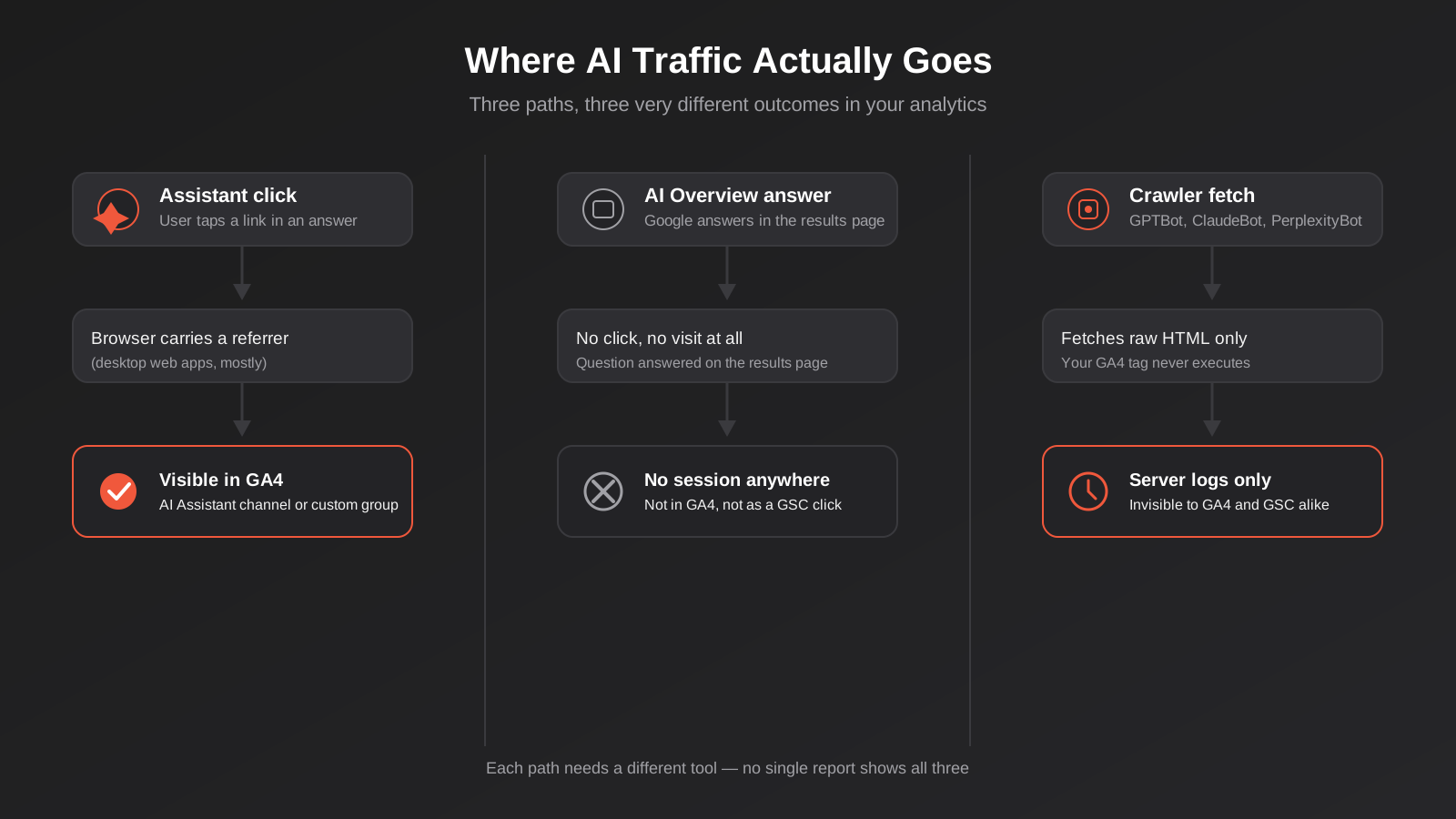
The first is referrer stripping. When someone clicks a link inside the ChatGPT desktop web app, the browser usually passes a referrer header and GA4 can see it came from chatgpt.com. Open the same conversation in the ChatGPT mobile app, though, and the click often opens inside an in-app browser that passes no referrer at all. That visit lands in Direct traffic, indistinguishable from someone who typed your URL in from memory. The same thing happens with links shared out of Claude’s mobile app and, less consistently, Perplexity’s. You didn’t lose the visit. You lost the ability to prove where it came from.
The second is zero-click answers. Google’s AI Overviews, and AI Mode in Search, frequently answer the question directly in the results page without anyone clicking through to a source at all. There’s no session to measure because there’s no visit. Being the source Google pulled from can still build awareness and brand recall, but it won’t show up as a session in GA4, a click in Search Console, or anything else you can point to in a report. This is the part of AI visibility that genuinely can’t be measured with traffic data, and it’s worth saying plainly rather than pretending a workaround exists.
The third is crawler invisibility, and it’s a different category entirely. GA4 is a JavaScript tag — it only fires when a browser actually renders your page and runs your analytics script. The bots that crawl your site to build AI answers (GPTBot, ClaudeBot, PerplexityBot and the rest) mostly fetch raw HTML and move on. They don’t execute JavaScript, so your GA4 tag never fires, and they never appear in your analytics at all — not as a session, not as a bounce, not as anything. If you want to know whether these systems are actually reading your site, GA4 is the wrong tool full stop. We’ll come back to the right one.
Three different problems means three different fixes. None of them is a single toggle.
It’s worth being upfront about why this is worth the hour or two of setup time rather than just something to feel good about. If you’re spending money on AI SEO work, structured data, or a content refresh aimed at AI citations, someone eventually asks whether it’s doing anything. Without the measurement pieces below, the honest answer is “we don’t know,” and that’s an uncomfortable position to defend a budget line from. With them, you can at least say “here’s what moved, here’s what we can’t see, and here’s our best read of the gap in between” — which is a genuinely stronger position than either blind faith or giving up on the channel because GA4 came back empty on day one.
It also changes what you do next. A business getting real referral traffic from ChatGPT should keep investing in the content that’s earning those citations. A business whose AI visibility is almost entirely zero-click AI Overview appearances needs a different conversation about what that visibility is actually worth to them, since it won’t show up as leads in the way a click-through would.
GA4’s native AI Assistant channel
Google rolled a native AI Assistant channel into GA4’s Default Channel Group in May 2026. If your property has picked it up, you’ll see sessions with the medium ai-assistant, grouped under a channel called “AI Assistant”, with the campaign labelled (ai-assistant). No setup is required on your end — it’s applied retroactively to matching traffic the moment Google recognises the referrer.
What it actually captures
When someone clicks a link out of an AI assistant and the browser passes a referrer that Google’s system recognises, that session gets bucketed automatically. You don’t need a regex, you don’t need to touch the admin settings, and it works the same way whether you noticed it existed or not.
What it doesn’t
Three gaps matter here, and all three catch people out.
Google hasn’t published the full list of referrers it treats as an AI assistant. You can infer the obvious ones — chatgpt.com, perplexity.ai, Gemini — but you can’t audit the list, and a smaller or newer AI tool may simply not be on it yet. Second, it only works when a referrer is present, so every one of the referrer-stripping cases above (mobile in-app browsers especially) falls straight through into Direct, exactly as it did before the channel existed. Third, and most importantly for a lot of businesses: it does not capture AI Overviews or AI Mode. Those are Google Search features, not an AI assistant visiting from an external site, and Google has been explicit that this channel doesn’t touch them. If most of your AI-driven visibility is happening inside Google’s own AI layer rather than a standalone chatbot, this new channel will tell you almost nothing.
Treat the AI Assistant channel as a useful floor, not a ceiling. It’s real data and it’s free, but it’s one signal among several, not the whole picture.
Building a custom channel group as a backup
Because Google won’t say exactly what the native channel does and doesn’t include, the practical move is to keep running your own custom channel group alongside it rather than trusting a single source. This also protects you if Google changes the native definition later without telling anyone, which it has a track record of doing.
The domains worth including
A reasonable starting list covers the major assistants your audience is actually likely to use: chatgpt.com and the legacy chat.openai.com, claude.ai, perplexity.ai, gemini.google.com, and copilot.microsoft.com. If you sell B2B and expect enterprise buyers researching you through Copilot inside Microsoft 365, keep that one in regardless of how small the numbers look at first — it tends to grow faster than people expect.
Setting it up in GA4
In GA4, go to Admin > Data display > Channel groups, create a new custom channel group, and add a rule that matches session source/medium against a regex covering the domains above (something like chatgpt\.com|chat\.openai\.com|claude\.ai|perplexity\.ai|gemini\.google\.com|copilot\.microsoft\.com), name the resulting channel “AI Referral (Custom)” or similar, and save. This needs Editor-level access to the property, takes about ten minutes, and only applies going forward — it won’t retroactively reclassify historical sessions, so set it up sooner rather than later. Run it as an Exploration report if you want to look back through existing Referral traffic for AI domains that arrived before you built the group.
UTM tagging links you actually control
You cannot control what links ChatGPT or Perplexity puts in an answer, so tagging won’t help you measure visits that originate from an AI-generated response. What you can tag is anything you personally hand to an AI tool or publish somewhere an AI tool might pick it up: a link in your LinkedIn bio, a press release, a guest article, a directory listing. Adding utm_source=chatgpt style tags to outbound links you control at least gives you one clean, attributable thread, even though it’s a small slice of the total picture.
Tracking the crawlers: server log analysis
This is the part most businesses skip entirely, and it’s the only way to answer a genuinely important question: are AI systems actually reading my site at all? GA4 can’t answer this because, as covered above, these bots mostly don’t run JavaScript. The answer lives in your raw server or CDN access logs, which record every request regardless of whether a browser executed anything.
The bot names that matter
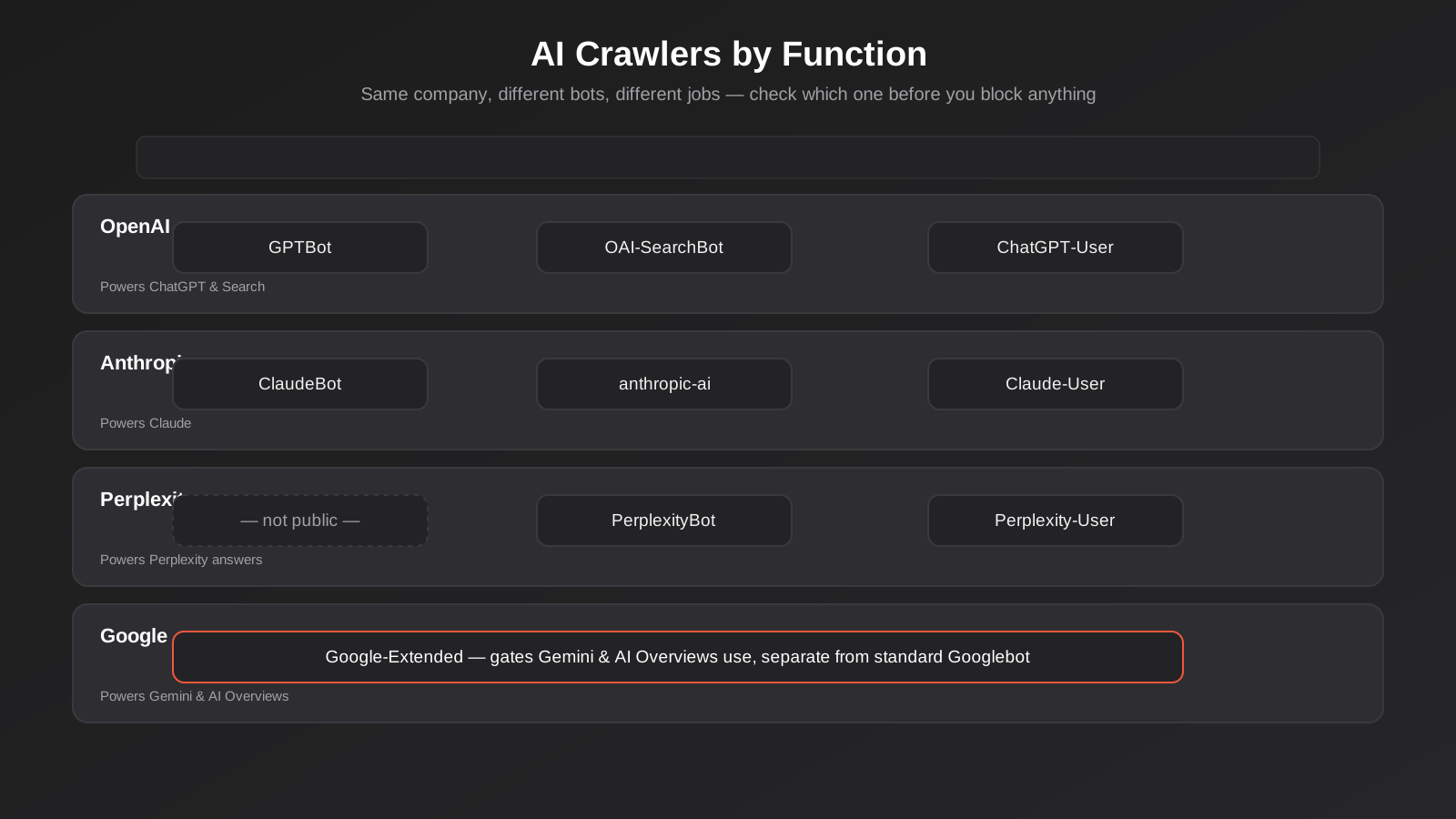
Each major AI provider runs more than one crawler, and they do different jobs. OpenAI operates GPTBot (crawls for model training), OAI-SearchBot (crawls to build its search index) and ChatGPT-User (fetches a page live, on demand, when a user asks ChatGPT to look at something right now). Anthropic runs ClaudeBot, anthropic-ai and Claude-User on a similar split. Perplexity runs PerplexityBot for indexing and Perplexity-User for live fetches. Google runs Google-Extended, which controls whether Gemini and AI Overviews can use your content for generative answers, separately from the standard Googlebot that handles normal search indexing.
That distinction between training crawlers, index crawlers and live-fetch bots matters practically. If you’re weighing whether to block a crawler in robots.txt (more on that below), blocking GPTBot stops your content being used for training but has no effect on whether ChatGPT can still fetch your page live when a user asks it to, because that’s a different bot with a different purpose. Treating them as one undifferentiated “AI traffic” and blocking the lot removes you from a lot more than you probably intended.
Verifying a hit is actually the bot it claims to be
User-agent strings are just text in a request header — anyone can set theirs to say GPTBot whether or not they’re OpenAI. Before you trust a spike in bot traffic in your logs, check it against the provider’s published IP ranges (OpenAI and Anthropic both publish theirs) or run a reverse DNS lookup on the requesting IP. It’s a five-minute check that stops a scraper impersonating GPTBot from skewing your numbers, and it’s worth doing before you report a crawl trend to anyone.
Where you actually find these logs depends on how your site is hosted, and this is where a lot of Australian small businesses stall before they’ve started. If you’re on a standard cPanel host, raw access logs usually sit under the Metrics or Raw Access Logs section and can be downloaded directly. If you’re behind Cloudflare, the free plan doesn’t give you raw logs by default, but Cloudflare’s own analytics let you filter by user agent, which covers most of what you need without paying for the Enterprise log push feature. Managed WordPress hosts (WP Engine, Kinsta and similar) typically expose access logs through their dashboard or via SSH. If your site runs on Shopify or another fully hosted platform with no server access at all, you genuinely can’t do this step yourself — that’s a real limitation of the platform, not something you’re missing in the settings, and it’s worth knowing that before you go looking for a toggle that doesn’t exist.
What to actually do with the log data
Once you’re pulling clean bot hits from your logs, three things are worth tracking monthly: which bots are visiting at all (a new one appearing is worth noting), which pages each one requests most often (tells you what these systems consider your most citable content), and whether requests are returning errors rather than 200s (a bot repeatedly hitting a page that 404s or times out simply won’t cite it, no matter how well you’ve written it). If you’ve set up an llms.txt file — we go through what that file does and doesn’t do in our separate guide to llms.txt — your logs are also the only place you’ll see whether any crawler is actually requesting it, since most currently aren’t.
What Google Search Console shows (and doesn’t)
Search Console is where a lot of business owners go looking for an “AI Overviews” filter, and it isn’t there. Google folds AI Overview appearances into the standard Web search type alongside ordinary organic results — there’s no separate row, no AI-specific metric, and critically, no zero-click count. Search Console has never reported impressions-without-clicks as a distinct figure, and that hasn’t changed with the rise of AI Overviews.
What you can do instead is look for the shape of the problem rather than a labelled line item. Pull your query-level performance report and look for queries where impressions have held steady or risen while clicks and click-through rate have fallen over the same period. That divergence — still being shown, suddenly getting clicked less — is the closest thing to a visible fingerprint of an AI Overview eating your click. It’s not proof on its own; rankings shift, seasonality happens, competitors improve. But a cluster of queries all showing that same pattern at the same time, especially ones you know trigger AI Overviews when you search them manually, is a reasonable signal worth investigating rather than ignoring.
It’s also worth manually checking: search your own target queries (ideally logged out, in an incognito window, from an Australian IP) and note which ones currently trigger an AI Overview. Keep a simple running list. When you see a query move from no-overview to overview, that’s your early warning that the click pattern for that term is about to change, usually before the Search Console data makes it obvious.
Proxy signals when direct attribution fails
For the genuinely unattributable slice of AI influence — someone who saw your brand mentioned in a ChatGPT answer, didn’t click anything, and later searched your business name directly — you’re not going to get a clean attribution chain. What you can do is watch for the proxy signals that tend to move together when this is happening.
Branded search growth
If your branded query volume in Search Console is climbing without a matching rise in paid spend, a PR push, or an obvious offline campaign, AI-driven brand awareness is a reasonable explanation worth testing. It won’t prove causation by itself, but tracked alongside the other signals here, a sustained lift in people searching your business name by name is one of the more reliable indirect indicators available.
Direct traffic anomalies
A genuine, unexplained step-change in Direct traffic — not a slow creep, a step — that lines up with a period when you know your content started getting cited more often (via the log data above) is worth flagging as a hypothesis in your reporting, clearly labelled as such rather than presented as confirmed fact. Dark social traffic (someone forwarding a link via Slack, WhatsApp or a screenshot) behaves the same way and gets lumped into Direct too, so this bucket was never clean to begin with. The honest framing for a client or your own board is “Direct traffic grew and we can’t fully explain why, here’s our best theory,” not a confident claim you can’t actually back up.
Third-party AI visibility tools
A category of dedicated AI visibility tracking tools has emerged over the past year or two — they work by running your target queries through various AI assistants on a schedule and logging whether and how your brand gets mentioned, which is something no amount of GA4 or Search Console configuration can replicate, because it’s testing the AI’s output directly rather than inferring it from your own traffic. Whether one of these is worth paying for depends on how much of your lead flow genuinely depends on AI-assisted discovery versus how much time you’re willing to spend running the same manual spot-checks by hand each month. For most small and mid-sized Australian businesses, the manual version — a short list of target queries, checked monthly, logged in a spreadsheet — gets you 80% of the insight for free.
Putting together a dashboard to track AI search visibility
None of the above is useful scattered across five different places you only check when something feels off. The point of measurement is a habit you actually keep, so keep it simple enough to survive contact with a busy month. A workable version looks like this, reviewed monthly:
One: GA4’s native AI Assistant channel sessions, trended over time, alongside your custom AI referral channel group sessions — side by side, not merged, so you can see where they agree and where the custom group is catching something native missed. Two: your manually logged AI Overview presence for your top ten to fifteen target queries, with a simple yes/no per query per month. Three: branded search impressions and clicks from Search Console, trended, watching specifically for the impressions-up-clicks-down divergence described earlier. Four: a monthly pull of your clean, verified bot hits by crawler name, so a new entrant or a sudden silence from a previously active one doesn’t go unnoticed. That’s four data points, each taking a few minutes once the groundwork is set up, and together they give you a genuinely more complete picture than any single tool offers on its own.
Who should actually own this
In most small and mid-sized businesses this ends up sitting with whoever already owns SEO or analytics reporting, not a new hire or a separate function. The log-checking step is the one exception — it needs someone comfortable in a hosting dashboard or willing to ask a developer for a filtered export once a month, which is a smaller ask than it sounds once the first pull is done and the process is written down. Set a recurring date, keep the same four numbers in the same spreadsheet or dashboard tab every month, and resist the urge to rebuild the format every time a new AI tool makes headlines. Consistency matters more here than sophistication, because the value is in the trend over six months, not any single month’s snapshot.
If you’re also running paid activity on an AI platform — our ChatGPT Ads page covers how that channel works for Australian advertisers — it’s worth keeping the paid and organic AI numbers in the same dashboard rather than two separate reports. Seeing both side by side is usually the fastest way to notice when organic citations start doing some of the work your paid spend was covering.
Common mistakes we see
- Treating zero sessions in the AI Assistant channel as proof of zero AI visibility, when it’s just as likely the traffic arrived through a mobile in-app browser that stripped the referrer, or through a zero-click AI Overview that never generated a session at all.
- Deleting an existing custom AI referral channel group the moment the native GA4 channel appeared, then losing visibility into any assistant that isn’t on Google’s unpublished list.
- Reporting raw bot-hit counts from server logs without verifying user agents against published IP ranges first, and quoting a number that’s partly scraper traffic dressed up as GPTBot.
- Blocking every bot with “GPT” or “AI” in the name via a blanket robots.txt rule, without realising a training crawler and a live-fetch crawler from the same company do completely different jobs.
- Expecting Search Console to show a dedicated AI Overviews metric or a zero-click count, when neither has ever existed in the product.
- Applying UTM tags to internal links or to pages, rather than to outbound links you personally control, and then being confused when no AI-sourced traffic ever carries the tag.
- Presenting a Direct traffic bump as confirmed proof of AI influence in a client report, instead of labelling it clearly as a hypothesis sitting alongside the harder evidence.
Frequently Asked Questions
Does GA4’s AI Assistant channel track AI Overviews in Google Search?
No. The AI Assistant channel only captures sessions where a referrer from a recognised external AI tool is present — a click out of ChatGPT or a similar assistant onto your site. AI Overviews and AI Mode are features inside Google Search itself, not a separate site sending a referrer, and Google has confirmed they aren’t captured by this channel. You have to infer AI Overview impact from Search Console query patterns and your own manual checks instead.
Why does my ChatGPT traffic show up as Direct instead of Referral or AI Assistant?
Almost always because the click happened inside the ChatGPT mobile app’s built-in browser, which frequently doesn’t pass a referrer header the way a desktop browser does. No referrer means GA4 has nothing to classify it against, and it defaults to Direct. This is a known limitation, not a configuration mistake on your end, and it affects every analytics platform equally, not just GA4.
Should I keep my custom AI channel group now that GA4 has a native one?
Yes. Google hasn’t published the full referrer list the native channel matches against, so a custom regex-based group covering the specific AI domains relevant to your audience acts as a safety net for anything the native version misses or hasn’t caught up to yet. Running both side by side costs nothing and gives you a cross-check.
Can I see how often AI crawlers like GPTBot or ClaudeBot actually visit my site?
Yes, but not through GA4. These bots generally don’t execute JavaScript, so your analytics tag never fires for them. You need raw server or CDN access logs, filtered for the relevant user agents, ideally cross-checked against each provider’s published IP ranges to rule out spoofed hits. Most hosting providers and CDNs keep these logs for at least a rolling window, even if you’ve never looked at them before.
Will blocking AI crawlers in robots.txt hurt my AI search visibility?
It depends entirely on which bot you block. Blocking a training crawler like GPTBot stops your content being used to train future models but has no bearing on whether ChatGPT can still fetch and cite your page live when a user asks about it, since that’s typically a separate bot. Blocking an index or live-fetch bot, on the other hand, can genuinely remove you from being cited. Check which specific bot you’re targeting before changing robots.txt, rather than applying one rule to every crawler with “AI” in the name.
Is it worth paying for a dedicated AI visibility tracking tool?
For a business where a meaningful share of leads already comes through AI-assisted discovery, a paid tool that automates query testing across assistants on a schedule can save real time versus checking manually. For most small and mid-sized Australian businesses still working out how material this channel is, a short list of target queries checked by hand once a month, alongside the GA4 and Search Console work covered above, gets most of the value without the subscription.
What if my site is on Shopify or another platform where I can’t access server logs?
You lose the crawler-tracking piece specifically, and there’s no real workaround for that on a fully hosted platform with no server access. The rest of this still applies, though — the GA4 channel setup, Search Console query analysis and manual AI Overview spot-checks don’t depend on log access, so you still get most of the picture. Some CDN or security layers in front of a Shopify store (Cloudflare on a custom domain, for instance) can still show bot-level analytics even without raw log files, so it’s worth checking what sits in front of your store before writing the whole approach off.
Where to start
If you’ve already done the structural work — schema, clearer answer-first content, a sensible llms.txt — and you’re now flying blind on whether any of it is landing, the fix isn’t one setting. It’s the combination above: the native GA4 channel plus a custom backup, a monthly glance at your server logs, and an honest read of what Search Console can and can’t tell you. None of it is complicated on its own. It just needs setting up once and checked on a schedule, rather than being left until someone asks “is this AI SEO thing actually working” and nobody has an answer.
If you’d rather have this set up and reported on properly each month instead of building it yourself, our AI SEO service folds this kind of tracking into the standard monthly report alongside the optimisation work, and our AI SEO pricing page has the current packages and what each one includes.
Worth putting a number on it: our own AI SEO packages start from $800 a month, below the $1,500–$10,000+ a month that most Australian businesses are quoted for comparable ongoing AI and search visibility work. If you’ve already got a written quote from another agency for comparable scope, send it through and we’ll do our best to beat it.
Keep reading
Related posts
llms.txt Explained: What It Actually Does for Australian SEO (2026)
llms.txt explained: why Google says it won't boost rankings or AI Overviews in 2026, and what actually helps instead.
AI SEO in Australia: How to Get Cited by ChatGPT, Google AI Overviews and Perplexity (2026)
A practical AI SEO guide for Australian businesses: how ChatGPT, Google AI Overviews and Perplexity choose what to cite, and how to…
Got a project you'd like to talk through?
Tell us what you're working on — we'll come back with a plan.
